

Are you the author? Sign in to claim
Generate draw.io diagrams from natural language — 6 presets, vision self-check + up to 5-round refinement, codebase-to-d







English · 中文 · 📖 Online Docs
A skill that turns natural-language descriptions into .drawio XML and exports them to PNG / SVG / PDF / JPG via the native draw.io desktop CLI. It can also turn an existing codebase (Python / JS-TS / Go / Rust) into an auto-laid-out structure diagram. Works with Claude Code, Cursor, Copilot, OpenClaw, Codex, Hermes, and any agent compatible with the Agent Skills format.
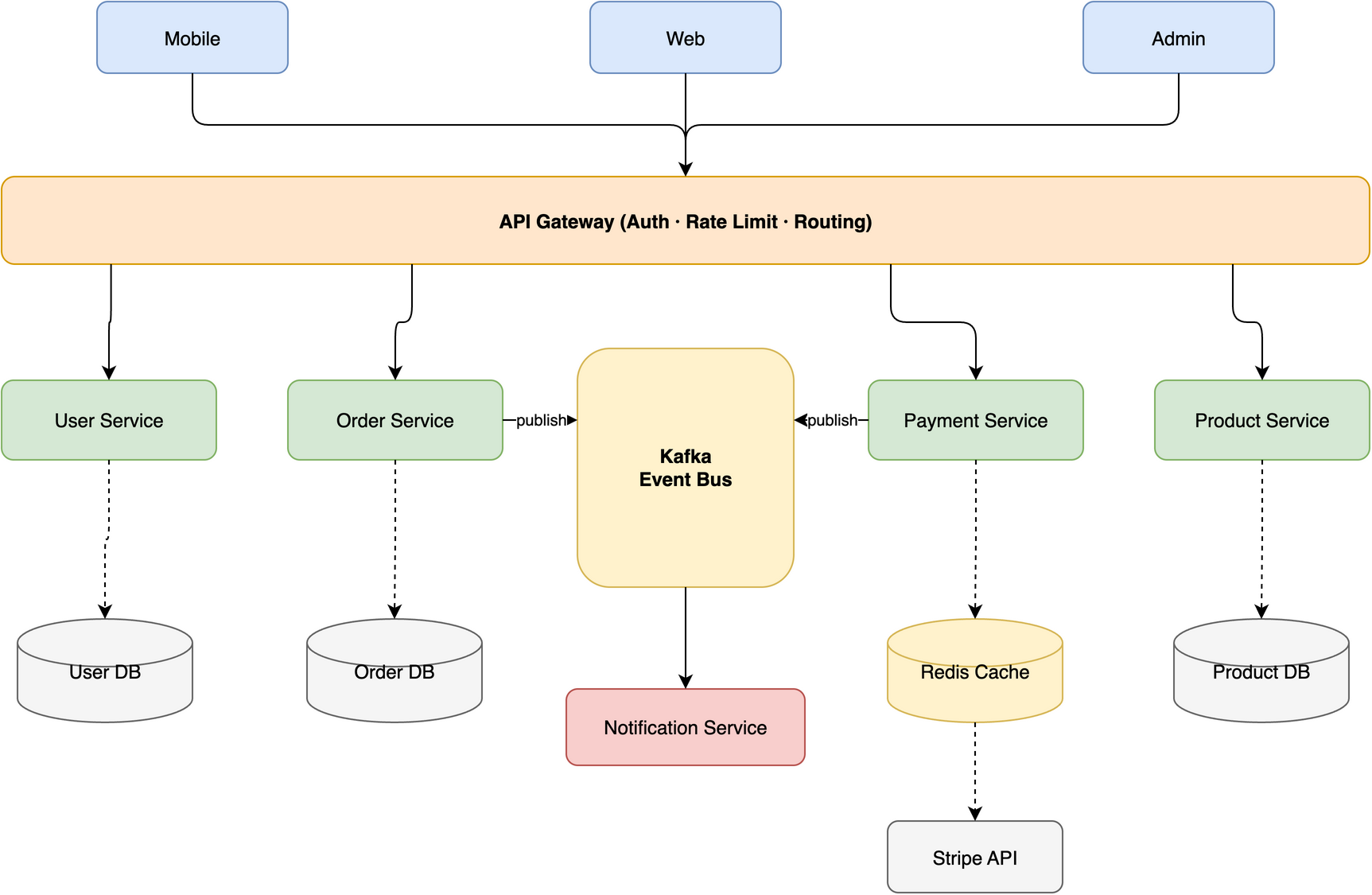
shape=mxgraph.* typos).drawio file or image, reuse on demandnpx installer needs Node, the skill itself does not)[!TIP] The hero image above was generated from this single prompt:
Create a microservices e-commerce architecture with Mobile/Web/Admin clients,
API Gateway (auth + rate limiting + routing), Auth/User/Order/Product/Payment
services, Kafka message queue, Notification service, and User DB / Order DB /
Product DB / Redis Cache / Stripe API
The skill is designed to route edges cleanly across different topologies, avoiding lines that cross through shapes:
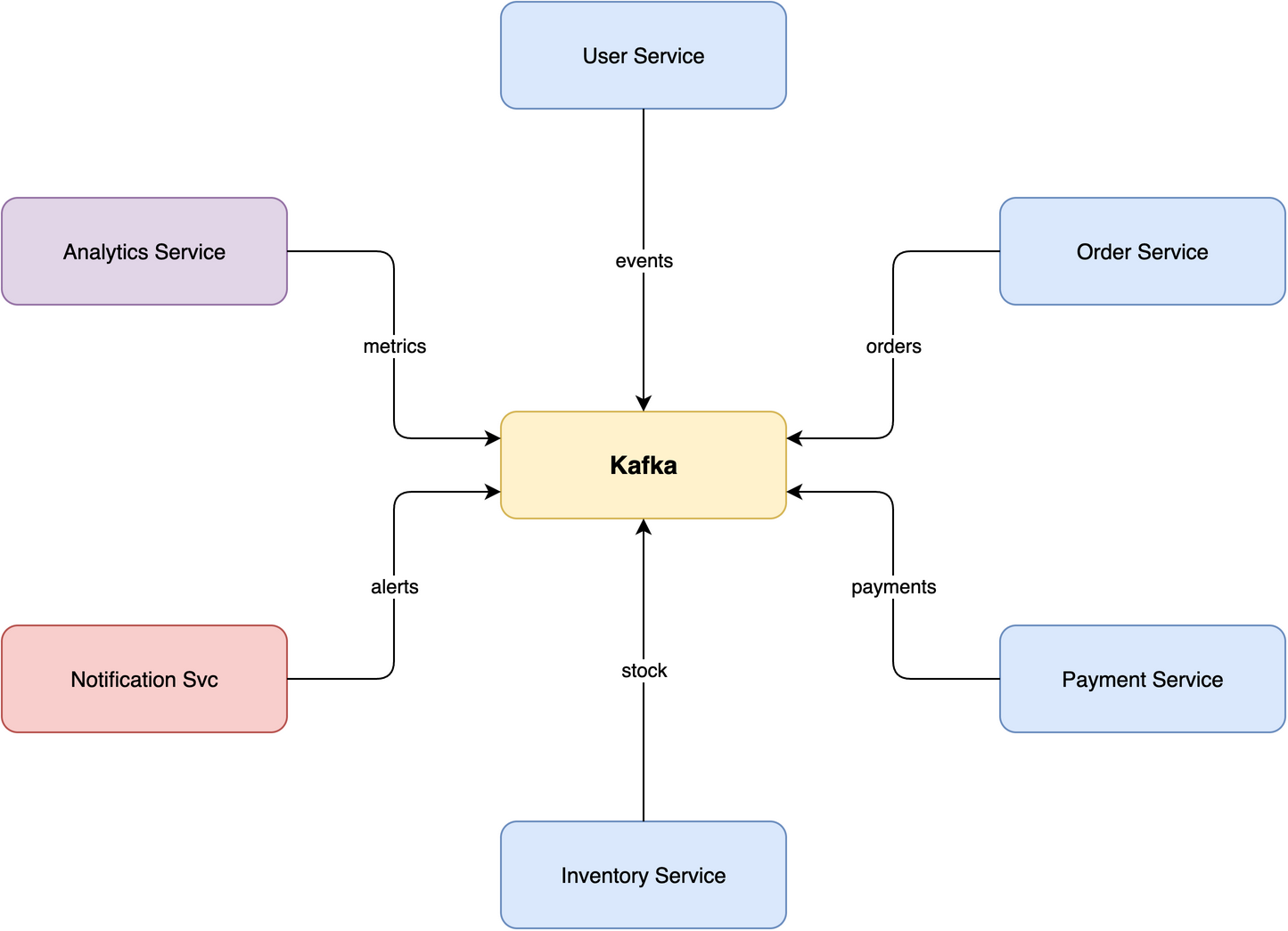 Star · 7 nodes Central message broker with 6 microservices radiating outward, no edge crossings on this example. |
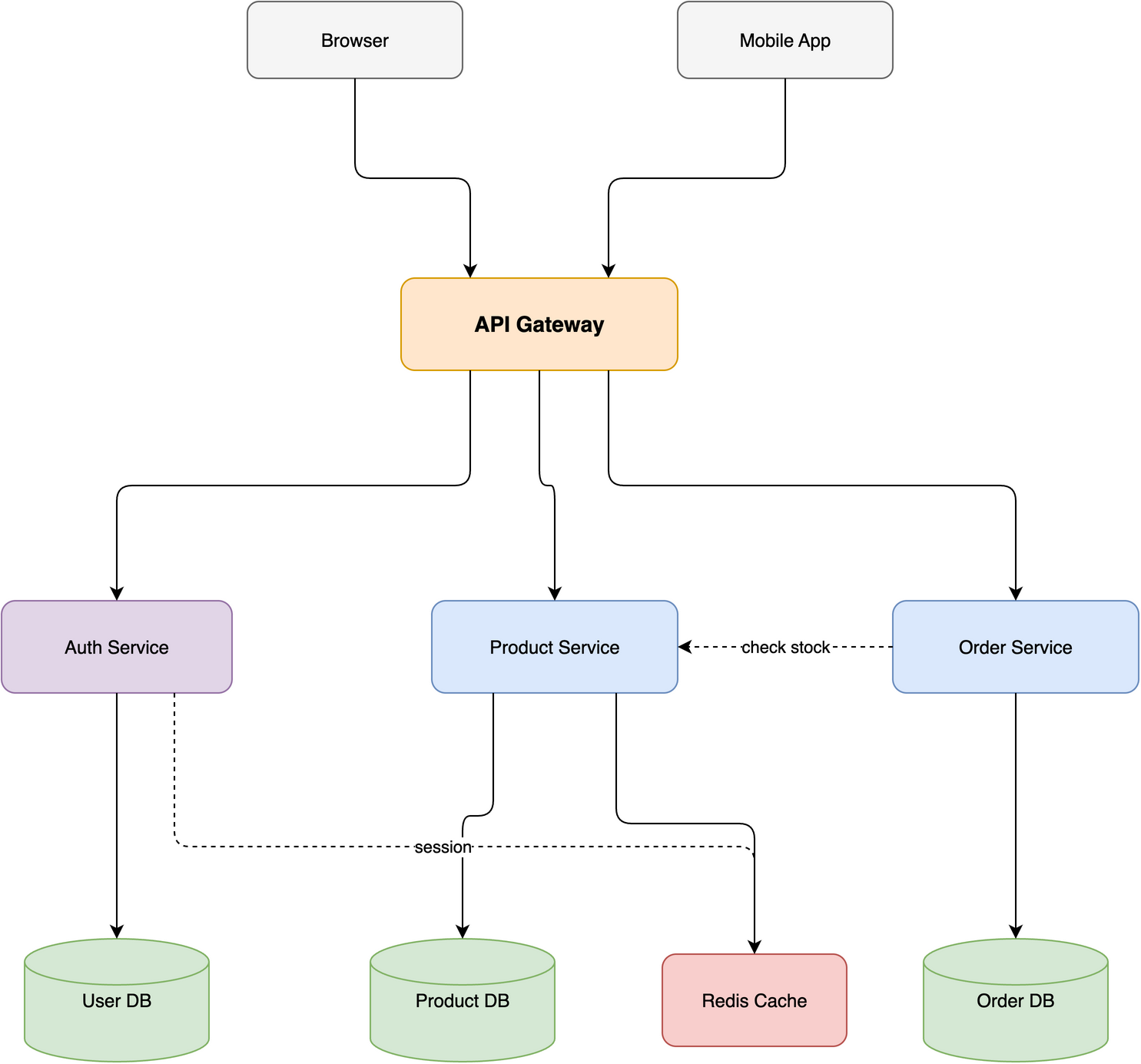 Layered · 10 nodes / 4 tiers E-commerce stack with horizontal and diagonal cross-connections routed via corridors. |
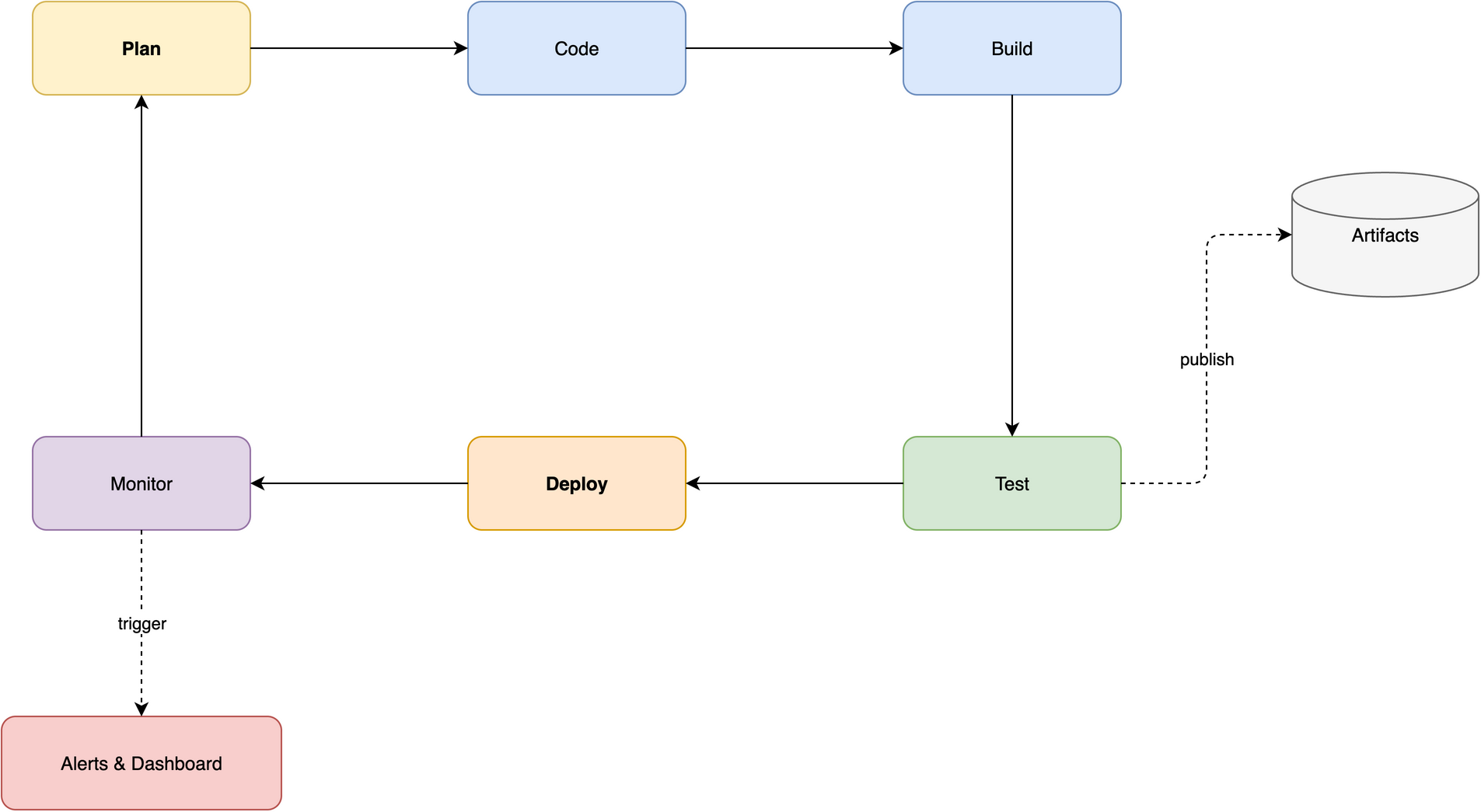 Ring · 8 nodes CI/CD pipeline with a closed loop and 2 spur branches flowing along the perimeter. |
Full walkthrough in docs/USAGE.md.
| Platform | Command |
|---|---|
| macOS | brew install --cask drawio |
| Windows | Download installer |
| Linux | .deb/.rpm from releases; sudo apt install xvfb for headless |
Verify with drawio --version. On WSL2 the CLI is the Windows desktop exe reached via /mnt/c — the skill detects this automatically (see troubleshooting). Full recipes in docs/INSTALL_CLI.md.
# Any agent (Claude Code, Cursor, Copilot, ...)
npx skills add Agents365-ai/365-skills -g
# Claude Code plugin marketplace
> /plugin marketplace add Agents365-ai/365-skills
> /plugin install drawio
# Manual install
git clone https://github.com/Agents365-ai/drawio-skill.git \
  ~/.claude/skills/drawio-skill
Also indexed on SkillsMP and ClawHub.
Updating: /plugin update drawio (Claude Code), skills update drawio-skill (SkillsMP), clawhub update drawio-pro-skill (OpenClaw), or git pull for manual installs — see docs/INSTALL_SKILL.md#updates. Release history in CHANGELOG.md.
After installation, just describe what you want. For example, an ML model:
Draw a Transformer encoder-decoder for machine translation: 6-layer encoder
with self-attention, 6-layer decoder with cross-attention, input embeddings
(batch × 512 × 768), positional encoding, and a final output projection.
Annotate tensor shapes between layers and color-code by layer type.
The skill plans the layout, generates the .drawio XML, exports to your chosen format, self-checks the result, and lets you iterate.
Beyond hand-authored diagrams, the skill turns existing code into structure diagrams — no manual coordinates. Just ask:
"Visualize the module structure of this Python project" · "Draw the class hierarchy of
mypackage"
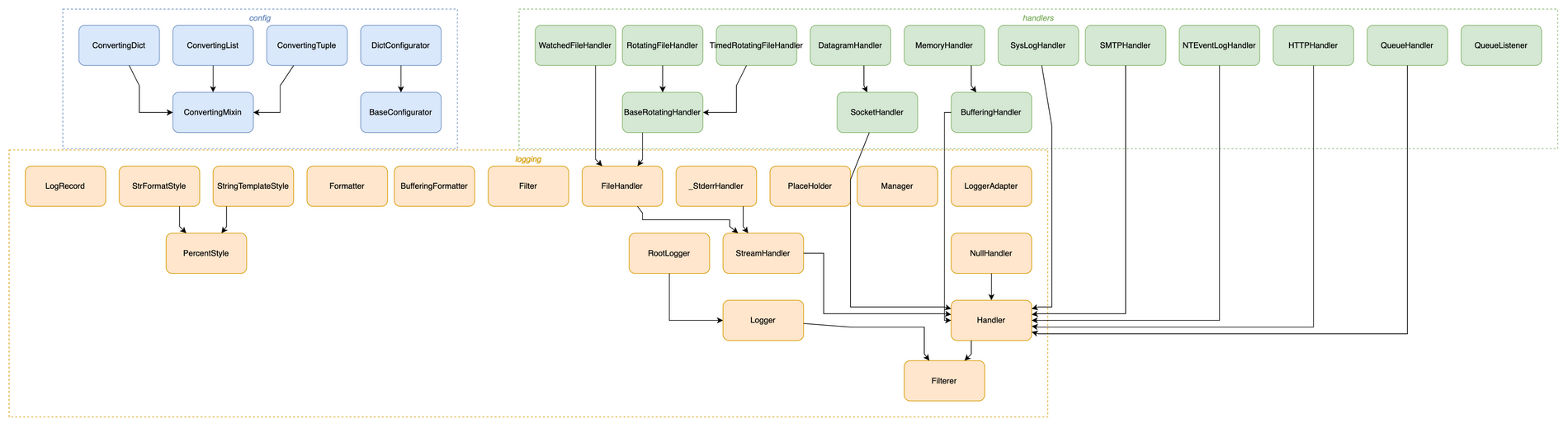
↑ Python's logging package as a class hierarchy — one command, modules auto-boxed, every inheritance edge resolved.
Under the hood it runs a bundled extractor → auto-layout → validate pipeline:
# Import graph — Python / JS-TS / Go / Rust
python3 scripts/pyimports.py   myproject --group -o graph.json
python3 scripts/jsimports.py   ./src     --group -o graph.json
python3 scripts/goimports.py   ./module  --group -o graph.json
python3 scripts/rustimports.py ./crate   --group -o graph.json

# Python class-inheritance hierarchy
python3 scripts/pyclasses.py   mypackage --group -o graph.json

# any extractor → auto-layout → editable .drawio
python3 scripts/autolayout.py  graph.json -o diagram.drawio
| Piece | What it does |
|---|---|
| 5 extractors | import graphs for Python · JS/TS · Go · Rust, plus Python class inheritance |
| Auto-layout | Graphviz places nodes and routes orthogonal edges around them — removes the manual-coordinate ceiling for large graphs |
| Transitive reduction | drops edges implied by a longer path, turning a dense hairball into a traceable graph (asyncio: 149 → 46 edges) |
| Nested containers | --group boxes modules by sub-package, nested for deep package trees |
| Deterministic validator | validate.py lints the .drawio (dangling edges, duplicate ids, overlaps) before the visual self-check |
Layout needs Graphviz (brew install graphviz / apt install graphviz) — optional; everything else works without it. Full format + flag reference in references/autolayout.md.
| Category | Examples | Notable features |
|---|---|---|
| Architecture | microservices, cloud (AWS/GCP/Azure), network topology, deployment | Tier-based swimlanes, hub-center strategy |
| ML / Deep Learning | Transformer, CNN, LSTM, GRU | Tensor shape annotations, layer-type color coding |
| Flowcharts | business processes, workflows, decision trees, state machines | Semantic shapes (parallelogram I/O, diamond decisions) |
| UML | class diagrams, sequence diagrams | Inheritance / composition / aggregation arrows; lifelines + activation boxes |
| Data | ER diagrams, data flow diagrams (DFD) | Table containers, PK/FK notation |
| Other | org charts, mind maps, wireframes | — |
Need a real AWS / Azure / GCP / Cisco / Kubernetes / UML / BPMN icon? The skill searches 10,000+ official draw.io shapes for the exact style string — so vendor icons render correctly instead of falling back to a blank box from a guessed shape=mxgraph.* name.
"Add an AWS Lambda wired to an S3 bucket" · "Use the real Kubernetes pod icon"
python3 scripts/shapesearch.py "aws lambda" --limit 5
# → Lambda (77x93)
#   outlineConnect=0;...;shape=mxgraph.aws3.lambda;fillColor=#F58534;...
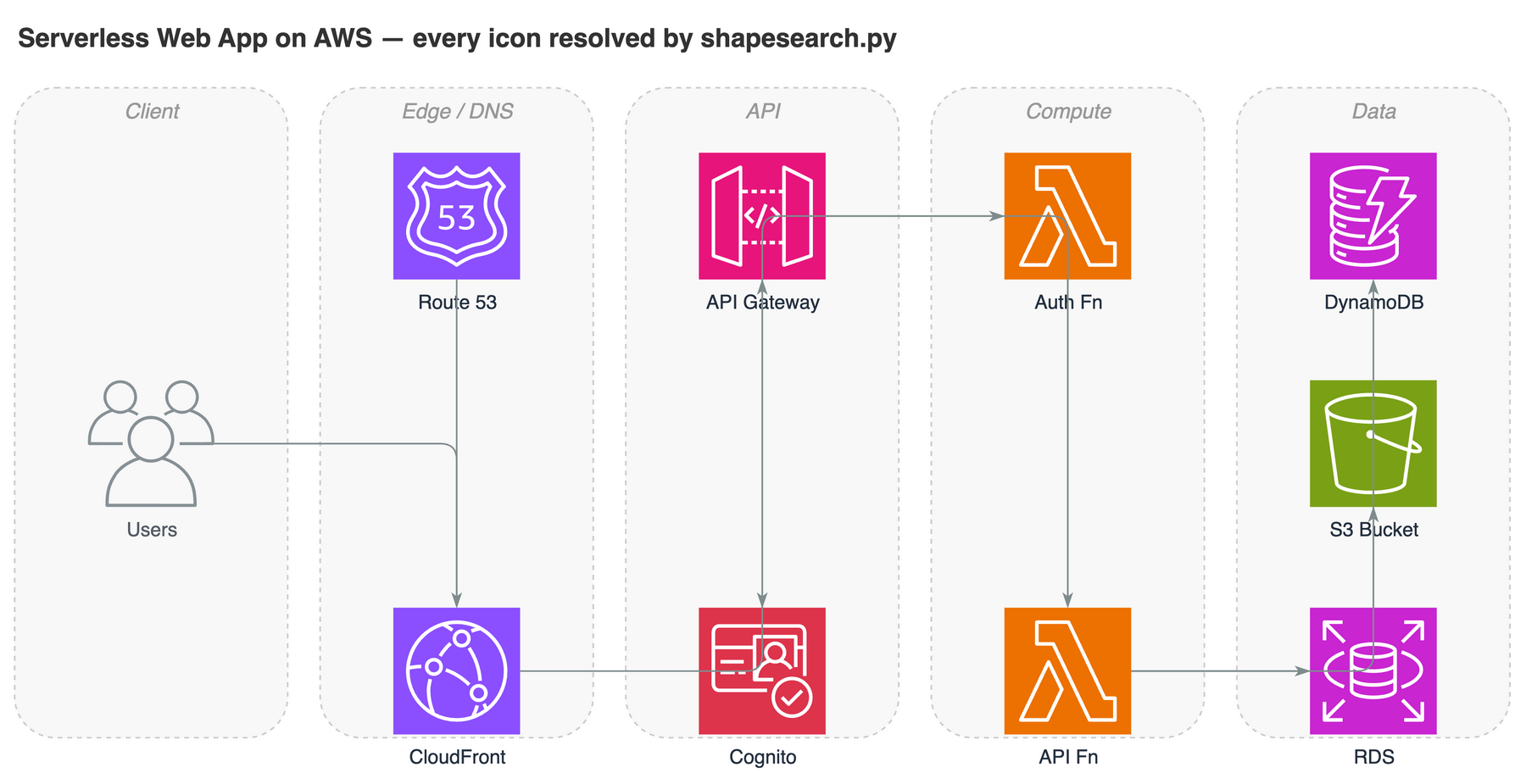
↑ A serverless AWS architecture — every icon is the real official draw.io shape resolved by shapesearch.py, not a hand-guessed shape= string.
Covers AWS / Azure / GCP / Cisco / Kubernetes / UML / BPMN / ER / electrical / P&ID and the general shape sets. Hand-writable style cheatsheet + search usage in references/shapes.md.
draw.io ships no modern AI/LLM logos, so an LLM-app diagram renders as generic boxes. aiicons.py resolves a brand name to a draw.io image style for any of 321 logos (OpenAI, Claude, Gemini, Mistral, Llama, Cohere, DeepSeek, Qwen, Ollama, LangChain, HuggingFace…) from lobe-icons (MIT).
python3 scripts/aiicons.py "claude" --json      # CDN-referenced (default)
python3 scripts/aiicons.py "openai" --embed     # self-contained data URI
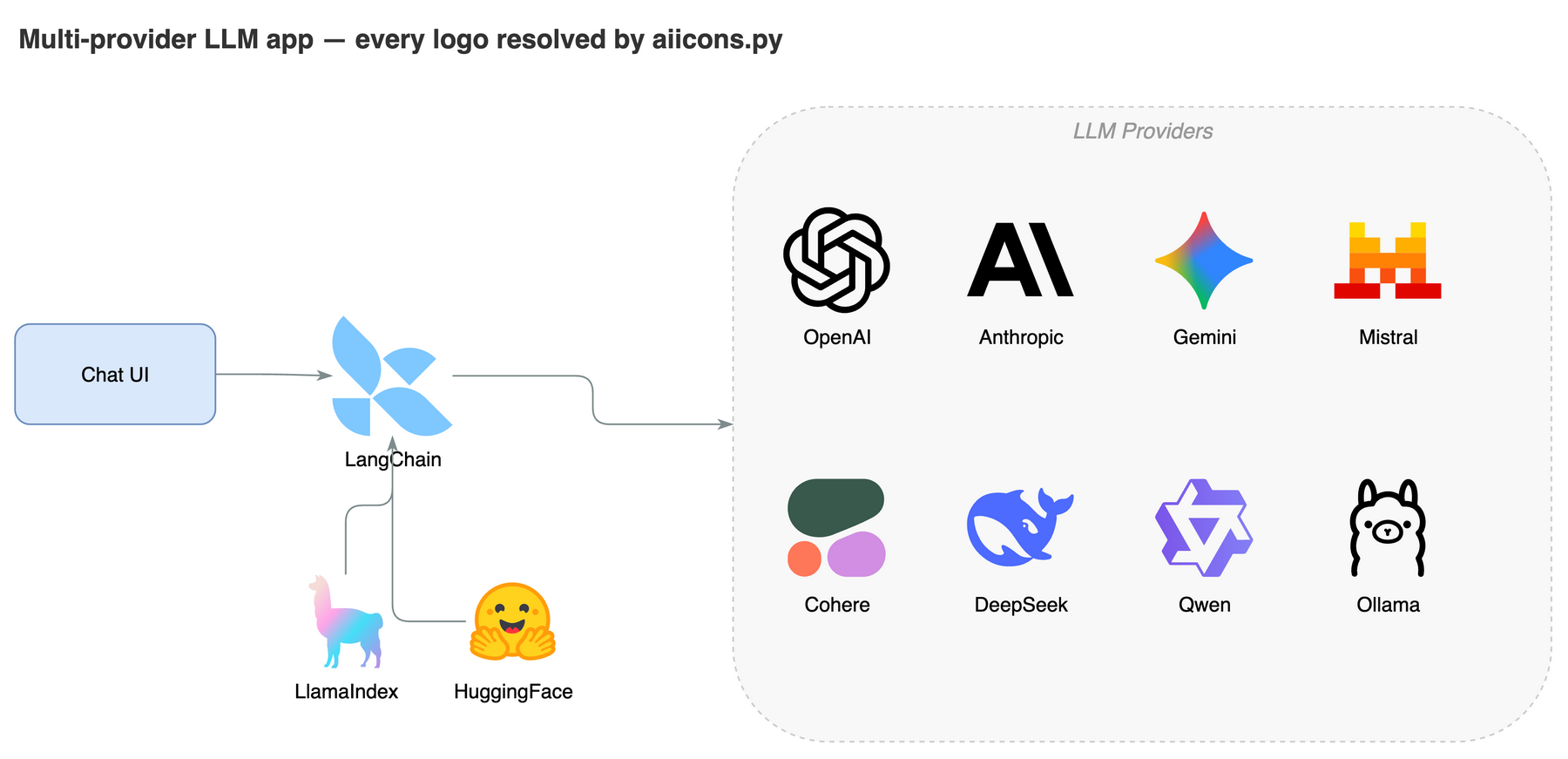
↑ A multi-provider LLM app — every brand logo resolved by aiicons.py. Icons are referenced from the unpkg CDN by default (network needed at render time); --embed inlines them for offline use. Logos are trademarks of their owners, used for identification only.
Capture a visual style once, reuse it everywhere. Three presets are built in — default, corporate, handdrawn — and you can teach the skill your own style from a .drawio file or a flat image:
Draw a microservices architecture using my "corporate" style
Learn my style from ~/diagrams/brand.drawio as "mybrand"
The skill extracts colors, shapes, fonts, and edge style, renders a preview, and only saves the preset after you approve. Full preset-management commands in docs/STYLE_PRESETS.md.
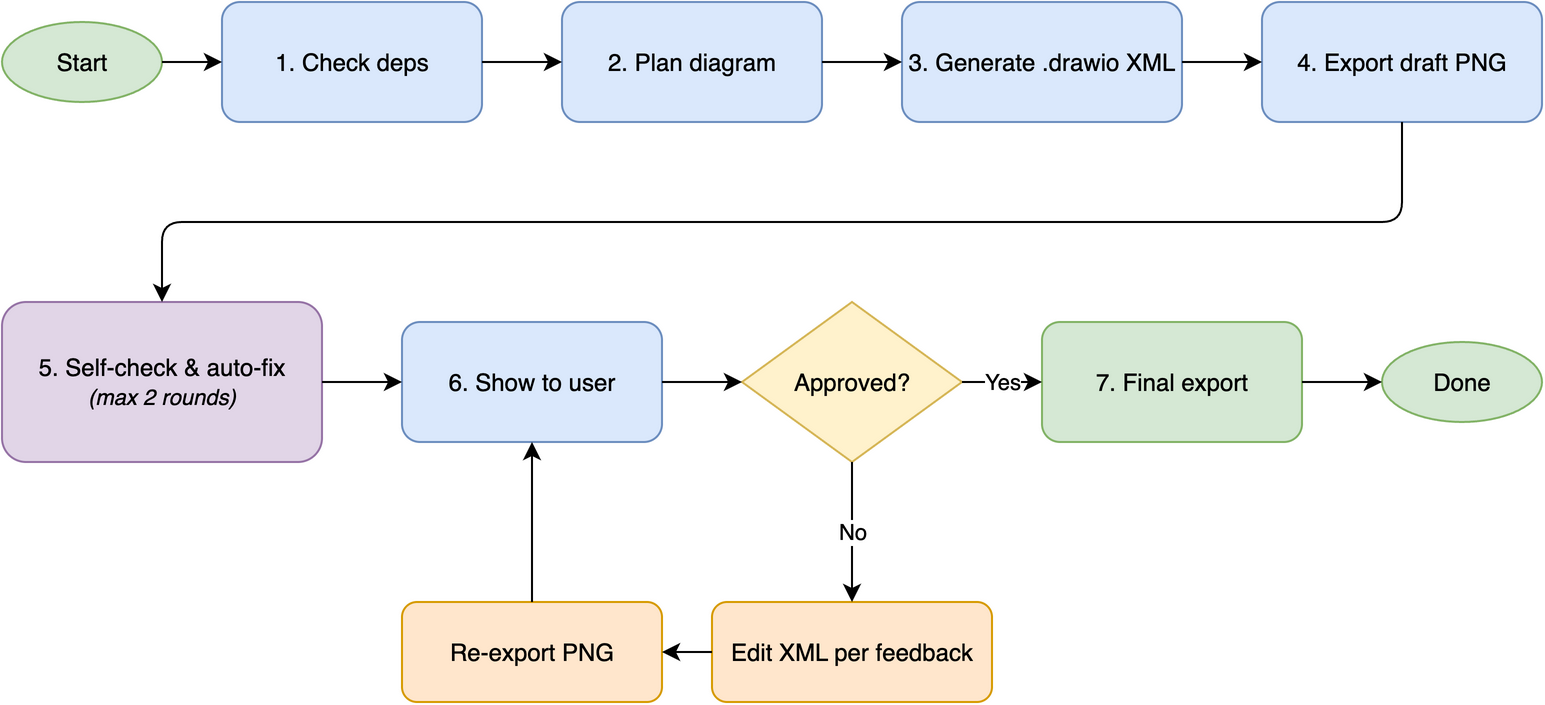
Behind the scenes: check dependencies → plan layout → generate .drawio XML → export draft PNG → self-check + auto-fix (up to 2 rounds) → show to user → 5-round feedback loop until approved → final export.
| Feature | Native agent | drawio-skill |
|---|---|---|
| Self-check after export | ❌ | ✅ reads PNG, auto-fixes 6 issue types |
| Iterative review loop | ❌ manual re-prompt | ✅ targeted edits, 5-round safety valve |
| Diagram type presets | ❌ | ✅ 6 presets (ERD, UML, Seq, Arch, ML, Flow) |
| Visualize a codebase | ❌ | ✅ import graphs (Py/JS/Go/Rust) + class diagrams |
| Auto-layout for large graphs | ❌ hand-places, overlaps | ✅ Graphviz placement, ortho routing, nested containers |
| Structural validation | ❌ | ✅ deterministic .drawio linter |
| Official shape search | ❌ guesses, blank boxes | ✅ exact style for 10k+ AWS/Azure/GCP/UML shapes |
| AI/LLM brand logos | ❌ none | ✅ 321 logos (OpenAI/Claude/Gemini/…) via aiicons.py |
| Grid-aligned layout | ❌ | ✅ 10px snap, routing corridors |
| Color palette | random / inconsistent | ✅ 7-color semantic system |
| Style presets | ❌ | ✅ learn from .drawio file or image |
| Feature | drawio-skill | jgraph/drawio-mcp (official) | bahayonghang/drawio-skills | GBSOSS/ai-drawio |
|---|---|---|---|---|
| Approach | Pure SKILL.md | SKILL.md / MCP / Project | YAML DSL + CLI (MCP optional) | Claude Code plugin |
| Dependencies | draw.io desktop only | draw.io desktop | draw.io desktop (MCP optional) | draw.io plugin + browser |
| Multi-agent | ✅ 6 platforms | ❌ Claude apps only | ✅ Claude / Gemini / Codex | ❌ Claude Code only |
| Self-check + auto-fix | ✅ 2-round (reads PNG) | ❌ | ✅ validation + strict mode | ❌ screenshot only |
| Iterative review | ✅ 5-round loop | ❌ generate once | ✅ 3 workflows | ❌ |
| Diagram presets | ✅ 6 types | ❌ | ✅ paper-mode classifier | ❌ |
| ML/DL diagrams | ✅ tensor shapes, layer colors | ❌ | ❌ | ❌ |
| Color system | ✅ 7-color semantic | ❌ | ✅ 6 themes | ❌ |
| Official shape search | ✅ 10k+ shapes (local) | ✅ 10k+ shapes (MCP) | ❌ | ❌ |
| AI/LLM brand logos | ✅ 321 (lobe-icons) | ❌ | ❌ | ❌ |
| Browser fallback | ✅ diagrams.net URL (viewer + editable) | ❌ inline preview only | ✅ via optional MCP | ✅ diagrams.net viewer (primary) |
| Zero-config | ✅ copy skills/drawio-skill/ | ✅ | ✅ desktop-only mode | ❌ needs plugin install |
Full comparison + key-advantages summary in docs/COMPARISON.md (with audit timestamp).
Good fit:
Reach for a sibling skill instead when you need:
Part of the Agents365-ai diagram-skill family — pick the right tool for the job:
| Skill | Style | Best for |
|---|---|---|
| excalidraw-skill | Hand-drawn / sketchy | Whiteboard mockups, informal diagrams |
| mermaid-skill | Text-based, auto-layout | README-embeddable, version-control friendly |
| plantuml-skill | UML-focused | Class / sequence diagrams in CI pipelines |
| tldraw-skill | Whiteboard collaboration | Casual sketches, FigJam-style boards |

If this skill helps you, consider supporting the author:

WeChat Pay |

Alipay |

Buy Me a Coffee |

Give a Reward |
Agents365-ai
WCAG accessibility audit — automated scanning, manual review, remediation
Playwright testing toolkit — test generation, flaky test fix, migration helpers
Parallel development with git worktrees — port isolation, env sync, cleanup
1000+ skills curated from Anthropic, Vercel, Stripe, and other engineering teams

