

Are you the author? Sign in to claim
Earth Agent is a Cursor-like AI agent for Google Earth Engine. It can be used right in your browser as a Chrome extensio

Earth Agent is a Cursor-like AI agent for Google Earth Engine. It can be used right in your browser as a Chrome extension or through MCP server support. It helps you do anything related to Google Earth Engine automatically through chatting (write code, run analysis, debug errors, explain maps, and manage your environment). Hatched from sundai.club.
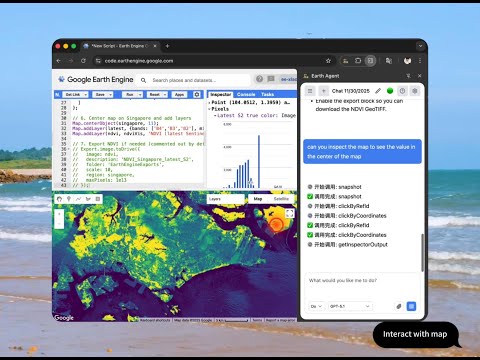
[!TIP] Quick Start: Install from Chrome Web Store, set up your API key (OpenAI/Anthropic/Google) or MCP server with Claude Code/Cursor/Zed/OpenCode, and say "Help me map NDVI for California".
Best for: Standard users who want to use OpenAI, Anthropic, or Google Gemini.
[!NOTE] The Web Store version does not support local connections (MCP Server or Ollama) due to store policies. For those features, use Option 2.
earth-agent-extension.zipchrome://extensions/npm installnpm run builddist directory in Chrome[!TIP] You do not have to do this if you only want to use Earth Agent as MCP server. If you want to use it directly in your browser without external agents tools, you need to do this.
Just as software developers use files like CLAUDE.md, GEMINI.md or AGENTS.md to define project-specific rules for their AI coding assistants, Earth Agent allows you to set Custom Instructions to align the AI with your scientific or policy goals. Think of it as giving the agent a "Standard Operating Procedure" for your research. This is powerful for:
map()) over client-side loops."To configure:
This allows you to create your own agent with specific system prompts and tool access for specific workflows or use cases. Each agent profile can have its own:
Example Profiles:
To configure:
You can use this extension in two ways: through the MCP Server or inside the Earth Agent side panel. MCP servers expose the same tools as the Earth Agent assistant. Check MCP Server Support for details on using it as an MCP server. The following section will show you how to use it inside the Earth Agent side panel.
After configuration:
[!NOTE] The agent can only see the code in temp/new scripts in the Google Earth Engine Code Editor for now. You should save it once you think the script is ready.
The agent operates in two modes that you can switch between:
Analysis and guidance mode - the agent can observe but not modify:
Best for: Learning, understanding code, exploring datasets, getting explanations
Full execution mode - the agent can take action:
Best for: Building scripts, debugging, automated analysis, multi-step tasks
Tip: Start in Ask Mode when exploring new concepts, switch to Do Mode when ready to implement

Earth Agent can work as a local Model Context Protocol (MCP) server, allowing you to control Google Earth Engine directly from Claude Code, Cursor, Zed, or other AI editors.
[!WARNING] Availability Note: The Chrome Web Store version of Earth Agent supports Cloud AI only (OpenAI, Anthropic, Google) due to browser security restrictions on
localhostconnections.To use the MCP Server (or local Ollama models), you must install the Developer Version from GitHub.
Install the Developer Version:
earth-agent-extension.zip from GitHub Releases.chrome://extensions/ > "Load unpacked".Enable in Settings:
Configure your Editor:
~/.claude/settings.json):{
"mcpServers": {
"earth-agent": {
"command": "npx",
"args": ["-y", "earth-agent-mcp"]
}
}
}
👉 Full MCP Server Documentation
🌍 Getting Started
Help me create a simple map showing NDVI for California using Landsat data
🛰️ Satellite Data Analysis
Find and display the latest Sentinel-2 image over New York City with less than 10% cloud cover
📊 Data Processing (⚡ Requires Do Mode)
Calculate zonal statistics for land use categories within protected areas and export the results to Drive
🚀 Complex Workflow (⚡ Requires Do Mode)
I want to analyze deforestation in the Brazilian Amazon from 2000 to 2023.
Please create a complete workflow that:
1. Loads appropriate satellite imagery
2. Calculates forest loss over time
3. Creates visualizations showing the changes
4. Generates statistics by state/region
5. Exports the results for further analysis
🔧 Debugging
This code is running slowly, check my code for best practices and suggest improvements
Earth Agent provides a comprehensive set of tools available both in the Chrome Extension and via MCP.
| Category | Agent Tool Name | MCP Tool Name | Description |
|---|---|---|---|
| Code Editing | readCode | read_gee_code | Read current code from editor |
editCode | edit_gee_code | Edit code using search & replace | |
writeCode | write_gee_code | Overwrite entire editor content | |
undoEdit | undo_gee_edit | Revert last edit | |
insertAtLine | N/A | Insert text at specific line | |
| Execution | runCurrentCode | run_gee_code | Run the script in editor |
wait | wait | Wait for execution/loading | |
| Analysis | getConsoleOutput | gee_console | Read console logs & errors |
getMapScreenPosition | gee_map_position | Get map bounds & zoom | |
getInspectorOutput | gee_inspector | Read inspector panel data | |
screenshot | gee_screenshot | Take screenshot of interface | |
snapshot | gee_snapshot | Get accessibility DOM tree | |
| Knowledge | geeDocs | gee_docs | Search datasets & API docs |
weather | weather | Get weather data | |
dateTime | date_time | Get current date/time | |
| Control | clearMapInspectorAndConsole | clear_gee | Reset workspace |
clickByRefId | click_element | Click element by ID | |
clickAtScreenPosition | click_position | Click at coordinates |
[!NOTE] Z.AI currently does not support multimodal inputs yet, so screenshot analysis features are unavailable when using Z.AI models. For the best Earth Engine integration experience with visual analysis capabilities, use OpenAI, Anthropic, or Google providers.
See Troubleshooting Guide for solutions to common issues (API keys, connectivity, tools, screenshots) and help resources.
We take your privacy seriously. Your API keys are stored securely in your browser using Chrome Sync and never share to our serever (even if we have one). Chat history and code remain local, it will sent to the LLM provider you choose. For full details on data handling and security practices, please read our Privacy Policy.
See roadmap.md for our planned features and future development.
See CHANGELOG.md for a detailed history of changes.
We welcome contributions! Please see our Contributing Guidelines for details on how to set up your development environment, build the project, and submit pull requests.
Run Claude Code as an MCP server so any agent can delegate coding tasks to it
 @microsoft✓ Official
Browser automation using accessibility snapshots instead of screenshots
 @googleapis✓ Official
Google's universal MCP server supporting PostgreSQL, MySQL, MongoDB, Redis, and 10+ databases
 @github✓ Official
Official GitHub integration for repos, issues, PRs, and CI/CD workflows