

Are you the author? Sign in to claim
Excalidraw MCP server with real vendor-icon search & insertion (AWS/Azure/GCP/OCI/Kubernetes) for AI-built architecture


A faster Excalidraw MCP server built around real vendor icons. AI agents draw architecture diagrams with official AWS, Azure, GCP, OCI, and Kubernetes icons — not generic rectangles — in one-shot batches on a live canvas they can see and refine.
Two things set it apart from the upstream fork it grew from:
search_official_icon + add_image pull actual vendor icons instead of drawing shapes that only approximate them.This repo provides:
Keywords: Excalidraw MCP server, AWS/Azure/GCP icons, AI architecture diagrams, diagrams as code, Claude Code skill, Codex CLI skill, Cursor MCP, Mermaid to Excalidraw.
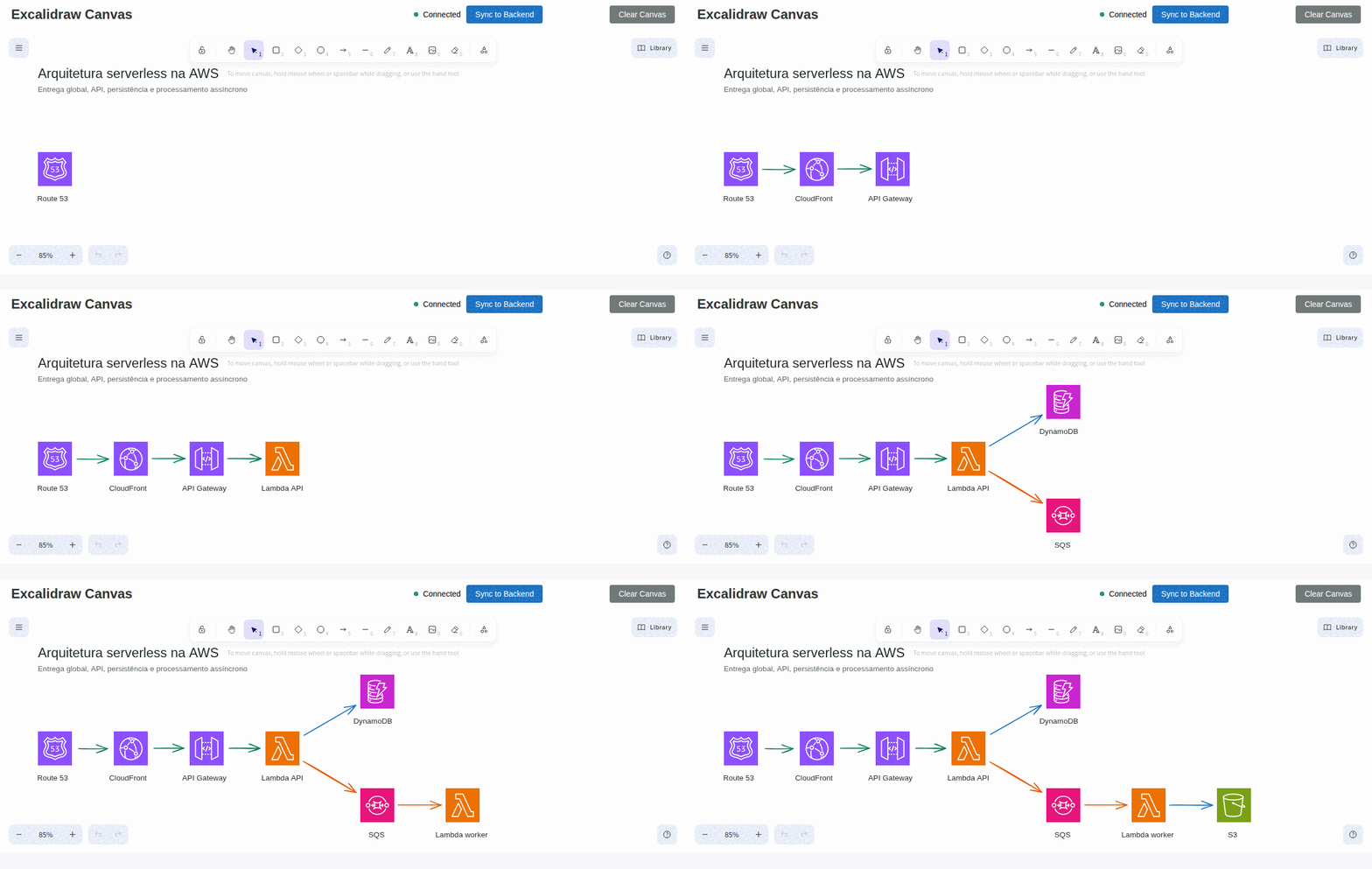
An AI agent builds a serverless AWS architecture step by step with Route 53, CloudFront, API Gateway, Lambda, DynamoDB, SQS, and S3.
This repo contains two separate processes:
http://127.0.0.1:3000)EXPRESS_SERVER_URLExcalidraw now has an official MCP — it's great for quick, prompt-to-diagram generation rendered inline in chat. We solve a different problem.
| Official Excalidraw MCP | This Project | |
|---|---|---|
| Approach | Prompt in, diagram out (one-shot) | Programmatic element-level control (31 tools) |
| State | Stateless — each call is independent | Persistent live canvas with real-time sync |
| Element CRUD | No | Full create / read / update / delete per element |
| AI sees the canvas | No | describe_scene (structured text) + get_canvas_screenshot (image) |
| Iterative refinement | No — regenerate the whole diagram | Draw → look → adjust → look again, element by element |
| Layout tools | No | align_elements, distribute_elements, group / ungroup |
| File I/O | No | export_scene / import_scene (.excalidraw JSON) |
| Snapshot & rollback | No | snapshot_scene / restore_snapshot |
| Mermaid conversion | No | create_from_mermaid |
| Shareable URLs | Yes | Yes — export_to_excalidraw_url |
| Design guide | read_me cheat sheet | read_diagram_guide (colors, sizing, layout, anti-patterns) |
| Viewport control | Camera animations | set_viewport (zoom-to-fit, center on element, manual zoom) |
| Live canvas UI | Rendered inline in chat | Standalone Excalidraw app synced via WebSocket |
| Multi-agent | Single user | Multiple agents can draw on the same canvas concurrently |
| Works without MCP | No | Yes — REST API fallback via agent skill |
TL;DR — The official MCP generates diagrams. We give AI agents a full canvas toolkit to build, inspect, and iteratively refine diagrams — including the ability to see what they drew.
search_official_icon + add_image pull real vendor icons — official AWS/Azure/GCP/OCI packs (user-supplied, see Vendor Icons), bundled Kubernetes, simple-icons (CC0), Tabler (MIT), and Iconify (~200k icons, fetched on demand and cached). No more generic rectangles for an "RDS" or "Compute Engine".search_library_items + insert_library_item for libraries.excalidraw.com shapes.read_diagram_guide accepts diagramType (network, cloud-aws, cloud-gcp, cloud-azure, c4, erd, flowchart, sequence) and returns that domain's standard conventions — canonical icons, boundary containers, shape semantics.batch_create_elements with autoLayout: true arranges nodes and removes overlaps; validate_layout flags overlaps, cramped spacing, and crossing arrows.get_element, clear_canvas, export_scene, import_scene, export_to_image, duplicate_elements, snapshot_scene, restore_snapshot, describe_scene, get_canvas_screenshot, read_diagram_guide, export_to_excalidraw_url, set_viewportdescribe_scene) and see it (get_canvas_screenshot returns an image) — enabling iterative refinementread_diagram_guide returns best-practice color palettes, sizing rules, layout patterns, and anti-patterns — dramatically improves AI-generated diagram qualityexport_to_excalidraw_url encrypts and uploads the scene to excalidraw.com, returns a shareable link anyone can openset_viewport with scrollToContent, scrollToElementId, or manual zoom/offset — agents can auto-fit diagrams after creation.excalidraw JSON filesalign_elements / distribute_elements fully implemented, points type normalization, removed invalid label type, removed HTTP transport dead code, ungroup_elements now errors on failureskills/excalidraw-skill/ (portable instructions + helper scripts for export/import and repeatable CRUD)agent-browser)main.tsx)Prereqs: Node >= 18, npm
npm ci
npm run build
Terminal 1: start the canvas
PORT=3000 npm run canvas
Security note: The server defaults to binding on
127.0.0.1only. If you need to expose it on a network interface (e.g. Docker, remote access), setHOST=0.0.0.0— but ensure you have network-level access controls in place, as the API has no built-in authentication.
Open http://127.0.0.1:3000.
Terminal 2: run the MCP server (stdio)
EXPRESS_SERVER_URL=http://127.0.0.1:3000 node dist/index.js
Canvas server:
docker run -d -p 3000:3000 --name excalidraw-icons-canvas ghcr.io/iagogfe/excalidraw-icons-mcp-canvas:latest
MCP server (stdio) is typically launched by your MCP client (Claude Desktop/Cursor/etc.). If you want a local container for it, use the image ghcr.io/iagogfe/excalidraw-icons-mcp:latest and set EXPRESS_SERVER_URL to point at the canvas.
The MCP server runs over stdio and can be configured with any MCP-compatible client. Below are configurations for both local (requires cloning and building) and Docker (pull-and-run) setups.
| Variable | Description | Default |
|---|---|---|
EXPRESS_SERVER_URL | URL of the canvas server | http://127.0.0.1:3000 |
ENABLE_CANVAS_SYNC | Enable real-time canvas sync | true |
Config location:
~/Library/Application Support/Claude/claude_desktop_config.json%APPDATA%\Claude\claude_desktop_config.json~/.config/Claude/claude_desktop_config.jsonLocal (node)
{
  "mcpServers": {
    "excalidraw": {
      "command": "node",
      "args": ["/absolute/path/to/excalidraw-icons-mcp/dist/index.js"],
      "env": {
        "EXPRESS_SERVER_URL": "http://127.0.0.1:3000",
        "ENABLE_CANVAS_SYNC": "true"
      }
    }
  }
}
Docker
{
  "mcpServers": {
    "excalidraw": {
      "command": "docker",
      "args": [
        "run", "-i", "--rm",
        "-e", "EXPRESS_SERVER_URL=http://host.docker.internal:3000",
        "-e", "ENABLE_CANVAS_SYNC=true",
        "ghcr.io/iagogfe/excalidraw-icons-mcp:latest"
      ]
    }
  }
}
Use the claude mcp add command to register the MCP server.
Local (node) - User-level (available across all projects):
claude mcp add excalidraw --scope user \
  -e EXPRESS_SERVER_URL=http://127.0.0.1:3000 \
  -e ENABLE_CANVAS_SYNC=true \
  -- node /absolute/path/to/excalidraw-icons-mcp/dist/index.js
Local (node) - Project-level (shared via .mcp.json):
claude mcp add excalidraw --scope project \
  -e EXPRESS_SERVER_URL=http://127.0.0.1:3000 \
  -e ENABLE_CANVAS_SYNC=true \
  -- node /absolute/path/to/excalidraw-icons-mcp/dist/index.js
Docker
claude mcp add excalidraw --scope user \
  -- docker run -i --rm \
  -e EXPRESS_SERVER_URL=http://host.docker.internal:3000 \
  -e ENABLE_CANVAS_SYNC=true \
  ghcr.io/iagogfe/excalidraw-icons-mcp:latest
Manage servers:
claude mcp list              # List configured servers
claude mcp remove excalidraw # Remove a server
Config location: .cursor/mcp.json in your project root (or ~/.cursor/mcp.json for global config)
Local (node)
{
  "mcpServers": {
    "excalidraw": {
      "command": "node",
      "args": ["/absolute/path/to/excalidraw-icons-mcp/dist/index.js"],
      "env": {
        "EXPRESS_SERVER_URL": "http://127.0.0.1:3000",
        "ENABLE_CANVAS_SYNC": "true"
      }
    }
  }
}
Docker
{
  "mcpServers": {
    "excalidraw": {
      "command": "docker",
      "args": [
        "run", "-i", "--rm",
        "-e", "EXPRESS_SERVER_URL=http://host.docker.internal:3000",
        "-e", "ENABLE_CANVAS_SYNC=true",
        "ghcr.io/iagogfe/excalidraw-icons-mcp:latest"
      ]
    }
  }
}
Use the codex mcp add command to register the MCP server.
Local (node)
codex mcp add excalidraw \
  --env EXPRESS_SERVER_URL=http://127.0.0.1:3000 \
  --env ENABLE_CANVAS_SYNC=true \
  -- node /absolute/path/to/excalidraw-icons-mcp/dist/index.js
Docker
codex mcp add excalidraw \
  -- docker run -i --rm \
  -e EXPRESS_SERVER_URL=http://host.docker.internal:3000 \
  -e ENABLE_CANVAS_SYNC=true \
  ghcr.io/iagogfe/excalidraw-icons-mcp:latest
Manage servers:
codex mcp list              # List configured servers
codex mcp remove excalidraw # Remove a server
Config location: ~/.config/opencode/opencode.json or project-level opencode.json
Local (node)
{
  "$schema": "https://opencode.ai/config.json",
  "mcp": {
    "excalidraw": {
      "type": "local",
      "command": ["node", "/absolute/path/to/excalidraw-icons-mcp/dist/index.js"],
      "enabled": true,
      "environment": {
        "EXPRESS_SERVER_URL": "http://127.0.0.1:3000",
        "ENABLE_CANVAS_SYNC": "true"
      }
    }
  }
}
Docker
{
  "$schema": "https://opencode.ai/config.json",
  "mcp": {
    "excalidraw": {
      "type": "local",
      "command": ["docker", "run", "-i", "--rm", "-e", "EXPRESS_SERVER_URL=http://host.docker.internal:3000", "-e", "ENABLE_CANVAS_SYNC=true", "ghcr.io/iagogfe/excalidraw-icons-mcp:latest"],
      "enabled": true
    }
  }
}
Config location: ~/.gemini/antigravity/mcp_config.json
Local (node)
{
  "mcpServers": {
    "excalidraw": {
      "command": "node",
      "args": ["/absolute/path/to/excalidraw-icons-mcp/dist/index.js"],
      "env": {
        "EXPRESS_SERVER_URL": "http://127.0.0.1:3000",
        "ENABLE_CANVAS_SYNC": "true"
      }
    }
  }
}
Docker
{
  "mcpServers": {
    "excalidraw": {
      "command": "docker",
      "args": [
        "run", "-i", "--rm",
        "-e", "EXPRESS_SERVER_URL=http://host.docker.internal:3000",
        "-e", "ENABLE_CANVAS_SYNC=true",
        "ghcr.io/iagogfe/excalidraw-icons-mcp:latest"
      ]
    }
  }
}
host.docker.internal to reach the canvas server running on your host machine. On Linux, you may need --add-host=host.docker.internal:host-gateway or use 172.17.0.1.npm run canvas (local) or docker run -d -p 3000:3000 ghcr.io/iagogfe/excalidraw-icons-mcp-canvas:latest (Docker)./absolute/path/to/excalidraw-icons-mcp with the actual path where you cloned and built the repo.This repo includes a skill at skills/excalidraw-skill/ that provides:
SKILL.md): step-by-step guidance for drawing, refining, and exporting diagramsreferences/cheatsheet.md): MCP tool and REST API referencescripts/*.cjs): export, import, clear, healthcheck, CRUD operationsThe skill complements the MCP server by giving your AI agent structured workflows to follow.
mkdir -p ~/.codex/skills
cp -R skills/excalidraw-skill ~/.codex/skills/excalidraw-skill
To update an existing installation, remove the old folder first (rm -rf ~/.codex/skills/excalidraw-skill) then re-copy.
User-level (available across all your projects):
mkdir -p ~/.claude/skills
cp -R skills/excalidraw-skill ~/.claude/skills/excalidraw-skill
Project-level (scoped to a specific project, can be committed to the repo):
mkdir -p /path/to/your/project/.claude/skills
cp -R skills/excalidraw-skill /path/to/your/project/.claude/skills/excalidraw-skill
Then invoke the skill in Claude Code with /excalidraw-skill.
To update an existing installation, remove the old folder first then re-copy.
All scripts respect EXPRESS_SERVER_URL (default http://127.0.0.1:3000) or accept --url.
EXPRESS_SERVER_URL=http://127.0.0.1:3000 node skills/excalidraw-skill/scripts/healthcheck.cjs
EXPRESS_SERVER_URL=http://127.0.0.1:3000 node skills/excalidraw-skill/scripts/export-elements.cjs --out diagram.elements.json
EXPRESS_SERVER_URL=http://127.0.0.1:3000 node skills/excalidraw-skill/scripts/import-elements.cjs --in diagram.elements.json --mode batch
sync mode to make canvas match a file.See skills/excalidraw-skill/SKILL.md and skills/excalidraw-skill/references/cheatsheet.md.
| Category | Tools |
|---|---|
| Element CRUD | create_element, get_element, update_element, delete_element, query_elements, batch_create_elements, duplicate_elements |
| Layout | align_elements, distribute_elements, group_elements, ungroup_elements, lock_elements, unlock_elements |
| Icons & Libraries | search_official_icon, add_image, search_library_items, insert_library_item |
| Scene Awareness | describe_scene, get_canvas_screenshot, validate_layout |
| File I/O | export_scene, import_scene, export_to_image, export_to_excalidraw_url, create_from_mermaid |
| State Management | clear_canvas, snapshot_scene, restore_snapshot |
| Viewport | set_viewport |
| Design Guide | read_diagram_guide |
| Resources | get_resource |
Full schemas are discoverable via tools/list or in skills/excalidraw-skill/references/cheatsheet.md.
read_diagram_guide accepts an optional diagramType — the client LLM identifies the diagram domain from the user's request and passes it to get that domain's standard convention appended to the guide (canonical icons, boundary containers, shape semantics, flow direction):
diagramType | Convention |
|---|---|
network | Cisco-style icons, LAN→ISP→cloud flow, dashed segment containers (LAN/DMZ/VLAN) |
cloud-gcp | Official GCP icons, Google Cloud boundary + region/zone containers |
cloud-aws | AWS Cloud → Region → VPC → AZ/subnet container nesting |
cloud-azure | Azure boundary, resource-group grouping, VNet/subnet containers |
c4 | C4 Model levels (one per diagram), Structurizr palette, labeled arrows with protocol |
erd | Crow's-foot cardinality labels, entity layout rules |
flowchart | ISO 5807 shape semantics (diamond = decision, labeled exits) |
sequence | UML lifelines, sync/async message styles (prefers create_from_mermaid) |
Conventions live in src/diagramConventions.ts; validated by npm run test:conventions.
search_official_icon works out of the box with bundled Kubernetes icons, simple-icons, Tabler, and Iconify (fetched on demand). Official cloud-vendor packs (AWS, Azure, GCP, OCI) are not bundled — each vendor requires accepting its own license, so you download them yourself and drop the SVGs under icons/<vendor>/. These folders are git-ignored and never redistributed by this repo.
| Vendor | Folder | Where to get it |
|---|---|---|
| AWS | icons/aws/ | AWS Architecture Icons — download the asset package, extract the *_48.svg / Res_*.svg files |
| Azure | icons/azure/ | Azure architecture icons — official SVG zip |
| GCP | icons/gcp/ | Google Cloud icons — official SVG zip |
| OCI | icons/oracle/ | OCI diagram toolkit |
Drop the .svg files directly under the folder (subfolders are fine — the index walks recursively). Local packs take priority over Iconify in search results. After adding a pack, restart the MCP server so the icon index picks it up.
curl http://127.0.0.1:3000/health
npm run test:bind
List tools:
npx @modelcontextprotocol/inspector --cli \
  -e EXPRESS_SERVER_URL=http://127.0.0.1:3000 \
  -e ENABLE_CANVAS_SYNC=true -- \
  node dist/index.js --method tools/list
Create a rectangle:
npx @modelcontextprotocol/inspector --cli \
  -e EXPRESS_SERVER_URL=http://127.0.0.1:3000 \
  -e ENABLE_CANVAS_SYNC=true -- \
  node dist/index.js --method tools/call --tool-name create_element \
  --tool-arg type=rectangle --tool-arg x=100 --tool-arg y=100 \
  --tool-arg width=300 --tool-arg height=200
If you use agent-browser for UI checks:
agent-browser install
agent-browser open http://127.0.0.1:3000
agent-browser wait --load networkidle
agent-browser screenshot /tmp/canvas.png
EXPRESS_SERVER_URL points at the running canvas server.All previously listed bugs have been fixed in v2.0. Remaining items:
export_scene / snapshots as a workaround.export_to_image and get_canvas_screenshot rely on the frontend doing the actual rendering. The canvas UI must be open in a browser.Contributions welcome!
npm run type-check
npm run build
This project started as a fork of yctimlin/mcp_excalidraw, which provides the live canvas + MCP foundation. On top of it, this fork adds standardized icon search and insertion (official AWS/Azure/GCP/OCI/Kubernetes packs, simple-icons, Tabler, Iconify), per-domain diagram conventions, auto-layout, and performance improvements. The demo above was recorded with this project's MCP server and official AWS icons.
MIT — original work © 2024 MCP Excalidraw Server (yctimlin), modifications © 2026 Iago Gonçalves.
Run Claude Code as an MCP server so any agent can delegate coding tasks to it
 @microsoft✓ Official
Browser automation using accessibility snapshots instead of screenshots
 @googleapis✓ Official
Google's universal MCP server supporting PostgreSQL, MySQL, MongoDB, Redis, and 10+ databases
 @github✓ Official
Official GitHub integration for repos, issues, PRs, and CI/CD workflows