

Are you the author? Sign in to claim
Local dashboard to run Claude Code across all your projects — per-project task logs and live .gitmir business-logic mode
A local, single-file dashboard to run Claude Code across all your projects — with a per-project task log and a live business-logic model of each product.







Launch Claude in any project with one click · copy reusable skills into your session · visualize your product's data, flows, processes and entity lifecycles — all in an offline, dependency-free HUD.
Built on the GITMIR multidimensional model — the living source-of-truth model behind gitmir.com.
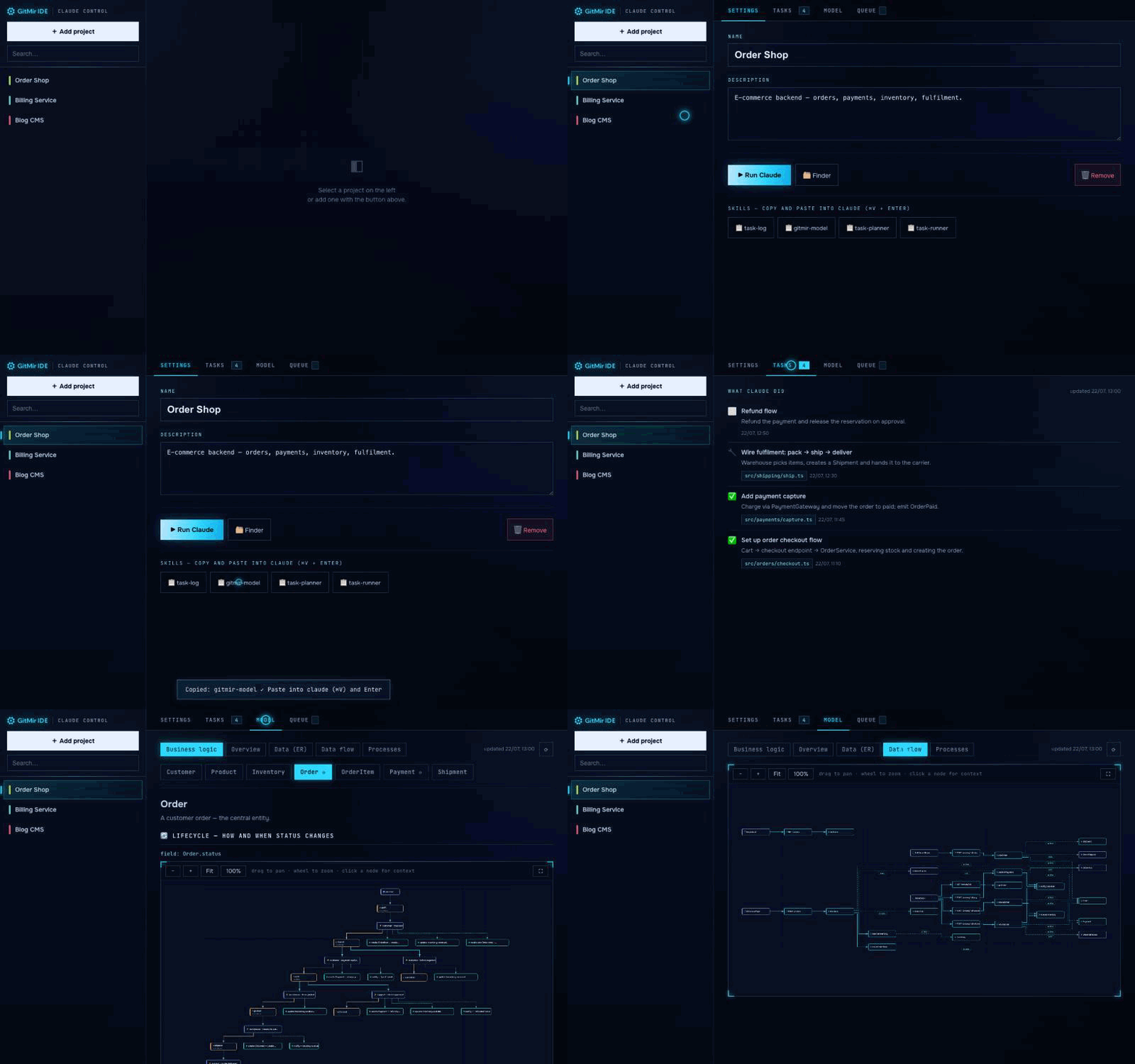
Pick a project → ▶ Run Claude → copy the gitmir-model skill → open Model and see the product's business logic and data flows — laid out by ELK in the GITMIR HUD.
At GITMIR we run Claude Code all day, across dozens of projects scattered over different folders and disks. Two things kept getting in the way — so we fixed them for ourselves, and now we use this every day.
First, the launching. cd into the right folder, start claude, repeat — and never quite remember where everything lives. So we put every project behind one screen: pick it, hit ▶ Run Claude, done.
Second — and this is the real one — losing the thread. As AI writes more of the software, the code stops being something you read and becomes something you have to trust. You lose sight of what the product actually is: which entities exist, how an order moves from placed to refunded, what fires when a status changes. Our answer is a model — a living, multidimensional source of truth the repository keeps current, instead of code you re-read every time. This tool builds that model from your real code and draws it, so you can see a product's business logic and data flows at a glance — and so Claude keeps it up to date after every change.
We built it for ourselves. It turned out useful enough to share — free and open source under GPL-3.0. If something's missing, you find a bug, or you'd like to contribute, you're very welcome.
Grab it: clone and node server.js — see Run. Made in the GITMIR lab.
This runs entirely on your computer. It launches Claude locally, builds the model locally, and stores everything under your own project folders. It makes no network calls to our servers — none. No account, no sign-in, no telemetry, nothing uploaded. It works fully offline.
You don't have to take our word for it:
server.js with
zero npm dependencies; everything it needs (ELK, fonts) is vendored locally.The well-known cloud AI dev tools send your source and your tasks to their servers. This doesn't — and that isn't a privacy policy you have to trust, it's the architecture, and you can verify it yourself in a few minutes. For a team under an NDA, that's the difference between "not allowed" and "fine."
See SECURITY.md for exactly what touches the network (your machine only) and what never does.
You keep dozens of projects in different folders and launch claude from each. GITMIR Claude Control is a local web dashboard that holds them all:
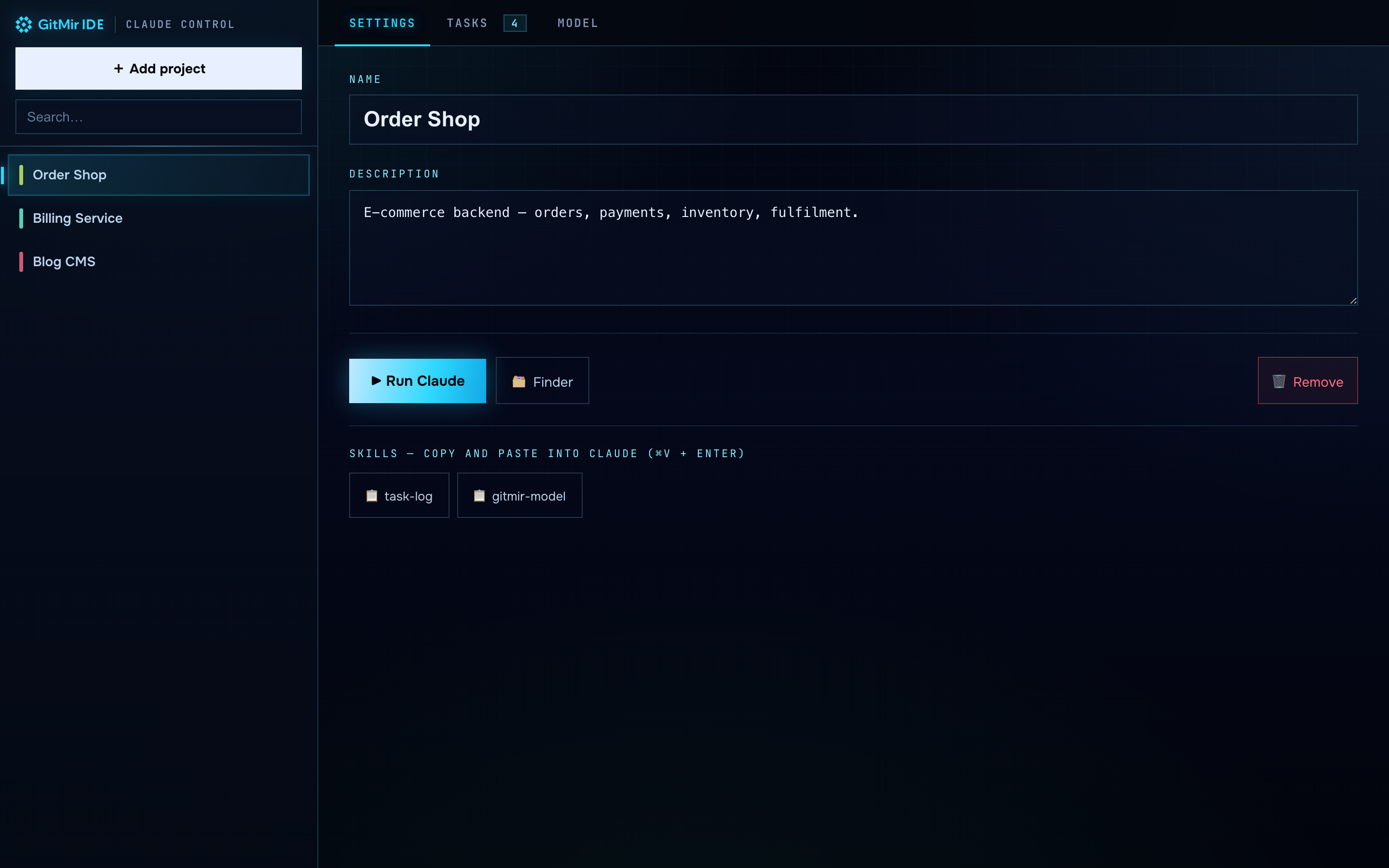
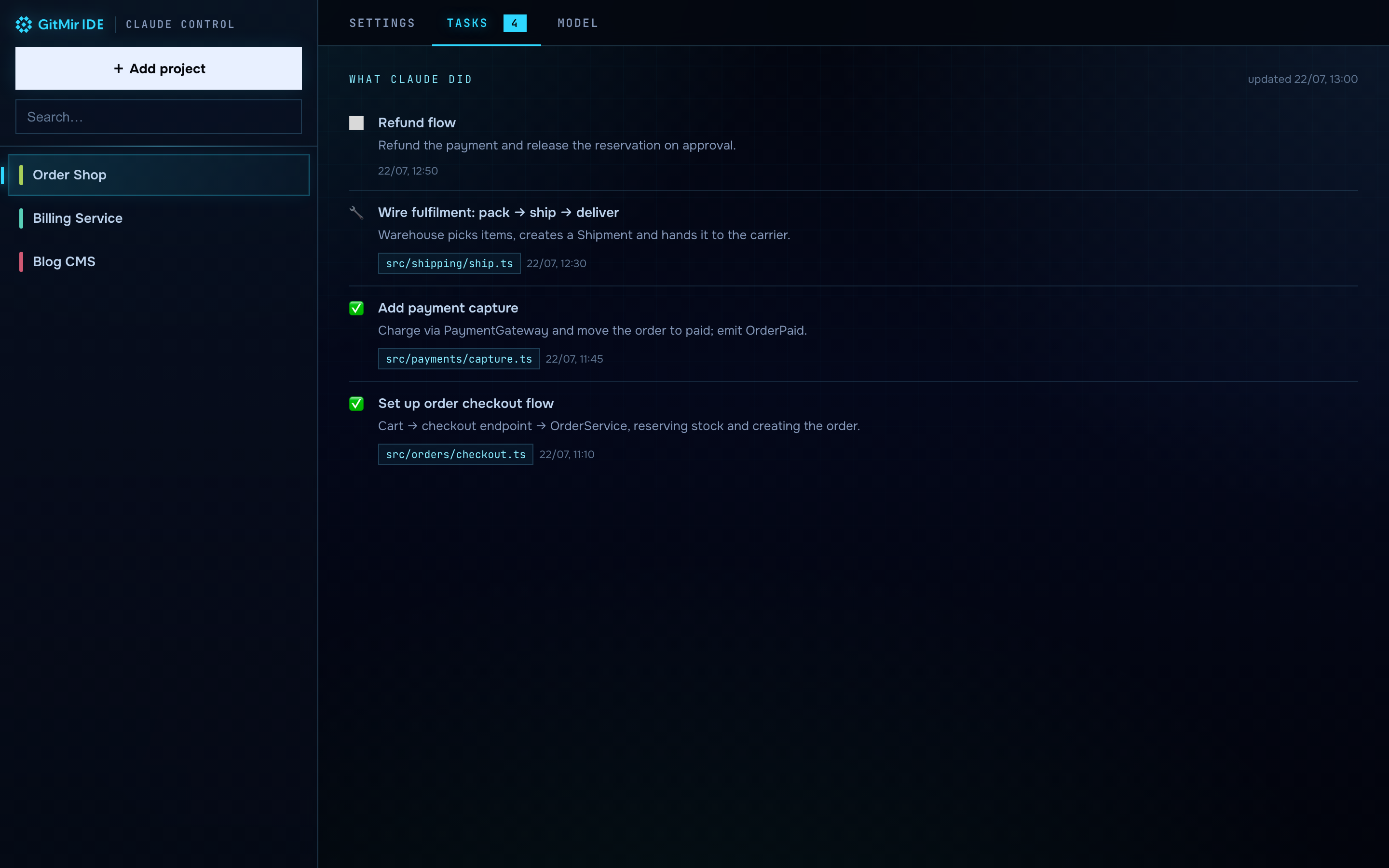
claude). Cross-platform: macOS Terminal, Windows cmd, Linux terminals. Below, one-click Skills you copy into your Claude session..claude/tasks.json), driven by the task-log skill..gitmir/model/: Business logic (entity lifecycles), Overview, Data (ER), Data flow and Processes. Click any element in a diagram to pull its exact context or turn it into a task.tasks/todo · inprogress · done) that the task-runner skill works through.It's one Node file, no npm dependencies. Everything it needs (ELK, fonts) is vendored locally, so it runs fully offline.
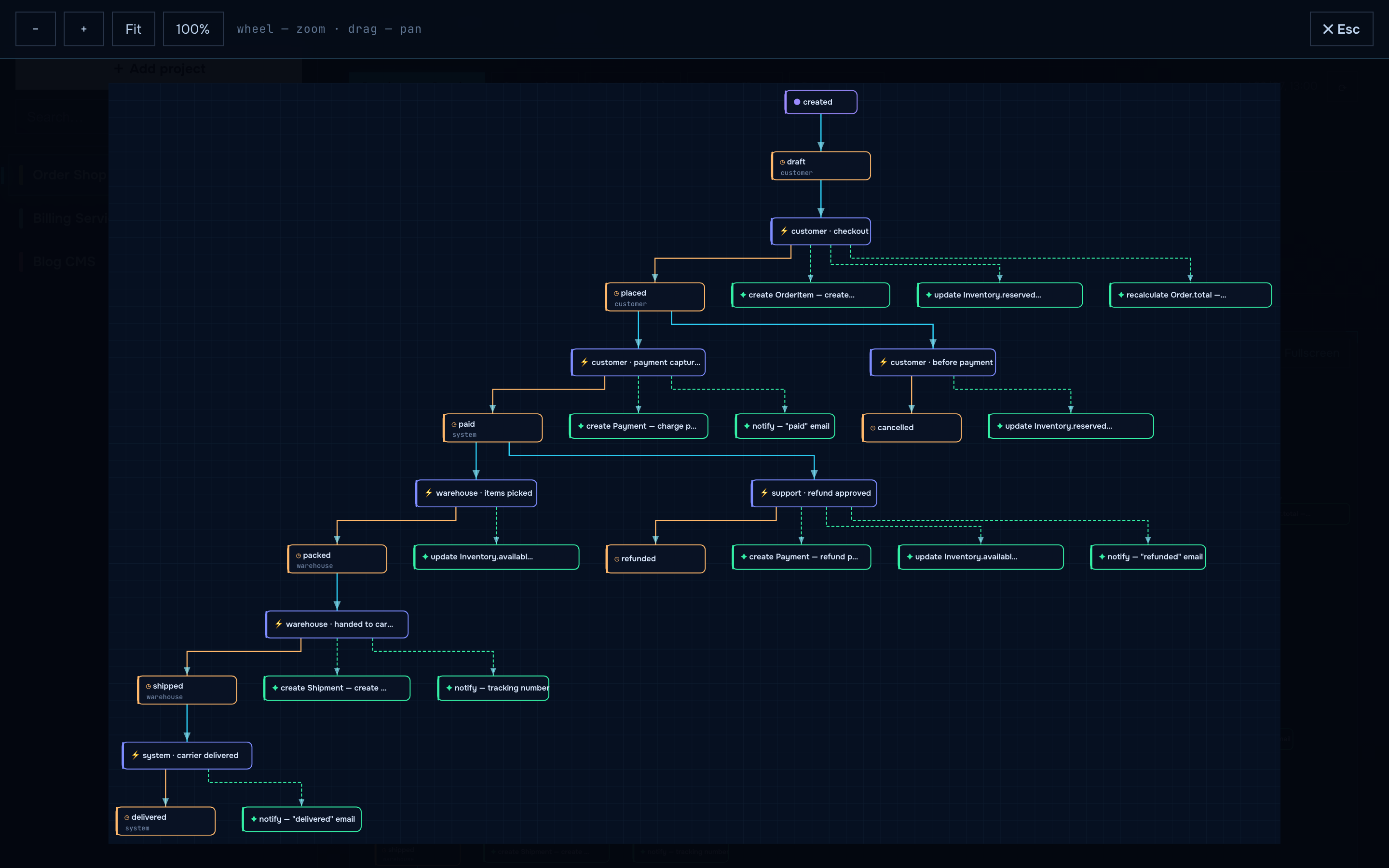
| Business logic — entity lifecycle | Data flow |
|---|---|
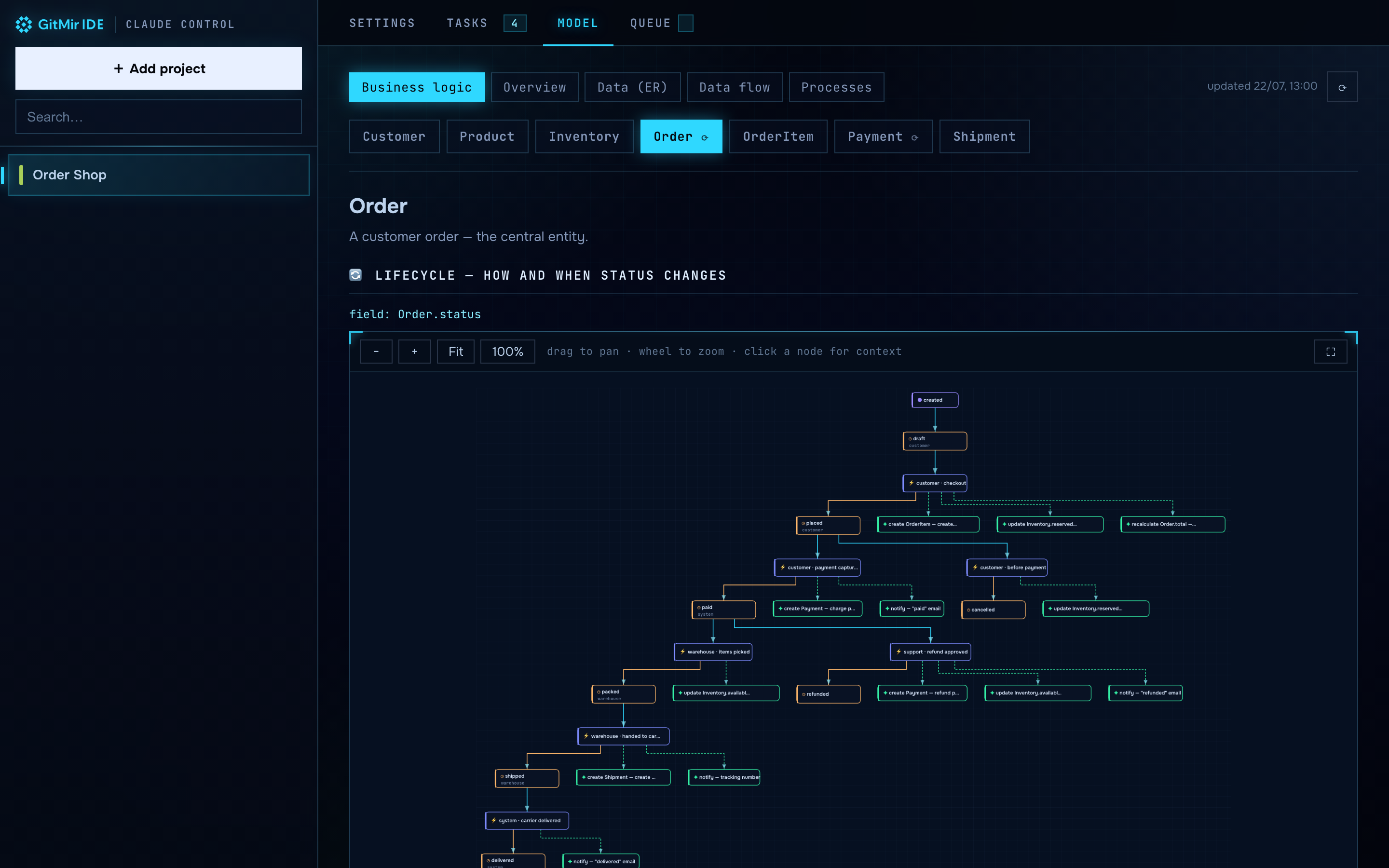 | 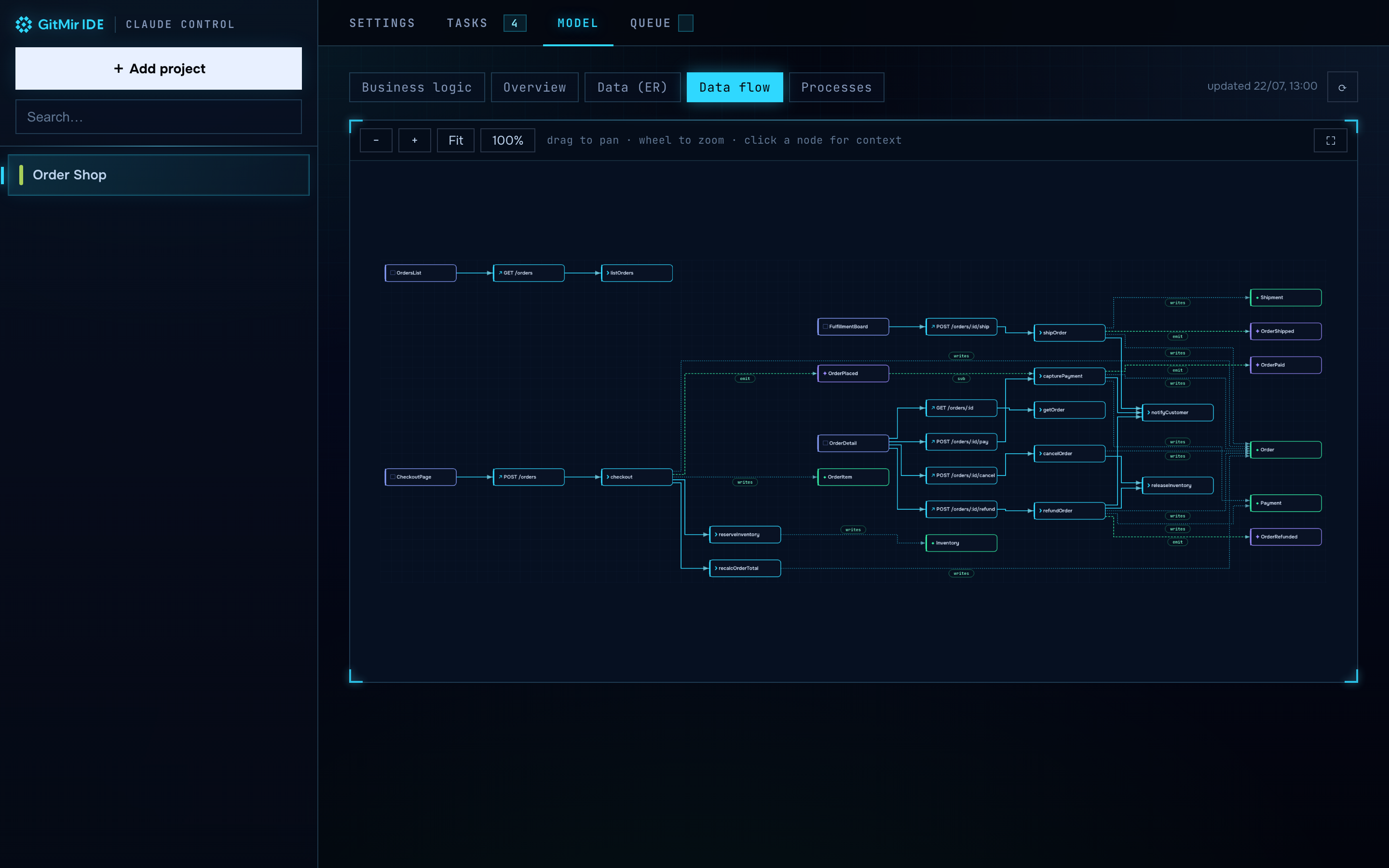 |
| Tasks — what Claude did | Order state machine (fullscreen) |
 |  |
The .gitmir/model/ is not just documentation. It is a multidimensional
object-information model of your product — a living blueprint of what the software
is, not the code itself. Ten linked dimensions, each a different lens on the same
product:
modules · entities · serverUnits · serverFunctions · apiRoutes ·
frontendUnits · events · processes · statusFlows · reactions
Every reference is a stable id, so the collections form one connected graph rather than ten disconnected lists — a human and an AI can both read it at a glance and act on it without re-reading the whole repository. The Business logic view walks a single entity through its lifecycle: how and when its status changes, which processes drive it, and what side effects fire.
This model — and the idea of a single, living source of truth for a codebase —
comes out of the GITMIR lab. It is the same information model that powers
GitMir, the control room for AI software development. This
repository is the open-source companion that builds that model locally (via the
gitmir-model skill) and renders it.
The model isn't just to look at — it's how you brief Claude. Click any element in a Model diagram and the tool walks its id-links to assemble the exact context for that thing: its fields, lifecycle, the functions that read/write it, the events it fires, the processes and reactions it's part of, related entities. No LLM guessing — pure, deterministic graph traversal.
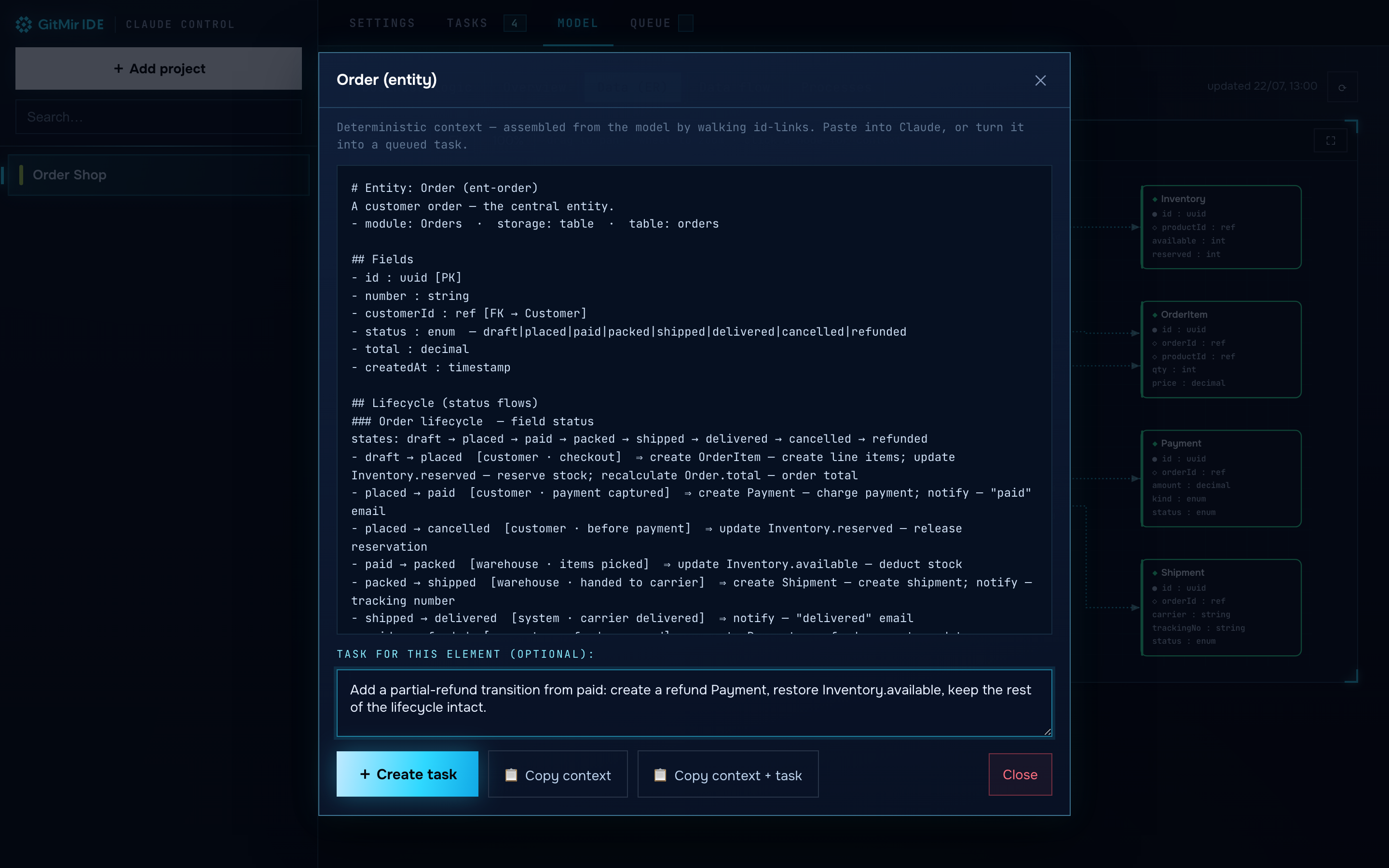
From there, 📋 copy the context into Claude, or + create a task. Tasks are
plain markdown files under <project>/tasks/{todo,inprogress,done}/ — one file per
task, each already carrying its context. The Queue tab shows them as a board:
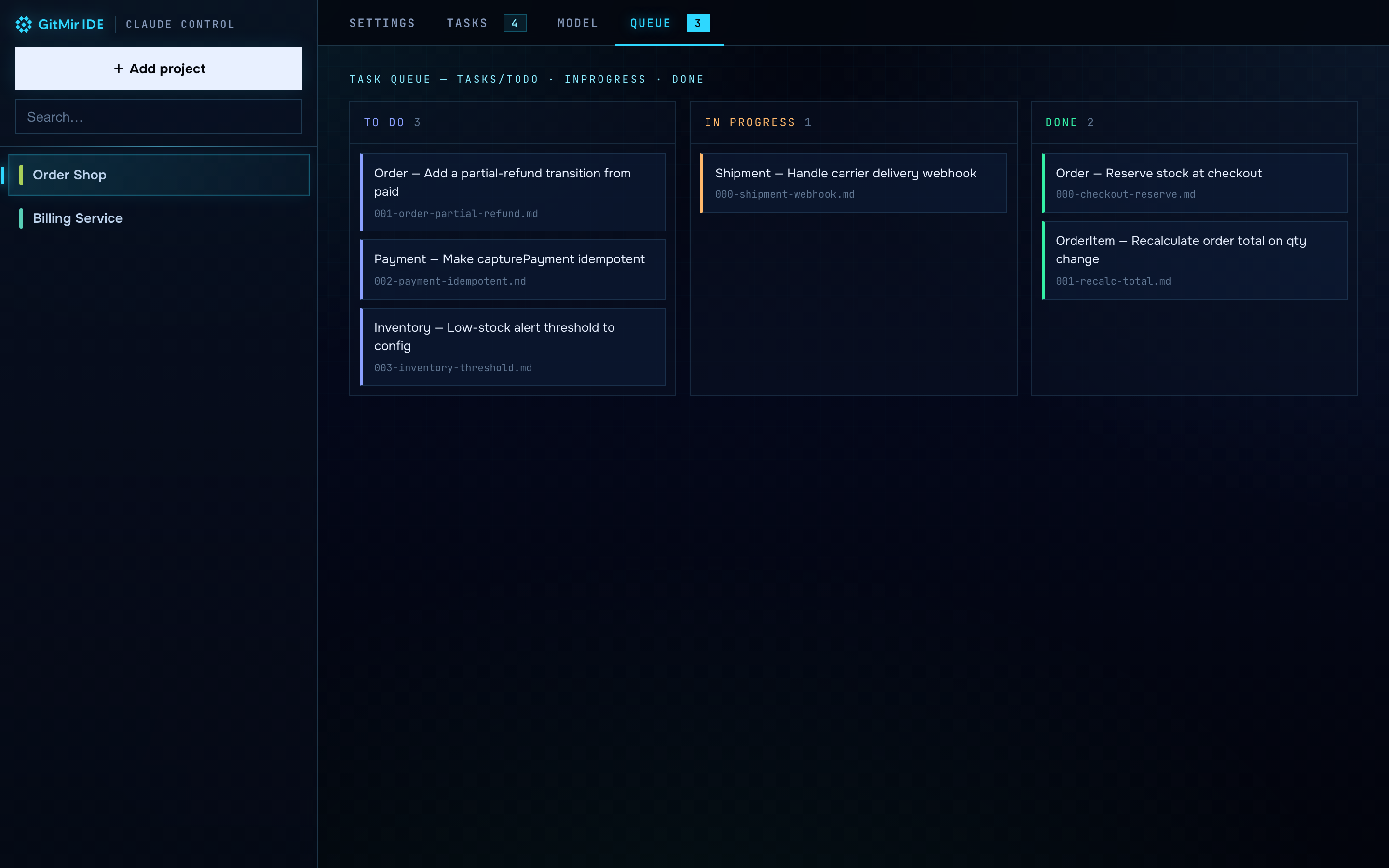
Then paste the task-runner skill into Claude: it works the queue one task at a
time, moving each file todo → inprogress → done as it goes (the board updates
live). Because every task ships with the right context, Claude executes it precisely.
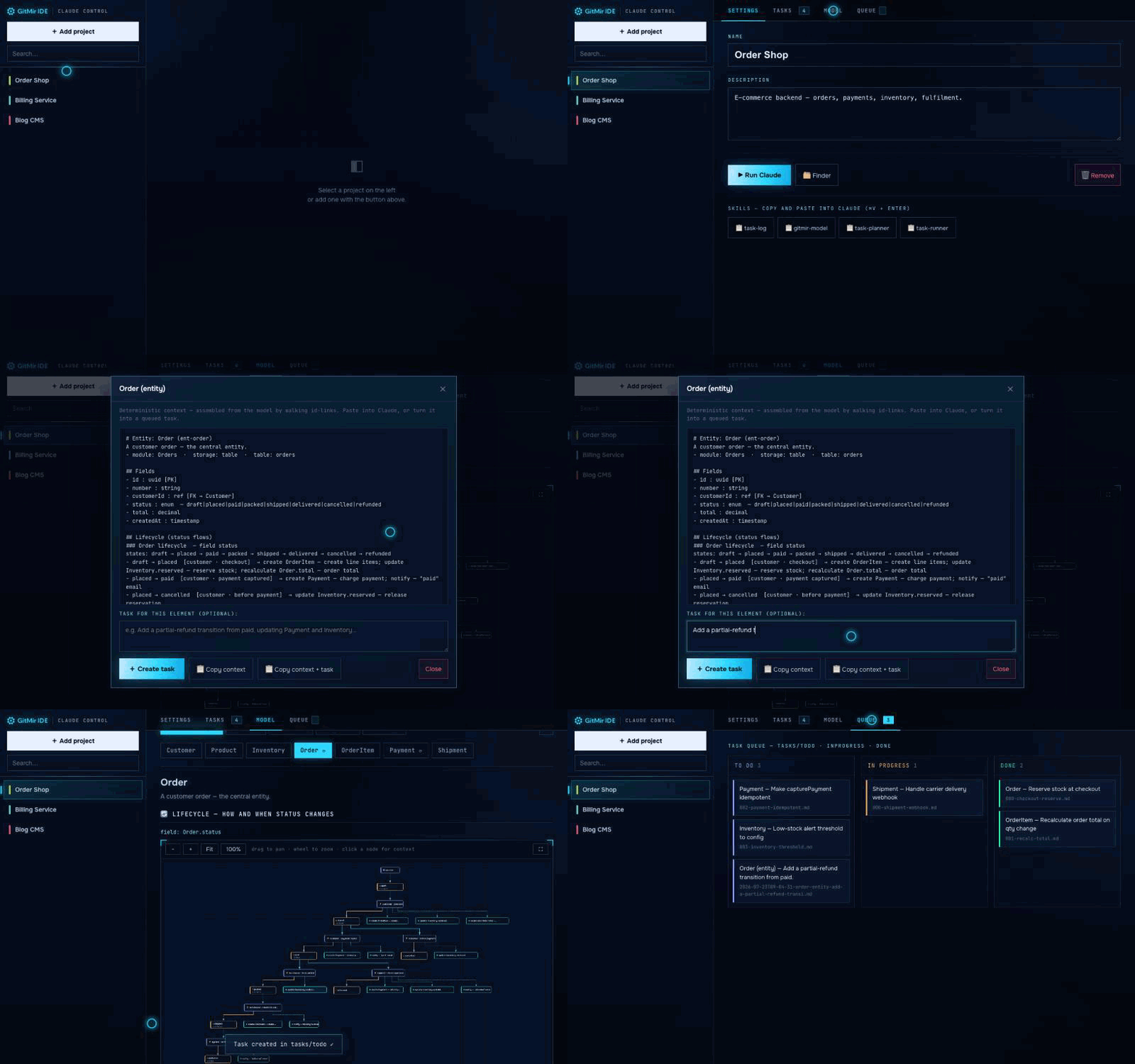
Click an element → assemble context → create a task → watch it land in the queue.
claude) installed and on your PATHgit clone https://github.com/gitmir-hello/gitmir-claude-control.git
cd gitmir-claude-control
node server.js
It starts on http://localhost:4599 and opens your browser. You can also double-click start.command (macOS) or start.cmd (Windows).
Node 18+ runs the dashboard. The optional Team bridge additionally needs Node 22+, because it uses Node's built-in WebSocket (that keeps the tool at zero dependencies); on an older Node the Team tab tells you so instead of failing silently.
Run it in your normal desktop session so the native folder picker and terminal launch work (macOS Terminal · Windows cmd · Linux terminals). Stop with Ctrl+C.
Skills are reusable instructions you copy from the dashboard (Settings → 📋 skill) and paste into your Claude session (⌘V/Ctrl+V + Enter). They live in skills.json; add your own by pointing an entry at a .md file.
task-log — Claude keeps a human-readable log of completed tasks in the project's .claude/tasks.json; the Tasks tab shows it live.gitmir-model — Claude builds/updates the project's multidimensional object model in .gitmir/model/ from the real code. It also installs a standing rule into the project's CLAUDE.md so the model stays the product's living source of truth: consult it before working, update it after code changes.task-planner — break a goal into small, self-contained task files in tasks/todo/, each with the relevant model context.task-runner — execute the task queue one at a time, moving each file todo → inprogress → done and appending an outcome.Run gitmir-model once per project (then re-run after changes — it's idempotent) and the Model tab lights up with data (ER), data-flow, process and entity-lifecycle diagrams.
The UI follows the GITMIR "holo / HUD" design language — deep-navy #04060a, electric cyan #2fd8ff, sharp technical plates with glowing corner brackets, Onest + JetBrains Mono typography. Diagram layout is computed by ELK and drawn as SVG.
GitMir is the control plane for AI development: describe what to build in plain language, run it on your own Claude Code over MCP, and see exactly what changed — in code, business logic and data flows. Its landing is a sci-fi information model lab — because the model is the point: one living source of truth for your product instead of code you have to re-read every time.
GITMIR Claude Control is a small open-source tool from the same lab — bringing the GITMIR model and one-click Claude runs to your local machine.
Bundled libraries and fonts are included under their own licenses — see THIRD_PARTY.md. The GITMIR logo is a trademark of GITMIR.
GPL-3.0 © GITMIR
⚠️ Experimentelle Skill-Sammlung für deutsches Recht (Arbeits-, Gesellschafts-, Insolvenz-, Datenschutz-, Prozessrecht u
Manage multiple Claude Code agents from TUI or Web with tmux and git worktrees
Project management using GitHub Issues + Git worktrees for parallel agent execution
Core skills library for Claude Code with 20+ battle-tested skills including TDD, debugging, and brainstorming