

Are you the author? Sign in to claim
Connect any MCP-compatible AI client (Claude Code, Cursor, Windsurf) to Unity or Godot. 235+ granular tools, a Unity-awa
Connect Cursor, Claude Code, Windsurf, Claude Desktop, and other AI clients directly to your Unity or Godot editor.
Unity: 235+ tools, full Unity-aware system prompt, GLADE.md project context, script semantic search, skill calibration, free CC0 asset pipeline, cloud intelligence layer with RAG and cross-session memory.
Godot (4.3+): 53 native tools across scene/node, scripts, resources, signals, runtime (incl. structured runtime-event observation), project introspection, Control / Window UI, and lighting & WorldEnvironment.
The MCP server auto-detects which editor is running (Unity on :8765, Godot on :8766) and exposes the matching tool set.
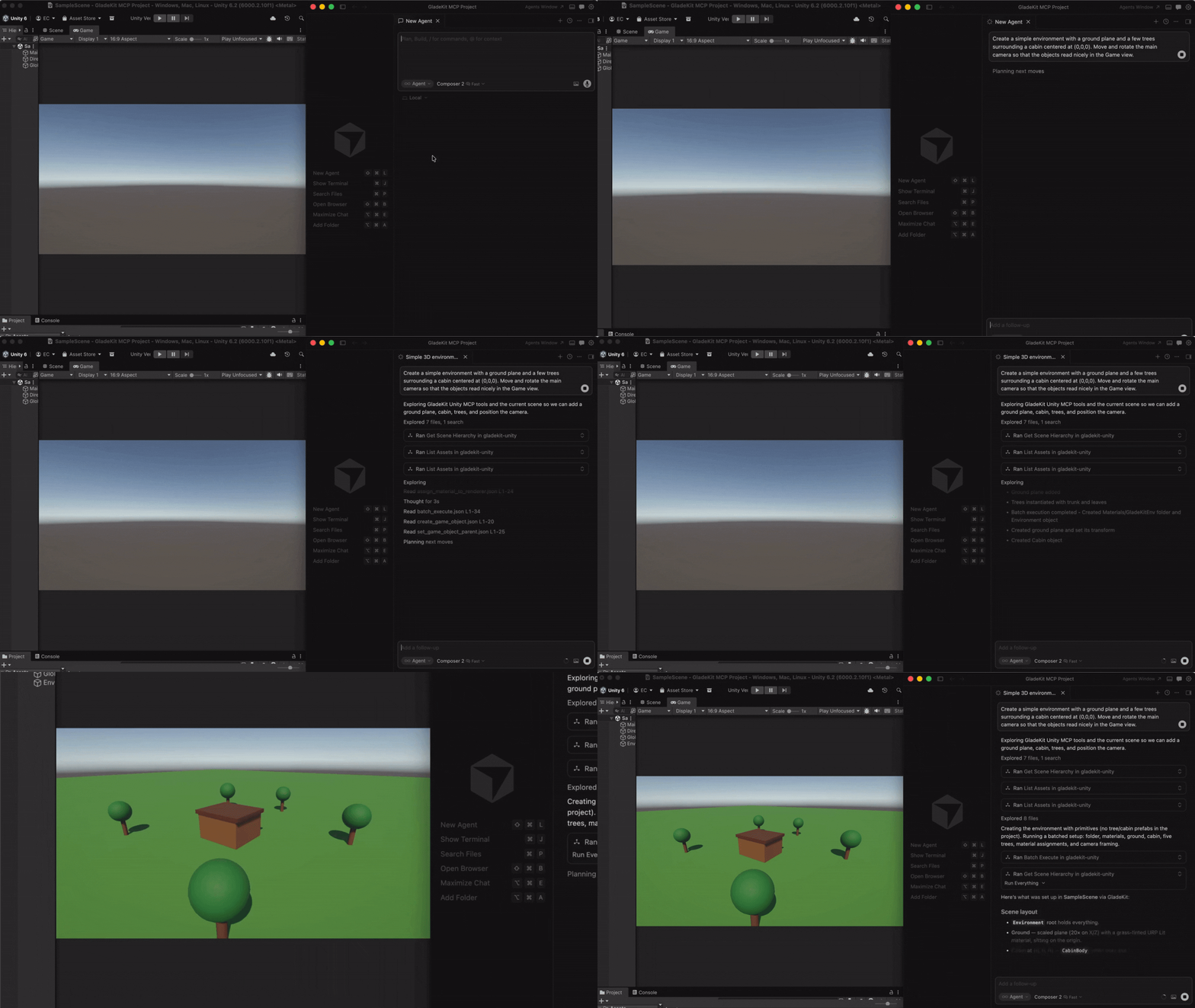
GladeKit MCP supports both Unity and Godot. Install the bridge for your engine by following the instructions below.
In Unity, open Window > Package Manager > + > Add package from git URL...
https://github.com/Glade-tool/glade-mcp.git?path=/unity-bridge
The Unity bridge starts automatically on localhost:8765.
com.gladekit.mcp-bridge.zip from the latest Godot bridge release. (Grab the zip asset under Assets - not "Source code".)com.gladekit.mcp-bridge/ folder. Move it into your project's addons/ directory, so the final path is <your-godot-project>/addons/com.gladekit.mcp-bridge/plugin.cfg.The Godot bridge starts automatically on localhost:8766. You should see a confirmation line in the editor Output panel:
[GladeKit MCP Bridge] listening on ws://127.0.0.1:8766 (v0.6.4, 60 tools registered, thread-polled at 200Hz)
Supported: Godot 4.3+ GDScript projects, Forward+ and Compatibility renderers, 2D and 3D. Not yet supported: Godot Mono / C# projects, web export targets, headless server builds. The bridge is editor-only; it never runs in exported games.
Engine auto-detection: the MCP server probes both ports on startup and exposes the matching tool set. Running both editors at once? Set GLADEKIT_MCP_FORCE_ENGINE=unity or =godot to pin a specific engine.
Install uv (one-time):
curl -LsSf https://astral.sh/uv/install.sh | shpowershell -ExecutionPolicy ByPass -c "irm https://astral.sh/uv/install.ps1 | iex"Then add the MCP config to your AI client. The client launches the MCP server automatically - no manual server step.
Option A: one-liner (recommended)
claude mcp add --transport stdio gladekit-mcp --scope user -- uvx gladekit-mcpclaude mcp add --transport stdio gladekit-mcp --scope user -- cmd /c uvx gladekit-mcpOption B: manual config
If you cloned this repo, the .mcp.json auto-connects. Otherwise add to your Claude Code MCP settings:
{
  "mcpServers": {
    "gladekit-mcp": {
      "command": "uvx",
      "args": ["gladekit-mcp"]
    }
  }
}
Cursor Settings > MCP > Add new MCP server:
{
  "mcpServers": {
    "gladekit-mcp": {
      "command": "uvx",
      "args": ["gladekit-mcp"]
    }
  }
}
Edit ~/Library/Application Support/Claude/claude_desktop_config.json (Mac) or %APPDATA%\Claude\claude_desktop_config.json (Windows):
{
  "mcpServers": {
    "gladekit-mcp": {
      "command": "uvx",
      "args": ["gladekit-mcp"]
    }
  }
}
Open Cline's MCP settings file (auto-created on first MCP use):
~/Library/Application Support/Code/User/globalStorage/saoudrizwan.claude-dev/settings/cline_mcp_settings.json%APPDATA%\Code\User\globalStorage\saoudrizwan.claude-dev\settings\cline_mcp_settings.json~/.config/Code/User/globalStorage/saoudrizwan.claude-dev/settings/cline_mcp_settings.jsonAdd:
{
  "mcpServers": {
    "gladekit-mcp": {
      "command": "uvx",
      "args": ["gladekit-mcp"]
    }
  }
}
In Windsurf, open Windsurf Settings → MCP Servers → Open MCP Registry, then click the settings (gear) icon to open mcp_config.json. Add the snippet below (or edit ~/.codeium/windsurf/mcp_config.json directly):
{
  "mcpServers": {
    "gladekit-mcp": {
      "command": "uvx",
      "args": ["gladekit-mcp"]
    }
  }
}
Unity's built-in AI Assistant can connect to GladeKit via MCP. This gives you GladeKit's 230+ tools directly inside the Unity Editor - no external AI client needed.
Requires: Unity 6000.3+ with AI Gateway package (com.unity.ai.assistant@2.x)
{
  "enabled": true,
  "path": "",
  "mcpServers": {
    "gladekit-mcp": {
      "type": "stdio",
      "command": "uvx",
      "args": ["gladekit-mcp"]
    }
  }
}
uvx. To get your PATH:
echo $PATHecho %PATH%Tip: If
uvxisn't found, add the directory containing it to thepathfield in the config (e.g.,"/opt/homebrew/bin"on Mac or"C:\\Users\\<you>\\.local\\bin"on Windows). Alternatively, usepip install gladekit-mcpand set"command": "python"with"args": ["-m", "gladekit_mcp"].
Troubleshooting: If the server shows FailedToStart, click Inspect for error details. The most common cause is PATH - Unity's PATH differs from your terminal's PATH. See the Troubleshooting section below.
Paid tier (
GLADEKIT_API_KEY): To enable RAG knowledge base and cross-session memory on any client, add the key to theenvfield of your config. See Cloud intelligence below.
Add to .vscode/mcp.json in your workspace:
{
  "servers": {
    "gladekit-mcp": {
      "type": "stdio",
      "command": "uvx",
      "args": ["gladekit-mcp"]
    }
  }
}
| Feature | GladeKit Unity MCP | unity-mcp (CoplayDev) |
|---|---|---|
| Tools | 235+ granular tools across 16 categories | ~40 consolidated tools |
| System prompt | Full Unity intelligence - render pipeline detection, input system routing, tool discipline rules | None |
| Project context | GLADE.md - inject your game design doc into every request | None |
| Script search | Semantic search via OpenAI embeddings (bring your own key) | None |
| Skill calibration | Auto-detects beginner/expert, adapts response verbosity | None |
| In-session memory | remember_for_session - AI stores and recalls facts mid-conversation | None |
| Cloud intelligence | GLADEKIT_API_KEY - RAG knowledge base, cross-session memory, convention extraction | None |
| License | MIT | MIT |
All core features are free and local. The cloud intelligence layer is optional and requires a GLADEKIT_API_KEY.
Scene • GameObjects • Scripts • Prefabs • Materials • Lighting • VFX & Audio • Animation • IK • Physics • Camera • UI • Input System • Terrain & NavMesh • Profiler • Asset Pipeline
All 235+ tools are dispatchable. Claude Code sees ~80 curated core tools by default (Claude Code has a practical 128-tool limit; Unity AI Gateway has a cloud token budget). Use get_relevant_tools to discover extended tools for specialized work (blend trees, NavMesh, IK, Cinemachine, etc.).
5 meta-tools: get_relevant_tools (task-based tool discovery + RAG context), remember_for_session (store facts), recall_session_memories (retrieve facts), batch_execute (multi-step tool dispatch), search_project_scripts (semantic code search).
7 MCP resources: Bridge health, project context, scene hierarchy, project scripts, current selection, GLADE.md, and session memory.
Create a GLADE.md file in your Unity project root. The MCP server reads it and injects it into every request. Works as a permanent context layer: your game's design intent, conventions, and constraints are always in scope.
# My Game

Genre: 3D platformer
Player: CharacterController, double jump enabled
Art style: pixel art, 16x16 sprites
Naming: PascalCase for scripts, snake_case for folders
Set OPENAI_API_KEY in your MCP config's env field and the server ranks project scripts by semantic similarity to your query. Ask "how does the enemy spawn?" and the right script surfaces, even if it's not named EnemySpawner.
Everything needed ships with the package; no install flags or extras required. Get a key at platform.openai.com/api-keys (pay-as-you-go, pennies per search via text-embedding-3-small).
{
  "mcpServers": {
    "gladekit-mcp": {
      "command": "uvx",
      "args": ["gladekit-mcp"],
      "env": { "OPENAI_API_KEY": "sk-..." }
    }
  }
}
Without the key, search_project_scripts still returns scripts - just unranked. Keys are never sent anywhere except OpenAI's embedding endpoint.
The server tracks vocabulary across your messages and detects whether you're a Unity beginner or expert. Beginners get plain-language explanations and encouraging framing. Experts get terse, technical responses. Calibration persists to .gladekit/skill_level.json in your project.
Three tools for finding and importing free, commercially-usable assets directly from your AI client. All assets are CC0 (public domain, no attribution required). v1 ships Kenney.nl packs; additional providers (Freesound, Quaternius, AI generation) are on the roadmap.
| Tool | Purpose |
|---|---|
find_asset | Search ranked candidates by description, asset type, style, and license. Read-only, no Unity dispatch. |
import_asset | Download, extract, place under Assets/, configure import settings for the asset type, and write a .gladekit-asset.json sidecar with license metadata. Requires explicit licenseAcknowledged: true. |
list_imported_assets | Walk the project's sidecars and surface a license audit (license counts, attribution-required count). Useful before a commercial release. |
Example workflow (Cursor, Claude Code, Windsurf use the same pattern):
You: I'm prototyping a 2D platformer and need placeholder character + tile art. Find me something free.
The AI calls find_asset:
{
  "description": "platformer character and tiles",
  "asset_type": "sprite_2d",
  "max_results": 5
}
Result (truncated):
{
  "success": true,
  "candidates": [
    {
      "id": "kenney/platformer-pack-redux",
      "name": "Platformer Pack Redux",
      "description": "360+ side-scrolling platformer sprites: characters, enemies, tiles, items, hazards.",
      "license": "CC0-1.0",
      "license_summary": "Public domain. No attribution required for any use, including commercial.",
      "official_page": "https://kenney.nl/assets/platformer-pack-redux",
      "approx_assets": 360,
      "score": 0.92
    },
    { "id": "kenney/pixel-platformer", "score": 0.71, ... },
    { "id": "kenney/tiny-town", "score": 0.45, ... }
  ],
  "count": 3
}
You: Let's go with Platformer Pack Redux. Import it to
Assets/Sprites/Platformer/. I accept the CC0 license.
The AI calls import_asset:
{
  "candidateId": "kenney/platformer-pack-redux",
  "assetType": "sprite_2d",
  "licenseAcknowledged": true,
  "targetPath": "Assets/Sprites/Platformer/"
}
The MCP server resolves the download URL locally (catalog is bundled with the server, no cloud dependency), passes it to the Unity bridge, which downloads, extracts, configures TextureImporter for each sprite (Texture Type = Sprite, Filter Mode = Point, Uncompressed) and writes the license sidecar. Result:
{
  "success": true,
  "message": "Imported 360 file(s) from kenney/platformer-pack-redux to Assets/Sprites/Platformer/",
  "downloadedBytes": 1842340,
  "importedFileCount": 360,
  "configuredImportSettings": 354,
  "license": "CC0-1.0",
  "sidecarPath": "Assets/Sprites/Platformer/.gladekit-asset.json"
}
The sprites appear in the Unity Project window, ready to drop into a scene.
You: Before I ship, audit my imported assets. Anything that needs attribution?
The AI calls list_imported_assets:
{
  "success": true,
  "count": 1,
  "licenseCounts": { "CC0-1.0": 1 },
  "attributionRequiredCount": 0,
  "entries": [
    {
      "candidate_id": "kenney/platformer-pack-redux",
      "license": "CC0-1.0",
      "asset_type": "sprite_2d",
      "imported_at": "2026-05-10T09:37:42Z",
      "target_path": "Assets/Sprites/Platformer/",
      "imported_file_count": 360,
      "sidecar_path": "Assets/Sprites/Platformer/.gladekit-asset.json"
    }
  ]
}
CC0 needs no attribution; the audit report is empty for required attributions. If you imported a CC-BY asset later, it would surface here so you remember to credit it.
Security and license discipline:
licenseAcknowledged: true is required on every import_asset call. The bridge refuses without it. Do not set it without explicit user confirmation._resolvedUrl's host against a per-provider allowlist (AssetPipelineGuard.IsResolvedUrlHostAllowed) before downloading. Even a client bypassing both the cloud and MCP preprocessors cannot smuggle in an arbitrary download URL; unknown hosts fail closed. HTTPS only..gladekit-asset.json sidecar recording the candidate id, provider, license, attribution string, source URL, and timestamp. list_imported_assets reads these for the audit report.AssetPipelineGuard on the bridge side. A misconfigured client cannot bypass it.Disabling the pipeline (for studio / curated-asset workflows):
Set GLADEKIT_MCP_DISABLE_ASSET_PIPELINE=1 in the MCP server's environment to suppress the three tools entirely. They will not appear in the tool list and dispatch will refuse with a clear error. This is the recommended setting for projects that already have a managed asset workflow (Perforce-tracked libraries, internal asset stores) where AI-driven external downloads aren't appropriate.
{
  "mcpServers": {
    "gladekit-mcp": {
      "command": "uvx",
      "args": ["gladekit-mcp"],
      "env": { "GLADEKIT_MCP_DISABLE_ASSET_PIPELINE": "1" }
    }
  }
}
The Unity bridge enforces the same gate via EditorPrefs (GladeAI.AssetPipelineEnabled, default true). Toggle it via POST http://localhost:8765/api/settings { "assetPipelineEnabled": false }.
Set GLADEKIT_API_KEY in your MCP config's env field to unlock cloud-powered features:
get_relevant_tools queries a curated Unity knowledge base (API corrections, error patterns) and injects results alongside tool recommendations.remember_for_session persist across sessions and are re-injected into the system prompt.All cloud features degrade gracefully: if the key is missing or the cloud is unreachable, everything works normally.
{
  "mcpServers": {
    "gladekit-mcp": {
      "command": "uvx",
      "args": ["gladekit-mcp"],
      "env": { "GLADEKIT_API_KEY": "your-api-key" }
    }
  }
}
GladeKit MCP supports two transports. stdio is the default and works with all MCP clients - every config above uses stdio.
Streamable HTTP is for clients that prefer URL-based config (Claude Desktop URL mode, custom clients). Launch the server manually, then point your client at the URL:
# Defaults: host=127.0.0.1, port=8766, path=/mcp
gladekit-mcp --transport http

# Custom host/port/path
gladekit-mcp --transport http --host 127.0.0.1 --port 9000 --path /mcp
Endpoints:
POST/GET/DELETE http://127.0.0.1:8766/mcp - MCP streamable-HTTP endpointGET http://127.0.0.1:8766/health - liveness checkSecurity defaults:
127.0.0.1). Use --host 0.0.0.0 to expose on LAN - opt-in only.Host header other than 127.0.0.1:<port> or localhost:<port> are rejected with 421 Misdirected Request.Client config example:
{
  "mcpServers": {
    "gladekit-mcp": {
      "url": "http://127.0.0.1:8766/mcp"
    }
  }
}
| Variable | Required | Description |
|---|---|---|
UNITY_BRIDGE_URL | No | Unity bridge URL (default: http://localhost:8765) |
OPENAI_API_KEY | No | Enables script semantic search via embeddings (get one) |
GLADEKIT_API_KEY | No | Enables RAG knowledge base, cross-session memory, convention extraction |
GLADEKIT_MCP_DISABLE_ASSET_PIPELINE | No | Set to 1 to suppress find_asset / import_asset / list_imported_assets (curated-asset workflows) |
GLADEKIT_MCP_SUPPRESS_BRIDGE_WARNING | No | Set to 1 to silence the stderr warning when the Unity bridge is older than the recommended version |
Bridge not connecting
lsof -i :8765 (Mac/Linux) or netstat -ano | findstr 8765 (Windows)AI client can't find uvx
curl -LsSf https://astral.sh/uv/install.sh | sh (Mac/Linux) or pip install uvpip install gladekit-mcp and change the config command from "uvx" to "python" with args ["-m", "gladekit_mcp"]Tools not appearing in Claude Code
get_relevant_tools to find extended tools by task description.GLADE.md not being picked up
GLADE.md (case-sensitive on Mac/Linux) and placed in the Unity project root (same directory as Assets/, Packages/, ProjectSettings/)Stderr warning: Unity bridge X.Y.Z is older than recommended
Unity caches UPM git packages and never refetches, so an ?path=unity-bridge install drifts behind main over time. Update via Unity → Window > Package Manager > GladeKit MCP Bridge > Update, or pin the manifest entry to a specific tag so future updates are explicit:
"com.gladekit.mcp-bridge": "https://github.com/Glade-tool/glade-mcp.git?path=unity-bridge#v0.4.1"
The same warning also appears as a one-shot prefix on the next tool response so you see it in chat. To silence both: add "GLADEKIT_MCP_SUPPRESS_BRIDGE_WARNING": "1" to the env of your MCP client config.
Unity AI Gateway - server shows FailedToStart
uvx. Under Path Configuration, paste your terminal's full PATH into User Path, then click Refresh Config File and Reload Serversecho %PATH% in Command Prompt. On Mac/Linux: echo $PATHpip install gladekit-mcp and set the command to "python" with args ["-m", "gladekit_mcp"] - avoids the uvx PATH dependencyuvx gladekit-mcp in a terminal (you should see the gladekit-mcp v... banner on stderr)[AI Client: Cursor / Claude Code / Windsurf / Claude Desktop / Unity AI Gateway]
|
| stdio or HTTP MCP protocol
v
[gladekit_mcp Python process]
bridge.py -> HTTP localhost:8765
prompts.py -> system prompt (auto-reads render pipeline, input system, GLADE.md)
tools/ -> 230+ tool schemas + dispatch
cloud.py -> optional GLADEKIT_API_KEY -> api.gladekit.com
|
| HTTP localhost:8765
v
[Unity Bridge -- C# Editor extension (UPM package)]
UnityBridgeServer.cs -> HttpListener on :8765
230+ ITool implementations
UnityContextGatherer -> scene, scripts, packages, render pipeline
The Unity bridge (unity-bridge/) is the source of truth for C# tools. Adding a tool requires two files:
1. C# implementation (unity-bridge/Editor/Tools/Implementations/<Category>/MyTool.cs):
public class MyTool : ITool
{
    public string Name => "my_tool";
    public string Execute(Dictionary<string, object> args)
    {
        // ... Unity Editor API calls ...
        return ToolUtils.CreateSuccessResponse("Done", extras);
    }
}
2. Python schema (mcp-server/src/gladekit_mcp/tools/<category>.py):
Add an entry to the category's tool list following the existing format (OpenAI function-calling schema).
Tools are auto-discovered via reflection - no registration needed beyond these two files.
License: MIT - see LICENSE.
The GladeKit desktop app is a separate commercial product that layers streaming, miss recovery, and a memory UI on top of this MCP server.
Run Claude Code as an MCP server so any agent can delegate coding tasks to it
 @microsoft✓ Official
Browser automation using accessibility snapshots instead of screenshots
 @googleapis✓ Official
Google's universal MCP server supporting PostgreSQL, MySQL, MongoDB, Redis, and 10+ databases
 @github✓ Official
Official GitHub integration for repos, issues, PRs, and CI/CD workflows