Are you the author? Sign in to claim
GCO is a platform that spins up EKS Auto Mode clusters across AWS regions, wired together with Global Accelerator for lo
One API. Every Accelerator. Any Region.
Multi-region accelerated-compute orchestration for AWS — NVIDIA GPUs, AWS Trainium, AWS Inferentia, and CPU (amd64 + arm64 / Graviton) — with capacity-aware scheduling, spot fallback, and multi-region autoscaling inference endpoints with automatic failover and latency-aware routing, all from a single REST API and CLI.



What it does. Spins up EKS Auto Mode clusters across AWS regions, wired together with Global Accelerator for latency-aware anycast routing and automatic failover. Submit Kubernetes manifests via a single REST API or CLI — GCO handles capacity-aware scheduling, spot fallback, multi-region autoscaling inference endpoints, and output persistence.
Who it's for. Teams running accelerated workloads — LLM training and inference, batch ML, HPC, and general CPU jobs — that need multi-region redundancy, automatic capacity discovery, and IAM-based access without per-cluster kubeconfig distribution. Pre-wired nodepools for NVIDIA GPUs (g4dn, g5, and ARM64 g5g), AWS Trainium, AWS Inferentia, and general-purpose CPU on both amd64 and arm64 / Graviton.
Why it's different. Capacity-aware routing across regions out of the box, full-stack observability (CloudWatch dashboards, alarms, SNS), and a CDK app validated across 20+ config matrix combinations in CI.
Deploy everything and tear it all down with one command each:
gco stacks deploy-all -y      # stand up every region defined in cdk.json
gco stacks destroy-all -y     # destroy every stack across every region — no orphaned resources
Recommended: run everything from the dev container. GCO pins exact versions of a lot of Python packages (CDK, AWS SDKs, FastAPI, mypy, Ruff, etc.), and installing them on top of an existing Python environment is the most common source of "it doesn't install" reports. The dev container ships a fully resolved environment (Python 3.14, Node.js 24, CDK, kubectl, AWS CLI, all Python deps) so you skip the whole problem.
git clone git@github.com:awslabs/global-capacity-orchestrator-on-aws.git
cd global-capacity-orchestrator-on-aws

docker build -f Dockerfile.dev -t gco-dev .
docker run -it --rm \
  -v ~/.aws:/root/.aws:ro \
  -v $(pwd):/workspace \
  -v /var/run/docker.sock:/var/run/docker.sock \
  -w /workspace \
  gco-dev
The docker.sock mount lets gco stacks deploy-all bundle Lambda assets through your host Docker daemon. See Prerequisites for Colima/Finch socket paths and the security note about host-socket pass-through.
Host installs are the advanced, non-recommended path. GCO pins exact versions of many Python packages, so installing on top of an existing Python environment frequently fails with dependency-resolver errors (ResolutionImpossible). The dev container shown above is the recommended path — it ships every dependency at the pinned versions — and the Quick Start Guide walks through it end to end. If you still want a host install, use a clean virtual environment or pipx.
git clone git@github.com:awslabs/global-capacity-orchestrator-on-aws.git
cd global-capacity-orchestrator-on-aws && pipx install -e .
See the Quick Start for the full install + first-job walkthrough, or docs/CLI.md for every CLI command.
💡 New to the codebase? GCO ships with the GCO MCP server — an MCP server exposing 95 tools by default (up to 127 with feature flags) that index the whole project: docs, examples, source code, K8s manifests, and scripts. Connect it to an AI-powered IDE with MCP support (like Kiro) and explore GCO conversationally — ask questions about the codebase instead of reading repository files directly: "How does region recommendation work?", "Walk me through the inference deployment flow". See mcp/README.md.
Running GPU workloads at scale is hard. You need to find regions with available capacity, provision clusters, handle authentication, deal with failover, and persist outputs after pods terminate. GCO solves all of this with a single deployable platform.
| Challenge | Traditional Approach | With GCO |
|---|---|---|
| GPU availability | Manually check each region | Auto-routes to available capacity |
| Node provisioning | Pre-provision or wait for scaling | EKS Auto Mode provisions on-demand |
| Multi-region ops | Manage clusters separately | Single API, automatic routing |
| Authentication | Configure per-cluster access | IAM-based, uses existing AWS credentials |
| Job outputs | Lost when pods terminate | Persisted to EFS/FSx storage |
| Inference serving | Deploy and manage per-region | Deploy once, serve globally |
| Failover | Manual intervention required | Automatic via Global Accelerator |
When to use GCO:
The fastest, most reliable path is the dev container — it sidesteps the dependency-conflict issues that come with installing GCO's pinned Python packages on top of your existing Python environment.
Build the dev container (Python, Node.js, CDK, kubectl, and the AWS CLI are all pinned and pre-installed), then drop into a shell with the gco CLI already on the path:
docker build -f Dockerfile.dev -t gco-dev .
docker run -it --rm \
  -v ~/.aws:/root/.aws:ro \
  -v $(pwd):/workspace \
  -v /var/run/docker.sock:/var/run/docker.sock \
  -w /workspace \
  gco-dev
From inside the container, deploy everything — CDK bootstrap runs automatically for every region defined in cdk.json:
gco stacks deploy-all -y
If you'd rather install on your host, use a clean virtual environment or pipx — see the Prerequisites and QUICKSTART.md for the details and known caveats.
Optional: configure kubectl access (requires
PUBLIC_AND_PRIVATEendpoint mode). The default endpoint mode isPRIVATE— see docs/CUSTOMIZATION.md for details. Most users don't need this; submit jobs via SQS or API Gateway instead.
Check GPU capacity in a region before you submit:
gco capacity check --instance-type g4dn.xlarge --region us-east-1
Submit a job using whichever path fits your setup — via SQS (recommended), via the global DynamoDB queue, via API Gateway, or directly through kubectl:
gco jobs submit-sqs examples/simple-job.yaml --region us-east-1
gco queue submit examples/simple-job.yaml --region us-east-1
gco jobs submit examples/simple-job.yaml -n gco-jobs
gco jobs submit-direct examples/simple-job.yaml -r us-east-1
Check status and pull logs:
gco jobs list --all-regions
gco jobs logs hello-gco -n gco-jobs -r us-east-1
gco inference deploy my-llm -i vllm/vllm-openai:v0.22.0 --gpu-count 1
gco inference status my-llm
gco inference scale my-llm --replicas 3
See the Quick Start Guide for the full step-by-step walkthrough, or the CLI Reference for all available commands.
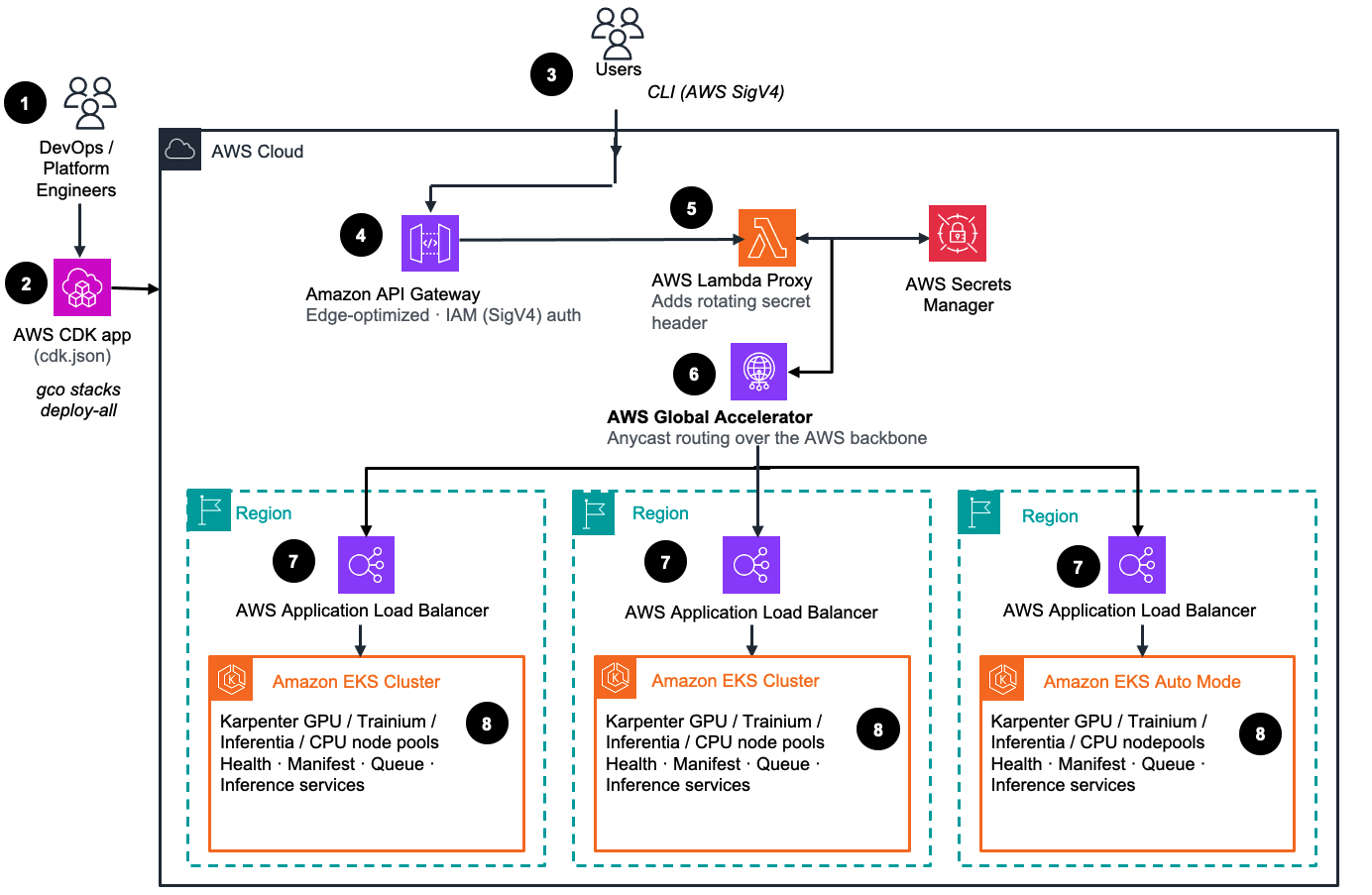
Figure 1: Global Capacity Orchestrator — multi-region control plane and regional EKS data planes
cdk.json and drive everything from the gco CLI.gco stacks deploy-all, provisioning the global control plane and one regional stack per target region.gco CLI, which signs every call with AWS SigV4 credentials.Below is the per-region view showing how a single regional stack is composed.
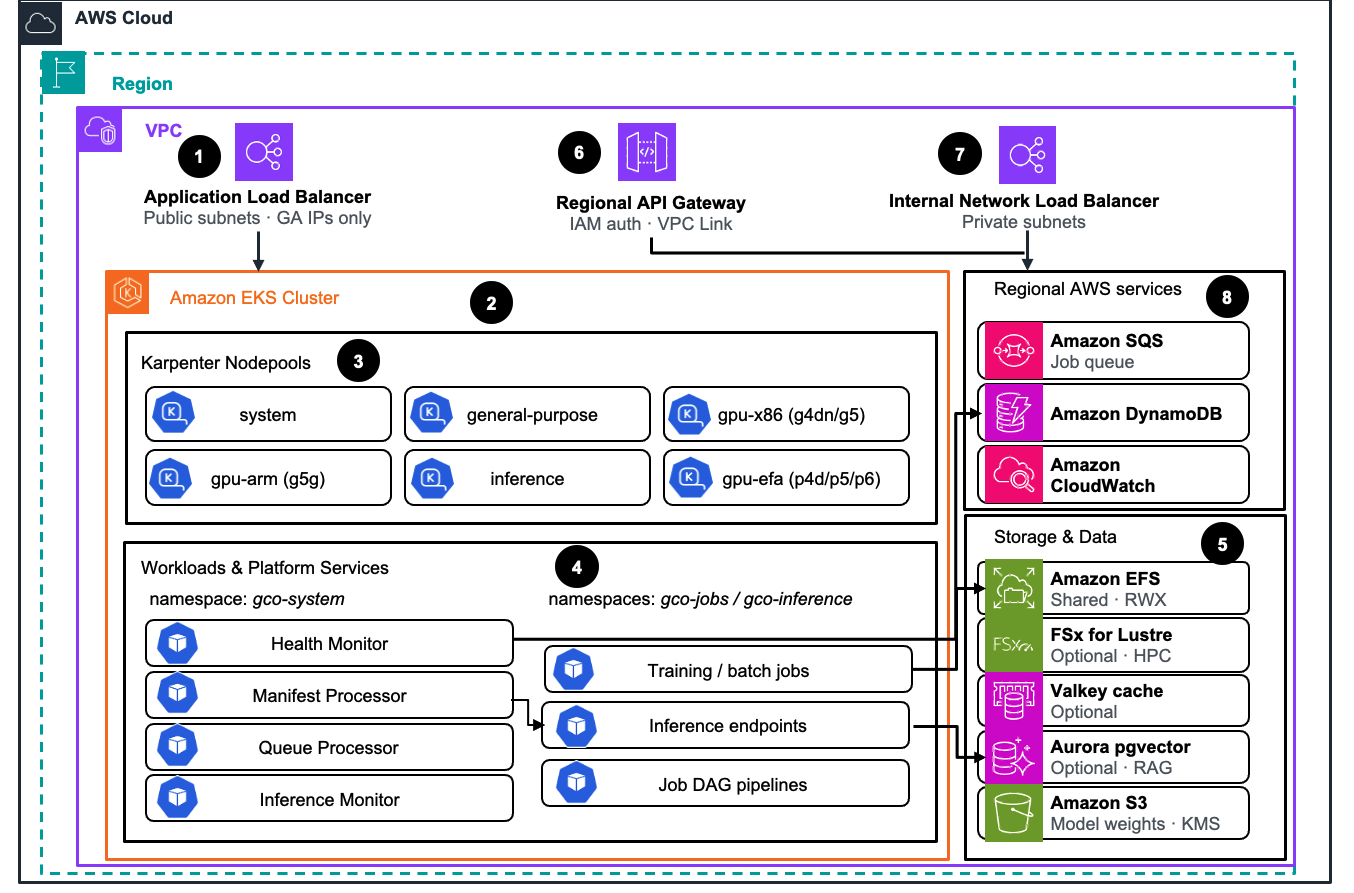
Figure 2: Regional stack — EKS cluster, Karpenter node pools, platform services, and regional AWS services
system, general-purpose, gpu-x86 (g4dn/g5), gpu-arm (g5g), inference, and gpu-efa (p4d/p5/p6) pools.gco-system (Health Monitor, Manifest Processor, Queue Processor, Inference Monitor) and gco-jobs / gco-inference (training and batch jobs, inference endpoints, and job DAG pipelines).
Regenerate this diagram and every per-stack view on demand with python diagrams/infra_diagrams/generate.py — it synthesises the current CDK app through AWS PDK cdk-graph so the diagrams never drift from the source. See diagrams/infra_diagrams/README.md for per-stack flags (--stack global|api-gateway|regional|regional-api|monitoring|analytics|all). Flowcharts of the code itself (Lambda handlers, CLI commands) live alongside them under diagrams/code_diagrams/.
The regional stack can be deployed to any AWS region. Add or remove regions by editing the
deployment_regions.regionalarray incdk.json.
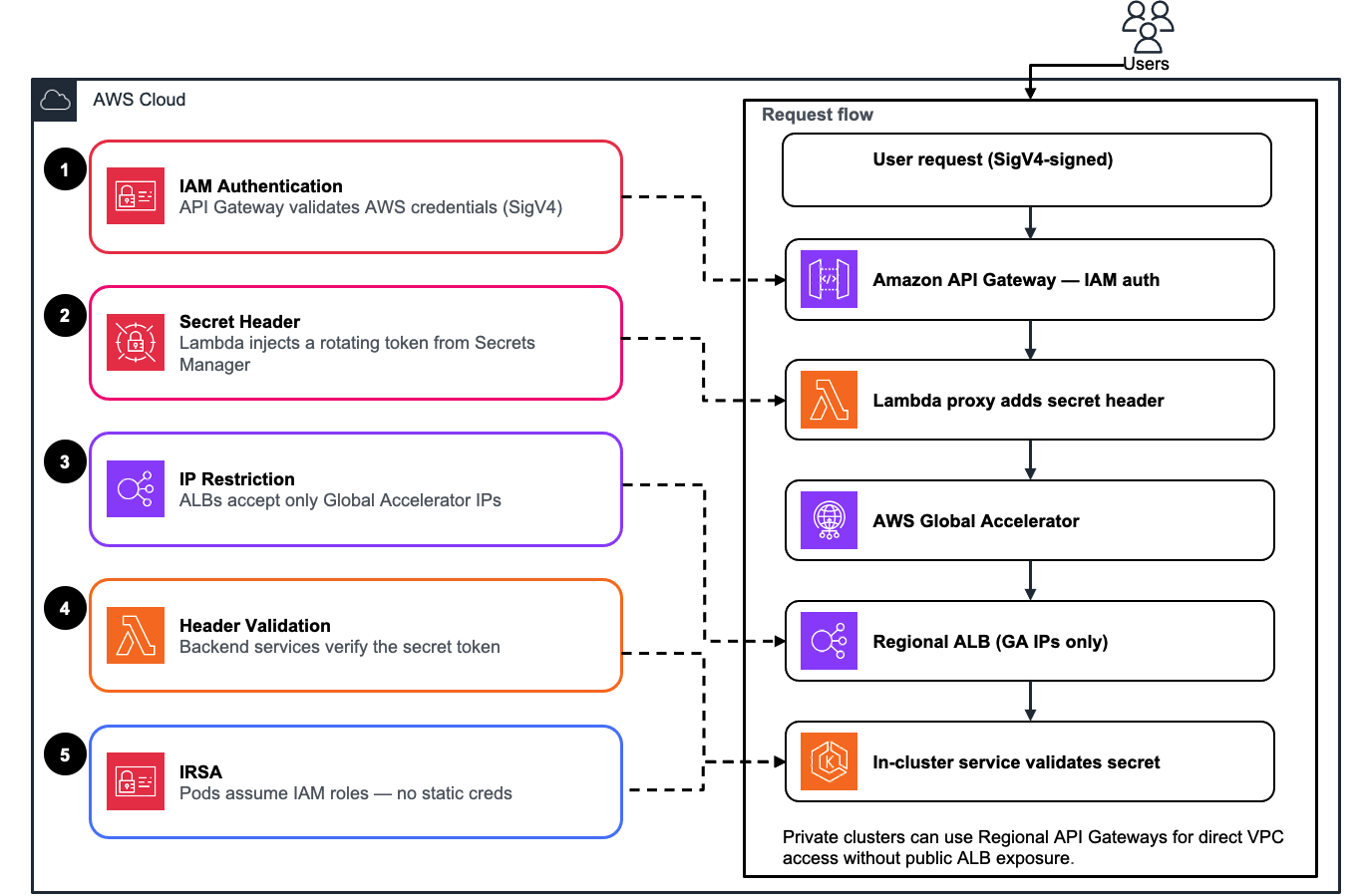
Figure 3: Defense-in-depth — five security layers applied across the request flow
Five layers protect every request:
Request flow: User → API Gateway (SigV4) → Lambda (adds secret) → Global Accelerator
  → ALB (GA IPs only) → Services (validate secret)
For private clusters, Regional API Gateways provide direct VPC access without public ALB exposure.
See Architecture Details for the full deep dive.
cdk.jsonCluster_Shared_Bucket that all cluster jobs can read and write. Off by default — enable with gco analytics enable. See Analytics Guide.Goal-directed iteration loop for orchestrated workflows. The operator declares a natural-language directive plus machine-checkable success criteria, a tool allowlist, and a budget; Mission runs five-phase iterations (propose → execute → observe → evaluate → decide) until a verdict is reached. Off by default — enable with GCO_ENABLE_MISSION=true. See Mission Guide.
gco mission subcommands (including the chained gco mission run that scaffolds criteria and drives a session to completion in one call) and matching MCP tools, plus three mission://sessions/{id} resource templates.New to GCO? Start here:
| Your Goal | Read This |
|---|---|
| Understand what GCO does | Core Concepts |
| Get running in under 60 minutes | Quick Start Guide |
| Learn the architecture | Architecture Details |
| Browse every guide in one place | Documentation Index |
Day-to-day operations:
| Your Goal | Read This |
|---|---|
| CLI commands and usage | CLI Reference |
| Deploy inference endpoints | Inference Guide |
| Use the REST API directly | API Reference |
| Fix issues | Troubleshooting |
| Respond to incidents | Operational Runbooks |
| Run interactive notebook analytics | Analytics Guide |
| Drive a goal-directed iteration loop | Mission Guide |
Customization and development:
| Your Goal | Read This |
|---|---|
| Add regions, tune nodepools, enable FSx | Customization Guide |
| Choose a scheduler for your workload | Schedulers & Orchestrators |
| Configure the SQS queue processor | Queue Processor Config |
| Contribute to the project | Contributing |
| API client examples (Python, curl, AWS CLI) | Client Examples |
| IAM policy templates | IAM Policies |
| Presentation slides and demo scripts | Demo Starter Kit |
Recommended path — dev container only:
~/.aws to mount in)docker build -f Dockerfile.dev -t gco-dev .
docker run -it --rm -v ~/.aws:/root/.aws:ro -v $(pwd):/workspace -w /workspace gco-dev
For gco stacks deploy-all, cdk deploy needs to run Docker to bundle Lambda assets. Mount the host Docker socket so the container's CLI talks to your host daemon (works with Docker Desktop on macOS/Windows, with Docker on Linux, and with Colima on macOS — see Dockerfile.dev for Colima-specific socket paths):
docker run --rm -it \
  -v ~/.aws:/root/.aws:ro \
  -v $(pwd):/workspace \
  -v /var/run/docker.sock:/var/run/docker.sock \
  -w /workspace \
  gco-dev gco stacks deploy-all -y
This is host-socket pass-through, not true Docker-in-Docker. Anyone with access to the container has root-equivalent access to the host Docker daemon, so keep the container on a trusted host.
Host install path (advanced):
npm install -g aws-cdk)ResolutionImpossible, switch to the dev container instead of debugging your local env..
├── app.py # CDK app entry point
├── cdk.json # CDK configuration (regions, features, thresholds)
├── pyproject.toml # Project metadata, dependencies, and CLI installation
│
├── cli/ # GCO CLI (jobs, stacks, capacity, inference, costs, DAGs)
├── diagrams/ # Auto-generated architecture diagrams (infra_diagrams/) and code flowcharts (code_diagrams/)
├── docs/ # Documentation (architecture, CLI, API, inference, customization, analytics)
├── examples/ # Example manifests (jobs, inference, Ray, Volcano, Kueue, Slurm, YuniKorn)
├── gco/
│ ├── config/ # Configuration loader with validation
│ ├── models/ # Data models for k8s clusters, health monitor, inference monitor and manifest processor
│ ├── services/ # K8s services (health monitor, inference monitor, manifest processor, queue processor)
│ └── stacks/ # CDK stacks (global, regional, API gateway, monitoring)
│ └── constants.py # Pinned versions: EKS addons, Lambda runtime, Aurora engine
│
├── lambda/ # Lambda functions
│ ├── alb-header-validator/ # ALB header validation for auth tokens
│ ├── analytics-cleanup/ # Custom resource that deletes Studio user profiles + EFS access points on stack destroy
│ ├── analytics-presigned-url/ # Generates presigned SageMaker Studio URLs for Cognito-authenticated users
│ ├── api-gateway-proxy/ # API Gateway → Global Accelerator proxy
│ ├── cross-region-aggregator/ # Cross-region job/health aggregation
│ ├── drift-detection/ # Scheduled drift checks against deployed CDK stacks
│ ├── ga-registration/ # Global Accelerator endpoint registration
│ ├── helm-installer/ # Installs Helm charts (schedulers, GPU operators, cert-manager)
│ │ └── charts.yaml # Helm chart configuration (schedulers, GPU operators, cert-manager)
│ ├── image-lookup/ # Adopt-or-create custom resource for the project's gco/* ECR repositories
│ ├── kubectl-applier-simple/ # Applies K8s manifests during deployment
│ │ └── manifests/ # Kubernetes manifests (nodepools, RBAC, services, storage)
│ ├── proxy-shared/ # Shared utilities for proxy Lambdas
│ ├── regional-api-proxy/ # Regional API Gateway → internal ALB proxy
│ └── secret-rotation/ # Daily secret rotation
│
├── mcp/ # MCP server for LLM interaction (95 tools default, up to 127 with feature flags)
├── scripts/ # Utility scripts (version bump, cluster access setup)
└── tests/ # PyTest + BATS test suites (counts tracked via badges)
See CONTRIBUTING.md for development setup, testing, the GitHub Actions CI/CD layout, release process, and dependency scanning schedules.
Quick start for contributors (dev container — recommended):
docker build -f Dockerfile.dev -t gco-dev .
docker run --rm -v $(pwd):/workspace -w /workspace gco-dev pytest tests/ -v --cov=gco --cov=cli --cov=mcp
Or, in a clean virtual environment on your host:
python3 -m venv .venv && source .venv/bin/activate
pip install -e ".[dev]"
pytest tests/ -v --cov=gco --cov=cli --cov=mcp
If
pip install -e ".[dev]"fails with dependency-resolver errors, that's the pinned-versions issue mentioned in Prerequisites. Use the dev container instead — it ships everything at the exact versions CI uses.
See the LICENSE file for details.
For security issues, do not open a public GitHub issue. See .github/SECURITY.md for the disclosure process.
Run Claude Code as an MCP server so any agent can delegate coding tasks to it
 @microsoft✓ Official
Browser automation using accessibility snapshots instead of screenshots
 @googleapis✓ Official
Google's universal MCP server supporting PostgreSQL, MySQL, MongoDB, Redis, and 10+ databases
 @github✓ Official
Official GitHub integration for repos, issues, PRs, and CI/CD workflows
 @codeguilds-knight