

Are you the author? Sign in to claim
The Ultimate Google Docs, Sheets, Drive, Gmail, & Google Calendar MCP Server. This MCP (primarily for use in Claude Desk
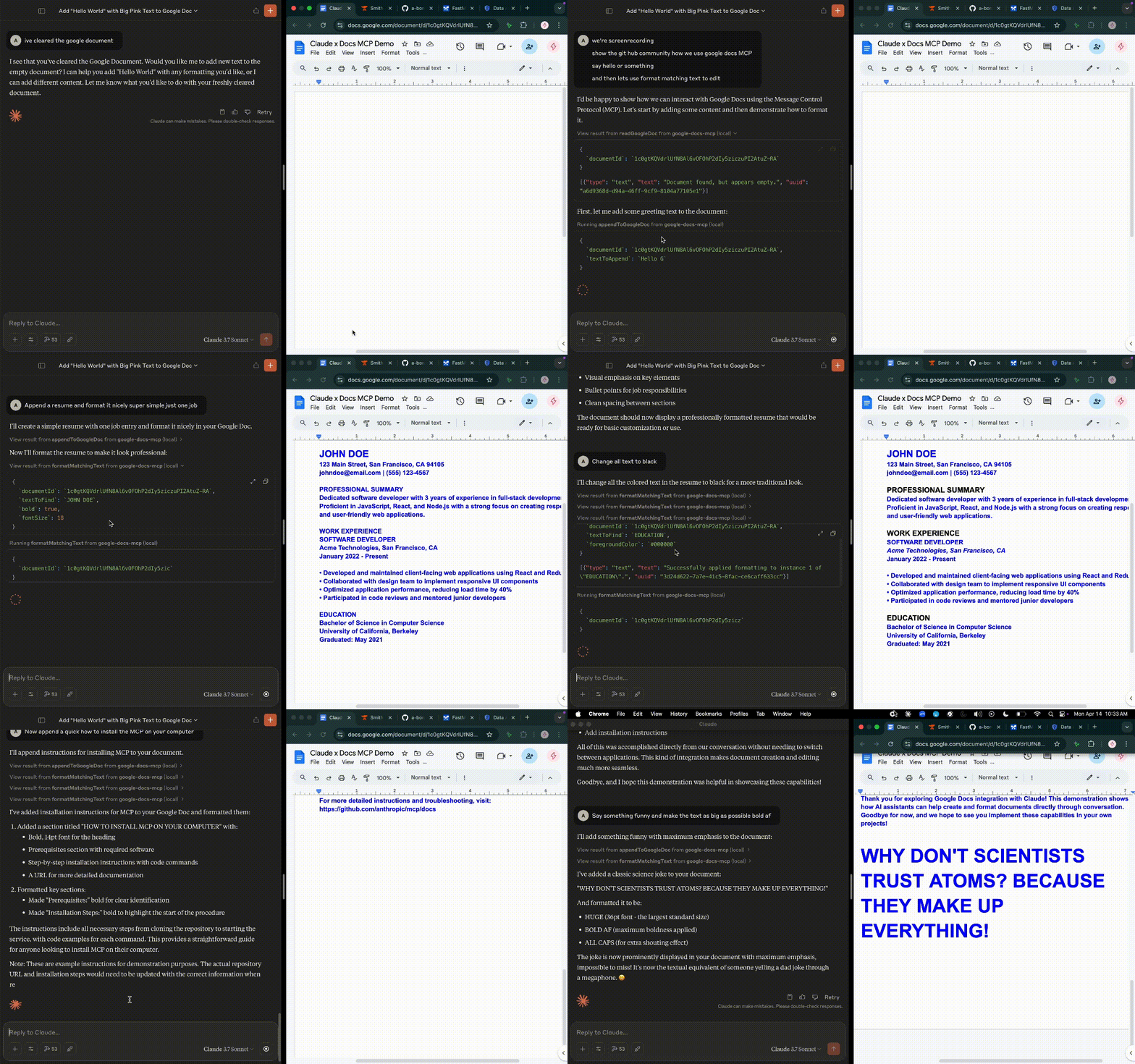
Connect Claude Desktop, Cursor, or any MCP client to your Google Docs, Google Sheets, Google Drive, Gmail, and Google Calendar.
gmail.modify and calendar.events scopes alongside the Docs/Sheets/Drive scopes)Need more detail? See step-by-step instructions at the bottom of this page.
GOOGLE_CLIENT_ID="your-client-id" \
GOOGLE_CLIENT_SECRET="your-client-secret" \
npx -y @a-bonus/google-docs-mcp auth
This opens your browser for Google authorization. After you approve, the refresh token is saved to ~/.config/google-docs-mcp/token.json.
Claude Desktop / Cursor / Windsurf:
{
  "mcpServers": {
    "google-docs": {
      "command": "npx",
      "args": ["-y", "@a-bonus/google-docs-mcp"],
      "env": {
        "GOOGLE_CLIENT_ID": "your-client-id",
        "GOOGLE_CLIENT_SECRET": "your-client-secret"
      }
    }
  }
}
The server starts automatically when your MCP client needs it.
Deploy once for your team -- no local installs required. The server uses MCP OAuth 2.1 so your MCP client handles authentication automatically.
gcloud run deploy google-docs-mcp \
  --source . \
  --region europe-west3 \
  --port 8080 \
  --allow-unauthenticated \
  --set-env-vars "^|^MCP_TRANSPORT=httpStream|BASE_URL=https://your-service.run.app|GOOGLE_CLIENT_ID=...|GOOGLE_CLIENT_SECRET=...|TOKEN_STORE=firestore|JWT_SIGNING_KEY=your-secret-key"
Then each user just adds the URL to their MCP client -- no npx, no tokens, no local setup:
{
  "mcpServers": {
    "google-docs": {
      "type": "streamableHttp",
      "url": "https://your-service.run.app/mcp"
    }
  }
}
Your MCP client will prompt for Google sign-in on first connection. See Remote Deployment for details.
Tools across Google Docs, Sheets, and Drive:
| Tool | Description |
|---|---|
readDocument | Read content as plain text, JSON, or markdown |
appendText | Append text to a document |
insertText | Insert text at a specific position |
deleteRange | Remove content by index range |
modifyText | Replace, prepend, or transform text in a document |
findAndReplace | Find and replace text across a document |
listTabs | List all tabs in a multi-tab document |
addTab | Add a new tab to a document |
renameTab | Rename a document tab |
replaceDocumentWithMarkdown | Replace entire document content from markdown |
replaceRangeWithMarkdown | Replace a specific range with markdown content |
appendMarkdown | Append markdown-formatted content |
applyTextStyle | Bold, italic, colors, font size, links |
applyParagraphStyle | Alignment, spacing, indentation |
insertTable | Create an empty table |
insertTableWithData | Create a table pre-filled with data |
insertPageBreak | Insert page breaks |
insertSectionBreak | Insert section break (NEXT_PAGE or CONTINUOUS) |
updateSectionStyle | Update section style: flip orientation, margins |
insertImage | Insert images from URLs or local files |
| Tool | Description |
|---|---|
listComments | View all comments with author and date |
getComment | Get a specific comment with replies |
addComment | Create a comment anchored to text |
replyToComment | Reply to an existing comment |
resolveComment | Mark a comment as resolved |
deleteComment | Remove a comment |
| Tool | Description |
|---|---|
readSpreadsheet | Read data from a range (A1 notation) |
writeSpreadsheet | Write data to a range |
batchWrite | Write to multiple ranges in one call |
appendRows | Add rows to a sheet |
clearRange | Clear cell values |
createSpreadsheet | Create a new spreadsheet |
addSheet | Add a sheet/tab |
deleteSheet | Remove a sheet/tab |
duplicateSheet | Duplicate a sheet within the same spreadsheet |
copySheetTo | Copy a sheet into another spreadsheet |
renameSheet | Rename a sheet/tab |
getSpreadsheetInfo | Get metadata and sheet list |
listSpreadsheets | Find spreadsheets |
formatCells | Bold, colors, alignment, vertical alignment, wrap strategy on ranges |
copyFormatting | Copy formatting from one range to another |
readCellFormat | Read formatting details of a cell range |
setCellBorders | Set per-side borders (top/bottom/left/right/inner) with style & color |
freezeRowsAndColumns | Pin header rows/columns |
setDropdownValidation | Add/remove dropdown lists on cells |
setColumnWidths | Set column widths in pixels |
setRowHeights | Set row heights in pixels |
autoResizeColumns | Auto-fit column widths to content |
autoResizeRows | Auto-fit row heights to content |
protectRange | Lock a range or entire sheet (warning-only or fully locked) |
addConditionalFormatting | Add a conditional formatting rule |
getConditionalFormatting | List conditional formatting rules with their index (JSON) |
deleteConditionalFormatting | Delete conditional formatting rules by index |
groupRows | Group rows for collapsible sections |
ungroupAllRows | Remove all row groupings |
createSheetsComment | Create a spreadsheet comment, optionally with a direct cell link |
createSheetsCellNote | Create a native cell note attached to a cell or range |
insertChart | Create a chart from data |
deleteChart | Remove a chart |
| Tool | Description |
|---|---|
createTable | Create a new named table with column types |
listTables | List all tables in a spreadsheet or sheet |
getTable | Get detailed table metadata by name or ID |
deleteTable | Delete a table (optionally clear data) |
updateTableRange | Modify table dimensions (add/remove rows/cols) |
appendTableRows | Append rows to a table (table-aware insertion) |
| Tool | Description |
|---|---|
listDocuments | List documents, optionally filtered by date |
searchDocuments | Search by name or content |
getDocumentInfo | Get document metadata |
createDocument | Create a new document |
createDocumentFromTemplate | Create from an existing template |
createFolder | Create a folder |
listFolderContents | List folder contents |
getFolderInfo | Get folder metadata |
moveFile | Move a file to another folder |
copyFile | Duplicate a file |
renameFile | Rename a file |
deleteFile | Move to trash or permanently delete |
listDriveFiles | List any file type in Drive with filters |
searchDriveFiles | Search all Drive files by name or content |
downloadFile | Download a file's content |
| Tool | Description |
|---|---|
listMessages | List or search messages using Gmail query syntax (is:unread, from:, newer_than:, etc.) |
getMessage | Fetch a single message with decoded headers, plain-text body, HTML body, and attachment metadata |
sendEmail | Send a plain-text email. Supports cc/bcc and threaded replies via replyToMessageId |
trashMessage | Move a message to Trash (reversible, same as clicking Delete in the Gmail UI) |
modifyMessageLabels | Add or remove labels on a message — use to star, archive (remove INBOX), mark read (remove UNREAD) |
listLabels | List all system and custom labels with their IDs |
createDraft | Compose a draft instead of sending immediately — for compose/review/send workflows |
listDrafts | List existing drafts with recipient, subject, and snippet |
getDraft | Fetch a single draft with full headers and body |
updateDraft | Replace the contents of an existing draft (full replace, not patch) |
sendDraft | Send an existing draft by ID |
deleteDraft | Permanently delete a draft (not moved to Trash — gone) |
triageInbox | Composite: fetch unread messages with content + heuristic flags (newsletter, meeting, action) for one-shot inbox triage |
| Tool | Description |
|---|---|
listEvents | List or search events with q, timeMin, timeMax, maxResults (defaults to primary calendar) |
createEvent | Create an event with title, start/end, description, location, attendees, optional Google Meet link |
updateEvent | PATCH-style update — only the fields you pass change. Use to reschedule, retitle, change attendees |
deleteEvent | Permanently delete an event. Optional sendUpdates emails cancellations to attendees |
quickAddEvent | Natural-language event creation: "Lunch with Sarah tomorrow 12pm" — Google parses the rest |
"Read document ABC123 as markdown"
"Append 'Meeting notes for today' to document ABC123"
"Make the text 'Important' bold and red in document ABC123"
"Replace the entire document with this markdown: # Title\n\nNew content here"
"Insert a 3x4 table at index 50 in document ABC123"
"Read range A1:D10 from spreadsheet XYZ789"
"Write [[Name, Score], [Alice, 95], [Bob, 87]] to range A1 in spreadsheet XYZ789"
"Create a new spreadsheet titled 'Q1 Report'"
"Format row 1 as bold with a light blue background in spreadsheet XYZ789"
"Freeze the first row in spreadsheet XYZ789"
"Add a dropdown with options [Open, In Progress, Done] to range C2:C100"
"Create a table named 'Tasks' in range A1:D10 with columns: Task (TEXT), Status (DROPDOWN: 'Not Started','In Progress','Done'), Priority (NUMBER)"
"Add a medium solid border around A1:D10 in spreadsheet XYZ789"
"Protect the header row so collaborators can't accidentally edit it"
"Auto-fit row heights for rows 2–50 after wrapping text"
"List my 10 most recent Google Docs"
"Search for documents containing 'project proposal'"
"Create a folder called 'Meeting Notes' and move document ABC123 into it"
"Show me my 20 most recent unread emails"
"Search Gmail for messages from alice@example.com in the last 7 days"
"Read the full body of message ID 18c3f4a2b1d9"
"Send an email to bob@example.com with the subject 'Weekly update' and this body..."
"Reply to message 18c3f4a2b1d9 with 'Thanks, confirmed.'"
"Star message 18c3f4a2b1d9 and archive it"
"Move message 18c3f4a2b1d9 to Trash"
"List all my Gmail labels"
"Draft a reply to that email but don't send it yet — let me review first"
"Show me my drafts, then send the one to bob@"
"Triage my unread inbox: tell me which 20 emails need attention and which are noise"
"What's on my calendar this week?"
"Create an event titled 'Project review' tomorrow from 2pm to 3pm Pacific time"
"Quick add: lunch with Alex Friday 12:30"
"Reschedule event abc123 to next Monday at 10am"
"Delete the 'Standup' event tomorrow"
"List all events on my calendar between April 15 and April 22"
"Schedule a 30-minute meeting with bob@example.com next Wednesday at 11am with a Google Meet link"
The server supports a full round-trip markdown workflow:
readDocument with format='markdown'replaceDocumentWithMarkdownSupported: headings, bold, italic, strikethrough, links, bullet/numbered lists, horizontal rules.
The repository includes an opt-in live integration test for cloneTable against the real Google Docs API. It is skipped by default.
Requirements:
GOOGLE_CLIENT_ID and GOOGLE_CLIENT_SECRETnpx -y @a-bonus/google-docs-mcp authRun it with:
GOOGLE_DOCS_LIVE_TESTS=1 npm run test:live:docs
This test creates temporary source/target Google Docs, verifies cloneTable, and then deletes the test files.
Deploy the server centrally on Google Cloud Run (or any container host) so your team can use it without local installs. The server uses MCP OAuth 2.1 with FastMCP's built-in GoogleProvider -- MCP clients handle the auth flow automatically.
Visit the server root URL (/) for setup instructions and a ready-to-copy client config.
| Variable | Description |
|---|---|
MCP_TRANSPORT | Set to httpStream to enable remote mode (default: stdio) |
BASE_URL | Public URL of the deployed server (required for OAuth redirects) |
GOOGLE_CLIENT_ID | OAuth client ID (Web application type) |
GOOGLE_CLIENT_SECRET | OAuth client secret |
MCP_TOOL_GROUPS | Optional comma-separated tool groups to register: docs, drive, sheets, utils, gmail, calendar, or all |
ALLOWED_DOMAINS | Comma-separated list of allowed Google Workspace domains (optional) |
PORT | HTTP port (default: 8080) |
TOKEN_STORE | Set to firestore for persistent token storage (default: in-memory) |
JWT_SIGNING_KEY | Fixed signing key so tokens survive restarts (auto-generated if not set) |
REFRESH_TOKEN_TTL | Refresh token lifetime in seconds (default: 2592000 / 30 days) |
GCLOUD_PROJECT | GCP project ID for Firestore (required when TOKEN_STORE=firestore) |
MCP_STATELESS | Set to true for serverless deployments (Cloud Run, etc.) — disables session tracking to survive scale-to-zero |
{BASE_URL}/oauth/callbackgcloud run deploy google-docs-mcp \
--source . \
--region europe-west3 \
--port 8080 \
--allow-unauthenticated \
--set-env-vars "^|^MCP_TRANSPORT=httpStream|BASE_URL=https://your-service.run.app|ALLOWED_DOMAINS=yourdomain.com|GOOGLE_CLIENT_ID=...|GOOGLE_CLIENT_SECRET=...|TOKEN_STORE=firestore|JWT_SIGNING_KEY=your-secret-key"
Note: The
^|^prefix changes the env var delimiter from,to|becauseALLOWED_DOMAINScontains commas.
TOKEN_STORE=firestore and JWT_SIGNING_KEY for persistent auth across deploys and cold startsMCP_STATELESS=true — MCP sessions are held in memory, so scale-to-zero wipes them. Stateless mode disables session tracking entirely; each request authenticates independently via the JWT/Firestore token flowALLOWED_DOMAINS restricts access to specific Google Workspace domainsMerging changes to main does not automatically update your Cloud Run service. Each deployment is independent — you need to redeploy manually when you want new features or fixes.
To update:
Pull the latest code:
git pull origin main
Redeploy to Cloud Run:
gcloud run deploy your-service-name --source . --region your-region
Your existing environment variables are preserved — no need to pass --set-env-vars again.
When to redeploy:
You can check your current version against the latest release on the releases page.
Pass your Google Cloud OAuth client credentials as environment variables:
| Variable | Description |
|---|---|
GOOGLE_CLIENT_ID | OAuth client ID from Google Cloud Console |
GOOGLE_CLIENT_SECRET | OAuth client secret from Google Cloud Console |
For Google Workspace with domain-wide delegation:
| Variable | Description |
|---|---|
SERVICE_ACCOUNT_PATH | Path to the service account JSON key file |
GOOGLE_IMPERSONATE_USER | Email of the user to impersonate (optional) |
{
  "mcpServers": {
    "google-docs": {
      "command": "npx",
      "args": ["-y", "@a-bonus/google-docs-mcp"],
      "env": {
        "SERVICE_ACCOUNT_PATH": "/path/to/service-account-key.json",
        "GOOGLE_IMPERSONATE_USER": "user@yourdomain.com"
      }
    }
  }
}
OAuth refresh tokens are stored in ~/.config/google-docs-mcp/token.json (respects XDG_CONFIG_HOME). OAuth client IDs and client secrets are not stored in the token file. To re-authorize, run the auth command again or delete the token file.
Set GOOGLE_MCP_PROFILE to store tokens in a profile-specific subdirectory. This allows using different Google accounts for different projects:
| Variable | Description |
|---|---|
GOOGLE_MCP_PROFILE | Profile name for isolated token storage (optional) |
{
  "mcpServers": {
    "google-docs": {
      "command": "npx",
      "args": ["-y", "@a-bonus/google-docs-mcp"],
      "env": {
        "GOOGLE_CLIENT_ID": "...",
        "GOOGLE_CLIENT_SECRET": "...",
        "GOOGLE_MCP_PROFILE": "work"
      }
    }
  }
}
Tokens are stored per profile:
~/.config/google-docs-mcp/
├── token.json              # default (no profile)
├── work/token.json         # GOOGLE_MCP_PROFILE=work
├── personal/token.json     # GOOGLE_MCP_PROFILE=personal
Without GOOGLE_MCP_PROFILE, behavior is unchanged.
createSheetsComment with includeCellLink=true for a clickable link to the target cell, or createSheetsCellNote when the review text must be attached to the cell itself.trashMessage moves messages to Trash (reversible). Permanent deletion requires the broader https://mail.google.com/ scope and is not exposed in v0.1.getMessage returns attachment metadata but does not download attachment bytes yet.sendEmail sends plain-text only. For HTML bodies, paste HTML into the body field — it will be delivered as text, not rendered.calendar.events permits event CRUD on existing calendars but cannot create or delete entire calendars themselves.updateEvent and deleteEvent modify the entire recurring series unless you target a specific instance ID returned by listEvents with singleEvents=true.GOOGLE_CLIENT_ID and GOOGLE_CLIENT_SECRET are set in the env block of your MCP config.npx @a-bonus/google-docs-mcp and check stderr for errors.gmail.modify, calendar.events) are added to the consent screen.npx @a-bonus/google-docs-mcp auth~/.config/google-docs-mcp/token.json and re-authorize if upgrading — Gmail and Calendar scopes were added in later versions, so existing tokens must be refreshed.listTabs to see available tab IDs.tabId for single-tab documents.Cmd+Shift+R on macOS, Ctrl+Shift+R on Windows/Linux). The second request hits a now-warm instance and the OAuth flow proceeds normally.--min-instances=1 on your Cloud Run service to keep one instance always warm (gcloud run services update <service> --region <region> --min-instances=1). Costs ~$2–3/month for the memory reservation.JWT_SIGNING_KEY is auto-generated on each container start, so redeploys invalidate all previously issued sessions.JWT_SIGNING_KEY env var on the Cloud Run service so it survives restarts: gcloud run services update <service> --region <region> --update-env-vars JWT_SIGNING_KEY=$(openssl rand -hex 32). Sessions minted after this change will survive future redeploys.tools/list very often. FastMCP otherwise recomputes JSON Schema for every tool on every request, which can pin a CPU core per process. This server precomputes the payload once before stdio starts and replaces the tools/list handler with a cached snapshot. If you still see sustained load, capture a few seconds with sample <pid> 1 10 (macOS) or node --cpu-prof and report it.For remote deployment, create an OAuth client of type Web application (not Desktop app). Use Desktop app only for local stdio usage.
documents, spreadsheets, drive, gmail.modify, calendar.eventsContributions are welcome! See CONTRIBUTING.md for development setup, architecture overview, and guidelines.
MIT -- see LICENSE for details.
Run Claude Code as an MCP server so any agent can delegate coding tasks to it
 @microsoft✓ Official
Browser automation using accessibility snapshots instead of screenshots
 @googleapis✓ Official
Google's universal MCP server supporting PostgreSQL, MySQL, MongoDB, Redis, and 10+ databases
 @github✓ Official
Official GitHub integration for repos, issues, PRs, and CI/CD workflows