

Are you the author? Sign in to claim
Production-grade MCP server for Google Forms, Google Drive & Google Sheets. Build, automate, and manage forms using AI-p
  ______       ________                                              __       __  ______  _______
 /      \     |        \                                            |  \     /  \/      \|       \
|  ▓▓▓▓▓▓\    | ▓▓▓▓▓▓▓▓ ______   ______  ______ ____   _______     | ▓▓\   /  ▓▓  ▓▓▓▓▓▓\ ▓▓▓▓▓▓▓\
| ▓▓ __\▓▓    | ▓▓__    /      \ /      \|      \    \ /       \    | ▓▓▓\ /  ▓▓▓ ▓▓   \▓▓ ▓▓__/ ▓▓
| ▓▓|    \    | ▓▓  \  |  ▓▓▓▓▓▓\  ▓▓▓▓▓▓\ ▓▓▓▓▓▓\▓▓▓▓\  ▓▓▓▓▓▓▓    | ▓▓▓▓\  ▓▓▓▓ ▓▓     | ▓▓    ▓▓
| ▓▓ \▓▓▓▓    | ▓▓▓▓▓  | ▓▓  | ▓▓ ▓▓   \▓▓ ▓▓ | ▓▓ | ▓▓\▓▓    \     | ▓▓\▓▓ ▓▓ ▓▓ ▓▓   __| ▓▓▓▓▓▓▓
| ▓▓__| ▓▓    | ▓▓     | ▓▓__/ ▓▓ ▓▓     | ▓▓ | ▓▓ | ▓▓_\▓▓▓▓▓▓\    | ▓▓ \▓▓▓| ▓▓ ▓▓__/  \ ▓▓
 \▓▓    ▓▓    | ▓▓      \▓▓    ▓▓ ▓▓     | ▓▓ | ▓▓ | ▓▓       ▓▓    | ▓▓  \▓ | ▓▓\▓▓    ▓▓ ▓▓
  \▓▓▓▓▓▓      \▓▓       \▓▓▓▓▓▓ \▓▓      \▓▓  \▓▓  \▓▓\▓▓▓▓▓▓▓      \▓▓      \▓▓ \▓▓▓▓▓▓ \▓▓





Production-grade Model Context Protocol (MCP) server for Google Forms, Drive, and Sheets automation.
Create, manage, and analyze Google Forms through an autonomous AI Planner that works with Claude, ChatGPT, Cursor, VS Code, Windsurf, Cline, Roo Code, and any MCP-compatible client.
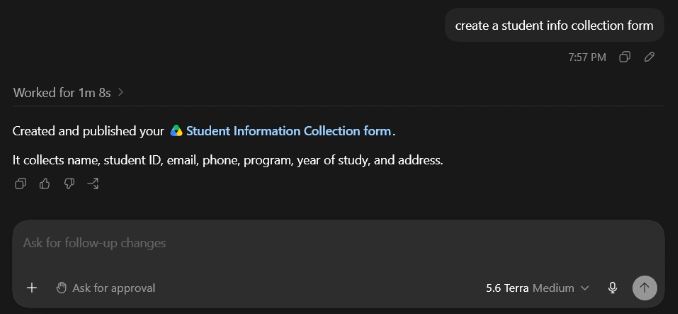
Building complete Google Forms in seconds right from your AI chat client.
plan_form, get_template, validate_execution_plan)Hackathon, Survey, Quiz, RSVP).SHORT_ANSWER, PARAGRAPH, MULTIPLE_CHOICE, CHECKBOXES, DROPDOWNFILE_UPLOAD, LINEAR_SCALE, DATE, TIMEMULTIPLE_CHOICE_GRID, CHECKBOX_GRIDget_responses, get_response)get_response_summary)export_responses)Google Forms MCPgenerate_token.py)We provide an interactive, self-troubleshooting token generator helper script right inside the repository:
# Run interactively (will prompt for Client ID and Secret if not set)
python generate_token.py

# Or pass directly via command line arguments
python generate_token.py --client-id "your-client-id" --client-secret "your-client-secret"

# Or pass the downloaded JSON secrets file from GCP
python generate_token.py --file client_secret.json
The script will launch your browser, complete authentication, output your GOOGLE_REFRESH_TOKEN, and automatically offer to save it directly into your local .env file!
generate_token.py)If you encounter issues generating your refresh token, check the common fixes below:
Error 400 (redirect_uri_mismatch):
http://localhost:8080/python generate_token.py --port 8080.Access Blocked (This app's request is invalid / Error 403):
No Refresh Token Returned:
Google Forms MCP and select Remove Access.python generate_token.py to prompt for a fresh offline token.# Using uvx (recommended for instant execution)
uvx google-forms-mcp
# Or install from source locally using uv / pip
git clone https://github.com/your-org/google-forms-mcp.git
cd google-forms-mcp
uv sync
uv run python -m google_forms_mcp
# Or run as a standalone HTTP server (Streamable HTTP transport on port 8000)
export GOOGLE_FORMS_MCP_TRANSPORT="http"
python -m google_forms_mcp
"cwd")If you cloned this repository locally, you must include the "cwd" property so your client locates the project environment (.env) and Python executable cleanly:
{
  "mcpServers": {
    "google-forms": {
      "command": "python",
      "args": ["-m", "google_forms_mcp"],
      "cwd": "C:/absolute/path/to/google-forms-mcp",
      "env": {
        "GOOGLE_CLIENT_ID": "your-client-id",
        "GOOGLE_CLIENT_SECRET": "your-client-secret",
        "GOOGLE_REFRESH_TOKEN": "your-refresh-token"
      }
    }
  }
}
uvx)If running globally without cloning:
{
  "mcpServers": {
    "google-forms": {
      "command": "uvx",
      "args": ["google-forms-mcp"],
      "env": {
        "GOOGLE_CLIENT_ID": "your-client-id",
        "GOOGLE_CLIENT_SECRET": "your-client-secret",
        "GOOGLE_REFRESH_TOKEN": "your-refresh-token"
      }
    }
  }
}
If running the server in http transport mode on http://127.0.0.1:8000/mcp:
http://127.0.0.1:8000/mcp (Or your public HTTPS tunnel URL if connecting from cloud web apps like claude.ai)..env already contains GOOGLE_REFRESH_TOKEN.claude mcp add)If you use Anthropic's Claude Code command-line agent (claude), you can register the MCP server directly using the terminal or by creating a workspace .mcp.json:
# Register globally (`user` scope) via uvx:
claude mcp add google-forms -s user -- uvx google-forms-mcp

# OR register globally from local Git repo Python environment:
claude mcp add google-forms -s user -- C:/path/to/google-forms-mcp/.venv/Scripts/python.exe -m google_forms_mcp
Note: If credentials are not saved in a root .env file, pass them via environment variables when running Claude Code or define them directly inside ~/.claude.json under "mcpServers".
When configuring the server using graphical settings panels (like in ChatGPT Desktop Developer Mode or IDE GUI forms):
-m google_forms_mcp) inside the Command to launch box!s:/google-forms-mcp/.venv/Scripts/python.exe (Or uvx if running globally)-mgoogle_forms_mcp
(If using uvx, add single argument google-forms-mcp)s:/google-forms-mcpGOOGLE_CLIENT_ID, GOOGLE_CLIENT_SECRET, GOOGLE_REFRESH_TOKEN).| Tool | Description |
|---|---|
plan_form | Interview user and autonomously outline form questions |
get_template | Get pre-built JSON form templates (Hackathon, Survey, Quiz, RSVP) |
validate_execution_plan | Validate question sequence and rules before API execution |
| Tool | Description |
|---|---|
create_form | Create a new Google Form |
get_form | Retrieve complete form structure |
update_form_info | Update title and description |
delete_form | Delete (trash or permanent) |
duplicate_form | Copy an existing form |
publish_form | Publish or stop accepting responses |
add_question | Add any of the 11 question types |
update_question | Modify an existing question |
delete_question | Remove a question |
move_question | Reorder a question |
duplicate_question | Duplicate an existing question |
set_question_branching | Branch based on choice option |
add_section | Add a section (page break) |
update_section | Update section title/description |
delete_section | Remove a section |
set_section_navigation | Set section navigation action |
update_settings | Update form settings (quiz, progress bar, etc.) |
add_media | Add an image or video |
add_text_item | Add a text block |
| Tool | Description |
|---|---|
get_responses | List all responses (paginated) |
get_response | Get a single response by ID |
get_response_summary | Aggregated statistics across all questions |
export_responses | Export as CSV or JSON |
| Tool | Description |
|---|---|
create_folder | Create a Drive folder |
search_forms | Search specifically for Google Forms |
search_files | Search for any files |
move_file | Move to another folder |
copy_file | Copy a file |
trash_file | Move to trash |
restore_file | Restore from trash |
get_file_metadata | Get complete file metadata |
share_file | Share with users/groups |
transfer_ownership | Transfer file ownership |
get_permissions | List sharing permissions |
remove_permission | Remove a permission |
| Tool | Description |
|---|---|
create_spreadsheet | Create a new spreadsheet |
get_spreadsheet_info | Get spreadsheet metadata |
read_sheet_data | Read from a range |
write_sheet_data | Write to a range |
append_sheet_data | Append rows |
clear_sheet_data | Clear data from a range |
export_sheet_csv | Export as CSV |
| Environment Variable | Description | Default |
|---|---|---|
GOOGLE_CLIENT_ID | OAuth 2.0 Client ID | Required |
GOOGLE_CLIENT_SECRET | OAuth 2.0 Client Secret | Required |
GOOGLE_REFRESH_TOKEN | Pre-obtained Refresh Token | Required |
GOOGLE_CLIENT_SECRETS_FILE | Path to client secrets JSON | — |
GOOGLE_FORMS_MCP_TRANSPORT | Transport mode: stdio or http | stdio |
GOOGLE_FORMS_MCP_PORT | HTTP port (when transport=http) | 8000 |
GOOGLE_FORMS_MCP_LOG_LEVEL | Log level | INFO |
GOOGLE_FORMS_MCP_TOKEN_PATH | Token storage path | ~/.google-forms-mcp/token.json |
These are Google Forms API limitations, not limitations of this MCP:
| Feature | Status |
|---|---|
| Theme customization (colors, fonts, headers) | ❌ Not supported by API |
| Delete responses | ❌ Not supported by API |
| Link Form to Sheets | ❌ Not supported via API (requires UI/Apps Script) |
| Settings | ✅ Now fully supported |
Contributions are welcome! See CONTRIBUTING.md for guidelines.
# Clone the repo
git clone https://github.com/your-org/google-forms-mcp.git
cd google-forms-mcp

# Install dependencies
uv sync --dev

# Run tests
uv run pytest

# Lint & format
uv run ruff check src/ tests/
uv run ruff format src/ tests/
MIT License — see LICENSE for details.
Run Claude Code as an MCP server so any agent can delegate coding tasks to it
 @microsoft✓ Official
Browser automation using accessibility snapshots instead of screenshots
 @googleapis✓ Official
Google's universal MCP server supporting PostgreSQL, MySQL, MongoDB, Redis, and 10+ databases
 @github✓ Official
Official GitHub integration for repos, issues, PRs, and CI/CD workflows