

Are you the author? Sign in to claim
Google Maps MCP Server: Connect AI Agents to Places, Directions, Geocoding & Roads APIs. Deployed on Kubernetes.





Production-ready Model Context Protocol (MCP) server for Google Maps Platform APIs.
Empower your AI agents with real-world location intelligence: directions, places, geocoding, traffic analysis, and road network data—all through a standardised MCP interface.
| API | Tool | Description | Use Cases |
|---|---|---|---|
| Places API | search_places | Find points of interest near a location | Restaurant recommendations, gas station finder, POI search |
| Places API | get_place_details | Get comprehensive details for a place | Opening hours, websites, phone numbers, accessibility info |
| Directions API | get_directions | Get routes with real-time traffic | Route planning, ETA calculation, alternative routes |
| Directions API | get_traffic_conditions | Analyse real-time traffic congestion | Commute monitoring, delay estimation, fleet routing |
| Geocoding API | geocode_address | Convert addresses to coordinates | Address validation, location lookup |
| Geocoding API | reverse_geocode | Convert coordinates to addresses | Location identification, address lookup |
| Distance Matrix API | calculate_distance_matrix | Multi-origin/destination distances | Fleet routing, delivery optimisation, travel planning |
| Roads API | snap_to_roads | Snap GPS points to road network | GPS trace cleaning, route reconstruction |
| Roads API | get_speed_limits | Retrieve speed limit data | Fleet safety monitoring, compliance checking |
| Elevation API | get_route_elevation_gain | Calculate elevation gain and profile | Cycling/hiking planning, fuel efficiency |
| Compound | calculate_route_safety_factors | Assess route safety risks | Fleet safety, insurance scoring, driver assistance |
uv pip install google-maps-mcp-server
pip install google-maps-mcp-server
git clone https://github.com/ettysekhon/google-maps-mcp-server.git
cd google-maps-mcp-server
uv sync
Create a .env file in your working directory:
GOOGLE_MAPS_API_KEY=your_maps_api_key_here

LOG_LEVEL=INFO
MAX_RESULTS=20
Or set environment variables:
export GOOGLE_MAPS_API_KEY="your_maps_api_key_here"
# Using the installed command
google-maps-mcp-server

# Or using Python module
python -m google_maps_mcp_server

# Or using uv
uv run google-maps-mcp-server
See DEPLOYMENT.md for full instructions, troubleshooting, and architecture details.
# Set your API key (or create a .env file)
export GOOGLE_MAPS_API_KEY=your-key

# Build and run
make docker-run

# Verify (in another terminal)
make verify-local
# Set environment
export GOOGLE_CLOUD_PROJECT=your-project-id
export GOOGLE_CLOUD_REGION=europe-west2

# First time: create secret
make deploy-secret

# Deploy (build, push, apply)
make deploy-all

# Check status
make deploy-status
# Rebuild and push new image
make deploy-build

# Force pod to pull new image
kubectl delete pod -l app=google-maps-mcp-server

# Watch for new pod to be ready
kubectl get pods -l app=google-maps-mcp-server -w
Verify your deployment using the official MCP Inspector:
npx @modelcontextprotocol/inspector
http://<EXTERNAL-IP>/sse (or http://localhost:8080/sse for local)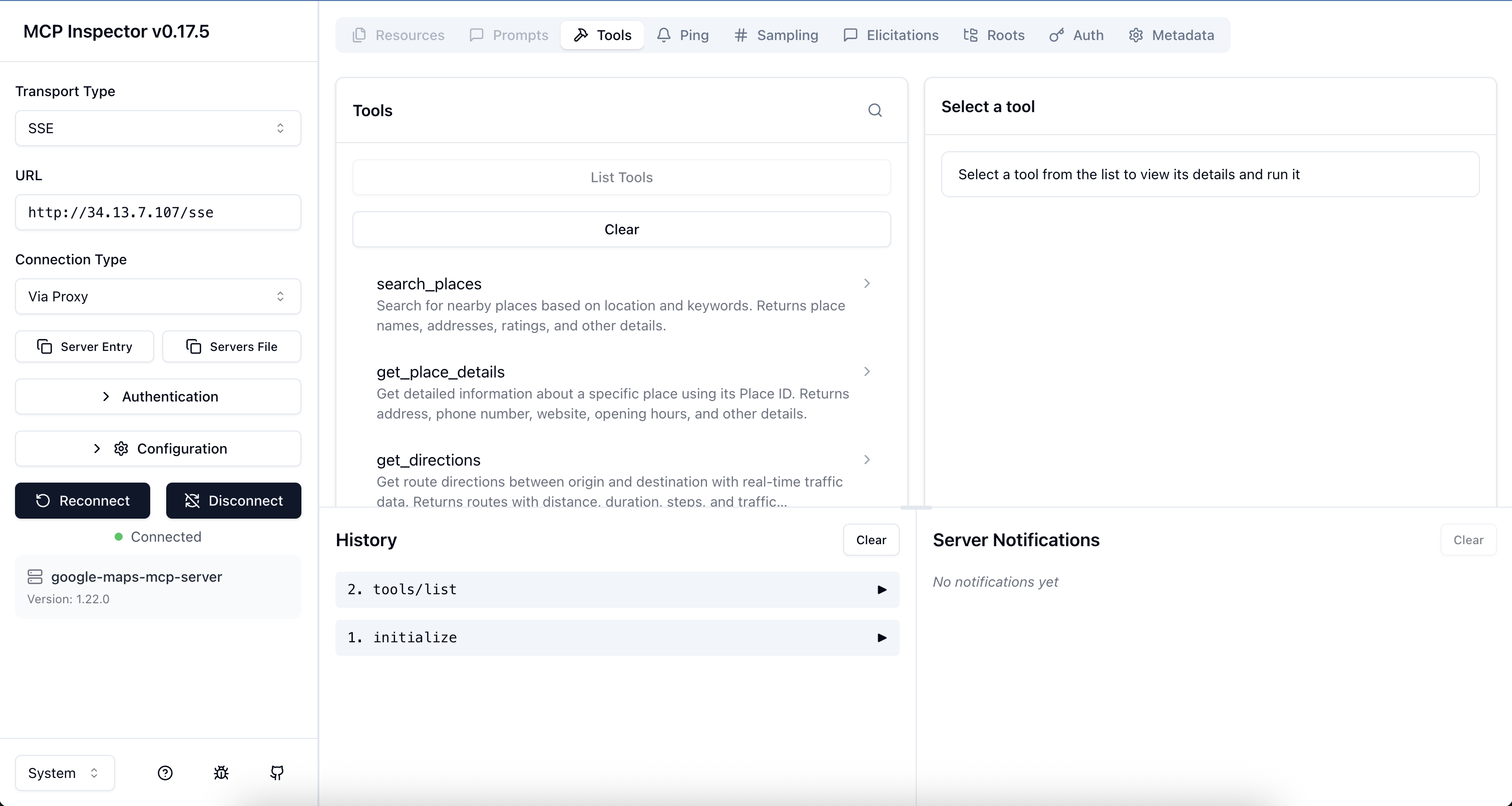
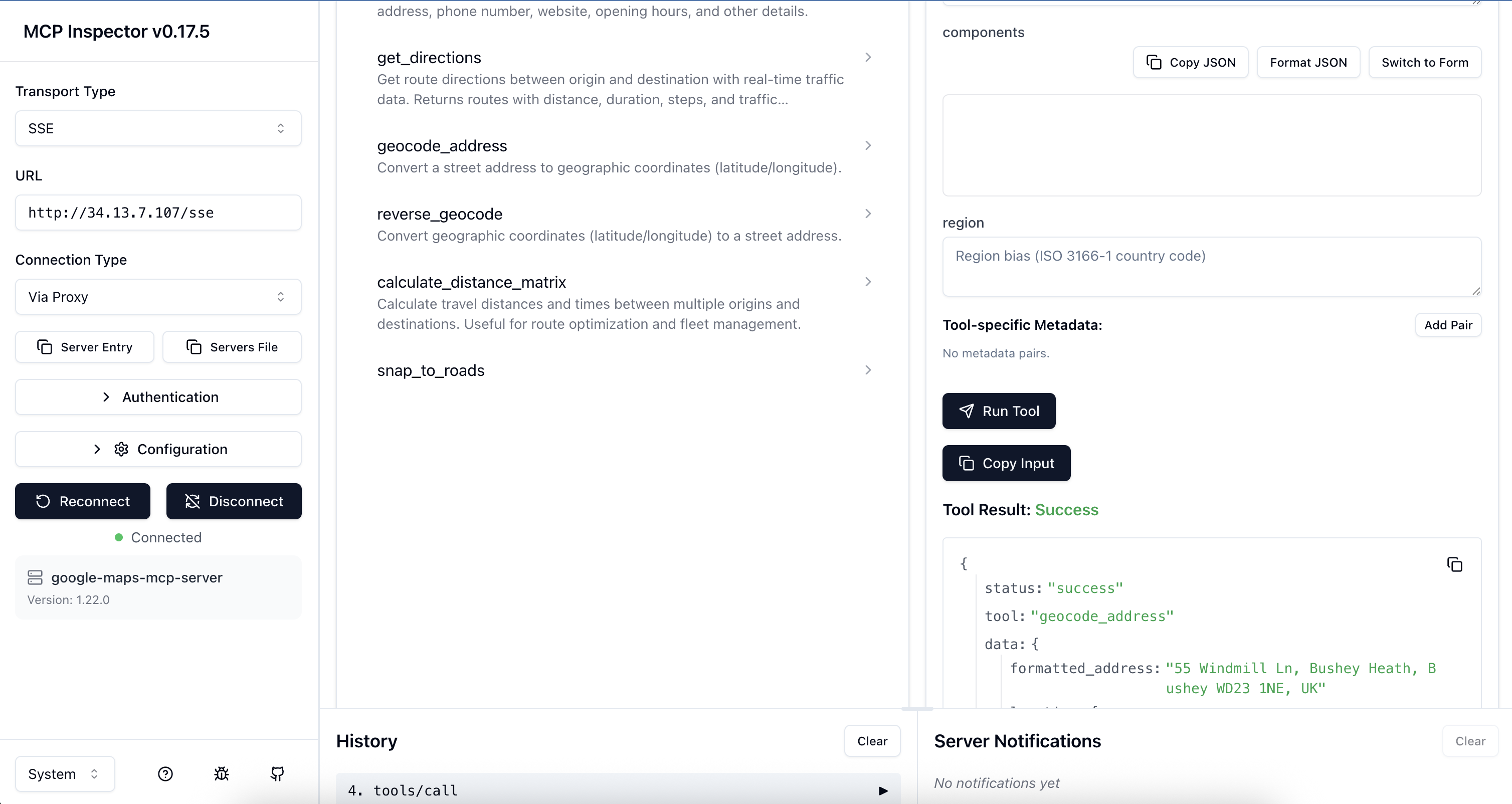
Run make help to see all available commands.
Add to your Claude Desktop configuration file:
macOS: ~/Library/Application Support/Claude/claude_desktop_config.json
Windows: %APPDATA%\Claude\claude_desktop_config.json
{
  "mcpServers": {
    "google-maps": {
      "command": "uvx",
      "args": ["google-maps-mcp-server"],
      "env": {
        "GOOGLE_MAPS_API_KEY": "your_api_key_here"
      }
    }
  }
}
Or if installed globally:
{
  "mcpServers": {
    "google-maps": {
      "command": "google-maps-mcp-server",
      "env": {
        "GOOGLE_MAPS_API_KEY": "your_api_key_here"
      }
    }
  }
}
Now you can ask Claude:
from google.adk.agents import Agent
from google.adk.tools.mcp_tool import MCPToolset
from mcp.client.stdio import StdioServerParameters

async def create_location_agent():
    # Connect to Google Maps MCP server
    maps_tools = await MCPToolset.from_server(
        connection_params=StdioServerParameters(
            command='google-maps-mcp-server',
            env={"GOOGLE_MAPS_API_KEY": "your_api_key_here"}
        )
    )

    # Create agent with Maps tools
    agent = Agent(
        name="location_intelligence_agent",
        model="gemini-2.0-flash",
        instruction="""You are a location intelligence assistant with access to
        Google Maps data. Help users with directions, place searches, and location queries.""",
        tools=[maps_tools]
    )

    return agent

# Use the agent
agent = await create_location_agent()
response = await agent.run("Find Italian restaurants near Hyde Park, London")
print(response)
import asyncio
from google_maps_mcp_server import GoogleMapsMCPServer, Settings

async def main():
    # Initialise with custom settings
    settings = Settings(
        google_maps_api_key="your_api_key_here",
        log_level="DEBUG",
        max_results=10
    )

    server = GoogleMapsMCPServer(settings)

    # Run the server
    await server.run()

if __name__ == "__main__":
    asyncio.run(main())
from google_maps_mcp_server.tools import PlacesTool, DirectionsTool
from google_maps_mcp_server.config import Settings

async def find_nearby_restaurants():
    settings = Settings(google_maps_api_key="your_key")
    places_tool = PlacesTool(settings)

    result = await places_tool.execute({
        "location": "51.5118,-0.1175",  # The Strand, London
        "keyword": "pizza",
        "radius": 1000
    })

    print(f"Found {result['data']['count']} pizza places")
    for place in result['data']['places']:
        print(f"- {place['name']}: {place['rating']}⭐")

asyncio.run(find_nearby_restaurants())
# Build the image
docker build -t google-maps-mcp .

# Run the container
docker run -it \
  -e GOOGLE_MAPS_API_KEY=your_maps_key_here \
  google-maps-mcp

# Or use docker-compose
docker-compose up
All configuration can be set via environment variables or .env file:
| Variable | Type | Default | Description |
|---|---|---|---|
GOOGLE_MAPS_API_KEY | string | required | Google Maps Platform API key (for Maps tools) |
LOG_LEVEL | string | INFO | Logging level (DEBUG, INFO, WARNING, ERROR, CRITICAL) |
MAX_RESULTS | integer | 20 | Maximum results to return (1-60) |
DEFAULT_RADIUS_METERS | integer | 5000 | Default search radius in meters |
MAX_RADIUS_METERS | integer | 50000 | Maximum allowed search radius |
MAX_RETRIES | integer | 3 | Maximum retry attempts for failed requests |
RETRY_MIN_WAIT | float | 1.0 | Minimum wait between retries (seconds) |
RETRY_MAX_WAIT | float | 10.0 | Maximum wait between retries (seconds) |
search_placesFind places near a location.
Parameters:
location (required): Coordinates as "lat,lng" or address stringkeyword (required): Search keyword (e.g., "restaurant", "petrol station")radius (optional): Search radius in meters (default: 5000, max: 50000)type (optional): Place type filter (e.g., "restaurant", "gas_station")Example:
{
  "location": "51.5118,-0.1175",
  "keyword": "coffee shop",
  "radius": 1000,
  "type": "cafe"
}
get_place_detailsGet detailed information about a specific place.
Parameters:
place_id (required): The unique Place IDfields (optional): Specific fields to retrieve (e.g., ["name", "phone", "hours"])Example:
{
  "place_id": "ChIJN1t_tDeuEmsRUsoyG83frY4",
  "fields": ["name", "website", "hours"]
}
get_directionsGet route directions with real-time traffic.
Parameters:
origin (required): Start location (address or coordinates)destination (required): End location (address or coordinates)mode (optional): Travel mode - "driving" (default), "walking", "bicycling", "transit"departure_time (optional): ISO 8601 timestamp for traffic estimationalternatives (optional): Return alternative routes (default: true)avoid (optional): Features to avoid - ["tolls", "highways", "ferries", "indoor"]traffic_model (optional): "best_guess" (default), "optimistic", "pessimistic"Example:
{
  "origin": "London, UK",
  "destination": "Manchester, UK",
  "mode": "driving",
  "alternatives": true,
  "avoid": ["tolls"]
}
get_traffic_conditionsAnalyze real-time traffic conditions between two locations.
Parameters:
origin (required): Starting locationdestination (required): Ending locationdeparture_time (optional): ISO 8601 timestamp (defaults to now)traffic_model (optional): "best_guess" (default), "optimistic", "pessimistic"Example:
{
  "origin": "London, UK",
  "destination": "Oxford, UK",
  "traffic_model": "best_guess"
}
geocode_addressConvert an address to coordinates.
Parameters:
address (required): Street address to geocodecomponents (optional): Component filters (e.g., {"country": "GB"})region (optional): Region bias (ISO 3166-1 country code)Example:
{
  "address": "10 Downing Street, London, UK"
}
reverse_geocodeConvert coordinates to an address.
Parameters:
lat (required): Latitude (-90 to 90)lng (required): Longitude (-180 to 180)result_type (optional): Filter by result typesExample:
{
  "lat": 51.5034,
  "lng": -0.1276
}
calculate_distance_matrixCalculate distances and times between multiple locations.
Parameters:
origins (required): Array of origin locationsdestinations (required): Array of destination locationsmode (optional): Travel mode (default: "driving")avoid (optional): Features to avoidunits (optional): "metric" (default) or "imperial"Example:
{
  "origins": ["London, UK", "Manchester, UK"],
  "destinations": ["Birmingham, UK", "Leeds, UK"],
  "mode": "driving"
}
snap_to_roadsSnap GPS coordinates to the nearest road.
Parameters:
path (required): Array of GPS points with lat/lng (2-100 points)interpolate (optional): Fill gaps between points (default: true)Example:
{
  "path": [
    {"lat": 51.5034, "lng": -0.1276},
    {"lat": 51.5035, "lng": -0.1275}
  ],
  "interpolate": true
}
get_speed_limitsGet speed limit data for road segments.
Parameters:
place_ids (required): Array of place IDs from snap_to_roadsExample:
{
  "place_ids": ["ChIJwQ2rKwAEdkgRo7h2RYD1oUM"]
}
calculate_route_safety_factorsCalculate safety scores for a route based on traffic, road conditions, and speed limits.
Parameters:
origin (required): Starting locationdestination (required): Ending locationdeparture_time (optional): ISO 8601 timestamp (defaults to now)traffic_model (optional): "best_guess", "optimistic", "pessimistic" (default)Example:
{
  "origin": "London, UK",
  "destination": "Oxford, UK",
  "departure_time": "2023-10-27T23:00:00Z",
  "traffic_model": "pessimistic"
}
get_route_elevation_gainCalculate elevation gain and retrieve elevation profile for a route.
Parameters:
origin (required): Starting locationdestination (required): Ending locationmode (optional): "driving", "walking", "bicycling" (default)samples (optional): Number of elevation samples (default: 50, max: 512)Example:
{
  "origin": "London, UK",
  "destination": "Brighton, UK",
  "mode": "bicycling",
  "samples": 100
}
# Clone the repository
git clone https://github.com/ettysekhon/google-maps-mcp-server.git
cd google-maps-mcp-server

# Install uv if you haven't already
curl -LsSf https://astral.sh/uv/install.sh | sh

# Install dependencies with dev extras
uv sync --extra dev

# Set up pre-commit hooks
uv run pre-commit install
# Run all tests
uv run pytest

# Run with coverage
uv run pytest --cov=src --cov-report=html

# Run only unit tests
uv run pytest -m "not integration"

# Run specific test file
uv run pytest tests/unit/test_places.py

# Run with verbose output
uv run pytest -v
# Format code
uv run black src tests

# Lint code
uv run ruff check src tests

# Fix linting issues automatically
uv run ruff check src tests --fix

# Type checking
uv run mypy src

# Run all checks
uv run black src tests && \
uv run ruff check src tests && \
uv run mypy src && \
uv run pytest
# Build package
uv build

# Publish to PyPI (requires authentication)
uv publish

# Build Docker image
docker build -t google-maps-mcp-server:latest .
We welcome contributions! Please see CONTRIBUTING.md for guidelines.
git checkout -b feature/amazing-feature)uv run pytest)git commit -m 'Add amazing feature')git push origin feature/amazing-feature)This MCP server uses Google Maps Platform APIs which have the following considerations:
Cost Optimisation Tips:
alternatives=false for directions when not neededmax_results for place searchesSee Google Maps Platform Pricing for details.
API Key Security:
API Key Restrictions (Recommended):
Application restrictions: HTTP referrers or IP addresses
API restrictions:
  - Places API
  - Directions API
  - Geocoding API
  - Distance Matrix API
  - Roads API
Monitoring:
Problem: ValidationError: google_maps_api_key cannot be empty
GOOGLE_MAPS_API_KEY environment variable is setProblem: REQUEST_DENIED error
Problem: OVER_QUERY_LIMIT error
Problem: Server won't start
export LOG_LEVEL=DEBUG
google-maps-mcp-server
This project is licensed under the Apache License 2.0 - see the LICENSE file for details.
Run Claude Code as an MCP server so any agent can delegate coding tasks to it
 @microsoft✓ Official
Browser automation using accessibility snapshots instead of screenshots
 @googleapis✓ Official
Google's universal MCP server supporting PostgreSQL, MySQL, MongoDB, Redis, and 10+ databases
 @github✓ Official
Official GitHub integration for repos, issues, PRs, and CI/CD workflows
