

Are you the author? Sign in to claim
FastMCP2 server for Google Drive uploads with Qdrant-powered semantic search


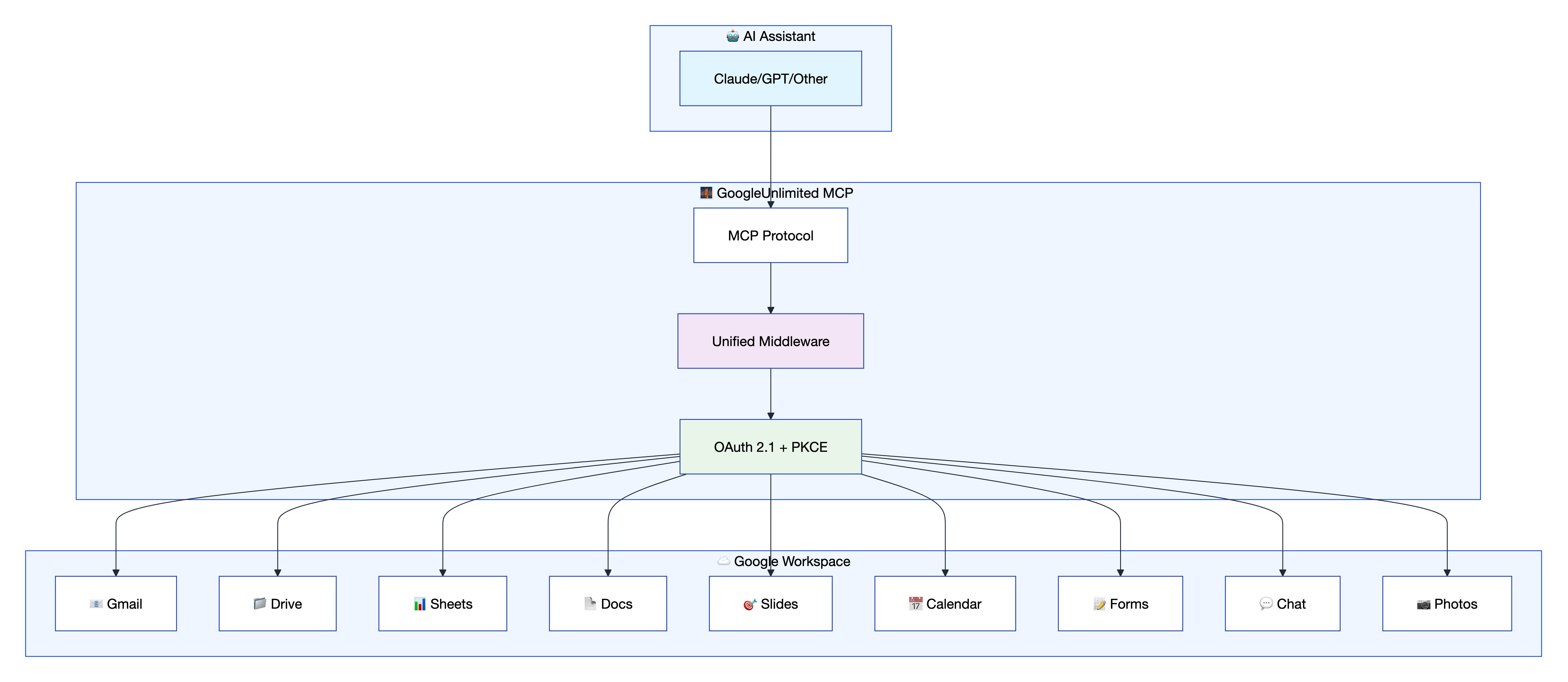
GoogleUnlimited is a comprehensive MCP framework that provides seamless Google Workspace integration through an advanced middleware architecture. It enables AI assistants and MCP clients to interact with Gmail, Google Drive, Docs, Sheets, Slides, Calendar, Forms, Chat, and Photos services using a unified, secure API.
GoogleUnlimited provides AI assistants with access to Google Workspace services through the Model Context Protocol (MCP). It supports 92+ tools across 9 Google services, enabling seamless integration between AI workflows and Google Workspace applications with revolutionary performance improvements.
The fastest way to get started - install directly from PyPI:
{
  "mcpServers": {
    "google-workspace-unlimited": {
      "command": "uvx",
      "args": ["google-workspace-unlimited"],
      "disabled": false,
      "timeout": 300
    }
  }
}
⚡ That's it! The server runs in stdio mode by default, perfect for MCP clients like Claude Desktop, Cursor, Roo, etc.
For development or customization:
Clone and setup:
git clone https://github.com/dipseth/google_workspace_fastmcp2.git
cd google_workspace_fastmcp2
uv sync
Start the server:
uv run python server.py
The server starts immediately with zero configuration required. OAuth credentials are not needed at startup — authentication is handled lazily when you first interact with a Google service.
Authenticate when ready:
When you call any Google Workspace tool, the server will prompt you to authenticate via the start_google_auth tool. This opens a browser-based OAuth flow. Once completed, credentials are stored locally and reused across sessions.
To pre-configure OAuth credentials (optional), create a .env file:
cp .env.example .env
Then add your Google Cloud Console credentials:
# Option A: Client ID + Secret
GOOGLE_CLIENT_ID=your-client-id.apps.googleusercontent.com
GOOGLE_CLIENT_SECRET=your-client-secret

# Option B: Downloaded JSON credentials file
GOOGLE_CLIENT_SECRETS_FILE=credentials.json
See the Google Cloud Console setup steps for creating OAuth credentials and enabling APIs.
📚 Configuration Resources:
- 🔧 Complete Configuration Guide - Comprehensive environment variables and settings reference
- 🤖 Claude.ai Integration Guide - Setup for Claude.ai remote MCP server usage
- 🔒 HTTPS Setup Guide - SSL certificate configuration for secure connections
- ⚙️ MCP JSON Configuration Guide - Standard MCP configuration for any compatible client
All environment variables are optional — the server starts with sensible defaults and no .env file required. OAuth credentials are only needed when initiating a new authentication flow via start_google_auth.
Google OAuth (needed for first-time authentication):
| Variable | Default | Description |
|---|---|---|
GOOGLE_CLIENT_ID | (empty) | OAuth 2.0 client ID from Google Cloud Console |
GOOGLE_CLIENT_SECRET | (empty) | OAuth 2.0 client secret |
GOOGLE_CLIENT_SECRETS_FILE | (empty) | Alternative: path to downloaded OAuth JSON file |
OAUTH_REDIRECT_URI | http://localhost:8002/oauth2callback | Must match Google Console redirect URI |
Provide either
GOOGLE_CLIENT_ID+GOOGLE_CLIENT_SECRETorGOOGLE_CLIENT_SECRETS_FILEbefore your first OAuth flow. Once authenticated, credentials are stored locally and these variables are no longer needed.
Server:
| Variable | Default | Description |
|---|---|---|
SERVER_HOST | localhost | Server bind address |
SERVER_PORT | 8002 | Server port |
ENABLE_HTTPS | false | Enable HTTPS/SSL |
SSL_CERT_FILE | - | Path to SSL certificate (required if HTTPS enabled) |
SSL_KEY_FILE | - | Path to SSL private key (required if HTTPS enabled) |
LOG_LEVEL | INFO | DEBUG, INFO, WARNING, ERROR |
Security & Sessions:
| Variable | Default | Description |
|---|---|---|
CREDENTIAL_STORAGE_MODE | FILE_ENCRYPTED | FILE_ENCRYPTED, FILE_PLAINTEXT, MEMORY_ONLY |
CREDENTIALS_DIR | ./credentials | Directory for stored credentials |
MCP_API_KEY | (empty) | Server API key — also used for crypto-bound credential encryption (HKDF-SHA256) and per-user key generation |
SESSION_TIMEOUT_MINUTES | 60 | Session idle timeout |
GMAIL_ALLOW_LIST | (empty) | Comma-separated trusted email addresses |
Tool Management:
| Variable | Default | Description |
|---|---|---|
MINIMAL_TOOLS_STARTUP | true | Start with only 5 protected tools enabled |
MINIMAL_STARTUP_SERVICES | (empty) | Comma-separated services to enable at startup (e.g., drive,gmail) |
ENABLE_CODE_MODE | false | Enable CodeMode transform — replaces full tool catalog with BM25 search + sandboxed execute |
ENABLE_SKILLS_PROVIDER | false | Enable FastMCP SkillsDirectoryProvider for dynamic skill generation |
SKILLS_DIRECTORY | ~/.claude/skills | Directory for generated skill documents |
RESPONSE_LIMIT_MAX_SIZE | 500000 | Max tool response size in bytes (0 = disabled) |
RESPONSE_LIMIT_TOOLS | (empty) | Comma-separated tool names to limit (empty = all) |
Qdrant Vector Database:
| Variable | Default | Description |
|---|---|---|
QDRANT_URL | http://localhost:6333 | Qdrant vector database URL |
QDRANT_KEY | NONE | Qdrant API key (use NONE for no auth) |
QDRANT_AUTO_LAUNCH | true | Auto-launch Qdrant via Docker if not reachable |
QDRANT_DOCKER_IMAGE | qdrant/qdrant:latest | Docker image for auto-launch |
QDRANT_DOCKER_CONTAINER_NAME | mcp-qdrant | Container name for auto-launched Qdrant |
Other:
| Variable | Default | Description |
|---|---|---|
MCP_CHAT_WEBHOOK | (empty) | Default webhook URL for Google Chat card tools |
FASTMCP_CLOUD | false | Enable cloud deployment mode (auto-switches to MEMORY_WITH_BACKUP storage) |
GoogleUnlimited supports multiple connection methods. Here are the two most popular ways to get started:
Option 1: Cursor IDE (STDIO - Community Verified ✅):
{
  "mcpServers": {
    "google-workspace": {
      "command": "uv",
      "args": [
        "--directory", "/path/to/google_workspace_fastmcp2",
        "run", "python", "server.py"
      ],
      "env": {
        "GOOGLE_CLIENT_SECRETS_FILE": "/path/to/client_secrets.json",
        "MCP_TRANSPORT": "stdio"
      }
    }
  }
}
Option 2: HTTP Streamable (VS Code Roo, Claude Code, Claude Desktop, etc.):
# Start server in HTTP mode
uv run python server.py --transport http --port 8002
Basic single-connection config:
{
  "google-workspace": {
    "type": "streamable-http",
    "url": "https://localhost:8002/mcp",
    "disabled": false
  }
}
Multi-connection setup — connect the same client (or multiple clients) to the same server with different tool sets using URL query parameters:
{
  "google-email": {
    "type": "streamable-http",
    "url": "https://localhost:8002/mcp?service=gmail"
  },
  "google-chat": {
    "type": "streamable-http",
    "url": "https://localhost:8002/mcp?service=chat"
  },
  "google-productivity": {
    "type": "streamable-http",
    "url": "https://localhost:8002/mcp?service=drive,docs,sheets,slides"
  }
}
Each connection gets its own isolated session with only the requested service tools enabled. You can also pin a session ID with ?uuid= to resume the same session state across reconnects:
{
  "google-workspace": {
    "type": "streamable-http",
    "url": "https://localhost:8002/mcp?uuid=my-workspace&service=gmail,drive,calendar"
  }
}
See URL-Based Service Filtering for the full list of query parameters.
For detailed setup instructions, troubleshooting, and configurations for all supported clients including:
🔗 Complete Client Connection Guide - Comprehensive setup instructions, troubleshooting, and advanced configurations for all supported AI clients and development environments
GoogleUnlimited supports 9 Google Workspace services with 90+ specialized tools:
| Service | Icon | Tools | Key Features | Documentation |
|---|---|---|---|---|
| Gmail | 📧 | 14 | Send, reply, labels, filters, search, allowlist | api-reference/gmail/ |
| Drive | 📁 | 9 | Upload, download, sharing, Office docs, file management | api-reference/drive/ |
| Docs | 📄 | 4 | Create, edit, format, batch operations | api-reference/docs/ |
| Sheets | 📊 | 7 | Read, write, formulas, formatting | api-reference/sheets/ |
| Slides | 🎯 | 5 | Presentations, templates, export | api-reference/slides/ |
| Calendar | 📅 | 9 | Events, scheduling, attendees, timezones | api-reference/calendar/ |
| Forms | 📝 | 8 | Creation, responses, validation, publishing | api-reference/forms/ |
| Chat | 💬 | 24 | Messaging, cards, spaces, webhooks, unified cards | api-reference/chat/ |
| Photos | 📷 | 12 | Albums, upload, search, metadata, smart search | api-reference/photos/ |
📚 API Documentation Resources:
- 🔗 Complete API Reference - Comprehensive documentation for all 92+ tools across 9 services
- 📧 Gmail API Guide - Email management, labels, filters, and search operations
- 📁 Drive API Guide - File operations, sharing, and Office document handling
- 📊 Sheets API Guide - Spreadsheet data manipulation and formatting
- 📅 Calendar API Guide - Event scheduling and timezone management
GoogleUnlimited uses a middleware architecture that provides seamless service integration, intelligent resource management, and powerful templating capabilities.
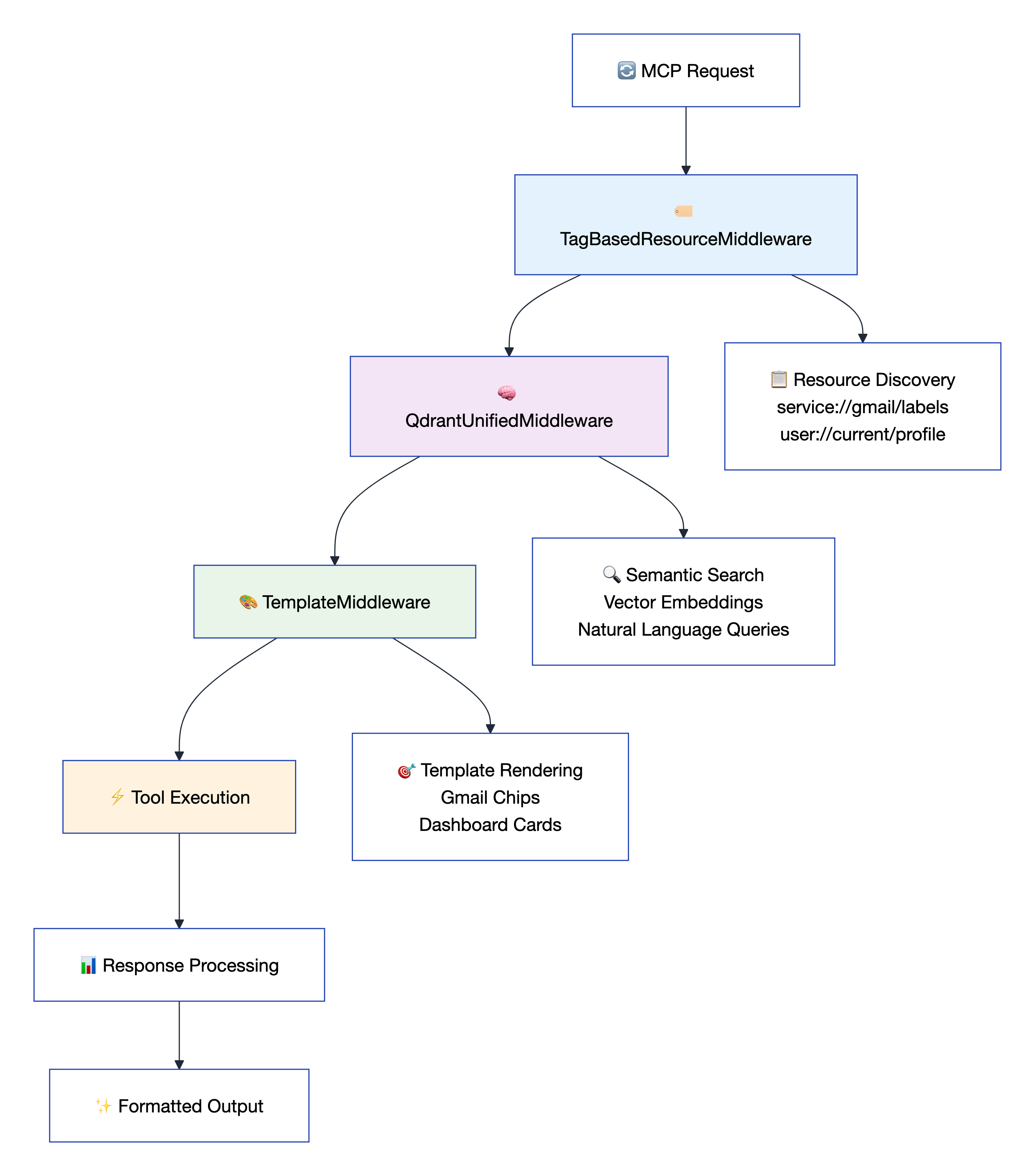
service://gmail/messages, user://current/email)📚 Middleware Documentation Resources:
- 📖 Middleware Architecture Guide - Complete middleware system documentation and implementation details
- 🏷️ TagBasedResourceMiddleware - URI pattern resource discovery and management
- 🧠 QdrantUnifiedMiddleware - AI-powered semantic search and vector embeddings
- 🎨 TemplateMiddleware - Advanced Jinja2 template system for output formatting
- 🔧 SessionToolFilteringMiddleware - Per-session tool enable/disable management
By default, GoogleUnlimited starts with only 5 protected tools enabled for optimal performance and security. This allows clients to enable only the tools they need.
Protected Tools (Always Available):
manage_tools - Enable/disable tools globally or per-sessionmanage_tools_by_analytics - Analytics-based tool managementhealth_check - Server health and configuration statusstart_google_auth - Initiate OAuth authenticationcheck_drive_auth - Verify authentication statusConfiguration:
# Default: Start with minimal tools (only 5 protected tools)
MINIMAL_TOOLS_STARTUP=true

# Optional: Pre-enable specific services at startup
MINIMAL_STARTUP_SERVICES=drive,gmail,calendar

# Disable minimal startup (enable all 92+ tools immediately)
MINIMAL_TOOLS_STARTUP=false
Enabling Tools at Runtime:
# Enable all tools globally
manage_tools(action="enable_all")

# Enable specific tools
manage_tools(action="enable", tool_names=["search_drive_files", "list_gmail_labels"])

# List all registered tools (shows enabled/disabled status)
manage_tools(action="list")
GoogleUnlimited supports per-session tool enable/disable functionality, allowing different MCP clients to have different tool availability without affecting other connected clients.
Key Features:
manage_tools, health_check, etc.) always remain availableSessionToolFilteringMiddleware for protocol-level filteringUsage Examples:
# Disable tools for this session only (other clients unaffected)
manage_tools(action="disable", tool_names=["send_gmail_message"], scope="session")

# Disable all except specific tools for this session
manage_tools(action="disable_all_except", tool_names=["search_drive_files", "list_events"], scope="session")

# Re-enable all tools for this session
manage_tools(action="enable_all", scope="session")

# Global operations (original behavior, affects all clients)
manage_tools(action="disable", tool_names=["send_gmail_message"], scope="global")
Response Structure:
{
  "success": true,
  "action": "disable_all_except",
  "scope": "session",
  "enabledCount": 94,
  "disabledCount": 0,
  "toolsAffected": ["tool1", "tool2", "..."],
  "sessionState": {
    "sessionId": "f725be09...",
    "sessionAvailable": true,
    "sessionDisabledTools": ["tool1", "tool2"],
    "sessionDisabledCount": 89
  },
  "message": "Kept 5 tools, disabled 89 tools for this session"
}
When enabled via ENABLE_CODE_MODE=true, CodeMode replaces the full 92+ tool catalog with 4 meta-tools, dramatically reducing token usage for LLM clients:
| Meta-Tool | Purpose |
|---|---|
get_tags | Browse tools by service category (Gmail, Drive, Calendar, etc.) |
search | BM25-powered keyword search across tool names and descriptions |
get_schema | Get full parameter schemas for selected tools |
execute | Run tool calls in a sandboxed Python block via await call_tool(name, params) |
How it works: Instead of loading all 92+ tool schemas upfront (expensive on tokens), LLMs discover tools on-demand via search, then chain multiple call_tool() calls in a single execute block:
# Single execute block can chain multiple tool calls
result = await call_tool("search_drive_files", {"query": "Q4 report"})
return result
Configuration:
ENABLE_CODE_MODE=true # Enable CodeMode transform
CodeMode and the standard tool catalog are mutually exclusive — when CodeMode is active, direct tool calls are replaced by the search + execute pattern.
When enabled via ENABLE_SKILLS_PROVIDER=true, GoogleUnlimited generates skill documents from ModuleWrapper instances and serves them via FastMCP's SkillsDirectoryProvider. Skills provide structured knowledge that LLMs can reference for complex multi-step tasks.
Currently supported modules:
card_framework → gchat-cards skill (Google Chat card DSL reference, component hierarchy, examples)Configuration:
ENABLE_SKILLS_PROVIDER=true     # Enable skill generation
SKILLS_DIRECTORY=~/.claude/skills  # Output directory (default)
Skills are auto-regenerated on each startup and immediately available via the FastMCP skills system.
GoogleUnlimited includes a built-in Tool Management Dashboard served via the MCP Apps ui:// resource scheme. This provides a visual interface for monitoring and managing tool availability across sessions.
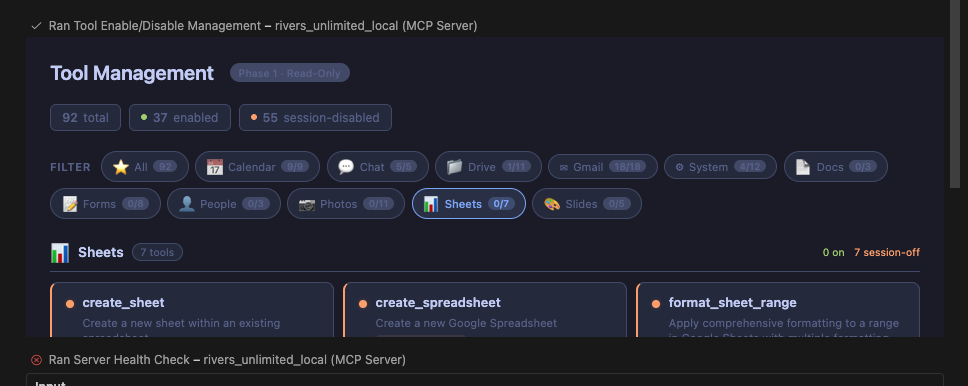
Features:
DashboardCacheMiddleware which caches list-tool results for instant ui://data-dashboard resource accessThe dashboard is automatically wired to all list tools via wire_dashboard_to_list_tools() — no per-tool configuration needed.
When using HTTP/SSE transport, you can filter tools by service directly via URL query parameters - no code required:
# Enable only Gmail tools
http://localhost:8002/mcp?service=gmail

# Enable Gmail + Drive + Calendar
http://localhost:8002/mcp?service=gmail,drive,calendar

# Resume a previous session
http://localhost:8002/mcp?uuid=your-session-id

# Resume session with specific services
http://localhost:8002/mcp?uuid=abc123&service=gmail,drive

# Disable minimal startup (enable all tools)
http://localhost:8002/mcp?minimal=false
Available URL Parameters:
| Parameter | Example | Description |
|---|---|---|
service or services | ?service=gmail,drive | Comma-separated list of services to enable |
uuid | ?uuid=abc123 | Resume a previous session by ID |
minimal | ?minimal=false | Override minimal startup mode |
Available Services: gmail, drive, calendar, docs, sheets, slides, photos, chat, forms, people
📚 Session Tool Management Resources:
- 🔧 SessionToolFilteringMiddleware Guide - Complete documentation for per-session tool management
GoogleUnlimited features powerful Jinja2 template macros that transform raw Google Workspace data into visually stunning, AI-optimized formats.
| Template File | Macro | Purpose | Key Features |
|---|---|---|---|
email_card.j2 | render_gmail_labels_chips() | Gmail label visualization | Interactive chips, unread counts, direct Gmail links |
calendar_dashboard.j2 | render_calendar_dashboard() | Calendar & events dashboard | Primary/shared calendars, upcoming events, dark theme |
dynamic_macro.j2 | render_calendar_events_dashboard() | Calendar events dashboard | Event cards, time/location details, clickable links, dark theme |
document_templates.j2 | generate_report_doc() | Professional reports | Metrics, tables, charts, company branding |
colorfuL_email.j2 | render_beautiful_email3() | Rich HTML emails | Multiple signatures, gradients, responsive design |
Gmail Labels Visualization - Transform label lists into beautiful interactive chips:
{{ render_gmail_labels_chips( service://gmail/labels , 'Label summary for: ' + user://current/email ) }}
Calendar Dashboard - Create comprehensive calendar overviews:
{{ render_calendar_dashboard( service://calendar/calendars, service://calendar/events, 'My Calendar Overview' ) }}
Calendar Events Dashboard - Transform calendar events into beautiful, interactive event cards:
{{ render_calendar_events_dashboard( service://calendar/events , 'Upcoming Events for: ' + user://current/email.email ) }}
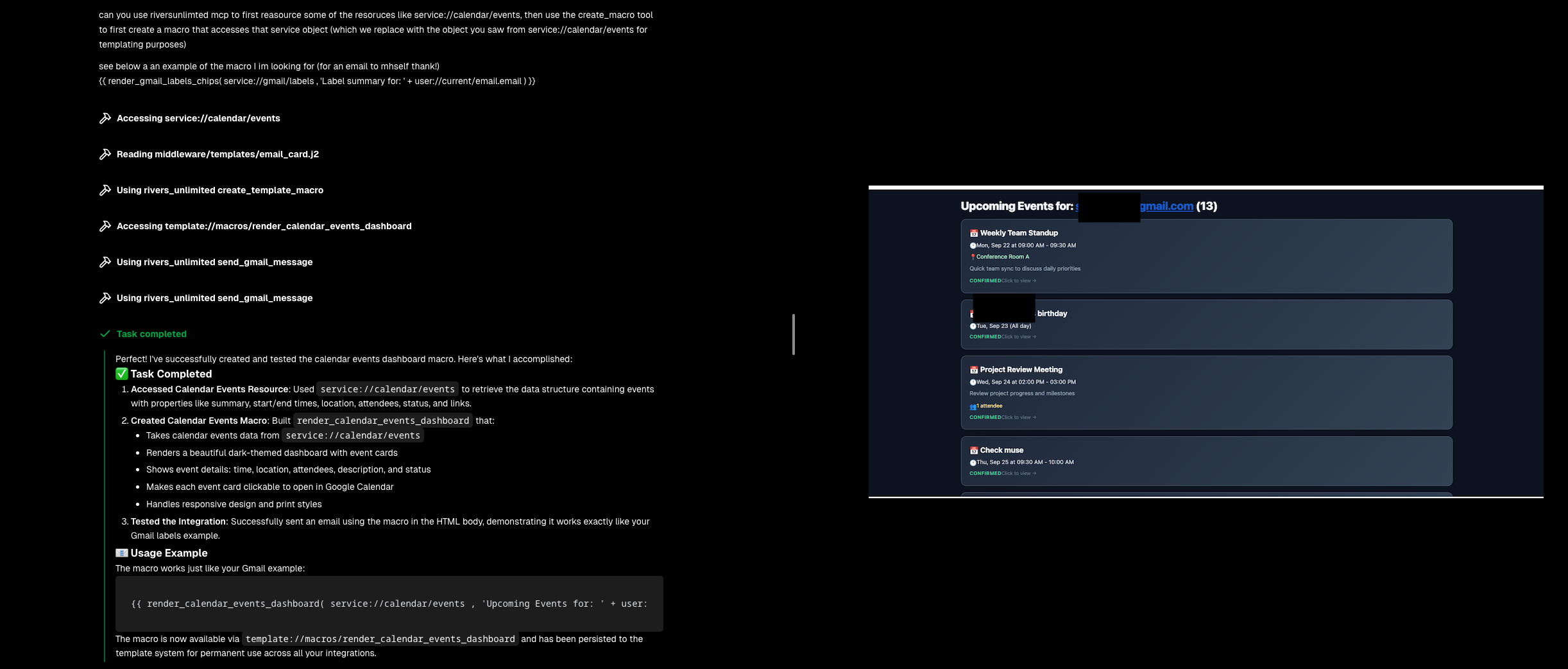
This macro creates a stunning dark-themed dashboard featuring:
Professional Documents - Generate reports with metrics and charts:
{{ generate_report_doc(
    report_title='Q4 Performance Report',
    metrics=[{'value': '$1.2M', 'label': 'Revenue', 'change': 15}],
    company_name='Your Company'
) }}
Explore all available macros using the template resource system:
# Access the template://macros resource to discover all available macros
macros = await access_resource("template://macros")
# Returns comprehensive macro information with usage examples

# Access specific macro details
macro_details = await access_resource("template://macros/render_gmail_labels_chips")
Create custom macros at runtime using the create_template_macro tool:
# Create a new macro dynamically
await create_template_macro(
    macro_name="render_task_status_badge",
    macro_content='''
    {% macro render_task_status_badge(status, size='small') %}
    {% if status == 'completed' %}
    <span class="status-badge status-completed {{ size }}">✅ Complete</span>
    {% elif status == 'in_progress' %}
    <span class="status-badge status-in-progress {{ size }}">🔄 In Progress</span>
    {% else %}
    <span class="status-badge status-pending {{ size }}">⏳ {{ status|title }}</span>
    {% endif %}
    {% endmacro %}
    ''',
    description="Renders visual status badges for task states with appropriate icons",
    usage_example="{{ render_task_status_badge('completed', 'large') }}",
    persist_to_file=True
)

# Immediately use the newly created macro
await send_gmail_message(
    html_body="Task Status: {{ render_task_status_badge('completed', 'large') }}"
)
DSL-powered macros — dynamic macros can also embed Google Chat card DSL notation to generate rich, structured cards. The DSL symbols define the card layout while Jinja2 handles dynamic content:
{# workspace_dashboard.j2 — a dynamic macro that outputs a Google Chat card #}
{% macro workspace_dashboard(user_email, stats=None, quick_actions=None) %}
{% set username = user_email.split('@')[0] if user_email else 'User' %}
{% set default_stats = stats or [
    {'label': 'Emails', 'value': '12 unread'},
    {'label': 'Calendar', 'value': '3 meetings today'},
    {'label': 'Tasks', 'value': '5 pending'}
] %}

§[δ×3, ℊ[ǵ×4], §[δ×2, Ƀ[ᵬ×3]]]

Welcome back, {{ username | title }}!

Your Workspace Overview:
{% for stat in default_stats %}
- {{ stat.label }}: {{ stat.value }}
{% endfor %}

Actions:
- Button: Open Gmail → https://mail.google.com
- Button: Open Calendar → https://calendar.google.com
- Button: Open Drive → https://drive.google.com
{% endmacro %}
The DSL line §[δ×3, ℊ[ǵ×4], §[δ×2, Ƀ[ᵬ×3]]] defines the card structure: a Section with 3 DecoratedText widgets, a Grid with 4 items, and a nested Section with 2 DecoratedText widgets and a ButtonList with 3 buttons. The Jinja2 template fills in the content dynamically — and because it's persisted to templates/dynamic/, it's immediately available to send_dynamic_card and other tools.
Key Features:
template://macros/macro_nameTemplates can be directly used in tool calls for beautiful, structured output:
# Send a beautiful email with calendar dashboard
await send_gmail_message(
    to="manager@company.com",
    subject="Weekly Schedule Update",
    html_body="{{ render_calendar_events_dashboard( service://calendar/events, 'My upcoming events') }}",
    content_type="mixed"
)

# Generate and send a professional report
await create_doc(
    title="Q4 Performance Report",
    content="{{ generate_report_doc( report_title='Quarterly Results', company_name='GoogleUnlimited' ) }}"
)
📚 Template System Resources:
- 🎨 Template Directory - Complete collection of Jinja2 templates and macros
- 💌 Beautiful Email Templates - Rich HTML email styling and themes
- 🏷️ Gmail Label Cards - Interactive label visualization with chips
- 📅 Calendar Dashboard - Event timeline and scheduling views
- 📄 Document Templates - Structured document formatting
GoogleUnlimited provides a powerful MCP resource system that enables lightning-fast data access without API calls through intelligent URI patterns.
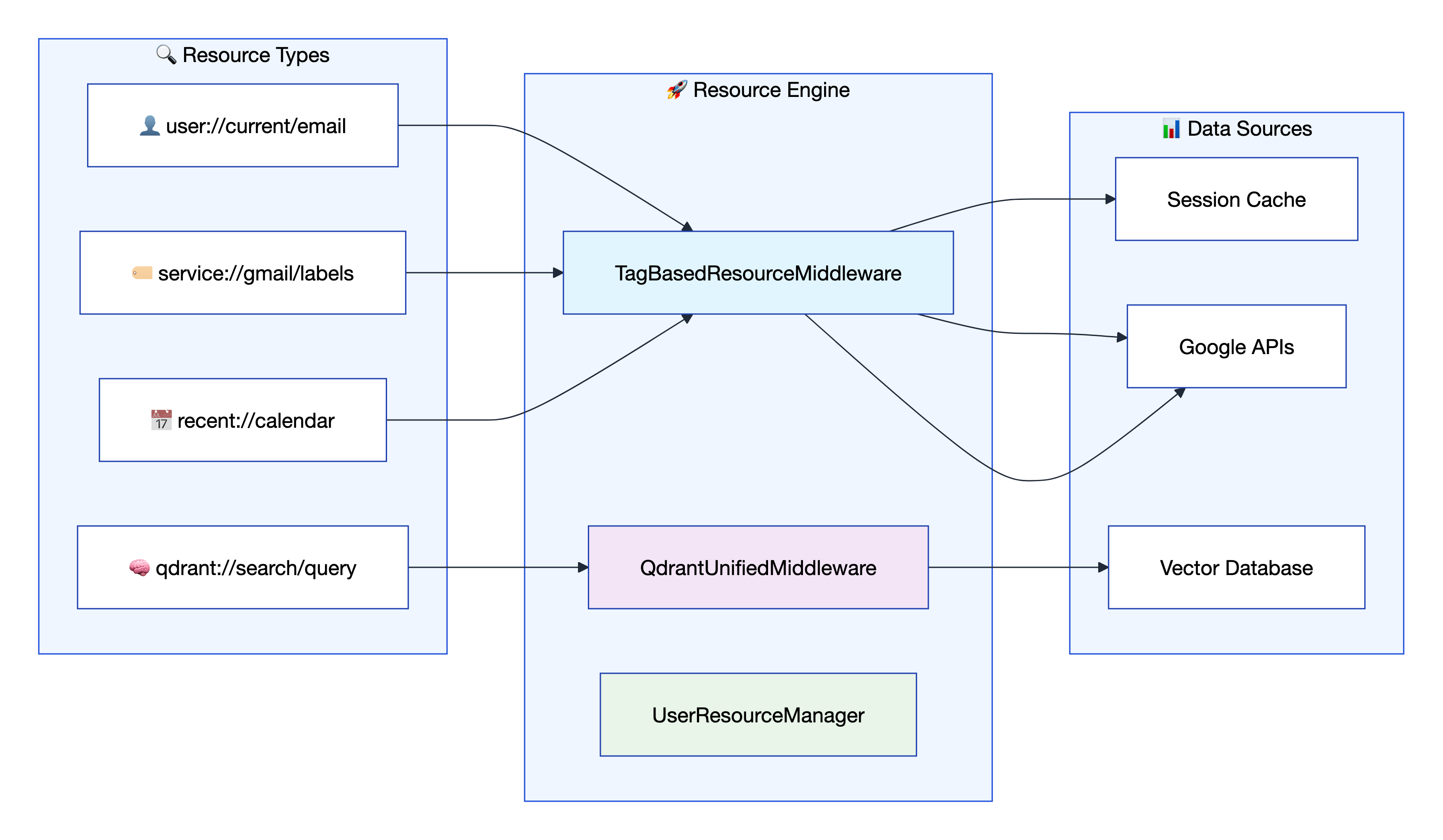
| Pattern | Purpose | Example | Returns |
|---|---|---|---|
user://profile/{email} | User authentication status | user://profile/john@gmail.com | Profile + auth state |
service://{service}/lists | Available service lists | service://gmail/lists | [filters, labels] |
service://{service}/{list_type} | All items in list | service://gmail/labels | All Gmail labels |
service://{service}/{list_type}/{id} | Specific item details | service://gmail/labels/INBOX | INBOX label details |
recent://{service} | Recent items | recent://drive | Recent Drive files |
qdrant://search/{query} | Semantic search | qdrant://search/gmail errors | Relevant responses |
resources/user_resources.py: Authentication, profiles, session management (1,812 lines)resources/service_list_resources.py: Service discovery through TagBasedResourceMiddleware (446 lines)middleware/qdrant_core/resources.py: AI-powered search and analytics (319 lines)# Instant Gmail labels (no API call needed)
labels = await access_resource("service://gmail/labels")
# Current user info from session
user = await access_resource("user://current/email")
# Semantic search across all tool responses
results = await access_resource("qdrant://search/gmail errors today")
# Recent calendar events
events = await access_resource("recent://calendar")
📚 Resource System Documentation:
- 🗂️ User Resources - Authentication, profiles, and session management (1,812 lines)
- 🏷️ Service List Resources - Service discovery through TagBasedResourceMiddleware (446 lines)
- 🧠 Qdrant Core Resources - AI-powered search and analytics (319 lines)
- 📋 Resource Patterns Guide - Complete URI pattern reference and usage examples
GoogleUnlimited includes comprehensive testing with client tests that validate MCP usage exactly as an LLM would experience it, plus additional testing suites. 559 tests passing with 100% pass rate.
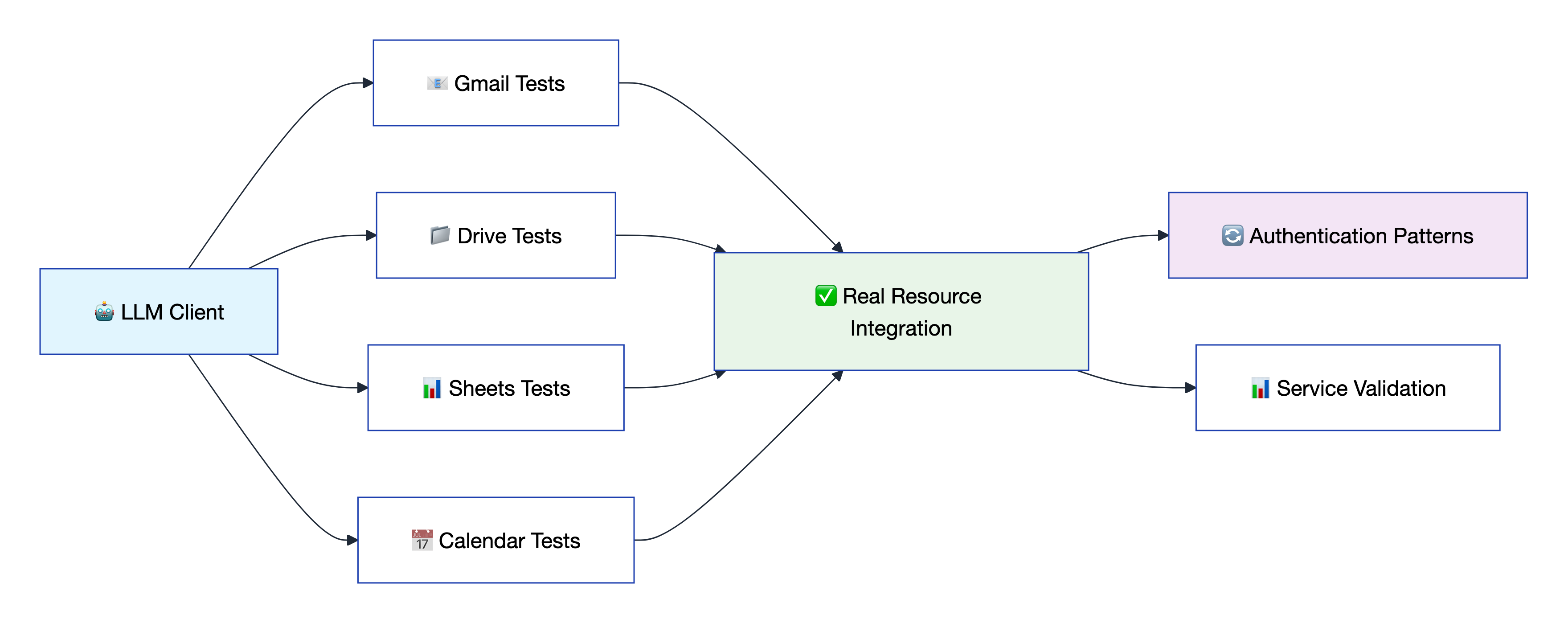
The client tests are the most important component - they provide deterministic testing of MCP operations using real resource integration and standardized patterns across all 92+ tools and 9 Google services. These tests validate both explicit email authentication and middleware injection patterns.
# 🧪 Run all client tests (primary test suite)
uv run pytest tests/client/ -v

# 📧 Test specific service
uv run pytest tests/client/ -k "gmail" -v

# 🔐 Authentication required tests
uv run pytest tests/client/ -m "auth_required" -v
The testing framework fetches real IDs from service resources for realistic testing:
# Available fixtures for real resource testing
real_gmail_message_id      # From service://gmail/messages
real_drive_document_id     # From service://drive/items
real_calendar_event_id     # From service://calendar/events
real_photos_album_id       # From service://photos/albums
real_forms_form_id         # From service://forms/forms
real_chat_space_id         # From service://chat/spaces
Automated testing and publishing via GitHub Actions:
ruff check and formatting with ruff format📚 Testing Resources:
- 📋 Client Testing Framework Guide - Complete client testing documentation and patterns
- 🧪 Client Tests Directory - Real resource integration tests for deterministic MCP validation
- 🤖 MCP Client Integration - Learn more about MCP client patterns and usage
- 🔐 Authentication Patterns - Email vs middleware injection validation testing
GoogleUnlimited implements enterprise-grade security with OAuth 2.1 + PKCE, advanced session management, and comprehensive audit capabilities.
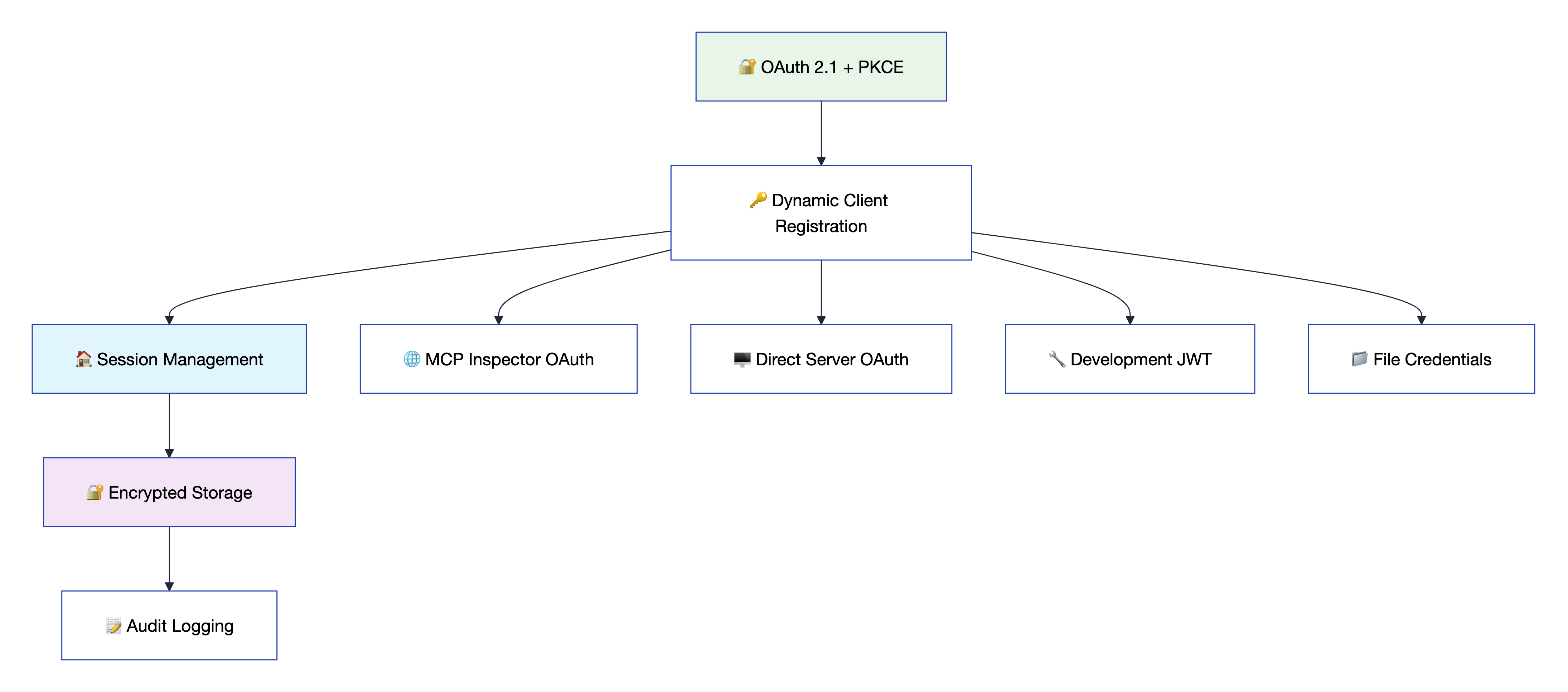
MCP_API_KEY# 🔒 Security settings in .env
CREDENTIAL_STORAGE_MODE=FILE_ENCRYPTED
SESSION_SECRET_KEY=your-secret-key
SESSION_TIMEOUT_MINUTES=30
ENABLE_AUDIT_LOGGING=true
GMAIL_ALLOW_LIST=trusted@example.com
📚 Security Documentation Resources:
- 🛡️ Unified OAuth Architecture - Complete security architecture and authentication design
- 🔐 OAuth 2.1 + PKCE Implementation - Modern authentication with proof-of-key exchange
- 🏠 Session Management Guide - Multi-tenant support and session isolation
- 🔒 Encryption & Storage - AES-256 credential encryption and machine-specific keys
- 📊 Audit Logging System - Complete security event tracking and monitoring
🚀 Ready to revolutionize your Google Workspace integration?
📚 Documentation • 🔧 Configuration • 🎯 API Reference • 🧪 Testing
Run Claude Code as an MCP server so any agent can delegate coding tasks to it
 @microsoft✓ Official
Browser automation using accessibility snapshots instead of screenshots
 @googleapis✓ Official
Google's universal MCP server supporting PostgreSQL, MySQL, MongoDB, Redis, and 10+ databases
 @github✓ Official
Official GitHub integration for repos, issues, PRs, and CI/CD workflows
