

Are you the author? Sign in to claim
Multi-channel AI proxy with intelligent key rotation. 智能密钥轮询的多渠道 AI 代理。


A high-performance, enterprise-grade AI API transparent proxy service designed specifically for enterprises and developers who need to integrate multiple AI services. Built with Go, featuring intelligent key management, load balancing, and comprehensive monitoring capabilities, designed for high-concurrency production environments.
For detailed documentation, please visit Official Documentation

GPT-Load serves as a transparent proxy service, completely preserving the native API formats of various AI service providers:
docker run -d --name gpt-load \
    -p 3001:3001 \
    -e AUTH_KEY=your-secure-key-here \
    -v "$(pwd)/data":/app/data \
    ghcr.io/tbphp/gpt-load:latest
Please change
your-secure-key-hereto a strong password (never use the default value), then you can log in to the management interface: http://localhost:3001
Installation Commands:
# Create Directory
mkdir -p gpt-load && cd gpt-load

# Download configuration files
wget https://raw.githubusercontent.com/tbphp/gpt-load/refs/heads/main/docker-compose.yml
wget -O .env https://raw.githubusercontent.com/tbphp/gpt-load/refs/heads/main/.env.example

# Edit the .env file and change AUTH_KEY to a strong password. Never use default or simple keys like sk-123456.

# Start services
docker compose up -d
Before deployment, you must change the default admin key (AUTH_KEY). A recommended format is: sk-prod-[32-character random string].
The default installation uses the SQLite version, which is suitable for lightweight, single-instance applications.
If you need to install MySQL, PostgreSQL, and Redis, please uncomment the required services in the docker-compose.yml file, configure the corresponding environment variables, and restart.
Other Commands:
# Check service status
docker compose ps

# View logs
docker compose logs -f

# Restart Service
docker compose down && docker compose up -d

# Update to latest version
docker compose pull && docker compose down && docker compose up -d
After deployment:
Use your modified AUTH_KEY to log in to the management interface.
Source build requires a locally installed database (SQLite, MySQL, or PostgreSQL) and Redis (optional).
# Clone and build
git clone https://github.com/tbphp/gpt-load.git
cd gpt-load
go mod tidy

# Create configuration
cp .env.example .env

# Edit the .env file and change AUTH_KEY to a strong password. Never use default or simple keys like sk-123456.
# Modify DATABASE_DSN and REDIS_DSN configurations in .env
# REDIS_DSN is optional; if not configured, memory storage will be enabled

# Run
make run
After deployment:
Use your modified AUTH_KEY to log in to the management interface.
Cluster deployment requires all nodes to connect to the same MySQL (or PostgreSQL) and Redis, with Redis being mandatory. It's recommended to use unified distributed MySQL and Redis clusters.
Deployment Requirements:
AUTH_KEY, DATABASE_DSN, REDIS_DSNIS_SLAVE=trueFor details, please refer to Cluster Deployment Documentation
GPT-Load adopts a dual-layer configuration architecture:
.env files or system environment variablesServer Configuration:
| Setting | Environment Variable | Default | Description |
|---|---|---|---|
| Service Port | PORT | 3001 | HTTP server listening port |
| Service Address | HOST | 0.0.0.0 | HTTP server binding address |
| Read Timeout | SERVER_READ_TIMEOUT | 60 | HTTP server read timeout (seconds) |
| Write Timeout | SERVER_WRITE_TIMEOUT | 600 | HTTP server write timeout (seconds) |
| Idle Timeout | SERVER_IDLE_TIMEOUT | 120 | HTTP connection idle timeout (seconds) |
| Graceful Shutdown Timeout | SERVER_GRACEFUL_SHUTDOWN_TIMEOUT | 10 | Service graceful shutdown wait time (seconds) |
| Follower Mode | IS_SLAVE | false | Follower node identifier for cluster deployment |
| Timezone | TZ | Asia/Shanghai | Specify timezone |
Security Configuration:
| Setting | Environment Variable | Default | Description |
|---|---|---|---|
| Admin Key | AUTH_KEY | - | Access authentication key for the management end, please change it to a strong password |
| Encryption Key | ENCRYPTION_KEY | - | Encrypts API keys at rest. Supports any string or leave empty to disable encryption. See Data Encryption Migration |
Database Configuration:
| Setting | Environment Variable | Default | Description |
|---|---|---|---|
| Database Connection | DATABASE_DSN | ./data/gpt-load.db | Database connection string (DSN) or file path |
| Redis Connection | REDIS_DSN | - | Redis connection string, uses memory storage when empty |
Performance & CORS Configuration:
| Setting | Environment Variable | Default | Description |
|---|---|---|---|
| Max Concurrent Requests | MAX_CONCURRENT_REQUESTS | 100 | Maximum concurrent requests allowed by system |
| Enable CORS | ENABLE_CORS | false | Whether to enable Cross-Origin Resource Sharing |
| Allowed Origins | ALLOWED_ORIGINS | - | Allowed origins, comma-separated |
| Allowed Methods | ALLOWED_METHODS | GET,POST,PUT,DELETE,OPTIONS | Allowed HTTP methods |
| Allowed Headers | ALLOWED_HEADERS | * | Allowed request headers, comma-separated |
| Allow Credentials | ALLOW_CREDENTIALS | false | Whether to allow sending credentials |
Logging Configuration:
| Setting | Environment Variable | Default | Description |
|---|---|---|---|
| Log Level | LOG_LEVEL | info | Log level: debug, info, warn, error |
| Log Format | LOG_FORMAT | text | Log format: text, json |
| Enable File Logging | LOG_ENABLE_FILE | false | Whether to enable file log output |
| Log File Path | LOG_FILE_PATH | ./data/logs/app.log | Log file storage path |
Proxy Configuration:
GPT-Load automatically reads proxy settings from environment variables to make requests to upstream AI providers.
| Setting | Environment Variable | Default | Description |
|---|---|---|---|
| HTTP Proxy | HTTP_PROXY | - | Proxy server address for HTTP requests |
| HTTPS Proxy | HTTPS_PROXY | - | Proxy server address for HTTPS requests |
| No Proxy | NO_PROXY | - | Comma-separated list of hosts or domains to bypass the proxy |
Supported Proxy Protocol Formats:
http://user:pass@host:porthttps://user:pass@host:portsocks5://user:pass@host:portBasic Settings:
| Setting | Field Name | Default | Group Override | Description |
|---|---|---|---|---|
| Project URL | app_url | http://localhost:3001 | ❌ | Project base URL |
| Global Proxy Keys | proxy_keys | Initial value from AUTH_KEY | ❌ | Globally effective proxy keys, comma-separated |
| Log Retention Days | request_log_retention_days | 7 | ❌ | Request log retention days, 0 for no cleanup |
| Log Write Interval | request_log_write_interval_minutes | 1 | ❌ | Log write to database cycle (minutes) |
| Enable Request Body Logging | enable_request_body_logging | false | ✅ | Whether to log complete request body content in request logs |
Request Settings:
| Setting | Field Name | Default | Group Override | Description |
|---|---|---|---|---|
| Request Timeout | request_timeout | 600 | ✅ | Forward request complete lifecycle timeout (seconds) |
| Connection Timeout | connect_timeout | 15 | ✅ | Timeout for establishing connection with upstream service (seconds) |
| Idle Connection Timeout | idle_conn_timeout | 120 | ✅ | HTTP client idle connection timeout (seconds) |
| Response Header Timeout | response_header_timeout | 600 | ✅ | Timeout for waiting upstream response headers (seconds) |
| Max Idle Connections | max_idle_conns | 100 | ✅ | Connection pool maximum total idle connections |
| Max Idle Connections Per Host | max_idle_conns_per_host | 50 | ✅ | Maximum idle connections per upstream host |
| Proxy URL | proxy_url | - | ✅ | HTTP/HTTPS proxy for forwarding requests, uses environment if empty |
Key Configuration:
| Setting | Field Name | Default | Group Override | Description |
|---|---|---|---|---|
| Max Retries | max_retries | 3 | ✅ | Maximum retry count using different keys for single request |
| Blacklist Threshold | blacklist_threshold | 3 | ✅ | After how many cumulative failures does the key get blacklisted |
| Key Validation Interval | key_validation_interval_minutes | 60 | ✅ | Background scheduled key validation cycle (minutes) |
| Key Validation Concurrency | key_validation_concurrency | 10 | ✅ | Concurrency for background validation of invalid keys |
| Key Validation Timeout | key_validation_timeout_seconds | 20 | ✅ | API request timeout for validating individual keys in background (seconds) |
GPT-Load supports encrypted storage of API keys. You can enable, disable, or change the encryption key at any time.
--to <new-key>--from <current-key>--from <current-key> --to <new-key># 1. Update the image (ensure using the latest version)
docker compose pull
# 2. Stop the service
docker compose down
# 3. Backup the database (strongly recommended)
# Before migration, you must manually backup the database or export your keys to avoid key loss due to operations or exceptions.
# 4. Execute migration command
# Enable encryption (your-32-char-secret-key is your key, recommend using 32+ character random string)
docker compose run --rm gpt-load migrate-keys --to "your-32-char-secret-key"
# Disable encryption
docker compose run --rm gpt-load migrate-keys --from "your-current-key"
# Change encryption key
docker compose run --rm gpt-load migrate-keys --from "old-key" --to "new-32-char-secret-key"
# 5. Update configuration file
# Edit .env file, set ENCRYPTION_KEY to match the --to parameter
# If disabling encryption, remove ENCRYPTION_KEY or set it to empty
vim .env
# Add or modify: ENCRYPTION_KEY=your-32-char-secret-key
# 6. Restart the service
docker compose up -d
# 1. Stop the service
# Stop the running service process (Ctrl+C or kill process)

# 2. Backup the database (strongly recommended)
# Before migration, you must manually backup the database or export your keys to avoid key loss due to operations or exceptions.

# 3. Execute migration command
# Enable encryption
make migrate-keys ARGS="--to your-32-char-secret-key"

# Disable encryption
make migrate-keys ARGS="--from your-current-key"

# Change encryption key
make migrate-keys ARGS="--from old-key --to new-32-char-secret-key"

# 4. Update configuration file
# Edit .env file, set ENCRYPTION_KEY to match the --to parameter
echo "ENCRYPTION_KEY=your-32-char-secret-key" >> .env

# 5. Restart the service
make run
⚠️ Important Reminders:
ENCRYPTION_KEY in .env matches the --to parameter after migrationENCRYPTION_KEY configuration# Generate secure random key (32 characters)
openssl rand -base64 32 | tr -d "=+/" | cut -c1-32
Access the management console at: http://localhost:3001 (default address)
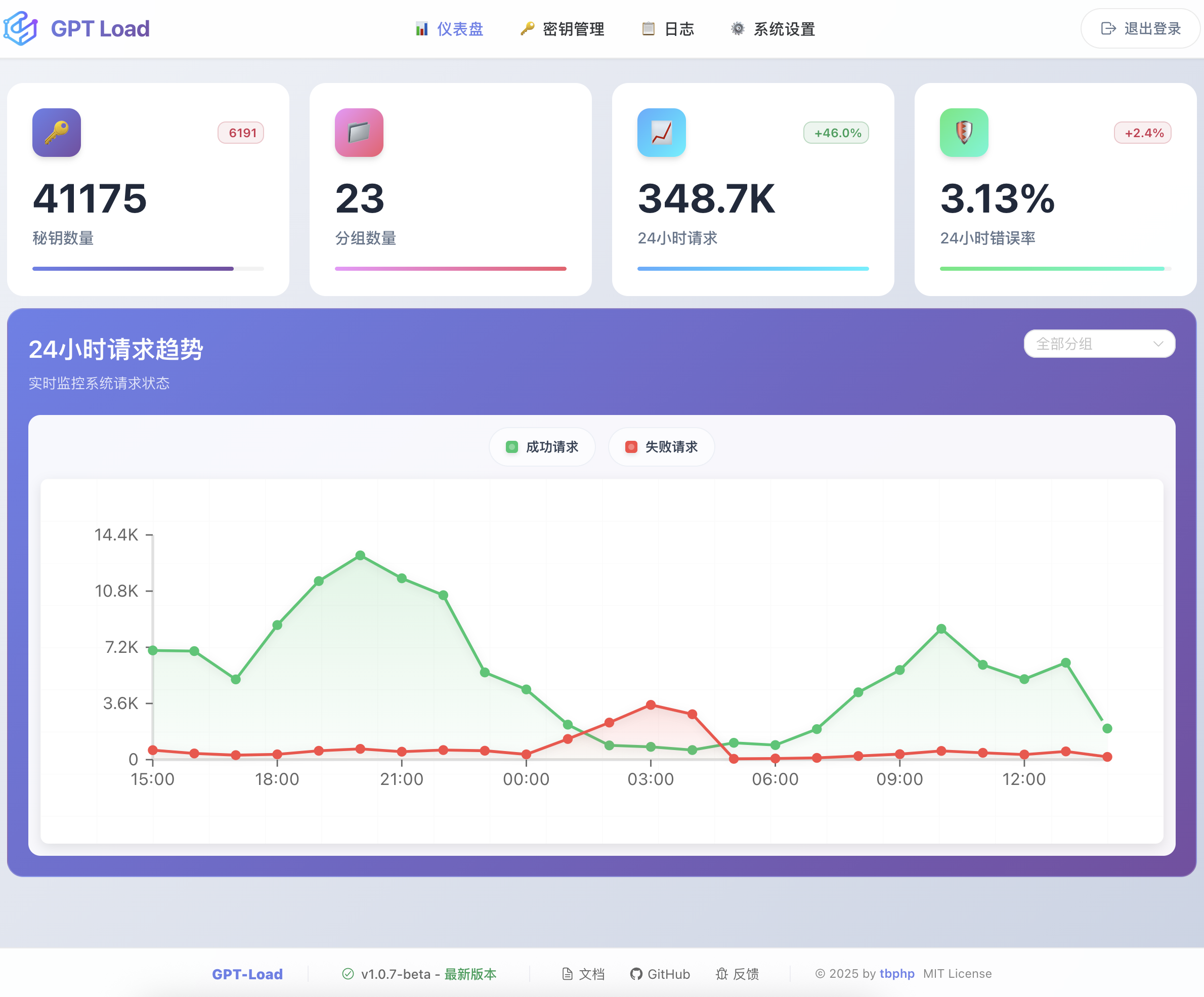
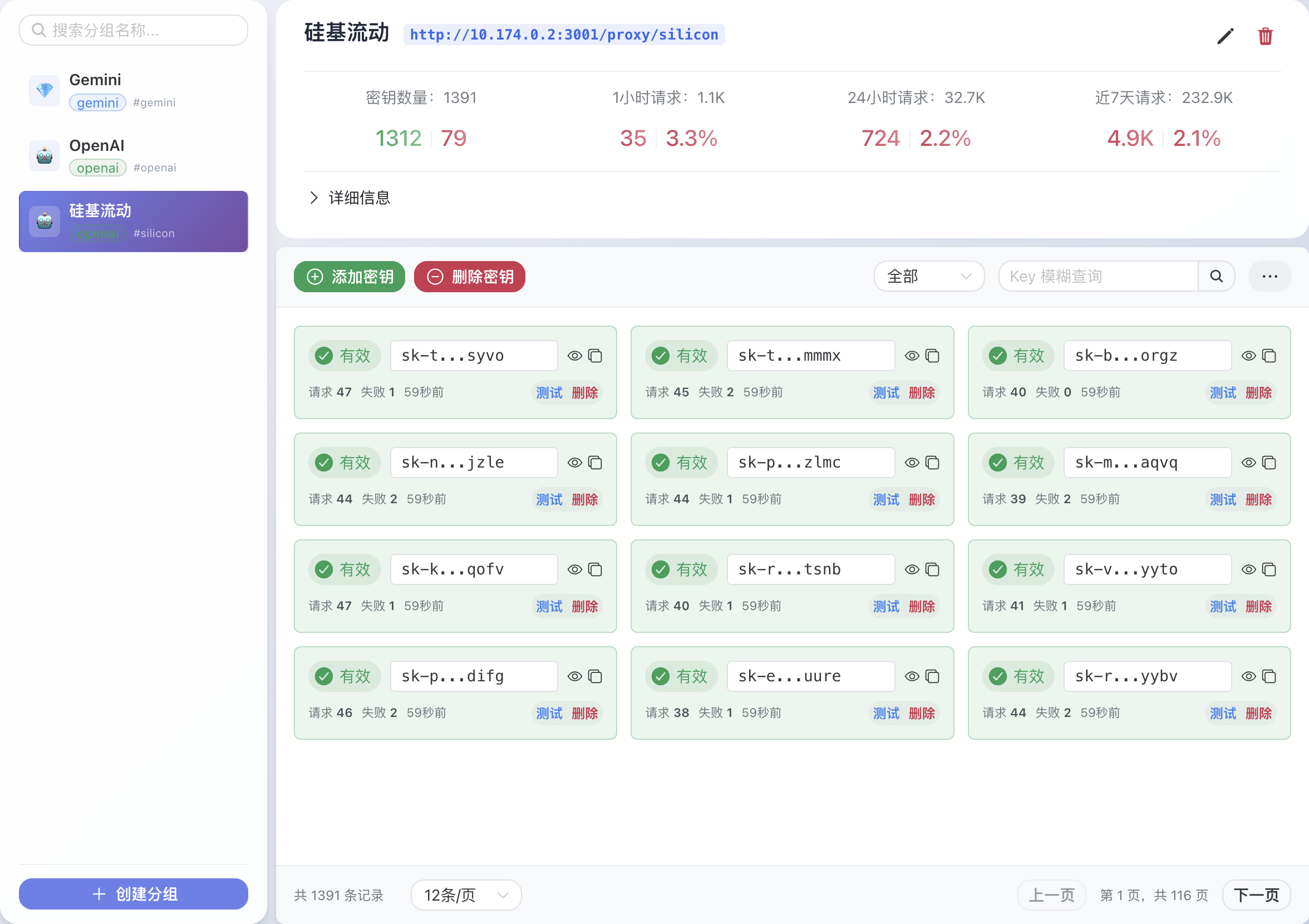
The web management interface provides the following features:
GPT-Load routes requests to different AI services through group names. Usage is as follows:
http://localhost:3001/proxy/{group_name}/{original_api_path}
{group_name}: Group name created in the management interface{original_api_path}: Maintain complete consistency with original AI service pathsConfigure Proxy Keys in the web management interface, which supports system-level and group-level proxy keys.
GPT-Load currently supports two OpenAI-compatible group types:
openai (OpenAI Chat Completions format)openai-response (OpenAI Responses format)Assuming a group named openai was created:
Original invocation:
curl -X POST https://api.openai.com/v1/chat/completions \
  -H "Authorization: Bearer sk-your-openai-key" \
  -H "Content-Type: application/json" \
  -d '{"model": "gpt-4.1-mini", "messages": [{"role": "user", "content": "Hello"}]}'
Proxy invocation:
curl -X POST http://localhost:3001/proxy/openai/v1/chat/completions \
  -H "Authorization: Bearer your-proxy-key" \
  -H "Content-Type: application/json" \
  -d '{"model": "gpt-4.1-mini", "messages": [{"role": "user", "content": "Hello"}]}'
Changes required:
https://api.openai.com with http://localhost:3001/proxy/openaiOpenAI Responses format example (openai-response group):
curl -X POST http://localhost:3001/proxy/openai-response/v1/responses \
  -H "Authorization: Bearer your-proxy-key" \
  -H "Content-Type: application/json" \
  -d '{"model": "gpt-4.1-mini", "input": "Hello"}'
Assuming a group named gemini was created:
Original invocation:
curl -X POST https://generativelanguage.googleapis.com/v1beta/models/gemini-2.5-pro:generateContent?key=your-gemini-key \
  -H "Content-Type: application/json" \
  -d '{"contents": [{"parts": [{"text": "Hello"}]}]}'
Proxy invocation:
curl -X POST http://localhost:3001/proxy/gemini/v1beta/models/gemini-2.5-pro:generateContent?key=your-proxy-key \
  -H "Content-Type: application/json" \
  -d '{"contents": [{"parts": [{"text": "Hello"}]}]}'
Changes required:
https://generativelanguage.googleapis.com with http://localhost:3001/proxy/geminikey=your-gemini-key in URL parameter with the Proxy KeyAssuming a group named anthropic was created:
Original invocation:
curl -X POST https://api.anthropic.com/v1/messages \
  -H "x-api-key: sk-ant-api03-your-anthropic-key" \
  -H "anthropic-version: 2023-06-01" \
  -H "Content-Type: application/json" \
  -d '{"model": "claude-sonnet-4-20250514", "messages": [{"role": "user", "content": "Hello"}]}'
Proxy invocation:
curl -X POST http://localhost:3001/proxy/anthropic/v1/messages \
  -H "x-api-key: your-proxy-key" \
  -H "anthropic-version: 2023-06-01" \
  -H "Content-Type: application/json" \
  -d '{"model": "claude-sonnet-4-20250514", "messages": [{"role": "user", "content": "Hello"}]}'
Changes required:
https://api.anthropic.com with http://localhost:3001/proxy/anthropicx-api-key header with the Proxy KeyOpenAI Chat Completions Format (openai):
/v1/chat/completions - Chat conversations/v1/completions - Text completion/v1/embeddings - Text embeddings/v1/models - Model listOpenAI Responses Format (openai-response):
/v1/responses - Unified response generation/v1/models - Model listGemini Format:
/v1beta/models/*/generateContent - Content generation/v1beta/models - Model listAnthropic Format:
/v1/messages - Message conversations/v1/models - Model list (if available)OpenAI Python SDK:
from openai import OpenAI

client = OpenAI(
    api_key="your-proxy-key",  # Use the proxy key
    base_url="http://localhost:3001/proxy/openai"  # Use proxy endpoint
)

response = client.chat.completions.create(
    model="gpt-4.1-mini",
    messages=[{"role": "user", "content": "Hello"}]
)
Google Gemini SDK (Python):
import google.generativeai as genai

# Configure API key and base URL
genai.configure(
    api_key="your-proxy-key",  # Use the proxy key
    client_options={"api_endpoint": "http://localhost:3001/proxy/gemini"}
)

model = genai.GenerativeModel('gemini-2.5-pro')
response = model.generate_content("Hello")
Anthropic SDK (Python):
from anthropic import Anthropic

client = Anthropic(
    api_key="your-proxy-key",  # Use the proxy key
    base_url="http://localhost:3001/proxy/anthropic"  # Use proxy endpoint
)

response = client.messages.create(
    model="claude-sonnet-4-20250514",
    messages=[{"role": "user", "content": "Hello"}]
)
Important Note: As a transparent proxy service, GPT-Load completely preserves the native API formats and authentication methods of various AI services. You only need to replace the endpoint address and use the Proxy Key configured in the management interface for seamless migration.
Thanks to all the developers who have contributed to GPT-Load!
Thank you very much for the support from the LINUX DO community!
This project is supported by DigitalOcean.

MIT License - see LICENSE file for details.
⚠️ Experimentelle Skill-Sammlung für deutsches Recht (Arbeits-, Gesellschafts-, Insolvenz-, Datenschutz-, Prozessrecht u
Manage multiple Claude Code agents from TUI or Web with tmux and git worktrees
Project management using GitHub Issues + Git worktrees for parallel agent execution
Core skills library for Claude Code with 20+ battle-tested skills including TDD, debugging, and brainstorming