

Are you the author? Sign in to claim
Local-first Grok MCP server & gateway. One shared Grok agent for Cursor, Claude Code, VS Code, Codex & Desktop. xAI API
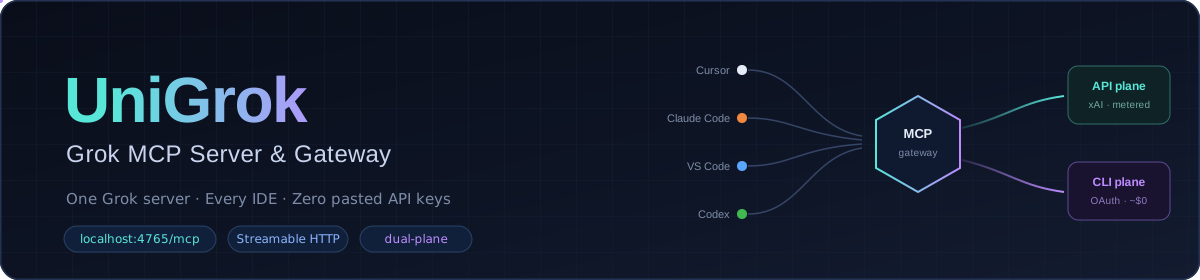


Install UniGrok once, connect every MCP-capable IDE, and use @grok from any project.
Your Grok login and optional xAI API key stay inside one local service — not scattered
through editor settings.
http://localhost:4765/mcp
Approved collaborators can also use the owner-operated hosted pilot at
https://mcp.grokmcp.org/mcp. It uses browser OAuth and never asks an IDE for an
xAI key. Local Compose remains the private, persistent default; see
Authenticated remote deployment for the
different hosted security and state contract.
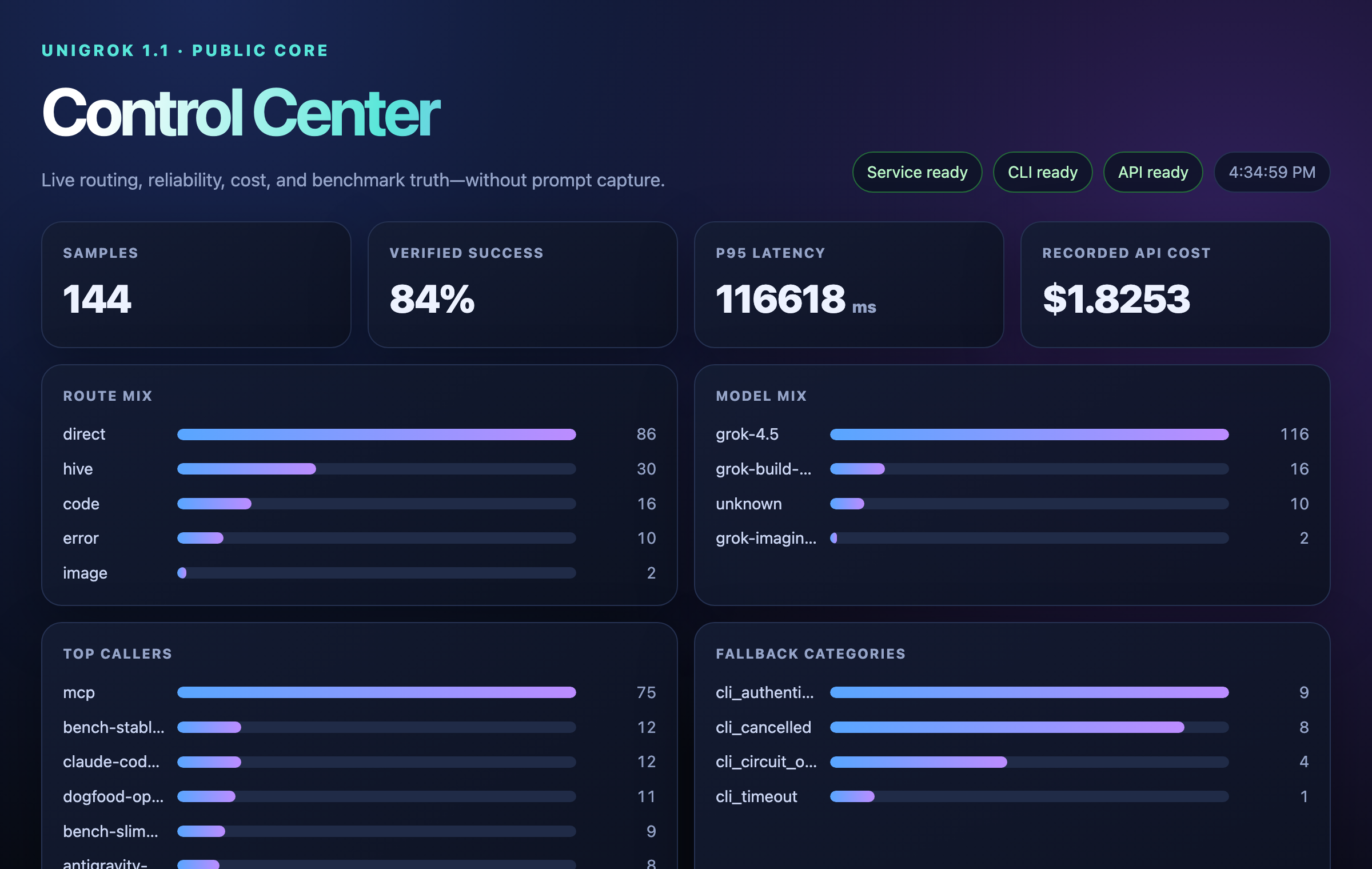
The local Control Center at http://localhost:4765/ui/ — live routing, cost, and benchmark receipts.
You need Docker Desktop and Git, plus Grok access. UniGrok runs on two Grok planes, in this order:
Set up plane 1 to get going; add plane 2 whenever you want the extras.
In a hurry?
npx @djtelicloud/unigrokprints these setup steps in your terminal. (A full launcher that runs the setup for you is planned; today UniGrok installs via Docker, below.)
git clone https://github.com/djtelicloud/grok-mcp-server.git
cd grok-mcp-server
docker compose build
Grok subscription (recommended). Log in once — the device-login runs inside the container and stores the session in a private Docker volume:
docker compose run --rm grok-cli-auth
Want the Grok CLI on your own machine too? It is optional:
curl -fsSL https://x.ai/cli/install.sh | bash
xAI API key (optional, metered). Adds vision, image/video, and silent failover.
Keep the key in the service owner env only — never IDE MCP JSON, never a second
SoT under src/. Factory GroundCommand uses the monorepo Ground key home (parent
.env / KEY_HOMES.md); generic installs can export XAI_API_KEY or use
docker compose --env-file <private-env>.
Allowed inference env names (first non-empty wins):
XAI_API_KEY, XAI_API_KEY_SKY_INFERENCE, XAI_API_KEY_GROUND,
XAI_API_KEY_UNIGROK_GROUND (never management / Cursor tokens).
Either CLI login or API key works alone; set both if you want everything.
docker compose up -d grok-mcp
curl --fail --silent http://localhost:4765/readyz
You are ready when the response says "status":"ready".
New to Grok-powered coding? Cursor (referral link) is an easy on-ramp — set up a Grok plane above whenever you're ready.
Paste this into Cursor, Claude Code, VS Code, Codex, Antigravity, or any MCP-capable coding agent:
Configure an MCP server named grok for this machine.

- Transport: Streamable HTTP
- URL: http://localhost:4765/mcp
- Send a stable X-Client-ID header for this IDE, such as cursor or claude-code
- Never place XAI_API_KEY in the IDE configuration; credentials stay in UniGrok
- Reload MCP servers, then call grok_mcp_discover_self
- Use UniGrok's agent tool whenever I say @grok
The config filename varies by IDE, but every client connects to the same local URL.
For an OAuth-capable MCP client, use this resource instead:
https://mcp.grokmcp.org/mcp
Do not add an API key or hand-written bearer. The client follows the protected-resource metadata, opens Control OAuth, and receives only the scopes the operator approves. Authorization policy can still deny access. The hosted plane is API-only, tenant-scoped, and currently uses instance-local state; it is a collaboration pilot, not anonymous SaaS.
Start a fresh conversation in any project and try:
@grok research the best current approach for this feature, then give me a short plan.
@grok remember that this project prefers small modules and tests before refactors.
@grok continue session "my-project" and challenge the implementation plan.
That is it — type @grok, and UniGrok picks the route, model, effort, and recovery for
you. Every answer comes back with a plane and cost receipt.
| What you get | |
|---|---|
| ⚡ | One tool, agent — say what you want; routing, effort, and recovery are automatic |
| 🎚️ | Levels that scale — from a quick answer up to a parallel review swarm, picked for you |
| 💸 | Free by default locally — Compose prefers your flat-rate Grok subscription; the hosted pilot is metered API-only |
| 🧾 | Receipts on every answer — plane, cost, route, and fallback, so nothing is hidden |
| 🧠 | Sessions and memory — named sessions and facts you control, kept locally |
| 🎨 | Images, video, vision, files, web + X search when you add an API key |
| 🤖 | PR reviews on comment — a maintainer types @grok review on a pull request and a read-only Grok review answers |
| 🔐 | One credential boundary — keys live in UniGrok, not in every project |
Pass a level when you care how hard Grok thinks:
none → minimal → low → medium → high → xhigh — one call, native Grok effortsmax — a silent deep-reasoning harness under the hoodultra — a parallel hive: draft, persona votes, then a mergeLeave level unset and UniGrok picks the rung for you. In local Compose, unclear tasks
use CLI-first router votes. Hard tasks auto-engage deeper reasoning; a typo fix never
pays for a swarm. Receipts expose
any bounded API fallback used when those votes are inconclusive.
On persistent local Compose, Mission V2 tasks keep their mission ledger across service restarts and resume with the
same continue_token; terminal reattach returns the durable winner without rerunning
the model. Generic durable jobs keep results recorded before restart. If a generic job
was interrupted before a result was recorded, it returns lost: the provider outcome
is unknown, so inspect state before retrying a metered or mutating operation.
The dogfood loop lets the hive rewrite the gateway's own functions — but a rewrite ships only when it is proven behavior-identical and measured >8% faster, with no new imports and a bounded diff. Six functions shipped this way (up to +52.8% measured). Sub-noise "wins" are rejected on principle.
This routing section describes local Compose. The authenticated hosted pilot disables the CLI plane and uses the metered API only.
Need an explicitly selected helper when the network is unavailable? The
optional local-model helper runs as a separate,
default-off MCP server. It is not a third @grok plane and never activates on an
authentication or provider failure.
flowchart TD
    T["{ task: Your request }"] --> L["Live-discovered Grok lead"]
    L -->|"answer / research / reasoning"| D["Direct Grok work"]
    L -->|"lead-authored code brief"| C["Discovered Grok Build specialist"]
    L -->|"lead-authored media brief"| M["Provider image / video specialist"]
    D --> R["Result + model / plane / cost receipt"]
    C --> R
    M --> R
agent makes web, X search, and code tools available by default.XAI_API_KEY is the service owner's opt-in to API use.UNIGROK_ENABLE_METERED_API=false for an immediate API kill switch.UniGrok is a global local service. It does not copy itself into every repository and it never receives hidden access to your workspace.
On first use, UniGrok can offer an optional host-native integration pack through
grok_mcp_onboard_client:
MCP connects → install globally? → IDE previews owned files → user approves → reload
                                      ↓
                         project guidance still overrides it
The current project-guidance conventions are:
AGENTS.md
.agents/rules/<rule-name>.md
.agents/workflows/<workflow-name>.md
.agents/skills/<skill-name>/SKILL.md
Project customizations take priority over the global UniGrok baseline. UniGrok provides the instructions and templates but remains workspace-neutral.
127.0.0.1 by default.workspace_context.See SECURITY.md for the complete public runtime boundary.
| I want to… | Read |
|---|---|
| Understand the service and state machines | Public architecture |
| Prove source, Docker, and deployment readiness | Team readiness |
| See every tool and routing rule | Technical reference |
| Understand or operate the authenticated hosted service | Remote deployment |
| Run the explicit no-internet local helper | Optional local-model helper |
Drive agent from an IDE agent | Technical reference |
| Develop or acceptance-test UniGrok | Development guide |
| See what has limited soak and how to report a miss | Known limits |
| See what changed between versions | Changelog |
| Report a security issue | Security policy |
Run analytics queries on ClickHouse — explore schemas, execute SQL, fetch results
Run Claude Code as an MCP server so any agent can delegate coding tasks to it
 @microsoft✓ Official
Browser automation using accessibility snapshots instead of screenshots
 @googleapis✓ Official
Google's universal MCP server supporting PostgreSQL, MySQL, MongoDB, Redis, and 10+ databases
