

Are you the author? Sign in to claim
This Guidance demonstrates how to securely run Model Context Protocol (MCP) servers on the AWS Cloud using containerized
This guidance demonstrates how to deploy Model Context Protocol (MCP) servers on AWS with secure authentication using Amazon Cognito, implementing the 2025-06-18 MCP specification with OAuth 2.0 Protected Resource Metadata (RFC9728). It enables you to host MCP servers that can be accessed remotely while maintaining security through standards-compliant OAuth 2.0 authentication flows.
The solution addresses several key challenges:
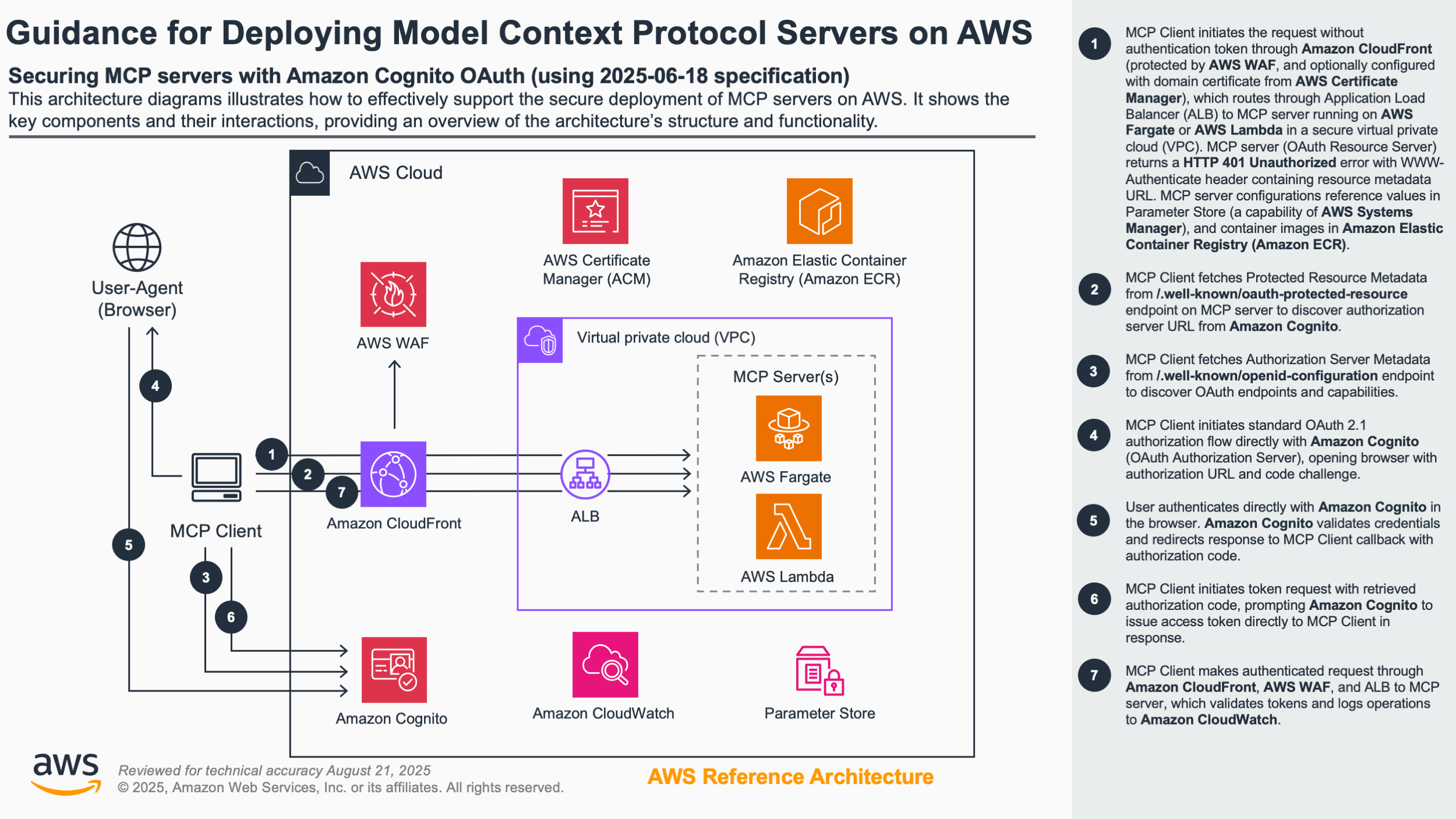
The architecture implements:
You are responsible for the cost of the AWS services used while running this Guidance. As of August 2025, the cost for running this Guidance with the default settings in the US East (N. Virginia) Region is approximately $194.18 per month for processing moderate traffic levels.
We recommend creating a Budget through AWS Cost Explorer to help manage costs. Prices are subject to change. For full details, refer to the pricing webpage for each AWS service used in this Guidance.
The following table provides a sample cost breakdown for deploying this Guidance with the default parameters in the US East (N. Virginia) Region for one month.
| AWS service | Dimensions | Cost [USD] |
|---|---|---|
| VPC (NAT Gateway) | 1 NAT Gateway × 730 hours + 100 GB data processing | $37.35 |
| Elastic Load Balancing | Application Load Balancer with moderate traffic | $16.83 |
| Amazon Cognito | 10,500 MAUs (within 50,000 free tier) | $0.00 |
| CloudFront | 2 TB data transfer + 15M requests | $87.96 |
| WAF | 2 Web ACLs (CloudFront and Regional) | $10.00 |
| ECS (Fargate) | 1 vCPU, 2GB memory × 730 hours | $36.04 |
| Secrets Manager | 1 secret for Cognito credentials | $0.40 |
| Lambda | Custom resources (minimal usage) | $0.20 |
| Total | $194.18/month |
These deployment instructions are optimized to work on Amazon Linux 2 AMI. Deployment in another OS may require additional steps.
npm install -g aws-cdk
If you're using AWS CDK for the first time, bootstrap your account:
cdk bootstrap
Clone the repository:
git clone <repository-url>
cd guidance-for-deploying-model-context-protocol-servers-on-aws
cd source/cdk/ecs-and-lambda
Install dependencies:
npm install
Login to public ECR:
aws ecr-public get-login-password --region us-east-1 | docker login --username AWS --password-stdin public.ecr.aws
Deploy the stacks:
Without domain configuration:
cdk deploy --all
Or with domain configuration (single region - us-east-1):
cdk deploy --all --context cdnCertificateArn=arn:aws:acm:us-east-1:123456789012:certificate/abc123 --context albCertificateArn=arn:aws:acm:us-east-1:123456789012:certificate/abc123 --context customDomain=mcp-server.example.com
Or with multi-region certificate configuration:
cdk deploy --all --context cdnCertificateArn=arn:aws:acm:us-east-1:123456789012:certificate/abc123 --context albCertificateArn=arn:aws:acm:eu-west-1:123456789012:certificate/def456 --context customDomain=mcp-server.example.com
Or with CloudFront HTTPS only (ALB stays HTTP):
cdk deploy --all --context cdnCertificateArn=arn:aws:acm:us-east-1:123456789012:certificate/abc123 --context customDomain=mcp-server.example.com
Update MCP servers:
Without domain configuration:
cdk deploy MCP-Server
Or with domain configuration:
cdk deploy MCP-Server --context cdnCertificateArn=arn:aws:acm:us-east-1:123456789012:certificate/abc123 --context albCertificateArn=arn:aws:acm:us-east-1:123456789012:certificate/abc123 --context customDomain=mcp-server.example.com
Verify CloudFormation stack status:
Validate Cognito setup:
Verify infrastructure:
For development and testing environments only, you can quickly create and manage users with AWS CLI:
# Create test user
aws cognito-idp admin-create-user --user-pool-id YOUR_USER_POOL_ID --username test@example.com

# Set permanent password (bypass temporary)
aws cognito-idp admin-set-user-password --user-pool-id YOUR_USER_POOL_ID --username test@example.com --password "TestPass123!" --permanent
The deployment includes a sample Python MCP client that demonstrates OAuth 2.0 Protected Resource authentication with the deployed servers. This client implements the 2025-06-18 MCP specification with StreamableHTTP transport.
Note: This client is a modified version of the simple-auth-client example from the official MCP Python SDK.
The included Python client (source/sample-clients/simple-auth-client-python/) demonstrates:
Important: This implementation does not support Dynamic Client Registration (DCR). Client credentials must be pre-configured in AWS Cognito and provided via environment variables.
Navigate to the client directory:
cd source/sample-clients/simple-auth-client-python
Install dependencies with uv:
pip install uv
uv sync --reinstall
Set environment variables:
export MCP_SERVER_URL="https://<your-cloudfront-endpoint>/weather-nodejs/mcp"
export OAUTH_CLIENT_ID="<your-cognito-client-id>"
export OAUTH_CLIENT_SECRET="<your-cognito-client-secret>"
Run the client:
uv run python -m mcp_simple_auth_client.main
Test available endpoints:
https://<your-cloudfront-endpoint>/weather-nodejs/mcphttps://<your-cloudfront-endpoint>/weather-nodejs-lambda/mcpThe client will automatically handle the OAuth flow, open a browser for authentication, and provide an interactive CLI to test the MCP tools.
Implement additional MCP servers:
Optimize costs:
Enhance security:
Remove deployed resources:
cdk destroy --all
Manual cleanup steps:
For detailed information, refer to these additional documentation files:
cdnCertificateArn) must be in us-east-1albCertificateArn) must be in the deployment regionFor any feedback, questions, or suggestions, please use the issues tab under this repo.
source/cdk/ecs-and-lambda/ for better organizationCustomers are responsible for making their own independent assessment of the information in this Guidance. This Guidance: (a) is for informational purposes only, (b) represents AWS current product offerings and practices, which are subject to change without notice, and (c) does not create any commitments or assurances from AWS and its affiliates, suppliers or licensors. AWS products or services are provided "as is" without warranties, representations, or conditions of any kind, whether express or implied. AWS responsibilities and liabilities to its customers are controlled by AWS agreements, and this Guidance is not part of, nor does it modify, any agreement between AWS and its customers.
Run Claude Code as an MCP server so any agent can delegate coding tasks to it
 @microsoft✓ Official
Browser automation using accessibility snapshots instead of screenshots
 @googleapis✓ Official
Google's universal MCP server supporting PostgreSQL, MySQL, MongoDB, Redis, and 10+ databases
 @github✓ Official
Official GitHub integration for repos, issues, PRs, and CI/CD workflows