

Are you the author? Sign in to claim
Hands-on guidance for AI-accelerated AWS development using AWS MCP Servers. Learn to leverage AI coding assistants to en
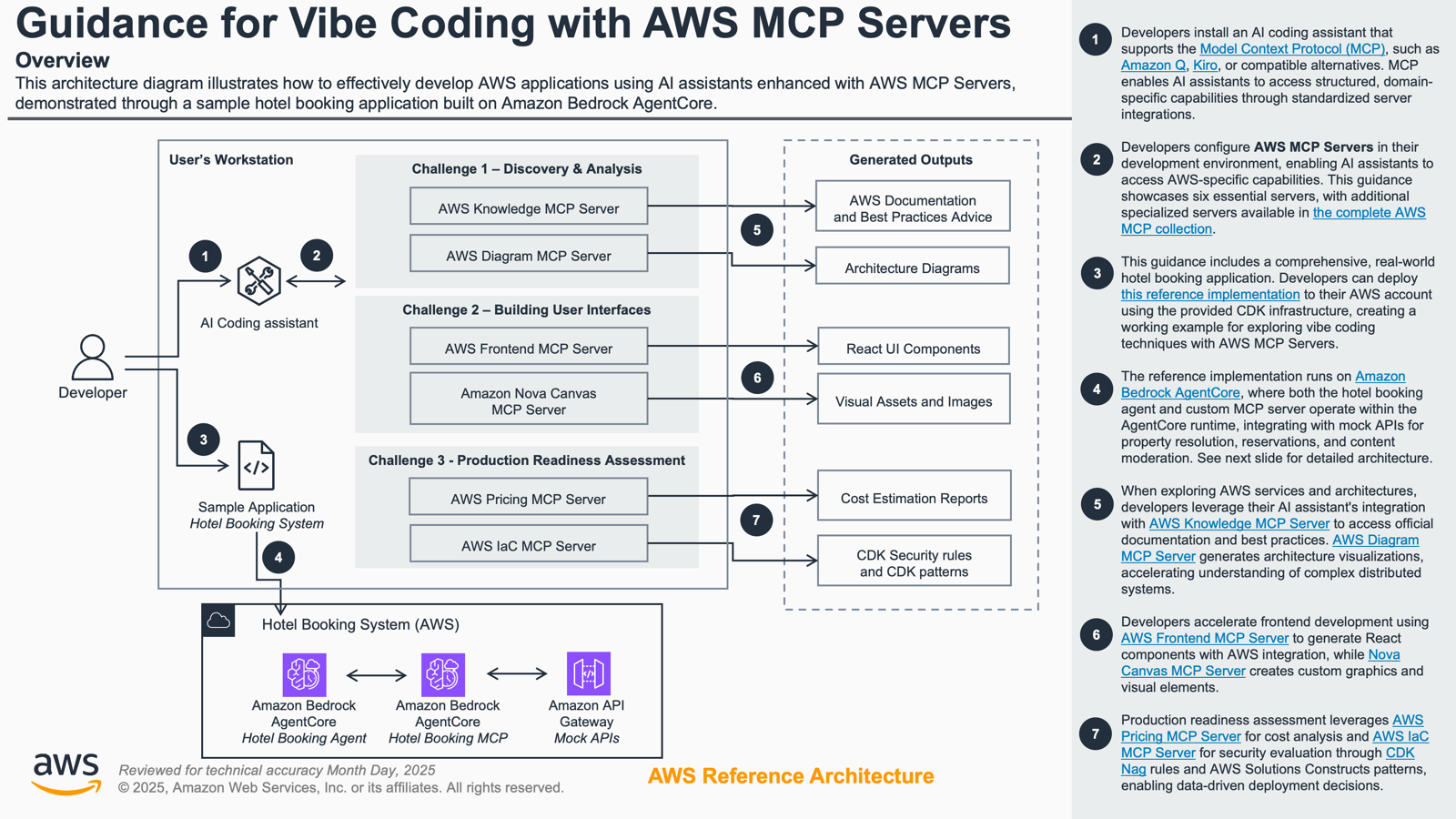
This Guidance demonstrates how to build AI-powered development workflows using Amazon Bedrock AgentCore and the Model Context Protocol (MCP). It provides a complete, deployable hotel booking agent system that showcases "vibe coding" techniques - an AI-assisted development approach that accelerates software development through intelligent code generation, discovery, and problem-solving.
The Guidance is designed as an interactive workshop where participants learn to:
Participants deploy a realistic hotel booking agent using Amazon Bedrock AgentCore and gain hands-on experience with AI development tools including Kiro, Amazon Q, and AWS MCP Servers. The skills learned can be immediately applied to production projects and shared across development teams.
This workshop leverages AWS MCP Servers, specialized MCP servers that enhance foundation model capabilities through the Model Context Protocol (MCP). MCP is an open protocol that enables seamless integration between LLM applications and external data sources and tools.
The workshop demonstrates these capabilities across three practical scenarios:
The solution implements a multi-tier architecture combining Amazon Bedrock AgentCore with serverless AWS services:
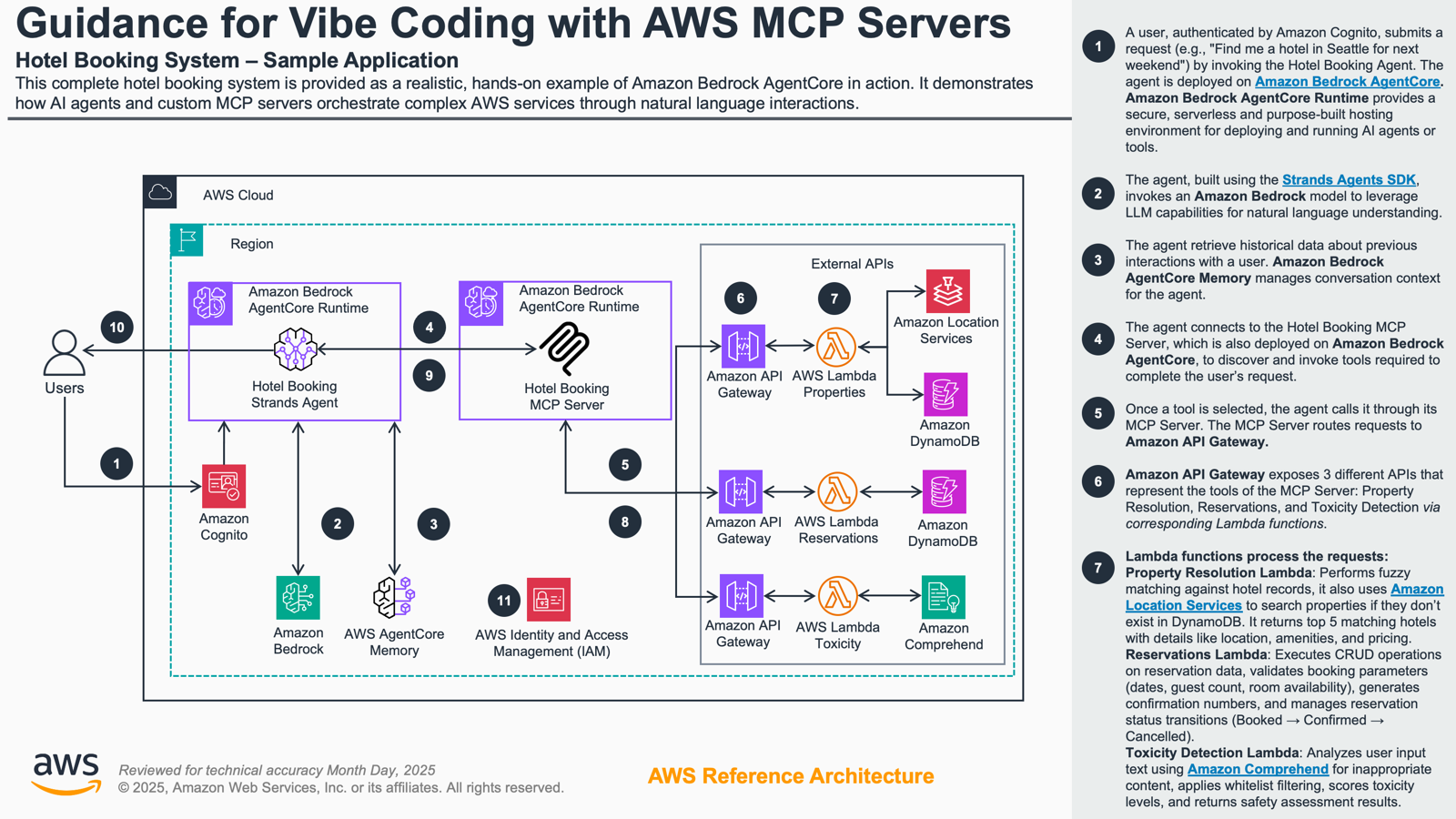
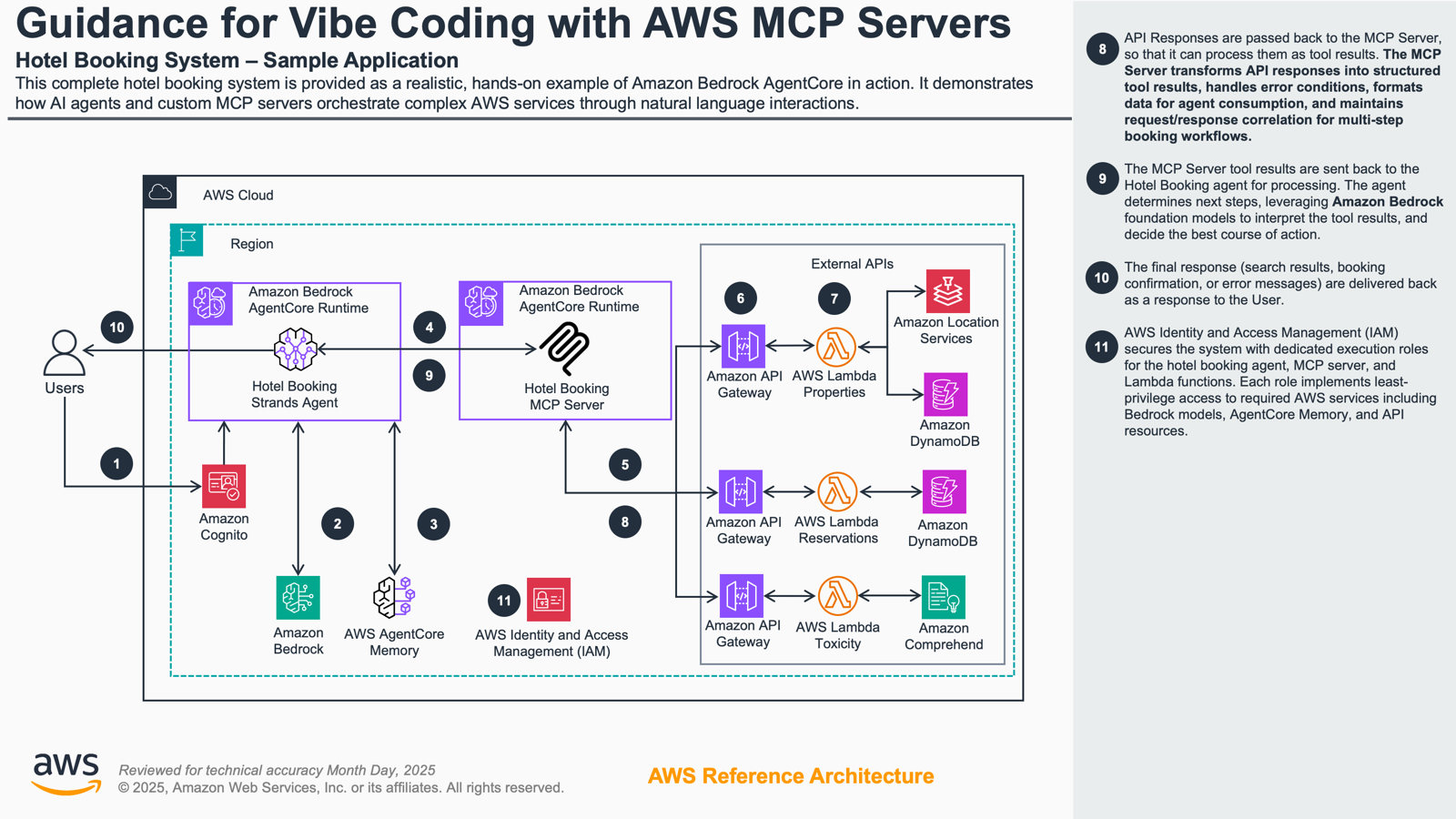
Architecture Flow:
Key Components:
You are responsible for the cost of the AWS services used while running this Guidance. As of October 2025, the cost for running this Guidance with the default settings in the US West (Oregon) Region is estimated at approximately $258 per month for continuous 24/7 operation.
Note: This estimate assumes continuous 24/7 usage with a moderately active workload. Actual costs will vary based on your specific usage patterns, interaction frequency, and data volumes.
We recommend creating a Budget through AWS Cost Explorer to help manage costs. Prices are subject to change. For full details, refer to the pricing webpage for each AWS service used in this Guidance.
The following table provides a sample cost breakdown for deploying this Guidance with the default parameters in the US West (Oregon) Region.
| AWS Service | Purpose | Monthly Cost | Note |
|---|---|---|---|
| Amazon Bedrock | Agent model invocation | $129.60 | 10K input, 10K output per hour assumption |
| Amazon Bedrock AgentCore | Hotel booking agent and MCP Server | $114.91 | 0.5 vCPU, 1 GB, 100 events per hour for short term memory |
| Amazon Comprehend | Toxicity detection API | $1.44 | Optional challenge (20 requests per hour) |
| AWS DynamoDB | Mock APIs | $1.83 | |
| AWS Lambda | Mock APIs | $0.07 | |
| Amazon ECR | AgentCore image | $0.10 | 1 GB Container Image storage |
| Amazon CloudWatch | Monitoring and logs | $10.00 | 20 GB log storage |
| Total | $257.96 |
This Guidance can be deployed in two ways:
If you're participating in an AWS-hosted workshop event, use Workshop Studio for a pre-configured environment with all prerequisites and infrastructure already set up.
Access the Workshop: Vibe Coding AI Agents with AWS MCP Servers
The Workshop Studio environment includes:
Simply follow the on-screen instructions in Workshop Studio to access your temporary AWS account and begin the workshop activities.
If you want to deploy this Guidance in your own AWS account, continue with the sections below:
This repository contains a complete Amazon Bedrock AgentCore hotel booking system with workshop materials:
├── packages/                   # Core application packages
│   ├── agentcore-agents/       # Amazon Bedrock AgentCore agents
│   │   └── hotel-booking-agent/    # Intelligent hotel booking assistant
│   ├── agentcore-mcp-servers/  # Model Context Protocol servers
│   │   └── hotel-booking/      # Hotel booking MCP server
│   └── cdk-infra-python/      # AWS CDK infrastructure
│       ├── src/stacks/        # CDK stack definitions
│       └── app.py             # CDK application entry point
└── docs/                       # Workshop documentation
    └── astro-docs/             # Participant documentation site
Your environment is completely pre-configured with all tools, dependencies, and infrastructure already deployed. Simply run pnpm docs:init to access the workshop documentation.
Minimum requirements to get started:
npm install -g pnpm
After running pnpm docs:init, follow the comprehensive Prerequisites Guide for step-by-step installation of:
These deployment instructions are optimized to work on macOS, Linux, and Windows operating systems.
Note: Amazon Bedrock AgentCore requires ARM64 container images (AWS Documentation). Docker Desktop includes built-in ARM64 emulation. For Docker Engine users, run
docker run --privileged --rm tonistiigi/binfmt --install allto enable ARM64 support.
git clone https://github.com/aws-solutions-library-samples/guidance-for-vibe-coding-with-aws-mcp-servers.git
Install project dependencies and start the workshop documentation locally:
# Install all dependencies
pnpm install

# Build and serve documentation locally (opens on localhost)
pnpm docs:init
The documentation will be available at http://localhost:4321. Open this URL and follow the detailed setup instructions in the participant guide.
Important: After starting the documentation server, navigate to:
These sections provide comprehensive step-by-step guidance for prerequisites installation, infrastructure deployment, and environment configuration. Once complete, you'll be ready to begin the workshop activities.
Verify your deployment was successful:
Check CloudFormation Stacks
# List all deployed stacks
aws cloudformation list-stacks --stack-status-filter CREATE_COMPLETE UPDATE_COMPLETE
You should see these stacks:
VibeCodingWorkshopMockApisVibeCodingWorkshopBookingAgentVibeCodingWorkshopMcpServerVerify API Endpoints
# Get stack outputs (API URLs and keys)
aws cloudformation describe-stacks \
  --stack-name VibeCodingWorkshopMockApis \
  --query 'Stacks[0].Outputs[*].[OutputKey,OutputValue]' \
  --output table
Test APIs with Bruno CLI
# Run API tests
pnpm test:apis:reservations
pnpm test:apis:toxicity
All tests should pass, confirming the APIs are functioning correctly.
Verify AgentCore Deployments
Check the AWS Console to confirm the Agent and MCP Server are listed in Amazon Bedrock AgentCore.
Once deployed, follow the workshop documentation for detailed activities:
Access Workshop Documentation
If you closed the documentation server, restart it with:
pnpm docs:init
Then open http://localhost:4321 in your browser.
Configure Your AI Development Tool
Follow the workshop documentation to configure your preferred AI tool (Kiro, Amazon Q Developer, VS Code + Cline, etc.) to connect to the deployed MCP server.
Workshop Phases
The workshop is organized into three phases:
Interact with the Agent
Use your configured AI tool to interact with the hotel booking agent through natural language conversations. The agent can:
After completing the workshop, consider these enhancements:
To avoid ongoing charges, delete all deployed resources:
Delete CDK Stacks
# Delete all stacks in reverse order
pnpm cdk destroy VibeCodingWorkshopMcpServer
pnpm cdk destroy VibeCodingWorkshopBookingAgent
pnpm cdk destroy VibeCodingWorkshopMockApis
For detailed cleanup instructions including CodeBuild cleanup, ECR cleanup, verification steps, and local environment cleanup, see the Cleanup Guide.
Q: Which AWS regions are supported?
A: This Guidance has been tested in us-west-2 (Oregon) and us-east-1 (N. Virginia). Other regions may work but are not officially supported.
Q: What are the estimated costs?
A: Cost estimates are pending. See the Cost section for details. Most workshop activities can be completed within AWS Free Tier limits.
Q: Can I use this in production?
A: This Guidance is designed as a workshop and learning tool. Not intended for production use.
Known Issues:
Python Interpreter Permission Errors
Permission denied error when running CDK commandscd packages/cdk-infra-python
rm -rf .venv
uv sync
cd ../..
Stack Does Not Exist Error
aws configure list
export AWS_PROFILE=YOUR_PROFILE_NAME
MCP Server Connection Issues
spawn uvx ENOENT error when MCP servers try to startwhich uvx and update your MCP settings file.API Tests Timeout
CDK Bootstrap Stack
Customers are responsible for making their own independent assessment of the information in this Guidance. This Guidance: (a) is for informational purposes only, (b) represents AWS current product offerings and practices, which are subject to change without notice, and (c) does not create any commitments or assurances from AWS and its affiliates, suppliers or licensors. AWS products or services are provided "as is" without warranties, representations, or conditions of any kind, whether express or implied. AWS responsibilities and liabilities to its customers are controlled by AWS agreements, and this Guidance is not part of, nor does it modify, any agreement between AWS and its customers.
Run Claude Code as an MCP server so any agent can delegate coding tasks to it
 @microsoft✓ Official
Browser automation using accessibility snapshots instead of screenshots
 @googleapis✓ Official
Google's universal MCP server supporting PostgreSQL, MySQL, MongoDB, Redis, and 10+ databases
 @github✓ Official
Official GitHub integration for repos, issues, PRs, and CI/CD workflows