

Are you the author? Sign in to claim
🏠 Manage your homelab from chat. Single binary, zero dependencies.

Your tiny homelab butler.
A single Go binary for running a small home server without babysitting it.





HomeButler helps you answer the boring but painful questions every homelab eventually creates:
No daemon required. No database. No always-on web service. Just one Go binary you can use from the terminal, scripts, a web dashboard, or AI tools.
The design goal is simple: give humans and agents a narrow, structured interface to the server. HomeButler returns readable summaries and JSON instead of asking you to trust a black-box shell session.
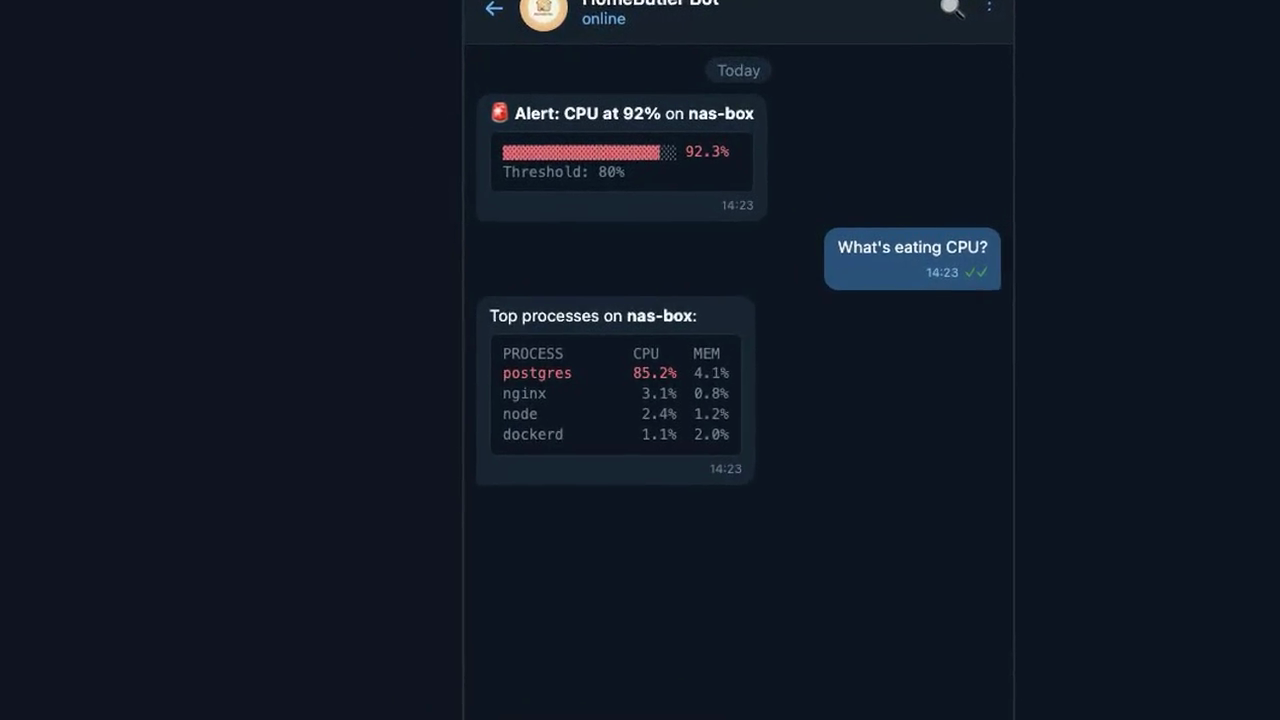
▶️ 34s demo — monitor, diagnose, and manage your homelab
# One-line install (auto-detects OS/arch)
curl -fsSL https://raw.githubusercontent.com/Higangssh/homebutler/main/install.sh | sh

# Or via Homebrew
brew install Higangssh/homebutler/homebutler

# Interactive setup — add your servers in seconds
homebutler init
Use it right away:
homebutler status                    # CPU, memory, disk, uptime
homebutler docker list               # running containers
homebutler inventory scan            # containers + ports + topology
homebutler report                    # butler-style health report + change summary
homebutler install uptime-kuma       # deploy a self-hosted app
homebutler backup drill uptime-kuma  # verify a backup actually restores
homebutler watch tui                 # terminal dashboard
homebutler serve                     # web dashboard at http://localhost:8080
Machine-readable output is available everywhere:
homebutler status --json
homebutler inventory scan --json
homebutler report --json
Self-hosting is not hard because one docker compose up is hard. It is hard because the maintenance never ends: ports collide, containers restart silently, backups look fine until restore day, and every server becomes a slightly different snowflake.
HomeButler is a small operations toolkit for that messy middle.
Those are great dashboards. HomeButler is CLI-first, scriptable, JSON-friendly, air-gap friendly, and safe to copy onto any server. Use it when you want commands you can run from a terminal, cron job, SSH session, CI script, or AI agent — especially when you care more about “what changed?” than another graph.
homebutler report
homebutler report --keep 7      # retain only the latest 7 snapshots
homebutler report --no-save     # preview without writing a snapshot
report gives you a concise butler-style summary of your homelab: current health, warnings, notable changes since the previous snapshot, and suggested next commands. On the first run, HomeButler creates a baseline under ~/.homebutler/reports/snapshots/; later runs compare against the latest snapshot. Old snapshots are pruned automatically (--keep 30 by default) so reports do not grow forever.
homebutler doctor
homebutler doctor --strict          # non-zero exit if warnings/failures are found
homebutler doctor --json            # automation / MCP friendly
doctor is a read-only preflight for the problems homelab users usually discover too late: high disk or memory usage, stopped containers, public bind ports, stale or missing backups, missing notifications, and whether report has a baseline for change detection.

homebutler install uptime-kuma— Deploy self-hosted apps in seconds. Pre-checks Docker, ports, and duplicates. Generatesdocker-compose.ymlautomatically. See all available apps →
homebutler inventory scan
homebutler inventory export --format mermaid
homebutler --json inventory scan
inventory scan gives you a quick map of what is running on a server: system health, Docker containers, app ports, and system ports. Docker-published ports are connected back to the container that owns them, so local forwarding details like Colima/Lima stay understandable.
🏠 Home Network
   Server  homelab (192.168.1.10)
   Summary ✅ 1 running · ⚪ 1 stopped · 🌍 2 public ports · 🔒 4 local ports

📦 Containers (2)
   ├─ ⚪ vaultwarden · not started
   │  └─ image vaultwarden/server:latest
   └─ ✅ api-server · running
      ├─ image my-api:latest
      └─ exposes :8080 → 8080/tcp

🌐 App Ports (1)
   └─ 🌍 :8080/tcp · api-server
Use Mermaid export when you want a diagram for GitHub, Obsidian, docs, or an AI assistant:
graph TD
  home["🏠 Home Network"] --> homelab["🖥 homelab<br/>192.168.1.10"]
  homelab --> c1["📦 api-server<br/>running"]
  homelab --> p1["🌍 :8080/tcp<br/>api-server"]
  c1 -. exposes .-> p1
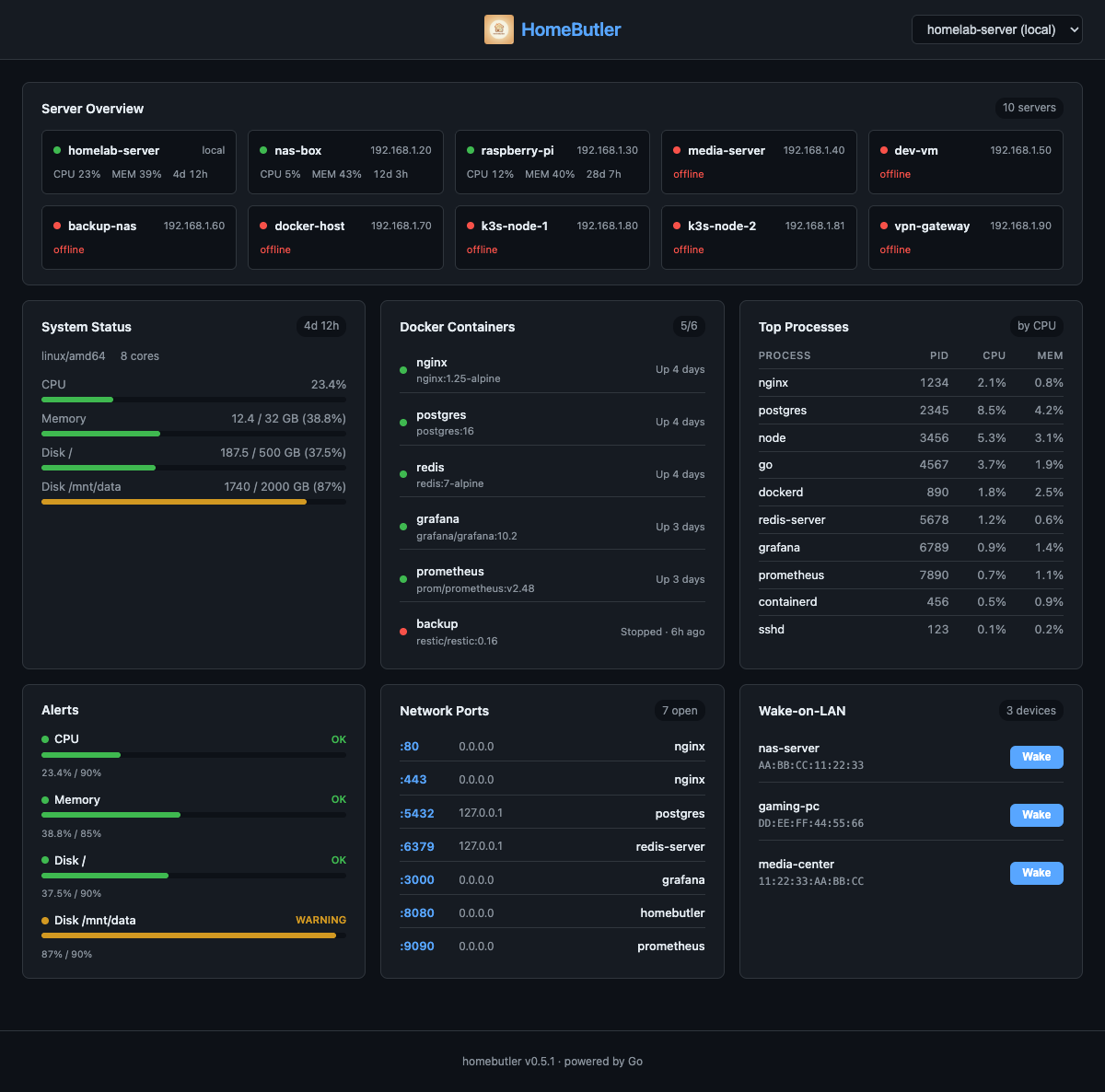
homebutler serve— A real-time web dashboard embedded in the single binary viago:embed. Monitor all your servers, Docker containers, open ports, alerts, and Wake-on-LAN devices from any browser. Dark theme, auto-refresh every 5 seconds, fully responsive.
homebutler serve              # Start on port 8080
homebutler serve --port 3000  # Custom port
homebutler serve --demo       # Demo mode with realistic sample data
Your container crashed at 3 AM — but why? homebutler watch catches it the moment it happens, saves the dying logs, figures out the cause, and tells you if it's happening over and over.
Supported backends: Docker (real-time event stream) · systemd (polling) · PM2 (polling)
homebutler watch add nginx              # Interactive: choose Docker / systemd / PM2
homebutler watch add --kind docker nginx          # or specify directly
homebutler watch add --kind systemd nginx.service
homebutler watch add --kind pm2 my-api
homebutler watch list                   # See what you're watching
homebutler watch start                  # Foreground, Ctrl+C to stop
homebutler watch start --interval 10s   # Custom poll interval (default 30s)
When a crash is detected, you'll see:
[03:14:22] INCIDENT: nginx (incident nginx-20260410-031422.581-7a2124)
  Crash: OOM — process killed by SIGKILL (oom, confidence: high)
  ⚠ FLAPPING: acute (3 restarts in short window)
homebutler watch history                # List all incidents
homebutler watch show <incident-id>     # Full details
watch show output includes:
Every incident is automatically analyzed using exit codes and log patterns:
| Signal | Exit Code | Meaning |
|---|---|---|
| SIGKILL | 137 | OOM Killer or forced kill |
| SIGSEGV | 139 | Segmentation fault (memory corruption) |
| SIGTERM | 143 | Graceful shutdown request |
| — | 1 | Application error |
| — | 0 | Clean exit (may be intentional restart) |
Log patterns like panic:, Out of memory, Connection refused, FATAL, and timeout are matched automatically to help identify the root cause.
Detects when a process is stuck in a restart loop (e.g., crash → restart → crash again):
Flapping incidents are tagged [FLAPPING] in history and highlighted in watch show.
Notifications are disabled by default, which is useful for air-gapped or closed networks where everything runs locally.
A minimal example in ~/.config/homebutler/config.yaml:
notify:
  telegram:
    bot_token: "your-bot-token"
    chat_id: "your-chat-id"

watch:
  enabled: true
  notify_on: flapping
  cooldown: 5m
  flapping:
    short_window: 10m
    short_threshold: 3
    long_window: 24h
    long_threshold: 5

alerts:
  cpu: 90
  memory: 85
  disk: 90
  rules:
    - name: cpu-spike
      metric: cpu
      threshold: 90
      action: notify
Legacy ~/.homebutler/watch/config.json is still read as a fallback for watch-specific settings, and legacy alerts.yaml notify/webhook provider settings are still accepted for older setups.
watch.enabled: true — allow watch notificationswatch.notify_on: flapping — notify only when repeated restart loops are detectedwatch.notify_on: incident — notify on every incidentwatch.notify_on: all — notify on both incidents and flappingwatch.notify_on: off — disable watch notifications without removing provider configwatch.cooldown: 5m — suppress duplicate notifications for the same event fingerprint during the cooldown windowwatch.flapping — optional advanced tuning for restart-loop detectionhomebutler watch remove nginx # Stop watching
homebutler watch check # One-shot check (no continuous monitoring)

homebutler watch tui— A terminal-based dashboard powered by Bubble Tea. Monitors all configured servers with real-time updates, color-coded resource bars, and Docker container status. No browser needed.
Use natural language when you want automation. MCP clients can call homebutler tools to check server status, list Docker containers, inspect ports, or run operational workflows. See screenshots & setup →
Deploy self-hosted apps with a single command. Each app runs via docker compose with automatic pre-checks, health verification, and clean lifecycle management.
# List available apps
homebutler install list

# Install (default port)
homebutler install uptime-kuma

# Install with custom port
homebutler install uptime-kuma --port 8080

# Install jellyfin with media directory
homebutler install jellyfin --media /mnt/movies

# Check status
homebutler install status uptime-kuma

# Stop (data preserved)
homebutler install uninstall uptime-kuma

# Stop + delete everything
homebutler install purge uptime-kuma
~/.homebutler/apps/
  └── uptime-kuma/
       ├── docker-compose.yml   ← auto-generated, editable
       └── data/                ← persistent data (bind mount)
docker-compose.yml you can inspect and customizeuninstall stops containers but keeps your data; purge removes everything| App | Default Port | Description | Notes |
|---|---|---|---|
uptime-kuma | 3001 | Self-hosted monitoring tool | |
plex | 32400 | Plex Media Server | --media /path to mount media dir |
vaultwarden | 8080 | Bitwarden-compatible password manager | |
filebrowser | 8081 | Web-based file manager | |
it-tools | 8082 | Developer utilities (JSON, Base64, Hash, etc.) | |
gitea | 3002 | Lightweight self-hosted Git service | |
jellyfin | 8096 | Media system (movies, TV, music) | --media /path to mount media dir |
homepage | 3010 | Modern homelab dashboard | |
stirling-pdf | 8083 | All-in-one PDF tool (merge, split, convert, OCR) | |
speedtest-tracker | 8084 | Internet speed test with historical graphs | |
mealie | 9925 | Recipe manager and meal planner | |
pi-hole | 8088 | DNS ad blocking | ⚠️ Uses port 53 (DNS), NET_ADMIN capability |
adguard-home | 3000 | DNS ad blocker and privacy | ⚠️ Uses port 53 (DNS) |
portainer | 9443 | Docker management GUI | ⚠️ Mounts Docker socket (HTTPS) |
nginx-proxy-manager | 81 | Reverse proxy with SSL and web UI | ⚠️ Uses ports 80/443 |
# Jellyfin: mount your media library
homebutler install jellyfin --media /mnt/movies

# Pi-hole / AdGuard: DNS ad blocking (port 53 required)
homebutler install pi-hole
# ⚠️ If port 53 is in use (Linux): sudo systemctl disable --now systemd-resolved

# Portainer: Docker GUI (mounts docker socket)
homebutler install portainer
# Access via HTTPS: https://localhost:9443

# Nginx Proxy Manager: reverse proxy
homebutler install nginx-proxy-manager
# Default login: admin@example.com / changeme (change immediately!)

# Any app: custom port
homebutler install <app> --port 9999
Want more apps? Open an issue or see Contributing.
homebutler <command> [flags]

Commands:
  status              System status (CPU, memory, disk, uptime)
  doctor              Diagnose health, exposure, backups, and readiness
  docker list         List running containers
  install <app>       Install a self-hosted app (docker compose)
  alerts              Show current alert status
  watch tui           TUI dashboard (monitors all configured servers)
  watch add/list/remove  Manage watched containers
  watch check/start   One-shot or continuous restart detection
  watch history/show  Browse restart history
  serve               Web dashboard (browser-based, go:embed)

Flags:
  --json              JSON output (default: human-readable)
  --server <name>     Run on a specific remote server
  --all               Run on all configured servers in parallel
  --port <number>     Port for serve command (default: 8080)
  --config <path>     Config file (auto-detected, see Configuration)
Run homebutler --help for all commands.
Commands:
  init                Interactive setup wizard
  status              System status (CPU, memory, disk, uptime)
  doctor              Diagnose health, exposure, backups, and readiness
  watch tui           TUI dashboard (monitors all configured servers)
  watch add <name>    Add container to restart watch list
  watch list          Show watched containers
  watch remove <name> Remove container from watch list
  watch check         One-shot restart check
  watch start         Continuous restart monitoring loop
  watch history       List restart history (alias: incidents)
  watch show <id>     Show restart details with logs
  serve               Web dashboard (browser-based, go:embed)
  docker list         List running containers
  docker restart <n>  Restart a container
  docker stop <n>     Stop a container
  docker logs <n>     Show container logs
  wake <name>         Send Wake-on-LAN packet
  ports               List open ports with process info
  ps                  Show top processes (alias: processes)
  ps --sort mem       Sort by memory instead of CPU
  ps --limit 20       Show top 20 (default: 10, 0 = all)
  network scan        Discover devices on LAN
  alerts              Show current alert status
  alerts --watch      Continuous monitoring with real-time alerts
  trust <server>      Register SSH host key (TOFU)
  backup              Backup Docker volumes, compose files, and env
  backup list         List existing backups
  backup drill <app>  Verify backup restores correctly (isolated)
  backup drill --all  Verify all apps in backup
  restore <archive>   Restore from a backup archive
  upgrade             Upgrade local + all remote servers to latest
  deploy              Install homebutler on remote servers
  install <app>       Install a self-hosted app (docker compose)
  install list        List available apps
  install status <a>  Check installed app status
  install uninstall   Stop app (keep data)
  install purge       Stop app + delete all data
  mcp                 Start MCP server (JSON-RPC over stdio)
  version             Print version

Flags:
  --json              JSON output (default: human-readable)
  --server <name>     Run on a specific remote server
  --all               Run on all configured servers in parallel
  --port <number>     Port for serve command (default: 8080)
  --demo              Run serve with realistic demo data
  --watch             Continuous monitoring mode (alerts command)
  --interval <dur>    Watch interval, e.g. 30s, 1m (default: 30s)
  --config <path>     Config file (auto-detected, see Configuration)
  --local             Upgrade only the local binary (skip remote servers)
  --local <path>      Use local binary for deploy (air-gapped)
  --service <name>    Target a specific Docker service (backup/restore)
  --to <path>         Custom backup destination directory
  --archive <path>    Specific backup archive for drill
  --all               Verify all supported apps (backup drill)
homebutler serve starts an embedded web dashboard — no Node.js, no Docker, no extra dependencies.
homebutler serve                # http://localhost:8080
homebutler serve --port 3000    # custom port
homebutler serve --demo         # demo mode with sample data
One-command Docker backup — volumes, compose files, and env variables.
homebutler backup                          # backup everything
homebutler backup --service jellyfin       # specific service
homebutler backup --to /mnt/nas/backups/   # custom destination
homebutler backup list                     # list backups
homebutler restore ./backup.tar.gz         # restore
⚠️ Database services should be paused before backup for data consistency.
📖 Full backup documentation → — how it works, archive structure, security notes.
alerts still exists for CPU, memory, and disk threshold checks, but it is an advanced flow and not the recommended first step for new users.
homebutler alerts --watch                  # default: 30s interval
homebutler alerts --watch --interval 10s   # check every 10 seconds
homebutler alerts history                  # view alert history
homebutler notify test                     # test your notification channels
Default thresholds: CPU 90%, Memory 85%, Disk 90%. Start with watch, then add alerts only if you specifically want threshold-based checks.
"Having a backup" and "being able to restore" are different things.
Backup Drill boots your backup in an isolated Docker environment and verifies the app actually responds — like a fire drill for your data.
homebutler backup drill uptime-kuma        # verify one app
homebutler backup drill --all              # verify all apps
homebutler backup drill --json             # machine-readable output
homebutler backup drill --archive ./file   # use a specific backup
What happens:
tar validation)🔍 Backup Drill — uptime-kuma
📦 Backup: ~/.homebutler/backups/backup_2026-04-04_1711.tar.gz
📏 Size: 18.6 MB
🔐 Integrity: ✅ tar valid (8 files)
🚀 Boot: ✅ container started in 0s
🌐 Health: ✅ HTTP 200 on port 58574
⏱️ Total: 2s
✅ DRILL PASSED
Zero risk — runs in a completely isolated environment. Your running services are never touched.
Supports health checks for: nginx-proxy-manager, vaultwarden, uptime-kuma, pi-hole, gitea, jellyfin, plex, portainer, homepage, adguard-home.
homebutler init # interactive setup wizard
📖 Configuration details → — config file locations, watch/notify options, and advanced alert thresholds.
Manage multiple servers from a single machine over SSH.
homebutler status --server rpi     # query specific server
homebutler status --all            # query all in parallel
homebutler deploy --server rpi     # install on remote server
homebutler upgrade                 # upgrade all servers
📖 Multi-server setup → — SSH auth, config examples, deploy & upgrade.
Built-in MCP server — manage your homelab from any AI tool with natural language.
{
  "mcpServers": {
    "homebutler": {
      "command": "npx",
      "args": ["-y", "homebutler@latest"]
    }
  }
}
Works with Claude Desktop, ChatGPT, Cursor, Windsurf, and any MCP client.
📖 MCP server setup → — supported clients, available tools, agent skills.
brew install Higangssh/homebutler/homebutler
Automatically installs to PATH. Works on macOS and Linux.
curl -fsSL https://raw.githubusercontent.com/Higangssh/homebutler/main/install.sh | sh
Auto-detects OS/architecture, downloads the latest release, and installs to PATH.
npm install -g homebutler
Downloads the Go binary automatically. Use npx -y homebutler@latest to run without installing globally.
go install github.com/Higangssh/homebutler@latest
git clone https://github.com/Higangssh/homebutler.git
cd homebutler
make build
rm $(which homebutler)           # Remove binary
rm -rf ~/.config/homebutler      # Remove config (optional)
Goal: Engineers manage servers from chat — not SSH.
Alert fires → AI diagnoses → AI fixes → you get a summary on your phone.
homebutler is the tool layer in an AI ChatOps stack. It doesn't care what's above it — use any chat platform, any AI agent, or just your terminal.
┌──────────────────────────────────────────────────┐
│  Layer 3 — Chat Interface                        │
│  Telegram · Slack · Discord · Terminal · Browser │
│  (Your choice — homebutler doesn't touch this)   │
└──────────────────────┬───────────────────────────┘
                       │
┌──────────────────────▼───────────────────────────┐
│  Layer 2 — AI Agent                              │
│  OpenClaw · LangChain · n8n · Claude Desktop     │
│  (Understands intent → calls the right tool)     │
└──────────────────────┬───────────────────────────┘
                       │  CLI exec or MCP (stdio)
┌──────────────────────▼───────────────────────────┐
│  Layer 1 — Tool (homebutler)       ← YOU ARE HERE │
│                                                   │
│  ┌─────────┐  ┌─────────┐  ┌─────────┐           │
│  │   CLI   │  │   MCP   │  │   Web   │           │
│  │ stdout  │  │  stdio  │  │  :8080  │           │
│  └────┬────┘  └────┬────┘  └────┬────┘           │
│       └────────────┼────────────┘                 │
│                    ▼                              │
│             internal/*                            │
│   system · docker · ports · network               │
│   wake · alerts · remote (SSH)                    │
└───────────────────────────────────────────────────┘
Three interfaces, one core:
| Interface | Transport | Use case |
|---|---|---|
| CLI | Shell stdout/stderr | Terminal, scripts, AI agents via exec |
| MCP | JSON-RPC over stdio | Claude Desktop, ChatGPT, Cursor, any MCP client |
| Web | HTTP (go:embed) | Browser dashboard, on-demand with homebutler serve |
All three call the same internal/ packages — no code duplication.
homebutler is Layer 1. Swap Layer 2 and 3 to fit your stack:
homebutler status (no agent needed)subprocess.run(["homebutler", "status", "--json"])No ports opened by default. CLI and MCP use stdin/stdout only. The web dashboard is opt-in (homebutler serve, binds 127.0.0.1).
Now: CLI + MCP + Web dashboard — you ask, it answers.
Goal: Full AI ChatOps — infrastructure that manages itself.
Contributions welcome! Please open an issue first to discuss what you'd like to change.
40+ tools for querying dashboards, alerts, datasources, and logs in Grafana
Run Claude Code as an MCP server so any agent can delegate coding tasks to it
 @microsoft✓ Official
Browser automation using accessibility snapshots instead of screenshots
 @googleapis✓ Official
Google's universal MCP server supporting PostgreSQL, MySQL, MongoDB, Redis, and 10+ databases