

Are you the author? Sign in to claim
MCP Server for IBM Decision Intelligence to extend AI experience with decisioning capabilities



flowchart LR
   client("AI Assistant <br><br>(Claude, Watsonx Orchestrate, etc.)") -- MCP --> server("Decision Intelligence<br>MCP Server")
   server -- HTTPS --> runtime("IBM Decision Intelligence <br>or IBM DI CMS <br><br>Decision Runtime")
This Model Context Protocol (MCP) server empowers AI assistants by accessing decisions from IBM Decision Intelligence or IBM Decision Intelligence Client Managed Software.
The MCP server is available as an npm package in the free npm registry at https://www.npmjs.com/package/di-mcp-server.
It supports both STDIO and streamable HTTP transports for local or remote deployments for supporting any MCP clients.
You can use the MCP server available in the npm registry. To develop your own MCP server or contribute to the development, see Developing the MCP server.
You can run the MCP server with npx to expose each operation of the last deployed version of a decision service as an MCP tool.
Create the MCP server by using decisions that are deployed in Decision Intelligence:
npx -y di-mcp-server --di-apikey <YOUR_DI_API_KEY> --url https://mytenant.decision-prod-us-south.decision.saas.ibm.com/ads/runtime/api/v1
Create the MCP server by using decisions that are deployed in IBM DI CMS that uses the Zen API key authentication:
npx -y di-mcp-server --authentication-mode zenapikey --zen-username <YOUR_ZEN_USERNAME> --zen-apikey <YOUR_ZEN_API_KEY> --url https://myads-hostname/ads/runtime/api/v1
Create the MCP server by using decisions that are deployed in IBM DI CMS that uses the basic authentication:
npx -y di-mcp-server --authentication-mode basic --basic-username <YOUR_USERNAME> --basic-password <YOUR_PASSWORD> --url https://myads-hostname/ads/runtime/api/v1
Syntax of the command line:
npx -y di-mcp-server [--authentication-mode <AUTHENTICATION_MODE>] <CREDENTIALS> --url <RUNTIME_BASE_URL> [--transport <TRANSPORT>] [--deployment-spaces <DEPLOYMENT_SPACES>] [--decision-service-ids <DECISION_SERVICE_IDS>] [--decision-service-poll-interval <DECISION_SERVICE_POLL_INTERVAL>]
where
AUTHENTICATION_MODE (optional) is the authentication mode to access the decision runtime; either diapikey (default), zenapikey, or basic respectively for authenticating with the Decision Intelligence API key, Zen API key, or basic credentials (i.e. username and password)CREDENTIALS is one of the following options, depending on the chosen authentication mode:
--di-apikey <DI_API_KEY> where DI_API_KEY is the API key to access the decision runtime for Decision Intelligence.--zen-username <ZEN_USERNAME> --apikey <ZEN_API_KEY> where ZEN_USERNAME and ZEN_API_KEY are the Zen API key credentials to access the decision runtime for IBM DI CMS (see Authorizing HTTP requests by using the Zen API key)--basic-username <BASIC_USERNAME> --basic-password <BASIC_PASSWORD> where BASIC_USERNAME and BASIC_PASSWORD are the basic authentication credentials to connect to the decision runtime for IBM DI CMS.RUNTIME_BASE_URL is the base URL of the decision runtime REST API. For Decision Intelligence, its pattern is: https://<TENANT_NAME>.decision-prod-us-south.decision.saas.ibm.com/ads/runtime/api/v1 where TENANT_NAME is the name of the tenant.TRANSPORT (optional) is the transport protocol, either stdio (default) or http.DEPLOYMENT_SPACES (optional) is a comma-separated list of deployment spaces to scan (defaults to development).DECISION_SERVICE_IDS (optional) If defined, comma-separated list of decision service ids to be exposed as toolsDECISION_SERVICE_POLL_INTERVAL (optional) is the interval in seconds for polling decision services (default: 30, minimum: 1)The following environment variables can be used in addition to the command line options.
| CLI Option | Environment Variable | Description |
|---|---|---|
| --authentication-mode | AUTHENTICATION_MODE | (Optional) Authentication mode to connect to the decision runtime: diapikey (default), zenapikey or basic |
| --di-apikey | DI_APIKEY | Decision Intelligence API key |
| --zen-username | ZEN_USERNAME | Zen username |
| --zen-apikey | ZEN_APIKEY | Zen API key |
| --basic-username | BASIC_USERNAME | Basic authentication username |
| --basic-password | BASIC_PASSWORD | Basic authentication password |
| --decision-service-ids | DECISION_SERVICE_IDS | (Optional) Comma-separated list of decision services (default: fetch all decision services) |
| --mcp-groups | N/A | (Optional) Only decision services with the metadata 'mcpGroups' set to one of the value of this comma-separated list will be exposed |
| --deployment-spaces | DEPLOYMENT_SPACES | (Optional) Comma-separated list of deployment spaces to scan (default: development) |
| --debug | DEBUG | When the value is true, the debug messages are written to the stderr of the MCP server |
| --decision-service-poll-interval | DECISION_SERVICE_POLL_INTERVAL | (Optional) Interval in seconds for polling decision services (default: 30, minimum: 1) |
| --transport | TRANSPORT | (Optional) Transport protocol: stdio (default) or http |
| --url | URL | Base URL of the decision runtime |
The MCP server for Decision Intelligence extends its capability by enabling AI applications, such as IBM watsonx Orchestrate and Claude, to discover and execute deployed decision services.
The article Enrich your watsonx Orchestrate chat experience with IBM Decision Intelligence demontrates how to integrate the capability to discover and execute decisions in an IBM watsonx Orchestrate agent by using the Decision Intelligence MCP server.
See the IBM watsonx Orchestrate integration page for passing sensitive configuration settings to the IBM Decision Intelligence MCP Server.
You can integrate decision services into Claude Desktop by adding the MCP server.
Locate the Claude Desktop configuration file.
Find your Claude configuration directory:
~/Library/Application\ Support/Claude/claude_desktop_config.json%APPDATA%\Claude\claude_desktop_config.json${HOME}/.config/Claude/claude_desktop_config.jsonAdd the MCP server configuration to the configuration file.
In the configuration directory, edit or create claude_desktop_config.json:
{
    [..]
    "mcpServers": {
        "di-mcp-server": {
            "command": "npx",
            "args": [
                "-y",
                "di-mcp-server",
                "--di-apikey",
                "<APIKEY>",
                "--url",
                "https://<TENANT_NAME>.decision-prod-us-south.decision.saas.ibm.com/ads/runtime/api/v1"
            ]
        }
    }
    [..]
}
Alternatively, you can use the APIKEY and URL environment variables to respectively specify the API key and the base URL of the decision runtime REST API:
{
    [..]
    "mcpServers": {
        "di-mcp-server": {
            "command": "npx",
            "args": ["-y", "di-mcp-server"],
            "env": {
                "DI_APIKEY": "<APIKEY>",
                "URL": "https://<TENANT_NAME>.decision-prod-us-south.decision.saas.ibm.com/ads/runtime/api/v1"
            }
        }
    }
    [..]
}
For more information, see https://modelcontextprotocol.io/quickstart/user.
You can integrate decision services into Cursor by adding the MCP server.
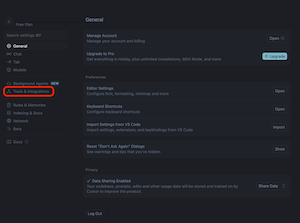
In Cursor, click the cog wheel icon to open the Cursor settings.
Click Tools & Integration in the settings categories that are listed on the left.
Click + New MCP Server, to open Cursor's mcp.json configuration file.
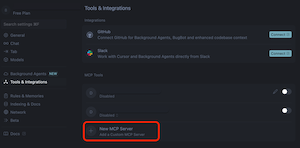
Add a new MCP server entry.
As for Claude Desktop, you can specify the API key and base URL of the decision runtime REST API using with one of the following methods:
{
    [..]
    "mcpServers": {
        "di-mcp-server": {
            "command": "npx",
            "args": [
                "-y",
                "di-mcp-server",
                "--di-apikey",
                "<APIKEY>",
                "--url",
                "https://<TENANT_NAME>.decision-prod-us-south.decision.saas.ibm.com/ads/runtime/api/v1"
            ]
        }
    }
    [..]
}
{
    [..]
    "mcpServers": {
        "di-mcp-server": {
            "command": "npx",
            "args": ["-y", "di-mcp-server"],
            "env": {
                "DI_APIKEY": "<APIKEY>",
                "URL": "https://<TENANT_NAME>.decision-prod-us-south.decision.saas.ibm.com/ads/runtime/api/v1"
            }
        }
    }
    [..]
}
For more information, see Installing MCP servers in the Cursor documentation.
When you integrate with MCP hosts, you might need to customize the tool names to meet specific requirements or limitations, such as:
By default, tool names are generated in the following way:
decisionServiceName operationIDdecisionServiceName_operationIDdecisionServiceID_operationID if decisionServiceName_operationID already existsIf the default naming strategy doesn't meet the requirements of your MCP hosts, you can specify custom tool names by setting the mcpToolName.OPERATION_ID decision metadata:
{
  "map": {
    [..]
    "mcpToolName.OPERATION_ID": {
      "name": "mcpToolName.OPERATION_ID",
      "kind": "PLAIN",
      "readOnly": false,
      "value": "YourCustomToolName"
    }
    [..]
  }
}
where
OPERATION_ID is the operation unique identifierYourCustomToolName is the desired tool name for the operationBy default, the MCP server exposes all decision services from the specified deployment spaces as tools. You can filter which decision services are exposed using one of two methods:
Use the --decision-service-ids option to expose only specific decision services by their unique identifiers.
The decision service ID is defined in the decisionServiceId metadata of the deployed decision service.
Example configuration:
{
    "mcpServers": {
        "di-mcp-server": {
            "command": "npx",
            "args": [
                "-y",
                "di-mcp-server",
                "--di-apikey",
                "<APIKEY>",
                "--url",
                "https://<TENANT_NAME>.decision-prod-us-south.decision.saas.ibm.com/ads/runtime/api/v1",
                "--decision-service-ids",
                "loan-approval,credit-scoring"
            ]
        }
    }
}
Use the --mcp-groups option to expose decision services that belong to specific logical groups. This is useful for organizing decision services by domain, team, or use case.
The MCP groups are defined in the mcpGroups metadata of the deployed decision service as a comma-separated list.
Example configuration:
{
    "mcpServers": {
        "di-mcp-server": {
            "command": "npx",
            "args": [
                "-y",
                "di-mcp-server",
                "--di-apikey",
                "<APIKEY>",
                "--url",
                "https://<TENANT_NAME>.decision-prod-us-south.decision.saas.ibm.com/ads/runtime/api/v1",
                "--mcp-groups",
                "finance,risk-management"
            ]
        }
    }
}
For information about how the MCP server automatically detects and notifies clients of tool changes, see Dynamic Tool Updates.
flowchart LR
    github["di-mcp-server github repository"] -- publish --> registry
    registry["NPM registry"] -- npx -y di-mcp-server--> server

    subgraph MCP Host
        client["MCP Client"] <-- MCP/STDIO --> server("DI MCP Server")
    end

    server -- HTTPS --> runtime("Decision Runtime")

    subgraph id["Decision Intelligence<br>or Decision Intelligence Client Managed Software"]
        runtime
    end


    client <-- MCP/HTTP --> server2("DI MCP Server") -- HTTPS --> runtime
Copyright contributors to the IBM Decision Intelligence / Decision Intelligence Client Managed Software MCP Server project

Licensed under the Apache License, Version 2.0 (the "License"); you may not use this file except in compliance with the License.You may obtain a copy of the License at http://www.apache.org/licenses/LICENSE-2.0

Unless required by applicable law or agreed to in writing, software distributed under the License is distributed on an "AS IS" BASIS, WITHOUT WARRANTIES OR CONDITIONS OF ANY KIND, either express or implied. See the License for the specific language governing permissions and limitations under the License.
Run Claude Code as an MCP server so any agent can delegate coding tasks to it
 @microsoft✓ Official
Browser automation using accessibility snapshots instead of screenshots
 @googleapis✓ Official
Google's universal MCP server supporting PostgreSQL, MySQL, MongoDB, Redis, and 10+ databases
 @github✓ Official
Official GitHub integration for repos, issues, PRs, and CI/CD workflows
