

Are you the author? Sign in to claim
Apple Icon Composer CLI & MCP server: create and manipulate .icon bundles and images with Liquid Glass rendering

CLI and MCP server for creating images, icons, and logos with Liquid Glass effects (iOS 26+). Not affiliated with Apple .





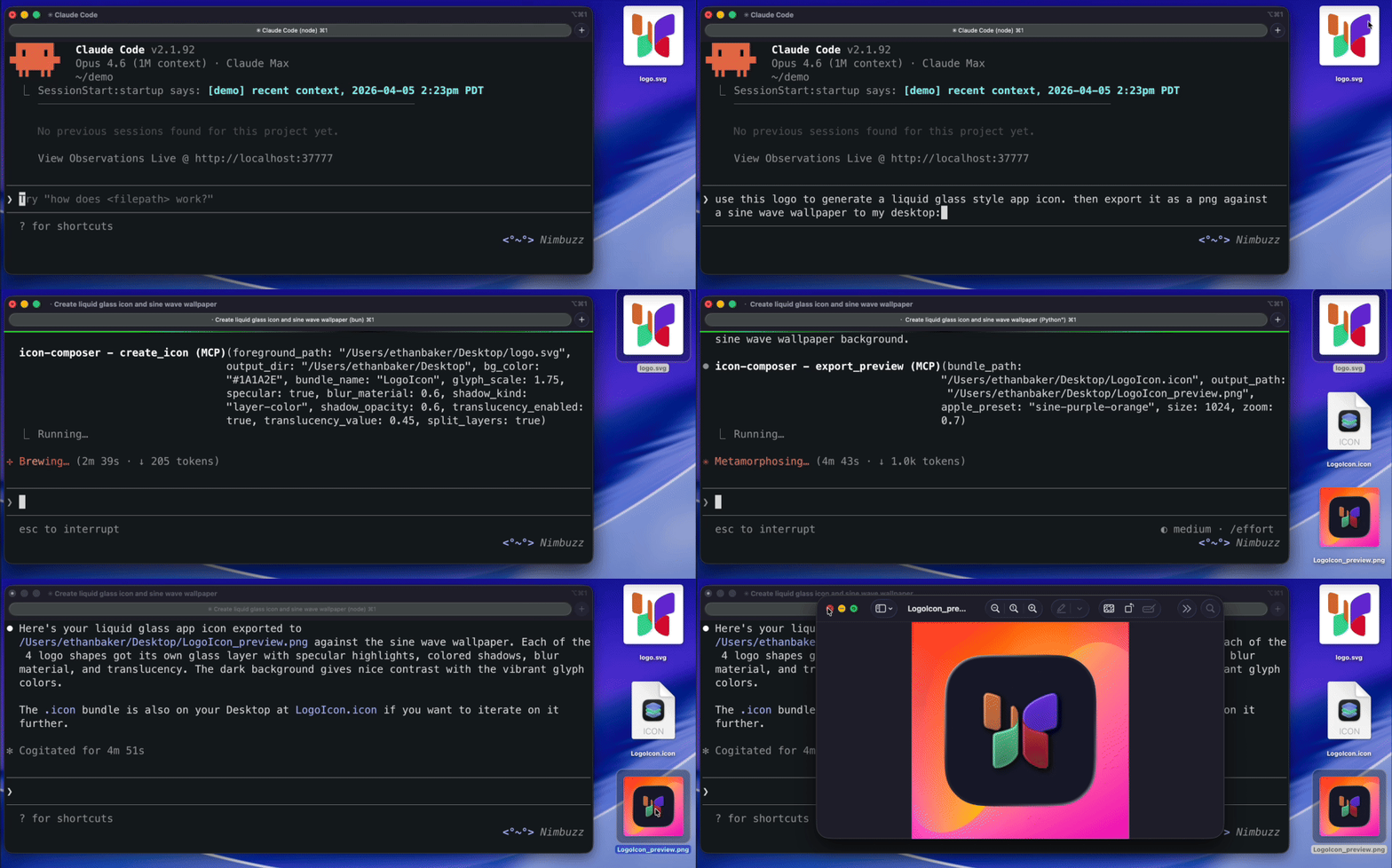
.icon bundles programmatically from PNG or SVG glyphs Claude Code
claude mcp add icon-composer -- npx -y icon-composer-mcp
 Claude Desktop
Add to ~/Library/Application Support/Claude/claude_desktop_config.json:
{
  "mcpServers": {
    "icon-composer": {
      "command": "npx",
      "args": ["-y", "icon-composer-mcp"]
    }
  }
}

Add to .cursor/mcp.json in your project root (or ~/.cursor/mcp.json for global):
{
  "mcpServers": {
    "icon-composer": {
      "command": "npx",
      "args": ["-y", "icon-composer-mcp"]
    }
  }
}
The server will appear in Cursor Settings > MCP Servers. No restart required.
 VS Code
Add to .vscode/mcp.json in your project root (or open Command Palette > MCP: Open User Configuration for global):
Note: VS Code uses
"servers"(not"mcpServers") and requires a"type"field.
{
  "servers": {
    "icon-composer": {
      "type": "stdio",
      "command": "npx",
      "args": ["-y", "icon-composer-mcp"]
    }
  }
}
You'll see Start/Stop/Restart buttons inline in the editor. First launch will prompt a trust confirmation.

First, enable MCP in Windsurf Settings > Cascade > Model Context Protocol (MCP).
Then add to ~/.codeium/windsurf/mcp_config.json:
{
  "mcpServers": {
    "icon-composer": {
      "command": "npx",
      "args": ["-y", "icon-composer-mcp"]
    }
  }
}
Press the refresh button in Windsurf settings to load the server.
The server uses stdio transport. Most MCP clients use this config format:
{
  "mcpServers": {
    "icon-composer": {
      "command": "npx",
      "args": ["-y", "icon-composer-mcp"]
    }
  }
}
Or run the server directly:
npx -y icon-composer-mcp
npm install -g icon-composer-mcp
icon-composer --help

.icon bundle — sets background fill, layer scale, and glass effects.icon bundle for Xcodebrew install --cask icon-composer
Run icon-composer doctor to check your setup.
| Command | Description |
|---|---|
create | Create a new .icon bundle from a foreground image |
add-layer | Add a layer to an existing bundle |
remove | Remove a layer or group |
inspect | Read and display bundle contents |
glass | Configure Liquid Glass effects on a group |
appearance | Set dark/tinted mode overrides |
fill | Set background fill (solid, gradient, automatic, none) |
position | Set layer/group scale and offset |
fx | Toggle all glass effects on/off |
preview | Export a preview PNG (Liquid Glass or flat) |
render | Render pixel-perfect Liquid Glass via ictool |
export-marketing | Export flat 1024x1024 PNG for App Store Connect (no alpha) |
doctor | Check system setup and dependencies |
create — Create a new .icon bundle
icon-composer create <foreground_path> <output_dir> --bg-color <hex> [options]
| Option | Default | Description |
|---|---|---|
--bg-color <hex> | required | Background color (e.g. "#0A66C2") |
--bundle-name <name> | AppIcon | Bundle name (without .icon extension) |
--dark-bg-color <hex> | — | Dark mode background color |
--glyph-scale <n> | 1.0 | Glyph scale (1.0 = standard ~65% of icon area) |
--specular / --no-specular | true | Specular highlight |
--shadow-kind <kind> | layer-color | Shadow type: neutral, layer-color, none |
--shadow-opacity <n> | 0.5 | Shadow opacity (0–1) |
--blur-material <n> | — | Blur material value (0–1) |
--translucency-enabled | false | Enable translucency gradient |
--translucency-value <n> | 0.4 | Translucency amount (0–1) |
Output: Creates <output_dir>/<bundle_name>.icon/ containing icon.json manifest and Assets/ directory.
add-layer — Add a layer to an existing bundle
icon-composer add-layer <bundle_path> <image_path> --name <name> [options]
| Option | Default | Description |
|---|---|---|
--name <name> | required | Layer name |
--group-index <n> | 0 | Target group index |
--create-group | false | Create a new group for this layer |
--opacity <n> | 1.0 | Layer opacity (0–1) |
--scale <n> | 1.0 | Layer scale |
--offset-x <n> | 0 | X offset in points |
--offset-y <n> | 0 | Y offset in points |
--blend-mode <mode> | normal | Blend mode (e.g. multiply, screen, overlay) |
--glass / --no-glass | true | Participate in Liquid Glass effects |
Supported formats: .png, .jpg, .jpeg, .svg, .webp, .heic, .heif
remove — Remove a layer or group
icon-composer remove <bundle_path> --target <layer|group> --group-index <n> [--layer-index <n>]
inspect — Read and display bundle contents
icon-composer inspect <bundle_path>
Output: Prints the full manifest JSON and lists all assets with sizes.
glass — Configure Liquid Glass effects
icon-composer glass <bundle_path> [options]
| Option | Description |
|---|---|
--group-index <n> | Target group (default: 0) |
--specular / --no-specular | Specular highlight |
--blur-material <n> | Blur amount (0–1) |
--shadow-kind <kind> | neutral, layer-color, or none |
--shadow-opacity <n> | Shadow opacity (0–1) |
--translucency-enabled / --no-translucency-enabled | Translucency toggle |
--translucency-value <n> | Translucency amount (0–1) |
--opacity <n> | Group opacity (0–1) |
--blend-mode <mode> | Group blend mode |
--lighting <type> | combined or individual |
appearance — Set dark/tinted mode overrides
icon-composer appearance <bundle_path> --target <fill|group|layer> --appearance <dark|tinted> [options]
| Option | Description |
|---|---|
--target <type> | fill (background color), group (glass effects), or layer (individual layer) |
--appearance <mode> | dark or tinted |
--group-index <n> | Group index (for target=group or target=layer) |
--layer-index <n> | Layer index within the group (required when target=layer) |
--bg-color <hex> | Background color for this appearance |
--specular / --no-specular | Specular for this appearance |
--shadow-kind <kind> | Shadow type for this appearance |
--shadow-opacity <n> | Shadow opacity for this appearance |
--opacity <n> | Opacity for this appearance |
--blur-material <n> | Blur material value (0–1) for this appearance |
--translucency-enabled / --no-translucency-enabled | Translucency toggle for this appearance |
--translucency-value <n> | Translucency amount (0–1) for this appearance |
--hidden / --no-hidden | Hidden state for this appearance |
--blend-mode <mode> | Blend mode for this appearance (target=layer) |
--fill-color <hex> | Fill color for this appearance (target=layer) |
--position-scale <n> | Position scale for this appearance |
--position-offset-x <n> | Position X offset for this appearance |
--position-offset-y <n> | Position Y offset for this appearance |
fill — Set background fill
icon-composer fill <bundle_path> --type <solid|gradient|automatic|none> [options]
| Option | Description |
|---|---|
--type <type> | solid, gradient, automatic, or none |
--color <hex> | Primary color (for solid or gradient bottom) |
--color2 <hex> | Secondary color (gradient top) |
--gradient-angle <n> | Gradient angle in degrees (default: 0) |
position — Set layer/group scale and offset
icon-composer position <bundle_path> [options]
| Option | Default | Description |
|---|---|---|
--target <type> | layer | layer or group |
--group-index <n> | 0 | Group index |
--layer-index <n> | — | Layer index (required for --target layer) |
--scale <n> | — | Scale factor (0.05–3.0) |
--offset-x <n> | — | X offset in points |
--offset-y <n> | — | Y offset in points |
fx — Toggle all glass effects
icon-composer fx <bundle_path> --enable|--disable
Enables or disables specular, shadow, blur, and translucency on every group at once.
preview — Export a preview PNG
icon-composer preview <bundle_path> <output_path> [options]
| Option | Default | Description |
|---|---|---|
--size <n> | 1024 | Output size in pixels |
--appearance <mode> | — | dark or tinted |
--flat | false | Force flat rendering (skip Liquid Glass) |
--canvas-bg <preset> | — | light, dark, checkerboard, homescreen-light, homescreen-dark |
--apple-preset <name> | — | Apple wallpaper: sine-purple-orange, sine-gasflame, sine-magenta, sine-green-yellow, sine-purple-orange-black, sine-gray |
--canvas-bg-color <hex> | — | Custom background color |
--canvas-bg-image <path> | — | Custom background image |
--zoom <n> | 1.0 | Zoom level (icon size relative to canvas) |
Output: PNG file. Uses Liquid Glass rendering by default (falls back to flat if Icon Composer is not installed).
render — Render Liquid Glass via ictool
icon-composer render <bundle_path> <output_path> [options]
| Option | Default | Description |
|---|---|---|
--platform <name> | iOS | iOS, macOS, or watchOS |
--rendition <name> | Default | Default, Dark, TintedLight, TintedDark, ClearLight, ClearDark |
--width <n> | 1024 | Output width |
--height <n> | 1024 | Output height |
--scale <n> | 1 | Scale factor (1x, 2x, 3x) |
--light-angle <n> | — | Light angle (0–360) |
--tint-color <n> | — | Tint hue (0–1) |
--tint-strength <n> | — | Tint strength (0–1) |
| Canvas options | — | Same as preview |
Requires: Icon Composer.app installed. Returns an error with install instructions if missing.
export-marketing — Export for App Store Connect
icon-composer export-marketing <bundle_path> <output_path> [--size <n>]
Output: Flat PNG with no alpha channel (avoids ITMS-90717 rejection). Default 1024x1024.
doctor — Check system setup
icon-composer doctor
Output: Reports Node version, platform, ictool path and version. Prints install instructions if Icon Composer is missing.
| Tool | Description |
|---|---|
create_icon | Create a .icon bundle from a foreground image and background color |
add_layer_to_icon | Add a new layer to an existing bundle |
remove_layer | Remove a layer or group, optionally clean up assets |
read_icon | Inspect bundle manifest and assets |
set_glass_effects | Configure specular, blur, shadow, translucency |
set_appearances | Set dark/tinted mode overrides |
set_fill | Set background fill |
set_layer_position | Adjust layer scale and offset |
toggle_fx | Enable/disable all glass effects at once |
export_preview | Render a preview PNG |
render_liquid_glass | Render via Apple's ictool (requires Icon Composer) |
export_marketing | Export flat opaque PNG for App Store Connect |
All tools return { content: [{ type: "text", text: "..." }], isError?: true }.
create_icon
Create a .icon bundle from a foreground image.
| Parameter | Type | Required | Default | Description |
|---|---|---|---|---|
foreground_path | string | yes | — | Absolute path to PNG or SVG |
output_dir | string | yes | — | Output directory |
bundle_name | string | no | AppIcon | Bundle name |
bg_color | string | yes | — | Background hex color |
dark_bg_color | string | no | — | Dark mode background color |
glyph_scale | number | no | 1.0 | Glyph scale (0.1–2.0) |
specular | boolean | no | true | Specular highlight |
shadow_kind | enum | no | layer-color | neutral, layer-color, none |
shadow_opacity | number | no | 0.5 | Shadow opacity (0–1) |
blur_material | number | no | — | Blur amount (0–1) |
translucency_enabled | boolean | no | false | Enable translucency |
translucency_value | number | no | 0.4 | Translucency amount (0–1) |
add_layer_to_icon
add_layer_to_iconAdd a layer to an existing bundle.
| Parameter | Type | Required | Default | Description |
|---|---|---|---|---|
bundle_path | string | yes | — | Path to .icon bundle |
image_path | string | yes | — | Path to image file |
layer_name | string | yes | — | Layer name |
group_index | number | no | 0 | Target group |
create_group | boolean | no | false | Create new group |
opacity | number | no | 1.0 | Layer opacity (0–1) |
scale | number | no | 1.0 | Layer scale (0.1–2.0) |
offset_x | number | no | 0 | X offset |
offset_y | number | no | 0 | Y offset |
blend_mode | enum | no | normal | Blend mode |
glass | boolean | no | true | Glass participation |
remove_layer
remove_layerRemove a layer or group. layer_index required when target=layer.
| Parameter | Type | Required | Default |
|---|---|---|---|
bundle_path | string | yes | — |
target | enum | yes | — |
group_index | number | yes | — |
layer_index | number | no | — |
cleanup_assets | boolean | no | true |
read_icon
read_iconInspect a bundle. Returns full manifest JSON and asset list with sizes.
| Parameter | Type | Required |
|---|---|---|
bundle_path | string | yes |
set_glass_effects
set_glass_effectsConfigure Liquid Glass on a group. All effect parameters are optional — only provided values are changed.
| Parameter | Type | Default | Description |
|---|---|---|---|
bundle_path | string | — | Path to bundle |
group_index | number | 0 | Target group |
specular | boolean | — | Specular toggle |
blur_material | number|null | — | Blur (0–1, null to disable) |
shadow_kind | enum | — | neutral, layer-color, none |
shadow_opacity | number | — | Shadow opacity (0–1) |
translucency_enabled | boolean | — | Translucency toggle |
translucency_value | number | — | Translucency amount (0–1) |
opacity | number | — | Group opacity (0–1) |
blend_mode | enum | — | Blend mode |
lighting | enum | — | combined or individual |
set_appearances
set_appearancesSet dark/tinted overrides for background fill, group effects, or individual layer properties.
| Parameter | Type | Required | Description |
|---|---|---|---|
bundle_path | string | yes | Path to bundle |
target | enum | yes | fill, group, or layer |
appearance | enum | yes | dark or tinted |
group_index | number | no | Group index (for target=group or target=layer) |
layer_index | number | no | Layer index within the group (required when target=layer) |
bg_color | string | no | Background color for this appearance (target=fill) |
specular | boolean | no | Specular for this appearance (target=group) |
shadow_kind | enum | no | Shadow type (target=group) |
shadow_opacity | number | no | Shadow opacity (target=group) |
opacity | number | no | Opacity for this appearance (target=group or target=layer) |
blur_material | number|null | no | Blur material for this appearance (target=group) |
translucency_enabled | boolean | no | Enable translucency for this appearance (target=group) |
translucency_value | number | no | Translucency amount for this appearance (target=group) |
hidden | boolean | no | Hidden state for this appearance (target=group or target=layer) |
blend_mode | enum | no | Blend mode for this appearance (target=layer) |
fill_color | string | no | Fill color hex for this appearance (target=layer) |
position_scale | number | no | Position scale for this appearance (0.05–3.0) |
position_offset_x | number | no | Position X offset for this appearance |
position_offset_y | number | no | Position Y offset for this appearance |
set_fill
set_fillSet background fill.
| Parameter | Type | Required | Description |
|---|---|---|---|
bundle_path | string | yes | Path to bundle |
fill_type | enum | yes | solid, gradient, automatic, none |
color | string | no | Hex color (solid or gradient bottom) |
color2 | string | no | Gradient top color |
gradient_angle | number | no | Angle in degrees (default: 0) |
set_layer_position
set_layer_positionAdjust layer or group scale and offset.
| Parameter | Type | Default | Description |
|---|---|---|---|
bundle_path | string | — | Path to bundle |
target | enum | layer | layer or group |
group_index | number | 0 | Group index |
layer_index | number | — | Layer index (for target=layer) |
scale | number | — | Scale (0.05–3.0) |
offset_x | number | — | X offset |
offset_y | number | — | Y offset |
toggle_fx
toggle_fxEnable or disable all glass effects on every group.
| Parameter | Type | Required |
|---|---|---|
bundle_path | string | yes |
enabled | boolean | yes |
export_preview
export_previewRender a preview PNG. Uses Liquid Glass by default, falls back to flat.
| Parameter | Type | Default | Description |
|---|---|---|---|
bundle_path | string | — | Path to bundle |
output_path | string | — | Output PNG path |
size | number | 1024 | Output size (16–2048) |
appearance | enum | — | dark or tinted |
flat | boolean | false | Force flat rendering |
canvas_bg | enum | — | Preset background |
apple_preset | enum | — | Apple wallpaper preset |
canvas_bg_color | string | — | Custom background hex |
canvas_bg_image | string | — | Background image path |
zoom | number | 1.0 | Zoom level (0.1–3.0) |
return_image | boolean | true | Return rendered image inline as base64 |
render_liquid_glass
render_liquid_glassPixel-perfect Liquid Glass via Apple's ictool. Requires Icon Composer.app.
| Parameter | Type | Default | Description |
|---|---|---|---|
bundle_path | string | — | Path to bundle |
output_path | string | — | Output PNG path |
platform | enum | iOS | iOS, macOS, watchOS |
rendition | enum | Default | Default, Dark, TintedLight, TintedDark, ClearLight, ClearDark |
width | number | 1024 | Output width (16–2048) |
height | number | 1024 | Output height (16–2048) |
scale | number | 1 | Scale factor (1–3) |
light_angle | number | — | Light angle (0–360) |
tint_color | number | — | Tint hue (0–1) |
tint_strength | number | — | Tint strength (0–1) |
| Canvas options | — | — | Same as export_preview |
return_image | boolean | true | Return rendered image inline as base64 |
export_marketing
export_marketingFlat marketing PNG for App Store Connect. No glass effects, no alpha channel.
| Parameter | Type | Default | Description |
|---|---|---|---|
bundle_path | string | — | Path to bundle |
output_path | string | — | Output PNG path |
size | number | 1024 | Output size (16–2048) |
return_image | boolean | true | Return rendered image inline as base64 |
| Prompt | Parameters | Description |
|---|---|---|
create-app-icon | image_path, output_dir, brand_color, dark_color? | Guided workflow: create icon from a logo, preview, iterate, export |
add-dark-mode | bundle_path, dark_color | Add dark mode to an existing icon with before/after preview |
export-for-app-store | bundle_path, output_dir | Export marketing PNG + preview for App Store submission |
# Create with brand color
icon-composer create logo.svg ./out --bg-color "#0A66C2"

# Add dark mode
icon-composer appearance ./out/AppIcon.icon --target fill --appearance dark --bg-color "#0D1B2A"

# Configure glass effects
icon-composer glass ./out/AppIcon.icon --specular --shadow-kind layer-color --blur-material 0.3

# Preview
icon-composer preview ./out/AppIcon.icon preview.png
# Marketing icon (flat, no alpha, 1024x1024)
icon-composer export-marketing ./out/AppIcon.icon marketing.png

# The .icon bundle goes into your Xcode project's asset catalog
# Create base icon
icon-composer create background.svg ./out --bg-color "#1C1C2E"

# Add foreground layers
icon-composer add-layer ./out/AppIcon.icon glyph.svg --name glyph --opacity 0.8
icon-composer add-layer ./out/AppIcon.icon badge.svg --name badge --create-group

# Configure glass per group
icon-composer glass ./out/AppIcon.icon --group-index 0 --specular --blur-material 0.3
icon-composer glass ./out/AppIcon.icon --group-index 1 --specular --shadow-kind neutral

# Render Liquid Glass
icon-composer render ./out/AppIcon.icon glass-preview.png
src/lib/          Pure library (bundle, manifest, render, ictool)
src/lib/ops-*.ts  Operations layer (MCP result format)
src/cli.ts        CLI (Commander.js, 14 commands)
src/server.ts     MCP server (thin wrapper, 12 tools + 3 prompts)
# Install dependencies
bun install

# Run tests
bun test              # 175 unit tests
npm run test:mcp      # 16 MCP integration tests

# Build
bun run build

# Visual test gallery
bun src/cli.ts visual-test --out ./gallery
Run Claude Code as an MCP server so any agent can delegate coding tasks to it
 @microsoft✓ Official
Browser automation using accessibility snapshots instead of screenshots
 @googleapis✓ Official
Google's universal MCP server supporting PostgreSQL, MySQL, MongoDB, Redis, and 10+ databases
 @github✓ Official
Official GitHub integration for repos, issues, PRs, and CI/CD workflows