

Are you the author? Sign in to claim
AIを中に持つスケジュール帳。予定・メモ・ToDoを同じ場所で扱える、セルフホスト可能なMCPプランナー。

Your personal digital planner, kept by an AI butler.
CLI · MCP · Self-hostable · AI-native
One Go binary that binds your memos, todos, schedule, and tables into a single planner — searchable from one place, kept by AI.
Connect Claude, Cursor, or any MCP client to your data.


日本語 | English
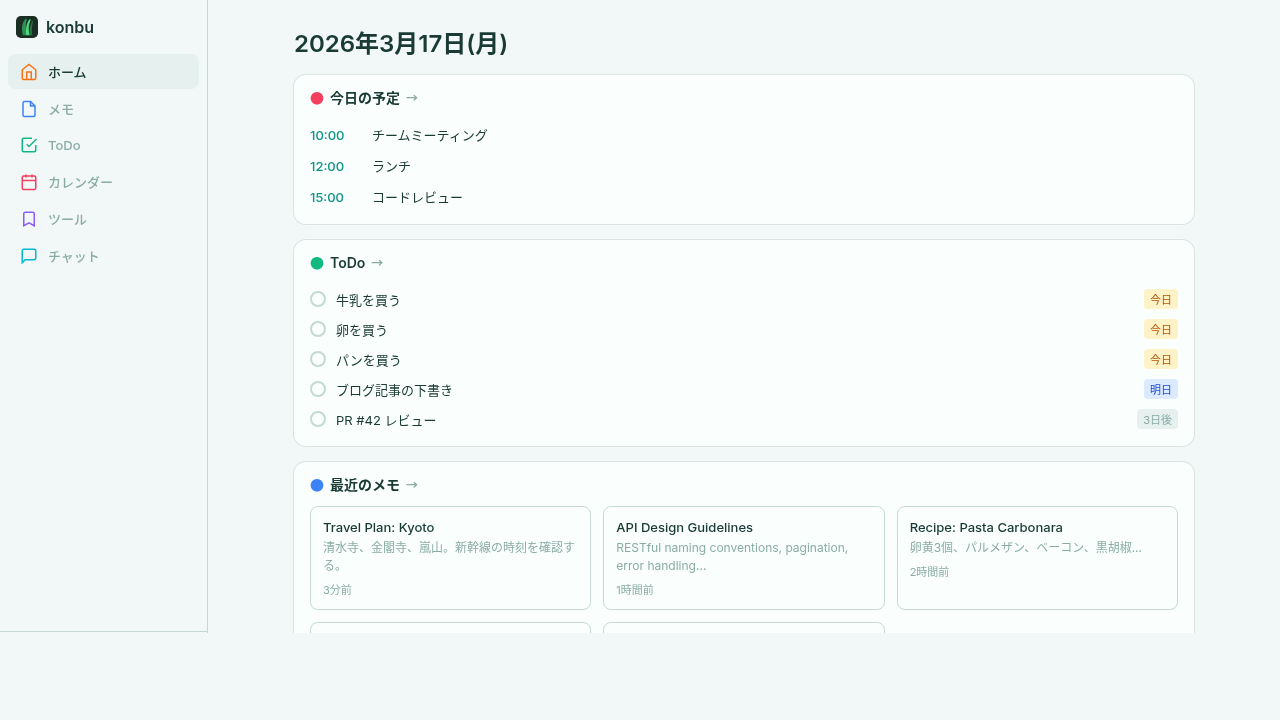
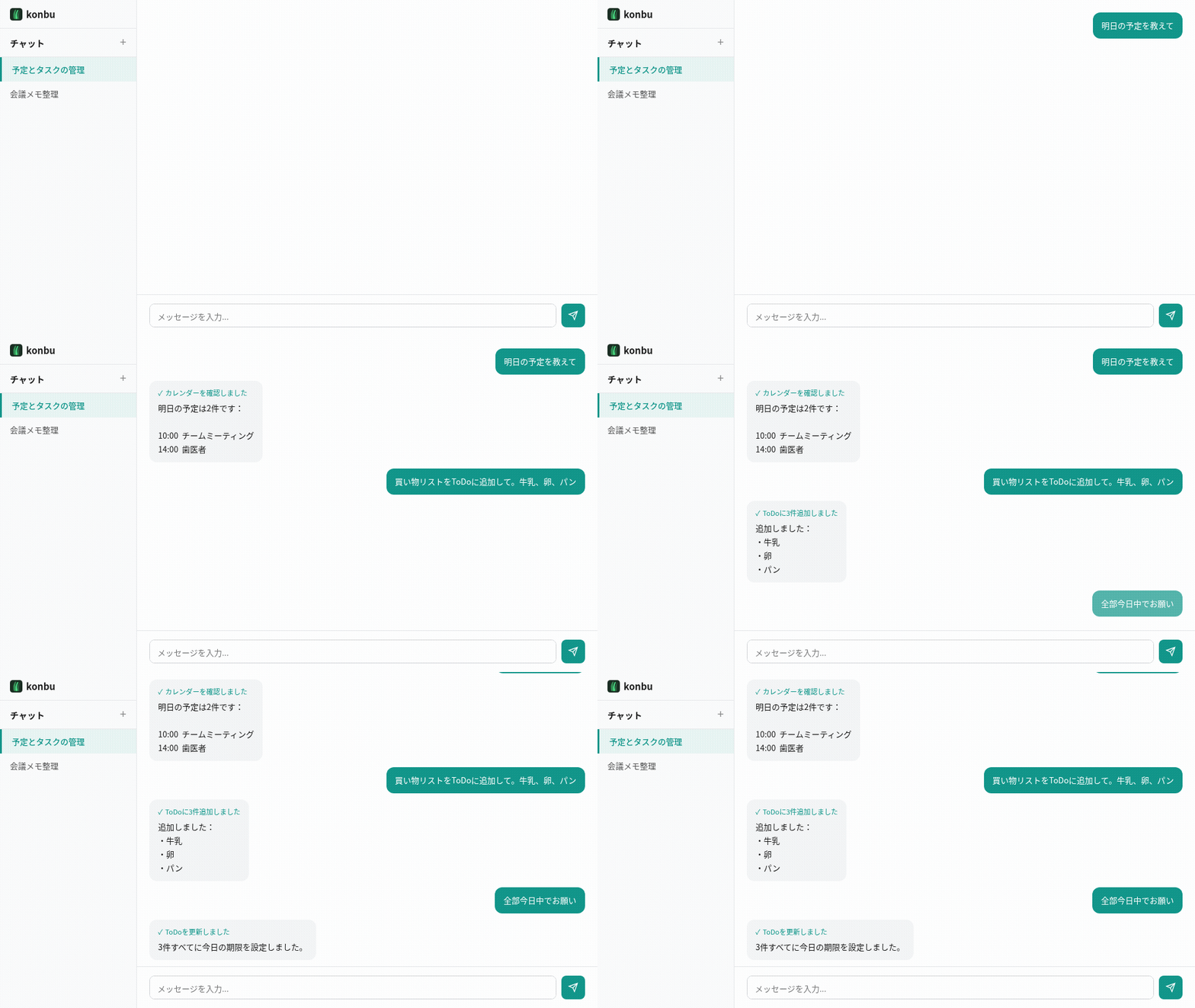
konbu is a personal digital planner — a Filofax-style system planner, digitized. A self-hostable Go binary that binds your memos, todos, schedule, and structured tables into one notebook, kept by an AI butler, and surfaces everything from a single search interface. It's yours alone — nothing is ever shared out. Not a replacement for Notion + Todoist + Calendar — a replacement for the act of searching four apps to find one thing.
What's different:
End the state of having your day scattered across four different apps.
cp .env.example .env
docker compose up -d
Open http://localhost:8080 and create your account. The dev compose file sets DEV_USER=dev@local to skip registration.
# Edit .env with real credentials and your domain
docker compose -f docker-compose.prod.yml up -d
# Prerequisites: Go 1.25+, Node.js 22+, PostgreSQL 16+

# Build frontend
cd web/frontend && npm ci && npm run build && cd ../..

# Build server
go build -o bin/server ./cmd/server

# Start (runs all SQL migrations automatically on boot)
DATABASE_URL="postgres://..." SESSION_SECRET="..." ./bin/server
| Variable | Required | Default | Description |
|---|---|---|---|
DATABASE_URL | Yes | -- | PostgreSQL connection string |
SESSION_SECRET | Yes | dev fallback | Session signing key |
PORT | No | 8080 | Server port |
DEV_USER | No | -- | Auto-login as this email (dev only) |
OPEN_REGISTRATION | No | -- | Set true to allow anyone to register (for Cloud) |
BASE_URL | No | -- | Public app URL used for OAuth callbacks |
GOOGLE_CLIENT_ID | No | -- | Enable Google OAuth login |
GOOGLE_CLIENT_SECRET | No | -- | Enable Google OAuth login |
WEBHOOK_SECRET | No | -- | GitHub Sponsors webhook secret |
STRIPE_SECRET_KEY | No | -- | Enable Stripe checkout and subscription billing |
STRIPE_WEBHOOK_SECRET | No | -- | Verify incoming Stripe webhook events |
STRIPE_PRICE_MONTHLY | No | -- | Stripe Price ID used for monthly Pro checkout |
STRIPE_PRICE_YEARLY | No | -- | Stripe Price ID used for yearly Pro checkout |
GITHUB_FEEDBACK_TOKEN | No | -- | GitHub token used to create anonymized feedback issues |
GITHUB_FEEDBACK_REPO | No | -- | Repository to receive feedback issues, e.g. krtw00/konbu |
GITHUB_FEEDBACK_LABELS | No | -- | Comma-separated labels added to forwarded feedback issues |
AI_ENCRYPTION_KEY | No | -- | 64 hex chars used to encrypt BYOK AI keys |
DEFAULT_AI_PROVIDER | No | openai | Server-side free-tier AI provider |
DEFAULT_AI_API_KEY | No | -- | Server-side free-tier AI key |
DEFAULT_AI_ENDPOINT | No | -- | Override free-tier provider endpoint |
DEFAULT_AI_MODEL | No | -- | Override free-tier provider model |
R2_ACCESS_KEY_ID | No | -- | Attachment upload credentials |
R2_SECRET_ACCESS_KEY | No | -- | Attachment upload credentials |
R2_ENDPOINT | No | Cloudflare R2 default | Attachment storage endpoint |
R2_BUCKET | No | konbu-attachments | Attachment storage bucket |
R2_PUBLIC_URL | No | -- | Optional public base URL for attachments |
SMTP_HOST | No | -- | SMTP relay host for reminder emails (e.g. smtp-relay.brevo.com). Notifications are disabled unless all five SMTP_* variables are set. |
SMTP_PORT | No | -- | SMTP relay port (typically 587 for STARTTLS) |
SMTP_USERNAME | No | -- | SMTP relay login |
SMTP_PASSWORD | No | -- | SMTP relay password / API key |
SMTP_FROM | No | -- | From address for outgoing reminder emails |
NOTIFICATION_TICK_INTERVAL | No | 1m | Notification sweep interval (Go duration, e.g. 30s, 2m) |
When the SMTP_* variables above are all set, the server starts a single in-process sweep loop that sends email reminders for upcoming events and due ToDos. Each user opts in via Settings (user_settings.notifications.enabled = true) and can override the recipient email, lead time, due-time, and timezone.
Notifications are a server-only feature — they run inside the API server process and require PostgreSQL. The MCP --standalone mode (SQLite) does not send reminders.
| Variable | Description |
|---|---|
POSTGRES_PASSWORD | PostgreSQL password |
KONBU_DOMAIN | Domain for Traefik TLS routing |
The CLI is a standalone client that connects to a remote konbu server via API. Server code is not included in the CLI binary.
go install github.com/krtw00/konbu/cmd/konbu@latest
# Set environment variables (recommended: add to ~/.zshrc or ~/.bashrc)
export KONBU_API=https://konbu.example.com
export KONBU_API_KEY=your-api-key

# Or pass as flags
konbu --api https://... --api-key your-key memo list
Generate an API key in Settings > Security on the web UI.
All commands support --json flag for machine-readable output.
konbu memo list                        # List memos
konbu memo show <id>                   # Show memo content
konbu memo add "title" -c "content"    # Create memo (-c - for stdin)
konbu memo edit <id> --title "new"     # Update memo
konbu memo rm <id>                     # Delete memo

konbu todo list                        # List todos
konbu todo show <id>                   # Show todo details
konbu todo add "task" -t "tag1,tag2"   # Create todo
konbu todo add "task" -d 2025-04-01    # Create with due date
konbu todo edit <id> --desc "notes"    # Update todo
konbu todo done <id>                   # Mark done
konbu todo reopen <id>                 # Reopen
konbu todo rm <id>                     # Delete

konbu event list                       # List events
konbu event show <id>                  # Show event details
konbu event add "title" -s <RFC3339>   # Create event
konbu event edit <id> --title "new"    # Update event
konbu event rm <id>                    # Delete

konbu tag list                         # List tags
konbu tag rm <id>                      # Delete tag

konbu search "query"                   # Cross-search

konbu api-key list                     # List API keys
konbu api-key create "key-name"        # Create API key
konbu api-key rm <id>                  # Delete API key

konbu export json -o backup.json       # Export as JSON
konbu export markdown -o backup.zip    # Export as Markdown ZIP
konbu import ical calendar.ics         # Import iCal file
Short IDs (first 8 chars) can be used in place of full UUIDs.
konbu can run as a built-in MCP (Model Context Protocol) server in two modes — pick whichever fits.
If you just want konbu as a local MCP backend for Claude Desktop, Cursor, or any MCP client, install the CLI and run it with --standalone. No PostgreSQL, no web server, no API key — everything is stored in a local SQLite file.
go install github.com/krtw00/konbu/cmd/konbu@latest
konbu mcp --standalone
Data is persisted at ~/.konbu/konbu.db by default. Override with --db /path/to/db.sqlite if needed.
Claude Desktop (~/Library/Application Support/Claude/claude_desktop_config.json on macOS, %APPDATA%\Claude\claude_desktop_config.json on Windows):
{
  "mcpServers": {
    "konbu": {
      "command": "konbu",
      "args": ["mcp", "--standalone"]
    }
  }
}
Cursor accepts the same config at ~/.cursor/mcp.json (or via the settings UI).
A multi-arch image (linux/amd64, linux/arm64) is published to GitHub Container Registry. Pull it directly — no build step needed:
docker pull ghcr.io/krtw00/konbu-mcp:latest
For reproducible setups, pin to a release tag instead — e.g. docker pull ghcr.io/krtw00/konbu-mcp:v0.2.0.
Then point your MCP client at it. Data persists in a named volume:
{
  "mcpServers": {
    "konbu": {
      "command": "docker",
      "args": ["run", "--rm", "-i", "-v", "konbu-data:/data", "ghcr.io/krtw00/konbu-mcp:latest"]
    }
  }
}
Prefer building from source? docker build -f docker/Dockerfile.mcp -t konbu-mcp . from the repo root produces the same image (CGO-free, distroless static, ~22 MB).
Standalone mode exposes memo / todo / calendar event CRUD plus cross-resource search. Tags, attachments, and AI chat are server-only (use the connected mode below for those).
If you're running a konbu server (self-hosted or konbu Cloud), point the MCP server at it over HTTP. You get the full feature set: tags, attachments, and AI chat.
konbu CLI binary (see CLI section above){
"mcpServers": {
"konbu": {
"command": "konbu",
"args": ["mcp"],
"env": {
"KONBU_API": "http://localhost:8080",
"KONBU_API_KEY": "your-api-key"
}
}
}
}
After restarting your MCP client, interact with konbu in natural language:
Base path: /api/v1
| Resource | Endpoints |
|---|---|
| Auth | POST /auth/register, POST /auth/login, POST /auth/logout, GET /auth/setup-status, GET /auth/providers, GET /auth/google/login, GET /auth/google/callback |
| User | GET/PUT /auth/me, GET/PUT /auth/settings, POST /auth/change-password, POST /auth/delete-account |
| API Keys | GET/POST /api-keys, DELETE /api-keys/:id |
| Memos | GET/POST /memos, GET/PUT/DELETE /memos/:id, GET/POST /memos/:id/rows, POST /memos/:id/rows/batch, GET /memos/:id/rows/export, PUT/DELETE /memos/:id/rows/:rowId |
| ToDos | GET/POST /todos, GET/PUT/DELETE /todos/:id, PATCH /todos/:id/done, PATCH /todos/:id/reopen |
| Events | GET/POST /events, GET/PUT/DELETE /events/:id |
| Calendars | GET/POST /calendars, GET/PUT/DELETE /calendars/:id (owner-only) |
| Tags | GET/POST /tags, PUT/DELETE /tags/:id |
| Search | GET /search?q=... |
| Chat | GET/POST /chat/sessions, GET/PUT/DELETE /chat/sessions/:id, POST /chat/sessions/:id/messages, GET/PUT /chat/config |
| Attachments | POST /attachments, GET /attachments/* |
| Export | GET /export/json, GET /export/markdown |
| Import | POST /import/ical |
# Start PostgreSQL
docker compose up -d postgres

# Frontend dev server
cd web/frontend && npm run dev

# Run server
DEV_USER=dev@local go run ./cmd/server

# Build CLI
go build -o bin/konbu ./cmd/konbu

# Run tests
go test ./...
cd web/frontend && npm test
cd web/frontend && npm run test:e2e
cmd/
  server/       # API server
  konbu/        # CLI client
internal/
  handler/      # HTTP handlers
  service/      # Business logic
  repository/   # DB access (sqlc)
  middleware/   # Auth, logging
  client/       # API client (used by CLI)
  mcp/          # MCP server
web/frontend/   # React + Vite SPA
sql/            # Schema and migrations
docker/         # Dockerfile
SMTP_* env is configured)If you find konbu useful, consider sponsoring the project.
Run Claude Code as an MCP server so any agent can delegate coding tasks to it
 @microsoft✓ Official
Browser automation using accessibility snapshots instead of screenshots
 @googleapis✓ Official
Google's universal MCP server supporting PostgreSQL, MySQL, MongoDB, Redis, and 10+ databases
 @github✓ Official
Official GitHub integration for repos, issues, PRs, and CI/CD workflows