

Are you the author? Sign in to claim
A universal VS Code extension that bridges any Language Server Protocol (LSP) capabilities to MCP tools and GitHub Copil
A Visual Studio Code extension that exposes any Language Server Protocol (LSP) capabilities as Model Context Protocol (MCP) tools and GitHub Copilot Language Model Tools. This universal extension works with any programming language that has an active language server in VSCode.
I created this because I work on an incredibly large C++ project (with clangd) and Copilot is not able find objects efficiently.

📥 Install from VS Code Marketplace
Or install directly in VS Code: Press Ctrl+Shift+X, search for "LSP MCP Bridge", and click Install
Here's a quick example of how the extension enhances GitHub Copilot's understanding of a C++ codebase.
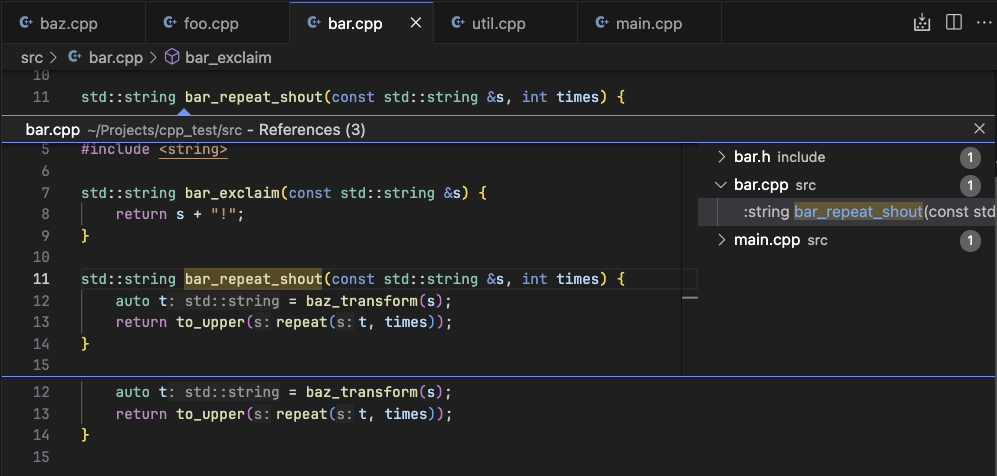
A small excerpt of the C++ project used in the demo.
2. Copilot's enhanced answer: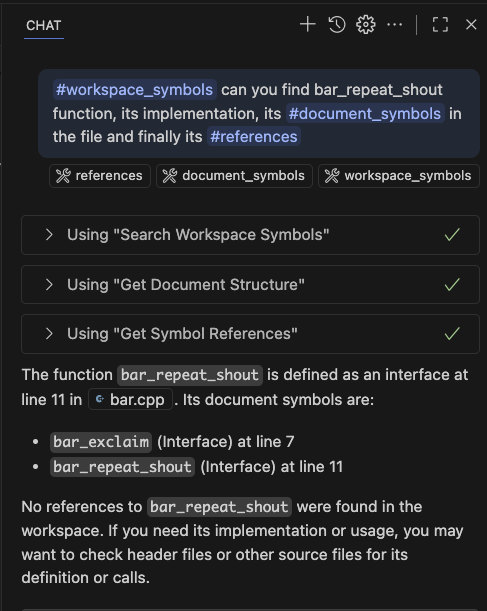
Copilot's response enriched with precise definitions, references, and hover info provided by the LSP-MCP bridge. |
3. Asking Copilot about the code: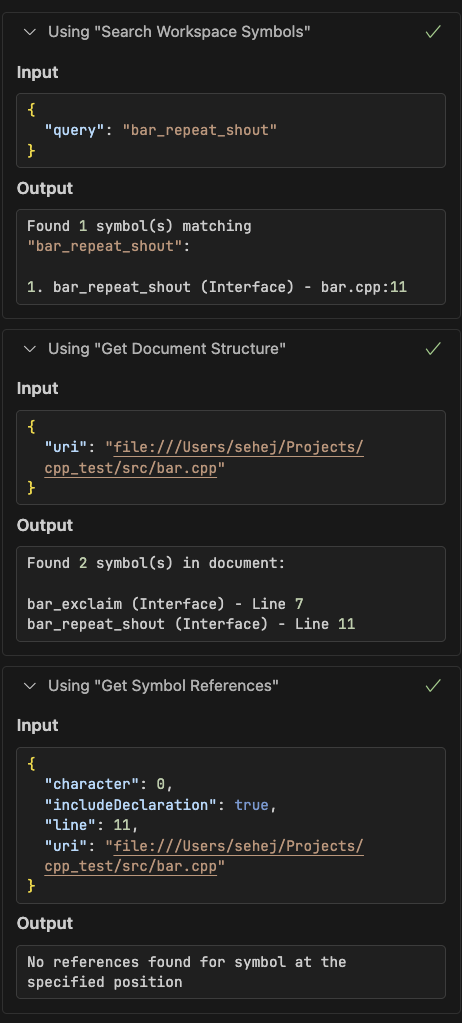
Copilot queries the registered LSP tools (workspace/document symbols, references) to find the symbol and its implementation. |
This extension bridges the gap between any existing language server's capabilities and MCP clients + GitHub Copilot, enabling AI models and tools to:
The extension exposes comprehensive LSP capabilities as GitHub Copilot tools that can be used automatically:
lsp_definition - Find symbol definitionslsp_references - Find all references to a symbollsp_hover - Get symbol information and documentationlsp_completion - Get code completion suggestionslsp_workspace_symbols - Search symbols across the workspacelsp_document_symbols - Get document structure/outlinelsp_rename_symbol - Preview symbol rename impactlsp_code_actions - Get available quick fixes and refactoringslsp_format_document - Preview document formattinglsp_signature_help - Get function signature and parameter helpWorks with any programming language that has an active language server in VSCode:
Method 1: Direct Link
Method 2: In VS Code
Ctrl+Shift+X (or Cmd+Shift+X on Mac) to open ExtensionsMethod 3: Command Line
code --install-extension sehejjain.lsp-mcp-bridge
For development or testing purposes:
lsp-mcp-bridge-0.0.1.vsix releasecode --install-extension lsp-mcp-bridge-0.0.1.vsix
Clone this repository:
git clone <repository-url>
cd lsp-mcp-bridge
Install dependencies:
npm install
Compile and package:
npm run compile
npx @vscode/vsce package
Install the extension:
code --install-extension lsp-mcp-bridge-0.0.1.vsix
Once installed, all LSP tools are automatically available to GitHub Copilot. Copilot will use them automatically when:
Example: Just ask Copilot "What does this function do?" while your cursor is on a function, and it will automatically use the hover and definition tools to provide a comprehensive answer.
The extension automatically registers itself with VS Code's MCP system, so:
Use the Command Palette (Ctrl+Shift+P / Cmd+Shift+P):
The extension also automatically registers with VS Code's MCP system, making it discoverable by external MCP clients without any additional configuration.
No additional configuration required! The extension automatically works with any language servers you have configured in VSCode.
The extension works with any LSP-compliant language server installed in VSCode:
| Language | Language Server | Extension |
|---|---|---|
| C/C++ | C/C++ extension, clangd | C/C++ or clangd extension |
| Python | Pylance, Jedi | Python extension |
| TypeScript/JavaScript | Built-in TS Server | Built-in |
| Rust | rust-analyzer | rust-analyzer extension |
| Go | gopls | Go extension |
| Java | Eclipse JDT | Language Support for Java |
| C# | OmniSharp | C# Dev Kit |
| PHP | Intelephense | PHP Intelephense |
| Ruby | Solargraph | Ruby LSP |
Run the comprehensive test suite:
npm test
The test suite includes:
All tools are automatically registered with GitHub Copilot and can be referenced by their toolReferenceName:
| Tool | Reference Name | Description |
|---|---|---|
lsp_definition | #definition | Find symbol definitions |
lsp_references | #references | Find symbol references |
lsp_hover | #hover | Get symbol information |
lsp_completion | #completion | Get completions |
lsp_workspace_symbols | #workspace_symbols | Search workspace symbols |
lsp_document_symbols | #document_symbols | Get document outline |
lsp_rename_symbol | #rename | Preview rename impact |
lsp_code_actions | #code_actions | Get quick fixes |
lsp_format_document | #format | Preview formatting |
lsp_signature_help | #signature_help | Get function signatures |
All tools use consistent input schemas based on LSP specifications:
Position-based tools (definition, references, hover, completion, signature_help):
{
  uri: string;        // File URI (e.g., "file:///path/to/file.py")
  line: number;       // 0-based line number
  character: number;  // 0-based character offset
}
Workspace symbol search:
{
  query: string;      // Search query for symbol names
}
Document symbols:
{
  uri: string;        // File URI
}
Code actions:
{
  uri: string;
  range: {
    start: { line: number; character: number };
    end: { line: number; character: number };
  };
}
toolReferenceNameexecuteCommand API to access any active language serverpackage.json for Node.js)git checkout -b feature/new-capabilitynpm testMIT License - see LICENSE file for details.
40+ tools for querying dashboards, alerts, datasources, and logs in Grafana
Run Claude Code as an MCP server so any agent can delegate coding tasks to it
 @microsoft✓ Official
Browser automation using accessibility snapshots instead of screenshots
 @googleapis✓ Official
Google's universal MCP server supporting PostgreSQL, MySQL, MongoDB, Redis, and 10+ databases
