

Are you the author? Sign in to claim
Onboard AI tools in one step, and catch the rest. Relay sets up Claude Desktop, Claude Code, and Codex to run through yo
LiteLLM Relay is a proxy you install on employee machines through your MDM. It does two things.
First, it sets up your developers' AI tools for them. On install, Relay auto-detects the AI tools already on the machine — Claude Desktop, Claude Code, and Codex (CLI, VS Code, and the macOS app) — and wires each one to your LiteLLM AI Gateway automatically. There is no per-tool opt-in: if Relay recognizes a tool, it routes it through the Gateway. Developers just launch the tool and sign in with their corporate identity, with no provider API key and no manual setup. See Auto-configuration and the AI Tool Guides below.
Second, it catches shadow AI. Relay detects AI traffic from tools like Notion AI, Perplexity, and OpenClaw and routes it to the Gateway too, making it a single pane of glass for all AI usage in your company.
Relay is opt-out, not opt-in. When you install it (or run relay setup), Relay
scans the device for supported AI tools and wires every one it finds to the
Gateway in a single pass — you never enumerate tools per machine.
| Tool | Detected by | Config Relay writes |
|---|---|---|
| Claude Code CLI | claude on PATH or ~/.claude | ~/.claude/settings.json |
| Claude Desktop | /Applications/Claude.app or its app-support dir | /etc/claude-desktop/managed-settings.json |
| Codex (CLI, VS Code, macOS app) | codex on PATH, Codex.app, the openai.chatgpt VS Code extension, or ~/.codex | ~/.codex/config.toml |
Detection also runs on a schedule, so a tool installed after Relay gets wired
to the Gateway automatically — no manual re-run. Because each tool's config
lives in a different place, the installer registers two periodic jobs (both at
login and every RELAY_AUTOCONFIGURE_INTERVAL seconds, default 3600):
| Job | Runs as | Tools | Why |
|---|---|---|---|
ai.litellm.relay.autoconfigure (LaunchAgent) | you | Claude Code, Codex | configs are user-writable (~/.claude, ~/.codex) |
ai.litellm.relay.autoconfigure-desktop (LaunchDaemon) | root | Claude Desktop | its managed file is the root-owned /etc/claude-desktop/managed-settings.json |
The root daemon pins HOME to the installing user so it reads that user's Relay
config while running as root. Installing it needs root; install.sh uses sudo
when not already root (the macOS .pkg postinstall already runs as root). If it
can't get root, Claude Code and Codex still auto-configure and Relay prints a
warning for Claude Desktop.
You can still run detection on demand, and scope it with --only:
relay autoconfigure                       # every detected tool
relay autoconfigure --only claude-desktop # just one (repeatable)
Unset flags fall back to the saved Relay config, so a managed config.yaml
seeded by your MDM is enough to configure a device with no arguments. Pass
--authorize-url, --team, --api-key, or the --oidc-* flags to override.
Only detected tools are touched, and one tool failing never blocks the others.
Pass --skip-autoconfigure to install.sh to disable it.
Relay also ships an optional macOS menu bar app so each developer can see their own AI spend right on their machine — no dashboard login. It reads live, key-scoped usage from the Gateway and breaks it down per coding tool: spend this month, spend/day, model mix, cache-hit rate, and the relay key's budget.
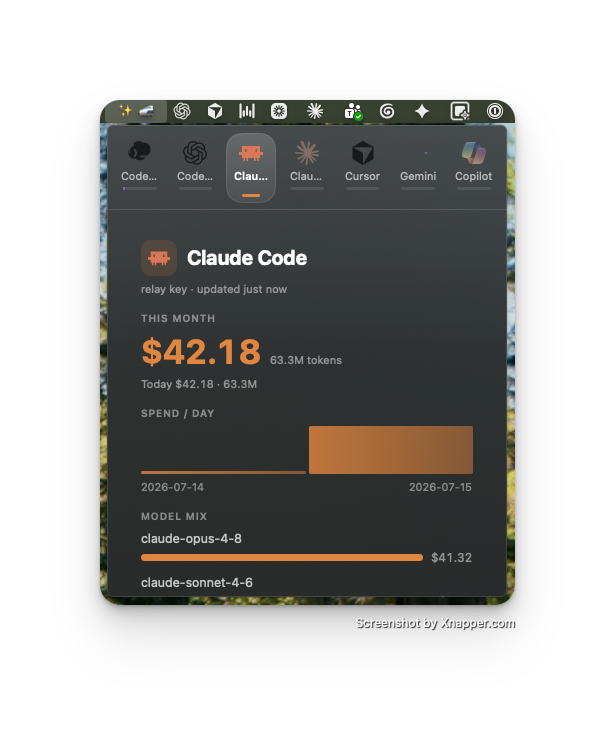
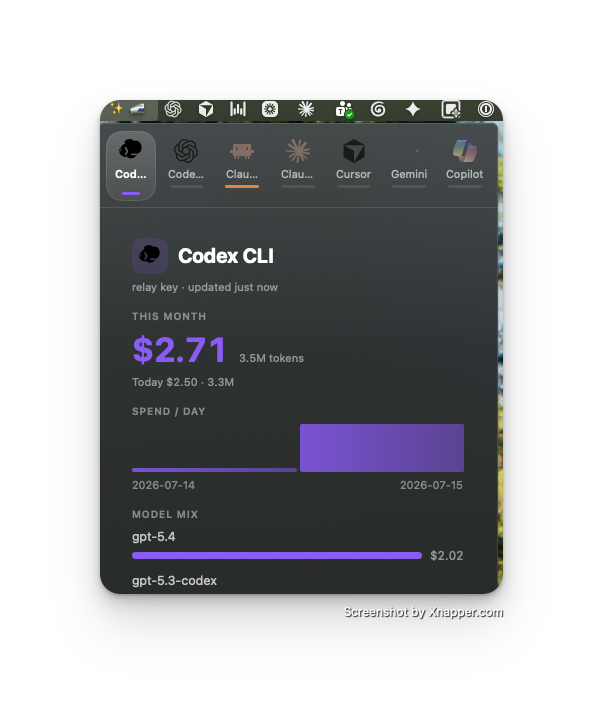
Each tool (Claude Code, Codex CLI, Cursor, Gemini, …) gets its own tab with its own color. Build it from macos/RelayBarGlass (./build.sh && open RelayBarGlass.app).
Relay onboards each AI coding tool onto the LiteLLM AI Gateway with zero developer setup — the developer just launches the tool. Pick your tool for the step-by-step guide:
Deploy LiteLLM Relay with your existing device-management process:
See the MDM rollout guide for the deployable .pkg, the PAC
configuration profile, and step-by-step Jamf and Intune runbooks.
Relay does not log cookies or authorization headers. Payload previews are truncated and headers are redacted.
Relay has no tagged release yet, so install it from GitHub. The installer
builds Relay from source, so you need Rust (cargo)
installed first. Relay currently supports macOS.
Clone the repository and run the installer:
git clone https://github.com/LiteLLM-Labs/litellm-relay.git
cd litellm-relay
./src/install.sh
Or install directly from main without cloning:
curl -fsSL https://raw.githubusercontent.com/LiteLLM-Labs/litellm-relay/main/src/install.sh | \
  RELAY_ALLOW_UNPINNED_MAIN=1 bash
The installer builds the relay command, adds it to your PATH, and trusts
the local Relay CA so AI app payloads can be captured. Pass --skip-trust-ca
to install without trusting the CA.
Then open a new terminal and run:
relay
Once tagged releases are published, production deployments will be able to pin a version tag and verify the source archive checksum:
curl -fsSL https://raw.githubusercontent.com/LiteLLM-Labs/litellm-relay/main/src/install.sh | \
  RELAY_VERSION=vX.Y.Z \
  RELAY_SHA256=<release-tarball-sha256> \
  bash
1000+ skills curated from Anthropic, Vercel, Stripe, and other engineering teams
Agent harness performance optimization with skills, instincts, memory, and security
Design enforcement with memory — keeps your UI consistent across a project
Detects 37 AI writing patterns and rewrites text with human rhythm across 5 voice profiles