

Are you the author? Sign in to claim
OpenClaw-native macOS calendar skill for IM-first schedule management (planning, execution, review, and safe dedup clean
I use this skill to turn weekly planning, daily execution, summary, and schedule adjustment into one continuous loop.
🔗 Available on ClawHub: https://clawhub.ai/bryant24hao/macos-calendar-assistant
English | 中文
Before this, I built a client app called CalendarAI. It proved that AI-powered calendar CRUD is feasible.
I also studied a range of scheduling products, including Toki / Calendly / Clockwise / Motion / Amie. Each gave me useful ideas across conversational UX, booking links, team scheduling, auto-rescheduling, and product design.
My conclusion was clear: high-frequency, natural scheduling is not just about "creating events" — it needs to happen inside the communication tools people already use daily.
After heavily using OpenClaw, I became even more certain: managing schedules directly in IM conversations, then syncing into system calendar is more agentic-friendly and more human-friendly than relying on a standalone client.
I built macos-calendar-assistant to close this loop:
So calendar is not just a record — it becomes an iterative execution system.
My typical workflow:
This creates a full loop: plan → execute → summarize → adjust.
This skill works with OpenClaw across IM channels (Telegram / Discord / Feishu / iMessage / Slack). I can say things like "add this event", "extend to 14:00", or "move to Friday night" in chat, without app switching.
If my calendar is synced via iCloud, the same schedule is visible on both Mac Calendar and iPhone Calendar. So any event creation/update/adjustment done through OpenClaw is reflected across desktop and mobile, giving me one consistent calendar system.
I often forward screenshots (group notices, posters, chat screenshots, booking pages):
CREATED / UPDATED / SKIPPED)--apply --confirm yes)flowchart LR
A[Weekly Plan] --> B[OpenClaw parsing]
B --> C[Calendar Skill idempotent upsert]
C --> D[Calendar time blocks]
D --> E[Daily execution]
E --> F[Daily summary]
F --> G[Daily review]
G --> H[Adjust tomorrow/rest-of-week schedule]
H --> C
sequenceDiagram
  participant U as Me (IM)
  participant IM as Telegram/Discord/Feishu
  participant OC as OpenClaw
  participant SK as Calendar Skill
  participant CAL as macOS Calendar

  U->>IM: Forward screenshot / send text
  IM->>OC: Message + image
  OC->>OC: Extract time/location/context
  OC->>SK: upsert_event(...)
  SK->>CAL: Idempotent create/update
  CAL-->>OC: CREATED/UPDATED/SKIPPED
  OC-->>U: Confirmation in chat
flowchart TD
  A[Run duplicate scan] --> B{delete_candidates > 0?}
  B -- No --> C[Done]
  B -- Yes --> D[Generate snapshot delete plan]
  D --> E[Manual review]
  E --> F{Apply deletion?}
  F -- No --> C
  F -- Yes --> G[--apply --confirm yes]
  G --> H[Deletion result + log]
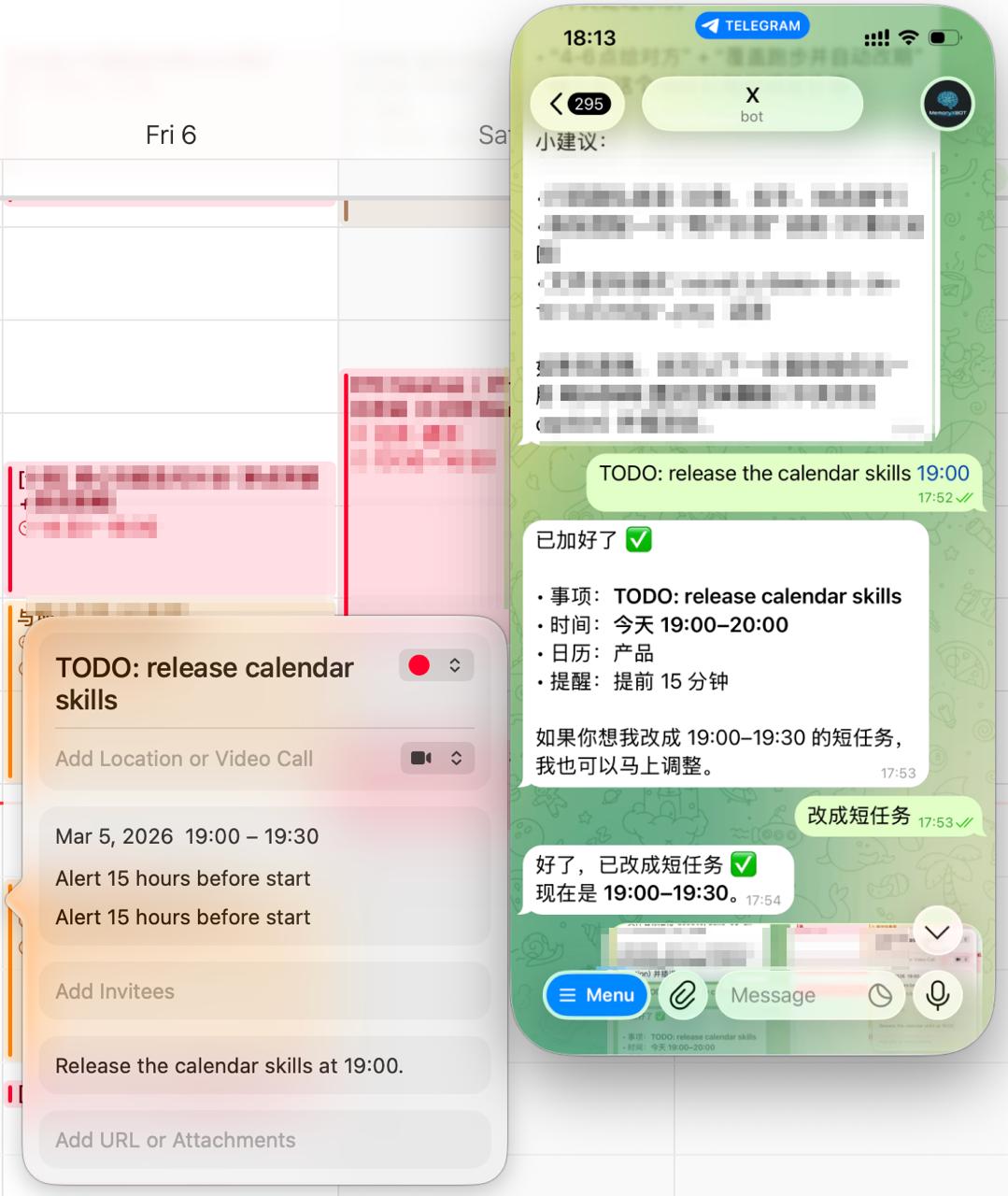
Create a task from IM, then update duration in a follow-up message. Changes are synced to Calendar instantly.
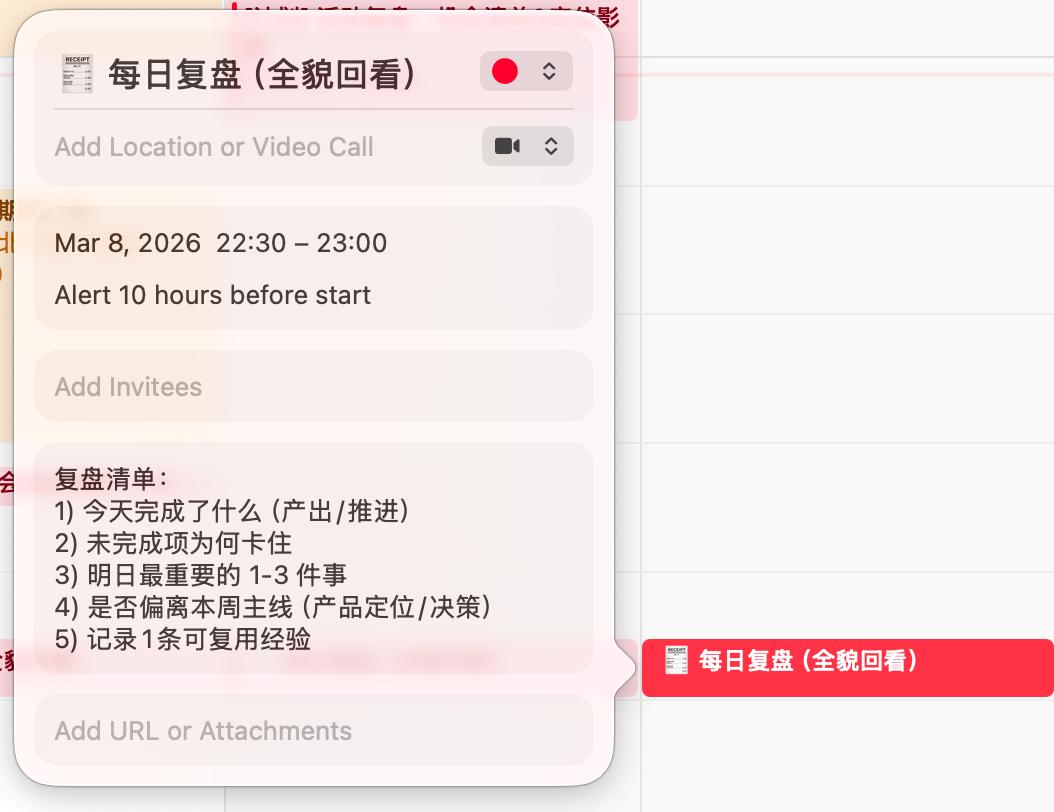
OpenClaw + skill writes both the review time block and checklist into Calendar, making execute → review → adjust repeatable.
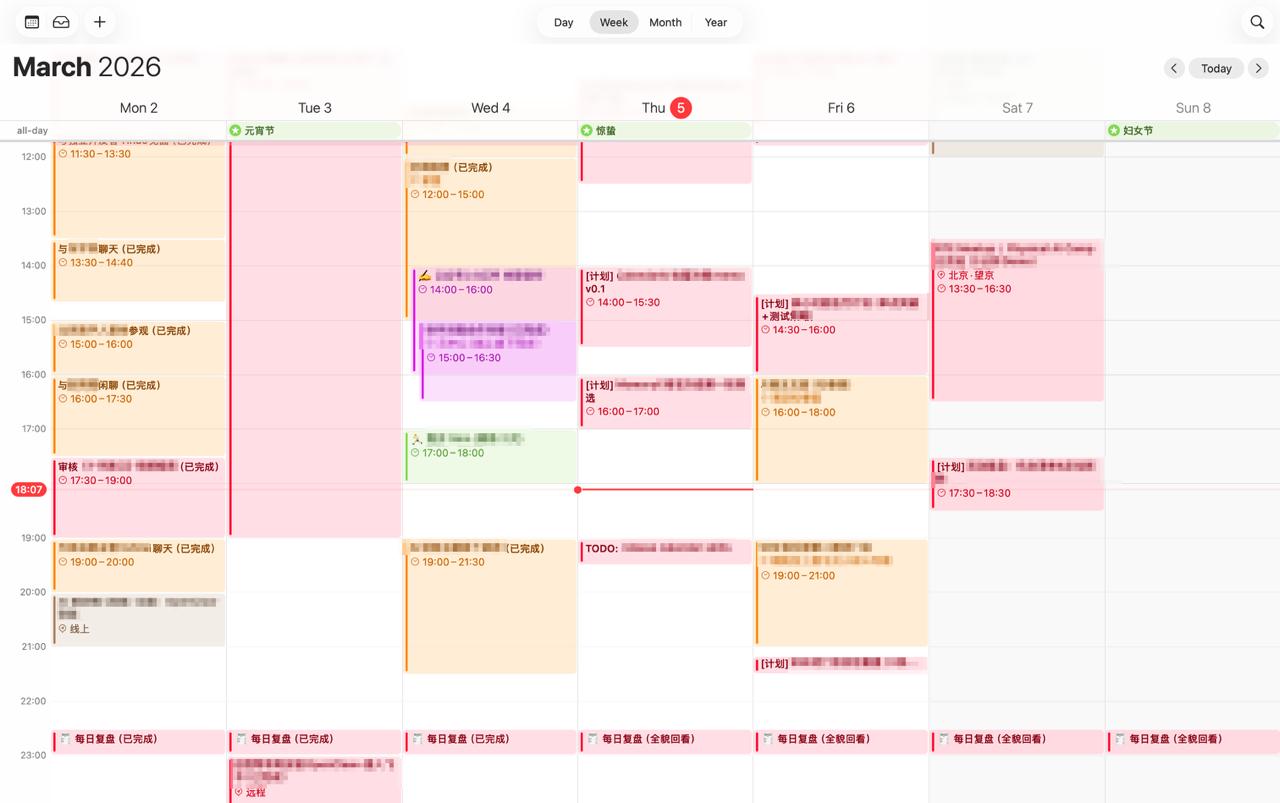
A full-week view after IM-driven scheduling, rescheduling, and daily review updates via OpenClaw + skill.
cd scripts
./install.sh
# Environment check
python3 scripts/env_check.py

# Idempotent create/update
python3 scripts/upsert_event.py \
  --title "Deep work: Product positioning" \
  --start "2026-03-06T10:00:00+08:00" \
  --end "2026-03-06T11:30:00+08:00" \
  --calendar "Product" \
  --notes "Aligned with weekly goals" \
  --alarm-minutes 15

# Duplicate scan (read-only)
python3 scripts/calendar_clean.py --start "2026-03-01T00:00:00+08:00" --end "2026-03-08T23:59:59+08:00"

# Duplicate cleanup (double confirmation)
python3 scripts/calendar_clean.py --start "..." --end "..." --apply --confirm yes --snapshot-out ./delete-plan.json
scripts/smoke_test.sh
python3 scripts/regression_test.py
cd scripts
./uninstall.sh
这个 Skill 的背景是:我前段时间做过一个叫 CalendarAI 的客户端,已经验证了“调用 AI 做日程增删改查”这件事是可行的。
我也系统研究过一批日程与智能排程产品,包括 Toki / Calendly / Clockwise / Motion / Amie 等。 它们分别在对话交互、约会链接、团队排程、自动重排与体验设计上给了我不同启发。 这些研究给了我一个很明确的结论: 真正高频、自然、可持续的日程管理,不只是“能建事件”,而是要把管理动作放进用户每天已经在用的沟通场景里。
所以在我开始重度使用 OpenClaw 后,我更确认了一点: 直接在 IM 对话里管理日程,再同步到系统日历,比单独做一个客户端更 agentic-friendly,也更 human-friendly。
我最终做这个 macos-calendar-assistant,就是为了把这条链路打通:
让日程不只是记录,而是持续迭代的执行系统。
我自己的典型工作流:
这样可以形成“计划—执行—总结—修正”的闭环。
这个 Skill 可以配合 OpenClaw 直接接入 IM(Telegram / Discord / Feishu / iMessage / Slack 等)。 我可以在聊天里直接说“加个日程”“延长到14:00”“改到周五晚上”,不需要来回切 App。
如果我的日历走的是 iCloud,同一份日程会自动在 Mac 端 Calendar 和 iPhone 端 Calendar 同步。 这意味着我在 OpenClaw 里完成的新增/修改/调整,会同时反映到电脑端和手机端,真正做到多端一致的日程管理。
我会直接转发截图(群通知、活动海报、聊天截图、预约页面等):
CREATED / UPDATED / SKIPPED)--apply --confirm yes)flowchart LR
A[周计划] --> B[OpenClaw 解析]
B --> C[Calendar Skill 幂等写入]
C --> D[日历时间块]
D --> E[每日执行]
E --> F[每日总结]
F --> G[每日复盘]
G --> H[调整明天/本周剩余安排]
H --> C
sequenceDiagram
  participant U as 我(IM)
  participant IM as Telegram/Discord/Feishu
  participant OC as OpenClaw
  participant SK as Calendar Skill
  participant CAL as macOS Calendar

  U->>IM: 转发截图/发送文字
  IM->>OC: 消息 + 图片
  OC->>OC: 提取时间地点上下文
  OC->>SK: upsert_event(...)
  SK->>CAL: 幂等创建/更新
  CAL-->>OC: CREATED/UPDATED/SKIPPED
  OC-->>U: 聊天内确认结果
flowchart TD
  A[运行重复扫描] --> B{delete_candidates > 0?}
  B -- 否 --> C[结束]
  B -- 是 --> D[生成 snapshot 删除计划]
  D --> E[人工确认]
  E --> F{是否执行删除}
  F -- 否 --> C
  F -- 是 --> G[--apply --confirm yes]
  G --> H[输出删除结果与日志]
先在 IM 中创建任务,再通过后续消息修改时长,变更会即时同步到日历。
OpenClaw + skill 会把复盘时间块和复盘清单一起写入 Calendar,让执行→复盘→调整形成可持续闭环。
通过 OpenClaw + skill 在 IM 中持续调度、改期与复盘后,最终形成的一周日程全貌。
cd scripts
./install.sh
# 环境自检
python3 scripts/env_check.py

# 幂等创建/更新
python3 scripts/upsert_event.py \
  --title "深度工作:产品定位" \
  --start "2026-03-06T10:00:00+08:00" \
  --end "2026-03-06T11:30:00+08:00" \
  --calendar "产品" \
  --notes "与周目标对齐" \
  --alarm-minutes 15

# 重复扫描(仅检查)
python3 scripts/calendar_clean.py --start "2026-03-01T00:00:00+08:00" --end "2026-03-08T23:59:59+08:00"

# 重复清理(双保险)
python3 scripts/calendar_clean.py --start "..." --end "..." --apply --confirm yes --snapshot-out ./delete-plan.json
scripts/smoke_test.sh
python3 scripts/regression_test.py
cd scripts
./uninstall.sh
1000+ skills curated from Anthropic, Vercel, Stripe, and other engineering teams
Design enforcement with memory — keeps your UI consistent across a project
Detects 37 AI writing patterns and rewrites text with human rhythm across 5 voice profiles
WCAG accessibility audit — automated scanning, manual review, remediation