

Are you the author? Sign in to claim
🚀 Ultimate Developer Productivity Suite - 11 specialized MCP servers for AI-powered code analysis, security scanning, b
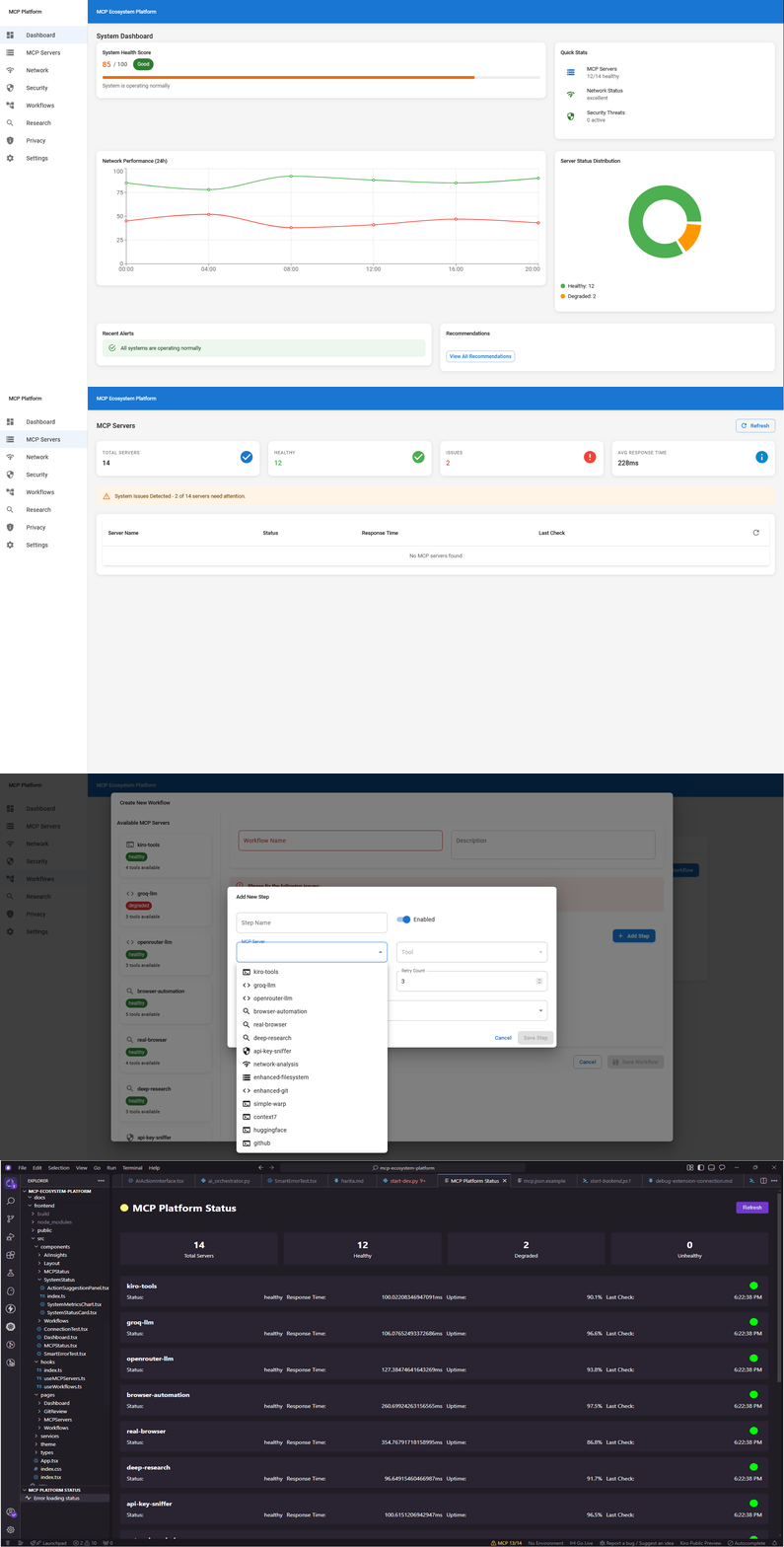
Ultimate Developer Productivity Suite - A comprehensive platform built around 11 specialized MCP (Model Context Protocol) servers, providing AI-powered code analysis, security scanning, browser automation, and intelligent workflow orchestration.












┌─────────────────────────────────────────────────────────────┐
│                    Frontend (React + TS)                    │
├─────────────────────────────────────────────────────────────┤
│                   FastAPI Backend                          │
├─────────────────────────────────────────────────────────────┤
│                  MCP Server Layer                          │
├─────────────────────────────────────────────────────────────┤
│  PostgreSQL  │    Redis     │   Docker    │  Kubernetes   │
└─────────────────────────────────────────────────────────────┘
| Server | Purpose | Key Features |
|---|---|---|
| kiro-tools | Core Operations | Filesystem, Git, Database operations |
| groq-llm | AI Processing | Ultra-fast Llama 3.1 AI processing |
| openrouter-llm | Multi-Model AI | Access to multiple AI models |
| browser-automation | Web Control | Real browser automation |
| deep-research | Intelligence | Comprehensive web research |
| api-key-sniffer | Security | API key protection and monitoring |
| network-analysis | Monitoring | Network performance analysis |
| enhanced-filesystem | File Ops | Advanced file operations |
| enhanced-git | Version Control | Git analysis and automation |
| real-browser | Web Testing | No-simulation browser control |
| simple-warp | Terminal | Terminal integration and automation |
🎯 Faz 0: Stabilizasyon Tamamlandı! Tek komutla tüm sistemi başlatabilirsiniz.
git clone https://github.com/turtir-ai/mcp-ecosystem-platform.git
cd mcp-ecosystem-platform

# Edit .env with your API keys (optional for basic testing)
# Then start everything with one command:
python start-dev.py
That's it! 🎉 The script will:
| Service | Port | URL |
|---|---|---|
| Frontend | 3000 | http://localhost:3000 |
| Backend API | 8001 | http://localhost:8001 |
| MCP Manager | 8009 | http://localhost:8009 |
git clone https://github.com/turtir-ai/mcp-ecosystem-platform.git
cd mcp-ecosystem-platform

# Copy environment template
cp .env.example .env
# Edit .env with your API keys
cd backend
python -m venv venv

# Windows
venv\Scripts\activate
# Linux/Mac
source venv/bin/activate

pip install -r requirements.txt
cd frontend
npm install
# Terminal 1: Backend
cd backend
uvicorn app.main:app --reload --port 8001

# Terminal 2: Frontend
cd frontend
npm start

# Terminal 3: MCP Manager
python mock-api-server.py
mcp-ecosystem-platform/
├── 📁 backend/                 # FastAPI backend
│   ├── 📁 app/
│   │   ├── 📁 core/           # Core interfaces and config
│   │   ├── 📁 services/       # Business logic services
│   │   ├── 📁 api/            # API routes
│   │   ├── 📁 models/         # Database models
│   │   └── 📄 main.py         # FastAPI application
│   ├── 📁 tests/              # Backend tests
│   ├── 📄 requirements.txt    # Python dependencies
│   └── 📄 Dockerfile          # Backend container
├── 📁 frontend/               # React frontend
│   ├── 📁 src/
│   │   ├── 📁 components/     # React components
│   │   ├── 📁 pages/          # Page components
│   │   ├── 📁 services/       # API clients
│   │   └── 📁 types/          # TypeScript types
│   ├── 📄 package.json        # Node dependencies
│   └── 📄 Dockerfile.dev      # Frontend container
├── 📁 mcp-servers/            # MCP server configurations
├── 📁 vscode-extension/       # VS Code extension
├── 📄 docker-compose.yml      # Development environment
├── 📄 .env.example           # Environment template
└── 📄 README.md              # This file
# API Keys
GROQ_API_KEY=your_groq_api_key
OPENROUTER_API_KEY=your_openrouter_key
GOOGLE_API_KEY=your_google_key
BRAVE_SEARCH_API_KEY=your_brave_key

# Database
DATABASE_URL=postgresql://postgres:password@localhost:5432/mcp_platform
REDIS_URL=redis://localhost:6379/0

# Security
SECRET_KEY=your_secret_key
JWT_SECRET=your_jwt_secret
The platform automatically discovers and configures MCP servers from your .kiro/settings/mcp.json file.
cd backend
pytest tests/ -v --cov=app
cd frontend
npm test
# Run full test suite
docker-compose -f docker-compose.test.yml up --build
# Build and start production containers
docker-compose -f docker-compose.prod.yml up -d
# Deploy to Kubernetes
kubectl apply -f k8s/
/health endpoint for all services/metricsgit checkout -b feature/amazing-feature)git commit -m 'Add amazing feature')git push origin feature/amazing-feature)MCP Ecosystem Platform, AI destekli proaktif sistem yönetimi sunar. AI, sistem sağlığını sürekli izler ve sorunları otomatik olarak tespit ederek çözüm önerileri sunar.
AI sistemi şu bileşenleri sürekli izler:
AI, şu pattern'leri otomatik olarak tespit eder:
Tespit edilen sorunlar için AI şu eylemleri önerebilir:
Web arayüzünde AI destekli özellikler:
AI'ın sistem üzerindeki yetkileri katı güvenlik kurallarıyla sınırlandırılmıştır:
# AI İzin Seviyeleri
SAFE:     # Otomatik onaylı
  - get_system_health
  - mcp_server_logs (INFO/ERROR)

MEDIUM:   # Kullanıcı onayı gerekli
  - auto_fix_apply
  - config_changes

HIGH:     # Açık onay gerekli
  - mcp_server_restart
  - mcp_server_stop

CRITICAL: # Yasaklı
  - system_shutdown
  - database_delete
1. AI, groq-llm sunucusunun offline olduğunu tespit eder
2. Kullanıcıya "Server Restart" önerisi sunar
3. Kullanıcı onayladıktan sonra sunucuyu yeniden başlatır
4. Başarılı restart sonrası sistem durumunu doğrular
1. AI, %85 CPU kullanımı tespit eder
2. Süreç analizi yaparak kaynak tüketen uygulamaları bulur
3. Optimizasyon önerileri sunar
4. Gerekirse servis yeniden başlatma önerir
1. AI, 200ms+ veritabanı gecikmesi tespit eder
2. Bağlantı havuzu durumunu analiz eder
3. Sorgu optimizasyonu önerileri sunar
4. Gerekirse veritabanı bakım önerir
AI sistemi şu metrikleri takip eder:
AI davranışı .kiro/steering/ai-permissions.md dosyasıyla yapılandırılabilir:
# AI Risk Toleransı
risk_tolerance: "medium"

# Otomatik Onay Ayarları
auto_approve_safe: true
auto_approve_low: false

# Onay Timeout Süreleri
approval_timeout_high: 5 minutes
approval_timeout_critical: 2 minutes
Roadmap'te yer alan AI geliştirmeleri:
This project is licensed under the MIT License - see the LICENSE file for details.
Built with ❤️ by the Kairos AI Team
Empowering developers with AI-driven productivity tools
Run Claude Code as an MCP server so any agent can delegate coding tasks to it
 @microsoft✓ Official
Browser automation using accessibility snapshots instead of screenshots
 @googleapis✓ Official
Google's universal MCP server supporting PostgreSQL, MySQL, MongoDB, Redis, and 10+ databases
 @github✓ Official
Official GitHub integration for repos, issues, PRs, and CI/CD workflows



