

Are you the author? Sign in to claim
MCP Toolkit for Flutter AI Agent Driven Development (MCP/CLI + custom client side tools) - via closed feedback loop (vis
Inspect and drive a running Flutter app from your AI assistant.





flutter-mcp-toolkit is a Dart MCP server + Flutter package that lets AI Agents (Codex, Zed, Cursor, Intent, Claude Code, Cline, etc..) take (semantic snapshots, tap widgets, type into forms, hot-reload, and read logs from a Flutter app) or create its own tools and resources at runtime using MCP Toolkit — without leaving the conversation and work with Flutter apps in closed feedback loop - see example of it described in OpenAI Agentic Harness.
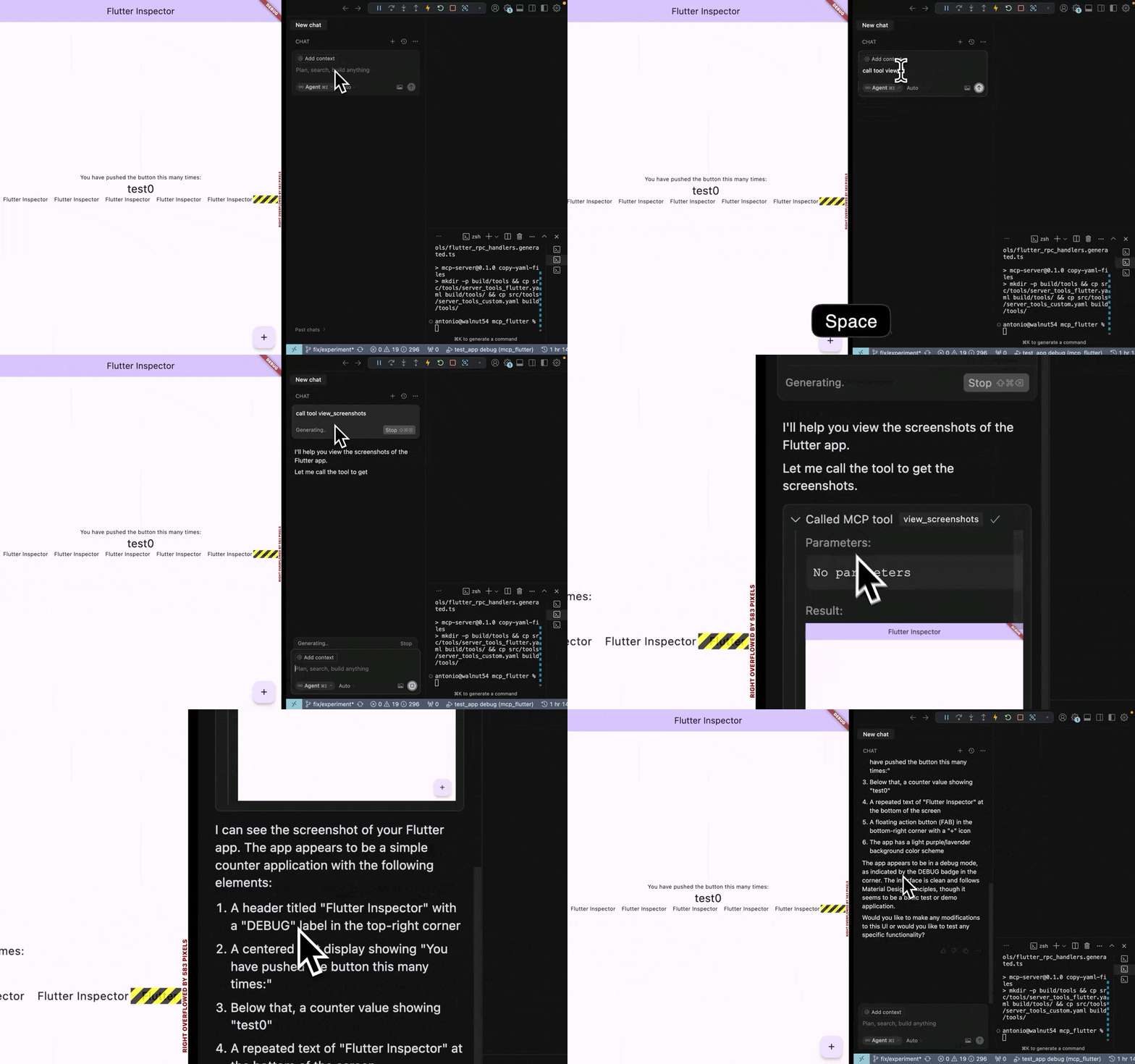
![NOTICE]: ‼️WARNING‼️ I accidently merged new experimental version into main (4.0.0-dev.1) - this is untested version and may break - it contains many architectural changes. Please use older version - will try to fix quality of the 4.0.0 as fast as possible. I’m sorry about that incident - hopefuly to resolve it soon.
# 1. Install the binary
curl -fsSL https://raw.githubusercontent.com/Arenukvern/mcp_flutter/main/install.sh | bash

# 2. Add the toolkit to your Flutter app
cd my-flutter-app
flutter-mcp-toolkit codegen-init   # adds mcp_toolkit + emits main.dart snippet

# 3. Install skills for your AI agent
flutter-mcp-toolkit init claude-code   # or: cursor | codex | cline | agents-skills | all
# Alternative (skills only): npx skills add Arenukvern/mcp_flutter -a cursor -y

# 4. Run
flutter run --debug
That's it. Your AI agent can now inspect and drive the running app — and your app can expose custom MCP tools at runtime (see Dynamic Tools Registration below).
| Platform | Command / link |
|---|---|
| Any agent (recommended) | flutter-mcp-toolkit init <agent> — see AI agent setup |
| Claude Code (git catalog) | /plugin marketplace add Arenukvern/mcp_flutter then install flutter-mcp-toolkit |
| Codex (git catalog) | codex plugin marketplace add Arenukvern/mcp_flutter |
| Cursor (local plugin) | flutter-mcp-toolkit init cursor |
| Skills only | npx skills add Arenukvern/mcp_flutter -a <agent> -y (add MCP via init or manual JSON) |
| MCP registries | Smithery, MseeP |
Maintainers submitting to official stores: marketplace submission runbook. Full matrix: marketplace distribution.
fmt_* MCP tools, binaries, client config keys, validate-runtime.MCPCallEntry removal, AgentCallEntry, platform codegen sync, fmt_migrate_agent_entries.The toolkit exposes 27 MCP tools (under the fmt_* capability prefix) across four categories:
See the flutter-mcp-toolkit-{guide,inspect,control,debug} skills for the full
reference (installed by flutter-mcp-toolkit init or npx skills add Arenukvern/mcp_flutter).
Install options: AI agent setup.
Flutter apps can register custom tools and resources at runtime. See how it
works in this short YouTube video.
The same arguments.connection targeting is supported by the CLI's exec,
batch, daemon command/execute, daemon watch/start, and snapshot step args.
[!NOTE] There is official MCP Server for Flutter from Flutter team which exposes Dart tooling. The main goal of this project is to bring power of MCP server tools by creating them in Flutter app, using dynamic MCP tools registration and close feedback loop for AI Agent. See how it works in short YouTube video. See Quick Start for more details. See original motivation behind the idea.
Dump RPC methods (like dump_render_tree) can produce huge token output and
are disabled by default. Enable with --dumps. See
mcp_server_dart README for the full flag surface.
Generally, since you use MCP server to connect to Flutter app in Debug Mode, it should be safe to use. However, I still recommend to review how it works in ARCHITECTURE.md, how it can be modified to improve security if needed.
This MCP server is verified by MseeP.ai.
Connection Issues
arguments.connection.uri and paste exact Flutter machine app.debugPort.wsUriconnection_selection_required, retry with arguments.connection.targetId using one URI from availableTargets (or set arguments.connection.uri directly)AI Tool Not Detecting Inspector
Dynamic Tools Not Appearing
mcp_toolkit package is properly initialized in your Flutter appMCPToolkitBinding.instance.addEntries()fmt_list_client_tools_and_resources to verify registrationThe Flutter MCP Server is registered with Smithery's registry, making it discoverable and usable by other AI tools through a standardized interface.
┌─────────────────┐     ┌───────────────────────┐     ┌─────────────────┐
│                 │     │  Flutter App with     │     │                 │
│  Flutter App    │<--->│  mcp_toolkit          │<--->│ flutter-mcp-    │
│  (Debug Mode)   │     │  (VM Svc. Extensions  │     │ toolkit-server  │
│                 │     │  + Dynamic Tools)     │     │                 │
└─────────────────┘     └───────────────────────┘     └─────────────────┘
Contributions are welcome! See CONTRIBUTING.md (maintainer releases, binary checksums) and the contribution guide. Pull requests and issues: GitHub.
Huge thanks to all contributors for making this project better!
MIT - Feel free to use in your projects!
Flutter and Dart are trademarks of Google LLC.
Run analytics queries on ClickHouse — explore schemas, execute SQL, fetch results
Run Claude Code as an MCP server so any agent can delegate coding tasks to it
 @microsoft✓ Official
Browser automation using accessibility snapshots instead of screenshots
 @googleapis✓ Official
Google's universal MCP server supporting PostgreSQL, MySQL, MongoDB, Redis, and 10+ databases


