

Are you the author? Sign in to claim
An intelligent MCP (Model Context Protocol) server that helps you discover and research MCP servers using the powerful E
An intelligent MCP (Model Context Protocol) server that helps you discover and research MCP servers using the powerful Exa AI search engine. Built with FastMCP for seamless integration with AI assistants like Claude, Cursor, and more.
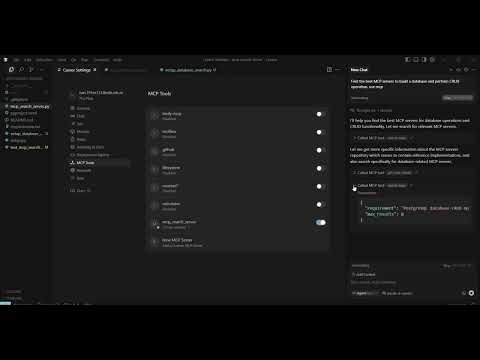
Watch the demo video to see the MCP Search Server in action:
The server consists of several key components:
ExaSearchClient: Handles interaction with Exa's search, answer, and find-similar APIs
MCPAnalyzer: Intelligent analysis engine that:
MCPRecommendation: Data structure representing discovered MCPs with:
| Tool | Description | Use Case |
|---|---|---|
search_mcps | Search for MCPs based on requirements | "I need an MCP for database access" |
get_mcp_details | Get detailed info about a specific MCP | Analyze a specific GitHub repo |
find_similar_mcps | Find MCPs similar to a reference | Discover alternatives to known MCPs |
ask_mcp_question | Ask specific questions about MCPs | "What are the best MCPs for web scraping?" |
categorize_mcps | Get MCPs organized by categories | Explore MCPs by functional area |
Clone and setup:
git clone <this-repo>
cd mcp-search-server
pip install -r requirements.txt
Set your Exa API key:
export EXA_API_KEY=your_api_key_here
Run the server:
python mcp_search_server.py
# Test the server interactively
fastmcp dev mcp_search_server.py

# Or inspect with web UI
fastmcp inspect mcp_search_server.py
This guide covers installing and setting up the MCP Search Server on different operating systems.
Option 1: Microsoft Store (Recommended)
python --versionOption 2: Python.org
python --versionOption 3: Chocolatey
# Install Chocolatey first (if not installed)
Set-ExecutionPolicy Bypass -Scope Process -Force; [System.Net.ServicePointManager]::SecurityProtocol = [System.Net.ServicePointManager]::SecurityProtocol -bor 3072; iex ((New-Object System.Net.WebClient).DownloadString('https://community.chocolatey.org/install.ps1'))

# Install Python
choco install python
Option 1: Homebrew (Recommended)
# Install Homebrew (if not installed)
/bin/bash -c "$(curl -fsSL https://raw.githubusercontent.com/Homebrew/install/HEAD/install.sh)"

# Install Python
brew install python@3.11
Option 2: Python.org
python3 --version# Update package list
sudo apt update
# Install Python 3.11
sudo apt install python3.11 python3.11-pip python3.11-venv
# Verify installation
python3.11 --version
# Fedora
sudo dnf install python311 python311-pip

# CentOS/RHEL (with EPEL)
sudo yum install python311 python311-pip
Download the files:
# Create project directory
mkdir mcp-search-server
cd mcp-search-server

# Download files (or copy from this project)
# - mcp_search_server.py
# - requirements.txt
# - README.md
# - test_mcp_search.py
Install dependencies:
# Using pip
pip install -r requirements.txt

# Or install manually
pip install fastmcp>=2.0.0 httpx>=0.25.0
Set up environment:
# Linux/Mac
export EXA_API_KEY=your_exa_api_key_here

# Windows Command Prompt
set EXA_API_KEY=your_exa_api_key_here

# Windows PowerShell
$env:EXA_API_KEY="your_exa_api_key_here"
Create virtual environment:
# Create virtual environment
python -m venv mcp-search-env

# Activate it
# Linux/Mac:
source mcp-search-env/bin/activate

# Windows:
mcp-search-env\Scripts\activate
Install dependencies:
pip install -r requirements.txt
Run server:
python mcp_search_server.py
exa_)Temporary (Current Session)
# Linux/Mac
export EXA_API_KEY=exa_your_key_here

# Windows Command Prompt
set EXA_API_KEY=exa_your_key_here

# Windows PowerShell
$env:EXA_API_KEY="exa_your_key_here"
Permanent Setup
Linux/Mac (~/.bashrc or ~/.zshrc):
echo 'export EXA_API_KEY=exa_your_key_here' >> ~/.bashrc
source ~/.bashrc
Windows (System Environment Variables):
EXA_API_KEYexa_your_key_here# Test Python installation
python --version
# Test package imports
python -c "import fastmcp, httpx; print('Dependencies OK')"
# Test environment variable
python -c "import os; print('API Key:', 'Set' if os.getenv('EXA_API_KEY') else 'Not Set')"
# Run test script
python test_mcp_search.py

# Or run server directly
python mcp_search_server.py
This guide walks you through setting up and using the MCP Search Server to discover and research MCP servers for your projects.
Locate Claude Desktop config file:
~/Library/Application Support/Claude/claude_desktop_config.json%APPDATA%\Claude\claude_desktop_config.jsonAdd server configuration:
{
  "mcpServers": {
    "mcp-search": {
      "command": "python",
      "args": ["/absolute/path/to/mcp_search_server.py"],
      "env": {
        "EXA_API_KEY": "your_exa_api_key_here"
      }
    }
  }
}
Restart Claude Desktop
Test in Claude:
{
  "command": "python",
  "args": ["/path/to/mcp_search_server.py"],
  "env": {
    "EXA_API_KEY": "your_api_key"
  }
}
# Interactive testing with FastMCP CLI
fastmcp dev mcp_search_server.py

# Web-based inspector
fastmcp inspect mcp_search_server.py
import asyncio
import json
from fastmcp import Client

async def search_for_mcps():
    async with Client("mcp_search_server.py") as client:
        # Search for MCPs
        result = await client.call_tool("search_mcps", {
            "requirement": "database access",
            "max_results": 5
        })

        data = json.loads(result.text)
        print(f"Found {data['total_found']} MCPs")

        for rec in data['recommendations']:
            print(f"- {rec['name']}: {rec['description']}")

# Run the search
asyncio.run(search_for_mcps())
Goal: Find MCPs for database operations
Steps:
search_mcps toolget_mcp_detailsExample interaction:
User: "I need an MCP for SQLite database access"
Tool: search_mcps(requirement="SQLite database access", max_results=5)
Result: List of SQLite-related MCPs with confidence scores
Goal: Understand what MCPs are available in different areas
Steps:
categorize_mcps toolExample interaction:
User: "What file management MCPs are available?"
Tool: categorize_mcps(requirement="file management")
Result: MCPs grouped by categories (File System, Cloud Storage, etc.)
Goal: Compare similar MCPs
Steps:
search_mcpsfind_similar_mcps to find alternativesget_mcp_details for detailed comparisonask_mcp_questionExample interaction:
User: "Find alternatives to the FastMCP file server"
Tool: find_similar_mcps(reference_mcp_url="https://github.com/example/fastmcp-file")
Result: List of similar MCPs with comparison data
Goal: Get expert answers about MCPs
Steps:
ask_mcp_question toolExample interaction:
User: "What are the most popular MCPs for web scraping?"
Tool: ask_mcp_question(question="most popular MCPs for web scraping")
Result: Direct answer with citations and source links
search_mcpsPurpose: Search for MCPs based on requirements
Parameters:
requirement (string): What you need (e.g., "database access")max_results (int, default=10): Number of resultsinclude_github_only (bool, default=false): Limit to GitHub reposReturns: JSON with MCP recommendations, confidence scores, categories
get_mcp_detailsPurpose: Get detailed information about a specific MCP
Parameters:
mcp_url (string): URL of the MCP repository or documentationReturns: Detailed MCP information including similar MCPs
find_similar_mcpsPurpose: Find MCPs similar to a reference MCP
Parameters:
reference_mcp_url (string): URL of reference MCPmax_results (int, default=5): Number of similar MCPsReturns: List of similar MCPs with comparison data
ask_mcp_questionPurpose: Ask specific questions about MCPs
Parameters:
question (string): Your question about MCP serversReturns: Direct answer with citations and sources
categorize_mcpsPurpose: Get MCPs organized by categories
Parameters:
requirement (string): Requirement to categorize MCPs forReturns: MCPs grouped by functional categories
Automatically extracted capabilities:
EXA_API_KEY (required): Your Exa AI API keyThe server can be run with different transports:
# STDIO (default) - for local use
mcp.run()

# HTTP Streaming - for web deployment
mcp.run(transport="streamable-http", host="127.0.0.1", port=8000)

# SSE - for compatibility
mcp.run(transport="sse", host="127.0.0.1", port=8000)
search_mcpsrequirement (str): Description of what you needmax_results (int, default=10): Number of results to returninclude_github_only (bool, default=False): Limit to GitHub repositoriesget_mcp_detailsmcp_url (str): URL of the MCP server or repositoryfind_similar_mcpsreference_mcp_url (str): URL of reference MCPmax_results (int, default=5): Number of similar MCPs to findask_mcp_questionquestion (str): Your question about MCP serverscategorize_mcpsrequirement (str): Requirement to categorize MCPs forAll tools return structured JSON with:
Add to your claude_desktop_config.json:
{
  "mcpServers": {
    "mcp-search": {
      "command": "python",
      "args": ["/path/to/mcp_search_server.py"],
      "env": {
        "EXA_API_KEY": "your_api_key_here"
      }
    }
  }
}
Configure in your MCP settings to enable MCP discovery within Cursor.
from fastmcp import Client

async def main():
    async with Client("mcp_search_server.py") as client:
        result = await client.call_tool("search_mcps", {
            "requirement": "file management",
            "max_results": 5
        })
        print(result.text)
Solutions:
python3 instead of pythonSolutions:
# Install missing dependencies
pip install fastmcp httpx

# Or reinstall from requirements
pip install -r requirements.txt
Solutions:
echo $EXA_API_KEY (Linux/Mac) or echo %EXA_API_KEY% (Windows)Solutions:
# Use --user flag
pip install --user -r requirements.txt

# Or use virtual environment
python -m venv venv
source venv/bin/activate  # Linux/Mac
# venv\Scripts\activate    # Windows
pip install -r requirements.txt
Solutions:
# Upgrade certificates
pip install --upgrade certifi

# Or use --trusted-host (temporary fix)
pip install --trusted-host pypi.org --trusted-host files.pythonhosted.org fastmcp
Solution: Check that your Exa API key is valid and active
Solutions:
Solutions:
If you get execution policy errors:
Set-ExecutionPolicy -ExecutionPolicy RemoteSigned -Scope CurrentUser
If you get permission errors:
# Use Homebrew Python instead of system Python
brew install python@3.11
export PATH="/opt/homebrew/bin:$PATH"
If compilation fails:
# Ubuntu/Debian
sudo apt install python3-dev build-essential

# CentOS/RHEL
sudo yum install python3-devel gcc
max_results values for faster responsesThe system uses multiple signals to identify and rank MCP servers:
Each MCP recommendation includes a confidence score based on:
Run the server in development mode:
# Interactive testing
fastmcp dev mcp_search_server.py

# Web-based inspector
fastmcp inspect mcp_search_server.py

# Run test script
python test_mcp_search.py
Contributions welcome! Areas for improvement:
Access the help resource: mcp-search://help
The server provides detailed error messages with troubleshooting tips
Use the test script to verify functionality:
python test_mcp_search.py
MIT License - see LICENSE file for details.
mcp-search://help resourceEXA_API_KEY is properly setBuilt with ❤️ using FastMCP and Exa AI
Happy MCP discovering! 🚀
Run Claude Code as an MCP server so any agent can delegate coding tasks to it
 @microsoft✓ Official
Browser automation using accessibility snapshots instead of screenshots
 @googleapis✓ Official
Google's universal MCP server supporting PostgreSQL, MySQL, MongoDB, Redis, and 10+ databases
 @github✓ Official
Official GitHub integration for repos, issues, PRs, and CI/CD workflows