

Are you the author? Sign in to claim
StarRocks MCP (Model Context Protocol) Server

The StarRocks MCP Server acts as a bridge between AI assistants and StarRocks databases. It allows for direct SQL execution, database exploration, data visualization via charts, and retrieving detailed schema/data overviews without requiring complex client-side setup.
SELECT queries (read_query) and DDL/DML commands (write_query).starrocks:// resources).proc:// resource path.table_overview) or entire databases (db_overview), including column definitions, row counts, and sample data.query_and_plotly_chart).The MCP server is typically run via an MCP host. Configuration is passed to the host, specifying how to launch the StarRocks MCP server process.
Using Streamable HTTP (recommended):
To start the server in Streamable HTTP mode:
First test connect is ok:
$ STARROCKS_URL=root:@localhost:8000 uv run mcp-server-starrocks --test
Start the server:
uv run mcp-server-starrocks --mode streamable-http --port 8000
Then config the MCP like this:
{
  "mcpServers": {
    "mcp-server-starrocks": {
      "url": "http://localhost:8000/mcp"
    }
  }
}
Using uv with installed package (individual environment variables):
{
  "mcpServers": {
    "mcp-server-starrocks": {
      "command": "uv",
      "args": ["run", "--with", "mcp-server-starrocks", "mcp-server-starrocks"],
      "env": {
        "STARROCKS_HOST": "default localhost",
        "STARROCKS_PORT": "default 9030",
        "STARROCKS_USER": "default root",
        "STARROCKS_PASSWORD": "default empty",
        "STARROCKS_DB": "default empty"
      }
    }
  }
}
Using uv with installed package (connection URL):
{
  "mcpServers": {
    "mcp-server-starrocks": {
      "command": "uv",
      "args": ["run", "--with", "mcp-server-starrocks", "mcp-server-starrocks"],
      "env": {
        "STARROCKS_URL": "root:password@localhost:9030/my_database"
      }
    }
  }
}
Using uv with local directory (for development):
{
  "mcpServers": {
    "mcp-server-starrocks": {
      "command": "uv",
      "args": [
        "--directory",
        "path/to/mcp-server-starrocks", // <-- Update this path
        "run",
        "mcp-server-starrocks"
      ],
      "env": {
        "STARROCKS_HOST": "default localhost",
        "STARROCKS_PORT": "default 9030",
        "STARROCKS_USER": "default root",
        "STARROCKS_PASSWORD": "default empty",
        "STARROCKS_DB": "default empty"
      }
    }
  }
}
Using uv with local directory and connection URL:
{
  "mcpServers": {
    "mcp-server-starrocks": {
      "command": "uv",
      "args": [
        "--directory",
        "path/to/mcp-server-starrocks", // <-- Update this path
        "run",
        "mcp-server-starrocks"
      ],
      "env": {
        "STARROCKS_URL": "root:password@localhost:9030/my_database"
      }
    }
  }
}
Command-line Arguments:
The server supports the following command-line arguments:
uv run mcp-server-starrocks --help
--mode {stdio,sse,http,streamable-http}: Transport mode (default: stdio or MCP_TRANSPORT_MODE env var)--host HOST: Server host for HTTP modes (default: localhost)--port PORT: Server port for HTTP modes--test: Run in test mode to verify functionalityExamples:
# Start in streamable HTTP mode on custom host/port
uv run mcp-server-starrocks --mode streamable-http --host 0.0.0.0 --port 8080

# Start in stdio mode (default)
uv run mcp-server-starrocks --mode stdio

# Run test mode
uv run mcp-server-starrocks --test
url field should point to the Streamable HTTP endpoint of your MCP server (adjust host/port as needed).Note: The
sse(Server-Sent Events) mode is deprecated and no longer maintained. Please use Streamable HTTP mode for all new integrations.
Environment Variables:
You can configure StarRocks connection using either individual environment variables or a single connection URL:
Option 1: Individual Environment Variables
STARROCKS_HOST: (Optional) Hostname or IP address of the StarRocks FE service. Defaults to localhost.STARROCKS_PORT: (Optional) MySQL protocol port of the StarRocks FE service. Defaults to 9030.STARROCKS_USER: (Optional) StarRocks username. Defaults to root.STARROCKS_PASSWORD: (Optional) StarRocks password. Defaults to empty string.STARROCKS_PASSWORD_KEYCHAIN_SERVICE: (Optional, macOS only) Generic password service name to use when reading the password from Keychain. This is only used when no explicit password is provided via STARROCKS_PASSWORD or STARROCKS_URL.STARROCKS_PASSWORD_KEYCHAIN_ACCOUNT: (Optional, macOS only) Generic password account name to use when reading the password from Keychain. Defaults to the resolved StarRocks user.STARROCKS_DB: (Optional) Default database to use if not specified in tool arguments or resource URIs. If set, the connection will attempt to USE this database. Tools like table_overview and db_overview will use this if the database part is omitted in their arguments. Defaults to empty (no default database).Option 2: Connection URL (takes precedence over individual variables)
STARROCKS_URL: (Optional) A connection URL string that contains all connection parameters in a single variable. Format: [<schema>://]user:password@host:port/database. The schema part is optional. When this variable is set, it takes precedence over the individual STARROCKS_HOST, STARROCKS_PORT, STARROCKS_USER, STARROCKS_PASSWORD, and STARROCKS_DB variables.
Examples:
root:mypass@localhost:9030/test_dbmysql://admin:secret@db.example.com:9030/productionstarrocks://user:pass@192.168.1.100:9030/analyticsPassword precedence:
STARROCKS_URL wins, including an explicit empty password like user:@host:9030/db.STARROCKS_URL omits the password, STARROCKS_PASSWORD is used when set.STARROCKS_PASSWORD_KEYCHAIN_SERVICE is configured, the password is read from macOS Keychain.macOS Keychain example
Store the password:
security add-generic-password -U -a root -s mcp-server-starrocks -w 'secret'
Verify the stored password:
security find-generic-password -a root -s mcp-server-starrocks -w
Use it with this server:
export STARROCKS_URL=root@localhost:9030/test_db
export STARROCKS_PASSWORD_KEYCHAIN_SERVICE=mcp-server-starrocks
export STARROCKS_PASSWORD_KEYCHAIN_ACCOUNT=root
STARROCKS_OVERVIEW_LIMIT: (Optional) An approximate character limit for the total text generated by overview tools (table_overview, db_overview) when fetching data to populate the cache. This helps prevent excessive memory usage for very large schemas or numerous tables. Defaults to 20000.
STARROCKS_MCP_OUTPUT_DIR: (Optional) Directory used by read_query when its output_file argument is a relative path. Defaults to ~/.mcp-server-starrocks/output/. The directory is created on demand. Absolute paths passed to output_file (including ~-prefixed paths) bypass this setting. Note: files are written on the machine where the MCP server runs. For Claude Code / Claude Desktop the server runs locally, so files land on your laptop. For remote/http deployments the file lands on the server, not the client.
STARROCKS_MYSQL_AUTH_PLUGIN: (Optional) Specifies the authentication plugin to use when connecting to the StarRocks FE service. For example, set to mysql_clear_password if your StarRocks deployment requires clear text password authentication (such as when using certain LDAP or external authentication setups). Only set this if your environment specifically requires it; otherwise, the default auth_plugin is used.
MCP_TRANSPORT_MODE: (Optional) Communication mode that specifies how the MCP Server exposes its services. Available options:
stdio (default): Communicates through standard input/output, suitable for MCP Host hosting.streamable-http (Streamable HTTP): Starts as a Streamable HTTP Server, supporting RESTful API calls.sse: (Deprecated, not recommended) Starts in Server-Sent Events (SSE) streaming mode, suitable for scenarios requiring streaming responses. Note: SSE mode is no longer maintained, it is recommended to use Streamable HTTP mode uniformly.read_query
SHOW, DESCRIBE). Optionally write the full result to a local file instead of returning it inline — useful for results too large to fit in the model context.{
"query": "SQL query string",
"db": "database name (optional, uses default database if not specified)",
"output_file": "optional path; if set, writes the full result to disk and returns only a summary + small preview. Relative paths resolve against STARROCKS_MCP_OUTPUT_DIR (default: ~/.mcp-server-starrocks/output/); absolute paths and ~ are used as-is",
"output_format": "optional: csv | tsv | json | jsonl. If omitted, inferred from output_file extension (.csv/.tsv/.json/.jsonl/.ndjson); defaults to csv"
}
output_file, text content containing the query results in CSV-like format with a header row and row count summary. With output_file, a short summary including the resolved absolute path, byte count, and row count, plus a small preview. Returns an error message on failure.write_query
CREATE, ALTER, DROP), DML (INSERT, UPDATE, DELETE), or other StarRocks command that does not return a ResultSet.{
"query": "SQL command string",
"db": "database name (optional, uses default database if not specified)"
}
analyze_query
{
  "uuid": "Query ID, a string composed of 32 hexadecimal digits formatted as 8-4-4-4-12",
  "sql": "Query SQL to analyze",
  "db": "database name (optional, uses default database if not specified)"
}
ANALYZE PROFILE FROM if uuid is provided, otherwise uses EXPLAIN ANALYZE if sql is provided.query_and_plotly_chart
{
  "query": "SQL query to fetch data",
  "plotly_expr": "Python expression string using 'px' (Plotly Express) and 'df' (DataFrame). Example: 'px.scatter(df, x=\"col1\", y=\"col2\")'",
  "db": "database name (optional, uses default database if not specified)"
}
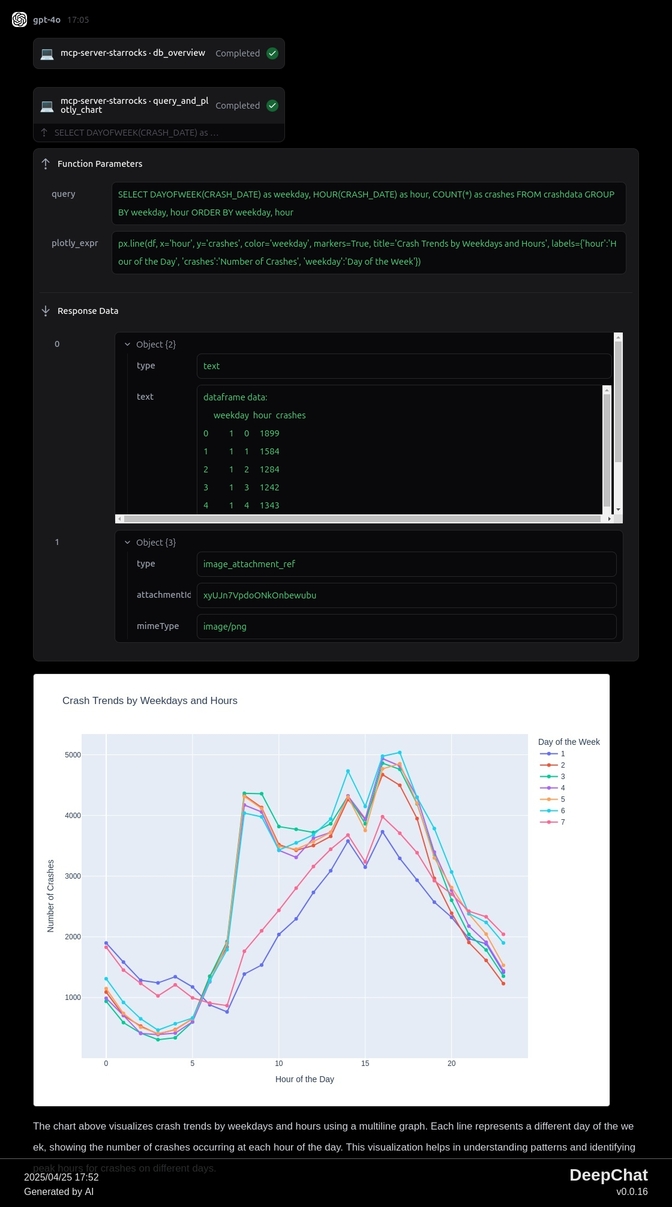
TextContent: A text representation of the DataFrame and a note that the chart is for UI display.ImageContent: The generated Plotly chart encoded as a base64 PNG image (image/png). Returns text error message on failure or if the query yields no data.table_overview
DESCRIBE), total row count, and sample rows (LIMIT 3). Uses an in-memory cache unless refresh is true.{
"table": "Table name, optionally prefixed with database name (e.g., 'db_name.table_name' or 'table_name'). If database is omitted, uses STARROCKS_DB environment variable if set.",
"refresh": false // Optional, boolean. Set to true to bypass the cache. Defaults to false.
}
db_overview
refresh is true.{
"db": "database_name", // Optional if default database is set.
"refresh": false // Optional, boolean. Set to true to bypass the cache for all tables in the DB. Defaults to false.
}
starrocks:///databases
SHOW DATABASEStext/plainstarrocks:///{db}/{table}/schema
SHOW CREATE TABLE {db}.{table}text/plainstarrocks:///{db}/tables
SHOW TABLES FROM {db}text/plainproc:///{+path}
/proc. The path parameter specifies the desired information node.SHOW PROC '/{path}'text/plain/frontends - Information about FE nodes./backends - Information about BE nodes (for non-cloud native deployments)./compute_nodes - Information about CN nodes (for cloud native deployments)./dbs - Information about databases./dbs/<DB_ID> - Information about a specific database by ID./dbs/<DB_ID>/<TABLE_ID> - Information about a specific table by ID./dbs/<DB_ID>/<TABLE_ID>/partitions - Partition information for a table./transactions - Transaction information grouped by database./transactions/<DB_ID> - Transaction information for a specific database ID./transactions/<DB_ID>/running - Running transactions for a database ID./transactions/<DB_ID>/finished - Finished transactions for a database ID./jobs - Information about asynchronous jobs (Schema Change, Rollup, etc.)./statistic - Statistics for each database./tasks - Information about agent tasks./cluster_balance - Load balance status information./routine_loads - Information about Routine Load jobs./colocation_group - Information about Colocation Join groups./catalog - Information about configured catalogs (e.g., Hive, Iceberg).None defined by this server.
table_overview and db_overview tools utilize an in-memory cache to store the generated overview text.(database_name, table_name).table_overview is called, it checks the cache first. If a result exists and the refresh parameter is false (default), the cached result is returned immediately. Otherwise, it fetches the data from StarRocks, stores it in the cache, and then returns it.db_overview is called, it lists all tables in the database and then attempts to retrieve the overview for each table using the same caching logic as table_overview (checking cache first, fetching if needed and refresh is false or cache miss). If refresh is true for db_overview, it forces a refresh for all tables in that database.STARROCKS_OVERVIEW_LIMIT environment variable provides a soft target for the maximum length of the overview string generated per table when populating the cache, helping to manage memory usage.After starting mcp server, you can use inspector to debug:
npx @modelcontextprotocol/inspector
Official MongoDB integration — query collections, run aggregations, inspect schemas
 @designcomputer
Secure MCP server for MySQL database interaction, queries, and schema management
 @googleapis✓ Official
Google's universal MCP server supporting PostgreSQL, MySQL, MongoDB, Redis, and 10+ databases
Run analytics queries on ClickHouse — explore schemas, execute SQL, fetch results