

Are you the author? Sign in to claim
Local-first shared project memory for Codex and Claude Code
Your AI agents forget things. memhub doesn't.







Every new session, your AI agent starts from zero — you re-explain the build command, the naming conventions, why you chose Postgres over SQLite six months ago. memhub gives the agent a persistent, searchable memory of your project, so it looks those things up instead of asking you again.
It's one offline binary and one SQLite file next to your code, shared by Claude Code, Codex, and OpenCode: decisions (with the why behind them), facts, tasks, your own reference docs, and an index of where things live in your codebase. When the agent needs context, it pulls a small ranked bundle of just the relevant rows — not your whole README — so prompts stay short and your token bill stays down. No cloud, no account, no daemon; everything, including semantic search, runs locally.
Jump to Quickstart → · See how it works →
Each agent below gets a copy-paste prompt that installs memhub end-to-end — expand the one you use. Prefer to run the steps yourself? See Install by hand.
Open Claude Code in the repo you want memhub to track and paste:
Please install memhub for me, then turn on hybrid recall.

1. Clone https://github.com/kninetimmy/memhub.git into ~/src/memhub if it
   isn't already there (`git pull` if it is). Stop if the Rust toolchain
   (1.87+) is missing.
2. Run `cargo install --path ~/src/memhub --force` so `memhub` ends up on
   PATH (~/.cargo/bin must be on PATH; warn me if it isn't). First build
   takes a couple of minutes — it downloads and bundles a ~130 MB
   embedding model into the binary.
3. Run `memhub --version` to verify.
4. Register memhub as an MCP server so Claude Code can call it as a
   structured tool (this is also how its routing instructions load):
   run `claude mcp add memhub -- memhub serve` (add `--scope user` to
   make it available across your sessions).
5. Copy the user-level skills so /wrap-up, /catch-up, /check-init,
   /init-project, /recall, /locate, /reindex, /eval-recall, /doc,
   /global, /audit-md, and /upgrade all work as slash commands:

       POSIX shell (bash/zsh):
       mkdir -p ~/.claude/commands
       for f in ~/src/memhub/templates/skills/claude/*.md; do case "$(basename "$f")" in metrics.md|viz.md) continue;; esac; cp "$f" ~/.claude/commands/; done

       Windows PowerShell:
       New-Item -ItemType Directory -Force -Path "$HOME\.claude\commands" | Out-Null
       Get-ChildItem "$HOME\src\memhub\templates\skills\claude\*.md" | Where-Object { $_.Name -notin 'metrics.md','viz.md' } | ForEach-Object { Copy-Item $_.FullName "$HOME\.claude\commands\" }

6. cd back to this repo and run `memhub init`, then `memhub status`.
   Tell me what status reports.
7. Run `memhub code index` to build the local code index, then tell me
   `memhub locate "<query>"` and the `/locate` skill can now answer
   "where is X" questions with ranked file:line breadcrumbs. Report how
   many files were indexed.
8. Ask me: hybrid recall (recommended — semantic + keyword) or FTS-only
   (lighter, keyword search only)?
     - If I say hybrid: set `mode = "hybrid"` under the existing
       `[retrieval]` table in .memhub/config.toml (memhub init already
       wrote that table), then run `memhub index rebuild --actor
       claude-code:reindex`. Report how many rows were embedded. Note
       that hybrid mode already runs a bundled cross-encoder re-ranker
       over the blended FTS+vector results by default — nothing extra
       to turn on.
     - If I say FTS: nothing to do; the default is already FTS.
9. Run `memhub recall "<some keyword from my project>" --max-results 3`
   so I can see the recall surface working end-to-end.
10. Tell me about the optional machine-global store: a second SQLite at
   ~/.memhub/global.sqlite, shared by every repo on this machine, for
   machine/toolchain facts and standing engineering policy — it's the
   global-vs-repo CLAUDE.md idea, made retrievable. Off by default and
   per-repo opt-in. Ask whether to enable it for this repo:
     - If I say yes: run `memhub global enable` and report the store
       path. Note that writing to global is always a deliberate human
       action — never promote to global on your own; repo is the safe
       default.
     - If I say no: just note `/global` and `memhub global enable` are
       available anytime.
11. Tell me memhub can also ingest long reference docs (design specs,
   API contracts) as RAG-searchable material. After the first doc add,
   relevant doc chunks automatically surface in plain recall — gated by
   a relevance threshold so off-topic docs stay silent. Ask whether I
   want to ingest one now — if I give you a path, run
   `memhub doc add "<path>" --json` and report the chunk count;
   if not, just note `/doc` is available anytime.
12. Tell me memhub can sync this repo's memory between my own machines
    through a folder that already syncs (Google Drive for Desktop, or an
    rclone mount on Linux) — memhub stays offline and only reads/writes a
    local path. It's off by default and opt-in per repo. Ask whether I
    work across machines:
      - If I say yes: run `memhub sync enable`, then ask me for the
        absolute path of the synced folder on this machine and set it as
        `[sync] drive_subpath` in .memhub/config.toml. Run
        `memhub sync status` and report the resolved remote dir. Note
        that `/catch-up` pulls at session start and `/wrap-up` pushes at
        the end.
      - If I say no: just note `/catch-up`, `/wrap-up`, and
        `memhub sync enable` are available anytime.

Don't touch any files in this repo other than what `memhub init` writes
(.memhub/ and the generated-output .gitignore entries), the
.memhub/config.toml edits in steps 8, 10, and 12, and — only if I opt in
at step 10 — the machine-global store at ~/.memhub/global.sqlite (outside
this repo, in my home directory; that is expected).
Open Codex in the repo you want to track and paste:
Please install memhub for me, then turn on hybrid recall.

1. Clone https://github.com/kninetimmy/memhub.git into ~/src/memhub if it
   isn't already there (`git pull` if it is). Stop if the Rust toolchain
   (1.87+) is missing.
2. Run `cargo install --path ~/src/memhub --force` so `memhub` ends up on
   PATH (~/.cargo/bin must be on PATH; warn me if it isn't). First build
   takes a couple of minutes — it downloads and bundles a ~130 MB
   embedding model into the binary.
3. Run `memhub --version` to verify.
4. Register memhub as an MCP server so you can call it as a structured
   tool. Append this to ~/.codex/config.toml:

       [mcp_servers.memhub]
       command = "memhub"
       args = ["serve"]

   Codex has no repo-scoped MCP config, so also confirm this repo is
   trusted — accept Codex's own trust prompt the first time you run it
   here, or add a `[projects.<absolute-repo-path>]` table by hand with
   `trust_level = "trusted"`. Without a trust entry Codex runs this repo
   under its untrusted-project approval/sandbox posture and the
   MCP-first skill instructions won't reliably fire.

5. Copy the user-level skills so /wrap-up, /catch-up, /check-init,
   /init-project, /recall, /locate, /reindex, /eval-recall, /doc,
   /global, /audit-md, and /upgrade all work:

       POSIX shell (bash/zsh):
       mkdir -p ~/.codex/skills
       for d in ~/src/memhub/templates/skills/codex/*; do case "$(basename "$d")" in metrics|viz) continue;; esac; cp -R "$d" ~/.codex/skills/; done

       Windows PowerShell:
       New-Item -ItemType Directory -Force -Path "$HOME\.codex\skills" | Out-Null
       Get-ChildItem "$HOME\src\memhub\templates\skills\codex" -Directory | Where-Object { $_.Name -notin 'metrics','viz' } | ForEach-Object { Copy-Item $_.FullName "$HOME\.codex\skills\" -Recurse -Force }

6. cd back to this repo and run `memhub init`, then `memhub status`.
   Tell me what status reports.
7. Run `memhub code index` to build the local code index, then tell me
   `memhub locate "<query>"` and the `/locate` skill can now answer
   "where is X" questions with ranked file:line breadcrumbs. Report how
   many files were indexed.
8. Ask me: hybrid recall (recommended — semantic + keyword) or FTS-only
   (lighter, keyword search only)?
     - If I say hybrid: set `mode = "hybrid"` under the existing
       `[retrieval]` table in .memhub/config.toml (memhub init already
       wrote that table), then run `memhub index rebuild --actor
       codex:reindex`. Report how many rows were embedded. Note that
       hybrid mode already runs a bundled cross-encoder re-ranker over
       the blended FTS+vector results by default — nothing extra to
       turn on.
     - If I say FTS: nothing to do; the default is already FTS.
9. Run `memhub recall "<some keyword from my project>" --max-results 3`
   so I can see the recall surface working end-to-end.
10. Tell me about the optional machine-global store: a second SQLite at
    ~/.memhub/global.sqlite, shared by every repo on this machine, for
    machine/toolchain facts and standing engineering policy — it's the
    global-vs-repo AGENTS.md idea, made retrievable. Off by default and
    per-repo opt-in. Ask whether to enable it for this repo:
      - If I say yes: run `memhub global enable` and report the store
        path. Note that writing to global is always a deliberate human
        action — never promote to global on your own; repo is the safe
        default.
      - If I say no: just note `/global` and `memhub global enable` are
        available anytime.
11. Tell me memhub can also ingest long reference docs (design specs,
    API contracts) as RAG-searchable material. After the first doc add,
    relevant doc chunks automatically surface in plain recall — gated by
    a relevance threshold so off-topic docs stay silent. Ask whether I
    want to ingest one now — if I give you a path, run
    `memhub doc add "<path>" --json` and report the chunk count;
    if not, just note `/doc` is available anytime.
12. Tell me memhub can sync this repo's memory between my own machines
    through a folder that already syncs (Google Drive for Desktop, or an
    rclone mount on Linux) — memhub stays offline and only reads/writes a
    local path. The `memhub.sync_*` MCP tools are the agent-first
    surface; they default to the canonical synced folder. It's off by
    default and opt-in per repo. Ask whether I work across machines:
      - If I say yes: run `memhub sync enable`, then ask me for the
        absolute path of the synced folder on this machine and set it as
        `[sync] drive_subpath` in .memhub/config.toml. Run
        `memhub.sync_status` and report the resolved remote dir. Note
        that `/catch-up` pulls at session start and `/wrap-up` pushes at
        the end.
      - If I say no: just note `/catch-up`, `/wrap-up`, and
        `memhub sync enable` are available anytime.

Don't touch any files in this repo other than what `memhub init` writes
(.memhub/ and the generated-output .gitignore entries), the
.memhub/config.toml edits in steps 8, 10, and 12, and — only if I opt in
at step 10 — the machine-global store at ~/.memhub/global.sqlite (outside
this repo, in my home directory; that is expected).
Open OpenCode in the repo you want to track and paste:
Please install memhub for me, then turn on hybrid recall.

1. Clone https://github.com/kninetimmy/memhub.git into ~/src/memhub if it
   isn't already there (`git pull` if it is). Stop if the Rust toolchain
   (1.87+) is missing.
2. Run `cargo install --path ~/src/memhub --force` so `memhub` ends up on
   PATH (~/.cargo/bin must be on PATH; warn me if it isn't). First build
   takes a couple of minutes — it downloads and bundles a ~130 MB
   embedding model into the binary.
3. Run `memhub --version` to verify.
4. Register memhub as an MCP server so you can call it as a structured
   tool. Add this to ~/.config/opencode/opencode.jsonc (or
   opencode.json — OpenCode reads either extension; use whichever
   already exists on this machine):

       {
         "$schema": "https://opencode.ai/config.json",
         "mcp": {
           "servers": {
             "memhub": {
               "type": "local",
               "command": ["memhub", "serve"],
               "disabled": false
             }
           }
         }
       }

   If that file already exists, merge only the `mcp.servers.memhub` block.
5. Copy the user-level skills so /wrap-up, /catch-up, /check-init,
   /init-project, /recall, /locate, /reindex, /eval-recall, /doc,
   /global, /audit-md, and /upgrade all work:

       POSIX shell (bash/zsh):
       mkdir -p ~/.config/opencode/skills ~/.config/opencode/commands
       for d in ~/src/memhub/templates/skills/opencode/*; do case "$(basename "$d")" in metrics|viz) continue;; esac; cp -R "$d" ~/.config/opencode/skills/; done
       for f in ~/src/memhub/templates/commands/opencode/*.md; do case "$(basename "$f")" in metrics.md|viz.md) continue;; esac; cp "$f" ~/.config/opencode/commands/; done

       Windows PowerShell:
       New-Item -ItemType Directory -Force -Path "$HOME\.config\opencode\skills","$HOME\.config\opencode\commands" | Out-Null
       Get-ChildItem "$HOME\src\memhub\templates\skills\opencode" -Directory | Where-Object { $_.Name -notin 'metrics','viz' } | ForEach-Object { Copy-Item $_.FullName "$HOME\.config\opencode\skills\" -Recurse -Force }
       Get-ChildItem "$HOME\src\memhub\templates\commands\opencode\*.md" | Where-Object { $_.Name -notin 'metrics.md','viz.md' } | ForEach-Object { Copy-Item $_.FullName "$HOME\.config\opencode\commands\" }

6. Restart OpenCode so it reloads config, skills, and commands.
7. cd back to this repo and run `memhub init`, then `memhub status`.
   Tell me what status reports.
8. Run `memhub code index` to build the local code index, then tell me
   `memhub locate "<query>"` and the `/locate` skill can now answer
   "where is X" questions with ranked file:line breadcrumbs. Report how
   many files were indexed.
9. Ask me: hybrid recall (recommended — semantic + keyword) or FTS-only
   (lighter, keyword search only)?
     - If I say hybrid: set `mode = "hybrid"` under the existing
       `[retrieval]` table in .memhub/config.toml (memhub init already
       wrote that table), then run `memhub index rebuild --actor
       opencode:reindex`. Report how many rows were embedded. Note that
       hybrid mode already runs a bundled cross-encoder re-ranker over
       the blended FTS+vector results by default — nothing extra to
       turn on.
     - If I say FTS: nothing to do; the default is already FTS.
10. Run `memhub recall "<some keyword from my project>" --max-results 3`
    so I can see the recall surface working end-to-end.
11. Tell me about the optional machine-global store: a second SQLite at
    ~/.memhub/global.sqlite, shared by every repo on this machine, for
    machine/toolchain facts and standing engineering policy — it's the
    global-vs-repo AGENTS.md idea, made retrievable. Off by default and
    per-repo opt-in. Ask whether to enable it for this repo:
      - If I say yes: run `memhub global enable` and report the store
        path. Note that writing to global is always a deliberate human
        action — never promote to global on your own; repo is the safe
        default.
      - If I say no: just note `/global` and `memhub global enable` are
        available anytime.
12. Tell me memhub can also ingest long reference docs (design specs,
    API contracts) as RAG-searchable material. After the first doc add,
    relevant doc chunks automatically surface in plain recall — gated by
    a relevance threshold so off-topic docs stay silent. Ask whether I
    want to ingest one now — if I give you a path, run
    `memhub doc add "<path>" --json` and report the chunk count;
    if not, just note `/doc` is available anytime.
13. Tell me memhub can sync this repo's memory between my own machines
    through a folder that already syncs (Google Drive for Desktop, or an
    rclone mount on Linux) — memhub stays offline and only reads/writes a
    local path. The `memhub.sync_*` MCP tools are the agent-first
    surface; they default to the canonical synced folder. It's off by
    default and opt-in per repo. Ask whether I work across machines:
      - If I say yes: run `memhub sync enable`, then ask me for the
        absolute path of the synced folder on this machine and set it as
        `[sync] drive_subpath` in .memhub/config.toml. Run
        `memhub.sync_status` and report the resolved remote dir. Note
        that `/catch-up` pulls at session start and `/wrap-up` pushes at
        the end.
      - If I say no: just note `/catch-up`, `/wrap-up`, and
        `memhub sync enable` are available anytime.

Don't touch any files in this repo other than what `memhub init` writes
(.memhub/ and the generated-output .gitignore entries), the
.memhub/config.toml edits in steps 9, 11, and 13, and — only if I opt in
at step 11 — the machine-global store at ~/.memhub/global.sqlite (outside
this repo, in my home directory; that is expected).
# 1. Build + install the binary (slow on first build; bundles BGE-small)
git clone https://github.com/kninetimmy/memhub.git ~/src/memhub
cargo install --path ~/src/memhub --force

# 2. Verify
memhub --version

# 3. Initialize in your project
cd /path/to/your/project
memhub init
memhub status

# 4. Warm up the code locator — builds a local index so `memhub locate`
#    (and the /locate skill) can answer "where is X" with ranked
#    file:line breadcrumbs instead of grepping around.
memhub code index
memhub code status   # confirm files indexed

# 5. Agent skills / command wrappers (Claude + Codex + OpenCode)
mkdir -p ~/.claude/commands ~/.codex/skills
for f in ~/src/memhub/templates/skills/claude/*.md; do case "$(basename "$f")" in metrics.md|viz.md) continue;; esac; cp "$f" ~/.claude/commands/; done
for d in ~/src/memhub/templates/skills/codex/*; do case "$(basename "$d")" in metrics|viz) continue;; esac; cp -R "$d" ~/.codex/skills/; done
mkdir -p ~/.config/opencode/skills ~/.config/opencode/commands
for d in ~/src/memhub/templates/skills/opencode/*; do case "$(basename "$d")" in metrics|viz) continue;; esac; cp -R "$d" ~/.config/opencode/skills/; done
for f in ~/src/memhub/templates/commands/opencode/*.md; do case "$(basename "$f")" in metrics.md|viz.md) continue;; esac; cp "$f" ~/.config/opencode/commands/; done
Windows PowerShell equivalent for step 5 (the for/case/basename loops above are POSIX-only):
# 5. Agent skills / command wrappers (Claude + Codex + OpenCode)
New-Item -ItemType Directory -Force -Path "$HOME\.claude\commands","$HOME\.codex\skills" | Out-Null
Get-ChildItem "$HOME\src\memhub\templates\skills\claude\*.md" | Where-Object { $_.Name -notin 'metrics.md','viz.md' } | ForEach-Object { Copy-Item $_.FullName "$HOME\.claude\commands\" }
Get-ChildItem "$HOME\src\memhub\templates\skills\codex" -Directory | Where-Object { $_.Name -notin 'metrics','viz' } | ForEach-Object { Copy-Item $_.FullName "$HOME\.codex\skills\" -Recurse -Force }
New-Item -ItemType Directory -Force -Path "$HOME\.config\opencode\skills","$HOME\.config\opencode\commands" | Out-Null
Get-ChildItem "$HOME\src\memhub\templates\skills\opencode" -Directory | Where-Object { $_.Name -notin 'metrics','viz' } | ForEach-Object { Copy-Item $_.FullName "$HOME\.config\opencode\skills\" -Recurse -Force }
Get-ChildItem "$HOME\src\memhub\templates\commands\opencode\*.md" | Where-Object { $_.Name -notin 'metrics.md','viz.md' } | ForEach-Object { Copy-Item $_.FullName "$HOME\.config\opencode\commands\" }
# 6. MCP for Codex — append to ~/.codex/config.toml (Codex has no repo
#    scope, so this is a per-machine step, and it also needs this repo
#    trusted or the MCP-first skill instructions won't reliably fire —
#    accept Codex's trust prompt on first run here, or add
#    [projects.<abs-repo-path>] with trust_level = "trusted" by hand):
#   [mcp_servers.memhub]
#   command = "memhub"
#   args = ["serve"]

# MCP for OpenCode V2 — merge into ~/.config/opencode/opencode.json:
#   { "mcp": { "servers": { "memhub": { "type": "local", "command": ["memhub", "serve"], "disabled": false } } } }

# 7. (Recommended) Turn on hybrid recall — FTS + semantic search, with a
#    bundled cross-encoder re-ranker over the blended results on by
#    default; nothing extra to enable once hybrid mode is set.
#    In .memhub/config.toml, set mode under the existing [retrieval]
#    table (memhub init already writes it):
#       mode = "hybrid"
#    Then backfill embeddings for existing rows:
memhub index rebuild --actor cli:user
memhub index status   # confirm Missing: 0

# 8. (Optional) Machine-wide memory: a second store at
#    ~/.memhub/global.sqlite shared by every repo on this machine.
#    Off by default; opt this repo in, then write/promote with --global.
memhub global enable
memhub global status

# 9. (Optional) Ingest a reference doc — after first add, relevant chunks
#    automatically surface in plain recall (relevance-gated; off-topic
#    docs stay silent). /doc wraps this as a slash command.
memhub doc add path/to/design-spec.md --json

# 10. (Optional) Cross-machine sync via a synced folder (Google Drive for
#     Desktop, or an rclone mount on Linux). memhub stays offline and only
#     reads/writes a local path. Opt in per repo, then set [sync]
#     drive_subpath in .memhub/config.toml to the absolute synced-folder
#     path. /catch-up pulls at session start; /wrap-up pushes at the end.
memhub sync enable
#    .memhub/config.toml:
#       [sync]
#       drive_subpath = "/abs/path/to/your/synced/folder"
memhub sync status   # confirms enablement + the resolved remote dir
Three views: the system as a whole, how memory follows you between machines, and what happens inside a single recall.
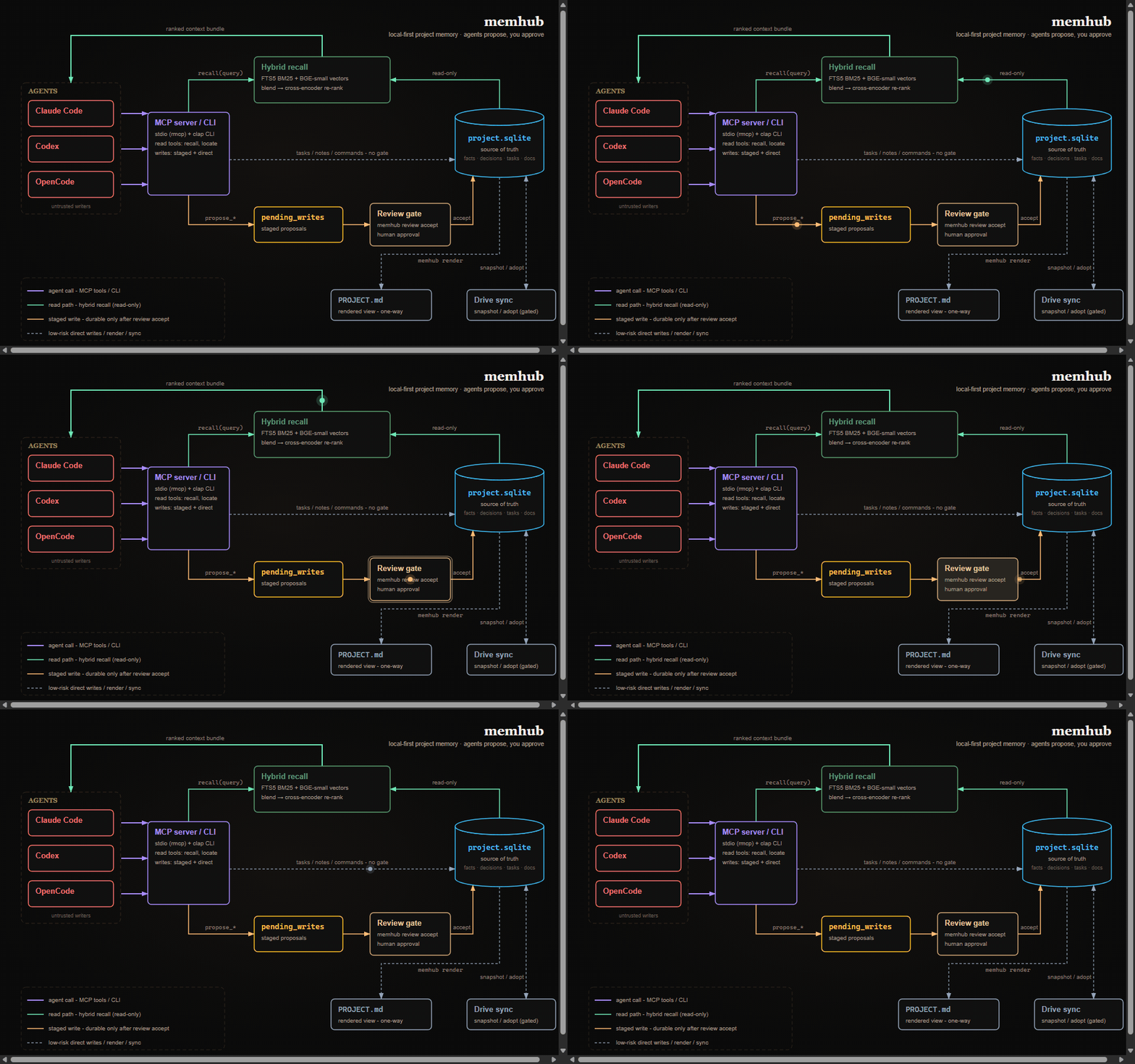
Your agents call memhub over MCP or the CLI. Reads come back as a small ranked bundle pulled from the SQLite database sitting next to your code. When an agent wants to save something durable — a fact, a decision — the write is staged in pending_writes and waits at the review gate until you accept it. Low-stakes writes (tasks, notes, commands) go straight in, and memhub render keeps a human-readable PROJECT.md view of the whole thing.
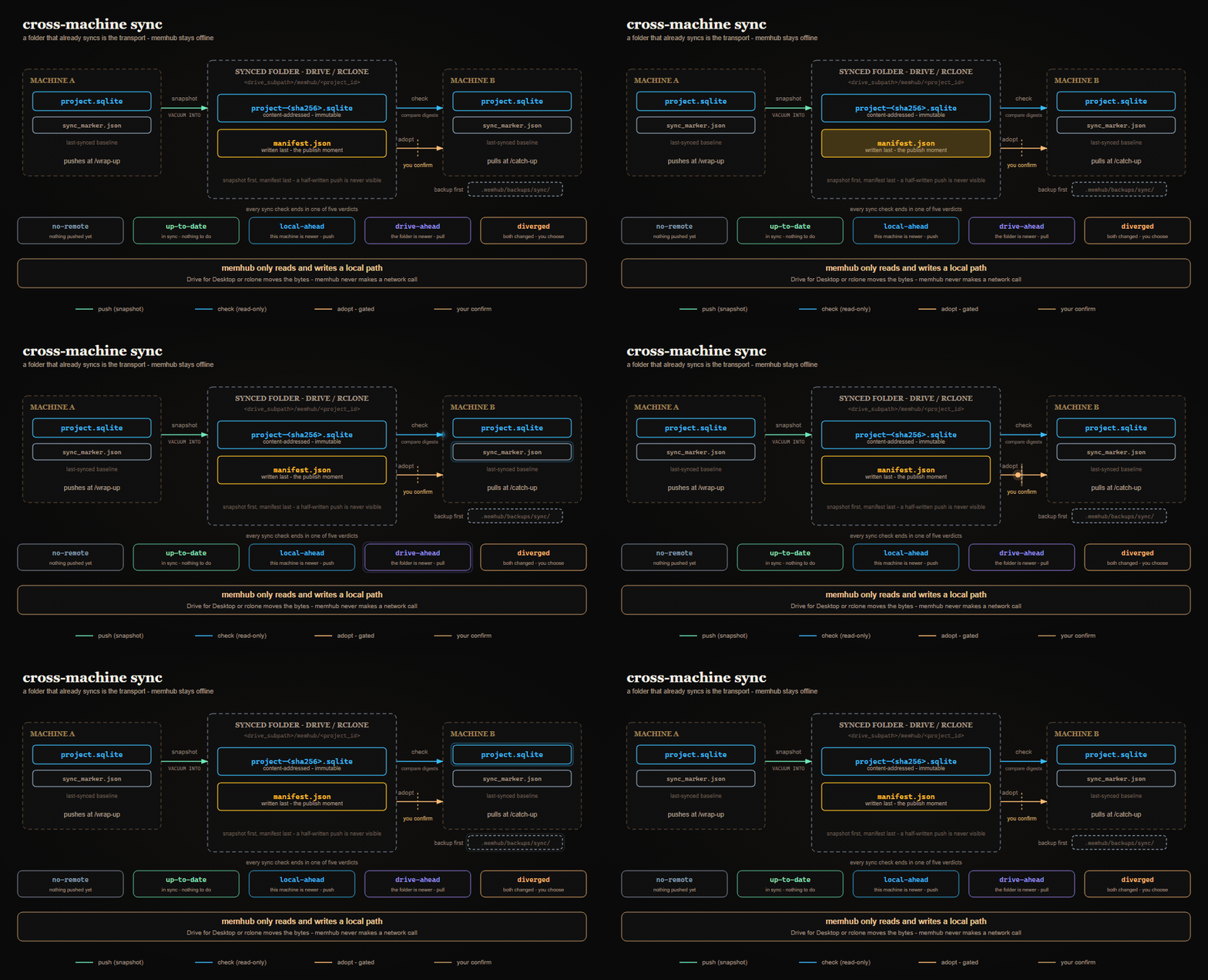
Opt a repo in, and your laptop and desktop share memory through a folder that's already syncing (Google Drive for Desktop, or an rclone mount). A push writes one whole-database snapshot, manifest last — so a half-finished push is never visible to the other side. A pull compares content digests and reports one of five verdicts; adopting remote state is the one destructive step, so it always waits for your confirm and writes a backup first. memhub itself never makes a network call. Setup →
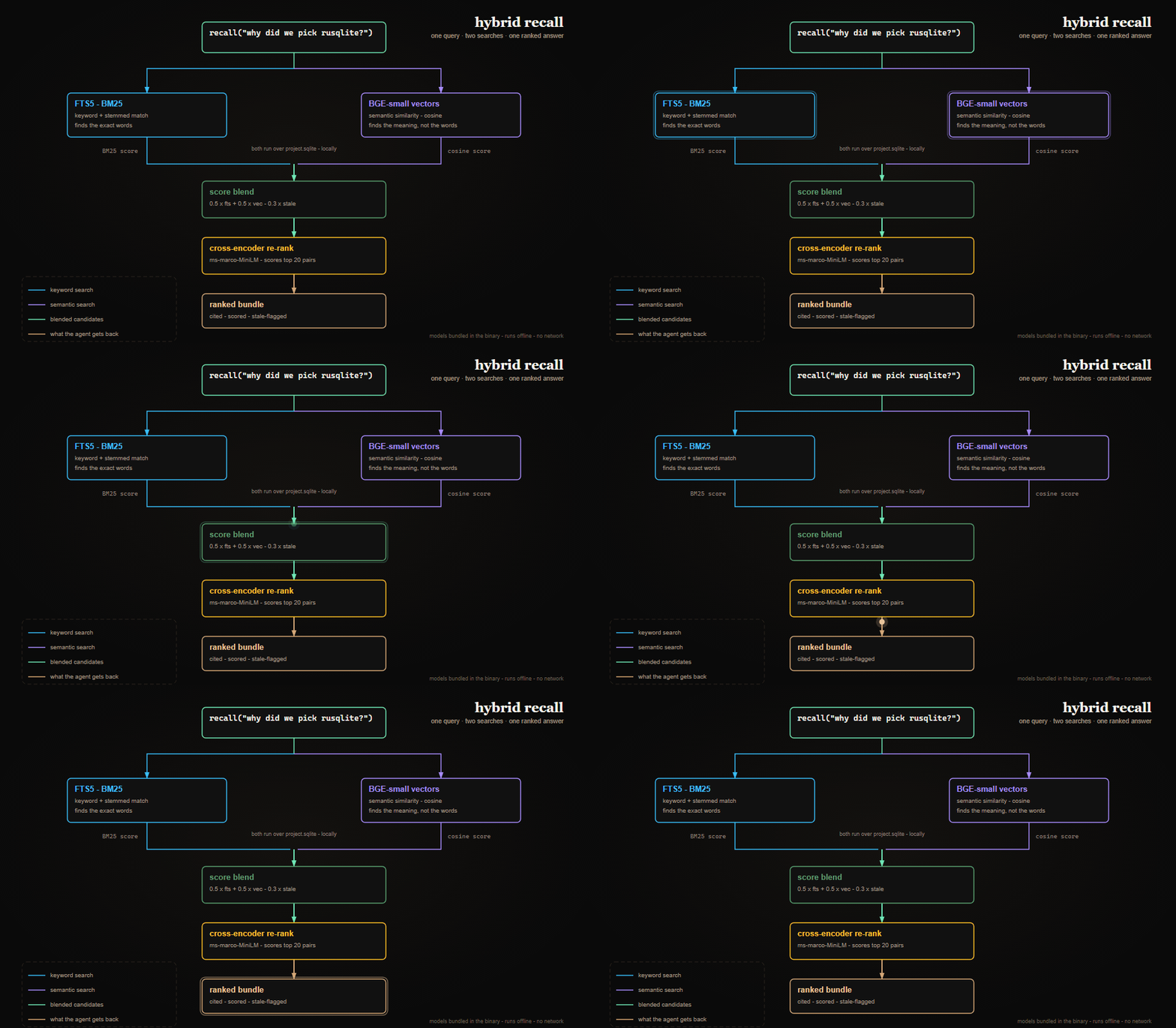
A recall runs two searches at once: FTS5 finds the exact words, BGE-small embeddings find the meaning (so "compile settings" still finds the fact filed under release_build). The scores blend, a cross-encoder re-ranks the top candidates, and the agent gets back a small, cited, staleness-flagged bundle instead of a wall of markdown. Both models are compiled into the binary — nothing downloads at runtime, nothing leaves your machine.
file:line breadcrumbs with clipped snippets — never whole files, so it costs almost no context.rm -rf .memhub/ and it's gone.You talk to your agent; memhub runs in the background. At the end you run /wrap-up, and the agent walks you through everything it wants to commit — you say yes or no to each item.
You: "What did we decide about the authentication flow?"
  → memhub.recall "authentication flow"  (returns cited evidence bundle)

You: "Add a task to refactor the cache layer."
  → task_add "refactor cache layer"  (direct write)

You: "We're going to use rusqlite bundled mode because it avoids setup friction."
  → propose_decision ...  (staged for your review)

You: "/wrap-up"
  → agent walks through staged proposals one by one
  → you approve or skip each one
  → session note written, PROJECT.md re-rendered
The /wrap-up gate is the whole point: the agent is good at surfacing knowledge; you decide what's true.
You can also drive it from the terminal — both flows write to the same database:
memhub recall "auth flow"
memhub task add "Refactor cache layer"
memhub fact add build-command "cargo build --release"
memhub decision add "use rusqlite bundled mode" \
  --rationale "Avoid system SQLite setup friction."
memhub render
memhub task list in this repo for the current picture)cargo audit hard failure is resolved (2026-08-28, task 127). Before: main was red on RUSTSEC-2026-0204 because it resolved crossbeam-epoch 0.9.18. After: crossbeam-epoch 0.9.20 resolves the hard failure and cargo audit now succeeds; the two warning-only advisories remain non-blocking: unmaintained paste (RUSTSEC-2024-0436) and the anyhow unsoundness advisory (RUSTSEC-2026-0190). The weekly job remains outside the required merge checks.list_pending_writes honors its documented pending default (2026-07-27, PR #174). It used to pass an omitted status through as every status, and because LIMIT applied afterwards, reviewed rows could crowd genuinely pending ones out of the window entirely. It now defaults to pending, adds an explicit all spelling, and always reports the filter actually applied.opencode.json command block — was fixed and is now guarded by a skill-parity test.main is live (2026-07-18, task 121). PRs required, with lint and Windows/macOS build+test as required checks and enforce_admins on.cargo audit), the sync_md channel retired, four small hardenings closed, docs reconciled, and rustfmt+clippy adopted with a CI lint gate.sync check --diff shows per-table divergence.facts.kind, repo-first doc default flip, dual-shell preflights, and upgrade aside-restore.| Type | What it's for | Who writes it | Goes straight to DB? |
|---|---|---|---|
| facts | Key project knowledge: build commands, MSRV, env vars, naming conventions | You or agent | Agent: no (staged). You: yes. |
| decisions | Design choices with rationale and context | You or agent | Agent: no (staged). You: yes. |
| tasks | Lightweight to-dos and in-flight work | You or agent | Yes — low-stakes |
| session notes | Observations and scratch thoughts during a session | Agent | Yes — scratchpad only, not recalled |
| commands | Verified shell commands with success/fail tracking | You or agent | Yes — observational |
| state / arch | The "currently building" and architecture narratives | Agent at wrap-up | Yes — agent-authored but explicit |
| reference docs | External markdown you point it at: specs, contracts, style guides | You (you hand it a file) | Yes — auto-joins default recall after first ingest |
The rule behind the table: things that could be wrong — facts that might be outdated, decisions that might be misattributed — need a human in the loop. Ephemeral or observational things write directly.
When an agent proposal gets staged, the source is recorded as e.g. agent:claude-code. When you accept it at /wrap-up, that upgrades to user+agent:claude-code — both signals preserved, so you can always tell what was verified.
Sometimes what the agent needs is sitting in an existing file — a design spec, an API contract, a style guide. Don't paste it into prompts or hand-transcribe it into facts:
memhub doc add ~/specs/design-system.md
memhub splits the file into section-aware chunks (heading breadcrumbs preserved, so a hit knows it came from Typography > Design Tokens), embeds them, and makes the whole thing searchable through the same recall path as everything else.
After the first doc add in a repo, relevant chunks surface in plain recall automatically. A relevance threshold keeps it from being noisy: a UI style guide stays silent on a backend query, but a question about color tokens pulls the right spec section. When chunks don't clear the bar, recall reports an available_docs count — your cue to run a targeted query:
memhub recall "color token naming" --source-type doc
Worth knowing:
memhub export — they're file-backed and re-ingestable. Re-run doc add on another machine.memhub doc ls / show / rm to manage what's ingested.include_docs_in_default = false in config for strict opt-in.Memory answers "what did we decide?" Sometimes the question is "where is the code that does X?" memhub builds a local code index for that: it walks your repo, splits each source file into symbol-aware chunks via tree-sitter, embeds them, and lets you search by intent:
memhub code index                 # build / refresh the index
memhub locate "where does the retry backoff happen"
You get ranked breadcrumbs — path, line range, symbol, and a clipped snippet, not a wall of code:
1. src/net/client.rs:88-121   fn send_with_retry      (score 0.91)
     async fn send_with_retry(&self, req: Request) -> Result<Response> {
         let mut backoff = Duration::from_millis(50);…
2. src/config/retry.rs:12-19   struct RetryPolicy      (score 0.74)
It's a locator, not a reader — you (or the agent) open those exact lines with your own tools. What keeps it honest and cheap:
.memhub/code_index.sqlite) with its own query path; it never pollutes recall.memhub code rm and rebuild anytime.locate does a lazy staleness check; edited files re-chunk transparently.Surfaces: memhub code index|status|rm and memhub locate (CLI) · memhub.locate (MCP) · /locate (skill).
memhub is per-repo. Every project gets its own .memhub/project.sqlite — isolated, no leakage between projects. (The one deliberate exception is the opt-in machine-global store below, and even that never merges repo databases.)
~/code/
├── my-web-app/
│   └── .memhub/project.sqlite   ← web app memory
├── my-cli-tool/
│   └── .memhub/project.sqlite   ← CLI tool memory
└── my-library/
    └── .memhub/project.sqlite   ← library memory
The binary installs once at ~/.cargo/bin/memhub. To add a project: cd in, memhub init. To uninstall a project: rm -rf .memhub/.
Some knowledge isn't about this repo — it's about this machine, or how you work everywhere: toolchain versions, install commands, a standing rule like "always integration-test against a real database." That's the machine-global store: a second SQLite at ~/.memhub/global.sqlite, shared by every repo on this machine. The global-vs-repo CLAUDE.md idea — made retrievable instead of always-loaded.
Off by default, per-repo opt-in. When disabled, recall is byte-for-byte identical to a build without the feature.
memhub global enable     # opt this repo in; create the store if absent
memhub global status     # path, schema version, counts
memhub global disable    # opt back out (non-destructive)
What belongs in it — only the broadly-applicable kind of facts, decisions, and docs: machine/toolchain truths, standing engineering policy, a universal style guide. Never: tasks, narratives, or anything naming a repo-specific path.
Writing to it is always a deliberate human action — born-global from the CLI, or promoted from an existing repo row (copy, not move; the repo row stays and still wins locally):
memhub fact add ci-runner "self-hosted, 16 vCPU" --global
memhub decision add "Integration-test against a real DB" \
  --rationale "A mocked DB once hid a prod migration failure." --global
memhub doc add ~/refs/python-style-guide.md --global
memhub fact promote 12 --global
memhub decision promote 8 --global
An agent can never write global on its own. Its only route is a staged proposal (propose_fact / propose_decision with global=true) that becomes durable only when you run memhub review accept. One bad global write would poison every repo on the machine, so this path is deliberately never agent-automatic.
Recall merges, then you arbitrate. Global hits blend with repo hits in one re-ranked pool; every hit carries a scope of "repo" or "global", and the agent applies repo-overrides-global — exactly how a repo CLAUDE.md overrides the global one. The store inherits the active repo's [retrieval] config, is per-machine, and is not part of memhub export. /global wraps all of this.
memhub state is machine-local by default — only code and migrations travel with the repo. To carry memory over once:
# on your current machine
memhub export ~/memhub-myproject-backup.json

# move the file (Drive, USB, scp)

# on the new machine, after cloning the repo + installing memhub
memhub init --from-backup ~/memhub-myproject-backup.json
memhub index rebuild   # re-generate embeddings from the imported rows
The export is versioned JSON covering facts, decisions, tasks, commands, pending writes, writes log, session notes, and both narratives. Embeddings, ingested docs, and the machine-global store are excluded — re-derive or re-add them on the target machine.
The export/import dance above works, but it's manual. Sync automates it: your repo's memory follows you between your own machines (one person, not a team) through a folder that's already syncing. The model is animated above; the guardrails worth knowing:
diverged is the one lossy case. If both machines changed since the last sync, adopting the remote copy discards this machine's local-only changes — memhub shows both logical versions and requires an explicit yes; it never adopts automatically..memhub/backups/sync/ first, and refuses outright on a project-id mismatch, a snapshot from a newer memhub schema (run memhub upgrade first), or a checksum that disagrees with the manifest.A synced folder on every machine. Install Google Drive for Desktop (macOS/Windows) or set up an rclone mount (Linux), and note the local path — e.g. G:\My Drive\memhub-sync on Windows. A leading ~ in drive_subpath expands to the home directory.
Linux / rclone — advanced users only. Google doesn't ship Drive for Desktop on Linux, so you mount Drive yourself with rclone. It works, but it's genuinely fiddly (OAuth config, a FUSE mount, keeping it alive across reboots). If that's not your thing, skip sync on Linux and use
memhub export/importby hand.
rclone config                                   # one-time: add a "gdrive" remote
mkdir -p ~/gdrive
rclone mount gdrive: ~/gdrive --vfs-cache-mode writes --daemon
ls ~/gdrive/My\ Drive/memhub-sync               # confirm the folder is visible
Then set drive_subpath = "~/gdrive/My Drive/memhub-sync" (matching the other machines). The mount must be live whenever you sync; for an unattended box, a systemd user unit keeps it up across reboots.
memhub on PATH on each machine (Quickstart above), with the same repo cloned.
A git remote on the repo (the project id derives from it), or an explicit [sync] project_id in .memhub/config.toml.
# --- once per repo, on each machine ---
memhub sync enable                       # opt this repo in
# then set the absolute synced-folder path in .memhub/config.toml:
#   [sync]
#   drive_subpath = "/Users/you/.../My Drive/memhub-sync"
memhub sync status                       # confirms enablement + the resolved remote dir
memhub resolves the snapshot location as <drive_subpath>/memhub/<project_id> — you never hand-build that path.
# --- push (end of a session on machine A) ---
memhub sync snapshot                     # write DB snapshot + manifest into the folder
memhub sync commit                       # record the baseline

# --- pull (start of a session on machine B) ---
memhub sync check                        # prints the verdict (drive-ahead / diverged / ...)
memhub sync adopt --yes                  # replace local with the snapshot (--yes = confirm gate)
memhub render                            # refresh the local PROJECT.md view
You rarely type these by hand. /catch-up (session start) runs the check, summarizes what's incoming, and adopts only after you approve; /wrap-up (session end) pushes if sync is enabled. The everyday loop is just those two commands — give Google's app a moment to finish syncing between machines.
memhub sync enable | disable | status | snapshot | check | adopt | commitmemhub.sync_status, .sync_snapshot, .sync_check, .sync_commit, .sync_adopt — all default to the canonical path; sync_adopt without confirm=true returns the would-change verdict and changes nothing/catch-up (pull) and the push tail of /wrap-upSync state ([sync] config and the per-machine baseline marker) is wiring, not memory — it's not part of memhub export.
| Command | What it does |
|---|---|
memhub init | Set up .memhub/ in a repo |
memhub status | Open tasks, stale facts, pending writes, schema version |
memhub recall <query> | Hybrid ranked bundle of facts/decisions/tasks/docs |
memhub fact add/list/verify | Durable key-value facts (build commands, MSRV, etc.); verify refreshes verified_at only, no confidence/source rewrite |
memhub decision add/list | Decisions with rationale, FTS-indexed and embedded |
memhub task add/list/done | Lightweight task tracking |
memhub command verify | Record verified command outcomes; derives confidence |
memhub note add/list | Session notes (low-stakes scratch; not in recall) |
memhub state set/show | The "current state" narrative |
memhub arch set/show | The architecture narrative |
memhub ingest-git | Pull commit + file history into the DB |
memhub doc add/ls/rm/show | Ingest external markdown docs; scope recall with --source-type doc |
memhub locate <query> | Find code by intent — ranked file:line breadcrumbs from the sibling code index |
memhub code index/status/rm | Build / inspect / drop the local code index (.memhub/code_index.sqlite) |
memhub global enable/disable/status | Opt this repo into the optional machine-wide store (~/.memhub/global.sqlite) |
memhub review list/accept/reject | Triage agent-proposed writes |
memhub render | Emit local PROJECT.md and PROJECT_LEDGER.md from the DB |
memhub index status/rebuild | Embedding coverage; backfill for fts → hybrid migrations |
memhub eval retrieval | Run the Recall@K harness against tests/retrieval_golden.json |
memhub eval locate | Recall@K harness for the code locator |
memhub stats --window 7d | Write activity by actor, review rate, stale-fact counts |
memhub metrics enable/status | Hibernated; available only in an explicit --features metrics build |
memhub viz | Hibernated; available only in an explicit --features viz build |
memhub export/import | Portable JSON backup; cross-machine restore |
memhub sync enable/status/snapshot/check/adopt/commit | Cross-machine Drive sync (M10); push/pull a whole-DB snapshot through a synced folder |
memhub upgrade | Rebuild + install the binary and bring every memhub instance on this machine to head schema; resync skill wrappers |
memhub gc | Reclaim stale Cargo build artifacts (memhub-owned target/ rlibs and test binaries) |
memhub serve | Stdio MCP server for Claude Code / Codex / OpenCode |
fact add, decision add, and doc add take --global; fact promote <id> --global and decision promote <id> --global copy an existing repo row up into the machine-wide store. Run any command with --help for flags.
Both are first-class; the install prompt asks you to pick one.
fts (default) | hybrid (recommended) | |
|---|---|---|
| Scoring | FTS5 BM25 over title + body | 0.5 × FTS + 0.5 × cosine − 0.3 × stale_penalty, then re-ranked |
| What it catches | Exact terms, stemmed variants | Exact + paraphrases ("compile a release" → release_build fact) |
| Per-write cost | 0 ms | ~50 ms eager-embed inside the source-write transaction |
| Per-recall cost | <10 ms | <100 ms (brute-force cosine + ~275 ms re-ranker at pool=20) |
| Disk footprint | None beyond source rows | ~1.5 KB per row (384-dim f32 vector) |
| Network | Never | Never. Model is bundled. |
| Best for | Small projects, scripted use | Multi-month projects where you forget exact wording |
Switching modes is non-destructive. fts → hybrid needs one memhub index rebuild; hybrid → fts just stops consulting embeddings.
The [retrieval] block in .memhub/config.toml:
[retrieval]
mode = "hybrid"                  # "fts" | "hybrid"
default_max_results = 6
accepted_only_by_default = true  # filter to source IN ('user', 'user+agent:%')
include_stale_by_default = false # hide stale facts unless asked

[retrieval.scoring]
fts_weight = 0.5
vector_weight = 0.5
stale_penalty = 0.3

[global]
enabled = false                  # opt-in via `memhub global enable`
include_docs_in_default = false  # auto-flips on first `doc add --global`
[global] enabled is managed by memhub global enable / disable — it's per-machine, so the tracked .memhub/config.example.toml baseline ships false. The machine-global store has no [retrieval] block of its own; it inherits the active repo's.
Claude Code
CLAUDE.md at session start..mcp.json — nothing to set up per machine.~/.claude/commands/: /wrap-up, /catch-up, /check-init, /init-project, /recall, /locate, /reindex, /eval-recall, /doc, /global, /audit-md, /upgrade. Dormant /metrics and /viz templates are retained for feature builds but not installed by default.actor=claude:wrap-up, source=user+agent:claude-code.Codex CLI
AGENTS.md at session start (same role as CLAUDE.md).~/.codex/skills/: same set as above.~/.codex/config.toml — see Register the MCP server.actor=codex:wrap-up, source=user+agent:codex.OpenCode CLI
AGENTS.md at session start (same role as Codex).~/.config/opencode/skills/ and command wrappers at ~/.config/opencode/commands/: same set as above.mcp.servers.memhub block in the tracked opencode.json — nothing to set up per machine.actor=opencode:wrap-up, source=user+agent:opencode.Session.Info through opencode2 api, then stores its session/agent/provider/model/variant values as optional structured fields on the session note only; those values do not change the actor or source above.model in opencode.json(c) for a default, or select one run with opencode2 run --model provider/model#variant (short form -m provider/model#variant). If no configured default is available, OpenCode can fall back to an available supported model.All three at once
Same DB, same rows. Every write is tagged, so you always know who surfaced what:
source                      Meaning
────────────────────────────────────────────────────────────────────
user                        You typed `memhub fact add` directly
agent:codex                 Codex proposed it (still in pending_writes)
agent:claude-code           Claude proposed it
agent:opencode              OpenCode proposed it
user+agent:codex            Codex surfaced via /wrap-up, you approved
user+agent:claude-code      Same, Claude-side
user+agent:opencode         Same, OpenCode-side
git                         Reserved for git ingestion
observed                    Reserved for observed signals
Two columns split the work:
source on facts and decisions — origin of the claim: user, agent:<id>, user+agent:<id>, git, observed.actor on writes_log and pending_writes — who performed the write: free-form, e.g. cli:user, claude:wrap-up.When you accept a pending proposal via memhub review accept, the durable row's source becomes user+agent:<actor> automatically.
memhub serve starts a stdio MCP server. Tools:
status, search, recall, locate, list_tasks, list_decisions, list_facts, list_pending_writes, get_commandtask_add, task_done, record_command, log_session_note, renderpropose_fact, propose_decision — both take an optional global flag; a global=true proposal only becomes durable in ~/.memhub/global.sqlite on human memhub review accept. (doc_add has no global parameter.)sync_status, sync_snapshot, sync_check, sync_commit, sync_adopt — all default to the canonical <drive_subpath>/memhub/<project_id> folder; sync_adopt without confirm=true returns the would-change verdict and changes nothing.This repo ships repo-scoped registration for the two CLIs that support it — nothing to do:
.mcp.json at the repo root (mcpServers.memhub).mcp.servers.memhub block in the tracked opencode.json.Codex has no repo scope, so it's a one-time per-machine step — append to ~/.codex/config.toml (not committed):
[mcp_servers.memhub]
command = "memhub"
args = ["serve"]

# Trust entry, keyed by this repo's absolute path (a TOML literal
# string avoids escaping backslashes on Windows):
[projects.'C:\absolute\path\to\this\repo']
trust_level = "trusted"
# macOS/Linux: [projects."/absolute/path/to/this/repo"]
The [projects.*] table has to be re-added on every machine (and after a repo move/rename). Without a trust entry, Codex runs the repo under its untrusted-project posture and the MCP-first skill instructions won't reliably fire — if you've already accepted Codex's trust prompt for this folder, that entry already exists.
Run memhub doctor (or --json) anytime to confirm registration status per CLI.
memhub export ./memhub-backup.json     # portable, version-tagged JSON
memhub init --from-backup <path>       # init + restore in one shot
memhub import <path>                   # restore into an existing repo
memhub import <path> --force           # overwrite live data
Export covers facts, decisions, tasks, commands, pending writes, writes_log, session notes, and both narrative tables. Embeddings and ingested docs are excluded; run memhub index rebuild after import and re-run memhub doc add for reference docs.
memhub fact verify <id|key> refreshes verified_at only; /wrap-up offers a per-item re-verify step for the oldest facts. CLI only — agent self-verification is exactly what the untrusted-writer guardrail forbids.success_count / (success_count + fail_count)./reindex..memhub/config.toml ships with defaults blocking .env*, *.pem, *.key, secrets/**, .aws/credentials, and similar. The list filters both ingest-git writes and search reads. Invalid patterns fail closed.
tests/retrieval_golden.json ships 12 starter queries for testing Recall@K:
memhub eval retrieval                  # markdown summary
memhub eval retrieval --json           # structured output
memhub eval retrieval --mode fts       # A/B compare modes
Single Rust binary over an embedded-migration SQLite database (migrations apply automatically on open). The MCP server reuses the same command layer. The embedding model is bundled at build time via build.rs (downloaded from Hugging Face, SHA256-pinned); no model download at runtime.
Offline is a runtime guarantee, not a build-time one. The default binary never touches the network. Building from source downloads ~150 MB of SHA256-pinned model assets;
cargo cleandiscards the cache. Airgapped source builds are unsupported today.
memhub CLI / MCP
   ├── src/commands/    fact / decision / task / command / review / eval / index / ...
   ├── src/db/          path discovery, migrations, audit log
   ├── src/config/      per-repo TOML (incl. [retrieval] and [metrics] blocks)
   ├── src/mcp/         stdio MCP server, client identity normalization
   ├── src/retrieval/   BGE-small bi-encoder + ms-marco cross-encoder, hybrid recall
   ├── src/code_index/  tree-sitter chunker + walker + `locate` over the sibling code index
   ├── src/dashboard/   hibernated read-only local web UI (`viz` feature)
   ├── src/metrics/     hibernated token accounting (`metrics` feature)
   ├── src/render/      PROJECT.md and PROJECT_LEDGER.md emit
   └── src/export/      v1 portable JSON
       │
       ├── SQLite (.memhub/project.sqlite) + bundled BGE-small + ms-marco ONNX
       └── SQLite (.memhub/code_index.sqlite)  ← sibling code index, locate-only
Two subsystems are fully implemented but compiled out of normal builds — the default binary has no metrics surface and no dashboard, and performs no recall logging or transcript scraping.
cargo build --features metrics.cargo build --features viz (implies metrics).metrics calibrate sends a fixed built-in corpus (never your project's content) to Anthropic's count_tokens endpoint — opt-in, needs ANTHROPIC_API_KEY, refuses cleanly without it.pending_writes until a human approves. The schema enforces it.writes_log or any durable table.docs/archive/memhub render, then read .memhub/rendered/PROJECT.mdRun Claude Code as an MCP server so any agent can delegate coding tasks to it
 @microsoft✓ Official
Browser automation using accessibility snapshots instead of screenshots
 @googleapis✓ Official
Google's universal MCP server supporting PostgreSQL, MySQL, MongoDB, Redis, and 10+ databases
 @github✓ Official
Official GitHub integration for repos, issues, PRs, and CI/CD workflows