

Are you the author? Sign in to claim
🍙 A personal AI Agent & local memory hub for all AI Agent and tools like Claude Code, Codex, OpenClaw and Hermes Agent.

Memmy is your personal memory hub — and a dedicated Agent that knows you best.
One unified memory layer for every AI you use. Evolving together through collaboration.
It distills your knowledge, preferences, and project experience into personal memory, and share the same context across every Agents — Cursor, Claude Code, Codex, OpenClaw 🦞, and more.
Available as a desktop app, CLI, and API. You can use the same long-term memory whatever the ways you like to use. Build it once, use it everywhere.
Docs • Quick Start • Core Concepts • Build from Source
简体中文 • English
Get Memmy from Official Website and GitHub.
Sign up to get free tokens. Model routing is automatic — start exploring the full Memory + Agent Runtime with zero config.
Trial credits:
Once the trial credits run out, you can switch to BYOK and use your own model API.
Every AI session generates context. Most of it gets thrown away.
Switch agents, close a tab, start a new session, and you're re-introducing yourself from scratch.
Memmy fixes that.
With a unified memory layer shared across Cursor, Claude Code, Codex, and more, your agents build on each other's context instead of starting over. One-shot conversations become a long-term working relationship.
Memmy provides a unified personal memory layer for all AI Agents.
Memmy provides a complete local Agent runtime environment.
Memmy can connect to your working environment, letting the Agent truly participate in your daily workflows.
Memmy is designed to guarantee your control over your personal data and memory.
After installing Memmy, it can automatically scan the history of your existing AI Agents. Within minutes, the project context, work habits, and preferences you have accumulated over the past months are converted into personal long-term memory, along with a personalized "First Meeting Report".
Now supported: Cursor, Claude Code, Codex, OpenCode, OpenClaw, Hermes Agent.
See the full support list → link to docs/import-agent-memory.md
Memmy is not just a chat interface — it is an AI Agent Runtime that runs locally. It unifies long-term memory, Agent execution, and tool connections in a single runtime environment, serving different scenarios through different entry points:
| Role | Core Capabilities | |
|---|---|---|
| 🧠 Memory Layer | Store and manage long-term context | Cross-Agent memory, history import, knowledge distillation, intelligent retrieval |
| 🤖 Agent Runtime | Drive Agents to execute tasks | Reasoning, task orchestration, tool calls, MCP, Skills |
| 🔌 Integration Layer | Connect external ecosystems | Messaging channels, third-party tools, OpenAI-compatible API |
| 🖥️ User Interface | Provide entry points | Desktop App, CLI/TUI, Web API |
Memmy uses an npm workspaces monorepo architecture:
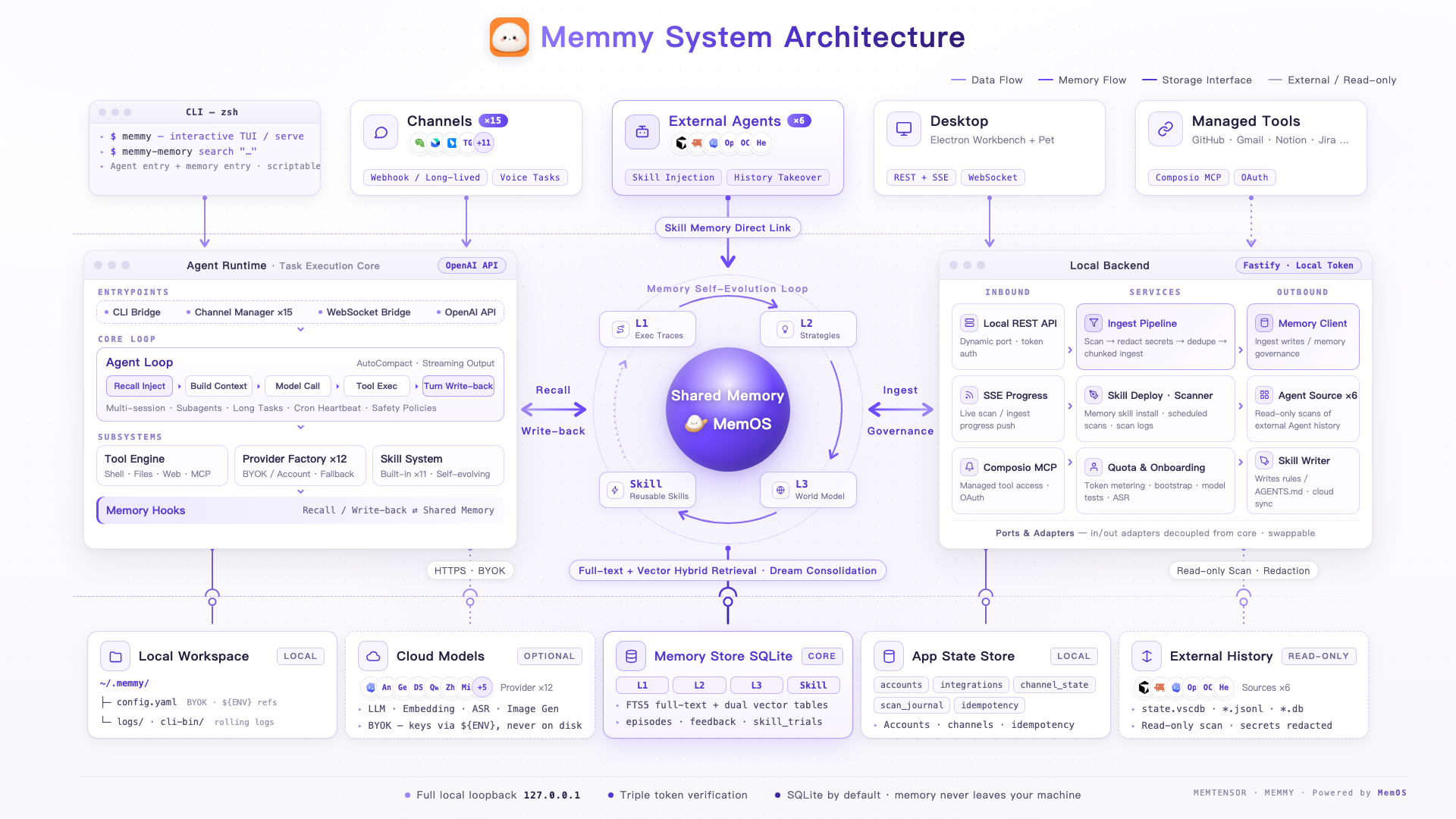
Compared with "personal AI Agents" like Hermes and OpenClaw, what sets Memmy apart is not "yet another assistant that chats and runs errands for you" — it is a memory foundation shared across Agents: it remembers you first, then builds a general-purpose Agent on top of that.
| Capability | Memmy | Hermes | OpenClaw |
|---|---|---|---|
| Product positioning | Memory foundation + general Agent | Personal AI Agent | Personal AI assistant |
| Local-first, data stays on your machine | ✅ | ⚠️ | ✅ |
| One memory shared across Agents | ✅ | 🚫 | 🚫 |
| Takes over external Agent history (Cursor/Codex/Claude Code) | ✅ | 🚫 | 🚫 |
| Installs memory Skills for external Agents | ✅ | 🚫 | 🚫 |
| Structured memory engine (MemOS hybrid retrieval) | ✅ | ⚠️ | ⚠️ |
| Multi-channel reach (Telegram / Discord / iMessage…) | ✅ | ✅ | ✅ |
| Voice messaging | ✅ | ⚠️ | ✅ |
| Multi-model / BYOK | ✅ | ✅ | ✅ |
✅ Native support | ⚠️ Partial / requires setup | 🚫 Not supported
The comparison is based on each product's public positioning (as of this writing), not an item-by-item benchmark; corrections are welcome.
Account mode free credits: signing in grants 30,000,000 (30 million) trial tokens, so you can get running without your own API Key. You can check used / total / remaining amounts and the expiry date anytime in the app. Once used up or expired, switch to API Key (BYOK) mode and continue with your own quota.
memmy CLI (Agent Runtime)memmy onboard # Initialize ~/.memmy/config.yaml and the workspace
memmy status # Check config, workspace, model, and provider status
memmy agent --message "Hi, introduce the current workspace" # Single-turn message
memmy # Run without a subcommand to enter interactive chat (TUI)
memmy serve # Start the OpenAI-compatible API (:18990)
Minimal BYOK configuration (~/.memmy/config.yaml):
agents:
  defaults:
    model: openai/gpt-4.1
    provider: openai
    timezone: Asia/Shanghai
providers:
  openai:
    apiKey: ${OPENAI_API_KEY}   # Supports ${ENV_NAME}-style environment variable references
memmy-memory CLI (memory access for external Agents / scripts)memmy-memory init # Write the Memory config and install Skills for each Agent as needed
memmy-memory health
memmy-memory search "memory policies in this project"
memmy-memory add "a piece of knowledge worth saving"
memmy-memory get <id>
Connects to http://127.0.0.1:18960\ by default; use --url, --token, --config, --source, and --user-id to specify the target service, authentication, source, and user namespace.
~/.memmy/workspace; syncs templates, built-in skills, and memory files.~/.memmy/config.yaml (overridable via MEMMY_CONFIG / --config), covering models, providers, tools, MCP, gateway, Memory, and workspace settings.http://127.0.0.1:18960\, providing session, turn, search, write, panel, and analytics APIs; every entry point reads and writes the same memory, so tasks and context carry over across Agents.Get running in three steps:
git clone https://github.com/MemTensor/memmy-agent.git && cd memmy-agent
cp .env.example .env         # Cloud address is pre-filled — works out of the box
bash scripts/dev-start.sh    # Install deps → build → start the full stack
scripts/dev-start.sh does it all in one command: installs dependencies, builds Memory and memmy-agent, installs the memmy / memmy-memory CLIs, and starts the full stack (Memory, Agent API, Gateway, frontend, desktop backend). Once the desktop app opens, finish account sign-in or BYOK setup and you're ready.
MEMMY_CLOUD_SERVICEin.envdefaults tohttps://memmy-api.memtensor.cn, so copying it connects you to the official cloud — no self-hosted backend or API key required. On Windows, run it in Git Bash.
>=22At the repository root:
npm install

npm run dev:desktop     # Start the desktop frontend Vite server and the Electron desktop shell together
npm run build           # Build Memory and all workspaces
npm run lint            # lint
npm run typecheck       # Type checking
npm run test            # Run Memory and workspace tests
Developing Memory standalone:
npm run memory:serve:dev -- \
  --host 127.0.0.1 --port 18960 \
  --db ~/.memmy/memory-service/memory.sqlite \
  --config ~/.memmy/config.yaml
Running memmy-agent from source:
cd App/memmy-agent
npm install
npm run build
node dist/main.js --help
Packaging:
npm run package:mac        # macOS DMG
npm run package:win:x64    # Windows x64
Memmy is building personal memory infrastructure, and its scope goes beyond coding Agents:
Memmy stands on the shoulders of a group of excellent open-source projects, and we are deeply grateful.
The point of open source is to let good ideas flow, and we hope Memmy becomes part of that river.
Thanks to every contributor who makes Memmy better ❤️
Design enforcement with memory — keeps your UI consistent across a project
Create animation-rich HTML presentations using a coding agent's frontend skills
1000+ skills curated from Anthropic, Vercel, Stripe, and other engineering teams
Detects 37 AI writing patterns and rewrites text with human rhythm across 5 voice profiles