

Are you the author? Sign in to claim
Shared memory layer for AI coding tools. One local SQLite DB, every tool reads the same verified facts. Local-first, zer
mcp-name: io.github.billy12151/memory-arbiter-mcp
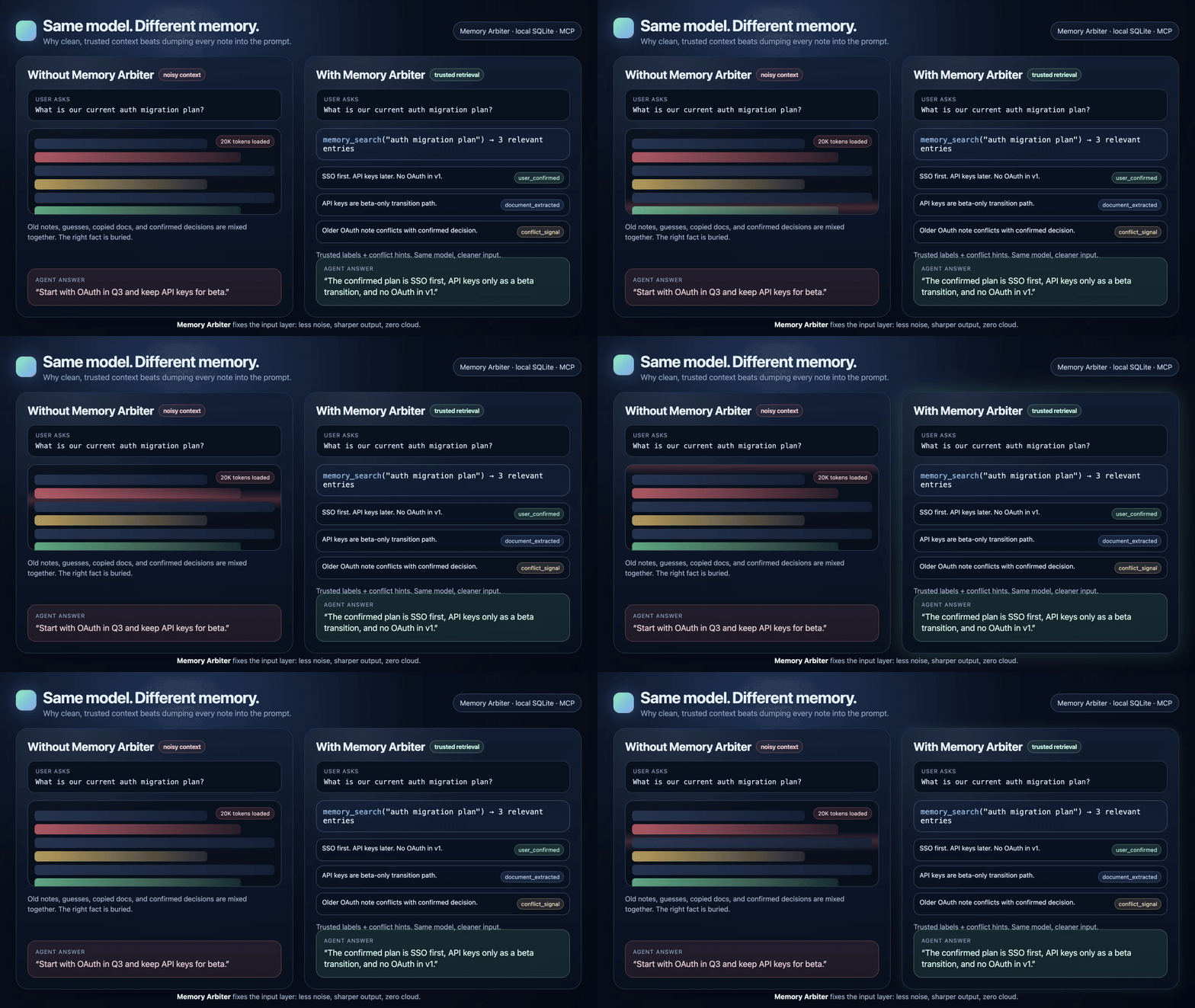
A shared memory layer for AI agents. One local SQLite database — every tool you use (Cursor, Claude Code, Codex, ZCode, WorkBuddy, …) searches the same verified facts instead of re-loading markdown files every turn.
# Instead of dumping 20K tokens of MEMORY.md into every prompt:
memory_search("auth migration plan")  → 3 laser-relevant entries, ~400 tokens
Less noise, sharper output. Most AI mistakes aren't the model being dumb — they're the model acting on stale, contradictory, or diluted context. Memory Arbiter fixes the input. Same model, better results.
Fully local. Zero cloud. Pure SQLite, no Postgres, no Redis, no API keys. Your data stays on your machine.
Your AI client loads MEMORY.md + memory/*.md into the system prompt every turn. As knowledge grows, 5K–20K tokens burn before the model even reads your question — and worse, the model drowns in noise, losing track of what's current, what's confirmed, and what's stale.
Memory Arbiter replaces this with a SQLite-backed search: only the relevant entries come back, everything else stays on disk.
Works with one tool. Scales to many.
| What pollutes AI context | How it degrades output | How Memory Arbiter fixes it |
|---|---|---|
| Key info buried in a 20K-token blob | Model attention is spread thin; it grabs the wrong detail or hallucinates. | memory_search returns 3–5 laser-relevant entries. High signal-to-noise. |
| Stale and current info mixed together | Model follows an outdated constraint. | Dual timeline + conflict arbitration: outdated entries are flagged or superseded. |
| "The user confirmed this" vs "the AI guessed this" — indistinguishable | Model treats a guess as ground truth. | source_type labels + user_confirmed lock. The model knows what to trust. |
| Tool switch = context reset | Each tool re-derives understanding from scratch; errors compound. | Shared memory layer: every tool starts from the same verified facts. |
Same model. Better context. Better output. Everything else — token savings, cross-tool sharing, audit trails — flows from this.
Model-agnostic: whether you run GLM, Claude, GPT, or Gemini — the stronger the model, the more sensitive it is to context quality, and the bigger the uplift.
Replacing full-file loading with targeted search is the most visible effect. (These are the same gains that section split compounds on long documents — see below.)
| Scenario | Full-file loading | With Memory Arbiter | Saving |
|---|---|---|---|
| Per-turn memory load | 5K–20K tokens in system prompt | 200–800 tokens via memory_search | ~80%+ |
| Conflict detection | LLM compares pairs (N², thousands of tokens) | memory_compare returns structured verdict (~200 tokens) | ~90% |
| Periodic audit | LLM scans entire library (10K+ tokens) | memory_list_conflicts + memory_audit_summary serve structured candidates | ~70% |
| Spec handoff (2000 words) | ~3000 tokens loaded into context | ~500 tokens via targeted memory_search | ~83% |
What it's not: memory-arbiter is not an LLM and does not do semantic reasoning — that stays with your AI client. It's a structured storage + retrieval + arbitration layer underneath the model.
Even with a single tool (Cursor, Claude Code, Codex, ZCode, WorkBuddy), Memory Arbiter upgrades your memory from flat markdown to a queryable database: thousands of entries at near-zero retrieval cost, structured conflict detection, source-trust levels, and a full audit trail — instead of manually trimming a growing markdown file.
Using two or more tools adds a shared memory layer: Tool A writes, Tool B searches. No file handoff, no copy-paste, no version drift. One database, zero duplication.
Real example — a three-tool pipeline (plan → design → code): OpenClaw writes the spec via memory_write → OpenDesign reads it with memory_search, produces designs, writes back decisions → ZCode gets spec and design decisions in one query. Zero file handoff across three tools. A spec+design handoff that used to cost ~5000 tokens of repeated context loading now costs ~800.
Three concrete usage patterns (per-turn retrieval, scheduled audit, write-time conflict check) and the full cross-tool delegation walkthrough:
docs/INTEGRATION.md.
memory_search also gains tags_filter / after_time / before_time / source_type, plus has_more + total_estimate so exhaustive queries know whether the page is complete.memory_search attaches up to 5 active todos (tagged todo) that share meaningful tags with the result set, in a separate linked_open_items field — pure read-only, never affects ranking. Every response also carries a retrieval_mode. v0.7.6 adds conflict_signal on each result: open_table (from scan/record-verified conflicts) or runtime_metadata_hint (advisory, not LLM-verified). Complete todos with memory_edit(tags_only=true, remove_tags=["todo"]) — a low-side-effect tag update that doesn't write history, bump version, or re-embed.memory_scan_conflict_candidates vector-recalls candidate conflict pairs (incremental: only new + recently edited memories), then the calling agent runs LLM comparison and persists the verdict with memory_record_conflict (idempotent, carries conflict_type / suggested_winner / source; v0.7.6 adds refresh=true for re-judgement after memory/model changes). Dismiss false positives with memory_resolve_conflict. The core package stays headless — no LLM, no network. doctor reports scan freshness via scan_log.jsonl. v0.7.6: memory_search surfaces these conflicts as conflict_signal on matching results; memory_write returns write_hints for possible duplicates/evolution.doctor check grades config integrity, the vector-enablement chain, split, data consistency, and capacity. Each finding carries a severity and a config-specific fix hint; works as an MCP tool (daily) or a standalone CLI (ambulance: runs even when the MCP process is down). Read-only.Requirements: Python 3.11+ (3.11, 3.12, or 3.13 — any of them works).
# Clone
git clone https://github.com/billy12151/memory-arbiter-mcp.git
cd memory-arbiter-mcp

# Setup — use whichever python3.1x you have (>=3.11).
python3.11 -m venv .venv        # or: python3.12 / python3.13
source .venv/bin/activate
pip install -e .                 # installs runtime deps from pyproject.toml

# Optional: semantic recall via sqlite-vec
pip install -e '.[vec]'

# Run
memory-arbiter-mcp
uvx (recommended for non-Python users)If you just want to run the server without managing a Python env — install uv once, then:
uvx --from memory-arbiter-mcp memory-arbiter
This pulls the published package and launches the memory-arbiter entry point. No venv, no pip install. The two entry points memory-arbiter-mcp and memory-arbiter are identical — the examples here use the shorter memory-arbiter for uvx (fewer keystrokes) and memory-arbiter-mcp for the local-venv path (matches the venv binary name). Use either. Note: uvx only shortens the install step; embedding model and sqlite-vec still need separate setup (see Semantic Recall).
Add to your tool's MCP config (see examples/ for ready-made templates). With a local venv:
{
  "mcpServers": {
    "memory-arbiter": {
      "command": "/path/to/memory-arbiter-mcp/.venv/bin/memory-arbiter-mcp",
      "env": {
        "MEMORY_ARBITER_CLIENT": "zcode",
        "MEMORY_ARBITER_AGENT_ID": "zcode-default"
      }
    }
  }
}
Or, zero-install via uvx (no local clone needed):
{
  "mcpServers": {
    "memory-arbiter": {
      "command": "uvx",
      "args": ["--from", "memory-arbiter-mcp", "memory-arbiter"],
      "env": {
        "MEMORY_ARBITER_CLIENT": "zcode",
        "MEMORY_ARBITER_AGENT_ID": "zcode-default"
      }
    }
  }
}
Change
MEMORY_ARBITER_CLIENTfor each tool (openclaw,zcode,codex,cursor,claude-code). Put shared paths/vector/model settings in~/.config/memory-arbiter/config.json; keep per-client identity in the MCP env block. The config file is the recommended home fordb_pathtoo — it survives client reinstalls. If you are not using a config file, fall back to puttingMEMORY_ARBITER_DB_PATHin each client's env and pointing them at the same SQLite file (config wins when both are set). (GUI tools like OpenDesign inherit the host CLI's config — no separate client name.)
⚠️ New session required: MCP servers are loaded at session startup. Already-open sessions won't see the new tools. Start a fresh session after configuring.
If your client also keeps local markdown (ZCode's MEMORY.md, Codex's AGENTS.md, etc.), paste this rule into your agent's system prompt so it knows what to write where:
Local md files store only self-use info (rules, tool experience, config notes,
agent persona). Anything that might be reused by another agent or platform —
not just project info: requirements, research, decisions, progress, user
preferences, knowledge conclusions — goes into memory-arbiter.

Every write must fill: subject, tags, source_type (one of: `user_confirmed`
/ `agent_generated` / `document_extracted`; `user_confirmed` auto-locks the
record — reserve it for facts the user explicitly verified), event_time
(ISO 8601), workspace (project name; v0.7.4: reserved metadata — stored and returned but does **not** filter `memory_search` / `memory_recent` results), source_ref.

Search via memory_search first; read source files only for detail. When you
find a contradiction, don't overwrite — if you know which is correct, use
memory_supersede (retire the wrong one); if unsure, use memory_arbitrate
(the system decides by timeline + trust level). When a to-do entry is done,
remove the `todo` tag via `memory_edit(tags_only=true, remove_tags=["todo"])`
— a low-side-effect update that doesn't write history or bump the version,
and drops the item from `linked_open_items`. Don't just mention "done" in a
new memory, or the old entry stays in to-do state and misleads future
searches.

The `authorized=true` flag on write tools (`memory_supersede` / `memory_edit`
/ `memory_cleanup_history`) is a **caller-side
confirmation gate**, not strong authentication. It lets the calling agent
explicitly assert "yes, override the `locked` / `user_confirmed` protection"
— memory-arbiter is a local, single-trust-domain tool, so the gate lives at
the caller. If you ever run multi-tenant, add caller identity + policy before
relying on it.
| Client | Config Location |
|---|---|
| ZCode | ~/.zcode/v2/ MCP config |
| Codex CLI | ~/.codex/ MCP config |
| Claude Code | .mcp.json in project root |
| Cursor | ~/.cursor/mcp.json |
| WorkBuddy | ~/.workbuddy/mcp.json |
| OpenClaw | ~/.openclaw/openclaw.json MCP config |
OpenDesign / OpenClaw GUI tools: these run on top of a host CLI (Codex CLI, Claude Code, etc.) and do not have their own MCP config entry. Whatever MCP server the host client has loaded is automatically available — e.g. once Codex CLI configures Memory Arbiter, OpenDesign running on top of Codex can call
memory_search/memory_writenatively with no extra setup.
Grouped by use case. For day-to-day agent work, the intended mental model is deliberately small: use memory_write, memory_search, and memory_get. The remaining groups are for correction/versioning, conflict workflows, long-doc split, semantic ops, and system status.
Daily read & write — what most sessions use.
| Tool | Description |
|---|---|
memory_write | Write a memory (source_type=user_confirmed auto-locks). Tags matter (v0.7.3) — they're a ranking + filter signal heavier than content; tag both query-intent words (what users will search by) and category/version labels. v0.7.6 may return advisory write_hints for likely duplicate/evolution records; these hints do not write the conflicts table. See Tag scoring & search filters (v0.7.3). |
memory_search | Search memories (FTS5 → LIKE fallback). limit is a page size, not a cap — has_more=true in the response means more matches exist. v0.7.6 can attach conflict_signal to direct hits; open_table comes from recorded conflicts, while runtime_metadata_hint is advisory only. See Tag scoring & search filters (v0.7.3). |
memory_get | Get a single memory by ID. Use when you already know the memory_id (e.g. from conflict lists, audit results, or previous search results) to quickly fetch full details without re-running a search. v0.8.0 adds sections (none/catalog/all, default catalog) and section_ids (takes precedence over sections; any IDs not found are listed in missing_section_ids). Read-only. |
Correction & version management — edit in place, confirm facts, retire stale records, and audit change history.
| Tool | Description |
|---|---|
memory_edit | (v0.4.0, v0.7.6) In-place edit a memory's content (full or partial old_text→new_text), or tags-only via tags_only=true+add_tags/remove_tags. Content edits archive the prior version to a history table and re-sync FTS. Tags-only edits are low-side-effect: no history, no version bump, no re-embedding. locked/user_confirmed records need authorized=true. |
memory_history | (v0.4.0) View the version chain (historical snapshots) of a memory, newest version first. Read-only. |
memory_confirm | Promote a memory to user-confirmed and locked. Use when the user explicitly validates a memory as authoritative. |
memory_supersede | Explicitly retire a memory; bypasses user-confirmed/locked protection (authorized=true required). This is the status-change primitive used by conflict workflows, not an automatic edit. |
memory_cleanup_history | (v0.4.0) Delete historical snapshots from memory_history (never touches active records). Per-memory / by-age / full; full cleanup requires authorized=true. |
Conflict workflow & diagnostics — low-frequency tools used after search/doctor/scan surfaces an issue.
| Tool | Description |
|---|---|
memory_list_conflicts | List unresolved conflicts. This is the main follow-up entry after memory_search reports an open_table conflict signal, doctor reports conflict backlog, or a scan task records conflicts. |
memory_compare | Low-frequency diagnostic tool: compare two memories and return an explanation only. It does not write conflicts. |
memory_arbitrate | Compatibility/manual arbitration tool. New conflict workflows should prefer scan_conflict_candidates → record_conflict → list_conflicts → supersede/resolve; this is not a daily entry point. |
Long-document section split (v0.6.0) — paragraph-level retrieval for docs over split.threshold. Requires sqlite-vec + GGUF embedding. Most documents are split automatically by memory_write (rule-based, when Markdown headings are detected); memory_split below is only the agent-side continuation/repair entry, not part of the daily write path.
| Tool | Description |
|---|---|
memory_split | Agent-side entry for continuing/repairing section split, not a daily write tool. Use it after memory_write returns a split_request (the agent reads the full content with its own LLM and produces only title/summary/anchor_text/occurrence_index/title_path metadata, then publishes), to repair historical NULL/failed/declined memories, or to actively rebuild (split_decision="rebuild"). Two-phase protocol is preserved: prepare returns full content + snapshot + schema; split/rebuild publishes. Do not pre-call memory_split on ordinary writes — memory_write already handles rule-based splitting. |
Semantic recall ops — manual embedding control; usually auto-handled once configured.
| Tool | Description |
|---|---|
memory_store_embedding | (optional) Store or replace an embedding manually. v0.5.0+ can also auto-embed writes/searches when configured. |
memory_rebuild_embeddings | (v0.6.0) Batch-rebuild all embeddings after switching embedding models. Processes memory-level + section-level vectors. No LLM needed. |
System status & audit
| Tool | Description |
|---|---|
memory_status | Show current mode, degradation status, storage paths. v0.8.0 reports split_capability ({available, reason: vec_ready/vec_not_ready/embedder_unavailable}) instead of the old boolean split_enabled. |
memory_list_conflicts | List unresolved conflicts |
memory_audit_summary | Per-workspace stats overview (counts, oldest/newest, open conflicts, source_type distribution) |
memory_doctor_overview | Run a read-only health check and return a graded report (18 checks across config / vector chain / split / consistency / capacity). Each finding has a severity and a config-specific fix_hint. deep=true also loads the GGUF model for a dimension probe. Same engine as the doctor CLI below. |
By default, memory-arbiter uses lexical recall (FTS5 trigram + BM25 + soft-rerank) — no embedding model, no heavy dependencies, fully local. This is enough for most cases.
For queries where wording differs but meaning is the same ("happy" vs "joyful", "金营平台" vs "金融带货"), you can opt into semantic recall. memory-arbiter does not bundle an embedding model — you bring your own, so the default install stays lightweight and you keep full control over the model, language, and cost. When configured, normal memory_write and memory_search(query="...") calls auto-embed; callers do not need to pass query_embedding manually.
Setup (4 steps):
Install sqlite-vec and the GGUF runtime:
pip install memory-arbiter-mcp[vec]
pip install llama-cpp-python
Choose an embedding model. For automatic embedding in v0.5.0, the built-in runtime supports local GGUF models:
llama-cpp-python. Reuses models you may already have (e.g. from OpenClaw/llama.cpp). Point the script at the file:
embeddinggemma-300m-qat-Q8_0.gguf is a good 768-dim default.bge-small-zh, bge-base-en, etc.):
use your own backfill/query script and pass vectors to memory_store_embedding / memory_search(query_embedding=...).memory_store_embedding. memory-arbiter only needs pip install memory-arbiter-mcp[vec]; no model runtime on this side.Embedding Model Quick Reference (pick one, then match MEMORY_ARBITER_VEC_DIM to its dimension):
| Path | Recommended model | Dim | Source | Best for |
|---|---|---|---|---|
| GGUF (local) | embeddinggemma-300m-qat-Q8_0.gguf | 768 | HuggingFace | Reusing a model you already have; no Python ML stack |
| sentence-transformers | BAAI/bge-small-zh-v1.5 (CN) / bge-base-en-v1.5 (EN) | 512 / 768 | HuggingFace | Best quality-to-size ratio; needs PyTorch |
| Remote API | text-embedding-3-small (OpenAI) / embedding-3 (Zhipu) | 1536 / 1024 | Provider dashboard | No local compute; per-call cost |
End-to-end flow for auto-embedding: pick GGUF model → put vec/model settings in ~/.config/memory-arbiter/config.json → restart the MCP server → run docs/semantic_example.py once to backfill old memories. New writes and plain-text searches auto-embed after that.
Copy the config template and edit paths:
mkdir -p ~/.config/memory-arbiter
# Source checkout:
cp examples/memory-arbiter.config.example.json ~/.config/memory-arbiter/config.json
# Or pip-installed users:
curl -L https://raw.githubusercontent.com/billy12151/memory-arbiter-mcp/main/examples/memory-arbiter.config.example.json \
  -o ~/.config/memory-arbiter/config.json
Keep shared paths/vector/model settings here instead of each MCP client's env block. Keep MEMORY_ARBITER_CLIENT and MEMORY_ARBITER_AGENT_ID in each client's env so tools keep separate identities. ~/.config/memory-arbiter/ is user-owned XDG config, so pip installs and client reinstallers do not overwrite it. The first auto-embedding call lazily loads the model and may be noticeably slower; later calls reuse it.
Backfill embeddings into existing memories, then search normally:
# From a source checkout:
python docs/semantic_example.py                 # backfill all active memories
python docs/semantic_example.py --query "金营平台营销"   # try a semantic search
The backfill helper currently ships as a source-tree script. If you installed only from pip, clone the repo or use memory_store_embedding from your own script for existing memories. New writes/edits are auto-embedded once the server is configured.
After configuration, normal memory_search(query="...") can generate the query vector automatically. Explicit query_embedding still works and takes precedence.
How it ranks: semantic candidates get a floor score just below content matches — they beat content-only noise but never outrank a real subject/tags hit. The arbitration and trust layer is untouched.
Measured impact (small sample, not a formal benchmark): on the same 15 golden queries + 18 pairwise constraints used to validate v0.3.0, enabling semantic recall improved Top-3 hit rate and pairwise ordering. The biggest win was pairwise pass rate reaching 100% — every "should-rank-above" constraint held. SQLite-side latency overhead was ~8ms per query; local embedding generation depends on your model/runtime.
| Metric | bm25 (v0.2.6) | hybrid (v0.3.0) | hybrid + semantic (v0.3.1) |
|---|---|---|---|
| Top-1 hit rate | 46.7% | 53.3% | 53.3% |
| Top-3 hit rate | 60.0% | 66.7% | 73.3% |
| Pairwise pass rate | 77.8% | 88.9% | 100.0% |
The problem it solves. Two pain points in v0.7.2 dogfooding:
tags precisely contained both query tokens (e.g. ["v0.7.2", "发版"] for query "v0.7.2 发版") ranked below a memory whose subject only incidentally contained one of them. The old scorer treated tags like a sentence (contiguous-substring match) — but tags are a discrete label set that almost never concatenates into the exact query string, so tags could never reach the strong tier.limit was both the page size and the result cap. An agent asking "all release notes" had no way to tell whether the 10 results returned were everything or just the first page.What changed.
_score_tags_surface). The query is split on whitespace, each token matched against the tag set, and the match ratio decides the tier: all tokens matched → strong, ≥half → medium, some → weak. Pure-CJK tokens use prefix/suffix substring (so tag 发版 matches query token 发版历史); ASCII/mixed tokens use equality (so v0.7 does not match tag v0.7.0). A bidirectional normalize strips the v prefix on version-like tokens.classify_match_level's specific_coverage threshold moved 0.4 → 0.6, so a subject that hits only half the query's anchors no longer gets medium (the incidental-subject trap that was suppressing tag-precise records).7/4/1.5 → 10/6/2, cap 7.0 → 10.0). Tags are an actively-curated signal — when they say "this is exactly what the query asked for", that should weigh the same as a subject hit, not less.limit is now a page size. The response carries has_more: bool and total_estimate: int so the caller can tell an exhaustive query from a complete one. This version does not ship a pagination cursor — when has_more=true, refine the query, raise limit (cap 100), or add tags_filter to narrow.memory_search (all optional, off = v0.7.2 behaviour):
tags_filter: list[str] — strict AND, memory must contain every listed tagafter_time / before_time — ISO 8601 bounds on ingest_time (naive = UTC)source_type — one of user_confirmed / agent_generated / document_extracted (the enum also has unknown / pending, but those are defaults/intermediate states, not values to write deliberately)Caveats (accepted this version).
query + tags_filter returns empty with a warning — use memory_recent + client-side filter for "list everything with tag X".tags_filter disables semantic-vec recall in practice (vec candidates' tags rarely match the literal filter, so post-filter culls them). Hybrid lexical recall still works.v0.7.2发版 written without a space) take the equality path and may miss — separate them with whitespace ("v0.7.2 发版").has_more can over-report when pool_cap (default 50) truncates the recall pool on large libraries; total_estimate stays accurate when filters are active (it uses a SQL COUNT).Validation. A 2000×5-seed synthetic corpus (scripts/tune_tag_weights.py) proved specific_coverage=0.6 is the inflection point. The decisive metric is the A>B pair (TAG_PRECISE should beat SUBJ_INCIDENTAL — the id=206 vs id=105 case that motivated the fix): it goes from 0.520 under the baseline to 1.000 when the subject threshold is tightened to 0.6; 0.5 is too loose, 0.7+ adds nothing. Overall pairwise accuracy on the corpus rises 0.958 → 0.984. On the real production library, dogfooding query "v0.7.2 发版" lifted the target memory from rank #13 to #1 with no regression on 6 sample queries.
The problem it solves. A long document — say a 12000-char design spec or a 4000-char API manual — is stored as one memory. When you search for a specific detail inside it, two things go wrong:
What section split does. It breaks a long document into titled sections (like chapters), and gives each section its own search vector. Now when you ask a question, the search can point straight to the right section — and return just that paragraph instead of the whole document.
Think of it as adding a table of contents that search can jump to, instead of always returning the entire book.
The payoff (measured on this project's own docs — small sample, your mileage may vary):
We ran 17 queries against 8 long documents (4500–12200 chars), each asking about a specific detail — 10 of them about content that sits past the 3600-char point the old search couldn't see at all. Reproduce with python scripts/benchmark_section_recall.py (read-only, runs against your real DB).
It finds the right paragraph, not just the right document:
| Metric | Without split | With split |
|---|---|---|
| Correct paragraph located (top-1) | — (impossible) | 94% |
| Correct paragraph located (top-3) | — | 100% |
| Search finds the document at all | 71% | — |
Without split, even when the document was found, it came back as a fuzzy "distance 14–19" match — search was guessing. With split, the correct paragraph matched at distance 0.23–0.41 — search was confident.
It returns less text, so your model reads more efficiently:
| Metric | Without split (full text) | With split (just the matched section) |
|---|---|---|
| Avg text returned per query | ~7350 chars | ~2630 chars |
| Total across 17 queries | 124,980 chars | 44,675 chars |
| Reduction | 64% |
For a 12000-char document both wins stack: the model is pointed to the right ~800-char paragraph and never has to scan the other 11000.
Prerequisites (all required):
split.enabled switch.)Just switched embedding models? Run
memory_rebuild_embeddingsfirst — section split stays offline until all vectors match the new model. Checksplit_capabilityviamemory_status(reason: vec_readymeans splittable).
How it works:
memory_write(long_doc)
  → saves content first (always succeeds; split failure never loses the original)
  → if vec ready AND content > split_threshold:
      - ≥2 fenced-code-safe Markdown headings, each ≤ max_section_chars,
        count ≤ max_sections  →  memory_write rule-splits synchronously,
        no agent needed (split_status=split)
      - otherwise (no heading / single heading / over limit)
        →  returns a full split_request (content + content_hash +
           memory_version + split_status + split_revision + schema)
        →  Agent reads the full content with its own LLM and produces ONLY
           title / summary / anchor_text / occurrence_index / title_path
           metadata, then calls memory_split(memory_id, split_decision="split",
           sections=[...]) to publish

memory_split(memory_id, split_decision="split", sections=[...])  ← publish
  → arbiter computes section boundaries from occurrence_index (not LLM guesses)
  → generates per-section embeddings (all must succeed)
  → saves sections + vectors
  → (also used to repair historical NULL/failed/declined memories, or to
     actively rebuild via split_decision="rebuild")

memory_search("query")
  → for split documents: section matching finds the relevant paragraphs
  → partial hit → returns full matched-section text
     (top-level content = concatenation of matched sections,
      content_scope=matched_sections, each matched_sections entry carries
      the full section body)
  → coverage met OR zero-match → returns the full memory (content_scope=full_memory)
  → no content_omitted / preview truncation semantics anymore

memory_get(memory_id, sections=..., section_ids=[...])  ← fetch catalog/all/specific sections
memory_get(memory_id)                                  ← fetch full text if needed
Good to know:
memory_writeauto-splits on write. It detects Markdown headings at write time and rule-splits structured documents synchronously — no agent round-trip. Only unstructured long prose (no heading / single heading / overmax_section_chars/ overmax_sections) returns asplit_requestfor the agent to continue with its own LLM. Don't pre-callmemory_spliton ordinary writes.- Auto-continue silently on
split_request. Receiving asplit_request(withaction_required=memory_split) is an internal signal, not a user step. Read the fullcontentit carries, generate section metadata with your own LLM, and publish viamemory_split— do not surface the prepare/publish/offset protocol to the user.- Search never degrades. If the vector index is temporarily unavailable,
memory_searchreturns the full memory (content_scope=full_memory) — you lose section precision but search keeps working.- Context-window overflow stays as backlog. If the full original content exceeds the current agent LLM's context window, do not truncate or mechanically chunk it — leave
split_status=NULLand letdoctorrecord it as along-unsplitbacklog entry.- Edit clears sections. A content
memory_editclears the old derived section index and resets split status, then re-runs rule-based splitting on the new content.- Re-calibrate after switching models.
section_vec_distance_threshold(default 0.42) is calibrated on embeddinggemma-300m. If you switch embedding models, runscripts/calibrate_section_threshold.pyand update it — a wrong threshold means no filtering. After switching, also runmemory_rebuild_embeddingsto rebuild all vectors.
Configuration: all split settings live in the config.json split section — see Configuration for the full table. (v0.8.0: the split.enabled switch and section_zero_match_preview_chars were removed; split capability is now bound to vec readiness.) Here's a complete example:
{
  "db_path": "~/.local/share/memory-arbiter/memory.sqlite3",
  "backup_jsonl": "~/.local/share/memory-arbiter/memory.backup.jsonl",
  "vec": { "enabled": true, "dim": 768 },
  "embedding": {
    "provider": "gguf",
    "model_path": "~/.node-llama-cpp/models/hf_ggml-org_embeddinggemma-300m-qat-Q8_0.gguf",
    "auto_query": true,
    "auto_write": true
  },
  "split": {
    "threshold": 4000,
    "section_vec_distance_threshold": 0.42,
    "section_fulltext_threshold": 0.8,
    "max_sections": 50,
    "max_section_chars": 3600
  }
}
When it's on: there is no on/off switch anymore — split is on whenever vec is ready (v0.8.0 bound it to vec readiness). If your memories are mostly short notes, code snippets, or conversation summaries, they stay under split.threshold and are never split, so you pay nothing. Section split pays off for long structured documents (design specs, API manuals, research notes). Structured docs split at memory_write time (rule-based, no LLM); only documents without detectable Markdown headings need an agent LLM call.
Configuration can come from MEMORY_ARBITER_CONFIG, then ~/.config/memory-arbiter/config.json, then environment variables/defaults. Durable vector/model settings belong in the config file so they survive MCP client reinstall/migration; each row below shows the JSON path and its env fallback (config file wins when both are set). Environment variables are still useful for simple client identity and CI overrides. Full explanations in docs/INTEGRATION.md.
Config file fields (~/.config/memory-arbiter/config.json) — grouped by what they control.
Storage & access — where data lives; set once.
| JSON path | Env fallback | Default | What to tune |
|---|---|---|---|
db_path | MEMORY_ARBITER_DB_PATH | ./memory_arbiter.sqlite3 | Shared path for cross-tool memory. |
backup_jsonl | MEMORY_ARBITER_BACKUP_JSONL | ./memory_arbiter.backup.jsonl | Append-only JSONL backup, used only when SQLite is read-only. |
policy_path | MEMORY_ARBITER_POLICY | (none) | Path to a JSON policy file (per-client enable/disable, agent allow/deny). |
Search tuning — knobs to turn when results feel off. recall_pool_cap is the first one to try.
| JSON path | Env fallback | Default | What to tune |
|---|---|---|---|
recall_pool_cap | MEMORY_ARBITER_RECALL_POOL_CAP | 50 | Raise to 100–200 when your store exceeds ~100 entries — first knob to turn if matches go missing. |
content_like_cap | MEMORY_ARBITER_CONTENT_LIKE_CAP | 30 | Raise if many same-topic memories exist. |
Semantic recall — enables "find by meaning, not just keyword". Requires sqlite-vec + a GGUF model. See Semantic Recall.
| JSON path | Env fallback | Default | What to tune |
|---|---|---|---|
vec.enabled | MEMORY_ARBITER_ENABLE_SQLITE_VEC | false | Set true to enable semantic recall (requires pip install memory-arbiter-mcp[vec]). |
vec.dim | MEMORY_ARBITER_VEC_DIM | 768 | Must match your embedding model. Changing it requires dropping and recreating memories_vec. |
embedding.provider | MEMORY_ARBITER_EMBEDDING_PROVIDER | inferred as gguf only when embedding.model_path is set | Only gguf is supported in v0.5.0. Without a model path, auto-embedding stays off. |
embedding.model_path | MEMORY_ARBITER_EMBEDDING_MODEL_PATH (or legacy MEMORY_ARBITER_GGUF) | (none) | Path to the GGUF embedding model. |
embedding.auto_query | MEMORY_ARBITER_EMBEDDING_AUTO_QUERY | true | Auto-encode plain-text queries for semantic recall. |
embedding.auto_write | MEMORY_ARBITER_EMBEDDING_AUTO_WRITE | true | Auto-embed new writes/edits so they enter semantic recall immediately. |
Long-document split — paragraph-level retrieval for long docs. Bound to vec readiness (no on/off switch in v0.8.0). See Section Split.
| JSON path | Env fallback | Default | What to tune |
|---|---|---|---|
split.threshold | MEMORY_ARBITER_SPLIT_THRESHOLD | 4000 | Min char count to trigger section split. |
split.section_vec_distance_threshold | MEMORY_ARBITER_SECTION_VEC_DISTANCE_THRESHOLD | 0.42 | Section Vec cosine distance cutoff. Calibrated on embeddinggemma-300m; re-calibrate if you switch models. |
split.section_fulltext_threshold | MEMORY_ARBITER_SECTION_FULLTEXT_THRESHOLD | 0.8 | Return full text when ≥X% of sections match. |
split.max_sections | MEMORY_ARBITER_MAX_SECTIONS | 50 | Max sections per memory (min 2). |
split.max_section_chars | MEMORY_ARBITER_MAX_SECTION_CHARS | 3600 | Char limit for section embedding input; v0.8.0 also rejects publish with section_too_large if a section slice exceeds it (hard gate). |
Environment variables — keep per-client identity in each MCP client's env block. Some fields also have config-file equivalents, but config wins; use env here when the value must differ by client/session.
| Variable | Default | What to tune |
|---|---|---|
MEMORY_ARBITER_CLIENT | codex | Per-tool identity (codex, claude-code, cursor, zcode, workbuddy, ...). |
MEMORY_ARBITER_AGENT_ID | default | Agent identity within a client. |
MEMORY_ARBITER_WORKSPACE | default | Record field on each memory. Reserved metadata (v0.7.4): stored and returned but does not filter memory_search / memory_recent results. Kept for future project-level features. |
MEMORY_ARBITER_CONFIG | (none) | Optional path to an alternate JSON config file. If set, memory-arbiter reads that file instead of the default ~/.config/memory-arbiter/config.json; file values still override other env fallbacks. |
MEMORY_ARBITER_RANKING_MODE | hybrid | hybrid (default) or bm25 (legacy). No config-file equivalent. |
MEMORY_ARBITER_GGUF | (none) | Legacy GGUF path fallback; prefer embedding.model_path in the config file. |
Moving to a new machine? Just copy the SQLite file:
# On the old machine: copy the database to the new one (via scp, USB, etc.)
scp ~/.local/share/memory-arbiter/memory.sqlite3 newmachine:~/.local/share/memory-arbiter/

# On the new machine: reinstall the project (don't copy .venv — rebuild it)
python3.11 -m venv .venv
source .venv/bin/activate
pip install -e .
When something feels off — "search stopped working", "did my model switch break recall?", "is the DB silently losing writes?" — run the built-in doctor. It's the ambulance entry: a standalone CLI that opens its own read-only connection, so it works even when the MCP process is down or the DB is read-only.
memory-arbiter doctor              # colored text report (auto-disables color when piped)
memory-arbiter doctor --json       # machine-readable, same shape as the MCP tool's data
memory-arbiter doctor --deep       # also load the GGUF model for a dimension probe (seconds)
memory-arbiter doctor --db PATH    # diagnose a different DB (disaster recovery)
It runs 18 read-only checks across five dimensions, each with a severity (info/warning/critical) and a fix hint tailored to your current config:
jsonl_backup = silently losing data = critical).vec.enabled → extension loaded → model usable → auto flags) and short-circuits at the first break, telling you exactly which link is down and how to fix it. Catches the classic "I configured a model but recall still doesn't work" case (usually vec.enabled=false).split.capability (vec/embedder available), split.long_unsplit_backlog (active long docs still at split_status=NULL), split.failed_count (with recent error summaries), split.legacy_declined, split.legacy_unknown_status (legacy pending/fallback_active surfaced read-only), and split.index_integrity (orphaned/overlapping/non-covering offsets, missing section vectors). Backlog/failed/legacy findings return sample memory IDs you can feed straight into memory_split for repair.Exit codes: 0 clean / 1 has warnings / 2 has criticals — usable in scripts and CI. If the DB can't be opened at all, doctor degrades to a single critical report instead of crashing (that's the whole point of an ambulance). The same engine is exposed as the memory_doctor_overview MCP tool for in-conversation use; the CLI just trades the MCP runtime state for a slightly less precise static inference (noted in the report).
python3.11 -m pip install -r requirements.txt
python3.11 -m pytest
Apache License 2.0. Copyright (c) 2026 张志维 (billy12151).
Memory Arbiter version 0.8.2 and later are offered under Apache-2.0 going forward. Prior MIT grants remain valid for copies previously distributed under MIT (including 0.8.0 and 0.8.1). Versions before 0.8.2 were released under MIT.
AI Agent 的共享记忆层。一个本地 SQLite 数据库——你用的每个工具(Cursor、Claude Code、Codex、ZCode、WorkBuddy……)搜索同一套已验证的事实,而不是每轮对话重新加载 markdown 文件。
# 不用每轮把 2 万 token 的 MEMORY.md 塞进 prompt:
memory_search("认证迁移方案")  → 3 条精准结果,约 400 token
噪声少了,输出更准。 AI 出错,大部分时候不是模型笨,而是它拿到的输入是过时的、自相矛盾的、或者关键信息被噪声淹没了。memory-arbiter 修的是输入端。同一个模型,结果更好。
完全本地,零云依赖。 纯 SQLite,不需要 Postgres、Redis、API key。数据留在你机器上。
你的 AI 客户端每轮对话都把 MEMORY.md + memory/*.md 整个塞进 system prompt。记忆越多,token 消耗越大——模型还没读你的问题,5K–20K token 的上下文已经烧掉了。更要命的是,模型淹没在噪声里,分不清什么是最新的、什么是用户确认的、什么是过时的。
Memory Arbiter 用 SQLite 检索替代全文加载:只有相关的条目返回,其余的留在磁盘上。
一个工具就能用。多个工具更香。
| 污染 AI 上下文的问题 | 导致的执行偏差 | memory-arbiter 怎么修 |
|---|---|---|
| 关键信息埋在 20K token 的大段文本里 | 模型注意力分散,抓错重点或直接编造 | memory_search 只返回 3–5 条高度相关的结果,信噪比拉满 |
| 旧信息和新信息混在一起 | 模型照着过时的约束去执行 | 双时间轴 + 冲突仲裁,过时条目被标记或淘汰 |
| "用户确认的"和"AI 猜的"分不清 | 模型把猜测当事实用 | source_type 标记来源,user_confirmed 自动锁定,模型知道该信什么 |
| 换个工具上下文就丢了 | 每个工具重新理解一遍,理解偏差累积 | 共享记忆层,所有工具从同一套已验证的事实出发 |
同一个模型,上下文对了,输出就准了。 其他一切——省 token、跨工具共享、审计追溯——都是这个核心的自然延伸。
模型无关:不管你用 GLM、Claude、GPT 还是 Gemini——模型越强,对上下文质量越敏感,提升越大。
用精准检索替代全文加载,是最直观的效果。(长文档分段的收益在这个基础上进一步叠加,见下文。)
| 场景 | 全文加载 | 用 memory-arbiter | 节省 |
|---|---|---|---|
| 每轮记忆加载 | system prompt 塞 5K–20K tokens | memory_search 返回 200–800 tokens | ~80%+ |
| 冲突检测 | LLM 逐条比对(N²,数千 tokens) | memory_compare 返回结构化裁决(~200 tokens) | ~90% |
| 定期审查 | LLM 扫全库(万级 tokens) | memory_list_conflicts + memory_audit_summary 出结构化候选 | ~70% |
| 规格交接(2000 字) | 加载进 context ~3000 tokens | 精准 memory_search ~500 tokens | ~83% |
它不是什么: memory-arbiter 不是 LLM,不做语义推理——那交给你的 AI 客户端。它是模型下面的一层结构化存储 + 检索 + 仲裁。
即使只用一个工具(Cursor、Claude Code、Codex、ZCode、WorkBuddy),memory-arbiter 也把你的记忆从扁平 markdown 升级成可查询的数据库:几千条记忆、检索成本接近零、结构化冲突检测、来源可信度分层、完整审计追溯——不用再手动精简越来越大的 markdown 文件。
同时用两个或更多工具时,再加一层共享记忆:工具 A 写、工具 B 搜。零文件传递、零复制粘贴、零版本混乱。一个数据库,零重复。
真实案例 —— 三工具管线(规划 → 设计 → 编码):OpenClaw 调 memory_write 写入规格 → OpenDesign 调 memory_search("项目") 拿到上下文、做设计、写回决策 → ZCode 一次查询拿到规格和设计决策。三个工具之间零文件传递。 一份规格+设计交接,传统重复加载上下文约 ~5000 tokens,现在精准检索约 ~800 tokens。
三种典型用法(每轮按需检索、定时审查、写入时冲突检测)和完整的跨工具委派步骤见
docs/INTEGRATION.md。
memory_search 还新增了 tags_filter / after_time / before_time / source_type,响应里带 has_more + total_estimate,让穷举式查询知道这一页是不是已经拿全。memory_search 在独立的 linked_open_items 字段附最多 5 条与结果集共享 meaningful tag 的 active 待办(带 todo tag),纯只读、不影响排序。每次响应还带 retrieval_mode 说明结果是怎么来的。v0.7.6 新增 conflict_signal:每条结果可能带 open_table(scan/record 验证过的结构化冲突)或 runtime_metadata_hint(运行时启发式,未经 LLM 验证)。完成待办用 memory_edit(tags_only=true, remove_tags=["todo"])——低副作用、不写历史、不增加 version、不重算 embedding。memory_scan_conflict_candidates 向量召回候选冲突对(增量:只扫新增 + 最近编辑的记忆),调用方 agent 跑 LLM 比对后用 memory_record_conflict 落表(幂等,带 conflict_type / suggested_winner / source)。误报用 memory_resolve_conflict 关闭。核心包保持无头——不调 LLM、不联网——扫描只产候选对,判断交给 agent。doctor 通过 scan_log.jsonl 报告扫描新鲜度(从未扫描或超 15 天会 WARN)。doctor 给配置完整性、向量化启用链、分段、数据一致性、容量堆积做分级体检。每条诊断带 severity 和针对当前配置的修复指引;既能作为 MCP 工具(日常)在对话里触发,也能作为独立 CLI(救护车:MCP 进程挂了也能连库诊断)。纯只读。要求:Python 3.11+(3.11、3.12、3.13 均可)。
# 克隆
git clone https://github.com/billy12151/memory-arbiter-mcp.git
cd memory-arbiter-mcp

# 安装 —— 用你机器上任意一个 3.11 及以上的 python 即可
python3.11 -m venv .venv        # 也可:python3.12 / python3.13
source .venv/bin/activate
pip install -e .                 # 从 pyproject.toml 安装运行时依赖

# 可选:启用语义召回增强(sqlite-vec)
pip install -e '.[vec]'

# 启动
memory-arbiter-mcp
uvx 零安装启动(推荐非 Python 用户)只想跑起来、不想管 Python 环境——装一次 uv,然后:
uvx --from memory-arbiter-mcp memory-arbiter
这会拉取已发布的包并启动 memory-arbiter 入口。无需 venv、无需 pip install。两个入口 memory-arbiter-mcp 和 memory-arbiter 完全等价——下面的示例在 uvx 路径用短的 memory-arbiter(少打几个字),在本地 venv 路径用 memory-arbiter-mcp(和 venv 里的二进制名一致)。用哪个都行。注意:uvx 只省掉安装这一步,embedding 模型和 sqlite-vec 仍需单独配置(见 语义检索)。
在你的工具的 MCP 配置中加入(完整示例见 examples/ 目录)。用本地 venv:
{
  "mcpServers": {
    "memory-arbiter": {
      "command": "/path/to/memory-arbiter-mcp/.venv/bin/memory-arbiter-mcp",
      "env": {
        "MEMORY_ARBITER_CLIENT": "zcode",
        "MEMORY_ARBITER_AGENT_ID": "zcode-default"
      }
    }
  }
}
或用 uvx 零安装(无需本地 clone):
{
  "mcpServers": {
    "memory-arbiter": {
      "command": "uvx",
      "args": ["--from", "memory-arbiter-mcp", "memory-arbiter"],
      "env": {
        "MEMORY_ARBITER_CLIENT": "zcode",
        "MEMORY_ARBITER_AGENT_ID": "zcode-default"
      }
    }
  }
}
每个工具改一下
MEMORY_ARBITER_CLIENT标识(openclaw、zcode、codex、cursor、claude-code)。共享路径、向量、模型配置放~/.config/memory-arbiter/config.json;每客户端身份放 MCP env 段。db_path也建议放配置文件——客户端重装不会丢。不用配置文件时,再把MEMORY_ARBITER_DB_PATH放到每个客户端 env 并指向同一个 SQLite 文件(两者都设时配置文件优先)。(OpenDesign 这类 GUI 工具继承宿主 CLI 的配置,不需要单独的 client 名称。)
⚠️ 需要新建会话:MCP Server 在客户端启动时加载,已经打开的会话不会识别新添加的 Server。配置好后请新建一个会话。
如果你的客户端同时维护本地 markdown(ZCode 的 MEMORY.md、Codex 的 AGENTS.md 等),把下面这段贴进你 agent 的系统指令,让它知道什么该写到哪里:
本地 md 只存自用信息(规则/经验/配置/角色)。凡是有可能被其他 agent
或平台复用的信息(不只是项目信息——需求、调研、决策、进展、用户偏好、
知识结论等),一律写入 memory-arbiter。

每次写入必填:subject、tags、source_type(限 `user_confirmed` /
`agent_generated` / `document_extracted`;其中 `user_confirmed` 会自动
锁定该条记忆——只用于用户明确确认过的事实)、event_time(ISO 8601)、
workspace(项目名;v0.7.4:保留元数据——会存储和返回,但**不**过滤 memory_search / memory_recent 结果)、source_ref。

查找先 memory_search,细节读源文件。发现矛盾不覆盖:明确知道哪条对时
用 memory_supersede(废弃错的),不确定时用 memory_arbitrate(系统按
时间线和可信度仲裁)。待办处理完成后用 memory_edit(tags_only=true,
remove_tags=["todo"])(v0.7.6)移除 todo tag——低副作用、不写历史、不
增加 version、不触发重算 embedding、从 linked_open_items 移除;不要只
在新记忆里提及,否则旧条目仍呈待办状态会误导检索。

写工具上的 `authorized=true`(`memory_supersede` / `memory_edit` /
`memory_cleanup_history`)是**调用方确认门**,
不是强鉴权。它让调用方 agent 显式声明"是的,突破 `locked` /
`user_confirmed` 保护"——memory-arbiter 是本地、单信任域工具,这道门在
调用方。若将来多租户使用,需先引入调用方身份 + 策略再依赖它。
| 客户端 | 配置文件位置 |
|---|---|
| ZCode | ~/.zcode/v2/ 下 MCP 配置 |
| Codex CLI | ~/.codex/ 下 MCP 配置 |
| Claude Code | 项目根目录 .mcp.json |
| Cursor | ~/.cursor/mcp.json |
| OpenClaw | ~/.openclaw/openclaw.json MCP 配置 |
OpenDesign / OpenClaw GUI 类工具:这类工具寄宿在底层 CLI(Codex CLI、Claude Code 等)之上,没有自己的 MCP 配置入口。宿主客户端加载了哪个 MCP Server,GUI 工具就天然能用——例如 Codex CLI 配好了 memory-arbiter,跑在 Codex 上的 OpenDesign 就能直接调用
memory_search/memory_write,无需额外设置。
按使用场景分组。日常 Agent 心智模型刻意收敛为 memory_write、memory_search、memory_get 三个工具;其余工具用于修正/版本管理、冲突工作流、长文档分段、语义检索运维和系统状态。
日常读写 —— 大多数会话只用到这些。
| 工具 | 说明 |
|---|---|
memory_write | 写入记忆(source_type=user_confirmed 自动锁定)。tags 是关键信号(v0.7.3)——权重高于 content,既影响排序也用于过滤;建议同时打"查询意图词"(用户将来用什么词查)和分类/版本号。v0.7.6 可能返回 advisory write_hints 提示疑似重复/演进,但不会写 conflicts 表。详见 Tag 评分与搜索过滤(v0.7.3)。 |
memory_search | 搜索记忆(FTS5 → LIKE 自动降级)。limit 是单页大小不是上限——响应里的 has_more=true 表示还有更多结果。v0.7.6 可在 direct 命中上附 conflict_signal;open_table 来自已记录冲突,runtime_metadata_hint 只是运行时启发式提示。详见 Tag 评分与搜索过滤(v0.7.3)。 |
memory_get | 通过 ID 直接获取单条记忆的完整信息。当已知 memory_id(如从冲突列表、审计结果、搜索结果中获取)时,直接用此工具获取记忆详情,无需重新搜索。v0.8.0 新增 sections(none/catalog/all,默认 catalog)和 section_ids(优先于 sections;缺失项进 missing_section_ids)。只读。 |
修正与版本管理 —— 原地修改、确认事实、废弃旧记录,并审计改动历史。
| 工具 | 说明 |
|---|---|
memory_edit | (v0.4.0,v0.7.6)原地编辑记忆正文(整体替换 new_content 或局部替换 old_text→new_text),或通过 tags_only=true+add_tags/remove_tags 仅更新 tags。正文编辑旧版本自动存入历史表并同步 FTS;tags-only 编辑低副作用:不写历史、不增加 version、不重算 embedding。locked/user_confirmed 记忆需 authorized=true。 |
memory_history | (v0.4.0)查看一条记忆的版本演化轨迹(历史快照,按版本号倒序)。只读。 |
memory_confirm | 将用户明确确认的记忆提升为 user_confirmed + locked,作为权威事实保护。 |
memory_supersede | 显式废弃某条记忆;可突破 user_confirmed/locked 保护(需 authorized=true)。这是冲突工作流中的状态变更原语,不是自动编辑。 |
memory_cleanup_history | (v0.4.0)清理历史表快照(绝不碰活跃记录)。支持单条 / 按时间 / 全量;全量清理需 authorized=true。 |
冲突工作流与诊断 —— search / doctor / scan 暴露问题后的低频工具。
| 工具 | 说明 |
|---|---|
memory_list_conflicts | 列出未解决的冲突。通常在 memory_search 返回 open_table 冲突信号、doctor 报冲突积压、或 scan 任务记录冲突后使用。 |
memory_compare | 低频诊断工具:比较两条记忆,只返回解释,不写 conflicts 表。 |
memory_arbitrate | 兼容保留的手动仲裁工具。新冲突工作流优先使用 scan_conflict_candidates → record_conflict → list_conflicts → supersede/resolve;本工具不是日常入口。 |
长文档分段(v0.6.0)—— 超过 split.threshold 的文档走段落级检索。需 sqlite-vec + GGUF embedding。大多数文档会被 memory_write 自动规则分段(检测到 Markdown 标题时);下面的 memory_split 只是 agent 侧的续接/修复入口,不在日常写入路径上。
| 工具 | 说明 |
|---|---|
memory_split | Agent 侧续接/修复分段入口,不是日常写入工具。在 memory_write 返回 split_request 后使用(agent 用自身 LLM 读全文,只产出 title/summary/anchor_text/occurrence_index/title_path 元数据后发布)、用于修复历史 NULL/failed/declined 记忆、或主动 rebuild(split_decision="rebuild")。两阶段协议保留:prepare 返回全文 + snapshot + schema;split/rebuild 发布。普通写入不要预先调 memory_split——memory_write 已处理规则分段。 |
语义检索运维 —— 手动控制向量;配置好后通常自动处理。
| 工具 | 说明 |
|---|---|
memory_store_embedding | (可选)手动存入或替换某条记忆的语义向量。v0.5.0+ 配置后也可自动为写入/查询生成向量。 |
memory_rebuild_embeddings | (v0.6.0)切换 embedding 模型后批量重建所有向量(memory 级 + section 级)。不需要 LLM,只重算向量。 |
系统状态与审计
| 工具 | 说明 |
|---|---|
memory_status | 查看运行状态、模式、降级原因。v0.8.0 用 split_capability({available, reason: vec_ready/vec_not_ready/embedder_unavailable})替代旧的布尔 split_enabled。 |
memory_list_conflicts | 列出未解决的冲突 |
memory_audit_summary | 各 workspace 记忆统计概览(条目数、最旧/最新、open 冲突数、来源分布) |
memory_doctor_overview | 跑一次只读健康体检,返回分级报告(18 项检查,覆盖配置 / 向量链 / 分段 / 一致性 / 容量)。每条诊断带 severity 和针对当前配置的 fix_hint。deep=true 时额外加载 GGUF 模型做维度探针。与下面的 doctor CLI 用同一套引擎。 |
默认情况下,memory-arbiter 用的是字面检索(FTS5 trigram + BM25 + 软重排)——不依赖 embedding 模型、不引入重依赖、完全本地。绝大多数场景这就够了。
对于"措辞不同但语义相同"的查询(比如搜"快乐"想命中"开心"、搜"金融带货"想命中"金营平台"),你可以可选开启语义检索。memory-arbiter 不内置 embedding 模型——你自己带模型,这样默认安装保持轻量,模型选择、语言、成本完全由你掌控。配置完成后,普通 memory_write 和 memory_search(query="...") 会自动向量化,调用方不用手动传 query_embedding。
四步开启:
安装 sqlite-vec 和 GGUF 运行时:
pip install memory-arbiter-mcp[vec]
pip install llama-cpp-python
选一个 embedding 模型。v0.5.0 的自动向量化内置支持本地 GGUF:
llama-cpp-python 跑任意 GGUF embedding 模型。能复用你已有的模型(比如 OpenClaw/llama.cpp 用的)。把脚本指到模型文件:
embeddinggemma-300m-qat-Q8_0.gguf 是一个 768 维的默认选择。bge-small-zh、bge-base-en 等):
用你自己的 backfill/query 脚本,把向量传给 memory_store_embedding / memory_search(query_embedding=...)。memory_store_embedding。memory-arbiter 这侧只需 pip install memory-arbiter-mcp[vec],不跑任何模型。向量模型速查表(任选一个,然后把 MEMORY_ARBITER_VEC_DIM 设成它的维度):
| 方式 | 推荐模型 | 维度 | 来源 | 适用场景 |
|---|---|---|---|---|
| GGUF(本地) | embeddinggemma-300m-qat-Q8_0.gguf | 768 | HuggingFace | 复用已有模型;不想搭 Python ML 环境 |
| sentence-transformers | BAAI/bge-small-zh-v1.5(中)/ bge-base-en-v1.5(英) | 512 / 768 | HuggingFace | 性价比最高;需要 PyTorch |
| 远程 API | text-embedding-3-small(OpenAI)/ embedding-3(智谱) | 1536 / 1024 | 各平台控制台 | 不想本地算力;按调用计费 |
自动向量化完整流程一句话:选 GGUF 模型 → 把 vec/model 配置写到 ~/.config/memory-arbiter/config.json → 重启 MCP server → 跑一次 docs/semantic_example.py 给旧记忆补向量。之后新写入和普通文本查询会自动向量化。
复制配置模板并修改路径:
mkdir -p ~/.config/memory-arbiter
# 源码 checkout:
cp examples/memory-arbiter.config.example.json ~/.config/memory-arbiter/config.json
# 或 pip 安装用户:
curl -L https://raw.githubusercontent.com/billy12151/memory-arbiter-mcp/main/examples/memory-arbiter.config.example.json \
  -o ~/.config/memory-arbiter/config.json
共享路径、向量、模型配置建议放这里,不放每个 MCP 客户端的 env 段。MEMORY_ARBITER_CLIENT、MEMORY_ARBITER_AGENT_ID 仍放各客户端 env,避免所有工具被全局 config 覆盖成同一个身份。~/.config/memory-arbiter/ 是用户自己的 XDG 配置目录,pip 安装和客户端重装不会覆盖。第一次自动向量化会懒加载模型,可能明显慢一次;后续复用已加载模型。
给现有记忆补向量,然后正常搜索:
# 从源码 checkout 运行:
python docs/semantic_example.py                 # 给所有活跃记忆补向量
python docs/semantic_example.py --query "金营平台营销"   # 试一次语义检索
backfill 辅助脚本目前是源码树脚本。只通过 pip 安装的用户,可以 clone 仓库后运行脚本,或用自己的脚本调用 memory_store_embedding 给旧记忆补向量。服务配置好后,新写入/编辑会自动写向量。
配置完成后,普通 memory_search(query="...") 可以自动生成查询向量。显式 query_embedding 仍然支持,并且优先级更高。
排序规则:语义召回的候选会给一个保底分(略低于正文命中分)——它能压过"正文顺带提及"的噪音,但永远不会盖过真正的标题/标签命中。仲裁和可信度分层逻辑完全不动。
实测效果(小样本,非正式 benchmark):在 v0.3.0 验证用的同一套 15 条黄金查询 + 18 条 pairwise 约束上,开启语义检索后 Top-3 命中率和排序质量进一步提升。最大的亮点是 pairwise 通过率冲到 100%——所有"该排前面的都排在前面了"。SQLite 侧查询延迟约多 8ms;本地 embedding 生成耗时取决于模型和运行时。
| 指标 | bm25 (v0.2.6) | hybrid (v0.3.0) | hybrid + 语义 (v0.3.1) |
|---|---|---|---|
| Top-1 命中率 | 46.7% | 53.3% | 53.3% |
| Top-3 命中率 | 60.0% | 66.7% | 73.3% |
| Pairwise 通过率 | 77.8% | 88.9% | 100.0% |
解决的问题。 v0.7.2 dogfooding 暴露了两个痛点:
"v0.7.2 发版" 命中 tags ["v0.7.2", "发版"]),排序竟然输给一条 subject 只是偶然含其中一个词的记忆。原因是旧评分器把 tags 当句子做整串 substring 匹配——但 tags 天然是离散标签集合,几乎永远拼不成 query 整串,结果 tags 永远到不了 strong 档。limit 同时是"单页大小"和"结果上限"。agent 问"所有发版记录"拿到 10 条后,没法判断这是全部还是只是第一页。做了什么改动。
_score_tags_surface)。query 按空格切 token,每个 token 去 tag 集合里匹配,命中率决定档位:全部命中 → strong、≥半数 → medium、有命中 → weak。纯 CJK token 走前缀/后缀子串(tag 发版 能匹配 query token 发版历史);ASCII/混合 token 走精确等值(v0.7 不会命中 tag v0.7.0)。双向归一化会剥掉版本号前面的 v。classify_match_level 的 specific_coverage 阈值 0.4 → 0.6,subject 只命中 query 一半 anchor 不再拿 medium(这正是压制 tag 精确命中记录的"subject 偶然命中"陷阱)。7/4/1.5 → 10/6/2,cap 7.0 → 10.0)。tag 是主动维护的精确分类——当它说"这正是 query 所问",权重应该和 subject 命中一样,而不是更低。limit 变成单页大小。 响应里带 has_more: bool 和 total_estimate: int,调用方可以区分穷举式查询和已完成查询。本版不提供翻页游标——has_more=true 时换更精确的 query、放大 limit(上限 100)、或加 tags_filter 收窄。memory_search 新增过滤参数(全部可选,不传 = v0.7.2 行为):
tags_filter: list[str] —— 严格 AND,记忆必须同时含所有列出的 tagafter_time / before_time —— ISO 8601,按 ingest_time 过滤(naive 当 UTC)source_type —— user_confirmed / agent_generated / document_extracted 之一(enum 另有 unknown / pending,但那两个是默认值/中间态,不应主动写入)已知限制(本版接受)。
query + tags_filter 返回空 + warning——要"列出所有带 X tag 的"用 memory_recent + 客户端过滤。tags_filter 时 vec 语义召回实际失效(vec 候选的 tags 通常和字面 filter 无关,会被 post-filter 砍光)。混合字面召回仍正常。v0.7.2发版 不带空格)走等值路径会漏匹配——用空格分隔("v0.7.2 发版")。has_more 在 pool_cap(默认 50)截断召回 pool 时可能高报;带过滤时 total_estimate 仍准确(走 SQL COUNT)。验证。 合成数据 2000×5 seed(scripts/tune_tag_weights.py)证明 specific_coverage=0.6 是临界点。关键指标是 A>B 这一对(TAG_PRECISE 应胜过 SUBJ_INCIDENTAL——即触发本次修复的 id=206 vs id=105 场景):在 baseline 下只有 0.520,subject 阈值收紧到 0.6 后达到 1.000;0.5 太松、0.7+ 无额外收益。总 pairwise 准确率从 0.958 升到 0.984。真生产库 dogfooding query "v0.7.2 发版" 把目标记忆从 #13 提到 #1,6 个抽样查询无回归。
它解决什么问题。 一篇长文档——比如 12000 字的设计方案、4000 字的接口手册——作为一条记忆存进去后,你要找里面的某个具体细节时,有两个问题:
分段做了什么。 它把长文档拆成带标题的段落(像书的章节),每个段落有自己的检索向量。这样你提问时,检索能直接指到对的那一段,并且只返回那一段,而不是整篇文档。
可以理解为给文档加了一张目录,检索能直接跳到对应章节,而不用每次都把整本书搬出来。
实测收益(在本项目自己的文档上测的——样本小,仅供参考):
我们跑了 17 个查询,对象是 8 篇长文档(4500–12200 字),每个查询都问一个具体细节——其中 10 个问的是旧检索根本看不见的 3600 字之后的内容。用 python scripts/benchmark_section_recall.py 可复现(只读,在你的真实库上跑)。
找得到对的段落,而不只是对的文章:
| 指标 | 不分段 | 分段后 |
|---|---|---|
| 定位到正确段落(top-1) | —(做不到) | 94% |
| 定位到正确段落(top-3) | — | 100% |
| 能找到这篇文章 | 71% | — |
不分段时,即使找到了文档,匹配距离也是 14–19(检索在"猜")。分段后,正确段落的匹配距离是 0.23–0.41(检索很有把握)。
返回更少的文字,模型读得更高效:
| 指标 | 不分段(返回全文) | 分段后(只返回命中的段落) |
|---|---|---|
| 每次查询平均返回 | ~7350 字 | ~2630 字 |
| 17 次查询合计 | 124,980 字 | 44,675 字 |
| 减少 | 64% |
对一篇 12000 字的文档,两个收益叠加:模型既被指到了对的那 ~800 字,又不用扫其余的 11000 字。
前置条件(全部满足才能生效):
split.enabled 开关。)刚换了 embedding 模型?先跑
memory_rebuild_embeddings——在所有向量和新模型匹配之前,分段功能保持离线。用memory_status的split_capability查看(reason: vec_ready表示可分段)。
工作流程:
memory_write(长文档)
  → 原文先成功保存(一定成功;分段失败不丢原文)
  → 若 vec ready 且内容超过 split_threshold:
      - 有 ≥2 个 fenced-code-safe Markdown 标题,每段 ≤ max_section_chars、
        数量 ≤ max_sections  →  memory_write 同步规则分段,无需 agent
        (split_status=split)
      - 否则(无标题 / 单标题 / 超限)
        →  返回完整 split_request(content + content_hash +
           memory_version + split_status + split_revision + schema)
        →  Agent 用自身 LLM 读全文,只产出
           title / summary / anchor_text / occurrence_index / title_path
           元数据,再调 memory_split(memory_id, split_decision="split",
           sections=[...]) 发布

memory_split(memory_id, split_decision="split", sections=[...])  ← 发布
  → arbiter 根据 occurrence_index 精确计算段落边界(不信 LLM 的猜测)
  → 生成每段向量(必须全部成功)
  → 保存段落 + 向量
  →(也用于修复历史 NULL/failed/declined 记忆,或通过
     split_decision="rebuild" 主动重建)

memory_search("查询")
  → 对已分段的文档:段落匹配找出相关段落
  → partial 命中 → 返回完整命中段正文
     (顶层 content = 命中段拼接,content_scope=matched_sections,
      matched_sections 每项含完整 section 正文)
  → 覆盖率达标或 zero-match → 返回完整 memory(content_scope=full_memory)
  → 不再有 content_omitted / preview 截断语义

memory_get(memory_id, sections=..., section_ids=[...])  ← 取 catalog/all/指定段落
memory_get(memory_id)                                  ← 需要时取全文
值得知道的:
memory_write写入时自动分段。 它在写入时检测 Markdown 标题,对结构化文档同步规则分段——不需要 agent 往返。只有无结构长文(无标题 / 单标题 / 超max_section_chars/ 超max_sections)才会返回split_request,让 agent 用自身 LLM 续接。普通写入不要预先调memory_split。- 收到
split_request就静默自动续接。 收到split_request(带action_required=memory_split)是内部信号,不是用户操作步骤。用它携带的完整content,结合 agent 自身 LLM 生成段落元数据,再通过memory_split发布——不要把 prepare/publish/offset 协议暴露给用户。- 检索永不退化。 如果向量索引临时不可用,
memory_search直接返回完整 memory(content_scope=full_memory)——丢的是段落精度,但检索照常工作。- 上下文窗口超限就留作 backlog。 如果完整原文超出当前 agent LLM 的上下文窗口,不要截断或机械切块——保持
split_status=NULL,由doctor记录为long-unsplitbacklog。- 编辑会清空段落。 对 content 跑
memory_edit会清空旧的派生段落索引并重置分段状态,然后对新内容重跑规则分段。- 换模型后重新校准。
section_vec_distance_threshold(默认 0.42)基于 embeddinggemma-300m 校准。换 embedding 模型后,跑scripts/calibrate_section_threshold.py更新阈值——阈值不对等于没过滤。换模型后也要跑memory_rebuild_embeddings重建所有向量。
配置: 分段的所有设置都在 config.json 的 split 段——完整表格见 配置。(v0.8.0:移除了 split.enabled 开关和 section_zero_match_preview_chars;分段能力绑定 vec readiness。)这里给一个完整示例:
{
  "db_path": "~/.local/share/memory-arbiter/memory.sqlite3",
  "backup_jsonl": "~/.local/share/memory-arbiter/memory.backup.jsonl",
  "vec": { "enabled": true, "dim": 768 },
  "embedding": {
    "provider": "gguf",
    "model_path": "~/.node-llama-cpp/models/hf_ggml-org_embeddinggemma-300m-qat-Q8_0.gguf",
    "auto_query": true,
    "auto_write": true
  },
  "split": {
    "threshold": 4000,
    "section_vec_distance_threshold": 0.42,
    "section_fulltext_threshold": 0.8,
    "max_sections": 50,
    "max_section_chars": 3600
  }
}
什么时候算开: 不再有开关了——只要 vec ready 就算开(v0.8.0 起绑定 vec readiness)。如果你的记忆大部分是短笔记、代码片段、对话摘要,它们不会超过 split.threshold,永远不会被分段,零成本。分段对长结构化文档(设计方案、接口手册、调研笔记)才有收益。结构化文档在 memory_write 时规则分段(不调 LLM);只有无可检测 Markdown 标题的文档才需要 agent LLM 调用。
配置读取顺序:MEMORY_ARBITER_CONFIG 指定文件 → ~/.config/memory-arbiter/config.json → 环境变量/default。耐久的向量和模型配置建议放配置文件,避免 MCP 客户端重装/迁移时丢失;下面每行同时给出 JSON 路径和对应的 env 兜底(两者都设时配置文件优先)。环境变量仍适合简单 client 标识和 CI 覆盖。完整说明见 docs/INTEGRATION.md。
配置文件字段(~/.config/memory-arbiter/config.json)——按用途分组。
存储与访问 —— 数据放哪;设一次就好。
| JSON 路径 | env 兜底 | 默认值 | 什么时候调 |
|---|---|---|---|
db_path | MEMORY_ARBITER_DB_PATH | ./memory_arbiter.sqlite3 | 跨工具共享记忆时设成同一路径。 |
backup_jsonl | MEMORY_ARBITER_BACKUP_JSONL | ./memory_arbiter.backup.jsonl | 追加式 JSONL 备份,仅在 SQLite 只读时启用。 |
policy_path | MEMORY_ARBITER_POLICY | (无) | 策略 JSON 文件路径,可按客户端开关、按 agent 允许/拒绝。 |
检索调优 —— 结果感觉不准时调的旋钮。recall_pool_cap 是第一个该试的。
| JSON 路径 | env 兜底 | 默认值 | 什么时候调 |
|---|---|---|---|
recall_pool_cap | MEMORY_ARBITER_RECALL_POOL_CAP | 50 | 记忆超过约 100 条时调到 100–200——发现结果里漏了相关记忆,第一个就调它。 |
content_like_cap | MEMORY_ARBITER_CONTENT_LIKE_CAP | 30 | 同主题记忆多时调大。 |
语义检索 —— 开启"按意思找,不只靠关键词"。需 sqlite-vec + GGUF 模型。详见 语义检索。
| JSON 路径 | env 兜底 | 默认值 | 什么时候调 |
|---|---|---|---|
vec.enabled | MEMORY_ARBITER_ENABLE_SQLITE_VEC | false | 设 true 开启语义检索(需 pip install memory-arbiter-mcp[vec])。 |
vec.dim | MEMORY_ARBITER_VEC_DIM | 768 | 必须和你的 embedding 模型一致。改维度要重建 memories_vec 表。 |
embedding.provider | MEMORY_ARBITER_EMBEDDING_PROVIDER | 仅在设置 embedding.model_path 时推断为 gguf | v0.5.0 只支持 gguf。没有模型路径时,自动向量化保持关闭。 |
embedding.model_path | MEMORY_ARBITER_EMBEDDING_MODEL_PATH(或 legacy MEMORY_ARBITER_GGUF) | (无) | GGUF embedding 模型路径。 |
embedding.auto_query | MEMORY_ARBITER_EMBEDDING_AUTO_QUERY | true | 自动 encode 纯文本查询触发语义检索。 |
embedding.auto_write | MEMORY_ARBITER_EMBEDDING_AUTO_WRITE | true | 新写入/编辑自动灌向量,立即进语义召回。 |
长文分段 —— 长文档的段落级检索。绑定 vec readiness(v0.8.0 起无开关)。详见 长文分段。
| JSON 路径 | env 兜底 | 默认值 | 什么时候调 |
|---|---|---|---|
split.threshold | MEMORY_ARBITER_SPLIT_THRESHOLD | 4000 | 触发分段的最小字符数。 |
split.section_vec_distance_threshold | MEMORY_ARBITER_SECTION_VEC_DISTANCE_THRESHOLD | 0.42 | section Vec 余弦距离上限。基于 embeddinggemma-300m 校准,换模型需重校准。 |
split.section_fulltext_threshold | MEMORY_ARBITER_SECTION_FULLTEXT_THRESHOLD | 0.8 | 命中段落占比达到此值时返回全文。 |
split.max_sections | MEMORY_ARBITER_MAX_SECTIONS | 50 | 每条记忆最大段数(最小 2)。 |
split.max_section_chars | MEMORY_ARBITER_MAX_SECTION_CHARS | 3600 | 段落 embedding 输入字符上限;v0.8.0 起同时也是发布硬门——任一段落切片超限会以 section_too_large 拒绝发布。 |
环境变量——每客户端身份建议放在各自 MCP env 段。部分字段也有配置文件对应项,但 config 优先;当某个值必须按客户端/会话变化时再放 env。
| 变量 | 默认值 | 什么时候调 |
|---|---|---|
MEMORY_ARBITER_CLIENT | codex | 每个工具一个标识(codex、claude-code、cursor、zcode…)。 |
MEMORY_ARBITER_AGENT_ID | default | 客户端内的 agent 身份。 |
MEMORY_ARBITER_WORKSPACE | default | 记忆记录上的字段。保留元数据(v0.7.4):会存储和返回,但不过滤 memory_search / memory_recent 结果。保留供后续项目级功能使用。 |
MEMORY_ARBITER_CONFIG | (无) | 可选:指定另一个 JSON 配置文件路径。设置后读取该文件,而不是默认的 ~/.config/memory-arbiter/config.json;配置文件里的字段仍然优先于其他 env 兜底值。 |
MEMORY_ARBITER_RANKING_MODE | hybrid | hybrid(默认)或 bm25(legacy)。无配置文件对应。 |
MEMORY_ARBITER_GGUF | (无) | 旧版 GGUF 路径兜底;建议改用配置文件里的 embedding.model_path。 |
换电脑只需拷贝一个文件:
# 旧机器:把数据库拷到新机器(scp / U 盘等方式均可)
scp ~/.local/share/memory-arbiter/memory.sqlite3 新机器:~/.local/share/memory-arbiter/

# 新机器:重新安装项目(.venv 不要拷贝,新机器上重建)
python3.11 -m venv .venv
source .venv/bin/activate
pip install -e .
感觉不对劲——"搜索突然不好用了"、"换模型是不是把召回弄坏了"、"数据库是不是在静默丢写入?"——跑一下内置的 doctor。它是救护车入口:一个独立 CLI,自己开只读连接,所以即使 MCP 进程挂了、或数据库只读,也能诊断。
memory-arbiter doctor              # 彩色文本报告(管道/重定向时自动关颜色)
memory-arbiter doctor --json       # 机器可读,结构与 MCP 工具的 data 一致
memory-arbiter doctor --deep       # 额外加载 GGUF 模型做维度探针(秒级)
memory-arbiter doctor --db PATH    # 诊断另一个 DB(灾祸恢复)
它跑 18 项只读检查,分五个维度,每条带 severity(info/warning/critical)和针对你当前配置的修复指引:
jsonl_backup = 正在静默丢数据 = critical)。vec.enabled → 扩展已加载 → 模型可用 → auto 开关),在第一处断裂处短路,明确告诉你哪一环断了、怎么修。专治"我明明配了模型,召回怎么还是不准"(通常是 vec.enabled=false)。split.capability(vec/embedder 可用性)、split.long_unsplit_backlog(长内容但仍 split_status=NULL 的 active 记录)、split.failed_count(带最近错误摘要)、split.legacy_declined、split.legacy_unknown_status(历史 pending/fallback_active 只读暴露)、split.index_integrity(孤儿/重叠/不连续/不覆盖的 offset、缺失段落向量)。backlog/failed/legacy 类问题会返回样例 memory ID,可直接喂给 memory_split 逐条修复。退出码:0 正常 / 1 有 warning / 2 有 critical —— 可在脚本和 CI 里用。如果数据库根本打不开,doctor 会降级成单条 critical 报告而不是崩溃(这正是救护车的意义)。同一套引擎也作为 memory_doctor_overview MCP 工具暴露,供对话内使用;CLI 只是用静态推断替代了 MCP 运行时状态(精度略低,报告里会标注)。
python3.11 -m pip install -r requirements.txt
python3.11 -m pytest
Apache License 2.0。版权所有 (c) 2026 张志维 (billy12151)。
Memory Arbiter 0.8.2 及后续版本从现在起按 Apache-2.0 授权;此前已经按 MIT 分发的副本,其既有 MIT 授权继续有效(含 0.8.0 与 0.8.1)。0.8.2 之前版本按 MIT 发布。
 @googleapis✓ Official
Google's universal MCP server supporting PostgreSQL, MySQL, MongoDB, Redis, and 10+ databases
Official MongoDB integration — query collections, run aggregations, inspect schemas
 @designcomputer
Secure MCP server for MySQL database interaction, queries, and schema management
Run Claude Code as an MCP server so any agent can delegate coding tasks to it