

Are you the author? Sign in to claim
天枢 - 企业级 AI 一站式数据预处理平台 | PDF/Office转Markdown | 支持MCP协议AI助手集成 | Vue3+FastAPI全栈方案 | 文档解析 | 多模态信息提取
企业级 AI 数据预处理平台
支持文档、图片、音频等多模态数据处理 | GPU 加速 | MCP 协议
结合 Vue 3 前端 + FastAPI 后端 + LitServe GPU负载均衡









English | 简体中文

如果这个项目对你有帮助,请点击右上角 ⭐ Star 支持一下,这是对开发者最大的鼓励!
transformers==4.57.6、albumentations>=1.4.11magic-pdf.json(扁平)→ mineru.json(嵌套 models-dir 结构)unimernet_hf_small_2503、pp_formulanet_plus_m).docx 文件路由至 MinerU 3.0 原生解析器(office_docx_analyze),解析精度优于 MarkItDown.doc、.xls、.ppt 经 LibreOffice 自动转换为新格式后,再交由 MinerU 或 MarkItDown 处理,不再报错.env 新增)
PDF_SPLIT_ENABLED: 是否启用自动拆分(默认 true)PDF_SPLIT_THRESHOLD_PAGES: 拆分阈值页数(默认 500)PDF_SPLIT_CHUNK_SIZE: 每个子任务处理页数(默认 500)WORKER_MEMORY_LIMIT: 容器硬内存限制(默认 16G)WORKER_MEMORY_RESERVATION: 内存软限制/预留(默认 8G)RUSTFS_PUBLIC_URL 环境变量(外部可访问地址).env.example 配置文件,移除冗余选项✅ Docker 容器化部署支持
make setup 或运行部署脚本即可完成全栈部署scripts/docker-setup.sh 或 Makefilescripts/docker-setup.batscripts/DOCKER_QUICK_START.txt、scripts/docker-commands.shdocker-compose.yml、backend/Dockerfile、frontend/Dockerfile)✅ 企业级用户认证与授权系统
backend/auth/ 目录✅ 新增插件化格式引擎系统
✅ 生物信息学格式引擎
backend/format_engines/README.md⚠️ 实验性功能:某些特殊水印可能效果不佳,建议先小范围测试。
📖 详细说明:水印去除优化指南
backend/video_engines/README.mdbackend/audio_engines/README.md🎯 支持内容结构化 JSON 格式输出
🎉 新增 PaddleOCR-VL 多语言 OCR 引擎
MinerU Tianshu(天枢)是一个企业级 AI 数据预处理平台,将非结构化数据转换为 AI 可用的结构化格式:
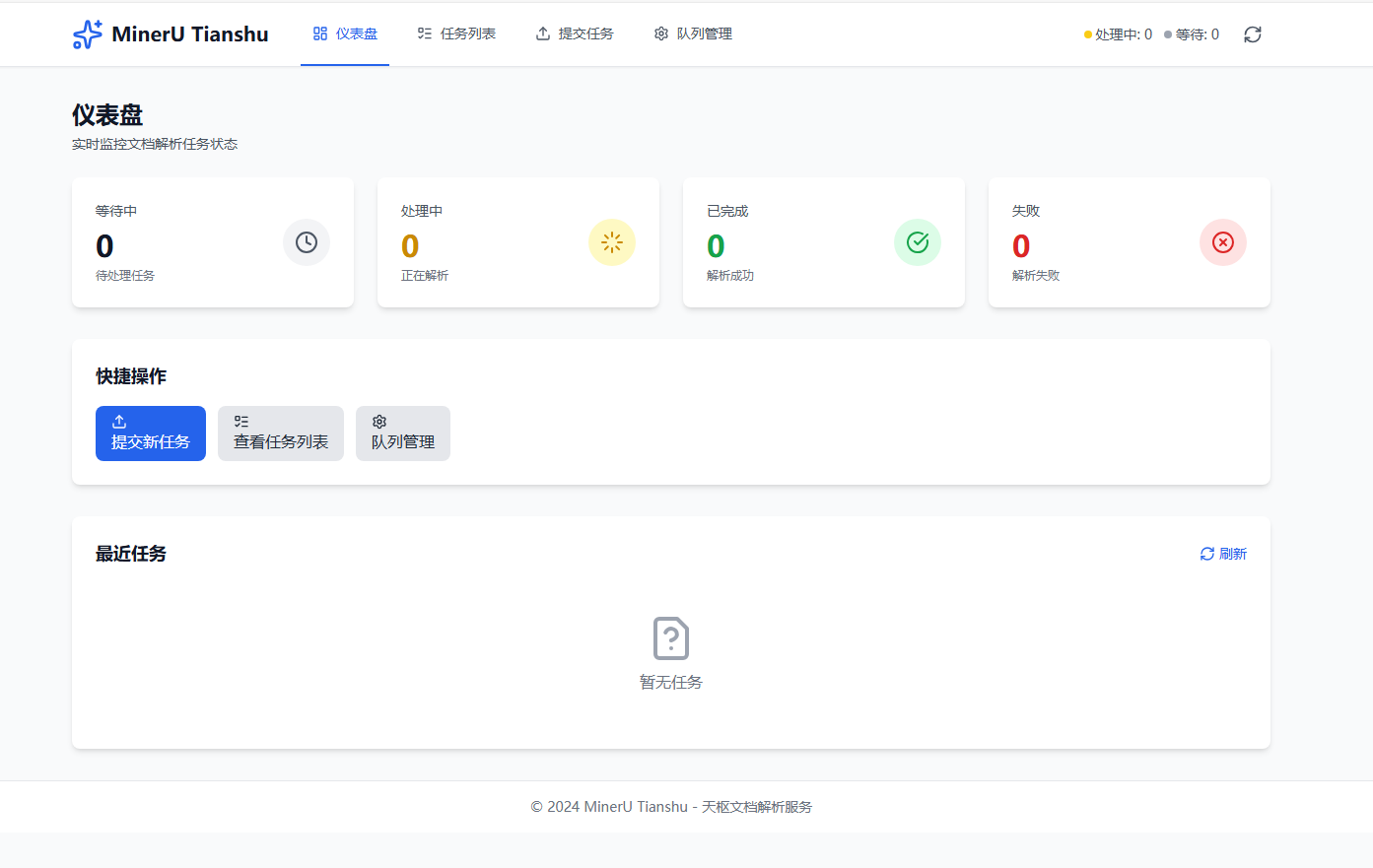
实时监控队列统计和最近任务
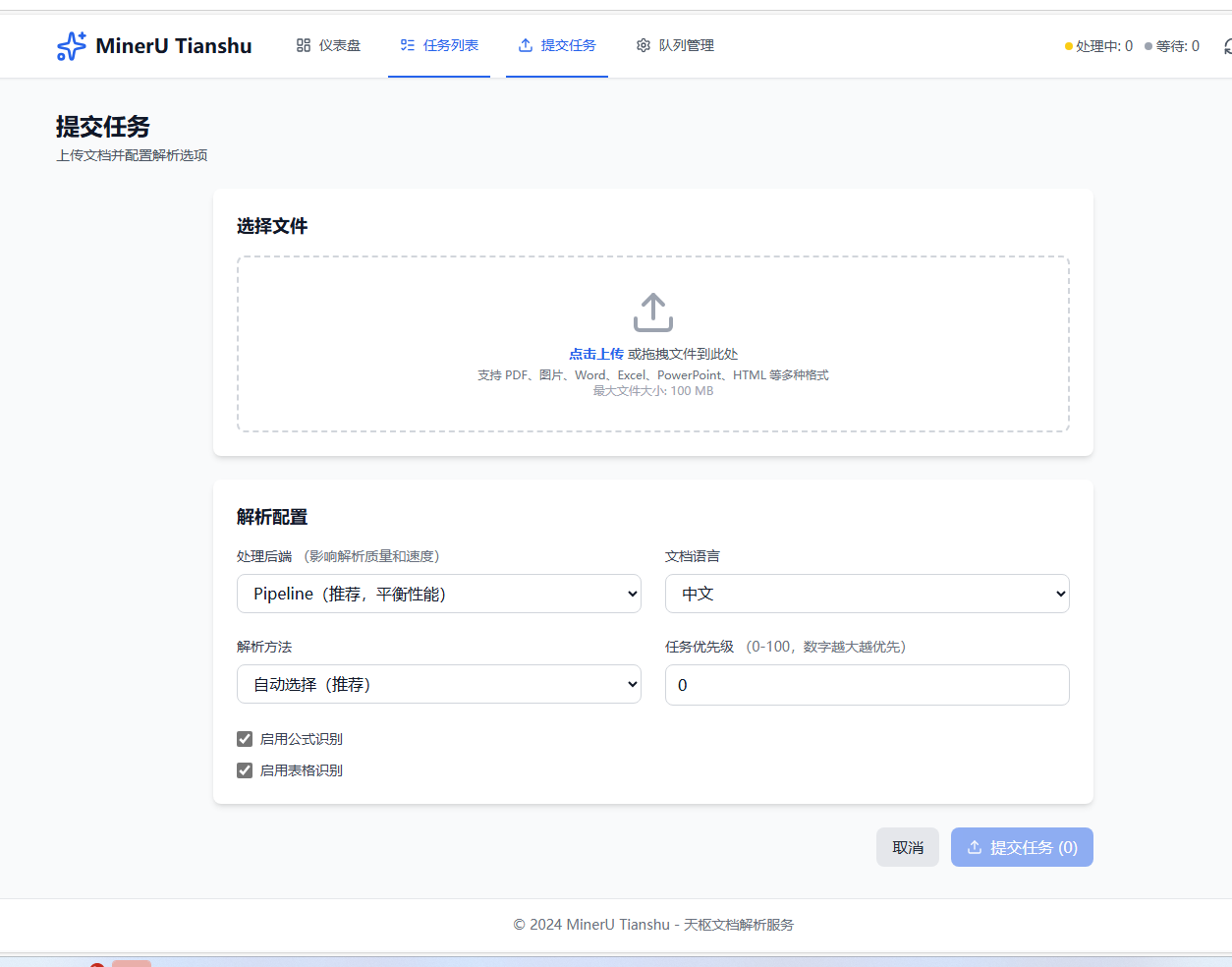
支持批量处理和高级配置
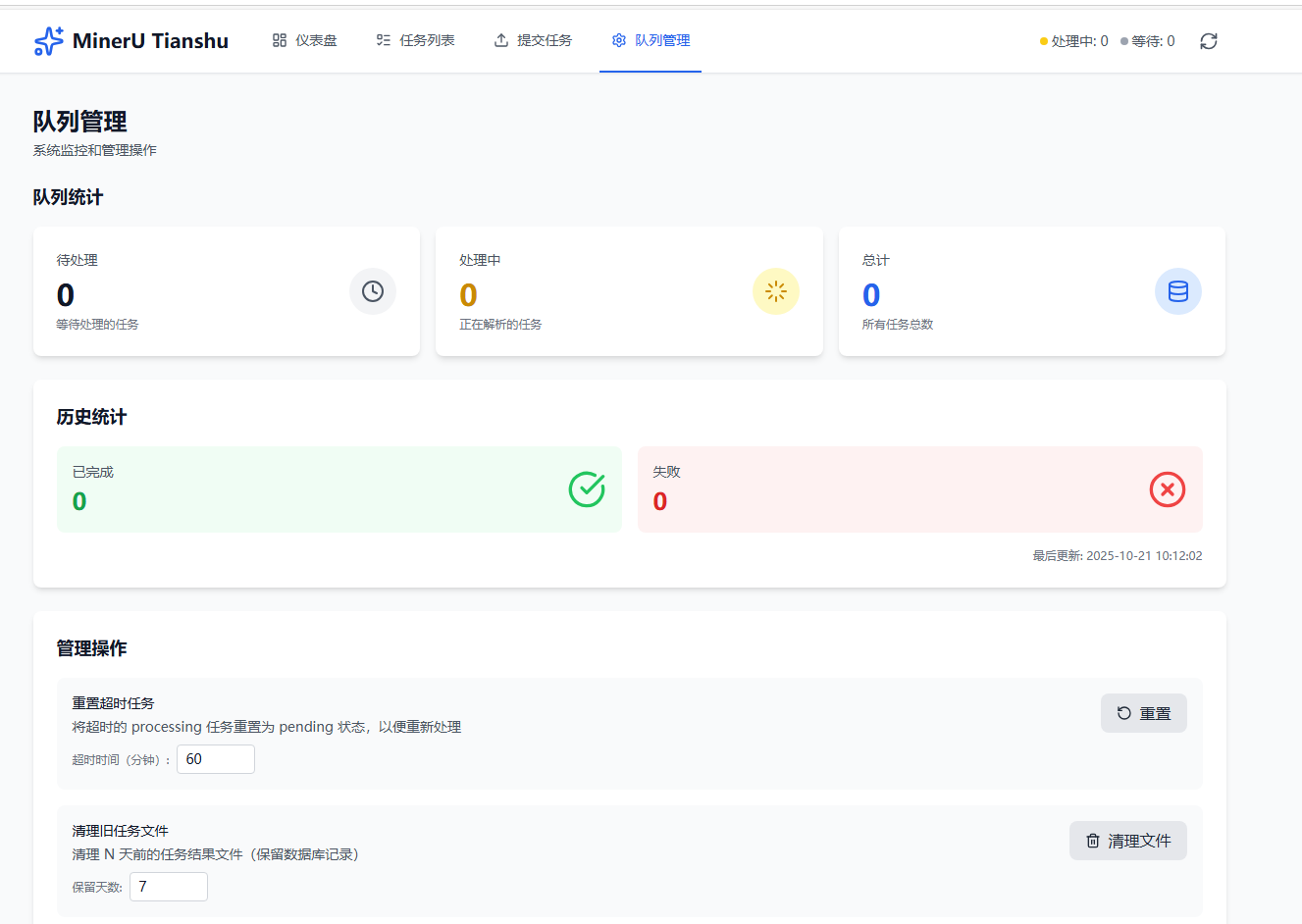
重置超时任务、清理旧文件
mineru-server/
├── frontend/              # Vue 3 前端(TypeScript + TailwindCSS)
│   ├── src/               # 源码(api、components、views、stores、router)
│   └── vite.config.ts
│
├── backend/               # Python 后端(FastAPI + LitServe)
│   ├── api_server.py      # API 服务器
│   ├── litserve_worker.py # GPU Worker Pool
│   ├── mcp_server.py      # MCP 协议服务器
│   ├── auth/              # 认证授权(JWT、SSO)
│   ├── audio_engines/     # 音频引擎(SenseVoice)
│   ├── video_engines/     # 视频引擎(FFmpeg + OCR)
│   ├── format_engines/    # 格式引擎(FASTA、GenBank)
│   ├── remove_watermark/  # 水印去除(YOLO11x + LaMa)
│   └── requirements.txt
│
├── scripts/               # 部署脚本
│   ├── docker-setup.sh    # Linux/Mac 部署
│   └── docker-setup.bat   # Windows 部署
│
├── docker-compose.yml     # Docker 编排配置
└── Makefile               # 快捷命令
前置要求:Docker 20.10+、Docker Compose 2.0+、NVIDIA Container Toolkit(GPU 可选)
# 一键部署
make setup

# 或使用脚本
./scripts/docker-setup.sh    # Linux/Mac
scripts\docker-setup.bat     # Windows

# 常用命令
make start    # 启动服务
make stop     # 停止服务
make logs     # 查看日志
服务访问:
前置要求:Node.js 18+、Python 3.8+、CUDA(可选)
1. 安装依赖
cd backend
bash install.sh              # Linux/macOS 自动安装
# 或 pip install -r requirements.txt
2. 启动后端
cd backend
python start_all.py          # 启动所有服务
python start_all.py --enable-mcp  # 启用 MCP 协议
3. 启动前端
cd frontend
npm install
npm run dev                  # http://localhost:3000
# 自定义启动
python backend/start_all.py \
  --api-port 8000 \
  --worker-port 9000 \
  --accelerator cuda \
  --devices 0,1 \
  --workers-per-device 2 \
  --enable-mcp --mcp-port 8002
MinerU Tianshu 支持 Model Context Protocol (MCP),让 AI 助手(Claude Desktop)直接调用文档解析服务。
1. 启动服务
cd backend
python start_all.py --enable-mcp  # MCP Server 端口 8002(默认)
2. 配置 Claude Desktop
编辑配置文件(%APPDATA%\Claude\claude_desktop_config.json Windows / ~/Library/Application Support/Claude/claude_desktop_config.json macOS):
{
  "mcpServers": {
    "mineru-tianshu": {
      "url": "http://localhost:8002/sse",
      "transport": "sse"
    }
  }
}
注意:MCP Server 默认端口为 8002(本地和 Docker 部署均相同)
3. 使用
在 Claude 中直接说:帮我解析这个 PDF:C:/Users/user/doc.pdf
支持的工具:
parse_document: 解析文档(Base64 或 URL,最大 500MB)get_task_status: 查询任务状态list_tasks: 列出最近任务get_queue_stats: 获取队列统计Tianshu 支持完全离线部署,提供两种部署模式:
适用于 Linux 服务器(有 GPU 则加速,无 GPU 自动降级 CPU):
# 1. 在联网环境构建镜像(Linux/Mac 均可)
./scripts/build-offline.sh

# 2. 传输到生产服务器
rsync -avz docker-images/ user@prod-server:/opt/tianshu/

# 3. 在生产服务器部署(自动检测 GPU/CPU)
cd /opt/tianshu
./deploy-offline.sh
适用于 Mac(Apple Silicon/Intel)和无 GPU 的 Linux 环境:
# 1. 在联网环境构建镜像
./scripts/build-offline.sh

# 2. 传输构建产物(可选:直接在目标机器构建可跳过此步)
rsync -avz docker-images/ user@target:/opt/tianshu/

# 3. 在目标机器部署(强制 CPU 模式)
cd /opt/tianshu
./deploy-offline-cpu.sh
特点:
关键修复:
📖 详细说明:DEPLOYMENT_GUIDE.md
推荐使用 Docker Compose 一键部署:
# 一键部署
docker compose up -d

# 或使用 Make 命令
make setup
如需手动部署:
前端构建:cd frontend && npm run build(产物在 dist/)
Nginx 配置:
server {
    listen 80;
    root /path/to/frontend/dist;
    location / { try_files $uri $uri/ /index.html; }
    location /api/ { proxy_pass http://localhost:8000/api/; }
}
后端部署:cd backend && python start_all.py --api-port 8000 --worker-port 9000
前端:Vue 3、TypeScript、Vite、TailwindCSS、Pinia、Vue Router
后端:FastAPI、LitServe、MinerU、PaddleOCR、SenseVoice、SQLite、Loguru
前端无法连接:curl http://localhost:8000/api/v1/health 检查后端,查看 vite.config.ts 代理配置
Worker 无法启动:nvidia-smi 检查 GPU,pip list | grep mineru 检查依赖
详见 frontend/README.md 和 backend/README.md
访问 http://localhost:8000/docs 查看完整 API 文档
主要端点:
POST /api/v1/tasks/submit - 提交任务GET /api/v1/tasks/{task_id} - 查询状态GET /api/v1/queue/stats - 队列统计欢迎提交 Issue 和 Pull Request!
本项目基于以下优秀的开源项目构建:
核心引擎
框架与工具
感谢所有开源贡献者!
本项目采用 Apache License 2.0 开源协议。
Copyright 2024 MinerU Tianshu Contributors

Licensed under the Apache License, Version 2.0 (the "License");
you may not use this file except in compliance with the License.
You may obtain a copy of the License at

    http://www.apache.org/licenses/LICENSE-2.0

Unless required by applicable law or agreed to in writing, software
distributed under the License is distributed on an "AS IS" BASIS,
WITHOUT WARRANTIES OR CONDITIONS OF ANY KIND, either express or implied.
See the License for the specific language governing permissions and
limitations under the License.
天枢 (Tianshu) - 企业级多 GPU 文档解析服务 ⚡️
北斗第一星,寓意核心调度能力


点击 ⭐ Star 支持项目发展,感谢!
Run Claude Code as an MCP server so any agent can delegate coding tasks to it
 @microsoft✓ Official
Browser automation using accessibility snapshots instead of screenshots
 @googleapis✓ Official
Google's universal MCP server supporting PostgreSQL, MySQL, MongoDB, Redis, and 10+ databases
 @github✓ Official
Official GitHub integration for repos, issues, PRs, and CI/CD workflows