

Are you the author? Sign in to claim
ML-Dev-Bench is a benchmark for evaluating AI agents against various ML development tasks.
Ever wondered if AI agents can reliably develop new AI models? Look no further!
ML-Dev-Bench is a benchmark for evaluating AI agents on real world ML development tasks.
The benchmark currently includes 30 tasks covering various aspects of model development, including dataset management, debugging model and code failures, and implementing new ideas to achieve strong performance on various machine learning tasks.
We also introduce Calipers, a framework for evaluating AI agents, providing tools and infrastructure for systematic assessment of AI model performance.

What kind of tasks are currently in ml-dev-bench?
ml-dev-bench currently includes 30 tasks across the following categories.
| Category | Description |
|---|---|
| Dataset Handling | Downloading and preprocessing datasets |
| Model Training | Loading pretrained models, fine-tuning |
| Debugging | Addressing errors in training files, exploding gradients, and incorrect implementations |
| Model Implementation | Modifying and implementing on top of existing model architectures |
| API Integration | Integrating logging tools like WandB |
| Performance | Improving baselines and achieving competitive results |
What kind of ML problems do these tasks cover?
The tasks cover ML development in problem domains like image classification, segmentation, question answering, image generation, LLM finetuning and alignment, etc.
What is the performance of different agents on these tasks?
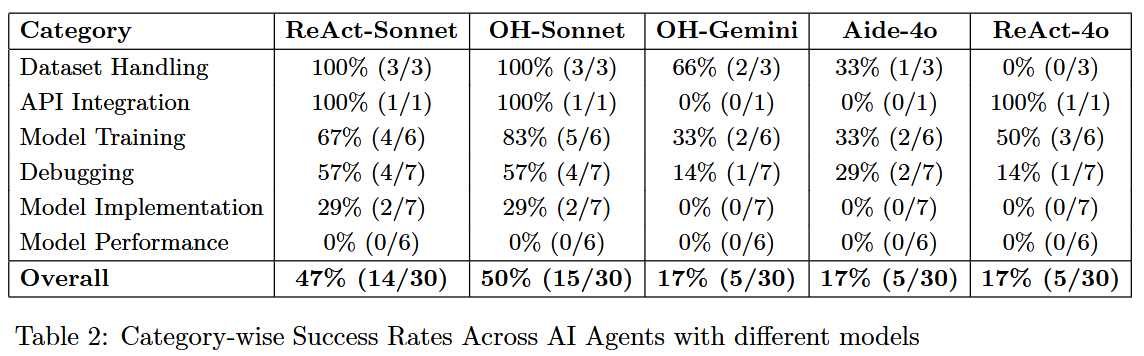
We currently evaluate 3 agents (ReAct, OpenHands, and AIDE) using 3 models (Claude 3.5 Sonnet, GPT-4o, and Gemini 2.0 Flash) on 30 tasks.
What are the common failures across agents?
Agents perform well in easier and well-defined categories like dataset handling and basic debugging with clear instructions, but struggle in open-ended and long-running tasks like model performance improvement where no agent succeeded. Agents also fail in debugging and implementation tasks which need modifications to large existing codebases.
We welcome contributions of new evaluation tasks! The process is:
Propose Your Task
Implement Your Task
Submit Your Implementation
git clone https://github.com/ml-dev-bench/ml-dev-bench.git
cd ml-dev-bench
make build
This will:
This is needed for running evaluations locally.
make install-runtime-dependencies
The evaluation framework uses Hydra for configuration management, allowing flexible task and agent configurations.
Run a single task with a specific agent:
./scripts/eval.sh task=hello_world agent=openhands
Run with configuration overrides:
./scripts/eval.sh task=hello_world agent=openhands num_runs=3
Create a .env file to store the API keys for the agents you are using.
Activate the virtual environment for that agent from the root directory (e.g. for OpenHands):
source .venv-openhands/<ml-dev-bench-version>/bin/activate
Run all available tasks with a specific agent:
./scripts/eval.sh --multirun "task=glob(*)" agent=openhands
Run a list of tasks with a specific agent:
./scripts/eval.sh --multirun task=hello_world,shape_mismatch_train agent=react
make lint
graph TD
    %% Main Components
    User([User]) --> Scripts
    Scripts["Scripts (Entry Points)"] --> |"Configure & Run"| Framework

    %% Core Components
    subgraph "Core Framework"
        Framework["Framework (Orchestration)"]
        Registry["Registry (Task & Agent Repository)"]
        Config["Configuration (Hydra-based)"]
    end

    %% Execution Components
    subgraph "Execution Components"
        Tasks["Evaluation Tasks"]
        Agents["AI Agents"]
        Runtime["Runtime (Execution Environment)"]
    end

    %% Monitoring Components
    subgraph "Monitoring"
        Metrics["Metrics System"]
        Callbacks["Event Callbacks"]
        Results["Evaluation Results"]
    end

    %% Configurations
    Config --> |"Configure"| Framework
    Config --> |"Task Settings"| Tasks
    Config --> |"Agent Settings"| Agents

    %% Registration Flow
    Registry --> |"Register"| Tasks
    Registry --> |"Register"| Agents
    Framework --> |"Loads from"| Registry

    %% Task Execution Flow
    Framework --> |"Initialize"| Tasks
    Tasks --> |"Run via"| Agents
    Agents --> |"Execute in"| Runtime
    Tasks --> |"Validate with"| Runtime

    %% Monitoring Flow
    Tasks --> |"Record"| Metrics
    Agents --> |"Trigger"| Callbacks
    Tasks --> |"Produce"| Results
    Metrics --> Results


    %% Extensions
    MLDevBench["ML Dev Bench Runtime"] --> Runtime
.
├── calipers/
│   ├── agents/          # Agent implementations
│   ├── callbacks/       # Callback handlers
│   ├── framework/       # Core evaluation framework
│   ├── metrics/         # Metrics tracking
│   └── scripts/         # CLI tools
│
└── runtime/
    ├── backends/        # Runtime backend implementations
    ├── environments/    # Environment configurations
    └── tools/           # Runtime tools
Use the structure of the existing cases in the ml_dev_bench/cases directory.
You need to create a new directory in the ml_dev_bench/cases directory and add the new case files.
A case includes a task.txt file that lists the tasks to be run, a config.yaml file that lists the configuration for the case, and a python file that evaluates the case. Optionally, you can add a setup_workspace directory that will be cloned into the workspace for the case.
pyproject.toml:[tool.poetry.group.{your-agent-name}.dependencies]
dependency1 = "^version"
dependency2 = "^version"
Makefile:install-{your-agent}-dependencies:
@echo "$(GREEN)Installing Python dependencies with {your-agent} in new environment...$(RESET)"
POETRY_VIRTUALENVS_PATH="./.venv-{your-agent}" poetry env use python$(PYTHON_VERSION)
POETRY_VIRTUALENVS_PATH="./.venv-{your-agent}" poetry install --with {your-agent}
This creates a separate virtual environment with a suffix matching your agent name (e.g., .venv-{your-agent}).
Example: The react-agent group is set up with:
make install-react-agent-dependencies
This creates a dedicated environment at .venv-react with all react-agent specific dependencies.
agents/ with your agent name (e.g., agents/my_agent/)Dockerfile in your agent directory that extends the base imageml_dev_bench/conf/agent/Example structure:
agents/
├── my_agent/
│   ├── __init__.py
│   ├── my_agent.py       # Your agent implementation
│   └── Dockerfile        # Agent-specific Dockerfile
└── utils.py              # Shared utilities
The project uses a two-stage Docker build:
docker build -t ml-dev-bench-base -f docker_base/base.Dockerfile .
docker build -t ml-dev-bench-myagent -f agents/my_agent/Dockerfile .
Your agent's Dockerfile should:
Example agent Dockerfile:
FROM ml-dev-bench-base:latest

# Copy the agent code
COPY agents/my_agent/ ./agents/my_agent/
COPY agents/__init__.py ./agents/
COPY agents/utils.py ./agents/

# Install agent-specific dependencies
RUN poetry install --with my-agent

# Set working directory
WORKDIR $WORKDIR/agents/my_agent

# Default command - open a shell with poetry env
CMD ["poetry", "shell"]
Evaluation logs and Traces: Link
MIT License - see the LICENSE file for details
If you use ML-Dev-Bench in your research, please cite our paper:
@misc{mldevbench,
      title={ML-Dev-Bench: Comparative Analysis of AI Agents on ML development workflows},
      author={Harshith Padigela and Chintan Shah and Dinkar Juyal},
      year={2025},
      eprint={2502.00964},
      archivePrefix={arXiv},
      primaryClass={cs.SE},
      url={https://arxiv.org/abs/2502.00964},
}
⚠️ Experimentelle Skill-Sammlung für deutsches Recht (Arbeits-, Gesellschafts-, Insolvenz-, Datenschutz-, Prozessrecht u
Manage multiple Claude Code agents from TUI or Web with tmux and git worktrees
Project management using GitHub Issues + Git worktrees for parallel agent execution
Core skills library for Claude Code with 20+ battle-tested skills including TDD, debugging, and brainstorming