

Are you the author? Sign in to claim
Claude code memory, or maybe not code.


Local semantic code search for Claude Code. Index your codebase once, search it with natural language.
# npm
npm install -g mnemex

# homebrew (macOS)
brew tap MadAppGang/tap && brew install mnemex

# or just curl it
curl -fsSL https://raw.githubusercontent.com/MadAppGang/mnemex/main/install.sh | bash
Claude Code's built-in search (grep/glob) works fine for exact matches. But when you're trying to find "where do we handle auth tokens" or "error retry logic" — good luck.
mnemex fixes that. It chunks your code using tree-sitter (so it actually understands functions/classes, not just lines), generates embeddings via OpenRouter, and stores everything locally in LanceDB.
The search combines keyword matching with vector similarity. Works surprisingly well for finding stuff you kinda-sorta remember but can't grep for.
# first time setup
mnemex init

# index your project
mnemex index

# search
mnemex search "authentication flow"
mnemex search "where do we validate user input"
That's it. Changed some files? Just search again — it auto-reindexes modified files before searching.
Run your own benchmark with mnemex benchmark. Here are results on real code search tasks:
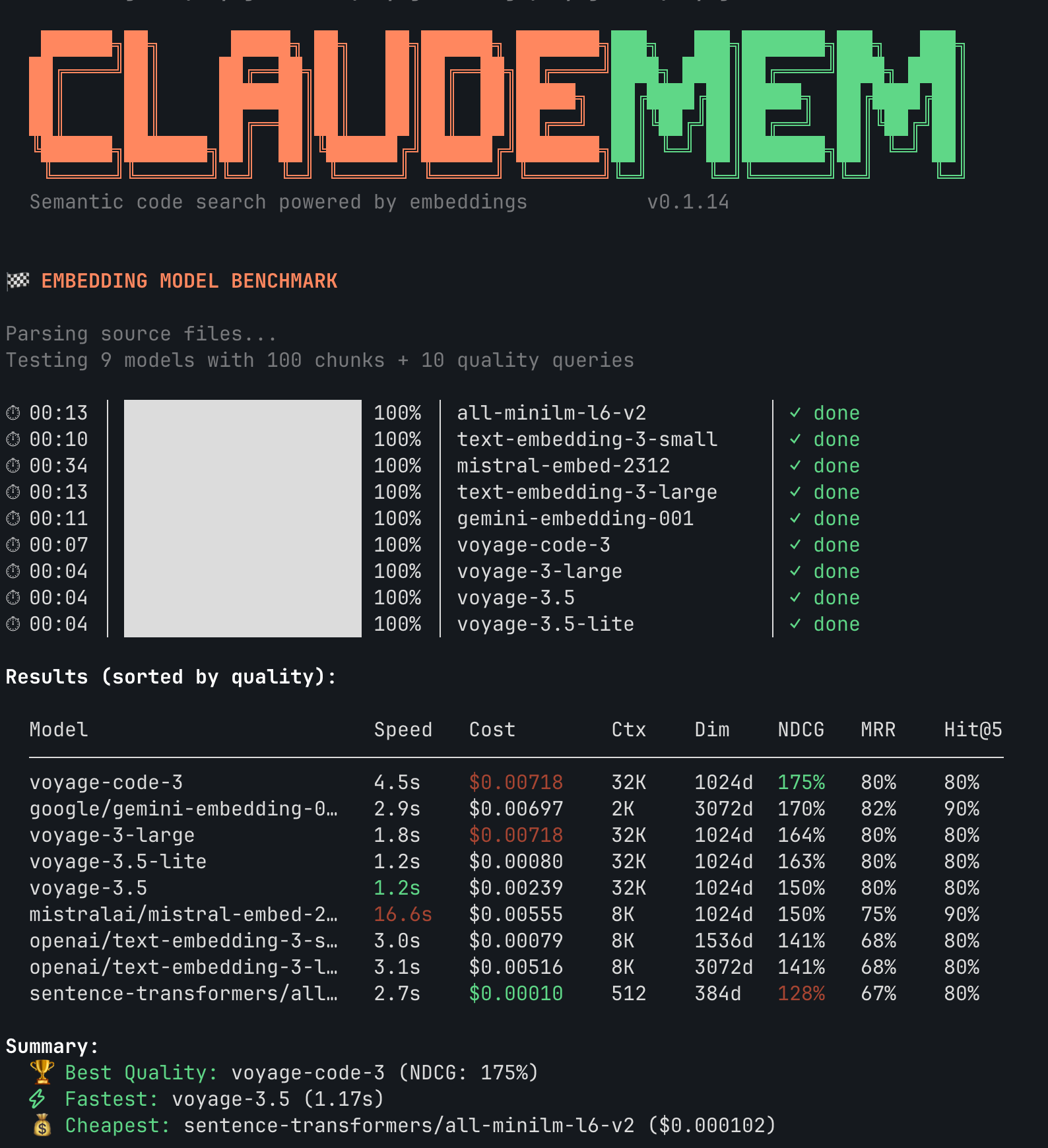
| Model | Speed | NDCG | Cost | Notes |
|---|---|---|---|---|
| voyage-code-3 | 4.5s | 175% | $0.007 | Best quality |
| gemini-embedding-001 | 2.9s | 170% | $0.007 | Great free option |
| voyage-3-large | 1.8s | 164% | $0.007 | Fast & accurate |
| voyage-3.5-lite | 1.2s | 163% | $0.001 | Best value |
| voyage-3.5 | 1.2s | 150% | $0.002 | Fastest |
| mistral-embed | 16.6s | 150% | $0.006 | Slow |
| text-embedding-3-small | 3.0s | 141% | $0.001 | Decent |
| text-embedding-3-large | 3.1s | 141% | $0.005 | Not worth it |
| all-minilm-l6-v2 | 2.7s | 128% | $0.0001 | Cheapest (local) |
Summary:
mnemex supports three embedding providers:
mnemex init  # select "OpenRouter"
# requires API key from https://openrouter.ai/keys
# ~$0.01 per 1M tokens
# install Ollama first: https://ollama.ai
ollama pull nomic-embed-text

mnemex init  # select "Ollama"
Recommended Ollama models:
nomic-embed-text — best quality, 768d, 274MBmxbai-embed-large — large context, 1024d, 670MBall-minilm — fastest, 384d, 46MBmnemex init # select "Custom endpoint"
# expects OpenAI-compatible /embeddings endpoint
View available models:
mnemex --models           # OpenRouter models
mnemex --models --ollama  # Ollama models
Run it as an MCP server:
mnemex --mcp
Then Claude Code can use these tools:
search_code — semantic search (auto-indexes changes)index_codebase — manual full reindexget_status — check what's indexedclear_index — start freshmnemex rg)mnemex ships a drop-in rg replacement that Claude Code's built-in Grep tool will call. It runs real ripgrep and mnemex semantic search in parallel, then merges the results with mnemex-ranked hits listed first — so every result rg would have returned is preserved, plus semantically related hits that literal regex misses.
# One-time install
mnemex rg install

# This writes ~/.local/bin/rg as a shim that execs `mnemex rg "$@"`
# and sets USE_BUILTIN_RIPGREP=0 in ~/.claude/settings.json so that
# Claude Code picks up the PATH rg instead of its bundled binary.
Requirements:
~/.local/bin must be early on your $PATH: export PATH="$HOME/.local/bin:$PATH".mnemex/ index for augmentation to kick in. Without one, the shim is a zero-overhead passthrough to the bundled rg.How it behaves:
rg + mnemex search in parallel (2s cap on mnemex), merges output with semantic hits first, deduplicated by file:line.rg. Byte-identical output, no overhead.--count mode or no pattern: passthrough only (mnemex can't meaningfully augment counts).-F, -w, -x, -i, -s, -S so it doesn't surface lines that rg would have rejected.To revert:
mnemex rg uninstall
# Removes ~/.local/bin/rg and unsets USE_BUILTIN_RIPGREP in ~/.claude/settings.json
mnemex integrates with AI coding assistants to replace grep/glob with semantic search.
Install the code-analysis plugin for automatic mnemex integration:
# In Claude Code
/plugin marketplace add MadAppGang/claude-code

# Enable the plugin in settings
# Add to your Claude Code settings:
{
  "enabledPlugins": {
    "code-analysis@mag-claude-plugins": true
  }
}
This gives you detective agents that use mnemex under the hood:
developer-detective — trace implementations, find usagesarchitect-detective — analyze architecture, find patternstester-detective — find test gaps, coverage analysisdebugger-detective — trace errors, find bug sourcesAutomatic installation:
# Install plugins (suggestion + tools)
mnemex install opencode

# Check status
mnemex install opencode status

# Uninstall
mnemex install opencode uninstall
Manual installation — see docs/OPENCODE_INTEGRATION.md.
This repo also contains an experimental VS Code inline completion extension that talks to a persistent mnemex autocomplete server.
mnemex --autocomplete-server --project .extensions/vscode-mnemex-autocomplete/.mnemex/ in your projectPack your entire codebase into a single AI-friendly file. Works like repomix but with correct XML escaping and built right into mnemex.
# XML format (default, repomix-compatible)
mnemex pack

# Markdown or plain text
mnemex pack --format markdown
mnemex pack --format plain

# Pipe to stdout
mnemex pack --stdout | pbcopy

# Filter files
mnemex pack --include "src/**/*.ts" --exclude "**/*.test.ts"

# Custom output path
mnemex pack -o context.xml
You can — mnemex's XML output is structurally compatible with repomix. But mnemex pack actually produces more correct XML. In independent testing by multiple AI models (GPT-5, Kimi K2.5), mnemex scored higher:
| Criterion | mnemex pack | repomix v1.12 |
|---|---|---|
| XML well-formedness | Correct — escapes & < > in content | Broken — raw <div>, & in content |
| Binary file marking | [binary] tag in directory tree | Listed but not marked |
| Directory tree | Tree characters (├── └── │) | Flat indentation |
| .gitignore in output | Included | Omitted |
The key issue: repomix v1.12 doesn't XML-escape file content, so files containing <, >, or & produce invalid XML that breaks parsers. mnemex handles this correctly.
Beyond semantic search, mnemex builds a symbol graph with PageRank scores. This enables powerful code analysis:
mnemex dead-code
# Finds: symbols with zero callers + low PageRank + not exported
# Great for: cleaning up unused code
mnemex test-gaps
# Finds: high-PageRank symbols not called by any test file
# Great for: prioritizing what to test next
mnemex impact FileTracker
# Shows: all transitive callers, grouped by file
# Great for: understanding blast radius before refactoring
# Option 1: Watch mode (daemon)
mnemex watch

# Option 2: Git hook (auto-index after commits)
mnemex hooks install
mnemex can automatically fetch and index documentation for your project dependencies. This gives you semantic search across both your code AND the frameworks you use.
package.json, requirements.txt, go.mod, Cargo.tomlmnemex init # prompts to enable docs & configure Context7
Or configure manually:
export CONTEXT7_API_KEY=your-key # get free key at https://context7.com/dashboard
mnemex docs fetch              # fetch docs for all detected dependencies
mnemex docs fetch react vue    # fetch specific libraries
mnemex docs status             # show indexed docs & cache state
mnemex docs clear              # clear cached documentation
| Source | Best For | Coverage | Auth Required |
|---|---|---|---|
| Context7 | Code examples, API reference | 6000+ libs | Free API key |
| llms.txt | Official structured docs | 500+ sites | None |
| DevDocs | Offline fallback | 100+ langs | None |
In ~/.mnemex/config.json:
{
  "docs": {
    "enabled": true,
    "providers": ["context7", "llms_txt", "devdocs"],
    "cacheTTL": 24,
    "maxPagesPerLibrary": 10,
    "excludeLibraries": ["lodash"]
  }
}
Environment variables:
CONTEXT7_API_KEY — Context7 API key (optional but recommended)MNEMEX_DOCS_ENABLED — disable docs entirely (false)TypeScript, JavaScript, Python, Go, Rust, C, C++, Java.
If your language isn't here, it falls back to line-based chunking. Works, but not as clean.
mnemex init              # setup wizard
mnemex index [path]      # index codebase
mnemex search <query>    # search (auto-reindexes changed files)
mnemex status            # what's indexed
mnemex clear             # nuke the index
mnemex models            # list embedding models
mnemex benchmark         # benchmark embedding models
mnemex --mcp             # run as MCP server
mnemex map [query]       # repo structure with PageRank scores
mnemex symbol <name>     # find symbol definition
mnemex callers <name>    # what calls this symbol?
mnemex callees <name>    # what does this symbol call?
mnemex context <name>    # symbol + callers + callees
mnemex dead-code         # find potentially dead code (zero callers + low PageRank)
mnemex test-gaps         # find important code without test coverage
mnemex impact <symbol>   # analyze change impact (transitive callers)
mnemex pack [path]       # pack codebase to XML (default: <name>-pack.xml)
mnemex pack --format md  # markdown format
mnemex pack --stdout     # write to stdout
mnemex pack --include "src/**" --exclude "*.test.ts"
-o, --output <file>       # output file path
--format <xml|markdown|plain>  # output format (default: xml)
--stdout                  # write to stdout instead of file
--include <pattern>       # glob pattern to include (repeatable)
--exclude <pattern>       # additional exclusion pattern (repeatable)
--no-gitignore            # don't use .gitignore patterns
--max-file-size <bytes>   # max file size (default: 1048576)
--tokens                  # show token count report
mnemex ui [path]         # full-screen TUI (search, map, graph, analysis, doctor)
mnemex setup             # interactive setup wizard (provider, model, scope)
mnemex monitor [path]    # passive display of MCP activity from Claude Code
Keyboard shortcuts in the TUI:
Tab / Shift+Tab — cycle tabs1–5 — jump to tab (search, map, graph, analysis, doctor)? — toggle help overlayq — quitmnemex watch # auto-reindex on file changes (daemon mode)
mnemex hooks install # install git post-commit hook for auto-indexing
mnemex hooks uninstall # remove the hook
mnemex hooks status # check if hook is installed
mnemex install opencode                # install OpenCode plugins (suggestion + tools)
mnemex install opencode --type tools   # install tools plugin only
mnemex install opencode status         # check installation status
mnemex install opencode uninstall      # remove plugins
mnemex rg install                      # install ~/.local/bin/rg shim for Claude Code Grep
mnemex rg uninstall                    # remove shim and revert Claude Code settings
mnemex rg [rg args...]                 # drop-in ripgrep + mnemex semantic augmentation
mnemex docs fetch        # fetch docs for all detected dependencies
mnemex docs fetch <lib>  # fetch docs for specific library
mnemex docs status       # show indexed docs and providers
mnemex docs clear        # clear cached documentation
-n, --limit <n>       # max results (default: 10)
-l, --language <lang> # filter by language
-y, --yes             # auto-create index without asking
--no-reindex          # skip auto-reindex
--max-pagerank <n>    # dead-code threshold (default: 0.001)
--min-pagerank <n>    # test-gaps threshold (default: 0.01)
--max-depth <n>       # impact analysis depth (default: 10)
--include-exported    # include exported symbols in dead-code scan
--agent               # agent mode: no logo, compact output (for AI tools)
Env vars:
OPENROUTER_API_KEY — for OpenRouter providerMNEMEX_MODEL — override embedding modelCONTEXT7_API_KEY — for documentation fetching (optional)Files:
~/.mnemex/config.json — global config (provider, model, docs settings).mnemex/ — project index (add to .gitignore)MIT
GitHub · npm · OpenRouter
Run Claude Code as an MCP server so any agent can delegate coding tasks to it
 @microsoft✓ Official
Browser automation using accessibility snapshots instead of screenshots
 @googleapis✓ Official
Google's universal MCP server supporting PostgreSQL, MySQL, MongoDB, Redis, and 10+ databases
 @github✓ Official
Official GitHub integration for repos, issues, PRs, and CI/CD workflows