

Are you the author? Sign in to claim
A personal knowledge base Claude can actually search. Ingests code, PDFs, images, and notes; serves them to Claude via M
A personal knowledge base that an AI assistant can search.
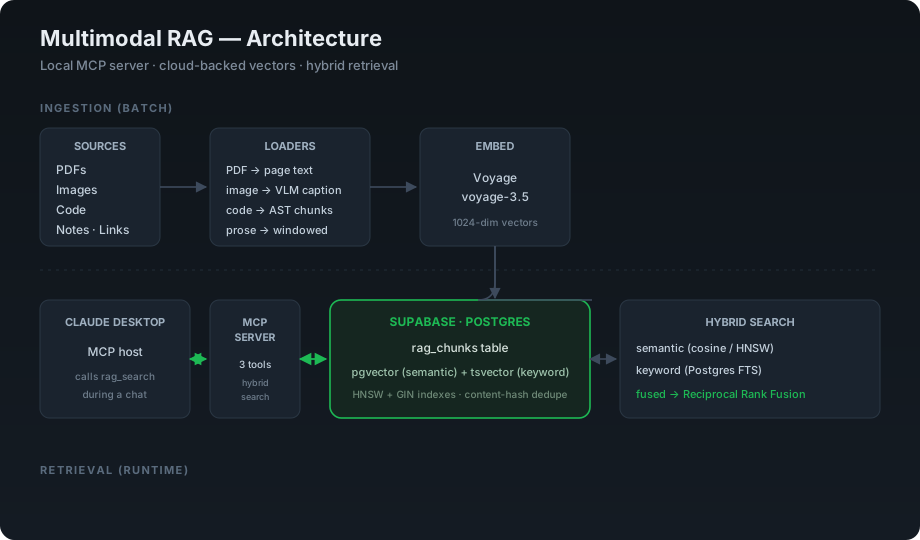
When you talk to an AI assistant like Claude, it only knows two things: what it learned during training, and what you paste into the conversation. It does not know anything about your work — your code, your notes, the documents on your computer, the things you discussed last week.
This project fixes that. It takes a pile of my own material — code from my projects, PDFs, images, and written notes — and organizes it into a searchable knowledge base. Then it connects that knowledge base directly to Claude, so when I ask a question, Claude can look things up in my own files and answer from them instead of guessing.
Think of it like giving the AI a personal filing cabinet, plus the ability to instantly find the right folder in it. Ask "what was the directory path for my portfolio project?" and instead of saying "I don't know," it searches the filing cabinet and answers with the real path from my actual files.
AI assistants are useful, but they forget. Every conversation starts mostly from scratch, and the AI has no reliable memory of your specific projects. For someone doing real work — writing code, managing projects, building things — that gap is the difference between a tool that gives generic advice and one that knows your actual situation.
Companies are running into this same problem at a much larger scale. As they adopt AI to help their teams, they need the AI to understand their internal documents, codebases, and history — not just general knowledge from the internet. This project is a small, working example of exactly that pattern: connecting an AI to a private body of knowledge so its answers are grounded in real, specific information.
The system has two halves: getting information in, and getting answers out.
Different kinds of files need different handling, so each type takes its own path:
Every chunk is then converted into a list of numbers called an embedding, which captures its meaning in a form a computer can compare quickly. All of it gets stored in a database.
When a question comes in, the system runs two kinds of search at the same time and combines them:
Neither alone is enough. Meaning-based search is bad at exact terms; keyword search is bad at concepts. Combining them (a technique called hybrid search) covers both, and the results are merged fairly so neither method drowns out the other.
The combined, ranked results get handed back to Claude, which uses them to answer.
The piece that lets Claude actually use all this is an MCP server (Model Context Protocol — a standard way to give AI assistants new tools). It exposes the knowledge base to Claude as a set of search tools. Claude decides when to use them, runs a search, gets the results, and answers — all within a normal conversation.
These are the choices that separate this from a tutorial clone:
ast module, with the symbol name preserved in metadata. Naive line-window chunking severs functions and wrecks retrieval; symbol names in metadata are also what make exact-identifier keyword search work.ts_rank live on different scales and one would otherwise dominate. RRF fuses on rank position, which is scale-free.pgvector handles semantic search and a generated tsvector column handles keyword search, both in Postgres. Reuses infrastructure already in place and removes an entire moving part.| Layer | Choice |
|---|---|
| Vector + keyword storage | Supabase (Postgres) with pgvector and full-text search |
| Embeddings | Voyage voyage-3.5 (1024-dim) |
| Image captioning | Claude vision, at ingestion time |
| AI connection | MCP server (Python, FastMCP) |
| Language | Python 3.12 |
sql/01_schema.sql                 table: pgvector + generated tsvector + indexes
sql/02_search_fns.sql             semantic / keyword / hybrid (RRF) search functions
ingest/core.py                    config, embedding, image captioning, database writes
ingest/loaders/code_loader.py     structure-aware code chunking
ingest/loaders/doc_loaders.py     pdf / image / note / link loaders
ingest/ingest.py                  ingestion command-line tool
ingest/retrieval.py               semantic / keyword / hybrid search
server.py                         MCP server exposing search to Claude
sql/01_schema.sql then sql/02_search_fns.sql in Supabase..env.example to .env and fill in Supabase, Voyage, and Anthropic keys.python -m venv .venv && source .venv/bin/activate && pip install -r requirements.txtIngest content:
python ingest/ingest.py path  ~/projects/my-repo     # a whole folder
python ingest/ingest.py file  ~/docs/spec.pdf        # a single file
python ingest/ingest.py link  https://example.com    # a web page
Test a search directly:
python ingest/retrieval.py "how does the login flow work"
Connect to Claude Desktop by adding the server to its config (see claude_desktop_config.example.json), then restart it. The search tools become available inside any conversation.
MIT — see LICENSE.
 @googleapis✓ Official
Google's universal MCP server supporting PostgreSQL, MySQL, MongoDB, Redis, and 10+ databases
Official MongoDB integration — query collections, run aggregations, inspect schemas
 @designcomputer
Secure MCP server for MySQL database interaction, queries, and schema management
Run Claude Code as an MCP server so any agent can delegate coding tasks to it