

Are you the author? Sign in to claim
Master AI Agent Assistant in 3 Days. A guided study plan using nanobot (~3k lines of Python) and your own AI Socratic Tu
                _           _           _
 _ __   __ _ _ __   ___ | |__   ___ | |_
| '_ \ / _` | '_ \ / _ \| '_ \ / _ \| __|
| | | | (_| | | | | (_) | |_) | (_) | |_
|_| |_|\__,_|_| |_|\___/|_.__/ \___/ \__|




🐈 nanobot is an ultra-lightweight personal AI assistant designed to be learned, dissected, and mastered.
Unlike bloated frameworks that hide their logic, nanobot delivers core agent functionality in just ~3,500 lines of code. It's the perfect "textbook" implementation of a modern LLM agent.
An AI Agent is not just a chatbot. It is a system that can:
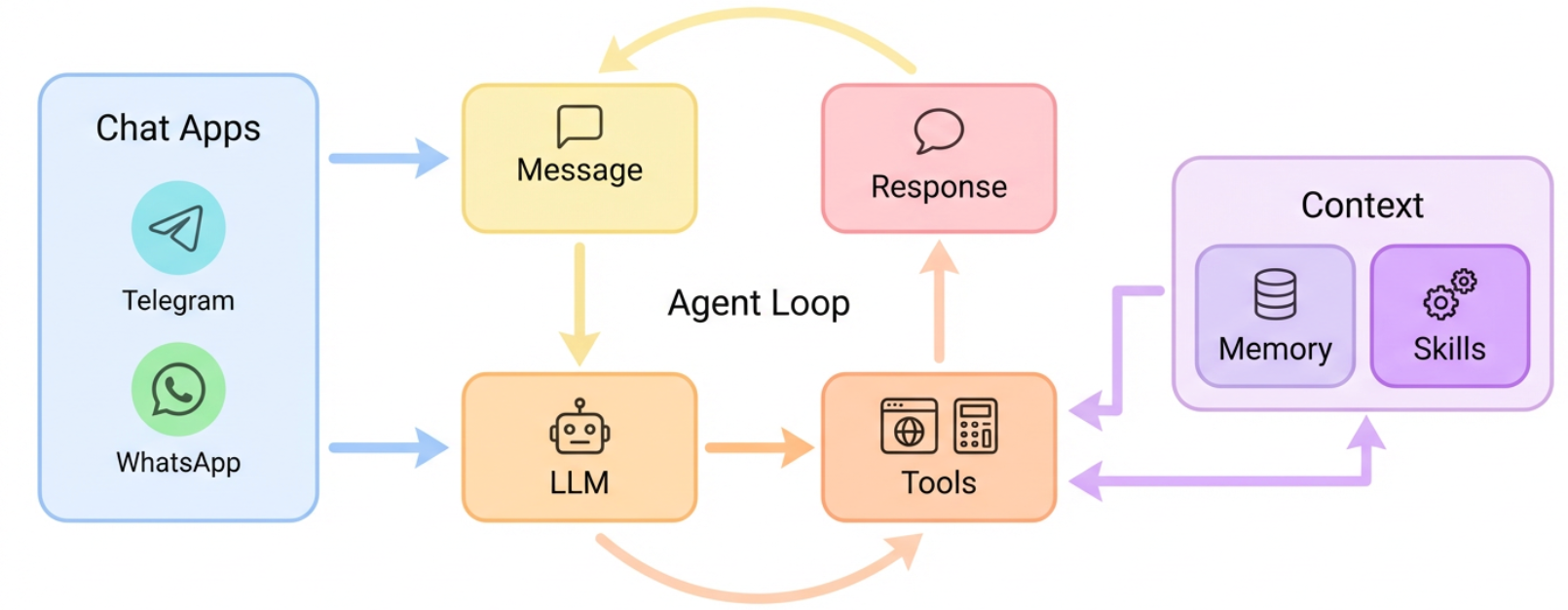
nanobot implements this Perceive-Think-Act-Loop in its purest form in agent/loop.py. By studying this repository, you aren't just learning a tool; you are learning the fundamental anatomy of Agentic AI.
[!TIP] Using an AI Coding Assistant? (Cursor, Claude Code, GitHub Copilot)
You can turn your AI assistant into a Personal Nanobot Tutor!
- Open
AI_COPILOT.md.- Copy its content or ask your AI to "Read AI_COPILOT.md and act as my tutor".
- The AI will now guide you through the 3-Day Plan using the Socratic method, helping you understand the code instead of just writing it for you.
Follow this guided path to go from "User" to "AI Engineer" in just one weekend (2-3 hours/day).
Objective: Understand how an LLM becomes an Agent.
30 min):
agent/loop.py: This is the heart. Read how _process_message handles the LLM -> Tool -> LLM cycle.config/: See how we manage prompts and model settings.1 hour):
nanobot onboard to initialize.nanobot agent -m "Calculate 128 * 455".~/.nanobot/workspace and find the log file. Follow the execution path you just read in loop.py.1 hour):
agent/prompts.py (or equivalent) to give the bot a "Pirate" personality.nanobot agent -m "Who are you?".Objective: Teach the AI to interact with the real world.
30 min):
agent/tools/: Look at web.py to see how we define tools.skills/: Understand how to bundle tools into skills.1 hour):
my_tool.py that prints "Hello from tool!".1.5 hours):
weather tool.Objective: Run your agent 24/7.
30 min):
channels/: How we bridge to Telegram/WhatsApp.cron/: How the agent wakes itself up.1 hour):
@BotFather).cron to run your "Daily Briefing" skill every morning at 8:00 AM.1.5 hours):
Dockerfile.This repository contains the Study Plan and Tutor Instructions. To follow the plan, you need the actual nanobot source code.
1. Clone the Repository (Recursive)
This command downloads both the study guide AND the nanobot source code at once.
git clone --recursive https://github.com/YOUR_USERNAME/nanobot-study.git
cd nanobot-study
2. Install Dependencies
pip install -e nanobot/
3. Start Learning
Return to this README (or AI_COPILOT.md) and begin your 3-Day Mastery Plan tasks. Note that the source code is now in the nanobot/ subdirectory.
If you are using Cursor, Claude Code, or GitHub Copilot, paste the content of AI_COPILOT.md into your chat. The AI will then act as a Socratic Tutor.
Example Interaction:
You: "How does the agent decide which tool to use?"
Standard AI: "It uses the
_process_messagefunction inloop.py. Here is the code..." (Gives you the answer, you learn nothing)Nanobot Tutor (Socratic): "That's the core of the agent! Open
nanobot/agent/loop.pyand look at the_process_messagemethod. Can you spot where we callself.llm.chat? What argument are we passing to it that contains the tool definitions?"
Your Goal: Don't just copy code. Answer the Tutor's questions to build your mental model of the system.
nanobot onboard~/.nanobot/config.json with your API keys (OpenRouter/OpenAI/Anthropic).nanobot agent -m "Hello World"
workspace/).We love PRs! If you finish your "Day 3 Challenge" and make a cool skill, make a PR to add it to the skills/ directory.
Special thanks to the original HKUDS/nanobot repository for the excellent base implementation.
nanobot is for educational, research, and technical exchange purposes only
⚠️ Experimentelle Skill-Sammlung für deutsches Recht (Arbeits-, Gesellschafts-, Insolvenz-, Datenschutz-, Prozessrecht u
Manage multiple Claude Code agents from TUI or Web with tmux and git worktrees
Project management using GitHub Issues + Git worktrees for parallel agent execution
Core skills library for Claude Code with 20+ battle-tested skills including TDD, debugging, and brainstorming