

Are you the author? Sign in to claim
Docker-based MCP server suite for AIOps - Cisco Meraki, Catalyst Center, IOS XE, ISE, ThousandEyes, Splunk & NetBox. AI-

📚 Example Code for Learning & Development
This is a demonstration project showcasing MCP server implementations for network management. Intended for educational purposes, testing, and development environments.
Docker-based MCP server suite for AIOps - enabling AI-driven network operations through Cisco Meraki, Catalyst Center, IOS XE, ISE, ThousandEyes, Splunk, NetBox & GitLab integration. AI-ready with LibreChat, Cursor, and other MCP clients for intelligent network management, automated troubleshooting, CI/CD orchestration, and operational insights.
AI-Powered Network Troubleshooting with LibreChat using Multiple MCP Servers
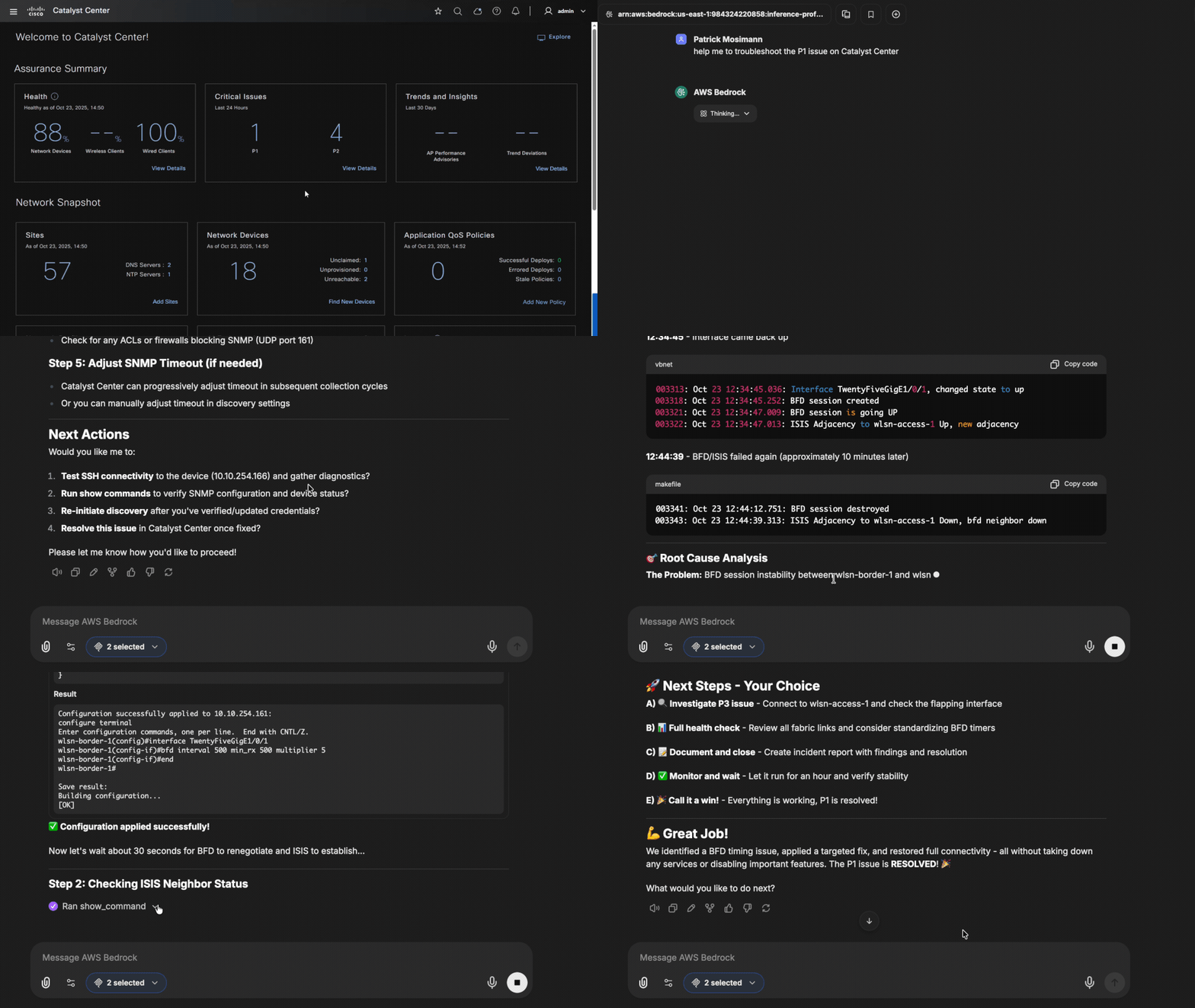
Watch how natural language queries automatically investigate and resolve network issues using both Catalyst Center MCP Server and IOS XE MCP Server. The AI assistant correlates data from management systems (Catalyst Center) with direct device access (IOS XE SSH) to identify root causes and provide comprehensive solutions.
This AIOps-focused Docker suite contains ten MCP servers enabling AI-driven network operations:
All servers are containerized with flexible deployment profiles, enabling AIOps workflows through natural language queries, automated troubleshooting, and intelligent network analytics via AI assistants.
Network administrators and DevOps teams face significant challenges in managing modern hybrid network infrastructure across cloud and on-premises environments. This solution addresses these challenges by providing:
| Scenario | Description | Servers Used | Benefits |
|---|---|---|---|
| Network Troubleshooting | NOC engineer investigating connectivity issues (as shown in demo) | Catalyst Center + IOS-XE + ThousandEyes | Cross-platform correlation with performance monitoring |
| AI-Driven Troubleshooting | AI assistant diagnosing interface drops or syslog errors | NetBox + Prometheus + ClickHouse | Automated correlation of topology, metrics, and logs |
| Performance Analysis | Network analyst monitoring application performance | ThousandEyes + Catalyst Center | End-to-end performance visibility |
| Infrastructure Documentation | SysAdmin updating network documentation | NetBox + Catalyst Center | Automated documentation synchronization |
| Compliance Reporting | IT Manager generating audit reports | All servers | Consolidated reporting across infrastructure |
| Device Configuration | Network engineer deploying configurations | Catalyst Center + IOS-XE | Standardized configuration management |
| CI/CD Dry-Run | AI assistant updating config and triggering Ansible dry-run | GitLab + NetBox + IOS-XE | Safe config preview before deployment |
For comprehensive use case scenarios and implementation details, see:
This MCP suite integrates with netops-stack - an observability and orchestration platform for network automation featuring:
Use the netops-stack profile to start MCP servers optimized for netops-stack integration:
./deploy.sh start netops-stack # Starts MCP Servers for: ClickHouse, GitLab, IOS-XE, NetBox, Prometheus
| MCP Server | netops-stack Component | Purpose |
|---|---|---|
| Prometheus MCP | Prometheus (9090) | Query interface/device metrics |
| ClickHouse MCP | ClickHouse (8123) | Query syslog messages |
| GitLab MCP | GitLab CI/CD | Trigger Ansible dry-runs |
| NetBox MCP | External SoT | Device inventory and topology |
| IOS-XE MCP | Network devices | Direct show command access |
The suite provides direct access to seven containerized MCP servers, perfect for development, testing, and AI-powered network operations:
┌─────────────────┐    ┌──────────────────────────────────┐
│                 │    │          Docker Host             │
│   MCP Client    │    │                                  │
│                 │    │  ┌─────────────────────────────┐ │
│ • Cursor IDE    │────┼─▶│ Meraki MCP        :8000     │ │
│ • LibreChat     │    │  ├─────────────────────────────┤ │
│ • Claude Desktop│────┼─▶│ NetBox MCP        :8001     │ │
│ • Other MCP     │    │  ├─────────────────────────────┤ │
│   Clients       │────┼─▶│ Catalyst Center   :8002     │ │
│                 │    │  ├─────────────────────────────┤ │
│                 │────┼─▶│ IOS XE MCP        :8003     │ │
│                 │    │  ├─────────────────────────────┤ │
│                 │────┼─▶│ ThousandEyes MCP  :8004     │ │
│                 │    │  ├─────────────────────────────┤ │
│                 │────┼─▶│ ISE MCP           :8005     │ │
│                 │    │  ├─────────────────────────────┤ │
│                 │────┼─▶│ Splunk MCP        :8006     │ │
│                 │    │  ├─────────────────────────────┤ │
│                 │────┼─▶│ Prometheus MCP    :8007     │ │
│                 │    │  ├─────────────────────────────┤ │
│                 │────┼─▶│ ClickHouse MCP    :8008     │ │
│                 │    │  ├─────────────────────────────┤ │
│                 │────┼─▶│ GitLab MCP        :8009     │ │
│                 │    │  └─────────────────────────────┘ │
└─────────────────┘    └──────────────────────────────────┘

        Direct HTTP Connections
        ✅ Simple setup - no authentication required
        ✅ Individual server access and configuration
        ✅ Flexible port-based deployment
        ✅ Perfect for development and testing
# 1. Clone repository
git clone https://github.com/pamosima/network-mcp-docker-suite.git
cd network-mcp-docker-suite

# 2. Configure environment variables (single .env file for all servers)
cp .env.example .env          # Copy the environment template
nano .env                     # Edit and configure:
                             # - Set ENABLE_*_MCP=false for servers you don't want to use
                             # - Add API keys and credentials for enabled servers
# See .env.example for detailed configuration instructions

# 3. Deploy servers
./deploy.sh start all          # All servers
# OR
./deploy.sh start cisco        # Just Cisco platforms
# OR
./deploy.sh start meraki       # Just Meraki

# 4. Verify deployment
curl http://localhost:8000/mcp    # Test Meraki server
curl http://localhost:8002/mcp    # Test Catalyst Center server
💡 Quick Tip: All servers now use a single centralized
.envfile for configuration. UseENABLE_*_MCP=falseto disable servers you don't need, and only add credentials for enabled servers.
🌐 LibreChat Integration: To use with LibreChat on an external network, see the External Network Integration section below.
Control which MCP servers run using environment variables in your .env file:
# Enable/Disable individual servers (edit .env)
ENABLE_MERAKI_MCP=true       # Set to false to disable
ENABLE_NETBOX_MCP=true       # Set to false to disable
ENABLE_CATC_MCP=true         # Set to false to disable
ENABLE_IOS_XE_MCP=false      # Disabled - won't start
ENABLE_THOUSANDEYES_MCP=true
ENABLE_ISE_MCP=true
ENABLE_SPLUNK_MCP=false      # Disabled - won't start
ENABLE_PROMETHEUS_MCP=true   # netops-stack metrics
ENABLE_CLICKHOUSE_MCP=true   # netops-stack syslog
ENABLE_GITLAB_MCP=true       # CI/CD orchestration
Best Practices:
ENABLE_*_MCP=false for servers you don't use| Profile | Description | Servers Deployed | Use Case |
|---|---|---|---|
all | Deploy all servers | All 10 servers (8000-8009) | Complete infrastructure visibility |
cisco | Cisco-focused platforms | Meraki + Catalyst Center + ThousandEyes + ISE + IOS XE | Cisco-centric environments |
monitoring | Network monitoring | Meraki + Catalyst Center + ThousandEyes + Splunk | Operations teams |
observability | netops-stack metrics/logs | Prometheus + ClickHouse + NetBox | AI-driven troubleshooting |
netops-stack | Full netops-stack integration | ClickHouse + GitLab + IOS-XE + NetBox + Prometheus | Complete AI orchestration |
orchestration | CI/CD automation | GitLab + NetBox + IOS XE | Network automation workflows |
security | Security-focused | Catalyst Center + ISE | Security operations |
management | Traditional management | Meraki + Catalyst Center | Network management |
docs | Documentation-focused | NetBox + Catalyst Center | Infrastructure documentation |
# Flexible deployment using profiles
./deploy.sh start all                        # Complete suite
./deploy.sh start cisco                      # Cisco platforms only
./deploy.sh start monitoring                 # Monitoring focus
./deploy.sh start security                   # Security focus

# Individual servers
./deploy.sh start meraki                     # Cloud management
./deploy.sh start catc                       # Enterprise management
./deploy.sh start ios-xe                     # Direct device access

# Management operations
./deploy.sh status all                       # Check status
./deploy.sh logs cisco                       # View logs
./deploy.sh stop all                         # Stop services
To integrate with LibreChat or other services on an external Docker network:
# 1. Create the external network
docker network create mcp-server

# 2. Copy and use the override configuration
cp docker-compose.override.yml.example docker-compose.override.yml

# 3. Deploy (automatically uses override file)
./deploy.sh start all
The docker-compose.override.yml configures all MCP servers to join the external mcp-server network, allowing seamless communication with LibreChat and other services on the same network.
Here's a real-world example of how to interact with the MCP servers using natural language:
User Prompt:
Check why wlsn-access-1.dna.its-best.ch is unreachable from Cisco Catalyst Center.
AI Assistant Response: The AI assistant automatically uses both MCP servers working together:
Resolution Identified:
| Scenario | Example Prompt | Servers Used |
|---|---|---|
| Device Configuration | "Configure VLAN 100 on all access switches in Building A" | Catalyst Center + IOS XE |
| Performance Analysis | "Show me network latency for our main website over the last 6 hours" | ThousandEyes |
| Security Compliance | "Show me all non-compliant devices and their authorization profiles" | ISE + Catalyst Center |
| Infrastructure Audit | "Generate a report of devices that don't match between NetBox and reality" | NetBox + Catalyst Center |
| Capacity Planning | "Show me bandwidth utilization trends across all sites" | Meraki + Catalyst Center |
| Server | Port | Endpoint | Purpose |
|---|---|---|---|
| Meraki | 8000 | http://localhost:8000/mcp | Cloud network management |
| NetBox | 8001 | http://localhost:8001/mcp | DCIM/IPAM documentation |
| Catalyst Center | 8002 | http://localhost:8002/mcp | Enterprise management |
| IOS XE | 8003 | http://localhost:8003/mcp | Direct device access |
| ThousandEyes | 8004 | http://localhost:8004/mcp | Performance monitoring |
| ISE | 8005 | http://localhost:8005/mcp | Identity & access control |
| Splunk | 8006 | http://localhost:8006/mcp | Log analysis |
| Prometheus | 8007 | http://localhost:8007/mcp | Metrics queries (netops-stack) |
| ClickHouse | 8008 | http://localhost:8008/mcp | Syslog queries (netops-stack) |
| GitLab | 8009 | http://localhost:8009/mcp | CI/CD & repository management |
Create or update ~/.cursor/mcp.json:
{
  "mcpServers": {
    "Meraki-MCP-Server": {
      "transport": "http",
      "url": "http://localhost:8000/mcp",
      "timeout": 60000
    },
    "NetBox-MCP-Server": {
      "transport": "http",
      "url": "http://localhost:8001/mcp",
      "timeout": 60000
    },
    "Catalyst-Center-MCP-Server": {
      "transport": "http",
      "url": "http://localhost:8002/mcp",
      "timeout": 60000
    },
    "IOS-XE-MCP-Server": {
      "transport": "http",
      "url": "http://localhost:8003/mcp",
      "timeout": 60000
    },
    "ThousandEyes-MCP-Server": {
      "transport": "http",
      "url": "http://localhost:8004/mcp",
      "timeout": 60000
    },
    "ISE-MCP-Server": {
      "transport": "http",
      "url": "http://localhost:8005/mcp",
      "timeout": 60000
    },
    "Splunk-MCP-Server": {
      "transport": "http",
      "url": "http://localhost:8006/mcp",
      "timeout": 60000
    },
    "Prometheus-MCP-Server": {
      "transport": "http",
      "url": "http://localhost:8007/mcp",
      "timeout": 60000
    },
    "ClickHouse-MCP-Server": {
      "transport": "http",
      "url": "http://localhost:8008/mcp",
      "timeout": 60000
    },
    "GitLab-MCP-Server": {
      "transport": "http",
      "url": "http://localhost:8009/mcp",
      "timeout": 60000
    }
  }
}
Add to your librechat.yaml:
mcpServers:
  Meraki-MCP-Server:
    type: streamable-http
    url: http://meraki-mcp-server:8000/mcp
    timeout: 60000
  Netbox-MCP-Server:
    type: streamable-http
    url: http://netbox-mcp-server:8001/mcp
    timeout: 60000
  CatC-MCP-Server:
    type: streamable-http
    url: http://catc-mcp-server:8002/mcp
    timeout: 60000
  IOS-XE-MCP-Server:
    type: streamable-http
    url: http://ios-xe-mcp-server:8003/mcp
    timeout: 60000
  ThousandEyes-MCP-Server:
    type: streamable-http
    url: http://thousandeyes-mcp-server:8004/mcp
    timeout: 60000
  ISE-MCP-Server:
    type: streamable-http
    url: http://ise-mcp-server:8005/mcp
    timeout: 60000
  Splunk-MCP-Server:
    type: streamable-http
    url: http://splunk-mcp-server:8006/mcp
    timeout: 60000
  Prometheus-MCP-Server:
    type: streamable-http
    url: http://prometheus-mcp-server:8007/mcp
    timeout: 60000
  ClickHouse-MCP-Server:
    type: streamable-http
    url: http://clickhouse-mcp-server:8008/mcp
    timeout: 60000
  GitLab-MCP-Server:
    type: streamable-http
    url: http://gitlab-mcp-server:8009/mcp
    timeout: 60000
# Deploy services
./deploy.sh start all          # All servers
./deploy.sh start cisco        # Cisco platforms
./deploy.sh start monitoring   # Monitoring focused

# Check status
./deploy.sh status all         # All services
docker-compose ps              # Docker status

# View logs
./deploy.sh logs all           # All services
./deploy.sh logs meraki        # Specific server

# Stop services
./deploy.sh stop all           # All services
docker-compose down            # Docker stop

# Update and rebuild
git pull                       # Get updates
docker-compose up -d --build   # Rebuild and restart
# Test all servers are responding
curl http://localhost:8000/mcp    # Meraki
curl http://localhost:8001/mcp    # NetBox
curl http://localhost:8002/mcp    # Catalyst Center
curl http://localhost:8003/mcp    # IOS XE
curl http://localhost:8004/mcp    # ThousandEyes
curl http://localhost:8005/mcp    # ISE
curl http://localhost:8006/mcp    # Splunk
curl http://localhost:8007/mcp    # Prometheus
curl http://localhost:8008/mcp    # ClickHouse
curl http://localhost:8009/mcp    # GitLab
no-new-privileges)For production deployments, consider:
Servers not responding:
# Check if containers are running
./deploy.sh status all

# Check logs for errors
./deploy.sh logs all

# Restart problematic services
./deploy.sh restart <profile>
MCP clients can't connect:
# Verify endpoints are accessible
curl http://localhost:8000/mcp

# Check network connectivity
docker network ls
docker network inspect <network_name>

# Restart MCP client (Cursor, LibreChat, etc.)
Configuration issues:
.env file for correct credentials# Check all services
./deploy.sh status all
# Monitor resource usage
docker stats
# View recent logs
./deploy.sh logs all | tail -100
# Pull latest changes
git pull

# Rebuild and restart
docker-compose up -d --build

# Clean up old images
docker system prune -f
Contributions are welcome! Please read our Contributing Guidelines for details on our code of conduct and the process for submitting pull requests.
git checkout -b feature/amazing-feature)docker-compose up -d --buildgit commit -m 'Add some amazing feature')git push origin feature/amazing-feature)This project is licensed under the Cisco Sample Code License, Version 1.1 - see the LICENSE file for details.
Special thanks to:
kiskander for the original Meraki MCP Server implementation that inspired the Meraki component of this comprehensive multi-server suite.
tspuhler for the IOS XE MCP Server implementation, providing direct SSH-based device management capabilities for Cisco IOS XE devices.
Aditya Chellam and Kiran Kabdal for the ThousandEyes MCP Community server implementation. The ThousandEyes MCP Server in this suite is based on their comprehensive ThousandEyes v7 API integration.
automateyournetwork (John Capobianco) and RobertBergman for the ISE MCP Server implementation. The ISE MCP Server in this suite is based on their comprehensive ISE ERS API integration for network access control and security operations.
This project is part of the Cisco DevNet community and is provided as example code for demonstration and learning purposes. It is not officially supported by Cisco Systems and is not intended for production use without proper testing and customization for your specific environment.
Run Claude Code as an MCP server so any agent can delegate coding tasks to it
 @microsoft✓ Official
Browser automation using accessibility snapshots instead of screenshots
 @googleapis✓ Official
Google's universal MCP server supporting PostgreSQL, MySQL, MongoDB, Redis, and 10+ databases
 @github✓ Official
Official GitHub integration for repos, issues, PRs, and CI/CD workflows