

Are you the author? Sign in to claim
A local-first cognitive substrate for neurodivergent professionals. Gives Claude memory, a sense of time, a translator f

A cognitive substrate that remembers, paces, and refuses. Built with neurodivergent professionals, not for them.







NeuroDock plugs into Claude Desktop / Claude Code / Cursor (any MCP-aware client). Local-first by default. No telemetry. AGPL-3.0-or-later.
You chat with Claude exactly like normal. Under the hood, Claude calls NeuroDock's local MCP servers; they read and write your local store; the result flows back into Claude's reply.
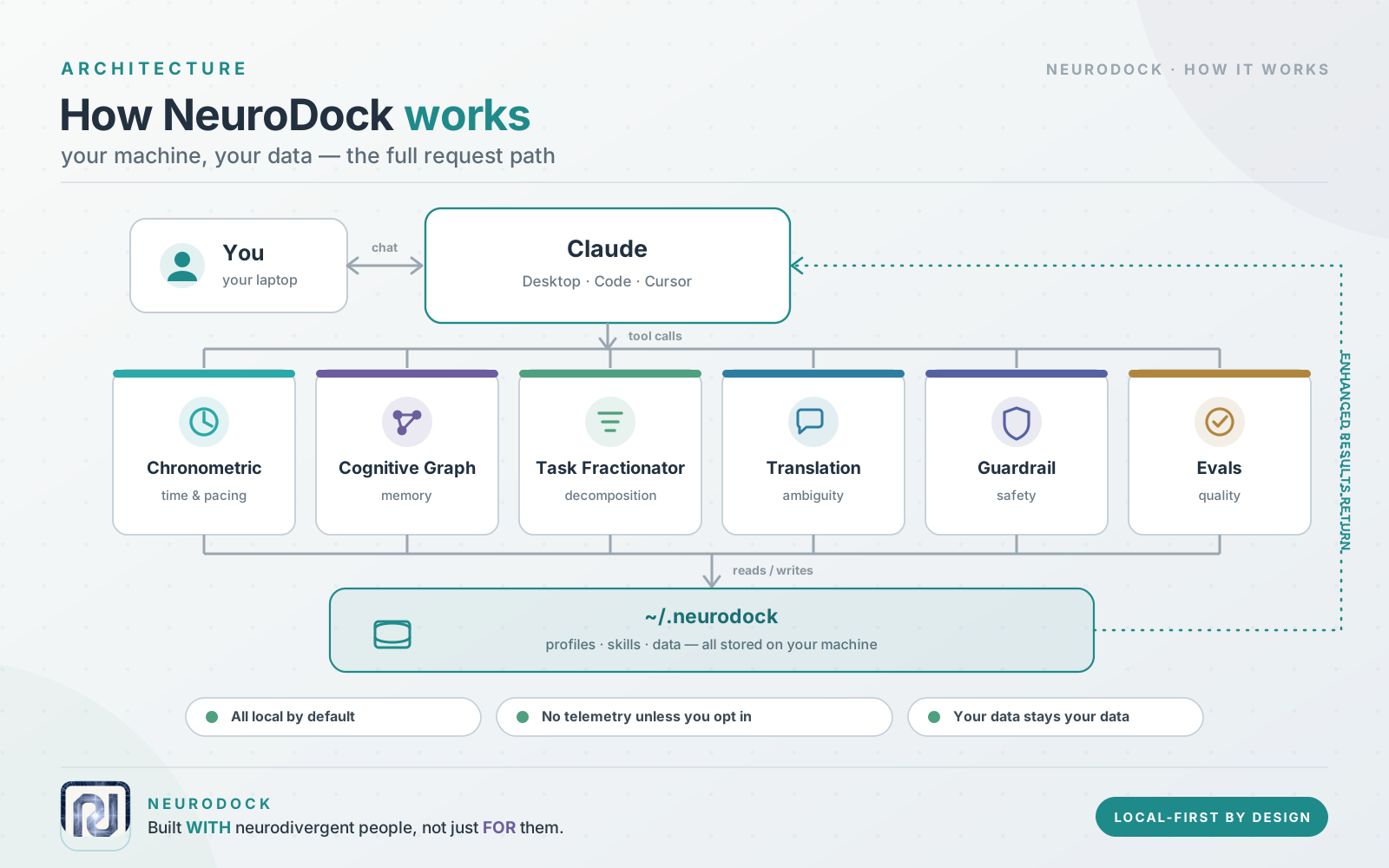
Everything runs on your laptop. Nothing leaves your machine unless you explicitly turn on a cloud option.
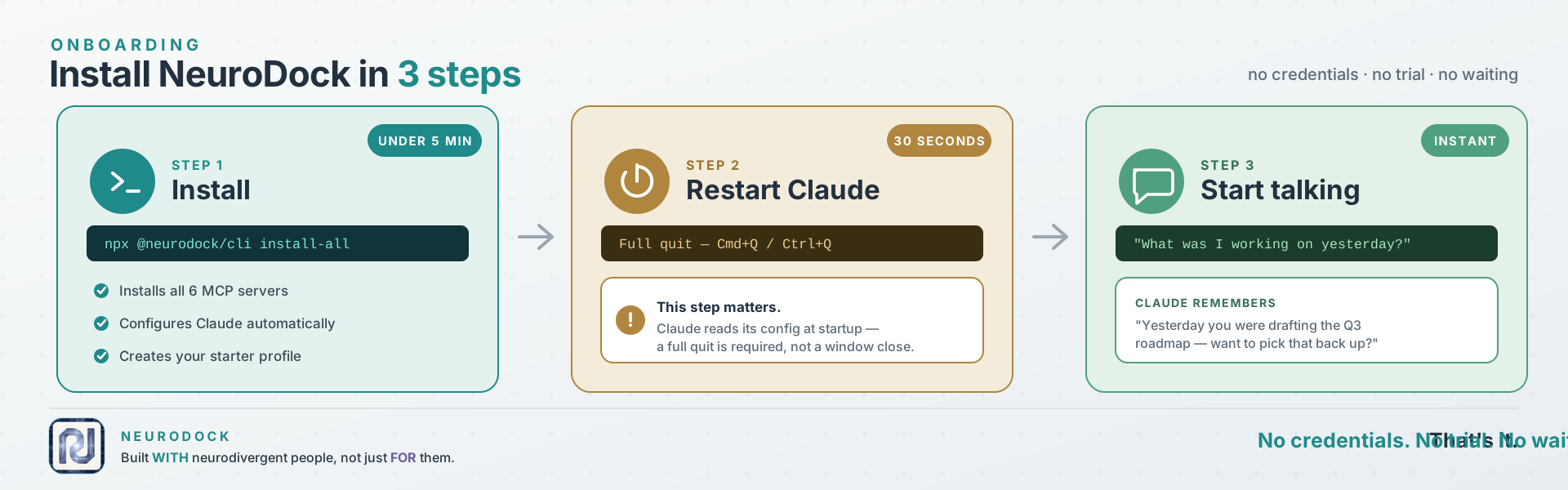
npx --yes @neurodock/cli@latest install-all
One command. It pip-installs the five MCP servers (plus the neurodock-evals
harness), wires Claude Desktop / Claude Code / Cursor, and drops a starter
profile at ~/.neurodock/profile.yaml.
Then, in any conversation, try one of:
What was I working on yesterday?
Plan my morning.
Decompose this goal into atomic tasks.
Claude calls the MCP tools under the hood; you just talk.
🛑 First-time gotcha: full-quit Claude before testing
Claude only reads its MCP config at startup. Closing the window is not enough. This is the #1 silent failure people hit.
- macOS:
Cmd + Q(or Claude menu → Quit Claude).- Windows: right-click the Claude icon in the system tray → Quit.
- Linux: kill the process (
pkill -f Claudeor quit from the tray).Then reopen Claude and try one of the prompts above.
Requires Python 3.11+ and Node 22+. Works on macOS, Linux, Windows.
Why
@latest? If you previously rannpm install -g @neurodock/cli, npx will silently reuse that older global install instead of fetching the current version — and old versions don't haveinstall-all. The@latesttag forces npx to resolve against the npm registry every time. Same reason we use it onupdate.
NeuroDock ships across two registries: the Python MCP servers (MCP = Model Context Protocol — the standard that lets Claude call local tools) on PyPI, and the user-facing CLI on npm. The CLI wraps everything else.
1. Install the six MCP servers
pip install neurodock-mcp-chronometric neurodock-mcp-cognitive-graph neurodock-mcp-task-fractionator neurodock-mcp-translation neurodock-mcp-guardrail neurodock-evals
2. Wire them into your MCP-aware client
npx --yes @neurodock/cli@latest init
Detects Claude Desktop, Claude Code, or Cursor and writes the server entries automatically.
3. Restart Claude (full quit, not close-window — see the callout above).
About the neurodock command — it lives on npm as @neurodock/cli,
not on PyPI. The pip install step gives you the MCP server binaries
that Claude calls over stdio; the CLI is separate. Two ways to run it:
# Option A — run via npx, no install
npx --yes @neurodock/cli@latest doctor

# Option B — install once, call 'neurodock' from anywhere
npm install -g @neurodock/cli
neurodock doctor
@neurodock/cli exposes: init, doctor, validate, update, sync,
uninstall, host install, host uninstall, profile show,
profile validate, install-all, install-hooks, examples,
plugin add/remove/list/enable/disable/validate.
By default NeuroDock waits for you to ask. That's the wrong shape — an ND user in hyperfocus is the one least likely to remember to run a break tool. One command flips it:
neurodock install-hooks --self-test
This wires a small Python script (bundled, stdlib-only — no extra install needed) into Claude Code's hook system. It then runs silently on every tool call and auto-fires the chronometric / rumination / sycophancy heuristics when patterns trip. You get a one-line stderr banner on the next prompt — never blocked, always dismissible.
For host-agnostic coverage (catches you working in the terminal at 02:00 too), add the standalone daemon:
neurodock install-hooks --install-daemon --self-test
That registers a per-user autostart entry (HKCU Run on Windows,
LaunchAgent on macOS, systemd --user on Linux). The daemon polls
every 5 min and surfaces OS-native notifications.
Opt out anytime:
neurodock install-hooks --uninstall          # removes both
export NEURODOCK_GUARDRAILS=off              # disables without removing
The browser extension carries its own equivalent (Phase 2 watchdog) —
it's enabled by default and toggleable from chrome.storage.local via
the popup Settings tab.
See docs/.../proactive-guardrails for the design behind this and the
opt-out matrix.
Want to see it work without installing from PyPI/npm at all?
TESTING_LOCAL.md walks through the from-clone path.
The install-all command above is the recommended path. The same servers are
also distributed through three standard channels — all install the identical
local stdio servers, so you can pick whichever fits your client:
Claude Code plugin — bundles the five MCP servers and a set of ND-aware
skills in one step. Requires uv (the servers
run via uvx).
/plugin marketplace add tlennon-ie/neurodock
/plugin install neurodock@neurodock
Claude Desktop extension (.mcpb) — one-click install, no config editing.
One bundle per server under mcpb/; build with
npx @anthropic-ai/mcpb pack mcpb/neurodock-mcp-translation and drag the
.mcpb onto Claude Desktop → Settings → Extensions. Requires uv.
Official MCP Registry — each server ships a
server.json and is published to
registry.modelcontextprotocol.io
under the io.github.tlennon-ie/* namespace, so MCP-aware clients can discover
them directly.
Hosted remote server (no install) — the stateless tools (translation,
guardrail, and decompose) are also served over OAuth at a hosted HTTPS
endpoint, so you can use them with no local install and no uv:
https://mcp.neurodock.org/mcp
In Claude (claude.ai or Desktop) → Settings → Connectors → Add custom
connector → paste that URL → complete the sign-in prompt. The eight stateless
tools appear immediately. An opt-in memory surface (enable_hosted_storage,
connect_byos_storage, record_fact, recall_entity, …) is also exposed but
does nothing until you explicitly enable storage for your signed-in account. The
personal cognitive graph and neurotype profile are never hosted — they stay
on the local install. Full walkthrough: Hosted server.
The hosted remote server is live at mcp.neurodock.org.
npx --yes @neurodock/cli@latest update
One command. Upgrades all six MCP servers (pip install --upgrade /
uv tool install), refreshes your wired client configs, and
re-registers the optional native-messaging host. Same flags as
install-all (--client, --profile, --installer, --dry-run,
--no-native-host, --yes).
The browser extension auto-updates through the Chrome / Firefox / Edge
store; sideloaded users git pull and rebuild.
Full-quit Claude after updating so it re-reads its MCP config — same as first install.
Just want to re-shape client configs without touching package versions?
Use neurodock sync.
The cognitive substrate in a real session — you talk to Claude normally; under the hood it calls NeuroDock's MCP tools to remember, pace, and decompose.
https://github.com/user-attachments/assets/bcbf65ce-88dd-4f83-8dc1-d56bdde01bed
The browser extension — translating corporate-speak inline on Gmail, Slack, and the rest, right where you read it, without context-switching back to Claude.
https://github.com/user-attachments/assets/5fa25044-923e-4c25-95bd-f1bd63fb3d6e
Prefer a written walkthrough? Try the Claude Desktop walkthrough.
There's also a browser extension that translates corporate-speak inline on Gmail, Slack, Linear, Notion, GitHub, Google Docs, and Outlook. It calls the same translation tools the MCP server exposes, but surfaces them where you'd actually use them — a floating Translate button plus a right-click menu — so you don't have to context-switch back to Claude just to decode "let's circle back on this."
You pick the LLM provider. Five options: Ollama (local, default), LM
Studio (local), OpenRouter (including its auto-router), Anthropic, OpenAI.
The API key, if you need one, stays in chrome.storage.local and never
leaves the device.
Store submission is still pending (the listing prep is done; the developer accounts and screenshots aren't). Until then, load it manually:
pnpm --filter @neurodock/extension-browser run buildchrome://extensions, turn Developer mode on,
click Load unpacked, and pick packages/extension-browser/.output/chrome-mv3/.about:debugging, click This Firefox → Load
Temporary Add-on, and pick manifest.json inside
packages/extension-browser/.output/firefox-mv3/.Full per-provider setup walkthrough lives in
packages/extension-browser/README.md.
NeuroDock is built around three pillars. Each pillar is made of small, independent packages that you can use one at a time or all together.
flowchart TB
  subgraph cognitive[Cognitive substrate]
    chrono[mcp-chronometric<br/>time + sessions]
    cgraph[mcp-cognitive-graph<br/>memory]
    frac[mcp-task-fractionator<br/>decomposition]
  end
  subgraph comms[Communication layer]
    trans[mcp-translation<br/>tone + meetings]
    ext[extension-browser<br/>Gmail, Slack, ...]
  end
  subgraph safety[Clinical guardrails]
    guard[mcp-guardrail<br/>rumination / hyperfocus / sycophancy]
    clin[clinical<br/>heuristic library]
  end
  skills[skills/<br/>six markdown bundles] --> cognitive
  skills --> comms
  skills --> safety
  cli[cli/<br/>install + manage] --> cognitive
  cli --> comms
  cli --> safety
neurodock/
├── packages/
│ ├── mcp-chronometric/      Time + session + break management
│ ├── mcp-cognitive-graph/   Persistent memory + entity recall (SQLite)
│ ├── mcp-task-fractionator/ Decompose vague goals into atomic tasks
│ ├── mcp-translation/       Corporate-speak translator (MCP + browser ext)
│ ├── mcp-guardrail/         Rumination / hyperfocus / sycophancy detectors
│ ├── skills/                Six SKILL.md bundles activating on phrases
│ ├── extension-browser/     WXT-built Chrome / Firefox / Edge extension
│ ├── native-host/           Optional native messaging host (extension <-> profile.yaml)
│ ├── cli/                   `npx neurodock init` and friends
│ ├── core/                  Shared types, profile schema, plugin spec
│ ├── clinical/              Heuristic library for the guardrail server
│ └── evals/                 Eval harness + corpus contribution pipeline
├── docs/                    Astro Starlight site (deploys to docs.neurodock.org)
├── plugins/                 Drop your own plugins here; auto-discovered
└── profiles/                Curated profile presets
Public preview shipped. All three substrate pillars (cognitive,
communication, guardrails) are built, on main, and installable from
npm + PyPI. Latest substrate tag: v0.7.3.
neurodock-mcp-chronometric — 5 tools, 22 tests, mypy --strict.neurodock-mcp-cognitive-graph — 4 tools, SQLite + sqlite-vec
record_fact errors so wrong-shape input
no longer leaks raw Pydantic traces.neurodock-mcp-task-fractionator — 2 tools, 32 tests; ISO 8601
duration spec.neurodock-mcp-translation — 4 tools, 29 tests; deterministic
baseline plus LLM refinement envelope.neurodock-mcp-guardrail — all three detectors live: rumination,
hyperfocus, sycophancy (48 tests, public heuristics).neurodock-evals — air-gapped harness, 10 seed corpus examples,
contribution pipeline.neurodock-clinical — reserved name; importable detector library
(currently a stub).@neurodock/cli — 19 verbs across 7 groups: init, install-all,
examples, doctor, validate, update, sync, uninstall,
host install/uninstall, profile show/validate, install-hooks,
plugin add/remove/list/enable/disable/validate. install-hooks
wires the proactive-guardrail hook into Claude Code and optionally
registers the standalone daemon.@neurodock/core — profile schema and plugin protocol manifests
(JSON Schema 2020-12).@neurodock/native-host — optional Chrome Native Messaging host
for the extension ↔ profile sync.@neurodock/extension-browser — WXT MV3 build for Chrome / Firefox
/ Edge. Seven sites wired. Five real LLM providers: Ollama, LM Studio,
Anthropic, OpenAI, OpenRouter. Includes the Phase 2 proactive watchdog
for hyperfocus / late-night / single-host rumination signals.
Not yet store-published.adhd-daily-planner, audhd-context-recovery,
ocd-decision-finalizer (beta), hyperfocus-formatter, visual-organizer,
asd-meeting-translator.docs.neurodock.org.TESTING_LOCAL.md — step-by-step guide to running this against your
Claude Desktop, today, from a clone. Takes about 5 minutes.
The docs site lives at docs.neurodock.org.
Source is at docs/src/content/docs/. To preview locally:
pnpm --filter @neurodock/docs run dev
# opens http://localhost:4321
The substrate splits into three pillars:
ETHICS.md.All three layers compose via the same MCP protocol the LLM client already speaks. There's no "NeuroDock app" — the surface is your Claude client.
Design rationale lives in docs/decisions/:
CONTRIBUTING.md has the welcome + on-ramp. Pick whichever lane matches
what you want to do:
Smallest first PR (~15 min):
packages/skills/<name>/tests/)packages/evals/corpora/translation/)One-afternoon PR:
packages/skills/<name>/ as a template; see
docs/src/content/docs/contribute/write-a-skill.mdx.mcp-cognitive-graph.Multi-day PR:
docs/src/content/docs/contribute/write-a-plugin.mdx.No code:
packages/evals/ and is the highest-
leverage non-code contribution.All PRs run CI: pnpm turbo run lint typecheck test build + uv run pytest
uv run mypy --strict packages/.... Every published package has its
own CHANGELOG. Use Conventional Commits in PR titles (feat:, fix:,
docs:, test:, chore:, ci:).Full text in MANIFESTO.md. Ethics framework in ETHICS.md. Governance
in GOVERNANCE.md.
AGPL-3.0-or-later. Plugins must declare an AGPL-compatible license to load — the SPDX whitelist is in ADR 0007.
 @microsoft✓ Official
Browser automation using accessibility snapshots instead of screenshots
Run Claude Code as an MCP server so any agent can delegate coding tasks to it
 @googleapis✓ Official
Google's universal MCP server supporting PostgreSQL, MySQL, MongoDB, Redis, and 10+ databases
 @github✓ Official
Official GitHub integration for repos, issues, PRs, and CI/CD workflows