

Are you the author? Sign in to claim
Vibe coding moves fast — specs get skipped, tests get forgotten. NexPath CLI is a lightweight guidance system for Claude
A behaviour guidance layer for builders working with AI coding agents — vibe coders, indie hackers, founders, and product managers.
Nexpath gives developers meaningful direction while they work with AI coding agents and AI code tools — helpful suggestions at the right moment that protect developer productivity, without slowing you down.
flowchart TB
    Agent["AI Coding Agent<br/>Claude Code — fully supported"]
    subgraph NS["nexpath-serve"]
        Capture["capture_prompt handler"]
    end
    DB[("prompt-store.db<br/>SQLite · ~/.nexpath/")]
    subgraph Pipeline["Advisory Pipeline — fires automatically after agent responds"]
        S1["Stage 1: Prompt Classifier<br/>Tier 1: Keyword Match — under 1ms<br/>Tier 2: TF-IDF Scoring — under 5ms"]
        SM["Session State Manager<br/>stage tracking · signal counters<br/>absence detection · user profile"]
        subgraph LLM["LLM Calls — gpt-4o-mini (only if Stage 2 approves)"]
            S2["Stage 2: Cross-Confirmation<br/>validate stage · decide if advisory fires"]
            PL["Pinch Label<br/>2–3 word header"]
            OPT["Option Adaptation<br/>vocabulary + feature embedding"]
        end
        DS["Decision Session UI<br/>question → L1 / L2 / L3<br/>selected prompt → back to agent"]
    end
    Agent --> NS
    NS --> DB
    Agent --> Pipeline
    S1 --> SM --> S2 --> PL --> OPT --> DS
    DS -->|"selected prompt"| Agent
Built during AI Hackfest 2026 by MLH.
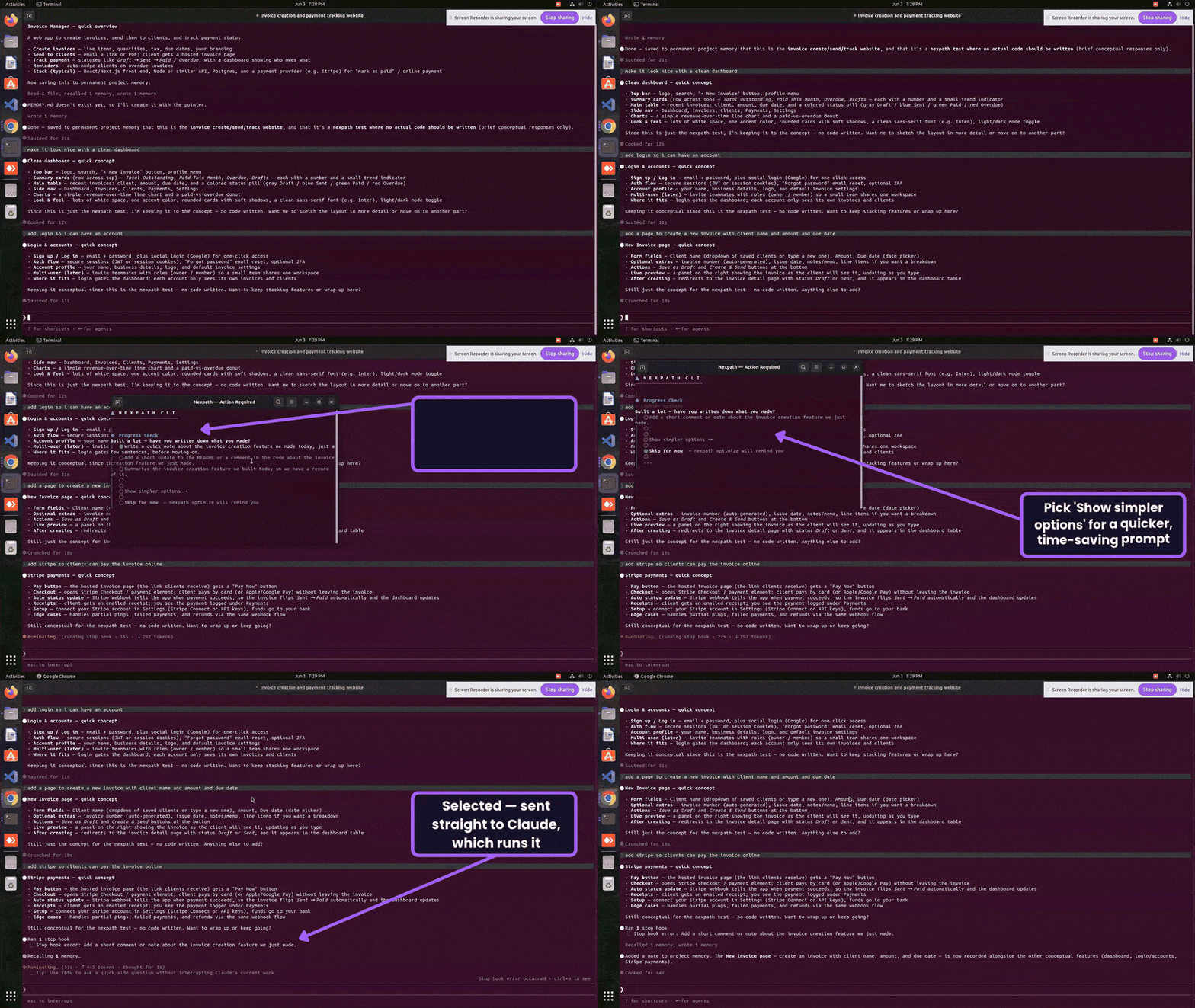
The core interaction:
The decision session cascades through three levels:
Select "Show simpler options →" to move down a level. Select "Skip for now" to record the item
and revisit it later with nexpath optimize (available in future versions). Want to adjust a prompt before sending? Select
"Copy to clipboard — edit before sending" — it lands on your clipboard to paste and tweak.
Nexpath CLI is built for prompt capture across AI coding agents.
| Agent | Status in v0.1.2 |
|---|---|
| Claude Code | Fully supported — end-to-end tested |
| Cursor | Not yet supported — end-to-end testing planned for v0.1.3 |
| Windsurf | Not yet supported — end-to-end testing planned for v0.1.3 |
| Cline | Not yet supported — end-to-end testing planned for v0.1.3 |
| Roo Code | Not yet supported — end-to-end testing planned for v0.1.3 |
| KiloCode | Not yet supported — end-to-end testing planned for v0.1.3 |
| OpenCode | Not yet supported — end-to-end testing planned for v0.1.3 |
# Clone and build from source
git clone https://github.com/hi0001234d/nexpath.git
cd nexpath
npm install
npm run build
npm link

# Register with your coding agent and verify
nexpath install
nexpath install --yes      # or accept defaults without prompts

# Verify
nexpath --version
Setup notes:
# Remove the Nexpath CLI
nexpath uninstall
npm uninstall -g nexpath
npm unlink -g nexpath

# Verify it's gone
npm list -g nexpath
which nexpath

# Clear local data and caches
rm -rf ~/.nexpath
rm -rf ~/.config/nexpath
rm -rf ~/.local/share/nexpath
rm -rf ~/.cache/nexpath

# Clear the npm cache
npm cache clean --force
nexpath uninstall disconnects Nexpath from all detected agents and offers to clear the stored
API key. The remaining steps remove the global package, any leftover binary, and all local
data and caches.
All data is stored locally only at ~/.nexpath/. Only targeted LLM calls per decision
session leave your machine.
sk-*, ghp_*, ghu_*), bearer tokens, and
PEM blocks are automatically stripped from prompts before storage.nexpath install, telemetry is a separate consent step
(defaults to enabled). Local prompt capture and remote telemetry are independent — disable
either anytime via nexpath store disable(if you do this, nothing will work) or
nexpath config set telemetry.enabled false.# Delete prompts for a specific project you no longer want to keep
nexpath store delete --project <path>
# Delete all stored prompts permanently
nexpath store delete -y
| Platform | Default location | Inspect with |
|---|---|---|
| macOS | Keychain | Keychain Access.app → search "nexpath" |
| Linux | Secret Service (libsecret) | secret-tool lookup service nexpath account openai_api_key |
| Windows | Credential Manager | Control Panel → Credential Manager → Web Credentials |
| Fallback (any OS) | ~/.nexpath/config.json (mode 0600) | cat ~/.nexpath/config.json |
Use nexpath config show-key-source to confirm which layer is currently active.
Contribution guide coming once the initial implementation is stable.
Built with insights from the vibe coding community and developers building real projects with AI coding agents, coding AI tools, and AI developer tools.
⚠️ Experimentelle Skill-Sammlung für deutsches Recht (Arbeits-, Gesellschafts-, Insolvenz-, Datenschutz-, Prozessrecht u
Manage multiple Claude Code agents from TUI or Web with tmux and git worktrees
Project management using GitHub Issues + Git worktrees for parallel agent execution
Core skills library for Claude Code with 20+ battle-tested skills including TDD, debugging, and brainstorming