

Are you the author? Sign in to claim
CDK&Mastra&Next.jsで実装したMCP Serverを呼び出すAIエージェント
AWS CDK project for running Mastra Agent and Next.js application with Amazon ECS and Amazon Bedrock to interact with MCP Server.
As an example, this project uses Playwright MCP server.
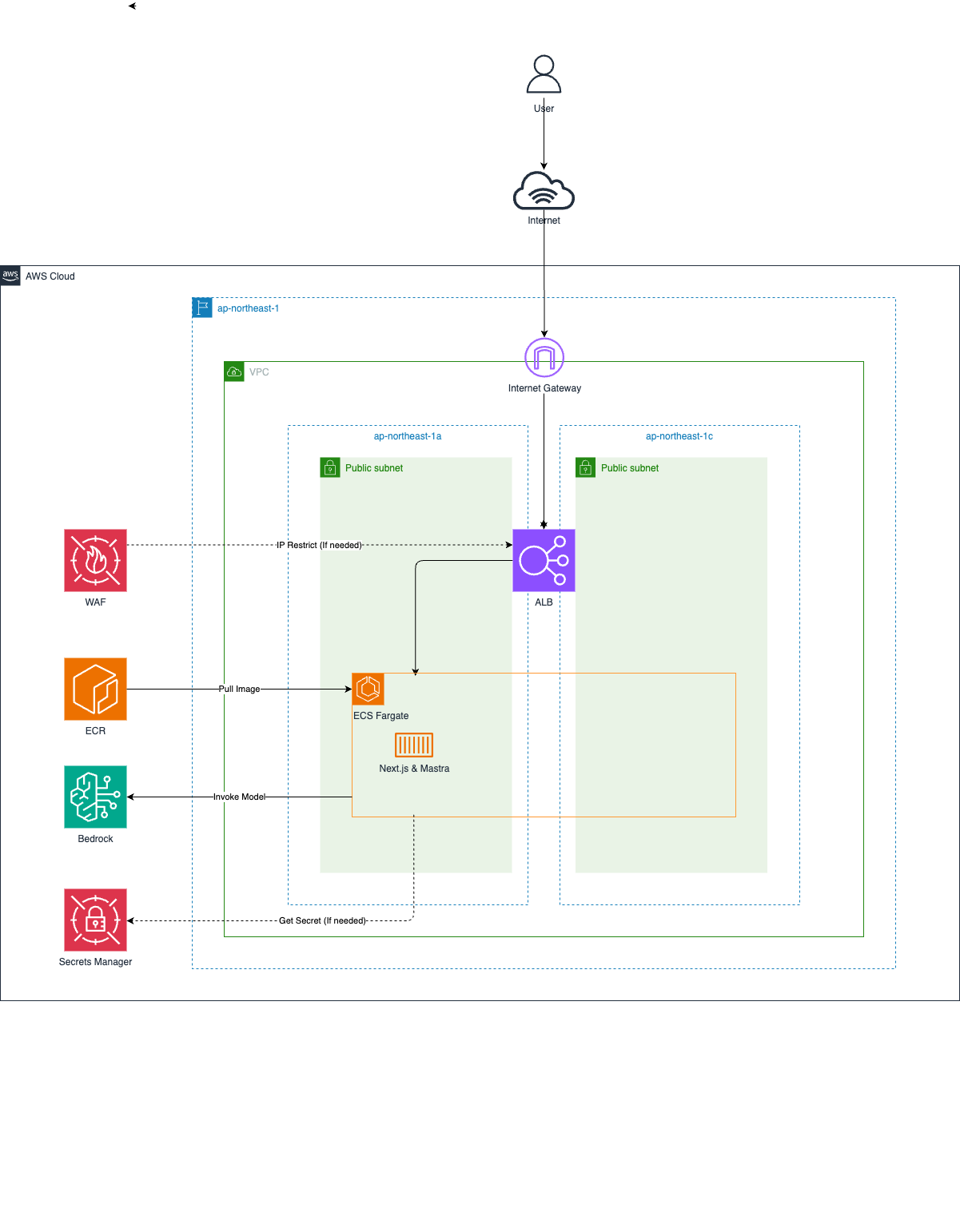
.
├── app/                    # Application root directory
│   ├── components/        # React components
│   ├── pages/            # Next.js pages
│   ├── styles/           # CSS styles
│   ├── src/              # Application source code
│   │   └── mastra/       # Mastra application root directory
│   │       ├── index.ts  # Mastra instance configuration
│   │       ├── agents/   # Agent definitions
│   │       └── mcp/      # MCP configuration
│   ├── .env.development  # Environment variables for development
│   ├── Dockerfile        # Container image definition
│   ├── package.json      # Application dependencies
│   └── tsconfig.json     # TypeScript configuration for app
├── infra/                # Infrastructure as Code directory
│   ├── bin/             # CDK application entry point
│   ├── lib/             # CDK stack definitions
│   ├── test/            # Infrastructure test files
│   ├── cdk.json         # CDK configuration
│   ├── package.json     # Infrastructure dependencies
│   └── tsconfig.json    # TypeScript configuration for infra
├── image/               # Architecture diagrams and images
├── package.json        # Root project dependencies
└── tsconfig.json       # Root TypeScript configuration
All commands should be executed at the repository root.
First, install dependencies for the root project.
npm run install:all
Next, set up environment variables by creating .env.development file which contains the aws credentials.
cat << EOF > web/.env.development
ACCESS_KEY_ID=XXXXXXXXXXXXXXXXXXXX
SECRET_ACCESS_KEY=XXXXXXXXXXXXXXXXXXXX
SESSION_TOKEN=XXXXXXXXXXXXXXXXXXXX
EOF
If you want to change the application configuration, you can modify the app/parameter.ts.
To start local mastra http server only, run the following command.
npm run mastra:dev
To start local Next.js server with mastra, run the following command.
npm run next:dev
If you want to change the infrastructure configuration, you can modify the infra/parameter.ts.
If you've never used CDK before, you need to Bootstrap for the first time only. The following command is unnecessary if your environment is already bootstrapped.
npx -w infra cdk bootstrap
To deploy the application to AWS, run the following command.
npm run cdk:deploy
To remove the application from AWS, run the following command.
npm run cdk:destroy
Run Claude Code as an MCP server so any agent can delegate coding tasks to it
 @microsoft✓ Official
Browser automation using accessibility snapshots instead of screenshots
 @googleapis✓ Official
Google's universal MCP server supporting PostgreSQL, MySQL, MongoDB, Redis, and 10+ databases
 @github✓ Official
Official GitHub integration for repos, issues, PRs, and CI/CD workflows