

Are you the author? Sign in to claim
notion-readonly-mcp-server
This project implements an optimized read-only MCP server for the Notion API, focusing on performance and efficiency for AI assistants to query and retrieve Notion content.
This read-only implementation exposes far fewer tools compared to the standard Notion API integration, improving performance and compatibility with AI assistants:

The reduced tool set helps stay within the recommended tool limits for optimal AI assistant performance while still providing all essential functionality.
Go to https://www.notion.so/profile/integrations and create a new internal integration or select an existing one.
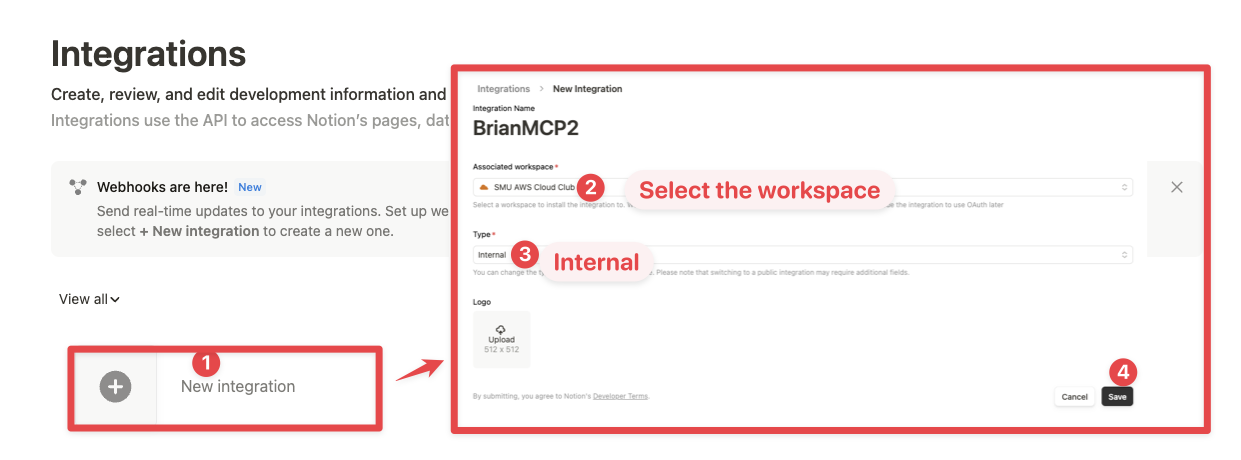
While we limit the scope of Notion API's exposed to read-only operations, there is a non-zero risk to workspace data by exposing it to LLMs. Security-conscious users may want to further configure the Integration's Capabilities.
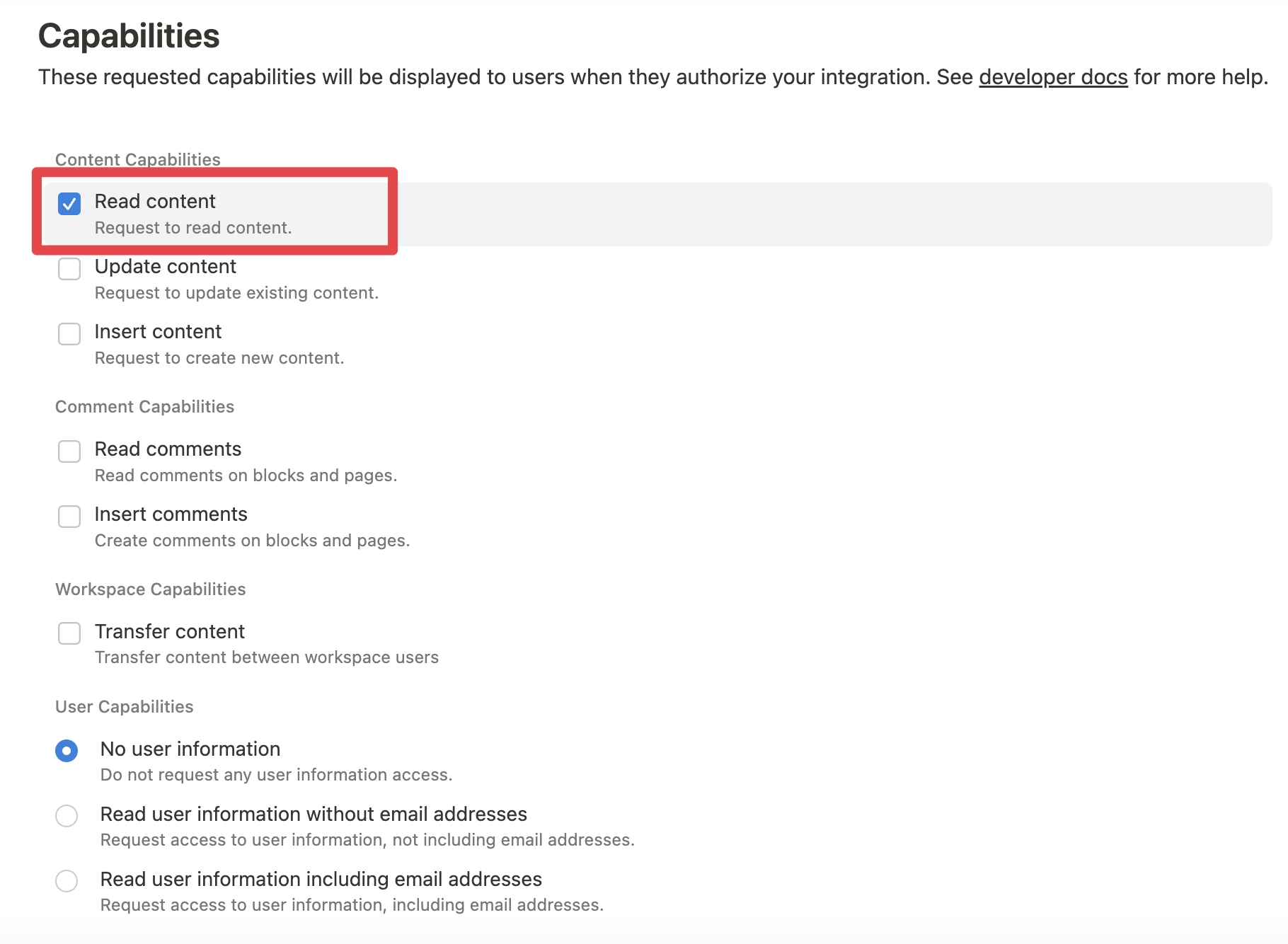
For example, you can create a read-only integration token by giving only "Read content" access from the "Configuration" tab:
Add the following to your .cursor/mcp.json or claude_desktop_config.json (MacOS: ~/Library/Application\ Support/Claude/claude_desktop_config.json)
{
  "mcpServers": {
    "notionApi": {
      "command": "npx",
      "args": ["-y", "notion-readonly-mcp-server"],
      "env": {
        "OPENAPI_MCP_HEADERS": "{\"Authorization\": \"Bearer ntn_****\", \"Notion-Version\": \"2022-06-28\" }"
      }
    }
  }
}
Add the following to your .cursor/mcp.json or claude_desktop_config.json:
{
  "mcpServers": {
    "notionApi": {
      "command": "docker",
      "args": [
        "run",
        "--rm",
        "-i",
        "-e", "OPENAPI_MCP_HEADERS",
        "taewoong1378/notion-readonly-mcp-server"
      ],
      "env": {
        "OPENAPI_MCP_HEADERS": "{\"Authorization\":\"Bearer ntn_****\",\"Notion-Version\":\"2022-06-28\"}"
      }
    }
  }
}
Don't forget to replace ntn_**** with your integration secret. Find it from your integration configuration tab.
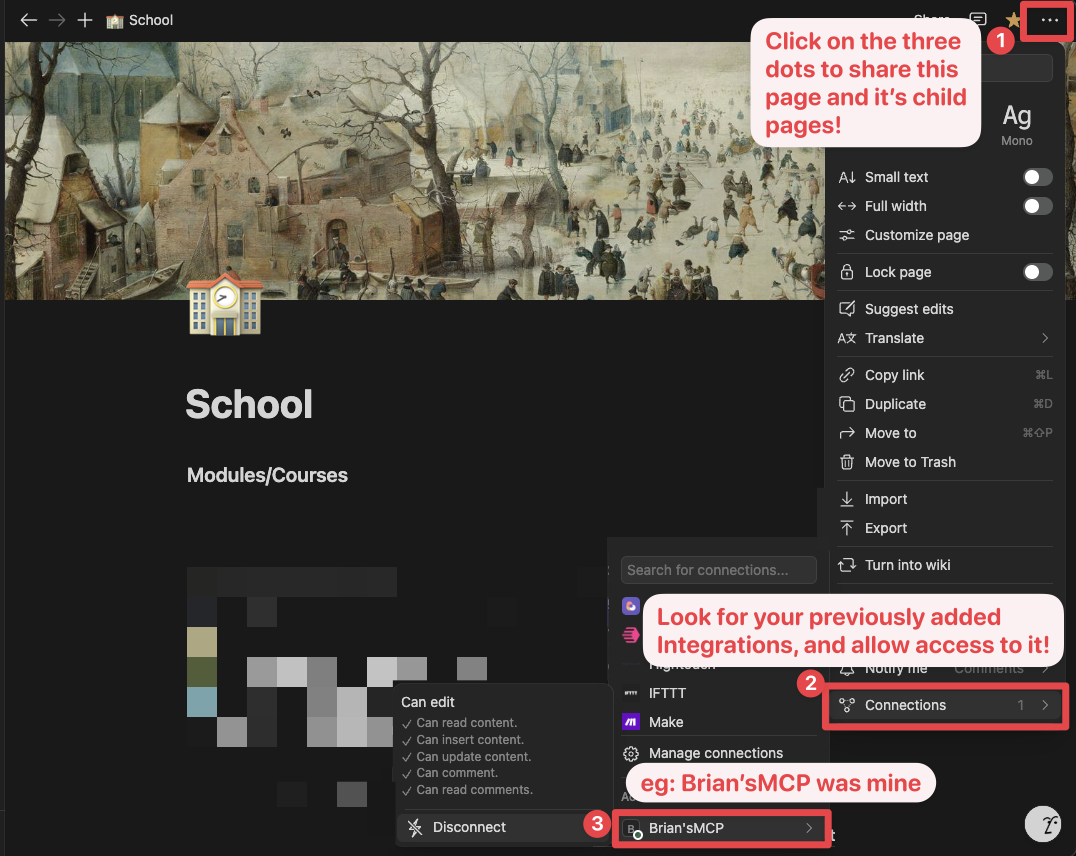
Ensure relevant pages and databases are connected to your integration.
To do this, visit the page, click on the 3 dots, and select "Connect to integration".
This optimized server exposes only essential read-only Notion API tools:
API-retrieve-a-page: Get page informationAPI-get-block-children: Get page content blocks (with parallel processing)API-retrieve-a-block: Get details about a specific blockAPI-retrieve-a-database: Get database informationAPI-retrieve-a-comment: Get comments on a page or blockAPI-retrieve-a-page-property: Get specific property information from a pageAPI-get-one-pager: NEW! Recursively retrieve a full Notion page with all its blocks, databases, and related content in a single callBy limiting to these 7 essential tools (compared to 15+ in the standard implementation), we ensure:
The new API-get-one-pager tool provides a powerful way to explore Notion pages without requiring multiple API calls:
{
  "page_id": "YOUR_PAGE_ID",
  "maxDepth": 5,               // Optional: Maximum recursion depth (default: 5)
  "includeDatabases": true,    // Optional: Include linked databases (default: true)
  "includeComments": true,     // Optional: Include comments (default: true)
  "includeProperties": true    // Optional: Include detailed page properties (default: true)
}
This automatic exploration capability is especially useful for AI assistants that need to understand the entire content of a Notion page without making dozens of separate API calls, resulting in much faster and more efficient responses.
The server implements advanced parallel processing techniques for handling large Notion documents:
Get the content of page 1a6b35e6e67f802fa7e1d27686f017f2
The AI will retrieve the page details efficiently with parallel processing of block content.
Get the structure of database 8a6b35e6e67f802fa7e1d27686f017f2
Build:
pnpm build
Execute:
pnpm dev
MIT
Modern AI assistants like Cursor and Claude have limitations on the number of tools they can effectively handle:
This read-only implementation deliberately reduces the Notion API surface to address these limitations while preserving all essential functionality. The result is:
Run Claude Code as an MCP server so any agent can delegate coding tasks to it
 @microsoft✓ Official
Browser automation using accessibility snapshots instead of screenshots
 @googleapis✓ Official
Google's universal MCP server supporting PostgreSQL, MySQL, MongoDB, Redis, and 10+ databases
 @github✓ Official
Official GitHub integration for repos, issues, PRs, and CI/CD workflows