

Are you the author? Sign in to claim
Browser-based RDF/ontology knowledge graph editor — load RDF from files, URLs or SPARQL endpoints; author nodes and edge


| I want to… | Start here |
|---|---|
| Try the live demo | Open Ontosphere ↗ |
| Connect an AI agent | AI / MCP Integration |
| Run it locally | Quick start (development) |
| Load my own data | Startup / URL parameters |
| Contribute code | Contributing |
| Read the paper | ISWC 2026 Demo Paper ↗ |
Ontosphere is a browser-based RDF/ontology knowledge graph editor. It loads RDF from local files, remote URLs, or SPARQL/Fuseki endpoints; lets users author nodes and edges directly on the canvas; runs OWL 2 DL reasoning (via Konclude) with visual differentiation of inferred triples; and applies multi-algorithm layout (Dagre, ELK) and automatic clustering for large graphs. Additional features include namespace management with live URI renaming, a drag-and-drop workflow template catalog, and a Model Context Protocol (MCP) server for AI-agent integration. All computation runs entirely client-side in the browser against an in-memory RDF store backed by Web Workers — no backend required.
L3/L2/∅). Fold/Unfold buttons for each level let users progressively reveal detail. L3 (community-detection clustering — Label Propagation, Louvain, K-Means) applies automatically on load above a configurable node threshold (default 100). Each view (TBox / ABox) tracks its fold state independently.navigator.modelContext API) for AI-agent integration. Tools: loadRdf, loadOntology, suggestOntologiesForTask, queryGraph, exportGraph, exportImage, addNode, removeNode, expandNode, getNodes, addLink, removeLink, getLinks, runLayout, clusterNodes, layoutNodes, focusNode, fitCanvas, runReasoning, clearInferred, getNeighbors, findPath, getNodeDetails, updateNode, getGraphState, setNamespace, removeNamespace, listNamespaces, loadShacl, validateGraph, getCapabilities, help. MCP manifest at /.well-known/mcp.json.npm install
npm run dev
http://localhost:8080/
Ontosphere supports several URL query parameters that control what is loaded on startup.
| Parameter | Aliases | Description |
|---|---|---|
rdfUrl | url, vg_url | HTTP(S) URL of an RDF resource to load on startup. |
Supported sources:
Plain RDF files — Turtle (.ttl), N-Triples (.nt), N3, RDF/XML, JSON-LD. Format is detected from Content-Type and file extension.
?rdfUrl=https://example.org/mydata.ttl
SPARQL endpoints — URLs whose path ends with /sparql or /query are recognised automatically. Ontosphere issues a CONSTRUCT { ?s ?p ?o } WHERE { { ?s ?p ?o } UNION { GRAPH ?g { ?s ?p ?o } } } query.
?rdfUrl=https://example.org/fuseki/$/sparql
Fuseki dataset root — Returns the full dataset; named-graph quads are flattened into the data graph.
?rdfUrl=https://docker-dev.iwm.fraunhofer.de/dataset/<uuid>/fuseki/$/
| Parameter | Default | Description |
|---|---|---|
apiKey | — | Value sent as an authentication header with the RDF fetch. |
apiKeyHeader | Authorization | Name of the HTTP header. |
?rdfUrl=https://private-endpoint.example.org/data.ttl
&apiKey=Bearer+my-token
&apiKeyHeader=Authorization
The API key is sent only with the RDF fetch request. CORS: the server must allow the Ontosphere origin with credentials (wildcard * origins are incompatible with authenticated requests).
| Parameter | Description |
|---|---|
ontologies | Comma-separated list of ontologies that replaces the configured autoload list entirely. Each value is a well-known short name (see table below) or a full HTTPS/HTTP URI. Use ?ontologies=owl,rdf,rdfs to load only the W3C core vocabs. |
ontology | Comma-separated list of ontologies to load in addition to the configured autoload list. |
?ontologies=owl,rdf,rdfs           # replace defaults — load only W3C core vocabs
?ontology=bfo,dcat                 # add on top of configured autoload list
?ontology=bfo2020,https://example.org/myontology.ttl
Well-known short names:
| Short name | Ontology |
|---|---|
rdf | RDF Concepts Vocabulary |
rdfs | RDF Schema |
owl | OWL |
skos | SKOS |
prov | PROV-O – The PROV Ontology |
p-plan | P-Plan Ontology |
bfo | BFO 2.0 – Basic Formal Ontology 2.0 |
bfo2020 | BFO 2020 – Basic Formal Ontology 2020 |
dcat | DCAT – Data Catalog Vocabulary |
foaf | FOAF |
dcterms | Dublin Core Terms |
qudt | QUDT |
iof-core | IOF Core |
| Parameter | Default | Description |
|---|---|---|
loadImports | true | Set to false to disable automatic loading of owl:imports referenced in the loaded RDF. Overrides the per-session app setting without persisting it. |
?rdfUrl=https://example.org/data.ttl&loadImports=false
http://docker-dev.iwm.fraunhofer.de:8080/
  ?rdfUrl=https://docker-dev.iwm.fraunhofer.de/dataset/<uuid>/fuseki/$/sparql
  &apiKey=<ckan-api-jwt-token>
All startup mechanisms are additive and run in this order:
rdfUrl / url / vg_url)?ontology= URL parameterowl:imports discovery (runs after each load unless ?loadImports=false)window.__VG_STARTUP_TTL — inline Turtle string loaded before any URL parameter.window.__VG_STARTUP_URL — programmatic URL override (takes precedence over rdfUrl).VITE_STARTUP_URL environment variable — build-time default startup URL.Ontosphere runs OWL reasoning entirely in the browser via a pluggable backend. The default is Konclude (full OWL 2 DL). Inferred triples appear as amber dashed edges; inferred types and annotations appear in amber italic. A reasoning report lists all inferred triples. Reasoning is idempotent — running it again produces no additional triples. Use Clear inferred to remove all inferred triples without affecting asserted data. See OWL 2 DL vs OWL-RL comparison for a side-by-side visual example.
OWL DL consistency checking runs automatically alongside inference (Konclude only). If the ontology is logically contradictory, reasoning is skipped and the report's Errors tab shows per-entity clash details (affected individual, violated axiom, description). An "OWL DL inconsistency detected" banner appears in the report. Common inconsistencies: an individual in two owl:disjointWith classes, an owl:allValuesFrom restriction violated by an asserted type, or an owl:AsymmetricProperty / owl:IrreflexiveProperty cycle. The N3 backend does not perform consistency checking (isConsistent is always null).
Konclude is a complete tableau reasoner for the description logic SROIQ(D) (OWL 2 DL), compiled to WebAssembly. It runs classification over the loaded ontology and writes rdfs:subClassOf and owl:equivalentClass inferences.
Supported OWL constructs (complete): rdfs:subClassOf, owl:equivalentClass, owl:someValuesFrom, owl:allValuesFrom, owl:hasValue, owl:inverseOf, owl:SymmetricProperty, owl:TransitiveProperty, owl:subPropertyOf, rdfs:domain/rdfs:range, owl:intersectionOf, owl:unionOf, owl:oneOf, owl:propertyChainAxiom, number restrictions, nominals, and more.
Deployment requirement: Konclude's WASM binary uses SharedArrayBuffer (pthreads). The server must send Cross-Origin-Opener-Policy: same-origin and Cross-Origin-Embedder-Policy: credentialless headers. Localhost deployments have SharedArrayBuffer available without headers. Ontosphere's server.js sets these headers automatically.
Performance: 250 ms – 2.5 s for typical benchmark ontologies (LUBM, GALEN, Pizza).
The N3 backend uses the N3.js BGP-only Reasoner with configurable rulesets loaded from public/reasoning-rules/. Select it in Settings → Reasoner Backend → N3 Rules.
N3.js is BGP-only: rules using EYE/SWAP built-ins (e:findall, list:in, log:notEqualTo) are silently ignored. The [REQUIRES EYE] comments in the rule files mark those rules. Use this backend when you need custom N3 rule files or are working with demos that depend on specific rule-file behavior.
Performance: Under 2 seconds for typical ontologies (hundreds to a few thousand triples). There is currently no way to abort a running reasoning job; a page reload is required if reasoning hangs.
The reasoning demo showcases OWL 2 DL / SROIQ(D) inference on a small employee ontology: Open demo ↗
The demo (public/reasoning-demo.ttl) defines a Person → Employee → Manager → Executive hierarchy with ABox assertions that drive inference patterns across all OWL 2 DL construct groups:
OWL 1 RL patterns:
ex:hasFriend sub-property of ex:knows: alice hasFriend bob → alice knows bob.ex:isManagedBy inverse of ex:manages: alice manages carol → carol isManagedBy alice.ex:isColleagueOf is symmetric: bob isColleagueOf carol → reverse direction.ex:hasSupervisor is transitive: bob→alice, alice→dave → bob→dave.ex:dave has no type; because he is subject of ex:manages (domain ex:Manager), the reasoner infers dave rdf:type ex:Manager.OWL 2 DL extensions:
6. owl:someValuesFrom — alice and carol each worksOn projectAlpha (a Project) → inferred ProjectContributor.
7. owl:hasValue — carol isManagedBy alice (via inverseOf) → carol inferred DirectReport (hasValue restriction on alice).
8. owl:intersectionOf — dave manages bob (inferred Manager) and eve (Employee) → dave inferred TeamLead.
9. owl:disjointWith — Contractor disjointWith Employee; frank is a Contractor (structural TBox constraint).
10. owl:complementOf — NonEmployee ≡ ¬Employee (structural TBox only).
11. owl:propertyChainAxiom — hasGrandManager ← hasSupervisor ∘ hasSupervisor: carol→bob→alice → carol hasGrandManager alice.
12. owl:unionOf — LeadershipTeam ≡ Executive ∪ Manager: alice (Executive) and dave (inferred Manager) → inferred LeadershipTeam.
13. owl:sameAs — aliceCEO sameAs alice: aliceCEO inherits all of alice's inferred types including Executive.
A separate inconsistency demo (public/reasoning-demo-inconsistent.ttl) shows the consistency checker in action:
Open inconsistency demo ↗
inc:frank is asserted as both inc:Employee and inc:Contractor, which are declared owl:disjointWith. Running reasoning produces isConsistent: false, reasoning is skipped, and the report's Errors tab shows the disjointness clash on frank.
Ontosphere fetches remote RDF directly from the browser. If the remote host does not allow cross-origin requests, the fetch will be blocked.
Well-known ontologies (FOAF, SKOS, PROV-O, Dublin Core, QUDT, etc.) are pre-configured with CORS-friendly fetch URLs (W3C, dublincore.org, LOV, qudt.org) and load without any proxy.
Custom ontology URLs that lack CORS headers require a proxy. Configure one in Settings → Advanced → CORS Proxy URL. The proxy must:
https://your-proxy/?url=<encoded>Accept header to the target servertext/turtle, application/rdf+xml, etc.)Note:
corsproxy.iofree tier blocks RDF content types and will not work. Self-hosted options that do work: a Cloudflare Worker using the cors-anywhere pattern, or a local Vite dev-server proxy.
Workarounds for development:
The annotated diagram below identifies the numbered UI elements described in this section.
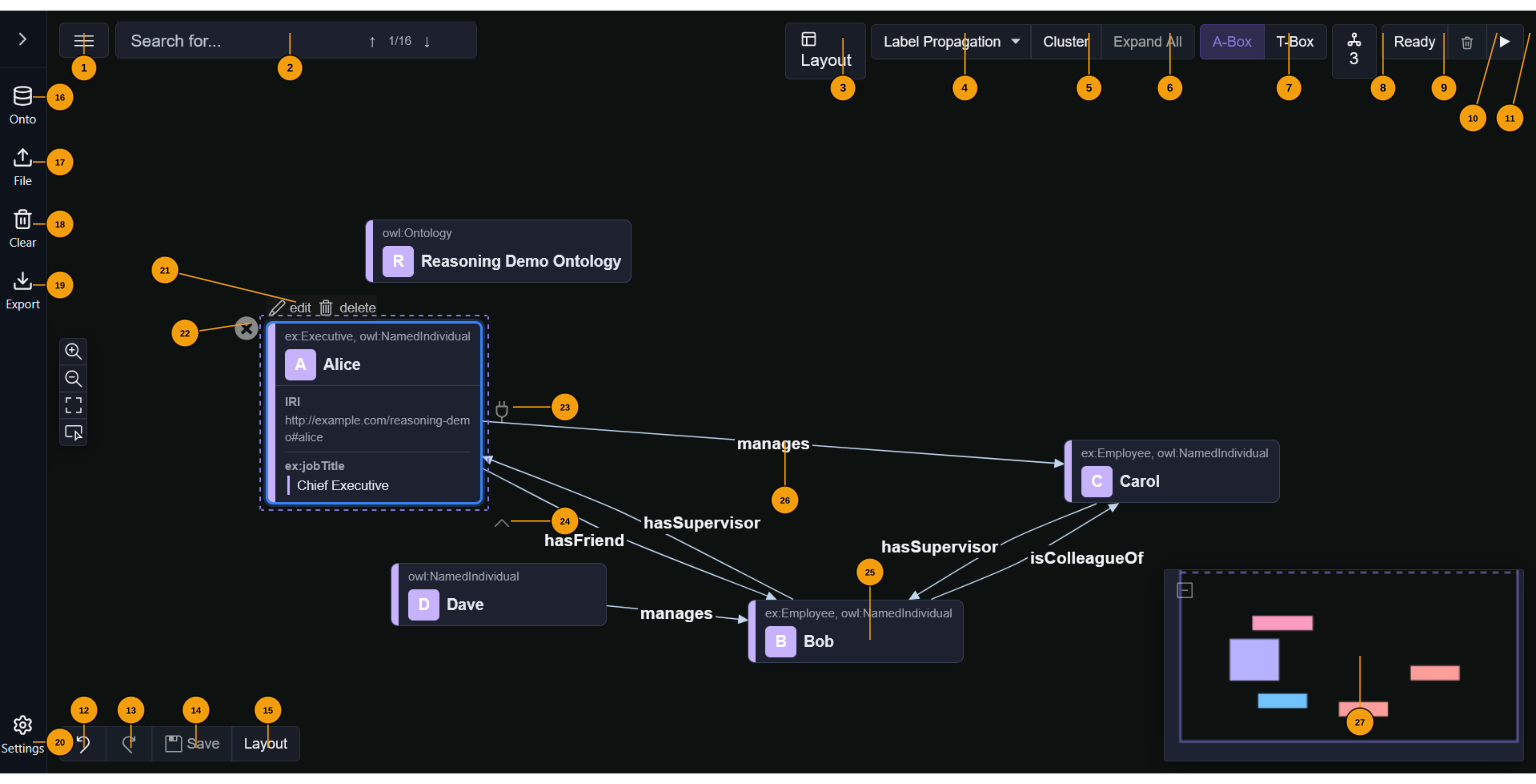
1 ☰ View menu — dropdown: Export canvas as PNG, Export as SVG, Print, Show/Hide Legend (toggles the namespace colour key panel).
2 Search — type to find entities by label or IRI. ↑↓ arrows or Enter cycle through matches on the canvas. The badge shows current match / total count.
3 Layout — opens the layout popover: choose algorithm (Dagre horizontal/vertical, ELK layered/force/stress/radial, Reactodia-default), adjust spacing via a slider, toggle auto-layout (re-runs after every graph update).
4 Level badge — shows current fold depth: L3 (community-detection clusters active), L2 (structural fold active — subclass chains and OWL collections), or ∅ (fully expanded).
5 Clustering algorithm selector — choose between None, Label Propagation, Louvain, or K-Means. The large-graph threshold (default 100 nodes, configurable in Settings) controls when auto-clustering runs on load.
6 Cluster — cluster visible nodes with the selected algorithm. Disabled when already clustered or algorithm is None.
7 Expand All — expand all collapsed cluster groups at once.
8 Fold L2 / Unfold L2 — toggle structural fold: collapses subclass chains and OWL collection members (owl:intersectionOf, owl:unionOf, etc.) into representative group nodes. Applied by default on load.
9 Fold L1 / Unfold L1 — toggle per-node annotation property visibility across all nodes at once.
10 A-Box / T-Box — switch between instance-level individuals (A-Box, highlighted when active) and ontology-level classes/properties (T-Box).
11 Ontologies — shows the count of loaded ontologies. Click to open a popover listing each ontology with options to add/remove from autoload.
12 Reasoning status — shows the current DL reasoning state: Ready / ✓ Valid / ⚠ Warnings / Errors / spinner while running. Click to open the reasoning report (inferred triples grouped by rule).
13 Clear inferred (🗑) — removes all inferred triples without touching asserted data.
14 Run reasoning (▶) — triggers DL reasoning (Konclude). Inferred triples appear as amber dashed edges. Idempotent.
15 Undo — undo last authoring change.
16 Redo — redo last undone change.
17 Save — commit all pending authoring edits to the RDF store in a single batch.
18 Re-layout — re-apply the current layout algorithm in-place.
19 Onto — open the ontology loader. Enter any HTTP(S) URL or pick from pre-configured sources in Settings.
20 File — open a file picker for local RDF files. Supported: Turtle (.ttl), JSON-LD (.jsonld), RDF/XML (.rdf/.owl), N-Triples (.nt).
21 Clear — remove all loaded graphs and reset the canvas.
22 Export — export as Turtle, JSON-LD, or RDF/XML (dropdown). Generated entirely in the browser.
23 Settings — open the settings panel for default layout, clustering algorithm, large-graph threshold, ontology autoload URLs, workflow catalog, and other preferences.
When the sidebar is expanded (click the › toggle), the file operation buttons are shown in a compact grid. A Workflows accordion appears below when the workflow catalog is enabled in Settings. Drag a template card onto the canvas to instantiate it as a connected subgraph.
24 Edit / Delete — buttons that appear above a selected node. Edit opens the property editor (IRI, annotation properties, custom fields). Delete permanently removes the entity from the RDF store.
25 Remove (✕) — removes the node from the canvas view without deleting it from the RDF store.
26 Establish Link (plug icon, right side) — drag to another node to create a new edge. A dialog confirms the predicate with scored autocomplete from loaded ontologies.
27 Expand neighbours (∧, bottom) — load and show all RDF neighbours of the node on the canvas.
28 Individual node — represents an RDF subject. The header shows the local name, a coloured namespace badge, and the OWL class. Properties (IRI, annotations, custom fields) are shown in an editable table on selection.
29 Edge / predicate — labelled arrow between two nodes. Amber dashed edges are inferred triples. Double-click to open the link property editor (scored autocomplete from ontologies).
30 Minimap — overview panel at bottom-right. Click to jump to a region, drag to pan.
The following debug flags can be set in the browser console to enable diagnostic output. All are gated — they only activate when window.__VG_DEBUG__ is truthy (or config.debugAll is enabled in Settings):
window.__VG_DEBUG__ — master debug gate. Set to true to enable all [VG_*] diagnostic console output.window.__VG_LOG_RDF_WRITES — log RDF triple writes to the console.window.__VG_DEBUG_STACKS__ — capture stack traces in debug messages.window.__VG_DEBUG_SUMMARY__ — read-only object populated by the startup debug harness with fallback and timing data.All flags are also persisted from config.debugAll (toggleable in Settings → Debug). Setting config.debugAll = true via Settings is the recommended way to enable diagnostics without console access.
Access-Control-Allow-Origin).?rdfUrl=... to avoid conflicts.Ontosphere exposes a full Model Context Protocol tool surface so AI agents can build and reason over knowledge graphs through natural-language chat.
The app has two coupled layers:
addNode / addLink write triples here.addNode to place a subject on canvas. After adding triples, canvas links refresh automatically. Nodes start collapsed — call expandNode (with an IRI to expand one node, or no args to expand all) to reveal annotation property cards.DL reasoning (Konclude) writes inferred triples back to the store and refreshes the canvas.
navigator.modelContext does not exist in headless Chromium. Inject the polyfill before the page loads using page.addInitScript:
await page.addInitScript(() => {
  const tools = {};
  Object.defineProperty(navigator, 'modelContext', {
    value: { registerTool: async (n, _d, _s, h) => { tools[n] = h; } },
    configurable: true,
  });
  window.__mcpTools = tools;
});

// After page load:
await page.evaluate(async () => {
  const mod = await import('/src/mcp/ontosphereMcpServer.ts');
  await mod.registerMcpTools();
});

// Call a tool:
await page.evaluate(async ([name, params]) => window.__mcpTools[name](params),
  ['addNode', { iri: 'ex:alice', typeIri: 'foaf:Person', label: 'Alice' }]);
In a browser with native navigator.modelContext, tools register automatically on app load.
An AI agent built this from scratch in one session — full demo with tool calls →

loadOntology (TBox)
  → addNode ×N  (ABox individuals, rdf:type set)
  → addLink ×N  (object-property triples, edges appear on canvas)
  → runLayout   (dagre-lr recommended)
  → expandNode  (reveal annotation property cards — omit iri to expand all)
  → runReasoning (infer subClass / domain / range entailments; isConsistent=false signals contradiction)
  → fitCanvas + exportImage   (SVG snapshot, token-efficient)
  → exportGraph(turtle)       (final deliverable)
| Parameter | Effect |
|---|---|
?url=<encoded-url> | Load RDF from URL on startup |
?ontology=foaf | Pre-load FOAF ontology |
?loadImports=false | Skip owl:imports auto-loading |
| Demo | Final state |
|---|---|
| FOAF social network Build a social network, extend FOAF with employment classes, run reasoning | |
| DL reasoning (Konclude) Build TBox + ABox, infer types via domain/range and transitivity |  |
| Scene ontology Load an external ontology, author individuals, export Turtle |  |
| Manchester Pizza Tutorial Full OWL pizza ontology — classes, disjointness, properties, DL reasoning |  |
Regenerate:
npm run demo:all
# or individually:
node scripts/run-demo.mjs docs/mcp-demo/seeds/foaf-social-network.md
node scripts/run-demo.mjs docs/mcp-demo/seeds/reasoning-demo.md
node scripts/run-demo.mjs docs/mcp-demo/seeds/scene-ontology.md
node scripts/run-demo.mjs docs/mcp-demo/seeds/pizza-tutorial.md
Full tool declarations with input schemas: public/.well-known/mcp.json
The demo scripts work against the live deployment — no local server needed. Any AI that can drive a browser (Claude Code, headless Playwright, computer-use agents) can use Ontosphere directly via its MCP tools.
Point the demo scripts at the deployed app:
node scripts/mcp-demo-reasoning.mjs --url https://thhanke.github.io/ontosphere
node scripts/mcp-demo-foaf.mjs       --url https://thhanke.github.io/ontosphere
The script opens a headless browser, navigates to the URL, registers the MCP tools, then drives the full workflow — building TBox + ABox, running reasoning, taking snapshots, exporting Turtle — exactly as shown in the demo documents.
The AI Relay Bridge connects any AI chat tab to Ontosphere with no server, extension, or copy-paste. A bookmarklet watches the AI's output for backtick-wrapped JSON-RPC 2.0 tool calls, executes them in Ontosphere via a BroadcastChannel popup, and injects JSON-RPC responses back into the chat input automatically.
➡️ Full setup guide: docs/relay-bridge.md
Setup (one time):
Starter prompt (paste into your AI chat after clicking the bookmarklet):
You are connected to Ontosphere via a relay. A script in this tab intercepts your tool calls, runs them in Ontosphere, and injects results back as a user message. If a tool call returns success:false, read the error, fix the argument, and retry the same call immediately — never skip a failed call. Ask the user what they would like to build.

Output format — one JSON-RPC 2.0 call per line, backtick-wrapped:
`{"jsonrpc":"2.0","id":<N>,"method":"tools/call","params":{"name":"<toolName>","arguments":{...}}}`

Call help first to get full instructions and the tool list:
`{"jsonrpc":"2.0","id":0,"method":"tools/call","params":{"name":"help","arguments":{}}}`
The relay handles execution and result feedback automatically — no manual copy-paste needed.
See docs/demo-scripts/HOWTO.md for the full guide.
Two styles of demo video are supported:
Seed-driven — write a seed markdown file in docs/mcp-demo/seeds/ with JSON-RPC
tool calls embedded in backtick blocks. The runner parses the seed and executes each
turn directly against window.__mcpTools. Existing seeds: foaf-social-network,
reasoning-demo, scene-ontology, pizza-tutorial.
Chat-style (side-by-side) — open demo-stage.html (mock chat left, app right),
inject messages programmatically via addChatMessage(), and call tools on the app
iframe via callToolOnStage(). No relay popup needed. Example: pizza-tutorial-chat.
| Video | Description |
|---|---|
| advert-intro.mp4 | Relay bookmarklet — mock chat + Ontosphere side by side |
| foaf-social-network.mp4 | AI builds a FOAF social graph with DL reasoning |
| reasoning-demo.mp4 | AI builds an OWL ontology and runs DL reasoning (Konclude) |
| scene-ontology.mp4 | AI builds a film scene ontology on BFO/RO upper ontology |
| pizza-tutorial.mp4 | Manchester Pizza Ontology — class hierarchy, disjointness, DL reasoning |
| pizza-tutorial-chat.mp4 | OWL pizza tutorial as AI tutor lesson, side-by-side chat |
To re-record all videos:
npm run demo:video # starts dev server, records, encodes, kills server
npm test.Check the repository root for licence and contributor information.
Run Claude Code as an MCP server so any agent can delegate coding tasks to it
 @microsoft✓ Official
Browser automation using accessibility snapshots instead of screenshots
 @googleapis✓ Official
Google's universal MCP server supporting PostgreSQL, MySQL, MongoDB, Redis, and 10+ databases
 @github✓ Official
Official GitHub integration for repos, issues, PRs, and CI/CD workflows