

Are you the author? Sign in to claim
Give AI your browser. Check email, track orders, download receipts -- all authenticated, no API keys. Open source MCP se



OpenBrowser is browser infrastructure for AI agents: real Chrome sessions, persistent profiles, human login handoff, a remote API, and MCP tools.
It lets Claude, Codex, Cursor, browser-use, OpenBrowser-style agents, and custom workers share real browsers without fighting over one CDP port. Agents lease a browser, use a named profile when account state is needed, hand login challenges to a human, and leave behind telemetry plus issue reports that can be audited later. Identities can also pin proxy, locale, and timezone settings when an account requires consistent routing.
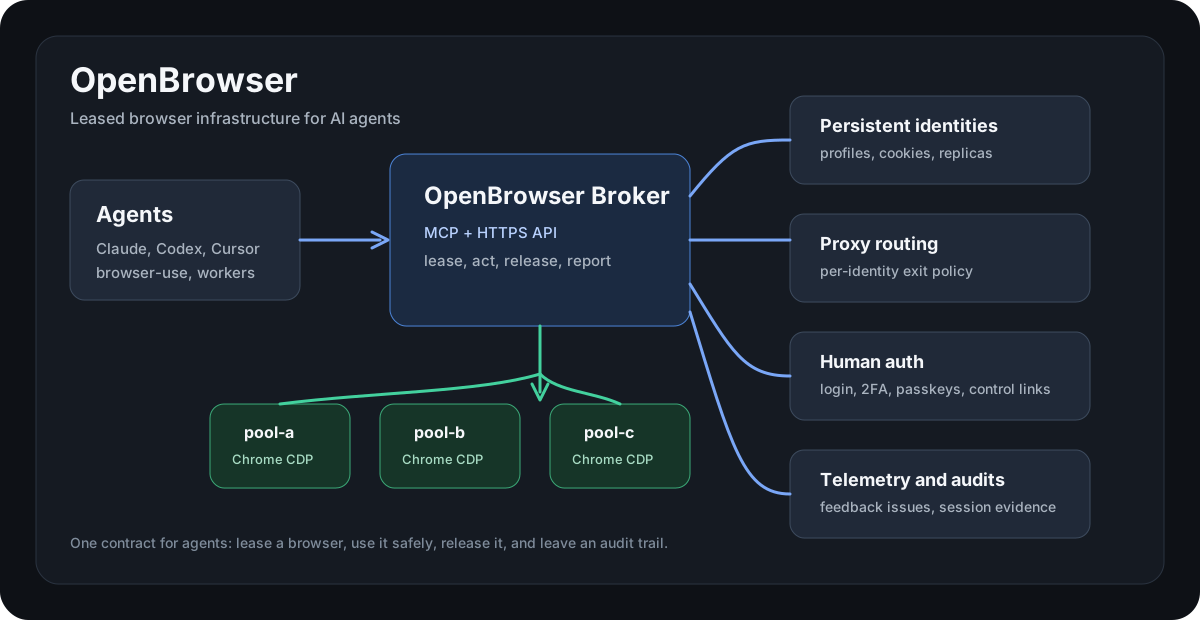
flowchart LR
  Agent["Agent\nClaude / Codex / Cursor / worker"] --> Client["MCP or API client"]
  Client --> Broker["OpenBrowser Broker"]
  Broker --> Lease["Lease manager"]
  Broker --> Profiles["Profile + identity manager"]
  Broker --> Proxy["Proxy router"]
  Broker --> Observability["Telemetry + feedback + audit"]
  Lease --> Pool["Chrome pool"]
  Profiles --> Pool
  Proxy --> Pool
  Pool --> Slots["pool-a ... pool-h\nisolated CDP sessions"]
Most browser agents break in the same ways:
OpenBrowser gives agents one operating contract: lease, act, release, report.
proxy_ref./openbrowser/v1 API for agents on any machine.openbrowser-use includes built-in broker commands for open, state, screenshot, click, type, keys, wait, and tabs; optional passthroughs can call external CLIs.| Use case | OpenBrowser gives you |
|---|---|
| Remote browser automation | HTTPS API and remote MCP for agents running on other machines. |
| Logged-in workflows | Named Chrome identities with persisted profile state. |
| Multi-agent work | Lease isolation so parallel agents do not steal each other's tabs. |
| Account-specific routing | Per-identity proxy refs, locale, timezone, and profile policy. |
| Human-in-the-loop auth | One-time portal links for passwords, 2FA, passkeys, and manual checks. |
| Debuggable automation | Sanitized telemetry, native feedback issues, and session-log audits. |
sequenceDiagram
  participant A as Agent
  participant B as OpenBrowser Broker
  participant C as Chrome slot
  participant H as Human auth portal
  A->>B: lease(owner, identity_id?)
  B->>C: reserve isolated Chrome session
  B-->>A: lease_id
  A->>B: navigate / click / type / screenshot
  B->>C: browser action over CDP
  C-->>B: page state
  B-->>A: snapshot or result
  alt login or challenge required
    A->>B: auth_request or lease_control_request
    B-->>H: one-time portal URL
    H->>C: human completes login
  end
  A->>B: release(lease_id)
  B->>B: telemetry + feedback + audit trail
git clone https://github.com/floomhq/openbrowser.git
cd openbrowser
python3 -m venv .venv
. .venv/bin/activate
pip install -e .
playwright install chromium
cp .env.example .env
cp config/identities.example.json config/identities.local.json
Start the broker:
openbrowser-broker
For a second instance on the same host, isolate the browser slot ports:
OPENBROWSER_BROKER_PORT=8876 \
OPENBROWSER_SLOT_PORT_START=19223 \
OPENBROWSER_BROKER_ROOT=/tmp/openbrowser-demo/root \
OPENBROWSER_BROWSER_POOL_DIR=/tmp/openbrowser-demo/pool \
openbrowser-broker
The broker installs its Chrome pool launcher scripts into OPENBROWSER_BROWSER_POOL_DIR/bin on startup and lazily starts a neutral Chrome slot when the first lease arrives.
git clone https://github.com/floomhq/openbrowser.git
cd openbrowser
OPENBROWSER_API_KEYS="$(openssl rand -base64 48)" docker compose up --build
Lease a browser:
curl -fsS http://127.0.0.1:8767/lease \
  -H "content-type: application/json" \
  -d '{"owner":"demo","ttl_seconds":300}'
Use the returned lease_id:
curl -fsS http://127.0.0.1:8767/browser/navigate \
  -H "content-type: application/json" \
  -d '{"lease_id":"<lease_id>","url":"https://example.com"}'

curl -fsS http://127.0.0.1:8767/browser/snapshot \
  -H "content-type: application/json" \
  -d '{"lease_id":"<lease_id>"}'

curl -fsS -X POST http://127.0.0.1:8767/release/<lease_id>
Expose the broker behind your HTTPS proxy or tunnel and configure:
OPENBROWSER_API_KEYS="your-long-random-api-key"
OPENBROWSER_PUBLIC_OPENBROWSER_BASE_URL="https://browser.example.com/openbrowser/v1"
Then call:
BASE=https://browser.example.com/openbrowser/v1
KEY=your-long-random-api-key

curl -fsS "$BASE/docs" \
  -H "authorization: Bearer $KEY" \
  -H "user-agent: openbrowser-client/1.0"
The API covers leases, navigation, snapshots, screenshots, clicks, typing, keyboard events, tabs, auth handoff, lease control, profiles, feedback issues, telemetry, and audits.
flowchart TD
  RemoteAgent["Remote agent"] -->|Bearer token| API["/openbrowser/v1"]
  API --> Lease["POST /leases"]
  API --> Browser["POST /browser/*"]
  API --> Auth["POST /auth/request"]
  API --> Issues["POST /feedback/issues"]
  API --> Audit["GET /audit"]
Local MCP, for agents running on the broker host:
{
  "mcpServers": {
    "openbrowser-broker": {
      "command": "openbrowser-mcp"
    }
  }
}
Remote MCP, for agents running anywhere:
{
  "mcpServers": {
    "openbrowser-remote": {
      "command": "openbrowser-remote-mcp",
      "env": {
        "OPENBROWSER_API_KEY": "<OPENBROWSER_API_KEY>",
        "OPENBROWSER_BASE_URL": "https://browser.example.com/openbrowser/v1"
      }
    }
  }
}
Core MCP tools:
browser_lease, browser_release, browser_heartbeatbrowser_navigate, browser_snapshot, browser_screenshotbrowser_click, browser_type, browser_keyboard_type, browser_keyboard_pressbrowser_tabs, browser_new_tab, browser_switch_tab, browser_waitauth_request, auth_status, lease_control_requestfeedback_report_issue, feedback_list_issues, feedback_update_issuetelemetry_record_event, telemetry_list_events, telemetry_summarybroker_audit, broker_docs, profile_statusIdentities are configured in config/identities.local.json:
{
  "identities": {
    "work-main": {
      "label": "Work account",
      "site": "example.com",
      "slot": "auto",
      "profile_dir": "/var/lib/openbrowser-broker/profiles/work-main",
      "proxy_ref": "residential:work-main",
      "timezone": "America/New_York",
      "lang": "en-US",
      "policy": {
        "max_parallel_sessions": 1,
        "requires_human_auth": true
      }
    }
  }
}
When an identity needs login:
curl -fsS "$BASE/auth/request" \
  -H "authorization: Bearer $KEY" \
  -H "content-type: application/json" \
  -d '{"owner":"setup","identity_id":"work-main","url":"https://example.com/login","reason":"initial_login"}'
Open the returned portal_url, complete login in the browser view, then mark the request complete. Future leases for that identity reuse the saved profile state.
For parallel work, set policy.max_parallel_sessions above 1. OpenBrowser then seeds per-slot replicas instead of starting multiple Chrome processes against one profile directory. That matters: several windows in a desktop Chrome profile are one Chrome process, but several AX41 agents are independent Chrome processes. Directly sharing the same profile_dir across those processes risks Chrome singleton-lock failures and profile database corruption.
flowchart LR
  Identity["identity_id=work-main"] --> Profile["Chrome profile dir"]
  Identity --> Policy["parallel-session policy"]
  Identity --> ProxyRef["optional proxy_ref"]
  ProxyRef --> Forwarder["local proxy forwarder"]
  Profile --> Chrome["leased Chrome slot"]
  Forwarder --> Chrome
Add proxy credentials in secrets/proxies.json:
{
  "proxies": {
    "residential:work-main": {
      "scheme": "http",
      "host": "proxy.example.net",
      "port": 12345,
      "username": "user",
      "password": "pass"
    }
  }
}
Then set "proxy_ref": "residential:work-main" on the identity. The broker starts a local proxy forwarder and launches Chrome with the matching proxy for that profile.
openbrowser-audit --json
openbrowser-adapter status
openbrowser-use --json open https://example.com
openbrowser-use --json state
openbrowser-adapter status and the common openbrowser-use tool commands are built into this package. Unsupported openbrowser-use commands can pass through to the external browser-use CLI when it is installed. OpenBrowser-compatible passthrough runs can use OPENBROWSER_CLI; they are optional compatibility hooks, not part of the core install path.
Systemd examples live in systemd/. Detailed runbooks live in docs/.
The product and visual source of truth lives in docs/brand/. The repo includes the OpenBrowser logo, favicon, reference hero, and token JSON under docs/assets/brand/, plus package-served runtime assets under ax_browser_broker/static/brand/.
python3 -m compileall ax_browser_broker tests
pytest -q
OpenBrowser is an alpha public release of production-oriented browser infrastructure. The core lease manager, profile identities, remote API, MCP surfaces, human auth handoff, telemetry, feedback issues, audits, and adapter wrappers are covered by tests. New deployments can use the generic commands and environment variables above; legacy ax-* command wrappers remain for existing installations.
MIT
 @microsoft✓ Official
Browser automation using accessibility snapshots instead of screenshots
Run Claude Code as an MCP server so any agent can delegate coding tasks to it
 @googleapis✓ Official
Google's universal MCP server supporting PostgreSQL, MySQL, MongoDB, Redis, and 10+ databases
 @github✓ Official
Official GitHub integration for repos, issues, PRs, and CI/CD workflows