

Are you the author? Sign in to claim
Free write-capable OpenProject integration for Codex, with Community Edition support



Manage OpenProject from Codex — projects, work packages, attachments, relations, boards, users, watchers, and notifications. This free, open-source integration exposes 41 focused API v3 tools and is designed to work with OpenProject Community and Enterprise editions.
OpenProject also provides an official MCP server in Professional plans and above. As of July 2026, that server exposes read-only tools. This community project is a good fit when you need write operations, Codex-specific guidance, or support for Community Edition. See the official MCP documentation for the current capabilities of OpenProject's server.
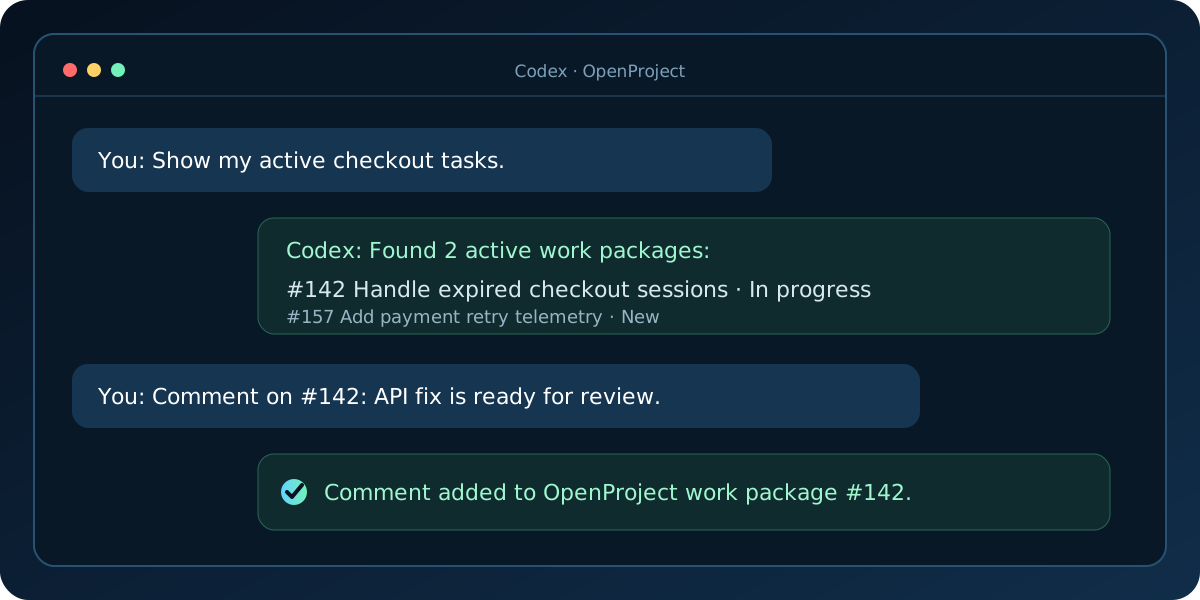
You:   Find checkout-related tasks in the Storefront project.
Codex: I found #142 "Handle expired checkout sessions" and
       #157 "Add payment retry telemetry".

You:   Add a comment to #142 saying the API fix is ready for review.
Codex: Added the comment to work package #142.
Codex resolves the request through MCP tools, while OpenProject remains the source of truth for permissions and work-package state.
The plugin and its local MCP server run natively on macOS, Linux, and Windows. It uses stable OpenProject API v3 endpoints and does not require an OpenProject Enterprise add-on. If you use Community Edition, make sure API tokens are enabled in your instance.
Clone the repository:
git clone https://github.com/alex13slem/openproject-codex-plugin.git
cd openproject-codex-plugin
MCP clients that support npm packages can instead run the server with
npx -y openproject-codex-plugin and pass OPENPROJECT_URL and
OPENPROJECT_API_TOKEN as environment variables.
The standalone server is published under
io.github.alex13slem/openproject in the official MCP Registry. Marketplace
installations use the same API permissions and security boundaries as the
local installer.
Create a private environment file:
mkdir -p ~/.codex
cp .env.example ~/.codex/openproject.env
chmod 600 ~/.codex/openproject.env
Set your OpenProject URL and API token in that file:
OPENPROJECT_URL=https://tasks.example.com
OPENPROJECT_API_TOKEN=your-api-token
Install the MCP integration:
./scripts/install.sh
From PowerShell, create the environment file:
$envDir = Join-Path $HOME ".codex"
New-Item -ItemType Directory -Force $envDir
Copy-Item .env.example (Join-Path $envDir "openproject.env")
notepad (Join-Path $envDir "openproject.env")
Set OPENPROJECT_URL and OPENPROJECT_API_TOKEN, save it, then install:
.\scripts\install.ps1
The installer passes paths as separate arguments, so repository and profile paths containing spaces work on every supported desktop OS.
| Variable | Default | Purpose |
|---|---|---|
OPENPROJECT_PAGE_SIZE | 25 | Default collection page size, from 1 to 100 |
OPENPROJECT_TIMEOUT_MS | 30000 | Request timeout, from 1 to 300 seconds |
OPENPROJECT_AUTH_MODE | basic | Use basic for broad compatibility or bearer for OpenProject 17.2+ |
OPENPROJECT_ALLOWED_UPLOAD_DIRS | Current working directory | Platform-separated directories from which upload tools may read files |
Existing configurations may use OPENPROJECT_BASE_URL and
OPENPROJECT_API_KEY as compatibility aliases.
Start a new Codex thread, then try prompts such as:
Show my active OpenProject tasks.Find work packages mentioning the checkout flow.Add a progress comment to work package 123.The first two prompts are read-only. Write tools are used only for explicit, unambiguous requests and return a direct link to the affected work package.
To keep the environment file elsewhere, pass its absolute path during installation on any desktop OS:
bun scripts/install.ts --env-file /secure/path/openproject.env
.\scripts\install.ps1 --env-file C:\secure\openproject.env
The 41 tools form one consistent OpenProject API surface:
| Area | Read tools | Write tools |
|---|---|---|
| Projects | list_projects, get_project, count_projects | create_project, update_project, delete_project |
| Work packages | search_work_packages, get_work_package, count_work_packages, list_work_package_activities | create_work_package, update_work_package, add_work_package_comment, delete_work_package |
| Attachments | list_work_package_attachments, get_work_package_attachment | upload_work_package_attachment, delete_work_package_attachment |
| Relations | list_work_package_relations, get_work_package_relation | create_work_package_relation, delete_work_package_relation |
| Users | get_current_user, list_users, get_user, list_available_assignees | — |
| Watchers | list_work_package_watchers | add_work_package_watcher, remove_work_package_watcher |
| Notifications | list_notifications, get_notification | mark_notification_read, mark_all_notifications_read |
| Boards | list_boards, get_board, list_board_lanes | — |
| Reference data | list_work_package_types, list_work_package_statuses, list_work_package_priorities, list_project_versions | — |
| Advanced | get_openproject_api | — |
List tools return pagination metadata. Native filter objects use field,
operator, and string values; count tools should be preferred when only a
total is needed. get_openproject_api accepts only relative GET paths under
/api/v3 and cannot call another host.
Write operations use the permissions of the API-token owner. Prefer a token with only the access you need, never commit it, and keep the environment file readable only by your user. File uploads read only explicitly supplied paths under configured upload roots, resolve symlinks before enforcing that boundary, and reject files above the requested size limit. Delete operations are separately marked destructive so MCP clients can require confirmation.
The repository includes a plugin manifest and a marketplace definition at
.agents/plugins/marketplace.json. Codex installations with plugin marketplace
support can add the repository as a local marketplace. The Bun installer and
its shell wrappers are the portable fallback when only MCP configuration is
available.
| Capability | This project | OpenProject MCP server |
|---|---|---|
| Community Edition | Yes | Enterprise add-on |
| Search and read | Yes | Yes |
| Create, update, comment, relate, and attach | Yes | Read-only as of July 2026 |
| Codex workflow guidance | Included | Client-independent |
| Deployment | Local Bun process | Built into OpenProject |
The official server may be preferable for centrally administered, multi-user OAuth deployments. This project is aimed at individual Codex users who want a portable integration and write-capable workflows.
Please do not include API tokens, private instance URLs, or customer data in public posts.
cd plugins/openproject
bun install --frozen-lockfile
bun run check
Generate a local coverage report with:
bun run test:coverage
The API module is covered by tests for request authentication, HAL collection handling, search filters, update payloads, and error responses. See CONTRIBUTING.md before opening a pull request.
plugins/openproject/
├── .codex-plugin/plugin.json   # Plugin metadata
├── .mcp.json                   # MCP process definition
├── scripts/
│   ├── server.ts               # MCP tools and orchestration
│   └── openproject-api.ts      # Tested API client and payload helpers
├── skills/openproject/         # Codex workflow guidance
└── tests/                      # Bun unit tests
Planned work is tracked in the project roadmap. Contributions and well-scoped feature proposals are welcome.
macOS and Linux:
./scripts/uninstall.sh
Windows PowerShell:
.\scripts\uninstall.ps1
This project is community-maintained and is not affiliated with or endorsed by OpenProject GmbH or OpenAI. OpenProject is a trademark of OpenProject GmbH.
If this integration saves you time, consider starring the repository to help other OpenProject users discover it. Bug reports, tested-version reports, and focused contributions are equally valuable.
Run Claude Code as an MCP server so any agent can delegate coding tasks to it
 @microsoft✓ Official
Browser automation using accessibility snapshots instead of screenshots
 @googleapis✓ Official
Google's universal MCP server supporting PostgreSQL, MySQL, MongoDB, Redis, and 10+ databases
 @github✓ Official
Official GitHub integration for repos, issues, PRs, and CI/CD workflows
