

Are you the author? Sign in to claim
Open-source MCP server. Give AI agents authenticated access to GitHub, Notion, Slack and 10+ tools via one connection.
One MCP server. All your tools. Fully open-source and self-hosted.
OpenTool gives AI agents secure, authenticated access to your tools via a single MCP connection. Connect GitHub, Notion, Slack, and more — then point any MCP-compatible agent at OpenTool with one API key.
Built for solo developers building with AI agents.




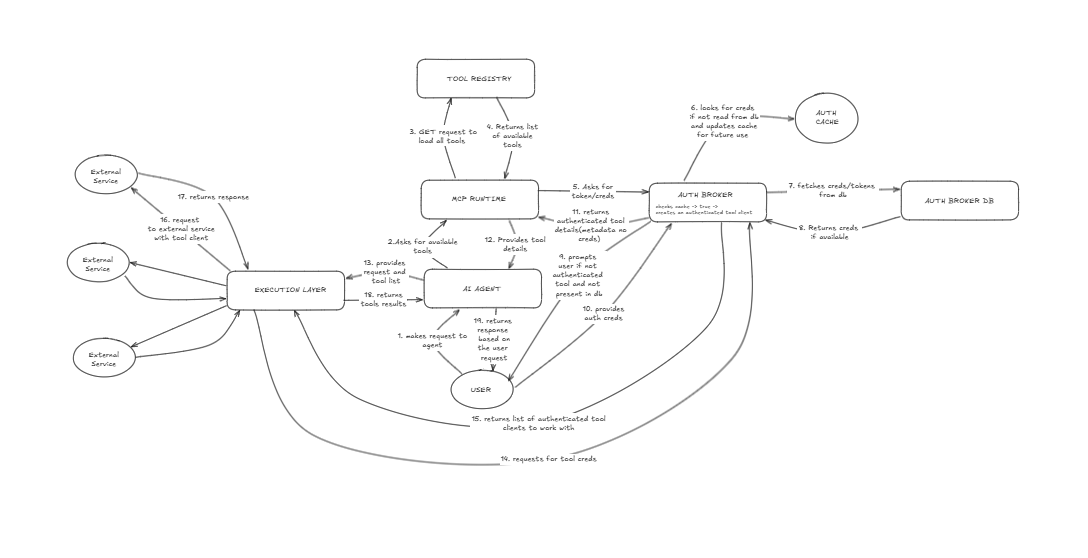
The original system design sketch. Hours of research distilled into one diagram — this is what the entire project was built from.
| Arcade | Composio | OpenTool | |
|---|---|---|---|
| Open source | Partial | Partial | ✅ Full |
| Self-hostable | ❌ | ❌ | ✅ |
| MCP native | ✅ | ✅ | ✅ |
| Free forever (self-hosted) | ❌ | ❌ | ✅ |
| CLI with REPL | ❌ | ❌ | ✅ |
| TypeScript + Python SDKs | ✅ | ✅ | ✅ |
# npm (recommended)
npm i -g opentool-cli

# or run without installing
npx opentool-cli

# or curl installer
curl -fsSL https://raw.githubusercontent.com/Aditya251610/opentool/main/install.sh | bash
# TypeScript
npm i @opentool-ts/sdk

# Python
pip install opentool-sdk
1. Get your API key Sign up at opentool.space → Settings → Generate API key
2. Connect your tools Go to the dashboard → Tools → Connect GitHub, Notion, Slack etc.
3. Connect your agent
For VS Code / Copilot / Claude Code, add to mcp.json:
{
  "servers": {
    "opentool": {
      "type": "http",
      "url": "https://opentool.onrender.com/mcp",
      "headers": {
        "Authorization": "Bearer <TOKEN>"
      }
    }
  }
}
Or use the CLI:
opentool init       # guided setup
opentool login      # authenticate
opentool tools      # see your connected tools
opentool            # launch interactive REPL
That's it. Your agent now has access to all your connected tools.
Prerequisites: Docker + Docker Compose
git clone https://github.com/Aditya251610/opentool
cd opentool
cp .env.example .env
# Fill in your OAuth app credentials in .env
docker-compose up -d
Dashboard available at http://localhost:3000
MCP server available at http://localhost:3001
Key production checklist:
TOKEN_ENCRYPTION_KEY (64 hex characters)SERVER_URL and DASHBOARD_URL for your domain26 providers, 133 tools — and growing.
| Provider | Status | Tools | Actions |
|---|---|---|---|
| GitHub | ✅ | 7 | Create issue, list issues, create PR, comment, get repo, search code, get PR diff |
| GitLab | ✅ | 8 | Create issue, get issue, create MR, get MR, list MR commits, list pipelines, get pipeline jobs, search |
| Linear | ✅ | 3 | Create issue, update status, search issues |
| Vercel | ✅ | 2 | List deployments, get deployment |
| Docker Hub | ✅ | 4 | Search images, get image, list tags, get vulnerabilities |
| Sentry | ✅ | 7 | List orgs, list projects, list/get/resolve issues, get event, search |
| Provider | Status | Tools | Actions |
|---|---|---|---|
| AWS | ✅ | 8 | List EC2/S3/Lambda/EKS, describe EC2, list S3 objects, invoke Lambda, CloudWatch metrics |
| GCP | ✅ | 7 | List instances/GKE/functions/buckets, get instance, list bucket objects, get project |
| Azure | ✅ | 7 | List subscriptions/resource groups/VMs/AKS/storage/functions, get VM |
| Cloudflare | ✅ | 6 | List zones/DNS/workers, create/update DNS, purge cache |
| Provider | Status | Tools | Actions |
|---|---|---|---|
| Gmail | ✅ | 3 | Send, read, search emails |
| Google Calendar | ✅ | 2 | Create event, list events |
| Google Drive | ✅ | 6 | List/search/get/create/share/delete files |
| Google Meet | ✅ | 3 | Create/list/get meetings |
| Microsoft 365 | ✅ | 8 | List/send/search emails, list/create events, list teams/channels, send channel message |
| Notion | ✅ | 3 | Create page, query database, update block |
| Slack | ✅ | 3 | Send message, read channel, search messages |
| Jira | ✅ | 7 | List projects, search/get/create/update issues, add comment, list transitions |
| Confluence | ✅ | 6 | List spaces/pages, search content, get/create/update page |
| Provider | Status | Tools | Actions |
|---|---|---|---|
| Telegram | ✅ | 5 | Get bot info, send message/photo, get updates/chat |
| Discord | ✅ | 5 | List guilds/channels, send/get/list messages |
| Twilio | ✅ | 4 | Send SMS/WhatsApp, list/get messages |
| Provider | Status | Tools | Actions |
|---|---|---|---|
| Stripe | ✅ | 2 | Create payment link, list customers |
| PayPal | ✅ | 8 | Create/list/send invoices, create/get orders, refund, list transactions, create product |
| Resend | ✅ | 1 | Send email |
| PostgreSQL | ✅ | 5 | Execute query, list tables, describe table, run transaction, explain query |
Want a tool added? Open an issue or contribute a tool.
The CLI ships with an interactive REPL and scriptable subcommands:
opentool                    # Launch interactive REPL
opentool tools --json       # List tools (machine-readable)
opentool exec github.list_issues --args '{"owner":"me","repo":"myrepo"}'
opentool doctor             # Run 9-point diagnostics
opentool completion --install  # Shell completions (bash/zsh/fish)
REPL features: Tab completion, ghost-text suggestions, Ctrl+R history search, fuzzy "did you mean?", readline keybindings, update notifications.
Full reference: docs/cli-reference.md
opentool/
├── apps/
│   ├── server/          # MCP server + Auth broker + REST API (Hono)
│   │   └── tools/       # Tool definitions (26 providers, 133 tools)
│   └── dashboard/       # Next.js dashboard
├── packages/
│   ├── cli/             # opentool-cli — interactive CLI + REPL
│   ├── sdk/ts/          # @opentool-ts/sdk — TypeScript SDK
│   ├── sdk/python/      # opentool — Python SDK
│   └── tool-schema/     # Shared tool definition types
├── install.sh           # curl | sh installer
└── docker-compose.yml
Tools are self-contained modules in apps/server/tools/. Each tool exports:
import { defineTool } from '@opentool/tool-schema'

export const myTool = defineTool({
  id: 'my-tool.action',
  name: 'My Tool Action',
  description: 'What this tool does',
  authType: 'oauth2',
  inputSchema: z.object({
    param: z.string().describe('What this param does'),
  }),
  execute: async ({ input, auth }) => {
    // auth.accessToken available here
    // return result
  },
})
apps/server/tools/yourprovider/apps/server/src/registry/index.ts.env.exampleFull guide: docs/contributing-a-tool.md
Full docs at docs/:
opentool-cli on npm)@opentool-ts/sdk on npm)opentool-sdk on PyPI)install.sh)MIT — use it, fork it, self-host it, build on it.
Run Claude Code as an MCP server so any agent can delegate coding tasks to it
 @microsoft✓ Official
Browser automation using accessibility snapshots instead of screenshots
 @googleapis✓ Official
Google's universal MCP server supporting PostgreSQL, MySQL, MongoDB, Redis, and 10+ databases
 @github✓ Official
Official GitHub integration for repos, issues, PRs, and CI/CD workflows