

optimize your claude code usage saving tokens






Hit Claude Code's usage limits less often by cutting dead-weight skill context from every prompt.
Every installed skill injects its description into every turn — even skills you haven't touched in months. /skill-optimize scans your session history, finds unused skills, and quietly mutes them. Fewer wasted tokens per turn means your daily usage limit goes further.
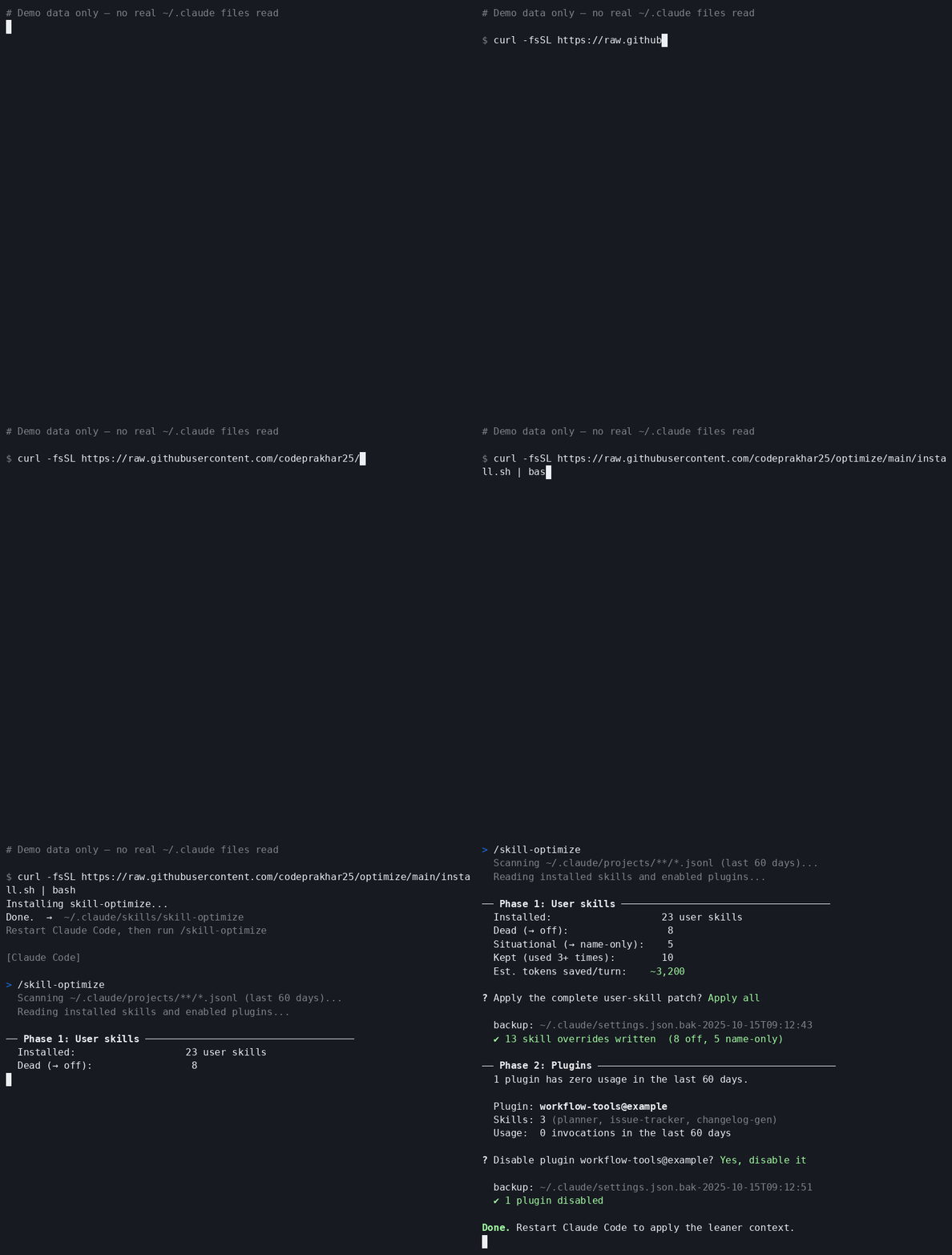
Sample output — shows the full flow: Phase 1 (user skills) with confirmation prompt, then Phase 2 (plugins) with per-plugin confirmation. No real ~/.claude data shown.
Every Claude Code skill adds its description to the model context on every turn. You pay that token cost whether or not you use the skill. With a handful of skills the overhead is negligible — but as your library grows, unused skills quietly spend hundreds or thousands of tokens on every single prompt, pushing you toward your usage limit faster.
optimize helps you answer:
Savings depend on your skill count and description sizes. Even a modest trim can meaningfully extend how long your daily limit lasts.
/skill-optimize runs a local audit over your Claude Code data:
~/.claude/skills/.~/.claude/projects/**/*.jsonl.dead: 0 uses in the lookback window, proposed as offsituational: 1-2 uses, proposed as name-onlykept: 3+ uses, left unchanged~/.claude/settings.json.Plugin skills are reported separately because Claude Code does not expose them through skillOverrides in the same way as user skills. If a plugin appears completely unused, the workflow can ask whether to disable that plugin.
curl -fsSL https://raw.githubusercontent.com/codeprakhar25/optimize/main/install.sh | bash
Restart Claude Code, then run:
/skill-optimize
curl for the installerNo Python packages are required.
/skill-optimize
The workflow will:
Nothing is changed until you explicitly confirm.
For user skills, optimize updates skillOverrides in:
~/.claude/settings.json
Example:
{
  "skillOverrides": {
    "rarely-used-skill": "name-only",
    "unused-skill": "off"
  }
}
For fully unused plugins, optimize may update enabledPlugins only after a separate confirmation.
| Mode | Meaning | When it is used |
|---|---|---|
name-only | Keep the skill available, but remove its description from the prompt | Skills used rarely |
off | Hide the skill from Claude Code context | Skills with no detected recent usage |
| unchanged | Leave the skill exactly as it is | Skills used regularly or protected by your config |
Every apply creates a timestamped backup of ~/.claude/settings.json.
Restore the latest backup:
python3 ~/.claude/skills/skill-optimize/scripts/restore.py
List available backups:
python3 ~/.claude/skills/skill-optimize/scripts/restore.py --list
Restore a specific backup:
python3 ~/.claude/skills/skill-optimize/scripts/restore.py --backup settings.json.bak-YYYY-MM-DDTHH:MM:SS
Restart Claude Code after restoring.
For one-off changes, you can use Claude Code's built-in skill picker:
/skills.Space to cycle between on, name-only, and off.Enter to save.Use the manual flow when you already know which skill to change. Use /skill-optimize when you want an audit based on usage history.
name-only, not immediately disabled.~/.claude/CLAUDE.md are kept.The audit is based on detectable usage — slash commands and Skill tool calls found in your session history. Review recommendations before applying.
Implicit usage may be missed. If Claude invoked a skill automatically (its description matched your prompt) without an explicit slash command, the audit counts it as zero. Keep borderline skills at name-only rather than off.
Fresh installs have thin history. If you've barely used Claude Code yet, everything looks unused. Wait a few days, then re-run.
Plugin disables are broader. Turning off a plugin removes all its skills and agents — not just one. Plugin changes are always shown separately and need their own confirmation.
Token savings are estimates. Calculated from description lengths, not Claude's internal tokenizer. Treat the number as a directional guide, not an exact figure.
Your prompts are read locally. The audit reads .jsonl session files on disk. Nothing is sent anywhere — all processing stays on your machine.
If a skill you need becomes hidden, restore from backup or re-enable it with /skills.
rm -rf ~/.claude/skills/skill-optimize
Uninstalling removes the skill-optimize command. It does not remove any skillOverrides already written to ~/.claude/settings.json; use the restore command first if you want to undo applied changes.
Run the audit script directly:
python3 scripts/audit.py --days 60
Emit JSON:
python3 scripts/audit.py --days 60 --json
The project is intentionally small:
skills/skill-optimize/SKILL.md: Claude Code workflowscripts/audit.py: usage audit and token estimatescripts/apply.py: settings patcher with backup and lockfilescripts/restore.py: backup restore helperscripts/record-demo.sh: regenerate the README demo GIFinstall.sh: curl installer1000+ skills curated from Anthropic, Vercel, Stripe, and other engineering teams
Agent harness performance optimization with skills, instincts, memory, and security
Design enforcement with memory — keeps your UI consistent across a project
Detects 37 AI writing patterns and rewrites text with human rhythm across 5 voice profiles
 @codeprakhar25