

Are you the author? Sign in to claim
Outworked - Cozy Office for Claude Code
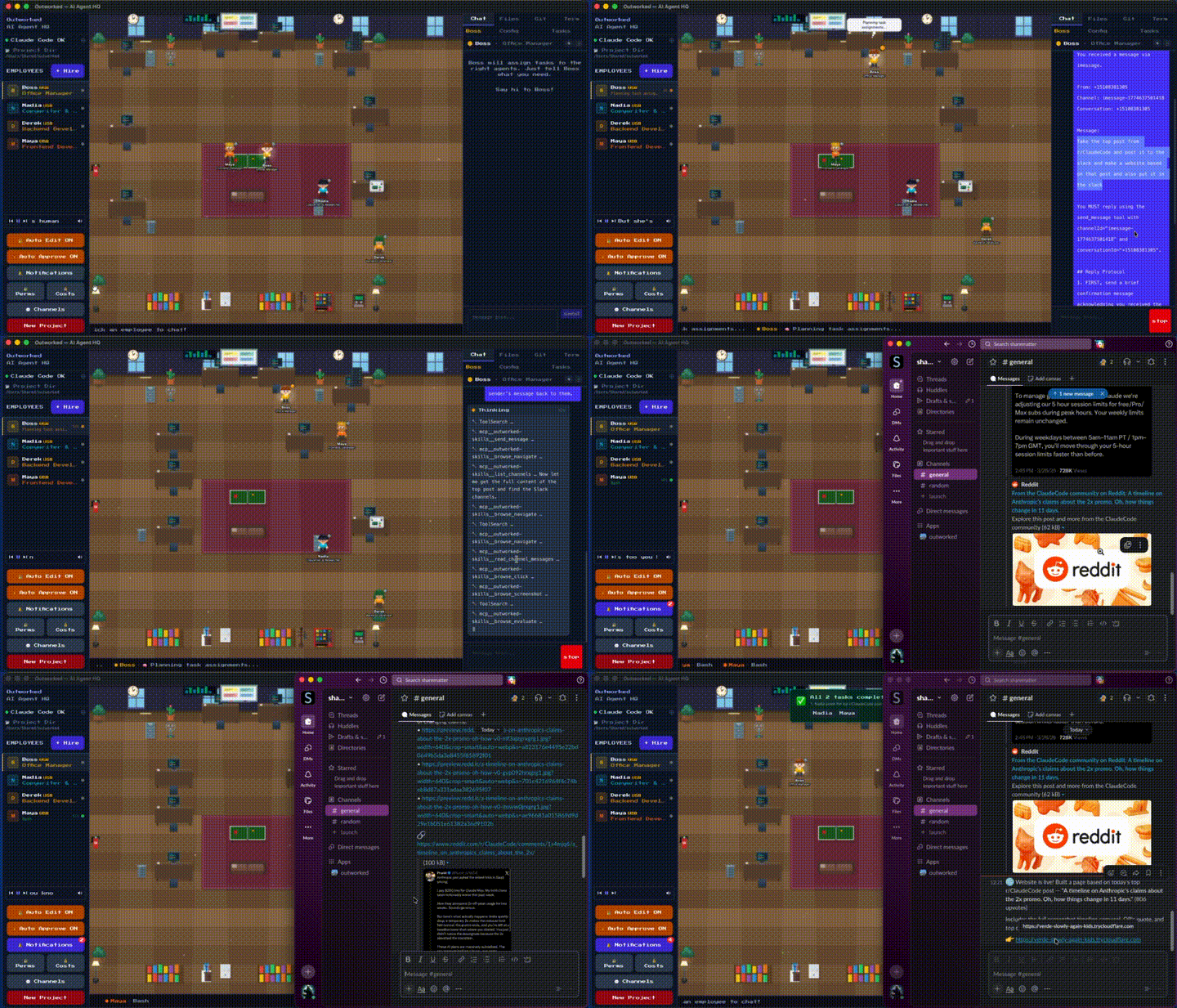

Outworked is a desktop app that turns Claude into a team of AI employees.
Hire agents. Give them roles. Watch them write code, interact with the web, send messages,
and run scheduled tasks — all from an office on your Mac.
Fully customizable — import your own sprites, furniture, backgrounds, and fonts via asset packs.
Claude Code with a can-do attitude!




Download · What's New · How It Works · Examples · Capabilities · Features · Skills · MCP Servers · Channels & Triggers · Asset Packs
v0.4.3 — Better bg handling for scheduled tasks.
v0.4.2 — Added browse:type for better browser handling.
v0.4.1 — Pop-out chat windows, fixed asset pack zip import and spaces in directory paths, fixed custom sprite loading.
v0.4.0 — Asset packs system: custom sprites, furniture, backgrounds, and fonts. Multi-pack support with fallthrough. Music player now plays user-added tracks.
v0.3.1 — Slack channel support, triggers UI, improved MCP server wiring, better channel reliability.
v0.3.0 — SQLite storage, iMessage channels, scheduled triggers, skills system, MCP server integration.
See the full Version History below.
These are real things you can do today:
You type one sentence. Here's what happens:
tunnel_start to get a public URLsend_message to text the link to your cofounder on iMessageYou watched the whole thing happen at the office. You are wowed. Your cofounder gives you more equity. Total prompts from you: 1.
0 9 * * *)No scripts to maintain. No GitHub Actions to debug. Just an agent with a schedule.
Three agents working simultaneously, finishing in minutes what would take you hours.
Write and ship code — Build features, fix bugs, open PRs, review each other's work, run tests, and deploy — across multiple repos at once.
Browse the web — Research docs, scrape pages, fill out forms, take screenshots, and bring findings back to the team via the built-in browser.
Send and receive messages — Reply to customers on Slack, text you a summary on iMessage, or monitor a channel and trigger tasks when someone says the magic word.
Run on a schedule — Daily standups, weekly reports, hourly health checks, one-off reminders. Set a cron and let an agent handle it while you sleep.
Query databases — Connect a PostgreSQL MCP server and let agents run queries, generate reports, or investigate production issues without you writing SQL.
Manage projects — Create and triage GitHub issues, update Linear tickets, post status updates to Slack — agents can own the workflow, not just the code.
Anything you can plug in — Every MCP server you add gives agents new capabilities. Connect your internal APIs, monitoring dashboards, CMS, or anything with a tool interface. If it exists as an MCP server, your agents can use it.
[ASK:AgentName] and a shared message busSKILL.md files that define tools, auth, and instructions| Provider | Models |
|---|---|
| Anthropic | Any model via Claude Code. |
Each agent can run a different model — pair a fast model for simple tasks with a powerful one for complex work.
Homebrew (recommended)
brew tap outworked/tap
brew install --cask outworked
Manual download
Grab the latest .dmg from the releases page and drag to Applications.
On first launch, the onboarding modal walks you through picking a workspace and creating your first agent. You'll be watching pixel employees do stuff in under two minutes.
This will start up a development instance of Outworked. To build a distributable, use npm run electron:build instead of npm run electron:dev
git clone https://github.com/outworked/outworked.git
cd outworked
npm install
npm run electron:dev
| Command | Description |
|---|---|
npm run dev | Start Vite dev server (browser only, no Electron) for testing only. Won't work correctly. |
npm run electron:dev | Build and launch the full Electron app in dev mode |
npm run electron:build | Package distributable (dmg/zip on macOS, exe on Windows, AppImage on Linux) |
| Layer | Technology |
|---|---|
| Desktop | Electron |
| Frontend | React 19 + TypeScript + Tailwind CSS |
| Build | Vite |
| Graphics | Phaser 3 |
| Storage | SQLite (better-sqlite3) |
| AI | Claude Code SDK |
src/
├── components/       # React UI (ChatWindow, OfficeCanvas, GitPanel, etc.)
├── lib/              # Core logic (AI, orchestration, tools, storage, costs)
└── phaser/           # Phaser game scene and sprite logic

electron/
├── main.js           # Electron main process (IPC, shell, permissions)
├── preload.js        # Context bridge to renderer
├── sdk-bridge.js     # Claude Code SDK bridge
├── db/               # SQLite database and migrations
├── channels/         # Messaging channels (iMessage, Slack)
├── mcp/              # MCP server management
├── skills/           # Skill runtimes (browser, Gmail, Slack, Notion, etc.)
└── triggers/         # Trigger engine, webhooks, and scheduling

public/
├── music/            # Background music tracks
└── assets/           # Bundled asset packs (installed on first launch)
Outworked uses a SKILL.md format — markdown files with YAML frontmatter that define what an agent can do.
---
name: my-skill
description: What this skill does
emoji: 🔧
runtime: backend-name # optional — for active skills with a backend
auth:
  type: oauth2 | api-key
  provider: service-name
tools: [tool-1, tool-2]
triggers: [event-type]
---
Instructions and usage docs in markdown...
Skills can be bundled (ship with the app), custom (created in the UI and stored in SQLite), or dynamic (loaded at runtime from MCP servers). Mark a skill as global to make it available to every agent, or assign it to specific agents.
Bundled skills:
| Skill | Description |
|---|---|
| Web Browser | Navigate, click, fill forms, screenshot — full Chromium browser |
| Scheduler | Create and manage scheduled tasks (cron, interval, one-time) |
More coming soon.
Connect agents to external tools and data sources via the Model Context Protocol.
Preset servers (one-click setup):
| Server | What it provides |
|---|---|
| GitHub | Repos, issues, PRs, code search |
| Filesystem | Read/write access to specified directories |
| PostgreSQL | Query and manage databases |
| Slack | Send and read messages in channels |
| Linear | Issues, projects, and workflows |
| Playwright | Browser automation and testing |
| Memory | Persistent key-value storage |
| Fetch | HTTP requests to external APIs |
You can also add custom MCP servers (stdio or HTTP) and configure environment variables (API keys, tokens) per server.
Channels connect agents to messaging platforms. Supported channel types:
Agents interact with channels through built-in tools: send_message, list_channels, and read_channel_messages. Configure allowed senders to control who can reach your agents.
You can also inject special system prompts for each channel, so that certain inbound messages get a different response than others.
Triggers wire up events to agents — when something happens, a prompt is automatically sent to an agent. Think of them as "if this, then prompt that."
Trigger types:
| Type | Fires when… |
|---|---|
| Message Pattern | An inbound channel message (Slack, iMessage) matches a pattern |
| Webhook | An external system sends an HTTP POST to a trigger URL |
| Skill Event | An internal skill emits a named event (e.g. scheduler:task_fired) |
Message pattern matching supports four modes:
contains — fires if the message contains the text anywhere (default)starts-with — fires if the message starts with the textexact — fires only on an exact matchregex — full regex with capture groups ($1, $2, …) substituted into the promptFor non-regex modes, the original message is automatically appended to the prompt so the agent has full context.
Setting up a trigger:
$1, $2 for regex captures or {{key}} for webhook/event dataAgents can also create and manage triggers programmatically using the create_trigger, list_triggers, update_trigger, and delete_trigger tools.
Example — Slack deploy command:
Pattern:
deploy(contains mode) Prompt:Handle this deploy request.When someone types "please deploy the api" in Slack, the agent receives the prompt with the original message appended and reply instructions so it knows where to respond.
Example — regex with capture groups:
Pattern:
deploy (.+) to (staging|prod)Prompt:Deploy the $1 service to $2. Run the deploy script and report back."deploy api to staging" → agent receives: "Deploy the api service to staging. Run the deploy script and report back."
Channel reply instructions are automatically prepended when a trigger fires from a channel message, including sender name, channel ID, and conversation ID so the agent knows exactly where to reply.
The Scheduler skill handles time-based automation — cron expressions, intervals, and one-time tasks. Ask an agent to schedule a task. Under the hood, scheduled tasks fire as skill events that the trigger engine picks up and routes to agents.
Every agent has access to a full browser — not a headless scraper, a real Chromium window managed by the app. It can even open instagram and slack off - just like us.
Agents can navigate pages, click elements, fill forms, run JavaScript, and take screenshots using a set of browse:* tools. The browser returns an interactive snapshot of every element on the page with its CSS selector, so agents don't need to probe the DOM — they just read the snapshot and act.
When a site requires login, the agent calls browse:login and a browser window pops up on your screen so you can sign in manually. Once you're done, the agent picks up right where it left off with a fully authenticated session.
Tools: browse:navigate, browse:click, browse:fill, browse:screenshot, browse:snapshot, browse:evaluate, browse:show, browse:login
Are you proud of what an agent built? Outworked has built-in Cloudflare tunneling — agents can expose any local server to the internet with a single tool call.
An agent starts a dev server, runs tunnel_start, and gets back a public URL. It can then send that link to someone via iMessage or Slack. No ngrok setup, no config — cloudflared is downloaded automatically on first use.
Tools: tunnel_start, tunnel_stop, tunnel_list
Example workflow:
npx serve dist on port 3000tunnel_start with port 3000 — gets a public *.trycloudflare.com URLOutworked takes a defense-in-depth approach:
You can turn all of it off with one button though.
Every office needs a vibe. Outworked ships with an original soundtrack featuring tracks like:
"Don't Ever Turn Me Off" · "She's Just a Coder Agent" · "LLM Love Lying Machine" · "Can Love Be Binary" · "Goodbye Humans" · "How Does Grass Feel" · "Are You Even Reading This"
Toggle music from the player in the bottom-left corner.
You can add your own music by dropping it in the ~/.outworked/music folder
Outworked supports asset packs that let you completely reskin the office. Drop a folder into ~/.outworked/assets/ or use the Import Pack button in the app, and your office gets a new look.
A single pack can include any combination of:
| Category | What it does |
|---|---|
| Employees | Replace the procedural pixel characters with custom sprite sheets |
| Furniture | Add custom furniture PNGs alongside or instead of the built-in items |
| Background | Replace the office floor, walls, and windows with a custom image |
| Font | Replace the pixel UI font with your own .ttf or .woff2 |
The simplest pack is just a folder with a PNG:
~/.outworked/assets/my-pack/
  default.png           # employee sprite sheet — that's all you need
Or go all out:
~/.outworked/assets/my-pack/
  manifest.json          # optional — everything auto-detects without it
  background.png         # replaces the office background
  myfont.ttf             # replaces the UI font
  employees/
    default.png          # sprite sheet used for all agents
    engineer.png         # role-specific sheet
    designer.png
  furniture/
    desk_wooden.png      # auto-detected as a desk (filename starts with "desk")
    bookshelf.png
    plant_big.png
Each sheet is a horizontal strip of animation frames in a fixed order — idle, walk, type, think — with 2 frames per state by default (384x48 total for 48px frames). Multi-row grids are also supported, where each row is a state.
The manifest lets you remap states, customize frame rates, and set per-role sheets. Sheets are auto-assigned to agents by role name, or distributed randomly.
Drop PNG images into a furniture/ subfolder. Files named desk* are auto-detected as desks (agents sit at them when working). All furniture can be added, removed, moved, and rotated from the office via long-press.
Drop a background.png (or bg.png) into your pack folder. It replaces the entire office floor, walls, rug, and windows. Supports cover, stretch, and tile display modes.
Drop a .ttf, .woff, or .woff2 file into your pack folder. It replaces the pixel font used throughout the UI. The change takes effect immediately when switching packs.
Click the grid icon in the sidebar header to open the Assets modal:
.zip file from anywhere on your machineA bundled example pack (outworked-default) is installed on first launch as a starting point. See ~/.outworked/assets/outworked-default/manifest.json for a fully documented example manifest.
Full documentation: electron/assets/assets.md
| Version | Date | Highlights |
|---|---|---|
| 0.4.1 | 2026-03-30 | Pop-out chat windows, fixed zip import and spaces-in-path bug, fixed custom sprite loading |
| 0.4.0 | 2026-03-29 | Asset packs (custom sprites, furniture, backgrounds, fonts), multi-pack support with fallthrough, user music tracks |
| 0.3.1 | 2026-03-27 | Slack channels, triggers UI, improved MCP wiring, better channel support and caffeination handling |
| 0.3.0 | 2026-03-26 | SQLite storage, iMessage channels, scheduled triggers, skills system, MCP servers, agent-to-agent collaboration |
| 0.2.1 | 2026-03-24 | Improved agent thinking displays, Homebrew tap |
| 0.2.0 | 2026-03-24 | Auto-updater |
| 0.1.8 | 2026-03-23 | Movable sprites and furniture, updated permissions flow |
| 0.1.7 | 2026-03-22 | Initial Public Release |
| 0.1.6 | 2026-03-20 | Migrated to Claude Code SDK, fixed agent config bug |
| 0.1.5 | 2026-03-19 | Parallel processing, background mode, timeout and cost fixes |
| 0.1.4 | 2026-03-18 | Skills system, onboarding flow, permissions, caffeination |
| 0.1.3 | 2026-03-18 | Git integration, MCP servers, agent collaboration bus, cost dashboard, notifications |
git checkout -b feature/my-feature)git commit -m 'Add my feature')git push origin feature/my-feature)Please open a discussion first for large changes so we can discuss the approach.
Outworked runs locally on your machine. The models are run by Anthropic, with the same privacy guarantees as using those APIs directly.
Agents require explicit approval for destructive operations (unless auto-approve is on then RIP). You can also configure command allowlists per agent.
Write a markdown file with YAML frontmatter (name, description, tools) and save it as SKILL.md. Then assign it to any agent from the Skills panel. See the bundled skills in electron/skills for examples.
Outworked is free and open source. You just need access to Claude Code.
Outworked is built on the Claude Code SDK, so it uses whichever models Claude Code supports. Each agent can be configured to use a different model — pair Opus for complex reasoning with Sonnet for fast tasks.
Yes. Agents have a built-in browser that can navigate pages, fill forms, take screenshots, and interact with any website. They can also expose local servers to the internet via built-in Cloudflare tunneling, and send links or results through iMessage and Slack.
Absolutely. Agents can browse the web for research, send and receive messages, manage GitHub issues and Linear tickets, run scheduled reports, query databases, and automate workflows. Code is just one of many things they can do. They do sometimes refuse to do some stuff though.
macOS is the primary platform today. Windows and Linux builds are possible via Electron but haven't been fully tested yet. iMessage channels are macOS-only. We will be testing Windows and Linux soon.
Manage multiple Claude Code agents from TUI or Web with tmux and git worktrees
Kanban-based orchestration for 10+ coding agents with isolated git worktrees per agent
⚠️ Experimentelle Skill-Sammlung für deutsches Recht (Arbeits-, Gesellschafts-, Insolvenz-, Datenschutz-, Prozessrecht u
191 agents, 155 skills, and 82 plugins cross-compatible with Claude Code, Cursor, and Codex