

Are you the author? Sign in to claim
Turn Claude, Cursor, and Codex into web performance experts. A 16-tool MCP server for PageSpeed Insights, Lighthouse, Cr





16-tool MCP server for Google PageSpeed Insights & Chrome UX Report APIs. Analyze, compare, and optimize web performance directly through Claude, Cursor, or any MCP-compatible AI client.
🎬 View Interactive Demo → — See all 16 tools in action with animated examples Fallback URL: https://ruslanlap.github.io/pagespeed-insights-mcp/demo.html
Add to your claude_desktop_config.json:
{
  "mcpServers": {
    "pagespeed-insights": {
      "command": "npx",
      "args": ["-y", "-p", "pino-pretty", "-p", "pagespeed-insights-mcp", "pagespeed-insights-mcp"],
      "env": {
        "GOOGLE_API_KEY": "your-google-api-key-here"
      }
    }
  }
}
Add to your configuration (TOML):
[mcp_servers.pagespeed-insights]
command = "npx"
args = [
  "-y",
  "-p",
  "pino-pretty",
  "-p",
  "pagespeed-insights-mcp",
  "pagespeed-insights-mcp"
]
env = { GOOGLE_API_KEY = "your-google-api-key-here" }
Note: The
pino-prettypackage is required for proper log formatting. The above configurations ensure it is installed automatically vianpx.
Add to ~/.grok/config.toml (global) or <repo>/.grok/config.toml (project-scoped, higher priority):
[mcp_servers.pagespeed-insights]
command = "npx"
args = ["-y", "-p", "pino-pretty", "-p", "pagespeed-insights-mcp", "pagespeed-insights-mcp"]
env = { GOOGLE_API_KEY = "${GOOGLE_API_KEY}" }
enabled = true

# Recommended companion professional MCPs (add once):
# [mcp_servers.github]      — PRs, issues, code search
# [mcp_servers.context7]    — fresh library docs (Upstash)
# [mcp_servers.serena]      — semantic code intelligence (uses your .serena/ if present)
Project-scoped example (put in this repo's .grok/config.toml for local dist/index.js + tighter Serena):
[mcp_servers.pagespeed-insights]
command = "node"
args = ["/home/ubuntuvm/Projects/pagespeed-insights-mcp/dist/index.js"]
env = { GOOGLE_API_KEY = "${GOOGLE_API_KEY}", NODE_ENV = "development" }
Verification inside Grok session:
/mcps (or Ctrl+L → MCP tab) → ensure pagespeed-insights shows "running"pagespeed-insights__analyze_page, pagespeed-insights__get_crux_data etc. (namespaced)We have comprehensive documentation available online.
👉 View Full Documentation Site
You can also view the raw markdown files in the
docs/directory or runmkdocs servelocally.
Current release: v1.2.3.
~/.gemini/config/mcp_config.json.examples/antigravity-config.json.docs(antigravity): ..., docs(integration): ..., or docs(config): ....For the complete release history, see CHANGELOG.md.
# Set environment variable
export GOOGLE_API_KEY=your-google-api-key
curl -sSL https://raw.githubusercontent.com/ruslanlap/pagespeed-insights-mcp/master/scripts/install.sh | bash
The installer uses the public npm package (pagespeed-insights-mcp) by default. To install the scoped GitHub Packages build instead, configure GitHub Packages authentication first and run:
curl -sSL https://raw.githubusercontent.com/ruslanlap/pagespeed-insights-mcp/master/scripts/install.sh | \
  PAGESPEED_INSIGHTS_MCP_PACKAGE=@ruslanlap/pagespeed-insights-mcp bash
# Global installation from npm
npm install -g pagespeed-insights-mcp

# Or use without installation
npx pagespeed-insights-mcp
# First configure authentication (see GITHUB_PACKAGES.md for details)
# Then install globally
npm install -g @ruslanlap/pagespeed-insights-mcp
Note: This package is available on both npm and GitHub Packages.
- For npm: Use
npm install pagespeed-insights-mcp- For GitHub Packages: Use
npm install @ruslanlap/pagespeed-insights-mcp(requires GitHub authentication)For detailed instructions on installing from GitHub Packages, see GITHUB_PACKAGES.md or visit the GitHub Packages page
The MCP server requires a Google API key to access the PageSpeed Insights API.
# Set environment variable
export GOOGLE_API_KEY=your-google-api-key

# Windows
$env:GOOGLE_API_KEY="your-google-api-key"

# Or pass directly when running
GOOGLE_API_KEY=your-google-api-key npx pagespeed-insights-mcp
"pagespeed-insights": {
  "command": "npx",
  "args": [
    "-y",
    "-p",
    "pino-pretty",
    "-p",
    "pagespeed-insights-mcp",
    "pagespeed-insights-mcp"
  ],
  "env": {
    "GOOGLE_API_KEY": "your-google-api-key-here"
  }
}
[mcp_servers.pagespeed-insights]
command = "npx"
args = [
  "-y",
  "-p",
  "pino-pretty",
  "-p",
  "pagespeed-insights-mcp",
  "pagespeed-insights-mcp"
]
env = { GOOGLE_API_KEY = "your-google-api-key-here" }
Note: These examples include
pino-prettyfor better log formatting. For production use without pretty logs, see the Logging section below.
To use this MCP server with Claude Desktop, add the following to your Claude Desktop configuration file:
{
  "mcpServers": {
    "pagespeed-insights": {
      "command": "npx",
      "args": ["-y", "-p", "pino-pretty", "-p", "pagespeed-insights-mcp", "pagespeed-insights-mcp"],
      "env": {
        "GOOGLE_API_KEY": "your-google-api-key-here"
      }
    }
  }
}
To use this MCP server with Google Antigravity, add the following configuration to your global settings file (~/.gemini/config/mcp_config.json):
{
  "mcpServers": {
    "pagespeed-insights": {
      "command": "npx",
      "args": ["-y", "-p", "pino-pretty", "-p", "pagespeed-insights-mcp", "pagespeed-insights-mcp"],
      "env": {
        "GOOGLE_API_KEY": "YOUR_GOOGLE_API_KEY"
      }
    }
  }
}
Example configuration files are available in the examples directory.
docker build -t pagespeed-insights-mcp .
docker run -e GOOGLE_API_KEY=your-key pagespeed-insights-mcp
To use this MCP server, you need a Google API key with the PageSpeed Insights API enabled.
[!TIP] ⚡ Quick Setup Link: You can go directly to the Google Cloud Credentials Setup Page to quickly create a key in your project.
GOOGLE_API_KEY in your configuration.

If you used the scripts/install.sh script, the configuration was created automatically.
Add the configuration to your Claude Desktop file:
macOS: ~/Library/Application Support/Claude/claude_desktop_config.json
Windows: %APPDATA%\Claude\claude_desktop_config.json
Linux: ~/.config/claude/claude_desktop_config.json
{
  "mcpServers": {
    "pagespeed-insights": {
      "command": "npx",
      "args": ["-y", "-p", "pino-pretty", "-p", "pagespeed-insights-mcp", "pagespeed-insights-mcp"],
      "env": {
        "GOOGLE_API_KEY": "your-google-api-key-here"
      }
    }
  }
}
{
  "mcpServers": {
    "pagespeed-insights": {
      "command": "npx",
      "args": [
        "-y",
        "-p",
        "pino-pretty",
        "-p",
        "@ruslanlap/pagespeed-insights-mcp",
        "pagespeed-insights-mcp"
      ],
      "env": {
        "GOOGLE_API_KEY": "your-google-api-key-here"
      }
    }
  }
}
{
  "mcpServers": {
    "pagespeed-insights": {
      "command": "docker",
      "args": [
        "run",
        "--rm",
        "-i",
        "--env",
        "GOOGLE_API_KEY=your-google-api-key-here",
        "pagespeed-insights-mcp"
      ]
    }
  }
}
Restart Claude Desktop after configuration!
After configuration, simply ask Claude any of these commands:
Analyze the performance of https://example.com
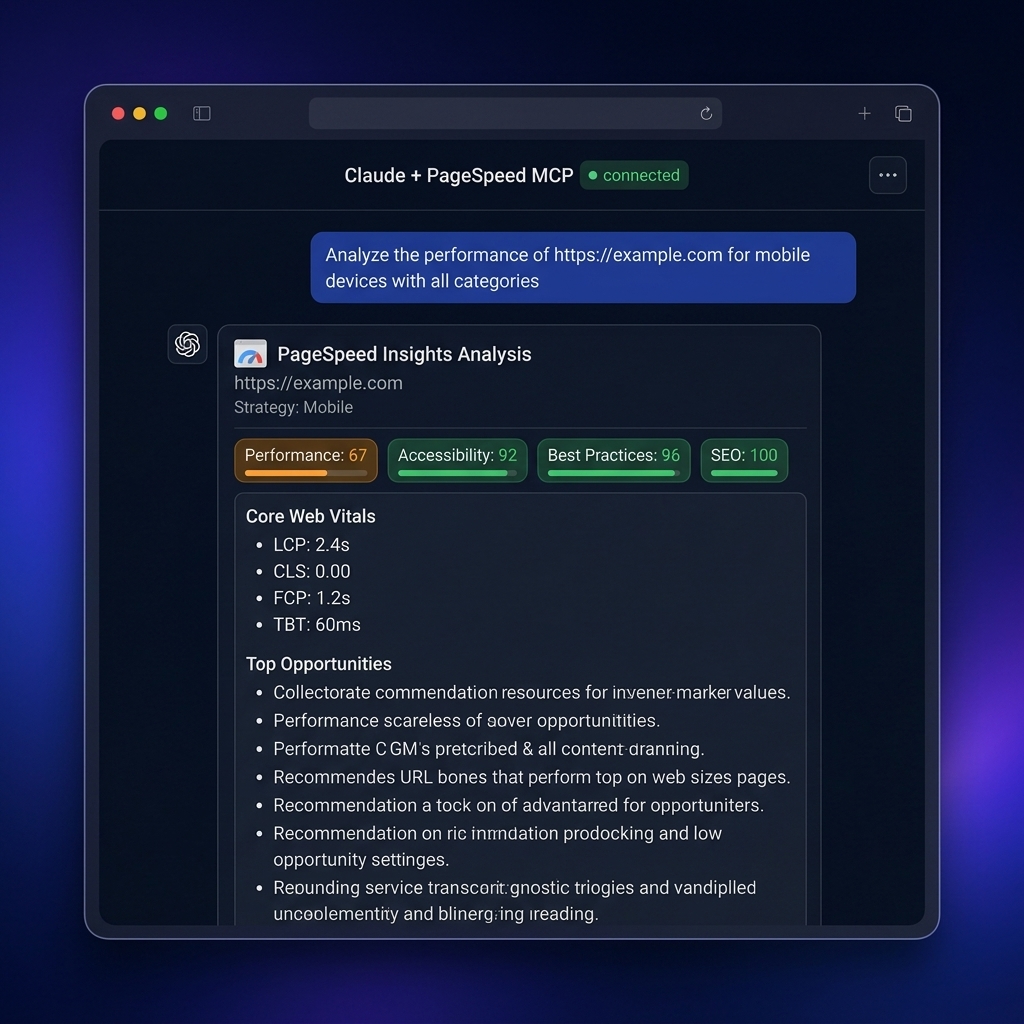
Analyze https://example.com for mobile devices with all categories
Get a quick performance report for https://example.com
Analyze https://example.com performance for desktop devices
Perform a full audit of https://example.com including SEO, accessibility, and best practices
Get smart recommendations for improving https://example.com performance
Clear the cache to get fresh data for all subsequent requests
Get visual analysis for https://example.com showing screenshots and loading timeline
Show me which specific elements are causing performance issues on https://example.com
Analyze the network requests and resource loading for https://example.com
Get JavaScript execution breakdown for https://example.com
Show me which images need optimization on https://example.com
Find render-blocking resources on https://example.com
Analyze third-party script impact on https://example.com performance
Run a full audit including accessibility, SEO, and best practices for https://example.com
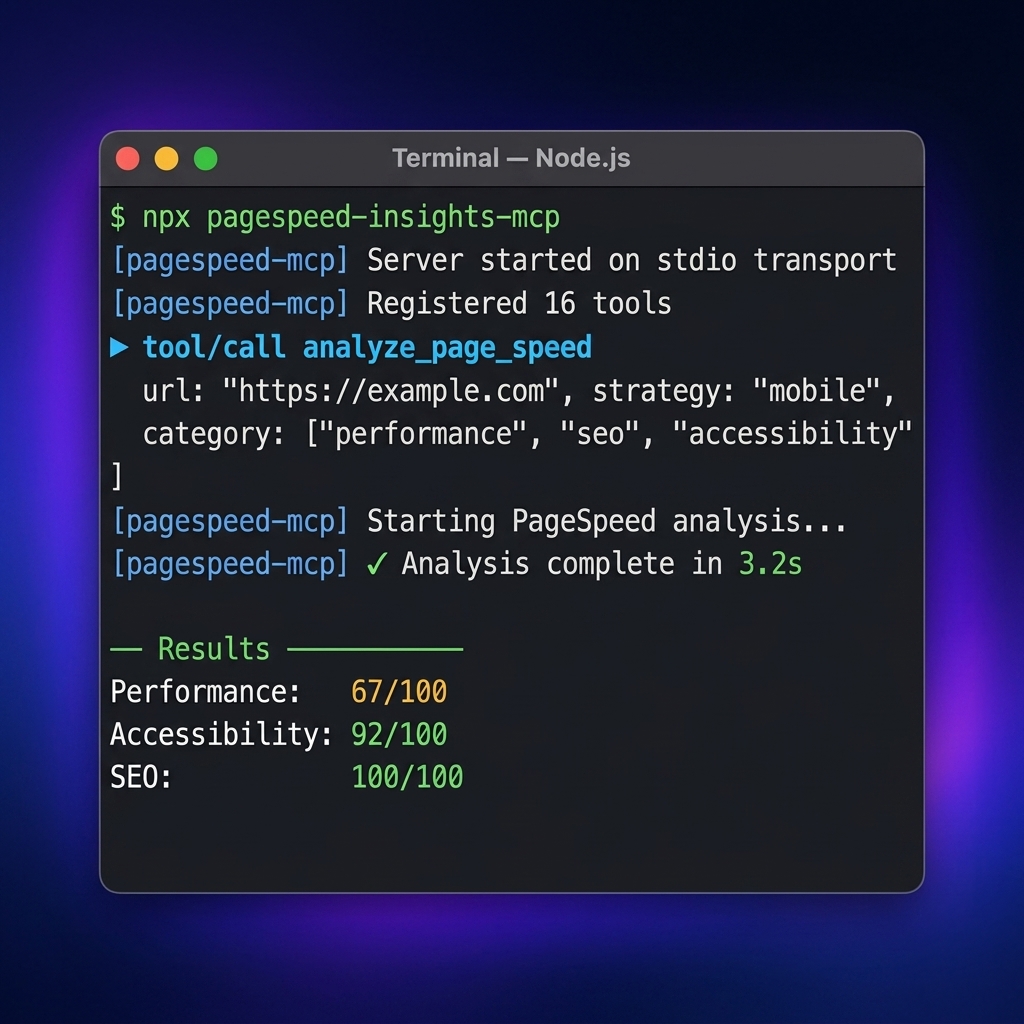
16 tools across three categories:
| Tool | Description |
|---|---|
analyze_page_speed | Full Lighthouse analysis — all metrics and audits |
get_performance_summary | Simplified key-metrics report |
get_recommendations | Prioritized recommendations with actionable fixes |
full_report | Unified report combining Lighthouse lab data with CrUX field data |
batch_analyze | Analyze up to 10 URLs in parallel with progress tracking |
clear_cache | Clear internal cache to force fresh API requests |
| Tool | Description |
|---|---|
crux_summary | Real-world Core Web Vitals from Chrome UX Report (field data) |
compare_pages | Side-by-side performance comparison between two URLs |
| Tool | Description |
|---|---|
get_visual_analysis | Screenshots, filmstrip, and full-page captures |
get_element_analysis | LCP/CLS DOM elements causing performance issues |
get_network_analysis | Network waterfall — all requests with timing and size |
get_javascript_analysis | JS bootup time, main-thread work, unused & duplicated modules |
get_image_optimization_details | Images needing optimization with exact savings |
get_render_blocking_details | Render-blocking resources and critical request chains |
get_third_party_impact | Third-party script impact grouped by provider |
get_full_audit | Complete Lighthouse audit for all categories |
analyze_page_speedComplete page analysis with all Lighthouse metrics.
Parameters:
url (required): URL of the page to analyzestrategy: "mobile" or "desktop" (default: "mobile")category: array of categories ["performance", "accessibility", "best-practices", "seo", "pwa"]locale: locale for results (default: "en")get_performance_summarySimplified report with key performance metrics.
get_recommendationsGenerate smart performance recommendations with priority scoring and actionable fixes.
Parameters:
url (required): URL of the page to analyzestrategy: "mobile" or "desktop" (default: "mobile")category: array of categories to analyze (default: ["performance", "accessibility", "best-practices", "seo"])locale: locale for results (default: "en")clear_cacheClear the internal cache to force fresh API requests for all subsequent analyses.
get_visual_analysisGet screenshots and visual timeline showing how the page loads.
Parameters:
url (required): URL of the page to analyzestrategy: "mobile" or "desktop" (default: "mobile")Returns:
get_element_analysisGet specific DOM elements causing performance issues.
Parameters:
url (required): URL of the page to analyzestrategy: "mobile" or "desktop" (default: "mobile")Returns:
get_network_analysisGet detailed network waterfall showing all requests with timing and size.
Parameters:
url (required): URL of the page to analyzestrategy: "mobile" or "desktop" (default: "mobile")Returns:
get_javascript_analysisGet JavaScript execution breakdown showing performance impact.
Parameters:
url (required): URL of the page to analyzestrategy: "mobile" or "desktop" (default: "mobile")Returns:
get_image_optimization_detailsGet specific images needing optimization with exact savings potential.
Parameters:
url (required): URL of the page to analyzestrategy: "mobile" or "desktop" (default: "mobile")Returns:
get_render_blocking_detailsGet render-blocking resources and critical request chains.
Parameters:
url (required): URL of the page to analyzestrategy: "mobile" or "desktop" (default: "mobile")Returns:
get_third_party_impactGet third-party script impact analysis grouped by entity.
Parameters:
url (required): URL of the page to analyzestrategy: "mobile" or "desktop" (default: "mobile")Returns:
get_full_auditGet comprehensive audit results for all Lighthouse categories.
Parameters:
url (required): URL of the page to analyzestrategy: "mobile" or "desktop" (default: "mobile")categories: array of categories to audit (default: ["performance", "accessibility", "best-practices", "seo"])Returns:
crux_summaryGet real-world Core Web Vitals from the Chrome UX Report (field data from actual Chrome users).
Parameters:
url (required): URL to analyzeformFactor: "PHONE", "DESKTOP", or "TABLET" (default: "PHONE")Returns:
compare_pagesCompare performance metrics between two URLs side-by-side.
Parameters:
urlA (required): First URL to compareurlB (required): Second URL to comparestrategy: "mobile" or "desktop" (default: "mobile")Returns:
full_reportUnified report combining Lighthouse lab data with CrUX real-world field data.
Parameters:
url (required): URL to analyzestrategy: "mobile" or "desktop" (default: "mobile")Returns:
batch_analyzeAnalyze performance for multiple URLs with progress tracking.
Parameters:
urls (required): Array of URLs to analyze (max 10)strategy: "mobile" or "desktop" (default: "mobile")Returns:
answer example from Claude Desktop with pagespeed-insights-mcp 🔥🔥🔥
Now I have the full analysis! Here are all the ratings:
| Category | Score | Status |
|---|---|---|
| Performance | 67/100 | 🟡 Needs Improvement |
| Accessibility | 92/100 | 🟢 Good |
| Best Practices | 96/100 | 🟢 Excellent |
| SEO | 100/100 | 🟢 Perfect |
| Metric | Value | Score |
|---|---|---|
| First Contentful Paint | 1.2s | 🟢 Excellent (98/100) |
| Largest Contentful Paint | 2.4s | 🟡 Needs Improvement (75/100) |
| Speed Index | 4.8s | 🟡 Needs Improvement (67/100) |
| Total Blocking Time | 60ms | 🟢 Good (94/100) |
| Cumulative Layout Shift | 0 | 🟢 Perfect (100/100) |
| Audit | Score | Description |
|---|---|---|
| Label Content Name Mismatch | 🔴 0/1 | 2 errors with aria-label |
| Unsized Images | 🟡 0.5/1 | 1 image without dimensions |
| Color Contrast | 🟢 1/1 | Sufficient contrast |
| Button Names | 🟢 1/1 | Accessible button names |
| Link Names | 🟢 1/1 | Accessible link names |
| ARIA Roles | 🟢 1/1 | Correct ARIA roles |
| HTML Lang | 🟢 1/1 | Valid lang attribute |
| Meta Viewport | 🟢 1/1 | Proper viewport |
| Image Alt Text | 🟢 1/1 | Correct alt attributes |
| List Items | 🟢 1/1 | Proper list structure |
| Audit | Score | Status |
|---|---|---|
| Uses HTTPS | 🟢 ✓ | HTTPS is used |
| HTTP Status Code | 🟢 1/1 | Correct 200 status |
| No Console Errors | 🟢 1/1 | No console errors |
| Valid Source Maps | 🟢 1/1 | Valid source maps |
| No Notification Requests | 🟢 1/1 | No notification requests |
| Charset Declaration | 🟢 1/1 | Correct encoding |
| No Inspector Issues | 🟢 1/1 | No DevTools issues |
| Audit | Score | Status |
|---|---|---|
| Meta Viewport | 🟢 1/1 | Mobile optimized |
| Document Title | 🟢 1/1 | Title present |
| Meta Description | 🟢 1/1 | Description present |
| HTTP Status Code | 🟢 1/1 | Successful status |
| Link Text | 🟢 1/1 | Descriptive link texts |
| Crawlability | 🟢 1/1 | Available for indexing |
| HTML Lang | 🟢 1/1 | Valid document language |
| Hreflang | 🟢 1/1 | Correct hreflang attributes |
| Issue | Affects | Potential Savings |
|---|---|---|
| Improperly sized images | LCP, FCP | 1,069 KB, 170ms |
| Inefficient caching | Overall speed | 1,445 KB |
| Forced Reflows | Smoothness | 46.8ms |
| JavaScript execution time | TBT | 338ms |
| Metric | Value |
|---|---|
| Server Response Time | 120ms (🟢 Good) |
| Network RTT | Minimal |
| Main Thread Work | 0.9s |
| DOM Size | 453 elements (optimal) |
Overall Rating: Good with potential for improvement
The site has excellent SEO optimization and follows best practices, but needs image optimization to improve performance.
Parameters:
url (required): URL of the page to analyzestrategy: "mobile" or "desktop" (default: "mobile")For better log formatting during development, it is recommended to install pino-pretty globally:
npm install -g pino-pretty
# Development mode
npm run dev

# Build project
npm run build

# Run built server
npm start
pino-pretty in MCP environmentsThis MCP server uses pino for logging and enables the pino-pretty transport when NODE_ENV=development.
NODE_ENV=production GOOGLE_API_KEY=your-google-api-key npx pagespeed-insights-mcp
or in your MCP config:
"pagespeed-insights": {
  "command": "npx",
  "args": ["pagespeed-insights-mcp"],
  "env": {
    "GOOGLE_API_KEY": "your-google-api-key-here",
    "NODE_ENV": "production"
  }
}
npx, you can have npx install pino-pretty alongside the server:"pagespeed-insights": {
"command": "npx",
"args": [
"-y",
"-p",
"pino-pretty",
"-p",
"pagespeed-insights-mcp",
"pagespeed-insights-mcp"
],
"env": {
"GOOGLE_API_KEY": "your-google-api-key-here"
}
}
Ensure the GOOGLE_API_KEY environment variable is set in your Claude Desktop configuration.
Check if PageSpeed Insights API is enabled in your Google Cloud project.
Ensure the URL includes the protocol — only http:// and https:// are accepted. Other schemes (file://, ftp://, javascript:, etc.) are rejected at the schema level.
Please report security issues privately — do not open a public issue. See SECURITY.md for the disclosure policy and operator hardening notes.
Special thanks to @engmsaleh (Mohamed Saleh Zaied) for his significant contribution to the development of this project.
A very special thank you to @system-conf for their outstanding and invaluable contribution to the growth and development of this project. Your dedication, expertise, and continuous support have made a tremendous impact — this project wouldn't be where it is today without you. 🙏
MIT
For bug reports or feature requests, please create an issue in the repository.
Run Claude Code as an MCP server so any agent can delegate coding tasks to it
 @microsoft✓ Official
Browser automation using accessibility snapshots instead of screenshots
 @googleapis✓ Official
Google's universal MCP server supporting PostgreSQL, MySQL, MongoDB, Redis, and 10+ databases
 @github✓ Official
Official GitHub integration for repos, issues, PRs, and CI/CD workflows