

Are you the author? Sign in to claim
AI video auto-dubbing plugin for coding agents — translate & dub videos into multiple languages via the Perso Dubbing AP




English | 한국어 | Español | Português | Русский | Bahasa Indonesia | Deutsch | ไทย | 日本語 | 繁體中文 | 简体中文 | Tiếng Việt | Français
A coding-agent skill that brings Perso Dubbing's AI dubbing to your agent. Install it once, then just say "dub this video into English".
/srt) — extract an SRT via speech-to-text, then your agent translates itRuns on Node.js 18+ and needs a Perso Dubbing API key. Built on the Agent Skills standard (SKILL.md), so it behaves identically on Claude, Codex, and Antigravity.
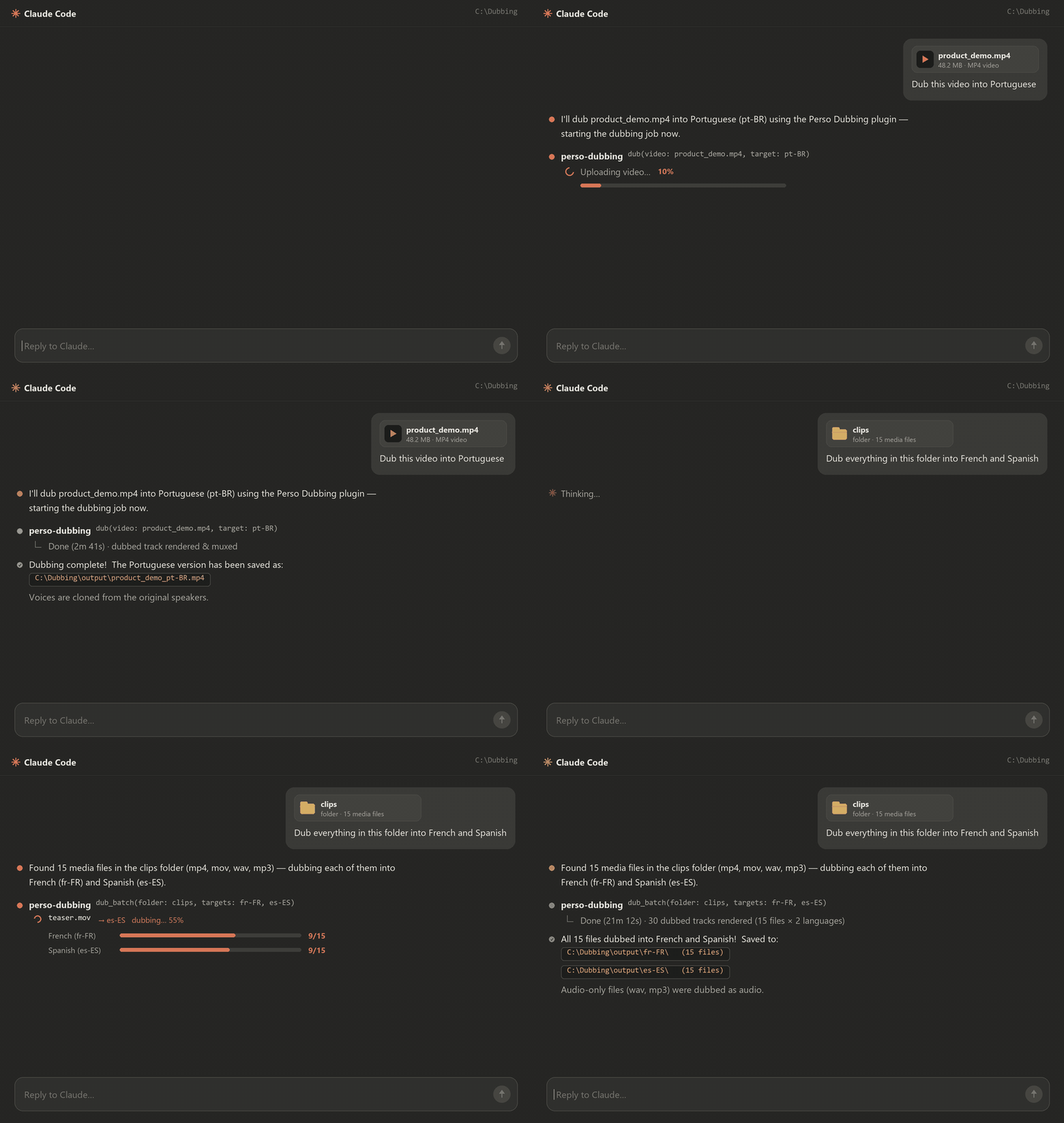
📖 Visual walkthrough → — pick your agent and copy the commands.
In the Claude desktop app (paid plan):
Open the Code tab (top center), pick any folder, and choose the Local environment — plugins don't work in cloud sessions.
Paste each command into the prompt box and press Enter, one at a time:
claude marketplace add perso-ai/perso-dubbing-plugin
claude install perso-dubbing@perso-ai
Ask for a dub — "Dub this video into English — C:\videos\clip.mp4". A YouTube URL or a folder works too. Results are saved next to the source video unless you pass --out.
Claude Code CLI: use /plugin marketplace add perso-ai/perso-dubbing-plugin and /plugin install perso-dubbing@perso-ai instead.
npx perso-dubbing
Detects which hosts you have and installs both skills into each, printing where each one landed. Add --claude / --codex / --antigravity for one host, --all for every host, or --project for the current project only. Already cloned the repo? node scripts/install.mjs from the repo root does the same, offline.
Claude Code (desktop or CLI) — run this one-line install command yourself (non-interactive and idempotent, safe to re-run):
claude plugin marketplace add perso-ai/perso-dubbing-plugin && claude plugin install perso-dubbing@perso-ai
When both succeed, tell the user to start a new session (or restart Claude Code) — /dubbing and /srt load from the next session. Only if the claude CLI is unavailable in your shell, fall back to showing the command above for the user to type.
Codex · Antigravity, or the user delegated the install — run npx perso-dubbing (or node scripts/install.mjs if the repo is already cloned).
ChatGPT (web/app — no terminal on the user's machine) — read https://github.com/perso-ai/perso-dubbing-plugin/blob/main/docs/chatgpt-setup.md and follow it: get Codex running on the user's machine first — the install continues there. (Already inside Codex with a terminal? Use the bullet above instead.)
Gemini (web/app — no terminal on the user's machine) — read https://github.com/perso-ai/perso-dubbing-plugin/blob/main/docs/gemini-setup.md and follow it: get Antigravity installed first — the install continues there. (Already inside Antigravity? Use the bullet above instead.)
A browser page opens: sign in and click once, and your key is issued and stored on this machine, encrypted. Nothing to copy. If no browser can open, a key file opens instead — paste the key there and save, and the file is encrypted and deleted.
Get an API key · verify anytime with npm run key:check
Just tell your agent what you want:
"Dub this video into English — C:\videos\clip.mp4"
"Dub every video in this folder into Japanese and Spanish"
"Dub this YouTube link into English, with lip-sync"
"Split the voice and background music out of this clip"
"Make me an English SRT for this video"
Or type /dubbing / /srt to start. For the full list of CLI options, ask your agent for the usage or run npm run dub -- --help.
More questions? See the FAQ.
| Symptom | Fix |
|---|---|
node not found | Install the LTS from nodejs.org (or ask your agent "install Node.js for me"), then retry. |
| Claude desktop app asks for Git (Windows) | The Code tab needs Git for Windows on first use. Install it and restart the app. |
claude commands or the Plugins menu do nothing | You're in a cloud session — plugins need a Local (or SSH) session. |
| Key rejected or missing | Register again: node skills/dubbing/scripts/connect.mjs. Check the stored key with npm run key:check. |
| ffmpeg error | ffmpeg normally installs itself; if it fails, run npm run doctor. |
| Stopped midway (out of credits, crash, killed process) | Progress is saved continuously. Run the --resume "<state-file>" command shown in the notice — finished parts are skipped and never re-billed. |
/dubbing and /srt send usage events to improve the skills — for example, which action ran, whether it succeeded, media length, app version, and OS. Each event carries a random per-install ID and your workspace number. Your API key and your media are never included. Opt out anytime with PERSO_NO_TELEMETRY.
.claude-plugin/    Claude Code plugin + marketplace manifests
.codex-plugin/     Codex plugin manifest
docs/              GitHub Pages landing + translated README · FAQ (12 languages)
skills/dubbing/    The dubbing skill (SKILL.md · lib/ · scripts/) — self-contained
skills/srt/        The SRT subtitle skill (SKILL.md · scripts/) — uses the dubbing skill's lib/
scripts/           Repo-level installer (install.mjs)
The skill code is MIT. Dubbing itself runs through the Perso Dubbing API, so API usage is subject to the Perso AI Terms of Service and pricing.
1000+ skills curated from Anthropic, Vercel, Stripe, and other engineering teams
Agent harness performance optimization with skills, instincts, memory, and security
Design enforcement with memory — keeps your UI consistent across a project
Detects 37 AI writing patterns and rewrites text with human rhythm across 5 voice profiles
