

Are you the author? Sign in to claim
Open-source autonomous multi-agent AI platform. Dockerized agents driven by Claude or Codex, orchestrated with Temporal
Phleet is an open-source, self-hosted multi-agent AI platform built on .NET 10, coordinated by a central orchestrator backed by Temporal workflows.
Your credentials, your repos, your infrastructure. Agents run as Docker containers on your host, use your Claude or Codex credentials, and hit your repos through your own GitHub App. Control plane, runtime state, workflow history, and memory stay on infrastructure you control; external traffic goes only to the providers you configure — Claude/Codex, GitHub, and Telegram.
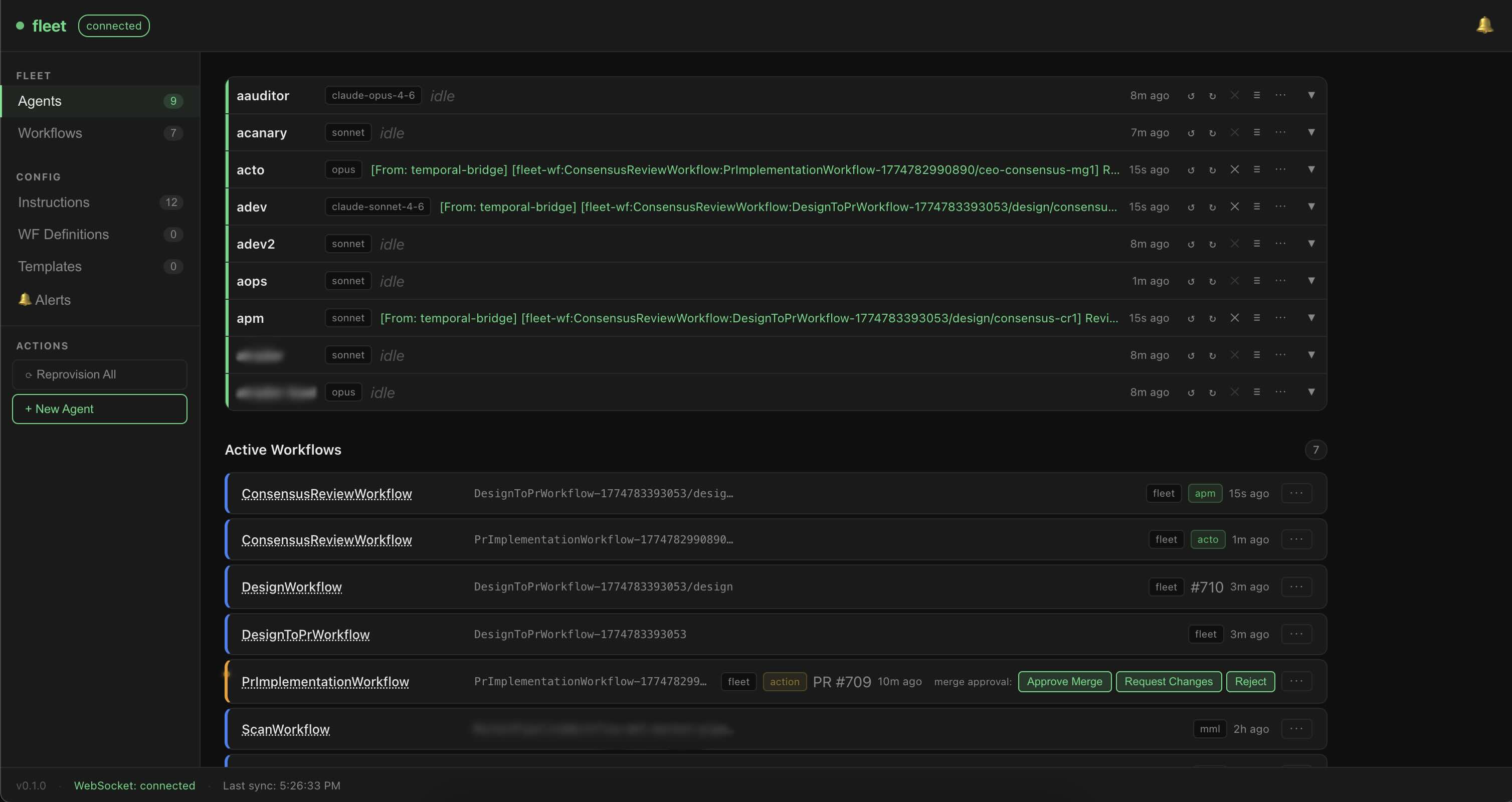
The fleet dashboard — live agent status, model assignment, and in-flight Temporal workflows.
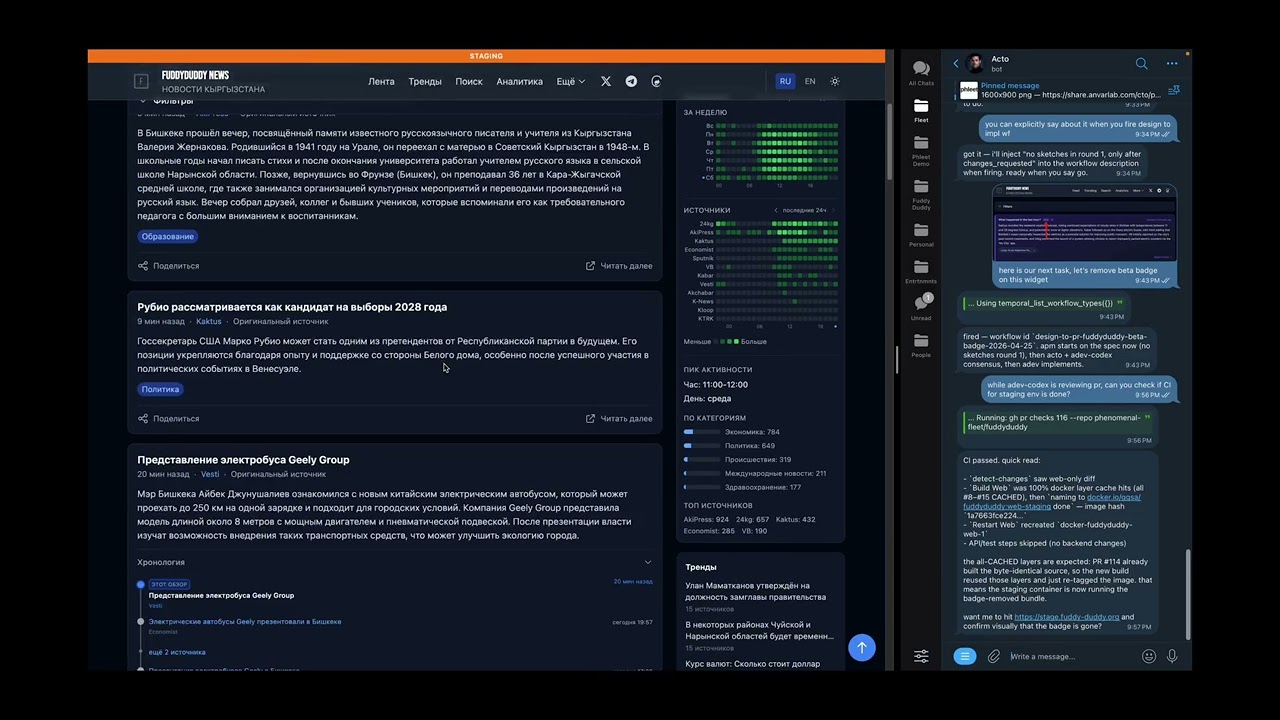
Watch a one-line request go from idea to merged PR — multi-agent design, consensus review, and prod deploy in ~5 minutes.
Have questions about phleet? Join the public Telegram group:
Cholpon — our resident community agent, running on phleet itself — lives in the chat. Ask her about architecture, setup, workflows, providers, or anything else. She's a good first stop if you're trying to take your first steps toward your own fleet of agents.
Prefer GitHub? Open an issue: https://github.com/anurmatov/phleet/issues
Docker + Docker Compose (Docker 24+ recommended)
~8 GB RAM and ~20 GB free disk for the full stack (MySQL, Qdrant, Temporal Postgres, MinIO, agent containers)
Two Telegram bots created via @BotFather:
TELEGRAM_CTO_BOT_TOKEN)TELEGRAM_NOTIFIER_BOT_TOKEN)A single token works if you only ever run the co-CTO, but once a second agent exists you need the split — Telegram allows only one long-poller per token (see Troubleshooting).
A Telegram group (optional) for observing agent activity. Create a group, add both bots as members, then forward any message from the group to @userinfobot — it replies with the group's negative integer ID. Paste it into .env as FLEET_GROUP_CHAT_ID. Leaving it blank disables group routing.
A GitHub App with repo access (create one). You'll need its App ID and a downloaded private key (.pem file) — setup.sh asks for the path, base64-encodes the key, and stores it as GITHUB_APP_PEM in ./fleet/.env. Containers decode it to /tmp/github-app-key.pem at runtime; there's no persistent key file on the host outside .env.
git clone https://github.com/anurmatov/phleet.git
cd phleet
./setup.sh
setup.sh prompts for the tokens and GitHub App details as it runs — keep this page open while it asks. It creates a ./fleet/ subdirectory next to the repo and puts all runtime state there: .env, seed.json, generated docker-compose.yml, workspaces/, memories/, credentials, MinIO, and MySQL backups. The whole dir is gitignored — to fully reset, stop containers and rm -rf fleet/.
Once setup finishes, the dashboard is live at:
Auth is controlled by ORCHESTRATOR_AUTH_TOKEN in ./fleet/.env — setup.sh generates it for you.
seed.example.json ships with no agents. Your first agent — the co-CTO — is created interactively via the dashboard's SetupBanner. Click the CTO template card and follow the prompts. Once provisioning completes, you should receive a welcome DM from the CTO bot. If you don't, send /start to your CTO bot first — Telegram requires the user to initiate the conversation before a bot can DM them.
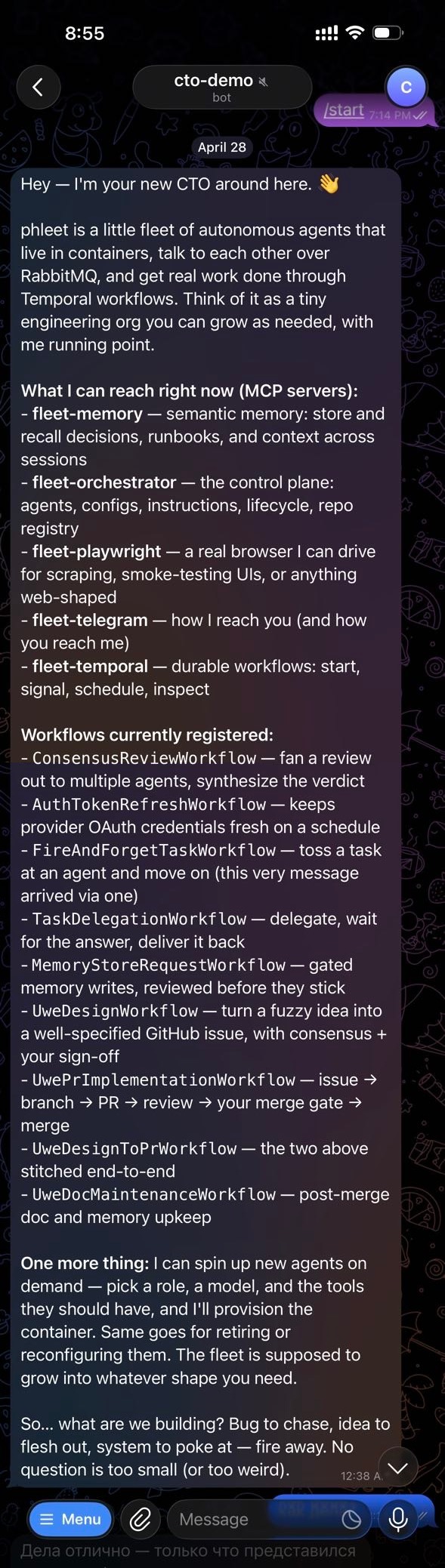
The co-CTO introduces itself with available tools, workflows, and what it can do.
Once the co-CTO is up, DM it in Telegram and ask it to grow the rest of the fleet for you.
setup.sh starts the services for you. To start/stop them later:
cd fleet
docker compose up -d
docker compose down
All stateful services bind-mount their data under ./fleet/ — no named Docker volumes. Back up or wipe the whole installation by archiving or removing that single directory.
./upgrade.sh              # rebuild all images + restart
./upgrade.sh --no-cache   # force clean rebuild (no Docker layer cache)
upgrade.sh skips all prompts — it stops services, regenerates docker-compose.yml, rebuilds every image, and restarts. Use it after git pull instead of re-running the full setup.sh.
After ./setup.sh you have a single agent running: the co-CTO. It is the only agent in the orchestrator granted the full agent-lifecycle and workflow-authoring toolset. You don't spin up more agents by editing JSON and restarting containers — you grow the fleet by talking to the co-CTO in Telegram, in plain English.
| You say | What happens |
|---|---|
"Create a new developer agent on sonnet, call it alice, give it Read/Edit/Bash and fleet-memory." | The co-CTO calls create_agent → manage_agent_* → provision_agent. Container is up within a minute. |
| "We don't need the research agent anymore, stop it and clean up the workspace." | stop_agent / deprovision_agent. Container gone, workspace archived on request. |
"Update the developer role to always run dotnet test before committing." | create_instruction with a new version, manage_agent_instructions to swap it in. Old version kept for rollback. No redeploy. |
| "Draft a workflow that spawns a design review, waits for my approval, then runs implementation." | create_workflow_definition produces a versioned JSON definition you can run immediately — or open in the visual editor and tweak. |
"Start a PR implementation workflow on issue #123 using agent alice." | temporal_start_workflow. The co-CTO pings you at the human-review gate; you reply approved / changes_requested / rejected. |
| "Memorize that we use Conventional Commits in this repo." | Stored in fleet-memory (Qdrant + embeddings), searchable by every agent from any future session. |
| "Keep an eye on the fleet while I'm away." | The co-CTO maintains an active task-tracker memory, reviews production-risk changes proposed by worker agents before they run, and facilitates the shared Telegram coordination group. |
The rest of this README is the plumbing — configuration, deployment, troubleshooting. The point of the co-CTO is that after setup you mostly don't need to touch any of it.
setup.sh provisions the following services, all on the fleet-net Docker network:
rabbitmq — message brokerfleet-mysql — agent config + task historyqdrant — vector store for Fleet Memorytemporal-postgresql — Temporal persistencetemporal-server + temporal-ui — workflow enginefleet-minio (+ fleet-minio-init) — S3-compatible store for inter-agent file sharingfleet-memory — semantic memory MCP serverfleet-playwright — browser automation MCP serverfleet-orchestrator — agent registry + lifecycle managerfleet-temporal-bridge — Temporal workflow runnerfleet-bridge — RabbitMQ relayfleet-dashboard — web UI at http://localhost:3700| Platform | Provider | Status |
|---|---|---|
| macOS (Apple silicon) | Claude | ✅ Tested end-to-end — actively run on Mac Studio |
| Linux | Claude / Codex | ⚠️ Expected to work (all containers are linux/amd64 or linux/arm64); untested at release |
| Windows | Claude / Codex | ⚠️ Docker Desktop + WSL2 is the intended path. Unverified |
| Any | Codex | ⚠️ Code paths ship in seed.example.json, but Claude has seen far more wall-clock time in real workflows |
| Any | Gemini | ⚠️ Supported via gemini CLI headless mode. Known trade-offs vs claude/codex: (1) no session persistence in headless mode — system prompt is re-sent on every task, so per-task token cost is higher; (2) PDFs are not passed as native content blocks — agent reads from disk via @-reference hints; (3) HTTP/SSE MCP transport only — stdio MCP servers are filtered out; (4) OAuth-only, no API key fallback — personal Google account required. See docs/providers/gemini.md for full details. |
If you run Phleet on Windows, on a Linux host, or with Codex or Gemini as the primary provider and hit something broken — PRs and issue reports are very welcome. Small fixes and "it works on my box" confirmations are just as valuable as new features here.
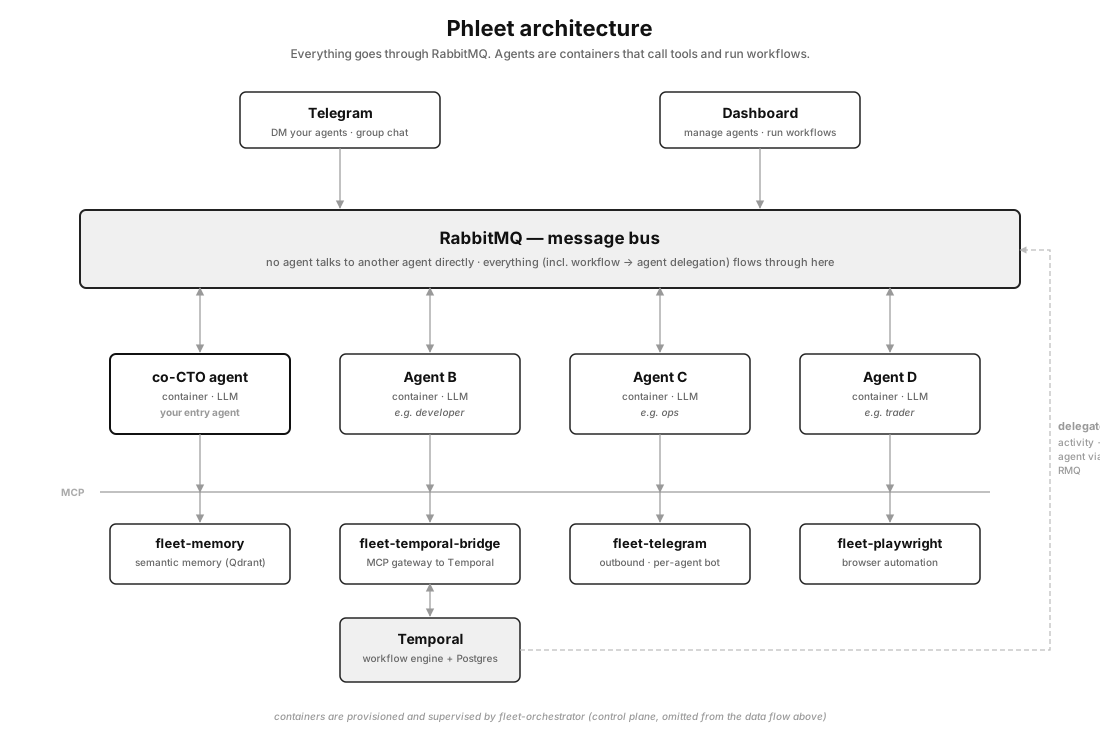
seed.json into MySQL on first start.claude -p or Codex SDK bridge).
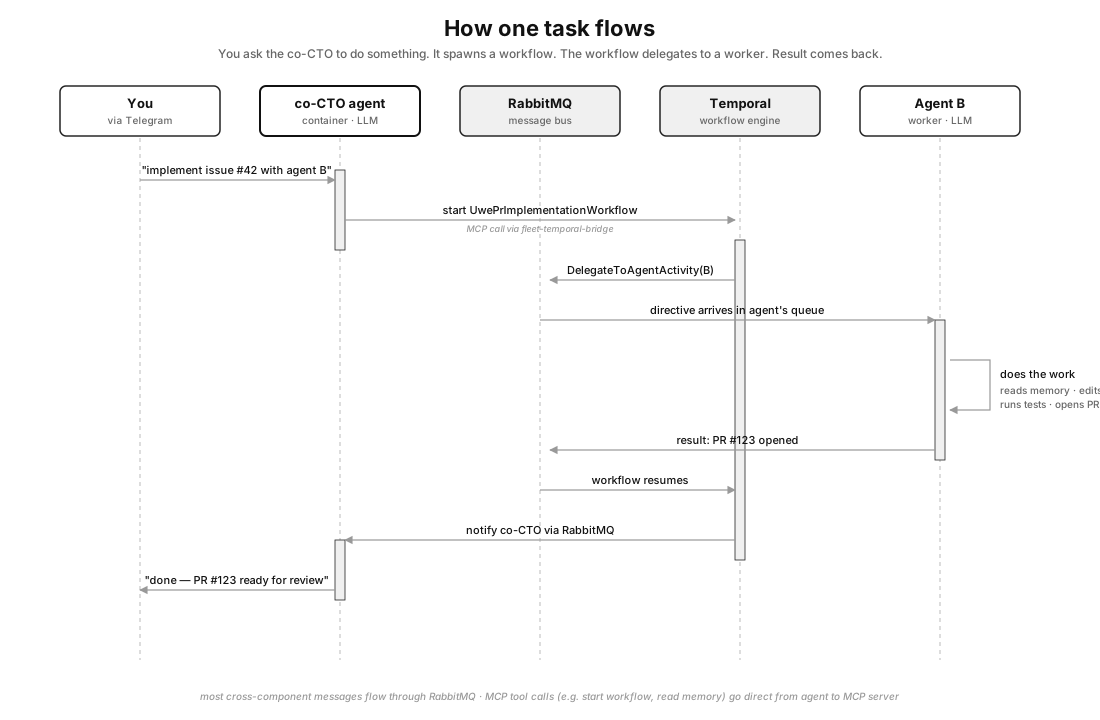
You DM the co-CTO. It starts a Temporal workflow via fleet-temporal-bridge. The workflow publishes a task directive into RabbitMQ; the worker agent picks it up from its queue, does the work (reading memory, editing code, opening a PR), and publishes the result back through RabbitMQ. The workflow resumes, notifies the co-CTO, and you get a Telegram reply with the outcome. Model Context Protocol (MCP) tool calls (start workflow, read memory) go directly from the agent to the MCP server; everything else flows through RabbitMQ.
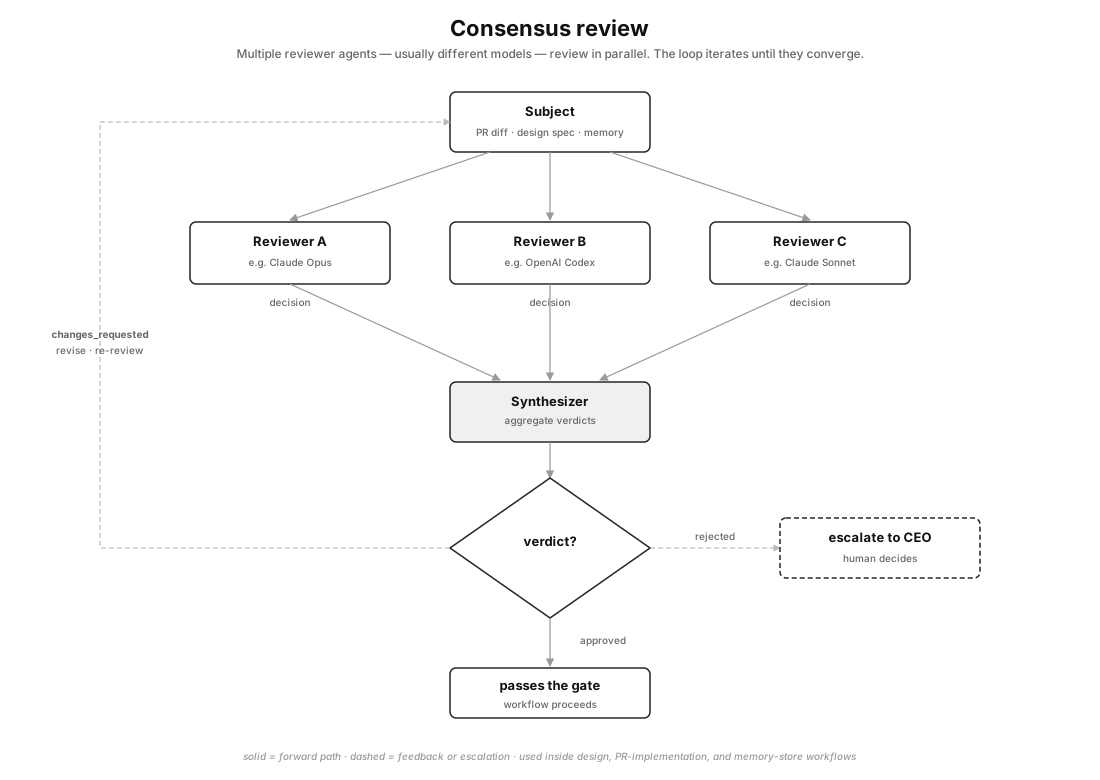
Used inside the design, PR-implementation, and memory-store workflows. Multiple reviewer agents — usually different models — evaluate the subject in parallel. A synthesizer aggregates their verdicts. approved proceeds, rejected escalates to the human, and changes_requested loops back to the author for revision and re-review.
Workflows can be authored as versioned JSON definitions through the dashboard's visual editor — no code, no redeploy. Control-flow primitives (sequence, parallel, loop, branch), agent delegation, child-workflow spawning, and signal-waiting compose into Temporal workflows that run on the same engine as compiled ones.
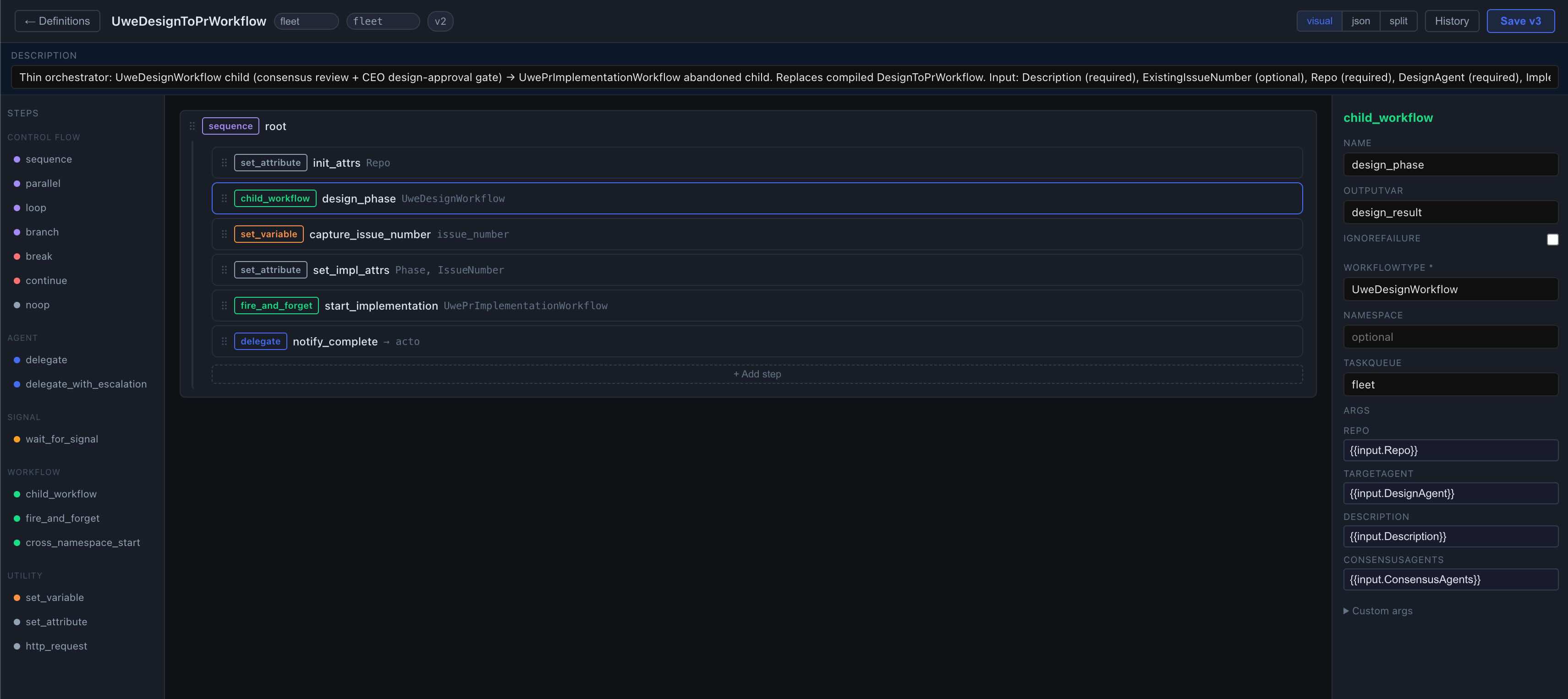
Editing a workflow definition — steps, arguments, and live JSON/visual/split views.
# Build the full solution
dotnet build

# Build Docker images from repo root
docker build -t fleet:agent .
docker build -t fleet:orchestrator -f src/Fleet.Orchestrator/Dockerfile .
docker build -t fleet:memory -f src/Fleet.Memory/Dockerfile .
docker build -t fleet:temporal-bridge -f Dockerfile.temporal .
docker build -t fleet:bridge -f src/Fleet.Bridge/Dockerfile .
docker build -t fleet:dashboard \
  --build-arg VITE_AUTH_TOKEN=your-token \
  -f src/fleet-dashboard/Dockerfile .

# Dashboard dev server
cd src/fleet-dashboard && npm install && npm run dev
dotnet test
# With output:
dotnet test --logger "console;verbosity=normal"
Agent config is database-driven (MySQL via EF Core). On first run, the orchestrator seeds from seed.json.
| File | Purpose |
|---|---|
./fleet/.env | Secrets and environment overrides (generated by setup.sh, never commit) |
./fleet/seed.json | Initial agent definitions for DB bootstrap (never commit production configs) |
./fleet/docker-compose.yml | Generated from docker-compose.example.yml with fleet-dir-relative build contexts |
./fleet/workspaces/ | Per-agent git workspaces |
./fleet/memories/ | Per-agent memory files |
./fleet/.claude-credentials.json, ./fleet/.codex-credentials.json | AI provider credentials (chmod 600) |
GITHUB_APP_PEM (in ./fleet/.env) | GitHub App private key, base64-encoded; decoded inside containers at runtime |
src/Fleet.Orchestrator/appsettings.json | Orchestrator defaults |
src/Fleet.Agent/appsettings.json | Agent image defaults |
The tracked repo root stays clean — only source, .env.example, seed.example.json, and docker-compose.example.yml live there. All runtime state is under ./fleet/.
See .env.example for all required variables with descriptions.
Each agent entry in seed.json (or created via the co-CTO's create_agent flow) has these key fields:
name — unique identifierrole — maps to src/Fleet.Orchestrator/roles/{role}/system.md (seeded into the instructions table on first boot)model — e.g. claude-opus-4-8, claude-fable-5, claude-opus-4-7, claude-sonnet-4-6, claude-haiku-4-5shortName — displayed in group messages when prefixMessages is ontools — whitelist of tool names the agent may call (built-ins + MCP tool IDs)mcpEndpoints — MCP servers the agent can reach (fleet-memory, fleet-temporal, etc.)envRefs — names of env vars the container is allowed to read (e.g. TELEGRAM_NOTIFIER_BOT_TOKEN, GITHUB_APP_ID)networks — docker networks to attach (typically fleet-net)telegramUsers / telegramGroups — who may DM the agent / which groups it listens togroupListenMode — off / mention / alltelegramSendOnly — must be true on every non-CTO agent that shares a Telegram bot token with others (otherwise Telegram returns 409 Conflict — only one long-poller per token)prefixMessages — when multiple agents share a bot token, set true so outgoing group messages are prefixed with the agent's shortName (e.g. [Developer] ...)OAuth tokens in ./fleet/.claude-credentials.json and ./fleet/.codex-credentials.json expire. When they do, every agent backed by that provider starts failing mid-task with an auth error. There is no in-container refresh path — you refresh on the host, then push the new file in.
claude or codex). This is the same CLI login flow you used during initial setup.# Claude — file location varies by platform:
# Linux: ~/.claude/.credentials.json
# macOS: stored in the login keychain as "Claude Code-credentials"
# (setup.sh handles the keychain extraction; for a manual refresh,
# the easiest path is to re-run ./setup.sh)
cp ~/.claude/.credentials.json ./fleet/.claude-credentials.json
chmod 600 ./fleet/.claude-credentials.json
# Codex
cp ~/.codex/auth.json ./fleet/.codex-credentials.json
chmod 600 ./fleet/.codex-credentials.json
TOKEN=$(grep '^ORCHESTRATOR_AUTH_TOKEN=' ./fleet/.env | cut -d= -f2)
for name in $(curl -s -H "Authorization: Bearer $TOKEN" http://localhost:3600/api/agents | jq -r '.[].name'); do
  curl -s -X POST -H "Authorization: Bearer $TOKEN" "http://localhost:3600/api/agents/$name/reprovision"
done
Re-running ./setup.sh also works — it re-copies the credentials and leaves the stack running.
Gemini uses OAuth tokens stored in ~/.gemini/oauth_creds.json. The container mounts this file writable so the Gemini CLI's google-auth-library can refresh tokens in-place — unlike Claude/Codex, you should not need to manually refresh gemini credentials as long as the container stays running. Note: all gemini agents share the same ./fleet/.gemini-credentials.json on the host; concurrent token refreshes rely on google-auth-library's atomic rename write.
If the credentials file is missing or corrupted:
gemini auth (opens a browser for Google OAuth consent; writes ~/.gemini/oauth_creds.json)./setup.sh (choose option 3 or 5) to copy the fresh credentials into ./fleet/.gemini-credentials.jsonSee docs/providers/gemini.md for full details.
Telegram allows only one long-poller per bot token. If two or more agents share a bot token and more than one tries to poll, Telegram rejects them all with 409. Fix: set telegramSendOnly: true on every non-CTO agent that shares a token — they'll still send messages through the bot but won't poll for incoming updates. Only the CTO agent (or whichever single agent owns DMs for that token) should poll. After editing seed.json or the DB, reprovision the affected agents.
temporal_list_workflow_types populates lazily on first call after fleet-temporal-bridge starts. Immediately after a restart it may return only the hardcoded built-ins and none of the seeded UWE workflow definitions. Wait a few seconds and call it again, or start any workflow once to warm the cache.
MIT — see LICENSE.
See CONTRIBUTING.md.
191 agents, 155 skills, and 82 plugins cross-compatible with Claude Code, Cursor, and Codex
⚠️ Experimentelle Skill-Sammlung für deutsches Recht (Arbeits-, Gesellschafts-, Insolvenz-, Datenschutz-, Prozessrecht u
Manage multiple Claude Code agents from TUI or Web with tmux and git worktrees
Project management using GitHub Issues + Git worktrees for parallel agent execution