

Are you the author? Sign in to claim
The Crossroads for AI Data Exchanges. A unified, self-hostable web interface for discovering, configuring, and managing

Turn your AI conversations into permanent organizational memory



🚀 Get Started • 📚 Documentation • 🌟 Features • 💬 Community
amd64 and arm64 architectures via a unified manifest.
🧠 v3.0.0 — Embedded RAG Vector Engine:
RAG now runs fully in-process using zvec (RocksDB + HNSW). No external services needed — document processing, chunking, and semantic search are all built-in.Every day, you have brilliant conversations with AI - strategy sessions with GPT-4, code reviews with Claude, analysis with Gemini. But when you close that chat window, all that knowledge vanishes. This is the "AI knowledge evaporation" problem.
plugged.in is the world's first AI Content Management System (AI-CMS) - a platform that transforms ephemeral AI interactions into persistent, versioned, and searchable organizational knowledge.
Think of it as "Git for AI-generated content" meets "WordPress for AI interactions".
Your AI conversations become permanent assets. Every document is versioned, attributed, and searchable.
Claude writes v1, GPT-4 adds technical specs in v2, Gemini refines in v3 - all tracked and attributed.
Works with 1,500+ MCP servers. Connect any tool, any AI, any workflow - all through one interface.
End-to-end encryption, OAuth 2.1, rate limiting, and sandboxed execution for your peace of mind.
Documents Managed: 90+ (72% AI-generated)
Integrated MCP Servers: 1,568
Active Versioning: Documents with up to 4 iterations
Model Attributions: 17 different AI models tracked
RAG Engine: Embedded zvec (RocksDB + HNSW) — zero external dependencies
Search Performance: Sub-second semantic search with cosine similarity
Security: AES-256-GCM encryption, Redis rate limiting
The default docker-compose.yml builds the app image from source (./Dockerfile) for your platform. There is intentionally no prebuilt self-host image: the embedded zvec vector engine needs build-time flags/bindings that a generic registry image can't carry, so the image is compiled locally with the right supportedArchitectures configuration.
The first
docker compose up --buildtakes roughly 10–15 minutes (installing dependencies +next build). Subsequent starts are instant — the image is cached. Requirements: Docker with BuildKit (Docker Desktop, ordocker buildx) and at least ~8 GB of memory allotted to the Docker engine —next buildis memory-hungry and will abort with "JavaScript heap out of memory" on smaller limits (raise it in Docker Desktop → Settings → Resources).
# Clone and setup
git clone https://github.com/VeriTeknik/pluggedin-app.git
cd pluggedin-app
cp .env.example .env
# Edit .env and set at minimum NEXTAUTH_SECRET (generate one with:
#   openssl rand -base64 32
# ). The bundled PostgreSQL/Redis URLs already work out of the box.

# Build the app image and start the full stack (PostgreSQL 18 + pgvector,
# Redis, one-shot migration, then the app):
docker compose up --build -d

# Follow startup (migration runs first, then the app becomes healthy):
docker compose logs -f pluggedin-app

# Visit http://localhost:12005
Useful commands:
docker compose ps                       # service status
docker compose run --rm pluggedin-migrate   # re-run database migrations
docker compose down                     # stop (keeps data)
docker compose down -v                  # stop + wipe all volumes
Production / hosted deployments use a different file — this
docker-compose.ymlis the self-host default, not the production stack:
docker-compose.production.yml— pulls the prebuiltveriteknik/pluggedinimage (the hosted/cloud build)infra/docker-compose.yml— the Traefik + SOPS production stack used by plugged.in
What's included:
Docker Architecture:
Services:
  - pluggedin-migrate:  One-shot DB migration; reuses the app image, then exits
  - pluggedin-app:      Main web application (host port 12005 → container 3000),
                        starts only after migration completes successfully
  - pluggedin-postgres: PostgreSQL 18 + pgvector database (port 5432)
  - pluggedin-redis:    Redis 7 (port 6379)

Volumes:
  - pluggedin-postgres: Database data (persistent)
  - pluggedin-redis:    Redis append-only data (persistent)
  - zvec-data:          Vector collections (persistent)
  - app-uploads:        User uploaded files (persistent)
  - app-logs:           Application logs (persistent)
  - mcp-cache:          MCP package cache (persistent)
Upgrading from older versions:
# If upgrading from PostgreSQL 16 or earlier
# Option 1: Fresh start (data loss)
docker compose down -v && docker compose up --build -d

# Option 2: Migrate existing data
docker exec pluggedin-postgres pg_dump -U pluggedin pluggedin > backup.sql
docker compose down -v
docker compose up -d
docker exec -i pluggedin-postgres psql -U pluggedin -d pluggedin < backup.sql
Visit plugged.in for instant access - no installation required.
customer_context, last_analysis)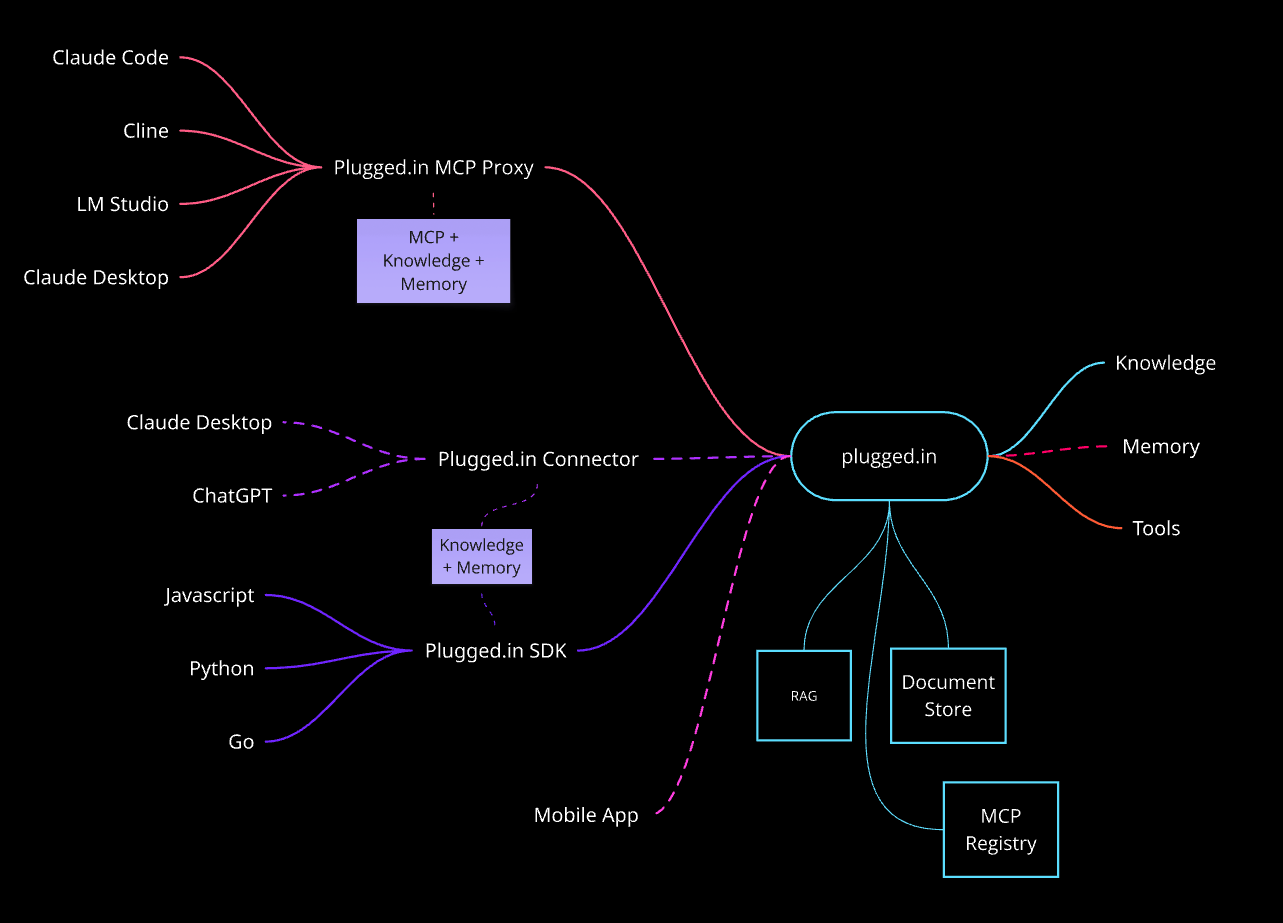
plugged.in acts as the central hub connecting various AI clients, development tools, and programming languages with your knowledge base and the broader MCP ecosystem. The architecture is designed for maximum flexibility and extensibility.
The MCP Proxy serves as a unified gateway that aggregates multiple MCP servers into a single interface:
How it works: Each AI client connects via STDIO, receiving access to all your configured MCP servers through one connection. The proxy handles:
Direct programmatic access through official SDKs:
@pluggedin/sdk) - Full-featured SDK for Node.js and browserpluggedin-sdk) - Pythonic interface for AI workflowspluggedin-go) - High-performance Go implementationUse Cases:
// Create documents programmatically
const doc = await client.documents.create({
  title: "API Analysis",
  content: "...",
  source: "api"
});

// Query RAG knowledge base
const results = await client.rag.query("How do we handle auth?");
The plugged.in web platform provides:
Knowledge Base (Embedded RAG)
Document Store
MCP Registry
Tools Management
Direct integrations bypassing the MCP Proxy for enhanced performance:
Why Native Connectors?
Persistent memory across sessions:
Example Workflow:
User Request Flow:
1. User asks question in Claude Desktop
2. MCP Proxy receives request
3. Proxy checks RAG for relevant context
4. Combines context + user question
5. Routes to appropriate MCP servers
6. Aggregates responses
7. Logs activity to database
8. Returns enriched response to user
Document Creation Flow:
1. AI generates document via SDK or user uploads PDF/text
2. Content processed, chunked, and sanitized
3. Model attribution recorded
4. Version created in Document Store
5. Chunks stored in PostgreSQL, embeddings indexed in zvec
6. Document searchable immediately via semantic search
All connections use:
The architecture supports:
Visit our comprehensive documentation at docs.plugged.in
Create a .env file with:
# Core (Required)
DATABASE_URL=postgresql://user:pass@localhost:5432/pluggedin
NEXTAUTH_URL=http://localhost:12005
NEXTAUTH_SECRET=your-secret-key # Generate: openssl rand -base64 32

# Security (Required)
NEXT_SERVER_ACTIONS_ENCRYPTION_KEY= # Generate: openssl rand -base64 32

# Features (Optional)
ENABLE_RAG=true
ENABLE_NOTIFICATIONS=true
ENABLE_EMAIL_VERIFICATION=true
REDIS_URL=redis://localhost:6379  # For Redis rate limiting

# RAG / Vector Search
ZVEC_DATA_PATH=./data/vectors     # Path to zvec collection files
EMBEDDING_MODEL=                   # OpenAI model (default: text-embedding-3-small)
RAG_SEARCH_TOP_K=5                 # Chunks returned per query
RAG_CACHE_TTL_MS=60000             # Storage stats cache TTL

# Email (For notifications)
EMAIL_SERVER_HOST=smtp.example.com
EMAIL_SERVER_PORT=587
EMAIL_FROM=noreply@example.com
# Install dependencies
pnpm install

# Setup database
pnpm db:migrate:auth
pnpm db:generate
pnpm db:migrate

# Build for production
NODE_ENV=production pnpm build

# Start the server
pnpm start
Connect your AI clients to plugged.in:
{
  "mcpServers": {
    "pluggedin": {
      "command": "npx",
      "args": ["-y", "@pluggedin/pluggedin-mcp-proxy@latest"],
      "env": {
        "PLUGGEDIN_API_KEY": "YOUR_API_KEY"
      }
    }
  }
}
npx -y @pluggedin/pluggedin-mcp-proxy@latest --pluggedin-api-key YOUR_API_KEY
| Feature | plugged.in | Traditional AI Chat | MCP Clients Alone |
|---|---|---|---|
| Persistent Memory | ✅ Full versioning | ❌ Session only | ❌ No storage |
| Multi-Model Support | ✅ All models | ⚠️ Single vendor | ✅ Multiple |
| Document Management | ✅ Complete CMS | ❌ None | ❌ None |
| Attribution Tracking | ✅ Full audit trail | ❌ None | ❌ None |
| Team Collaboration | ✅ Built-in | ❌ None | ❌ Limited |
| Self-Hostable | ✅ Yes | ⚠️ Varies | ✅ Yes |
| RAG Integration | ✅ Native | ⚠️ Limited | ❌ None |
We love contributions! See our Contributing Guide for details.
# Fork the repo, then:
git clone https://github.com/YOUR_USERNAME/pluggedin-app.git
cd pluggedin-app
pnpm install
pnpm dev
MIT License - see LICENSE for details.
Built on top of these amazing projects:
Latest Release: v3.0.0 — Embedded RAG Vector Engine
This is a major architectural shift that eliminates the external FastAPI/Milvus dependency for RAG.
🧠 Embedded RAG Vector Engine (Breaking Change)
lib/vectors/) with domain-based collections🔒 Security Hardening
ZVEC_DATA_PATH blocked unless explicitly opted in.bak before recreation with stats logging🗑️ Dead Code Removal
UploadProgressContext, UploadProgressToast, upload-status API route⚠️ Migration Notes
pgvector/pgvector:pg18 — back up your database before upgradingZVEC_DATA_PATH, EMBEDDING_MODEL, RAG_SEARCH_TOP_K, RAG_CACHE_TTL_MSRAG_API_URLpnpm db:migrate after upgrading (3 new migrations)View the full changelog at GitHub Releases
Ready to give your AI permanent memory?
🚀 Start Now • ⭐ Star on GitHub
If this project inspires you, please ⭐ Star it —
stars power the community and keep development momentum alive!
Run analytics queries on ClickHouse — explore schemas, execute SQL, fetch results
Run Claude Code as an MCP server so any agent can delegate coding tasks to it
 @microsoft✓ Official
Browser automation using accessibility snapshots instead of screenshots
 @googleapis✓ Official
Google's universal MCP server supporting PostgreSQL, MySQL, MongoDB, Redis, and 10+ databases
