

Are you the author? Sign in to claim
Multi-agent Claude Code orchestrator with Telegram I/O, Docker isolation, swarm patterns, and Mission Control UI

Personal AI agent assistant. A single Go binary that receives messages from Telegram, routes them to named agents running Claude Code in isolated Docker containers, and serves a real-time Mission Control web UI. Self-hosted, single-binary deployment via Docker Compose.
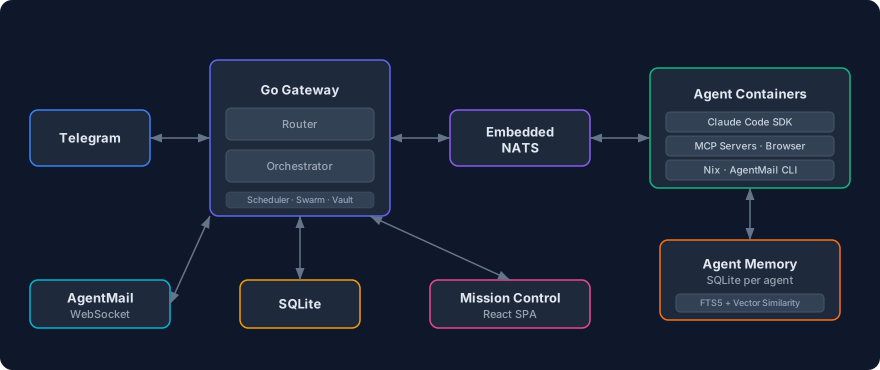
/start, /stop, /reset, /nix, /agents, /commands@agent_name prefix or AI-powered classification via the default agentAGENT.md for personality and expertise, editable from Mission Control or by agents themselvesUSER.md, editable from Mission Control or by agents themselvespraktor.yaml and changes apply automatically, no restart needed/nix Telegram commandclaude setup-token)git clone https://github.com/mtzanidakis/praktor.git
cd praktor
cp config/praktor.example.yaml config/praktor.yaml
cp .env.example .env && chmod 0600 .env
Edit .env and fill in your credentials (see comments in the file for details). Set DOCKER_GID to the group ID of the docker group on your host so the non-root container user can access the Docker socket:
grep docker /etc/group # look for the docker group GID
Edit config/praktor.yaml to define your agents:
telegram:
  allow_from: []            # Telegram user IDs (empty = allow all)
  main_chat_id: 0           # Chat ID for scheduled task / swarm results

defaults:
  model: "claude-sonnet-4-6"
  max_running: 5
  idle_timeout: 10m

agents:
  general:
    description: "General-purpose assistant for everyday tasks"
    nix_enabled: true
  coder:
    description: "Software engineering specialist"
    model: "claude-opus-4-8"
    nix_enabled: true
    env:
      GITHUB_TOKEN: "secret:github-token"    # Resolved from vault
  researcher:
    description: "Web research and analysis"
    allowed_tools: [WebSearch, WebFetch, Read, Write]

router:
  default_agent: general
docker compose build agent    # Build the agent image locally
docker compose up -d          # Start the stack (pulls gateway from GHCR)
docker compose logs -f        # Watch logs
The agent image must be built locally because it bundles proprietary third-party software that cannot be redistributed. See Third-Party Notice for details.
Mission Control is available at http://localhost:8080.
Open Telegram and send a message to your bot. Praktor routes it to the right agent, spins up a container, and responds. Use @agent_name to target a specific agent, or let smart routing classify the message automatically:
Hello!                              → smart routing picks best agent
@coder fix the login bug            → explicit routing to coder
@researcher find papers on RAG      → explicit routing to researcher
Routing works in 3 tiers: @agent_name prefix → AI-powered classification via default agent → default agent fallback.
For a secure setup without exposed ports, see Production Deployment.
Pull the latest code, images, and rebuild the agent:
./scripts/upgrade.sh
Then restart the stack:
docker compose up -d
See the Wiki for detailed documentation on all features:
Hot Config Reload · Vault · Voice Messages · Browser Automation · AgentMail · Agent Extensions · Agent Swarms · Nix Package Manager · Backup & Restore · Production Deployment
After cloning the repo, you can use Claude Code to get help with any aspect of Praktor. The project includes a detailed CLAUDE.md that gives Claude full context about the architecture, configuration, and available APIs.
git clone https://github.com/mtzanidakis/praktor.git
cd praktor
claude
For example, you can ask Claude Code things like:
Local tooling is pinned in mise.toml. With mise installed, run:
mise install # Provision go, golangci-lint, node, nats, jq
This matches the versions used in CI, so make lint and go test behave identically locally and on GitHub Actions. sqlite3 is expected from the system package manager.
go mod download              # Install Go dependencies
make dev                     # Run the gateway locally
make test                    # Run tests
make lint                    # Run golangci-lint
Mission Control with hot reload:
cd ui && npm install && npm run dev # Vite dev server on :5173, proxies /api to :8080
See LICENSE.
This project integrates with third-party tools that have their own licenses and terms of service. In particular, Claude Code and the Claude Agent SDK are proprietary software by Anthropic and subject to Anthropic's Commercial Terms of Service. They are not included in this repository — users must install them at build time and are responsible for complying with Anthropic's terms. Pre-built Docker images containing these components should not be redistributed without Anthropic's permission.
⚠️ Experimentelle Skill-Sammlung für deutsches Recht (Arbeits-, Gesellschafts-, Insolvenz-, Datenschutz-, Prozessrecht u
Manage multiple Claude Code agents from TUI or Web with tmux and git worktrees
Project management using GitHub Issues + Git worktrees for parallel agent execution
Core skills library for Claude Code with 20+ battle-tested skills including TDD, debugging, and brainstorming