Are you the author? Sign in to claim
Build and deploy a full-stack RAG app on AWS with Terraform, using free tier Gemini Pro, real-time web search using Remo
Terraform-based Infrastructure as Code (IaC) to deploy a complete AWS backend for a Retrieval-Augmented Generation (RAG) application. It integrates with Google’s free-tier Gemini Pro and Embedding models for AI powered document querying and includes a Streamlit UI with token-based authentication for interacting with the app.
👉 Related Remote MCP Server: Web Search using SerpAPI Remote MCP Server based on Streaming Http Transport protocol for Real Time Web Search. It's located within the mcp_servers/ directory of this repository.
👉 Related UI: RAG UI (Streamlit Frontend) A Streamlit-based frontend application designed to interact with the backend infrastructure deployed by this project. It's located within the rag_ui/ directory of this repository.
💰 Estimated cost: $3 (₹250) to experiment without the AWS Free Tier, primarily for RDS and NAT Gateway if active.
🎥 YouTube Video: Walkthrough on setting up the application, building, deploying, and running it end-to-end 👇

This repository contains the complete Terraform codebase for provisioning and managing the AWS infrastructure that powers a RAG application. It allows users to upload documents, which are then processed, embedded, and stored for efficient semantic search and AI-driven querying.
📌 Key features include:
pgvector extension for storing and searching text embeddings.dev, staging, and production environments.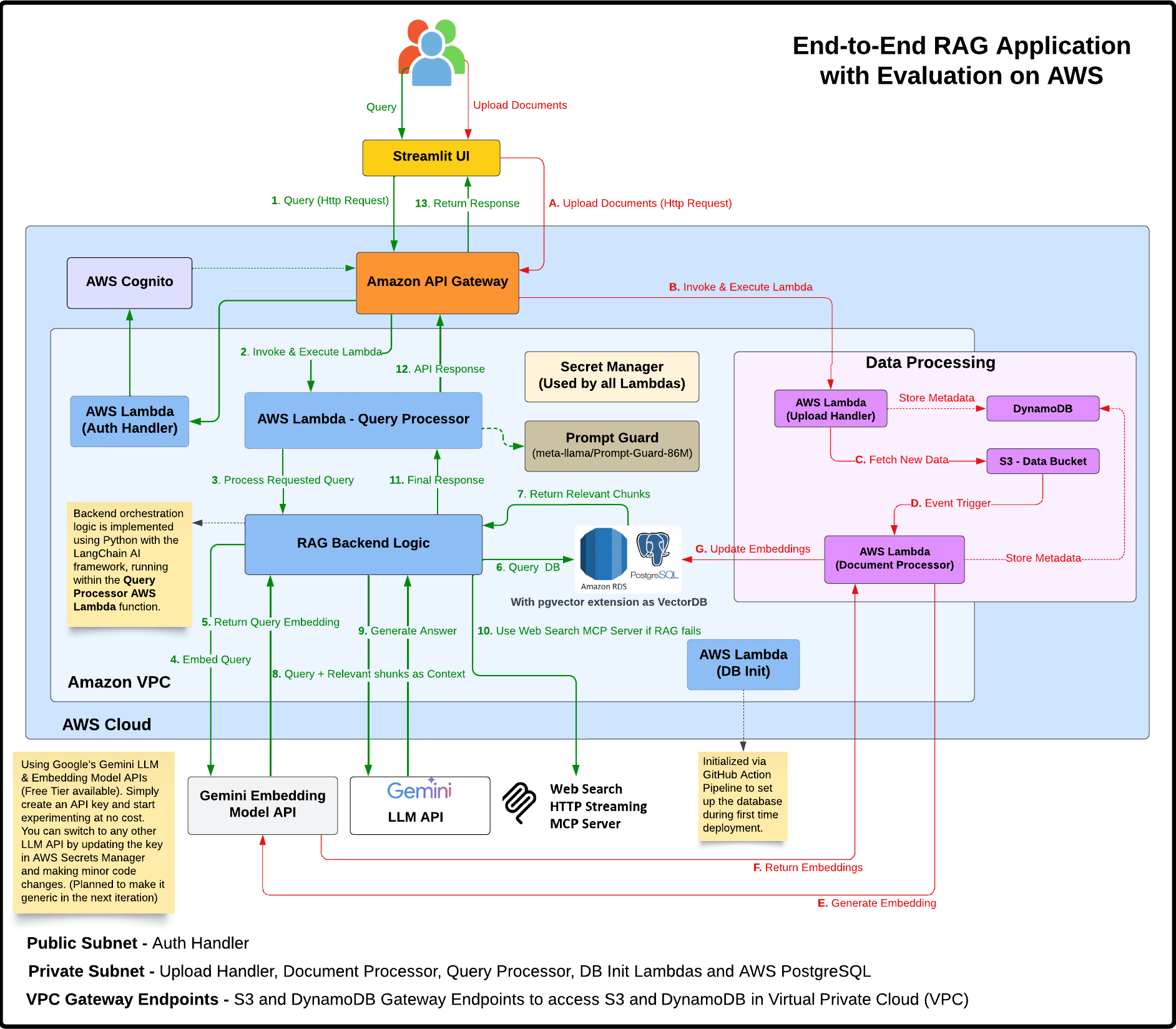
upload_handler Lambdaupload_handler Lambda → S3 Gateway Endpoint → S3 Bucketdocument_processor Lambda (in private subnet)document_processor Lambda → NAT Gateway → Internet Gateway → Gemini API (for embeddings)document_processor Lambda → RDS Security Group → PostgreSQL Database (stores chunks/vectors)query_processor Lambda (in private subnet)query_processor Lambda → RDS Security Group → PostgreSQL Database (vector search)query_processor Lambda → NAT Gateway → Internet Gateway → Gemini API (for answer generation)query_processor Lambda → API Gateway → User (returns answer)This network architecture ensures that sensitive operations and data are processed in a secure environment, while still allowing the necessary external communications through controlled channels.

🗺️ Infra Provisioning Lifecycle Flow (Illustrates the Terraform provisioning sequence)
.
├── .github/workflows/       # CI/CD via GitHub Actions
│   ├── deploy.yml           # Infrastructure deployment workflow
│   └── manual_cleanup.yml   # Resource cleanup workflow
├── environments/            # Environment-specific configs (dev, staging, prod)
│   └── dev/                 # Example 'dev' environment
│       ├── main.tf          # Root Terraform file for the environment
│       ├── providers.tf     # Terraform provider configurations
│       └── variables.tf     # Environment-specific variable definitions
├── modules/                 # Reusable Terraform modules
│   ├── api/                 # API Gateway configuration
│   ├── auth/                # Cognito authentication
│   ├── compute/             # Lambda functions & IAM roles
│   ├── database/            # PostgreSQL RDS with pgvector & Secrets Manager
│   ├── monitoring/          # CloudWatch Logs, Alarms & SNS Topic
│   ├── storage/             # S3 Buckets & DynamoDB Table
│   └── vpc/                 # VPC, Subnets, NAT, Security Groups, Endpoints
├── rag_ui/                  # Streamlit UI application
│   ├── app.py               # Main Streamlit application code
│   └── README.md            # README specific to the UI
├── scripts/                 # Utility shell scripts
│   ├── cleanup.sh           # Comprehensive resource cleanup script
│   ├── import_resources.sh  # Script to import existing AWS resources into Terraform state
│   └── network-diagnostics.sh # Script for troubleshooting network connectivity (e.g., Lambda to RDS)
├── src/                     # Lambda backend source code (Python)
│   ├── auth_handler/        # Lambda for Cognito authentication operations
│   ├── db_init/             # Lambda for database schema and pgvector initialization
│   ├── document_processor/  # Lambda for processing uploaded documents
│   ├── query_processor/     # Lambda for handling user queries and RAG
│   ├── tests/               # Unit and integration tests
│   │   ├── integration/     # Integration tests for deployed services
│   │   │   └── run_integration_tests.py
│   │   ├── unit/            # Unit tests for Lambda functions
│   │   │   ├── conftest.py  # Pytest common fixtures and mocks
│   │   │   ├── test_*.py    # Individual unit test files
│   │   └── __init__.py
│   ├── upload_handler/      # Lambda for handling file uploads via API
│   └── utils/               # Shared utility code (e.g., db_connectivity_test.py)
├── sonar-project.properties # SonarQube configuration file
└── tox.ini                  # tox configuration for running tests and linters
The infrastructure is modularized using Terraform modules:
modules/vpc)prod).modules/compute, src/)auth_handler): Manages user authentication lifecycle with Cognito (registration, login, email verification, password reset, token refresh).document_processor):
uploads/ prefix in the documents bucket.query_processor):
pgvector) against stored document chunks.upload_handler):
uploads/{user_id}/{document_id}/{file_name}).db_init):
documents, chunks) if they don't exist.pgvector extension required for vector operations.modules/storage, modules/database, environments/dev/main.tf){project_name}-{stage}-documents: Stores uploaded documents. S3 event notifications trigger the document_processor Lambda. Configured with CORS and lifecycle rules.{project_name}-{stage}-lambda-code: Stores Lambda function deployment packages (ZIP files).{project_name}-terraform-state: Central S3 bucket for storing Terraform state files (versioning enabled).{project_name}-{stage}-metadata: Stores metadata related to documents (e.g., status, S3 key, user ID). Used by upload_handler and document_processor. Features Global Secondary Indexes (GSIs) on user_id and document_id, and Point-in-Time Recovery (PITR).{project_name}-{stage}-terraform-state-lock: DynamoDB table for Terraform state locking, ensuring safe concurrent operations.pgvector (modules/database):
pgvector extension for efficient storage and similarity search of text embeddings.documents table and text chunks with their corresponding vector embeddings in a chunks table.modules/api, modules/auth)API Gateway (REST API):
Provides public HTTP(S) endpoints for backend Lambda functions.
Routes include /upload, /query, and /auth.
Configured with CORS for frontend integration.
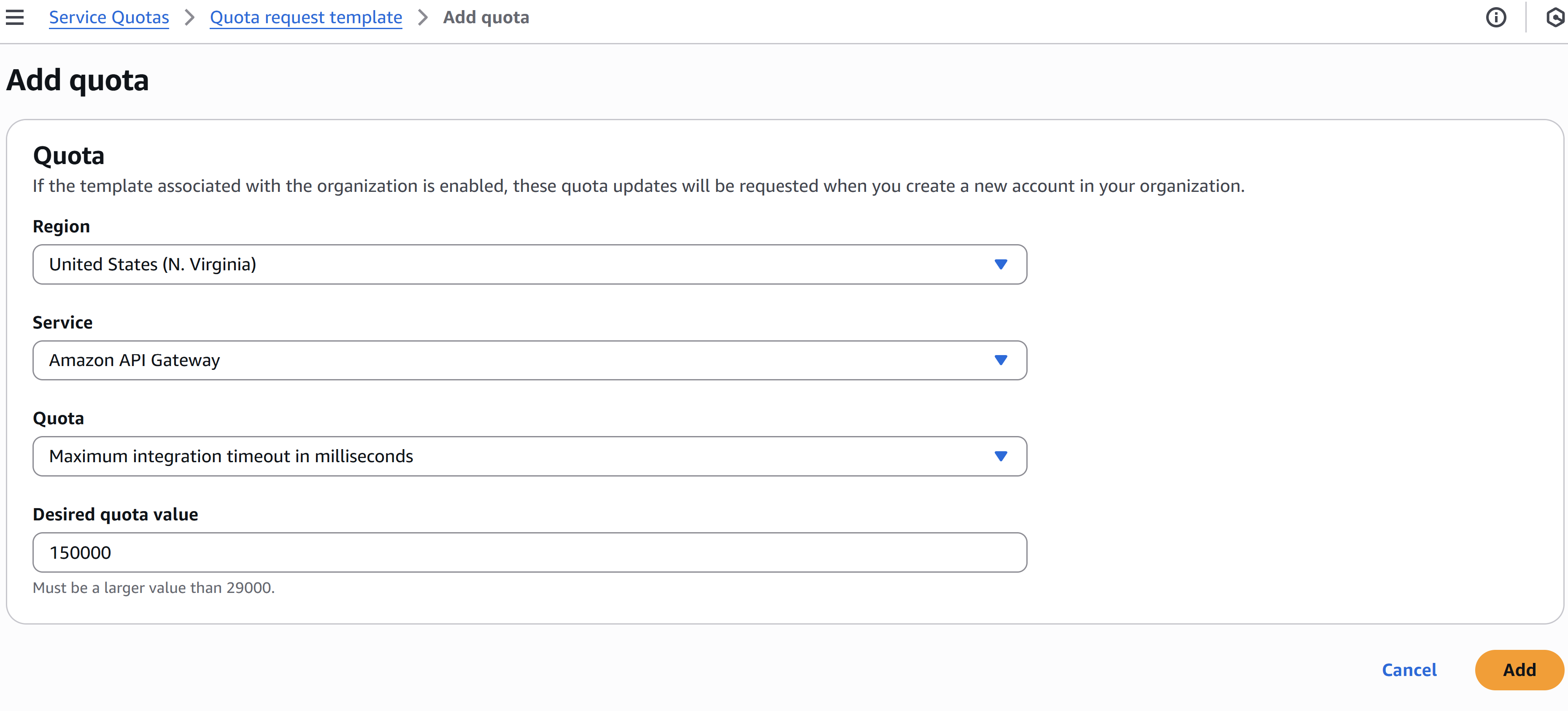
Amazon API Gateway has a default timeout of 30 seconds. However, GenAI use cases may require longer processing times. To support this, you can request an increased timeout via the AWS support form. After logging into your AWS account, use the following URL to access the form. In our case, we’ve configured the timeout to 150,000 milliseconds (2.5 minutes). Select United States (N. Virginia) as the region since it's set as the default in terraform.tfvars. If you're using a different region, choose the appropriate one accordingly. Keep all other settings unchanged.
https://us-east-1.console.aws.amazon.com/servicequotas/home/template/add
Cognito User Pools:
JWT-based API Authorization:
/upload and /query endpoints, ensuring only authenticated users can access them./auth endpoint is public to allow user registration and login.Secrets Management (modules/compute, modules/database):
{project_name}-{stage}-gemini-api-key: Stores the Google Gemini API Key used by document_processor and query_processor.{project_name}-{stage}-db-credentials: Stores the master credentials for the PostgreSQL RDS instance, automatically rotated or managed by Terraform.modules/monitoring)Errors for document_processor, query_processor).{project_name}-{stage}-alerts):
✅ Python: 3.11+ (For Streamlit UI).
✅ AWS Cloud Account: You’ll need an AWS account to build and deploy this end-to-end application (excluding the streamlit UI, which can runs locally on your system).
✅ GitHub Account: For forking the repository and using GitHub Actions.
✅ Git installed on Local Machine: Use Git Bash or any preferred Git client to manage your repository.
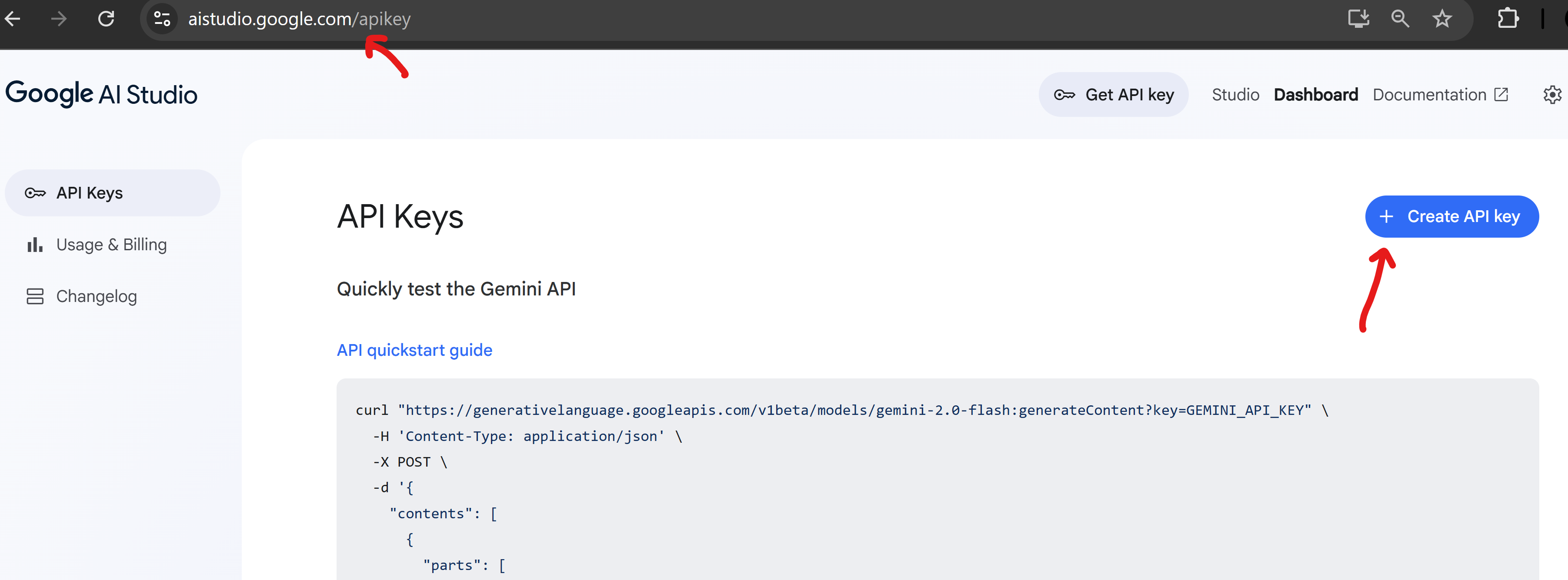
✅ Google API Key: For accessing Google's free-tier Gemini Pro and Gemini Embedding models.
👉 Get your API key from Google AI Studio
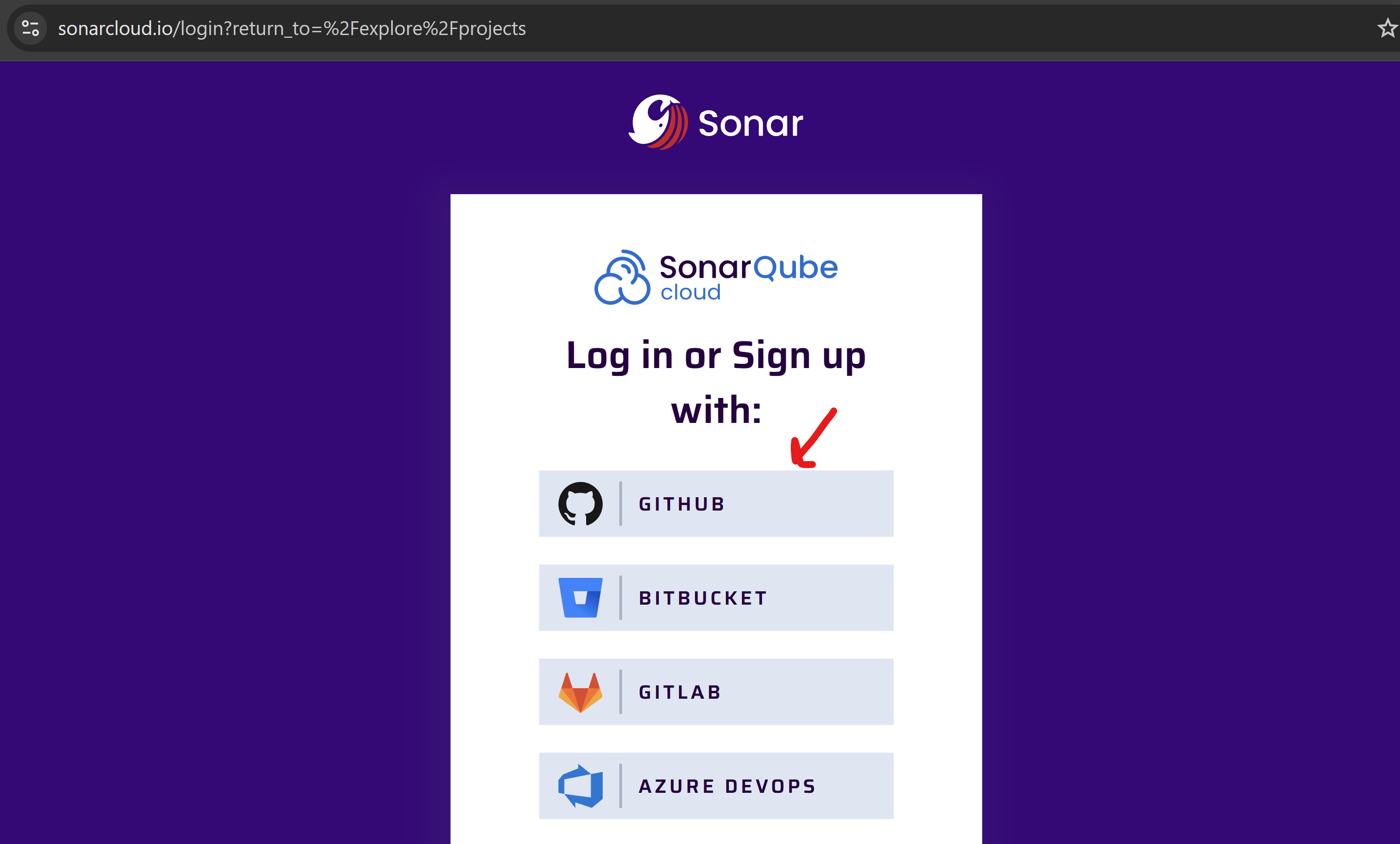
✅ Free SonarCloud Account for Code Quality Checks (Optional)
Sign up at SonarCloud to enable automated quality gates and static analysis for your codebase.
The repository supports multiple deployment environments, typically:
dev: For development and testing.staging: For pre-production validation.prod: For the live production environment.Configuration for each environment (Terraform variables, backend configuration) is managed within its respective subfolder under the environments/ directory (e.g., environments/dev/, environments/staging/).
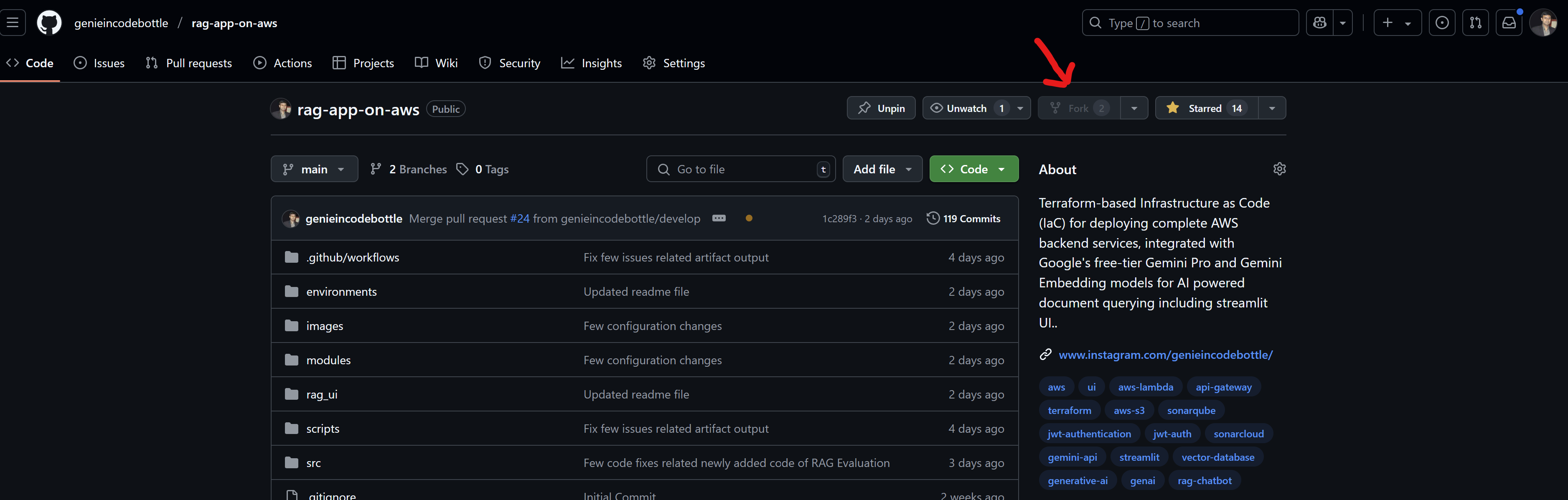
Fork the Repository
👉 https://github.com/genieincodebottle/rag-app-on-aws
Clone to Your Local Machine:
git clone https://github.com/<your-github-username>/rag-app-on-aws.git
Customize Project Configuration:
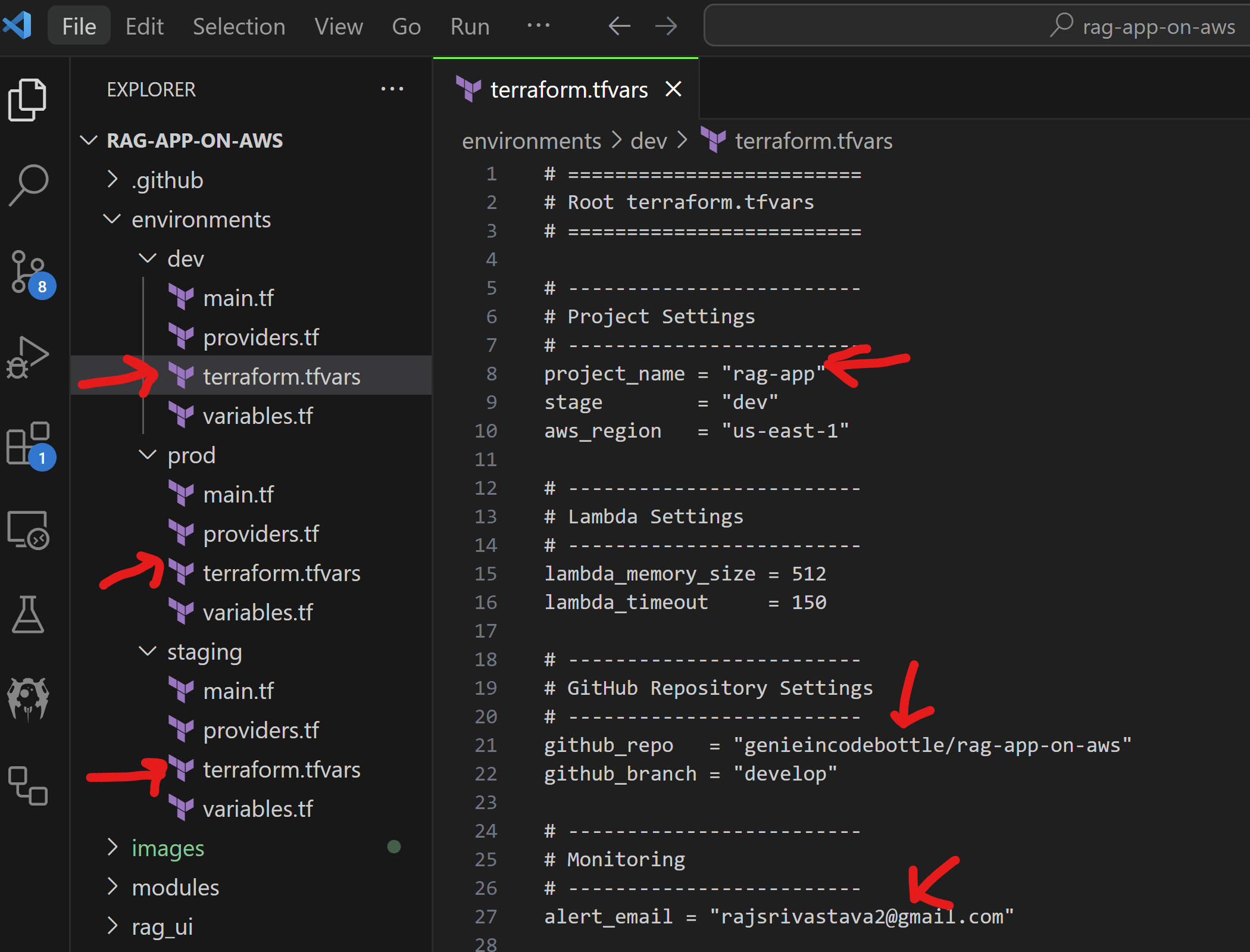
Update the following fields in environments//terraform.tfvars:
project_name = "<your-project-name>" – to avoid global resource name conflicts (e.g., S3 buckets).
github_repo = "<your-github-username>/rag-app-on-aws" – for CI/CD pipeline setup.
alert_email = "<your-email>" – for receiving deployment alerts.
AWS Access Keys:
Generate an Access Key for either an IAM user with sufficient permissions or the Root user (which has full access) to experiment and create resources defined in Terraform..
If logged in as root user -> Go to the top-right dropdown menu after login and select 'Security Credentials' as shown below.
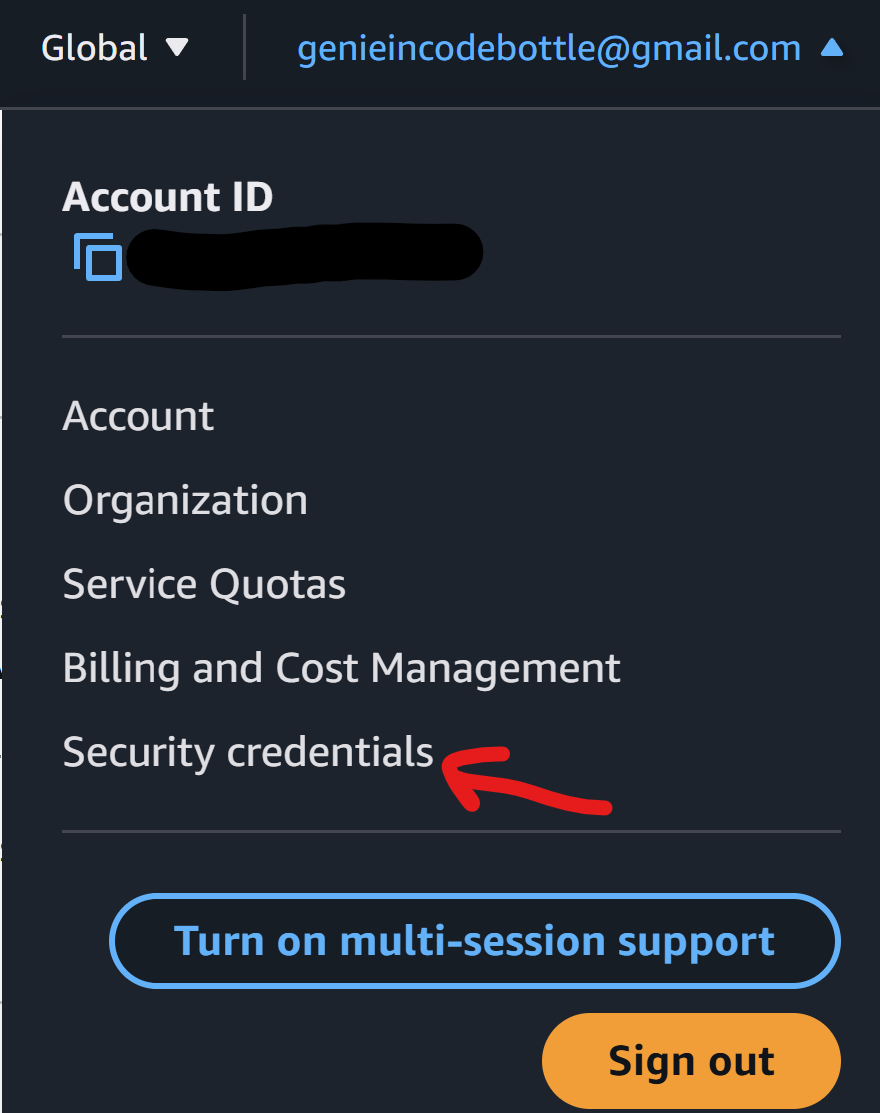
If IAM User -> Navigate to IAM > Users > [Your User] > Security credentials > Create access key.
Add these as GitHub repository secrets:
AWS_ACCESS_KEY_IDAWS_SECRET_ACCESS_KEYSonarQube Token (Optional):
First, create an organization and import your GitHub project.
Then, generate an access token and add it to your GitHub repository secrets as SONAR_TOKEN.
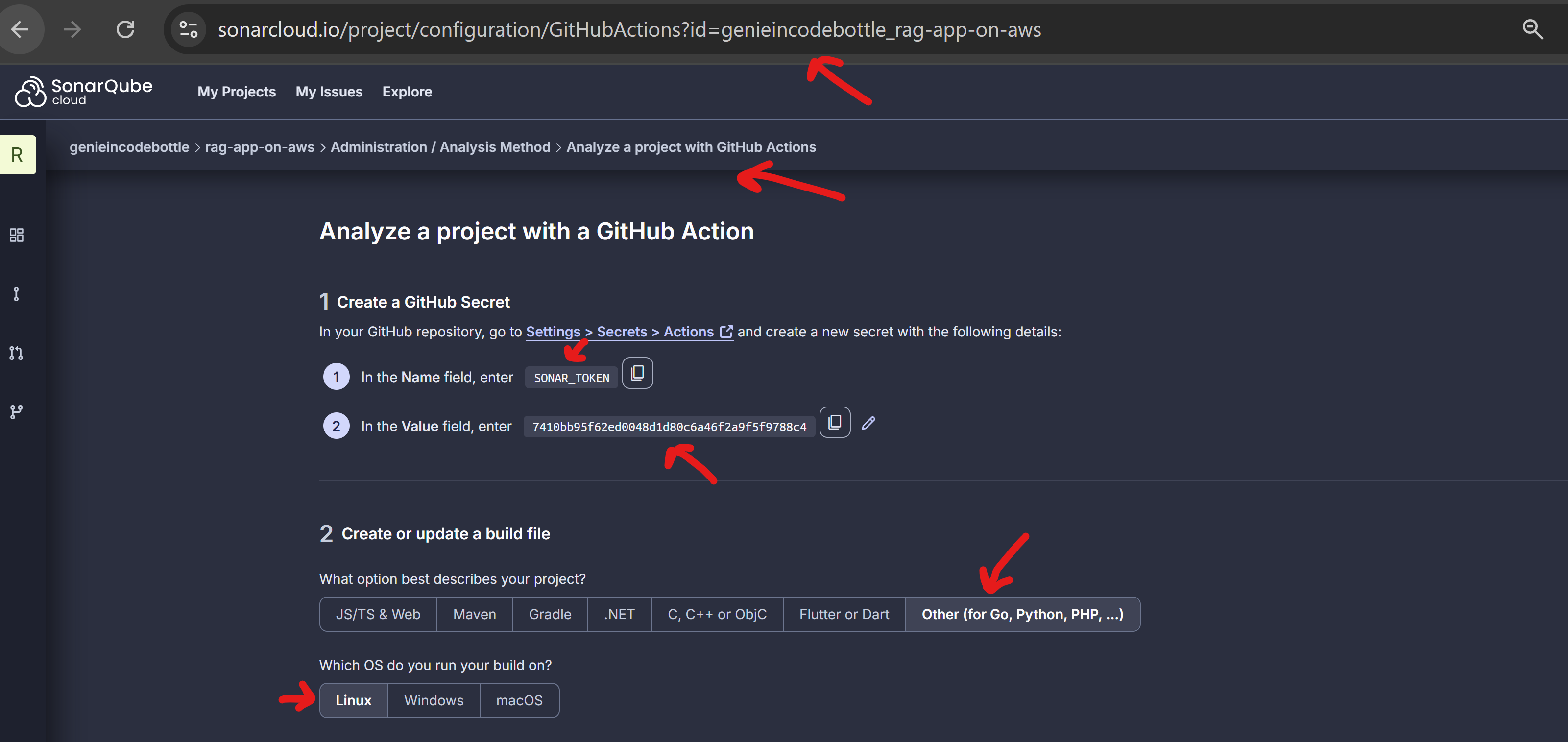
Also, update the following keys in the sonar-project.properties file at the project root:
sonar.projectKey=<your-sonar-organization-name>_rag-app-on-awssonar.organization=<your-sonar-organization-name>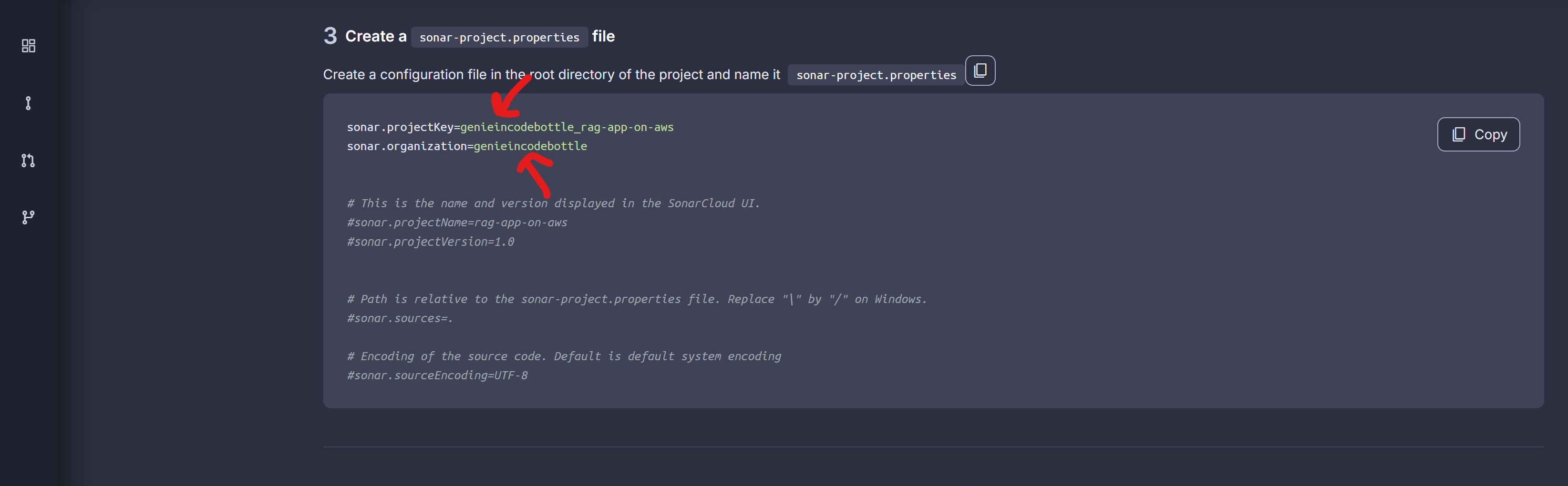
Google API Key:
🔑 Secret name format: --gemini-api-key Example: rag-app-dev-gemini-api-key
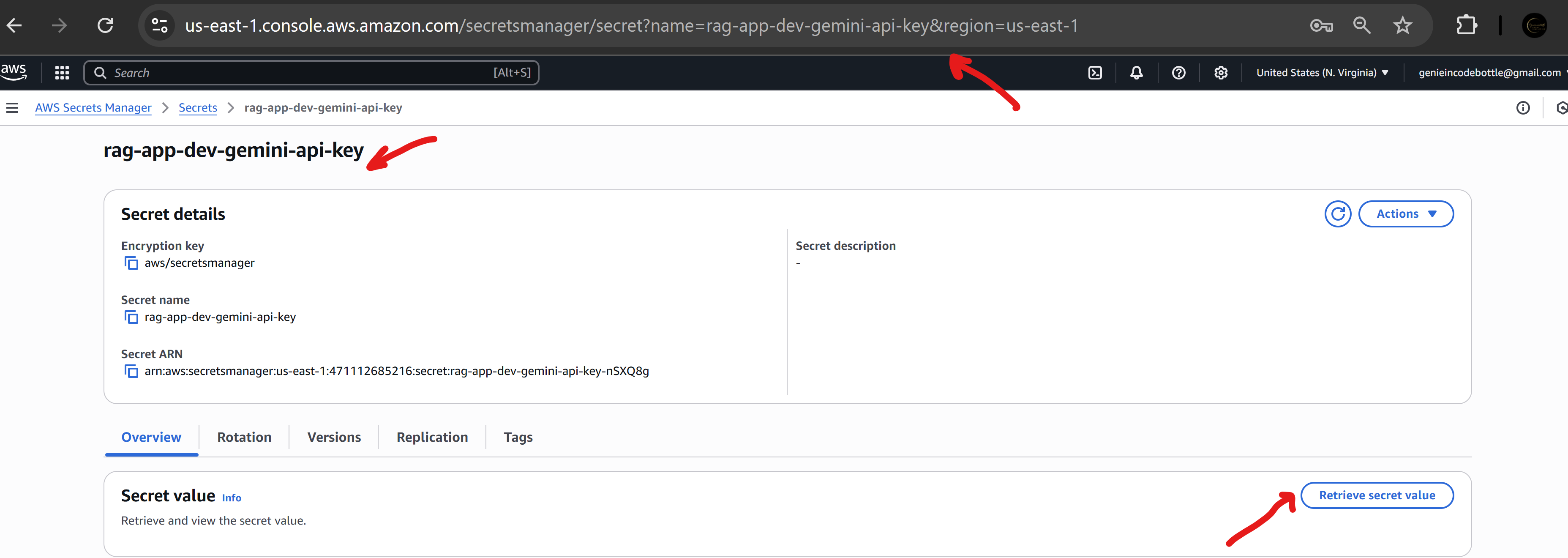
To Add Secrets: Go to your forked GitHub repository → Settings → Secrets and variables → Actions → New repository secret.
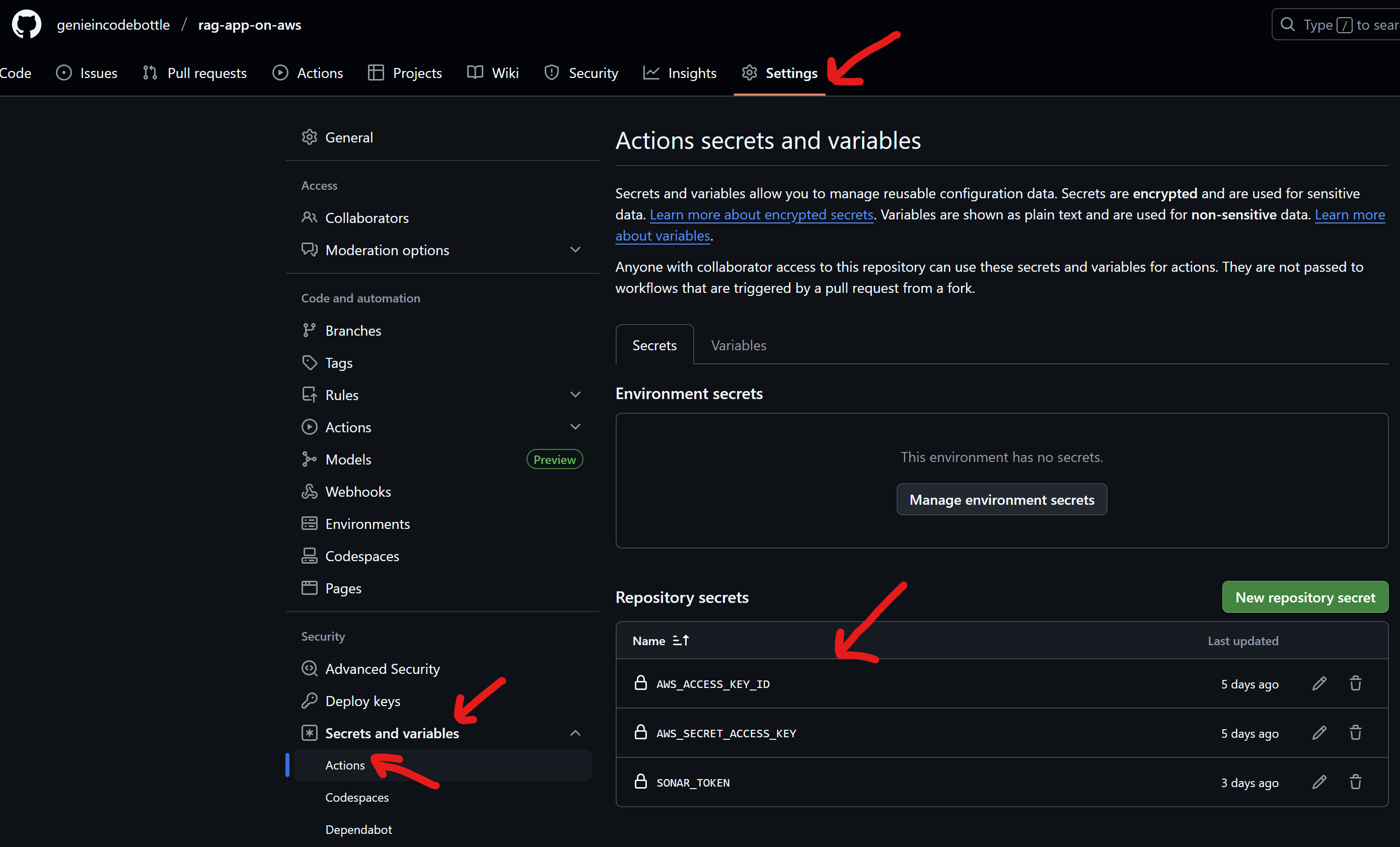
The repository includes two primary GitHub Actions workflows:
.github/workflows/deploy.yml):
develop (for dev env), main (for prod env), and staging (for staging env).reset_db_password or bastion_allowed_cidr (Keep everything default if running pipeline manually).github/workflows/manual_cleanup.yml):
scripts/cleanup.sh script.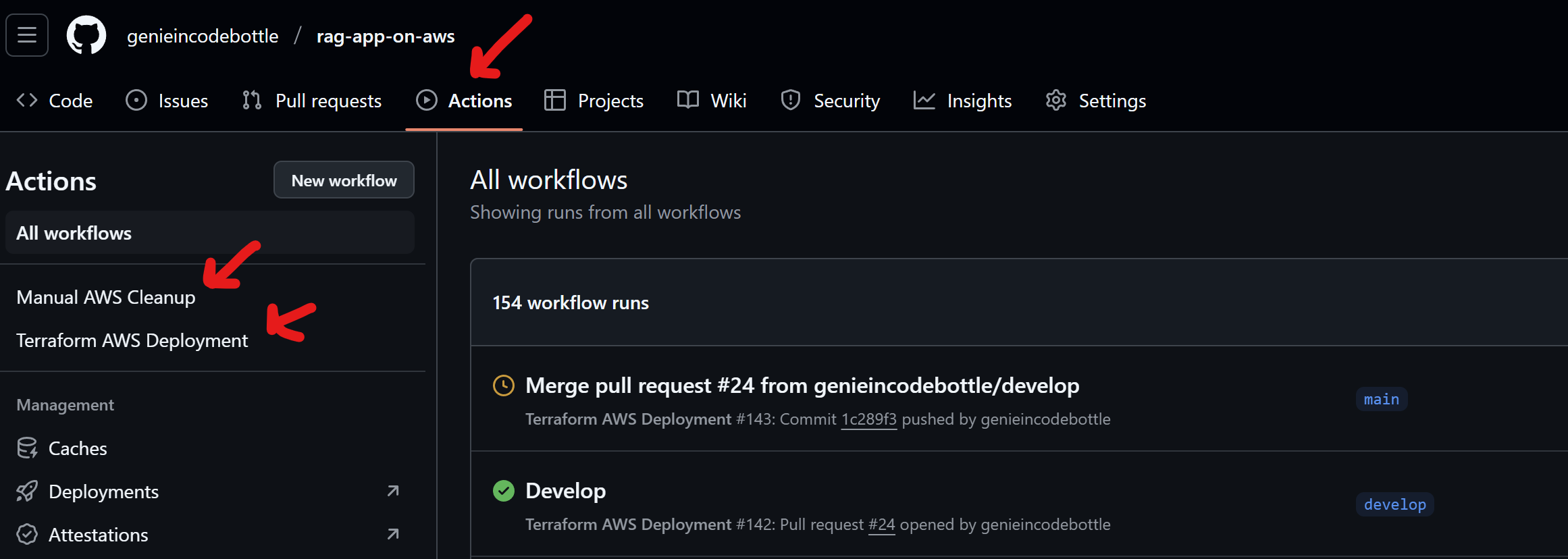
📤 Push to trigger CI/CD deployment:
git push origin developgit push origin staginggit push origin main
🧑💻 Manually trigger deployment from GitHub:
git clone https://github.com/genieincodebottle/rag-app-on-aws.git

cd rag-app-on-aws/mcp_server

pip install uv # If uv doesn't exist in your system

uv venv

.venv\Scripts\activate   # Linux: source .venv/bin/activate

uv pip install -r requirements.txt
Create a .env file:
SERPAPI_API_KEY=your_serpai_api_key
SerpAPI API Key (Free Quota) -> https://serpapi.com/dashboard
Run the following command to start the MCP server on localhost at port 8000 (you can change the port if needed)
python web_search_mcp_server.py --host localhost --port 8000
To expose your local server to the internet (required because AWS Lambda cannot access localhost), choose one of the following methods. Be sure to update the port if you're not using 8000.
✅ Option 1 (Recommended): Use Cloudflare Tunnel (Free without login) Run the following commands in Windows PowerShell to start a secure tunnel and get a public URL. This URL allows external access to your local MCP server in the RAG UI for testing purposes.
iwr -useb https://github.com/cloudflare/cloudflared/releases/latest/download/cloudflared-windows-amd64.exe -OutFile cloudflared.exe

cloudflared tunnel --url http://localhost:8000
✅ Option 2: Use Serveo (Quick SSH Tunnel) Run this command in Windows PowerShell or Git Bash to open an SSH tunnel and expose your local server for testing purpose:
ssh -R 80:localhost:8000 serveo.net
👉 UI Readme: https://github.com/genieincodebottle/rag-app-on-aws/rag_ui
Once the AWS resources are deployed via the GitHub Actions pipeline, follow these steps to launch the UI and test the application locally.
Navigate to the rag-ui directory in your cloned repository using the terminal.
cd rag-app-on-aws/rag_ui

pip install uv # If uv doesn't exist in your system

uv venv

.venv\Scripts\activate # Linux: source .venv/bin/activate

uv pip install -r requirements.txt
Configuration
Create a .env file:
# RAG Application API Configuration
API_ENDPOINT=https://your-api-gateway-url.amazonaws.com/stage
UPLOAD_ENDPOINT=/upload
QUERY_ENDPOINT=/query
AUTH_ENDPOINT=/auth

# Default user settings
DEFAULT_USER_ID=test-user

# Cognito Configuration
COGNITO_CLIENT_ID=your_cognito_client_id

# Enabling/disabling evaluation
ENABLE_EVALUATION="true"
Once the GitHub Action pipeline completes successfully, you can download the zipped environment variables file from the GitHub Artifact. Unzip it, open the file, and copy both API_ENDPOINT and COGNITO_CLIENT_ID into your .env file.
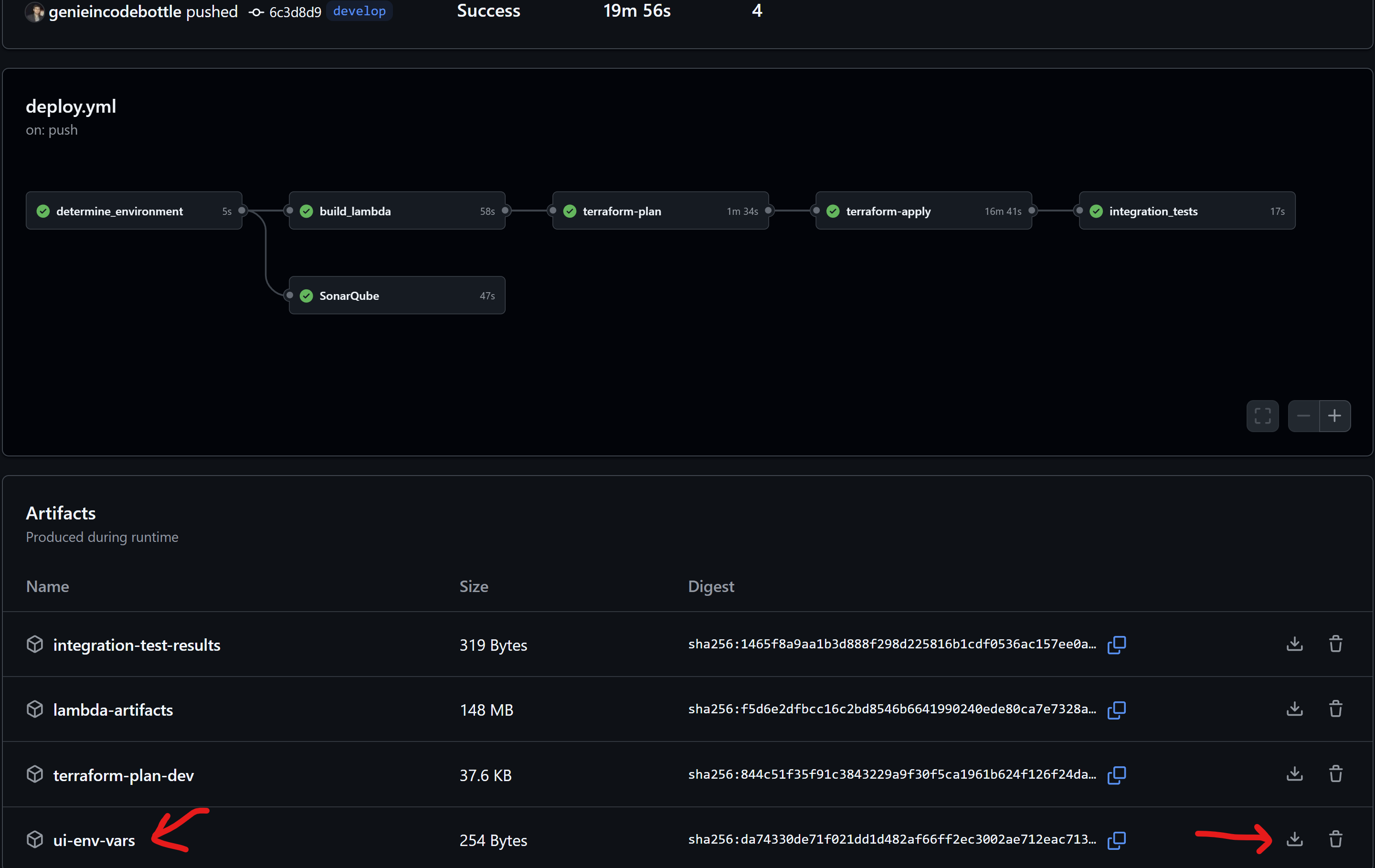
Usage
streamlit run app.py
Visit http://localhost:8501, register or log in, upload documents, and start querying.
deploy.yml)The deploy.yml workflow automates the deployment process with the following key steps:
dev, staging, prod) based on the Git branch or manual workflow input.SONAR_TOKEN secret is configured, it runs SonarQube analysis using tox for code quality checks.auth_handler, db_init, document_processor, query_processor, and upload_handler Lambda functions into ZIP artifacts.backend.tf for S3 state storage.{PROJECT_NAME}-terraform-state) and DynamoDB lock table ({PROJECT_NAME}-{STAGE}-terraform-state-lock) if they don't already exist.{PROJECT_NAME}-{STAGE}-lambda-code S3 bucket.terraform init).scripts/import_resources.sh (this helps adopt unmanaged resources).terraform plan) using environment-specific variables (e.g., reset_db_password, enable_lifecycle_rules, bastion_allowed_cidr).tfplan file as a GitHub artifact.tfplan artifact.terraform apply -auto-approve tfplan).api_endpoint and cognito_app_client_id.env_vars.env file with these outputs for UI configuration.wait_for_db input) Waits for the RDS instance to become available.reset_db_password was true, updates Lambda environment variables with the new DB secret ARN.db_init and auth_handler Lambda functions are updated with the latest code from S3 (as a safeguard).db_init Lambda function to set up the PostgreSQL schema and pgvector extension. This step includes retries in case the database isn't immediately ready.upload_handler Lambda via API Gateway.src/tests/integration/run_integration_tests.py against the deployed API Gateway endpoint.The /scripts/ folder contains helpful shell scripts:
cleanup.sh: A comprehensive script to tear down all AWS resources created by Terraform for a specific environment. It requires jq to be installed. Use with extreme caution as this is destructive.import_resources.sh: Aids in importing existing AWS resources into the Terraform state. This can be useful if some resources were created manually or outside of Terraform initially.network-diagnostics.sh: A script to help troubleshoot network connectivity issues, particularly between Lambda functions and the RDS database within the VPC. It checks security groups, RDS status, and can test DNS resolution from a Lambda.To remove all AWS resources created by this project for a specific environment:
dev, staging, prod) you wish to clean up.scripts/cleanup.sh script with the necessary context.Warning: This script will delete resources. Ensure you have the correct AWS credentials and region configured for your AWS CLI, and that you are targeting the correct environment.
jq is installed:
# On Debian/Ubuntu
sudo apt-get update && sudo apt-get install -y jq
# On macOS (using Homebrew)
brew install jq
scripts directory:
cd scripts
chmod +x cleanup.sh
PROJECT_NAME, STAGE, and AWS_REGION to be set. You can set them inline:
PROJECT_NAME="your-project-name" STAGE="dev" AWS_REGION="us-east-1" ./cleanup.sh
Contributions are welcome! Please follow these steps:
git checkout -b feature/new-ai-model-integration).git commit -m 'feat: Add support for Claude 3 model').git push origin feature/new-ai-model-integration).develop branch of the original repository.Note: Deploying this infrastructure will incur AWS charges. Always review the output of
terraform planbefore applying changes to understand potential costs and resource modifications.Security Best Practice: Never commit secrets directly to your Git repository. Use GitHub Secrets for CI/CD variables and manage sensitive application configurations (like API keys) securely, for instance, through AWS Secrets Manager populated via secure Terraform variables or post-deployment steps.
Run Claude Code as an MCP server so any agent can delegate coding tasks to it
 @microsoft✓ Official
Browser automation using accessibility snapshots instead of screenshots
 @googleapis✓ Official
Google's universal MCP server supporting PostgreSQL, MySQL, MongoDB, Redis, and 10+ databases
 @github✓ Official
Official GitHub integration for repos, issues, PRs, and CI/CD workflows